
...
| Area | Description |
|---|---|
| Invite job | Fix: User invited from external AAD cannot sign in (RTC-43253) When guest user in one directory is invited to EG directory, they're is correctly created in AAD and database. Such user can sign in to Cloud Chain Web. |
| Languages for users | System parameters user interface (RTC-42543) The system parameters view is available for User Management. To access this view and edit values in it, user needs following permission: User management administrator-->Manage system parameters. The system parameters view contains two parameters for now: User language, responsible for what interface language is displayed to users by default, and Content language, responsible for what language the content will be displayed in.
|
| Shell | Entra ID permissions (RTC-26349) ChainWebShell will now require new (much narrower) permissions from our customers, which improves security both for us and our customers. Depending on the configuration of our customer's Microsoft Entra ID, admins may need to provide consent for these new permissions. |
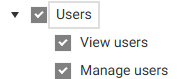
| User roles | New scoped permissions for managing users (RTC-44596) New scoped permissions for managing users are added for the store role: Users - View Users and Manage Users
to allow store managers to manage the employees of the store without being able to manage other stores personnel. The permissions can be saved /modified for the role, as well as assigned to the user. The permissions does not have affect on users actions yet. Fix: Store roles can be assigned on stores, when user has access to profile/team (RTC-43909) If the user has access to the profile or team level, they can assign a store role on stores, belonging to this profile/team. |
| User role export | User is exported when modifying the user access level (RTC-43671) When a user is updated via the UI and the only change is the store access at the user level, the user is exported. The store access is then updated in the BackOffice. |

...