
Chain Web v. 2.10.350 - coming next main release
Deactivate reason codes
Reason codes can be deactivated and activated, by double clicking on a reason code selecting from the "more" button.
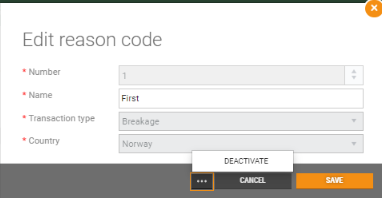
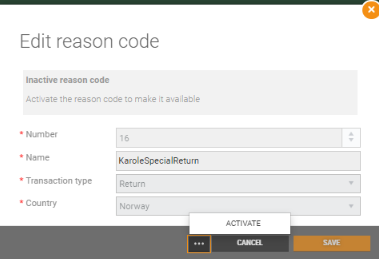
- Deactivated reason codes are not available in POS.
- The name and accounting number of an active reason can be edited, by double clicking on the reason code row and saving the changes.
System info view
Flight Data Service can be configured in System Info - Services status view now.
| Expand | ||
|---|---|---|
| ||
|
Improvements
| Area | Description |
|---|---|
| Balance | Balance permissions (RTC-45009) Store users without "Administer balance" permission are able to create balance for cash registers (BalanceTransactionType = Workstation). Modifying shift settlement without submitting settlement, resets settlement (RTC-44386) Values displayed in the shift balance edit view are always fetched from previously submitted settlement and editing the settlement without submit does not longer affect displayed values. |
| Customer | Issues with creation of new customer when no IsDefaultSuggestedGroup CustomerGroup is defined (RTC-44309) Error is no longer occurring and customer is correctly created, even if default group is not defined. |
| Customer order | Pickup code and Picking status in Customer order (RTC-45147)
Block allocating order number on-prem (system parameter) (RTC-43242) Order number allocation through BackOfficeService can be blocked, by setting CustomerOrderNumberAllocationMovedToCloud parameter to True. A message with information that allocation should be done via cloud service is then returned in the BackOfficeService logs. |
| Dispatch orders | Payment method missing/incorrect in Email templates (RTC-44436) Payment methods used for particular order are properly displayed in the email templates:
|
| Gift card | Redirect for Gift card in Cloud or Chain Web (RTC-44967) The system parameter RedirectToGiftCardManagement defines if the user should be sent to Gift cards in Chain Web or Gift card management in Cloud. |
| Invoice | Discount in EHF (RTC-41628) Discounts are added to the EHF invoices. They are present on Price level, which is part of the InvoiceLine/CreditNoteLine area. |
| Scale labels | Best before on scale labels (RTC-43542) It is possible to differentiate 'shelf life' and 'best before' in files containing scale labels. There are three cases that vary in display of value:
In first case, Myhrvold XML file in 'ShelfLife' field has value of Shelf life from item. In second, value is 'Shelf life+900'. And when shelf life is empty, field has value 0. Strongpoint atte.dat files have different placements of Shelf life value from item depending on Best before flag. If it is True, ShelfLife is written in 24th to 26th positions in file. When False, in 27th to 29th are filled with values. Zeros in 24th to 29th position mean that there is no Shelf life on item. Values of Shelf life and Best before are taken from common fields or from store local attributes if set. |
| Users | Create users with special characters (RTC-44999) In user management, users can be created with "/", "\" and space in the username.
Team users with correct permissions are allowed to assign/create cashiers for other users. |
...
Chain Web v. 2.10.340
| Status | ||||||
|---|---|---|---|---|---|---|
|
...