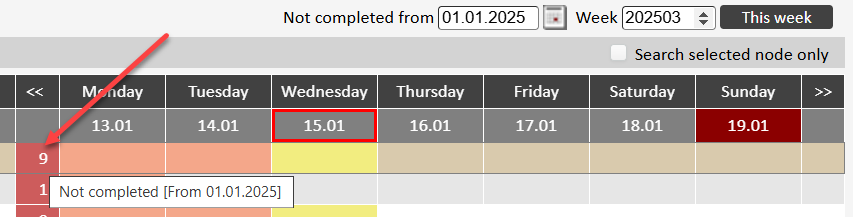
Weekly view for checkpoint status, ie executed (blue) and non-executed points (red). You can also, among other things, filtering on a checklist (head).
...
For checkpoints associated with checklists NOT set up with 'Generate not completed [Checkpoints]':
Red marking for when the item should have last been carried out (Not carried out)
Blue marking for each day/time the checkpoint has been carried out. Indication with a spanner/wrench if the checkpoint is marked with 'Requires action'
Yellow marking due today
Green marking for due date in the future
No color when the checkpoint should not have been carried out or has not been carried out
...
For checkpoints associated with checklist set up with 'Generate not completed [Checkpoints]':
Red marking for each day/time the checkpoint should have been completed
Blue marking for each day/time the checkpoint has been carried out. Indication with a spanner if the checkpoint is marked with 'Requires action'
Yellow marking due today
Green marking for due date in the future
No color when the checkpoint should not have been carried out
...
In this view, a summary for the number of times a checkpoint has not been performed can also be displayed (in a separate column). Appears if you enter a [From]- date as a filter. Note! Applies only to checklists set up with this functionality ‘Generate not completed [ Checkpoints]’.