...
Self-service EG POS display different images on the Welcome Page and Goodbye Page depending on whether they are in unmanned or manned mode. This helps users quickly identify the current mode of the POS.
| Expand | ||
|---|---|---|
| ||
|
Improvements POS
Area | Description | |||||
|---|---|---|---|---|---|---|
| Finished receipts | Finished receipt view (RTP-36772) When a previously finished receipt is scanned, the cashier name for the original receipt is hidden if Cashier Name is not configured in InformationInTitleBar parameter. | |||||
| Maintenance | Cleanup of receipts (RTP-36777) The maintenance job that cleans up completed receipts in the database was fixed. A problem had occured with cleanup after new columns were added to the POSLog table in the database. | |||||
| Payment | Handling returns and sales on the same receipt (RTP-37011) When canceling dialog "Confirm Klarna Payment - Order will pay to Klarna xxx" will now not send anything to Klarna. Fixes for scanning when paying by credit (RTP-37136) Social ID field in Credit payment dialog can be filled in by using a scanner, which means the customer can have their identification cards (e.g. driver's license) scanned to fill in the field. | |||||
| Prices | Fix for incorrect VAT Rate (RTP-34228) The correct VAT Rate is shown in the receipt.
| |||||
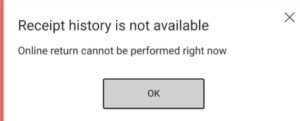
| Return | Online return when receipt history is unavailable (RTP-36778) It is configurable (OfflineItemReturnAllowed) if POS allows online returns when the receipt history from the central server is not available (typically in an offline situation). If it is not allowed, the following dialog is shown:
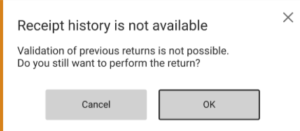
If it is allowed, the following dialog gives the cashier the possibility to go ahead with the return process:
| |||||
| Self-service | Age control for time restricted items (RTP-37230) When age control messages for time-restricted items, such as alcohol in Norway, are set to display as information text only, the age approval at the POS remains valid even if more time-restricted items are added later. This prevents repeated age approvals for items with the same age requirement, making the checkout process smoother. Existing relevant parameters in POS Configuration: 'SurveillanceApprovalOfAlcoholPossible' (default 'True') - if set to 'False' age control messages are shown as information text only, and the buttons Yes / No are not visible. Applies to cashier approval for age control of time-restricted items (only). Configuration must be equal for all POS's and Pos Monitors within a store! 'SurveillanceApprovalPossible' (default 'True') - if set to 'False' age control messages are shown as information text only, and the buttons Yes / No are not visible. Applies to cashier approval for age control (in general), for configured items, for low total amount, for deletion of items and for staff purchase.
|