...
Area | Description |
|---|---|
| Fuel integration | Fusion Forecourt Controller - Fix issues with price change messages (RTP-34784) FuellingType is added with the correct value (2) to the authorization message sent to Fusion Forecourt Controller, which previously caused issues with price change messages. Fusion Forecourt Controller - Fix for error when fuel transaction is freed up (RTP-35231) When a fuel transaction is freed up for in-store payment, error message is no longer shown and no longer causes the cash register to hang. Online return in Fusion Forecourt integration (RTP-34882) Online return can be performed on a fuel sales transaction done via Fusion Forecourt integration. The relevant information for the fuel transaction is added in ARTS XML. |
| Order | Printing of order confirmation for prepaid web orders (RTP-37327) "Print order confirmation " button is added in Prepaid Web Orders tab in Web Orders view. Moreover, automatic print of order confirmation no longer fails. After printing order confirmation in POS:
|
| Payment | Handling returns and sales on the same receipt (RTP-37011) When canceling dialog "Confirm Klarna Payment - Order will pay to Klarna xxx" will now not send anything to Klarna. |
| PLU Board | Fix for unexpected error in PLU board (RTP-37528) Unexpected error in POS when switching between PLU Board no longer occurs. |
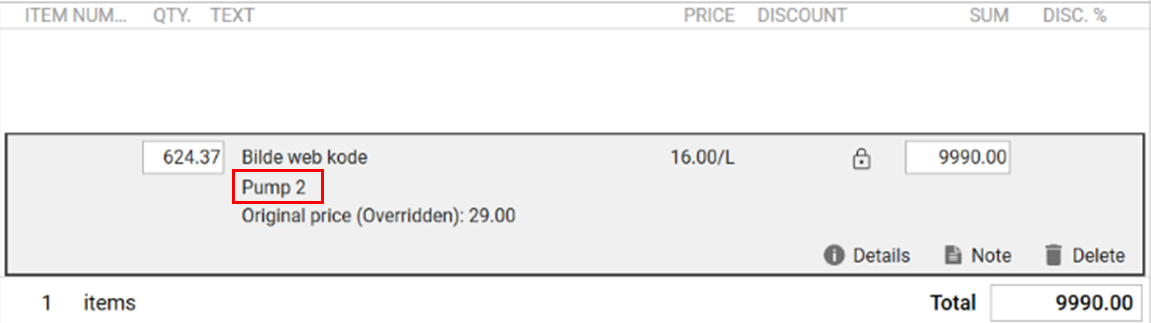
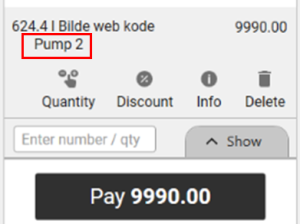
| User interface | Pump number on the item line (RTP-34885) The fuel pump number is displayed on the item line after a fuel transaction is added to the transaction in both Normal Sales View and Convenience Sales View. This would help the cash register ensure that the correct fuel transaction is being paid for by the customer. Cashier Sales view:
Convenience view:
|