| Status | ||||||
|---|---|---|---|---|---|---|
|
|
Prerequisites are located in the menu on the left.
Improvement POS
| Area | Description |
|---|---|
| Order | Canceling a finished receipt with order payment (RTP-37531) A problem that caused order edit mode to be started incorrectly was fixed. This happened when using the function to cancel a finished receipt and the receipt contained payment of an order. |
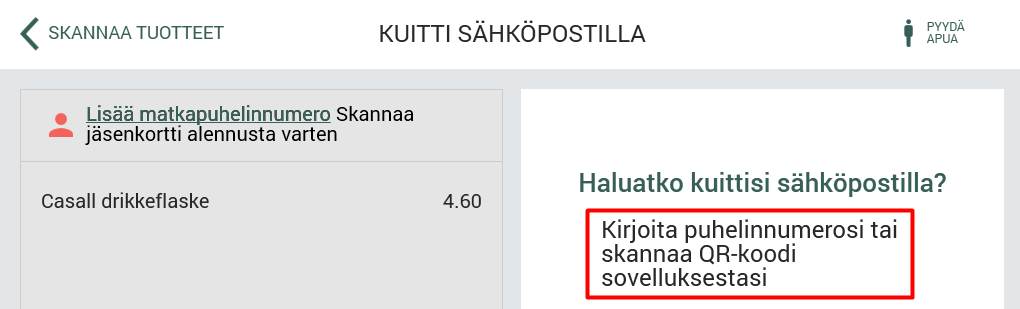
| Self-service | Assisted control for scanned weight items (20-codes) in self-service (RTP-37517) Staff can register a deviation for scanned weight-based items (20-codes) the same way as for weight items without a barcode. This is done by pressing the deviation button on the screen. If an incorrect registration or obviously incorrect weight is not noticed, the item can be checked by scanning the same barcode the customer used. The item's calculated weight is displayed with three decimals, as is standard for weight items. Scanner and keyboard input are blocked during an ongoing pay terminal transaction. This prevents accidental inputs, such as scanning an item or pressing a button at the wrong time, from disrupting the payment process. Updated the text on the "KUІTTІ SÄHKÖPOSTІLLA" screen to display: "Kirjoita puhelinnumerosi tai skannaa QR-koodi sovelluksestasi"
|