...
Base on different actions, different sounds are played in self-seviceservice. By placing a [MessageType].wav file in the media folder, this sound will be played instead of the default sound.
Possible messages types is:
- Available
- AssistanceNeeded
...
...
- DeclinedAgeControl
- AbuserAlertFromItab
- AwaitingItemFromItab
- ErrorStatusFromItab
- AwaitingAudit
- InUse
- ItemRegistrationError
- TimeRestriction
- PaperEmptyError
- PayTerminalError
...
| Expand |
|---|
|
| POS Configuration |
|---|
MediaBankCacheFolder - Specifies the folder in which MediaBank files are stored. Default value: 'C:\lpos\MediaCache'
ShopAndGoSoundWarnings - Value indicating whether POS should play sound when surveillance message that required attention have received. Default value: ' |
falseFalse'. To play sound set to ' |
true'.True'.
SignalLightConfig - Specifies light signals for Shop&Go (light tower). The sound logic has been connected to the signal light logic. Default value and possible messages types: 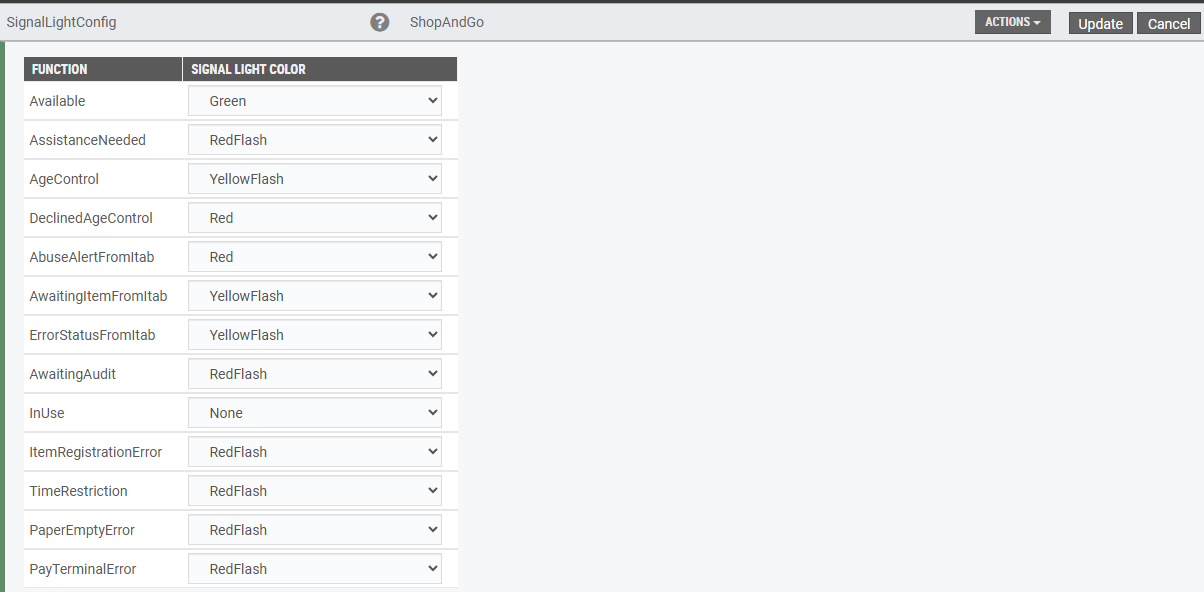 Image Added Image Added
|
|
Consumer sales date on items
...
