
1. To edit the dashboard, hover the mouse pointer over Edit and click Edit dashboard.
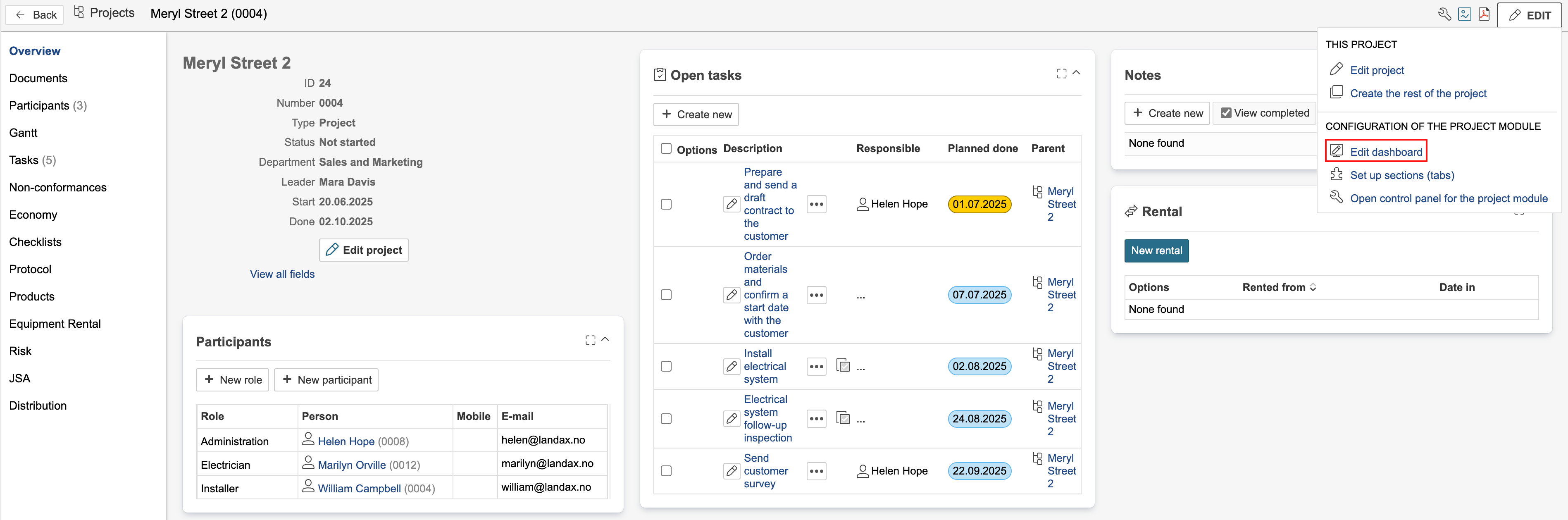
2. If the section is using a system dashboard, you must duplicate it before you can make any changes.
...
After the dashboard is duplicated, it can be edited. Project dashboards are edited in the same way as the start page dashboard. For more information, see the guide on editing dashboards with subpages.
The gadgets display different content on the dashboard. Some gadgets filter the records based on the project currently open, while others do not. The gadgets are marked with icons.
 - This gadget has special support for dashboards in module Projects, but also works on other types of dashboards. Special support means that the gadget displays records based on the project currently open.
 - This gadget is made only for dashboards in module Projects. The gadget displays records based on the project currently open.
 - Content in this list will not be filtered on project, but will display data from the entire module. The gadget does not filter the records based on the project currently open.