
A module to manage tenants, premesis rental, re-invoicing and a more detailed follow-up of use / consumption.
The Tenants module is part of out growing range of functionality that makes it possible to tailor you use of Mestro Portal. Contact your Customer Success Manager to talk about how the module can work for your particular organization!
...
The Tenant module adds a layer of functionality on top of the base energy monitoring system. It makes it possible to create tenants with contracts and "move in" the tenants in virtual buildings and components where you connect physical sub meters or virtual meters. Using this structure (that we can help you configure), the system will tally costs, distribution of usage and categorize environmental impact automatically. Get the material you need with a simple click!
TIP: The settlement report and other tools become much better if you also establishe real cost and environmental agreements in the portal. Otherwise, the system will apply Mestro's standard factors based on Nils Holgersson index for costs and Nordisk Residualmix (obs, external link to Energimarknadsinspektionen) for greenhouse gas emissions.
...
The module consists of several parts. The first is about creating virtual building components in you properties. These allow for a structured distribution of the property's usage data between different spaces and tenants. When you want to work with tenants in the portal you begin by creating a building component! How many components you choose to create depends on your needs. There is no right or wrong quantity.
Part 2 - Tenants and section contracts
Creating section contracts and administering tenants is the second part. Once you are in a building component you are able to create a section contract where you specify the name of the section, contract number, leased area and which meters (or part of) that serve the space rented by the tenants. When the section contract is created you either choose to "move in" a tenant or create a new one. Take a look at the picture below to see an example of a completed configuration.

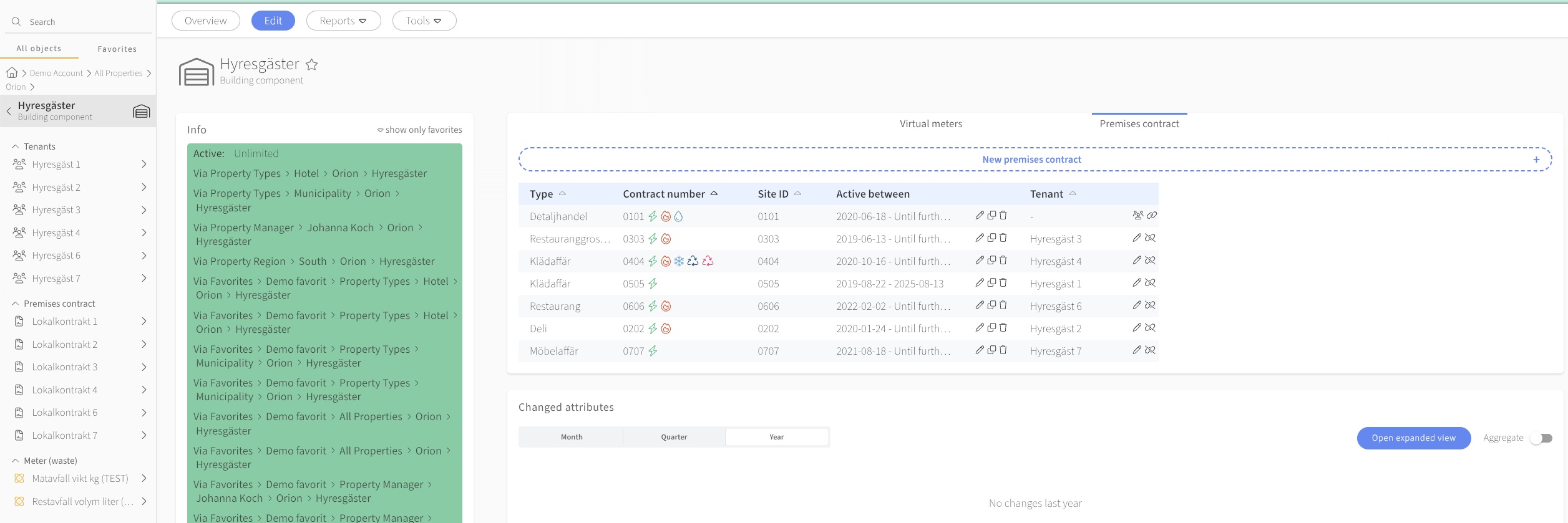
Part 3 - Sub metering
Part 3 is about distribution of measuring points. All properties have at least two main metering points; one for electricity och one for water. What you choose to measure in the portal is up to you. When you want to allocate metering points to contracts, you can either do it by installing a sub metering system for different spaces or create virtual meters to attribute portions of the use of the main metering points. More on that subject in the next chapter!
...
When the module is configured (tenants, section contracts and meters are connected and in place) you can find the new report in the menu Reports.

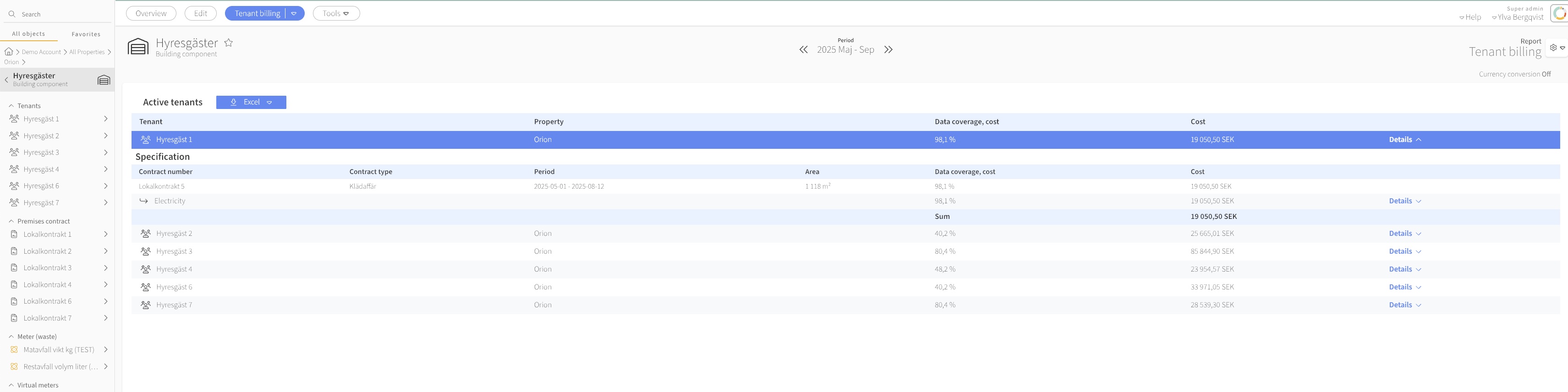
The tab Active tenants is the meeting point for all the tenants. Here you'll find a list of all the tenants and information about data coverage and costs. Click Details in order to see information about tenants, section contracts and connected meters. Here you also see the cost agreements that form the basis for the settlement repport. 
If you prefer to administer invoicing from excel or other programs you can easily download the information. There is a button in both the overview and the specification that is named Excel or CSV where you can choose between excel och .csv-format. Simple, right?
...
You can also combine different meters for billing, e.g. sub-meters for electricity, a percentage for district heating and water.
N.B: Use the cost and environmental agreements module to ensure that costs are calculated correctly. Alternatively, order our invoice scanning service to load the invoiced cost in the portal! If neither own agreements are established nor invoiced costs are loaded, Mestro's standard factor will be used to calculate costs for re-invoicing. The same goes for greenhouse gas emissions!