
...
On this page, you will find information about new features and changes in the system, including a brief explanation and where to find them. The most recent items are listed at the top.
Latest
- Template for checklists: It is possible to create custom templates for the distribution and printing of checklists and checklist responses.
- External non-conformity form: The plugin allows registration of non-conformities without having a user account in Landax. Information and ordering of the plugin is available under “Plugins” in the control panel.
- Public documents: Documents can be set as public and made available to people without a user account in Landax.
- Active status on products: Products can be set as active or inactive.
- Repeating tasks: It is now possible to define that a task is to be repeated on a specific day of the week or month.
Previous
- JSA template: It is possible to create a template for printing or email distribution in the JSA module.
- Multiple department selection: Multiple departments can be selected in the department selector on the form for customers and suppliers.
- Bulk edit checklist responses: It is possible to bulk edit checklist responses in the gadget for checklist responses on the dashboard.
- Tags on data filters and dashboards: It is possible to add tags to data filters and dashboards. The tags can be used to filter the overview of dashboards and data filters.
- Reading confirmation on documents: Reading confirmation can be requested for multiple documents simultaneously.
- QR codes in the document module: You can copy QR codes for document folders and documents.
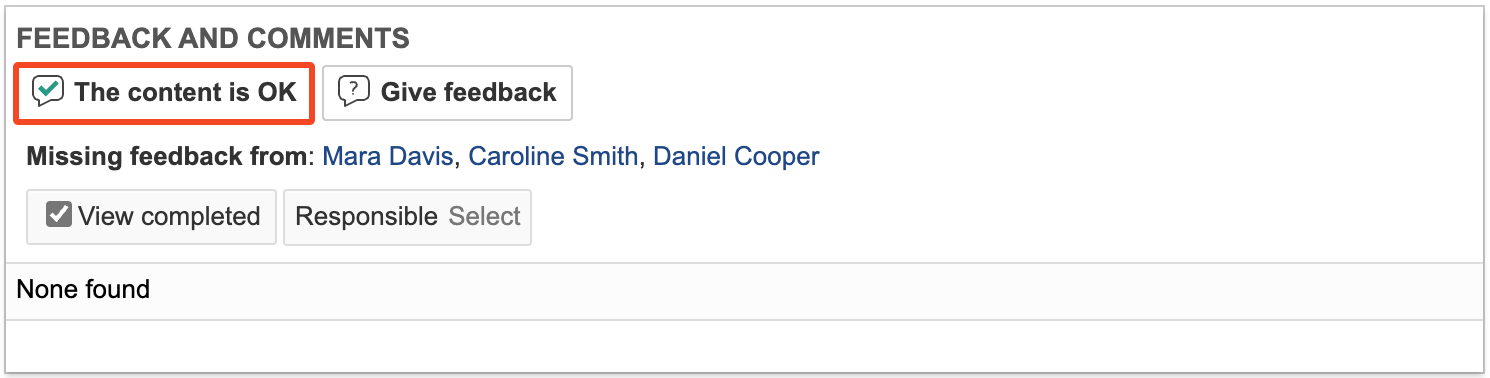
- Feedback shortcut: A shortcut button labelled The content is OK is available to review participants on documents with the status For review.
...
- Notifications for deadlines related to reading confirmations and document review rounds: It is now possible to set up notification rules that send reminders about deadlines for reading confirmations or document review rounds.
- Tab for reading confirmation: In the employee module, each user now has their own tab displaying requests for reading confirmation on documents that have been sent to them. Requests marked in green are those that have been confirmed as read and understood.
...