
...
Prerequisites and Installation Steps
- Download Download Visual Studio
Install Visual Studio from the Visual Studio Marketplace. Obtain - Obtain Professional License Access
Ensure you have access to the Professional version of Visual Studio: - Submit an access request through the Service Desk portal
...
- Notify your manager to approve the license request
...
- Configure Installation Components
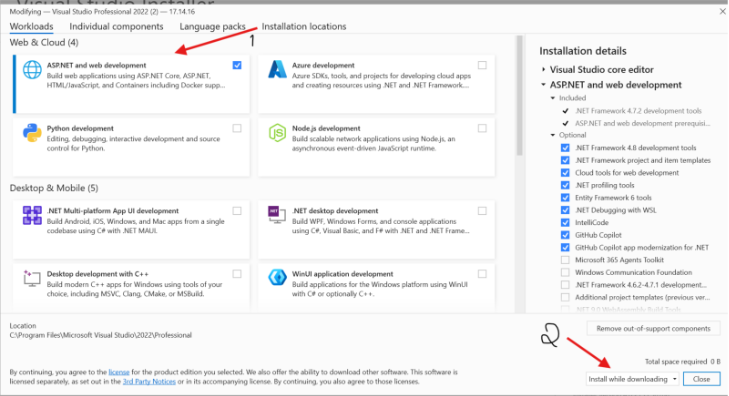
During the Visual Studio installation process: - When prompted, select the installation components screen
...
- Check the ASP.NET and web development workload
...
...
- his will automatically download all required dependencies and packages for EG-Flow development
...
- Click Install to begin the installation
...
- Complete Installation
The installer will now set up Visual Studio on your local machine.
Check the image below.
...