ASPECT 4 Finance release Y26H1 contains several new features, improvements and corrections to known issues.
Payments from debtors
The debtor payment module in ASPECT4 Finance has been expanded with the following options:
- Splitting a payment between two or more customers
- Post a bank transaction to a financial account
- Automatic posting of bank fees
The three functional extensions are all part of the existing license key.
ASPECT4 OCR scanning and Workflow - handling incoming invoices
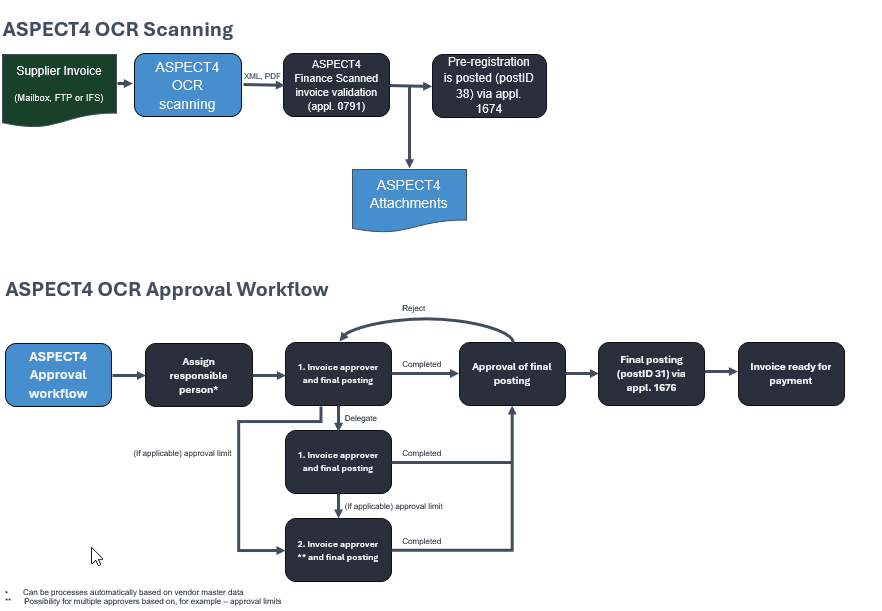
OCR Scanning Workflow is ASPECT4’s own solution for scanning incoming invoices and subsequent posting using a workflow with the option of differentiated authorization approval. It is a solution that automates the receipt, posting and approval of supplier invoices. The solution significantly reduces manual work while maintaining a clear daily overview of the process. In ASPECT4 industry solutions, processes have been created for automatic accounting based on defined criteria.
The solution requires a separate license key.
Application Discontinuation Notification
The application for 'Common entry' (1211) will be discontinued with ASPECT4 Finance release Y26H2.
Read more under 'Labels’ for 1211.
Changes caused by the Danish Bookkeeping Act
ASPECT4 Finance Y26H1 also focuses on the new and amended measures under the Danish Bookkeeping Act.
The joint public standard chart of accounts has been updated on 1 December 2025 with the following changes:
- Added all form requirements from Annex 2, forms 1 and 3 of the Danish Financial Statements Act.
- Added initial accounts etc. to the balance sheet items that were missing this.
- Added extra sub-accounts for certain accounting transactions that users are expected to request.
- Corrected existing accounts (renamed text, moved, deleted).
- Added relevant accounts for companies in accounting class A for tax reporting purposes.
The changes must be implemented in the registered digital accounting systems by the system providers so that the updated standard chart of accounts is ready for use by accounting companies as of 5 January 2026.
The new standard chart of accounts will not be used until the start of the next financial period in 2026. This means that if the company uses the calendar year as the financial year, the new standard chart of accounts must be used from January 2026. If the company has postponed the financial year (e.g. 1 July - 30 June), the new standard chart of accounts must be used from 1 July 2026. The standard chart of accounts can either be implemented directly in the company's accounting system by the system providers or indirectly, where the company’s or the accounting system’s accounts are 'mapped' to the public standard chart of accounts.
The common public standard chart of accounts is part of a larger overall plan for more automated, digital and uniform accounting and reporting - with less manual handling and fewer errors. The updating of the public standard chart of accounts is a prerequisite for being able to support companies that will be subject to a digital accounting obligation from 1 January 2026, as well as a prerequisite for the upcoming extended requirements for extracting accounting data in the SAF-T file format on 1 January 2027.
(Reference: Danish Business Authority)
The Danish Business Authority has released the new version of the Standard Chart of Accounts, version 20260101. The new version replaces version 20230101.
The Danish Business Authority has also released a new version of the Danish Standard VAT codes, version 20260101. The new version replaces the previous version 20230101.
With ASPECT4 Finance Y26H1, the new versions of the Standard chart of accounts and of the Standard VAT codes are enclosed.
It is important that the accounting chart of accounts in ASPECT4 Finance for every Danish company is mapped to the Standard chart of accounts version 20260101. The VAT codes in ASPECT4 Finance must also be mapped to the Standard VAT codes version 20260101. As when version 20230101 was introduced, the accounting chart of accounts must be set up so that an ASPECT4 account can be mapped to an account in the Standard chart of accounts or many ASPECT4 accounts to an account in the Standard chart of accounts. It is not possible to map an ASPECT4 account to several accounts in the Standard chart of accounts.
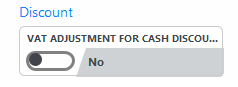
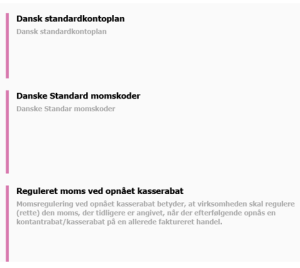
There is a requirement from the Danish Tax Agency that the VAT on an invoice must be adjusted in relation to a discount obtained on payment. When the discount becomes effective, the VAT basis must be adjusted because the remuneration becomes lower.
The adjustment takes place at the time the discount is obtained, not at the time of invoicing. With this release, it is possible to collect, calculate and display information for use in adjusting the VAT amount. For now, it is the debtor module in ASPECT4 that is being clarified.
As of 1 April 2026: SKAT has not yet issued official guidance about the change in practice, which is why EG considers the rule not yet to have entered into force.
News items
All new features, quality assurances and corrections are described at application and task level in this document.
New features
Labels | Client Release Notes | Key | |
1111 1478 | SAF-T reporting (Norway) Maintain chart of accounts (1111) A new field for mapping of SAF-T account number (field: KKEXA1) has been added. Version 1.3 of SAF-T reporting contains alphanumeric account numbers. Valid account numbers can be retrieved using List (F4). Valid account numbers are in the SAFNOKT1 file. From 1 January 2025, the account must be mapped to 'Næringsoppgaven'. SAF-T reporting NO (1478). SAF-T account is now retrieved from the new field KKEXA1. | ||
1111 | SAF-T reporting (Norway) An application parameter has been added to application 'Chart of accounts’ (1111), where it can be specified that the Norwegian SAF-T account (field KKEXA1) must be validated. | ||
1120 | Name of the account The name of the alternative account, e.g. account name linked to account number in default chart of accounts, has been added to the table, which now shows the following information:
| ||
1131 1644 Standard VAT codes | Danish standard VAT codes The Danish Business Authority has released a new version of Danish Standard VAT codes. Version 20260101. This version replaces version 20230101. With this release, both version 20230101 and version 20260101 are sent out. In the general file section 1001 'Bookkeeping Act - setup', add which version is to be used. Version 20260101 is recommended here. In all Danish companies, ASPECT4 VAT codes must be mapped to the standard VAT codes. Use application 'Maintain VAT information' (1131) for this mapping. TIP! If the standard VAT codes are already mapped to ASPECT4 VAT codes, use the application 'Convert standard VAT codes to version 20260101' (1F31) to convert from version 20230101 to version 20260101.
Generally, only a few users have access to maintain these system parameters. Make sure that all necessary VAT codes have been created in ASPECT4. If you would like assistance from EG for this process, please contact your ASPECT4 consultant. When uploading transactions to the Cloud using application 'Upload finance voucher to Cloud' (1644), the standard VAT code mapped to the ASPECT4 VAT code is used. It is important to get the VAT code mapping in place. | ||
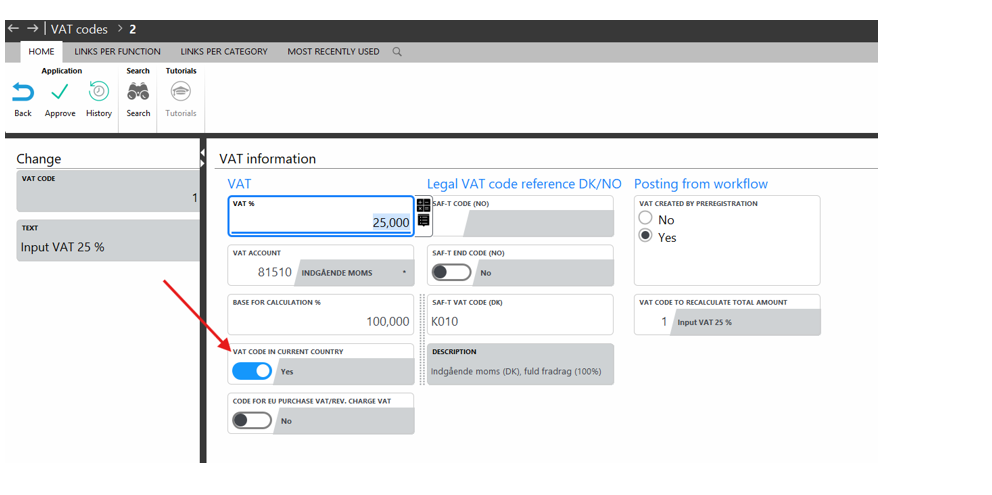
1131 | Maintain VAT codes In the application, new information has been added on the individual VAT code, which tells whether the VAT code represents VAT in the current company’s country. Recommendation: The marking should already be made now.
Please refer to further details under the item 'Calculationof regulated VAT for cash discount', which is described for “Labels” 1640 2605 2606. | ||
1208 | Bank Reconciliation - match for date When an attempt is made to match on date/amount, the first attempt is made with the date of the bank transaction, then with the date of the bank transaction plus/minus 1 and then plus/minus 2 up to the number of days noted in the application parameter for the application. | ||
1211 | Application 'Common entry' (1211) is notified to be discontinued for ASPECT4 Finance Y26H2 The application will be closed due to the following possible conditions:
The application is replaced by direct use of the following applications:
| ||
1282 1674 | Text for 'Informative VAT' on A/P transactions
| ||
1296 | Cleaning up procedures An application has been created to clean up posting suggestions created using the ASPECT4 OCR Scanning Workflow solution. The new application should be executed using the 'Job Schedule' (0160). NOTE! The online help for the application states that the number of days to be retained, counted from the execution date, can be specified in an application parameter. | ||
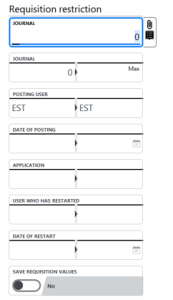
1315 | Multiple selection options With an increasing number of journals posted in ASPECT4 Finance, more options have become necessary to limit the selection of journals in the application. Requisitions The requisition has therefore been expanded with more delimitation options, so that it now appears with these options:
| ||
1333 | Name of the account The account name can now be displayed correctly when there are Unicode characters in the name. Applied to all types of transactions. | ||
1381 | VAT Amount in Currency VAT amount in currency has been added to the financial transaction in the interface to ASPECT4 Finance. | ||
1437 1673 | Posting of VAT return Posting date has been added to the requisition. A summarized VAT transaction is posted per VAT account, with the offset posted on the ledger account for VAT settlement. The posting is carried out according to the configuration of the application parameters. An application has been created 'Accounting: DK VAT reporting' (1673), to be used for posting the VAT reporting.
| ||
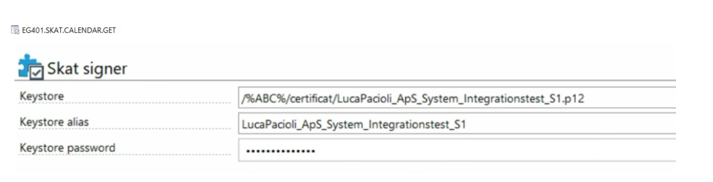
1437 | VAT reporting It has been made possible to retrieve the reporting date from SKAT.DK based on the entered reporting period.
For this to work, a certificate must be retrieved from SKAT.DK and attached to the ABC profile.
The CVR number from general file section 0020 'Group/company numbers’ is used in the lookup to SKAT.DK. | ||
1640 2605 2606 | Calculation of regulated VAT for cash discount - debtors Definition of term: VAT adjustment when cash discount is obtained means that the company must adjust the VAT previously stated when a cash discount is subsequently obtained on an invoice. The VAT Act describes the basic rules for the tax base, including:
In ASPECT4 Finance, a VAT adjustment is calculated when an invoice is settled with a cash discount obtained. Information about the regulation is written in the file DEBVATT1. Prerequisite:
Processing method When a payment is posted and if a cash discount is applied, ASPECT4 calculates a VAT adjustment while doing the settlement.
The application 'Calculate VAT adjustment for cash discount' (2605) can be used to recalculate the VAT adjustment manually, if the invoice is subsequently reposted. Application 'VAT adjustment for cash discount' (2606) shows the calculation regarding VAT adjustment per invoice (per VAT code) NB! The adjustment must be posted manually. If required by SKAT, a credit note must be issued to the debtor. Also read the item 'Maintain VAT codes’ with “Labels” 1131. | ||
1640 | Pre-registered creditor invoice/credit note with amount = 0 If an incoming invoice or credit note with a gross amount of 0.00 (zero) is posted, the posting identification is automatically changed from 38 to 31 and at the same time the code for “not posted” is updated to “posted” on the creditor transaction.
| ||
1644 | Uploading financial transactions to the cloud The application has been extended as follows:
| ||
1659 Standard chart of accounts | The Danish Standard Chart of Accounts The Danish Business Authority’s standard chart of accounts is a joint public, standardised chart of accounts to ensure consistent accounting in Danish companies. The aim is to make bookkeeping easier, increase automation and create better opportunities for data exchange between companies and authorities. The standard chart of accounts has been developed as part of the new Accounting Act, and although it is not a requirement to use it directly, accounting systems must be able to map the company’s ledger accounts to the public standard if you use your own chart of accounts. The first version of the standard chart of accounts has version number 20230101. The second version of the standard chart of accounts has version number 20260101. The two versions of the standard chart of accounts have been created and distributed as two alternative charts of accounts in ASPECT4. They are both installed in group number 999. The standard chart of accounts you will use must be copied to the group(s) you use in ASPECT4. It is recommended to keep the chart of accounts number (901 and 902 respectively) if possible. When the standard chart of accounts must be made available in the relevant ASPECT4 group:
Use application 'Copy chart of accounts’ (1234) to copy the standard chart of accounts from group = 999 to relevant group numbers. The mapping itself requires that you decide which alternative number to use to contain the account number to be pointed to in the Standard chart of accounts. Use the application 'Maintain alternative account' (1120) to map the standard chart of accounts to your ASPECT4 chart of accounts in the individual companies where the Danish Bookkeeping Act applies. Add the used chart of accounts number for the Standard chart of accounts in the general file section 1001 'Bookkeeping Act - setup'. Use application 'Standard chart of accounts’ (1659) to see the hierarchy of the standard chart of accounts. This applies to both version 20230101 and version 20260101. | ||
1912 | Excel report The Excel report contains both realized amount and budgeted amount.
| ||
2107 | Application parameter description Description of parameters for handling voucher numbers has been added to the application parameter description. | ||
2107 3107 | Reconciliation If you use the facility to calculate the VAT reduction for a cash discount (debtors/creditors), you can only settle one invoice at a time if a discount has been obtained. | ||

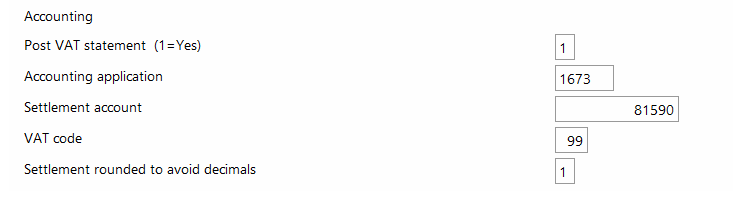


The parameter for calculating reduced VAT is set up in the general file section 1001 'Bookkeeping Act - setup'.
| ||
2111 3111 | ||
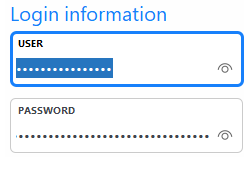
Looking for information at VIRK.DK For security reasons, the password for VIRK.DK has been moved from the general file section 2113/3113 'CVR Information' to the KeyStore facility in ASPECT4. User ID and password must still be maintained in the 2 general file sections. Permission must be granted in KeyStore if the user ID/password |
has tbe shown in the sections.
| |||
2114 2115 2314 2315 3114 3115 3314 3315 | Status Codes The status code and its description are now displayed for the individual debtor/creditor. | ||
2265 3265 | Split payments When working with payments, it is possible to split one payment between two or more customers.
| ||
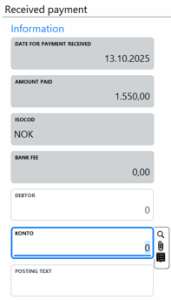
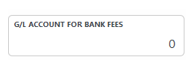
2265 3265 | Management of financial transactions When a file with debtor payments is received from the bank, there may be transactions in the file that do NOT relate to the debtors, or a fee may have been deducted from a payment, so that the actual amount deposited in the bank account is less than the paid amount. With this release, a transaction can be assigned to a financial account instead of a debtor. Similarly, a bank charge specified in the file from the bank will be displayed and handled and posted.
In general file section 2265 'Receipt of bank payments', a field has been added to the ledger account for the bank fee so that any registered fee can be posted automatically:
| ||
2265 3265 | Handling small payment differences If too little or too much has been paid in relation to the invoice(s) being paid/settled, it is possible to post the journal if the difference on the individual payment is within the permitted difference interval. Permitted difference is set up in general file section 2399 'Payment rounding'. For users of ASPECT4 Transport, the difference can be overridden by setting up in the general file section 3399 'Payment rounding'. | ||
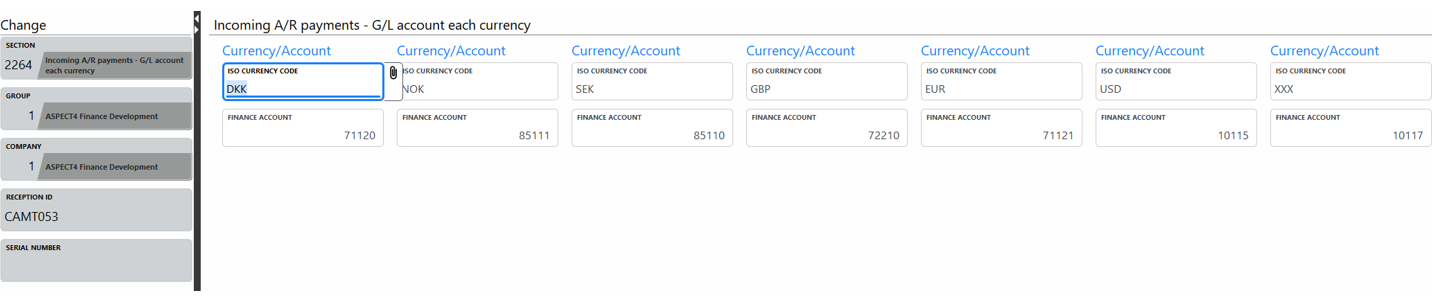
2265 3265 | Ledger accounts for the payment The bank account for posting the payment can now be overridden, so that it is possible to post to different accounts, depending on the currency in which the payment is received. The setup is made in the general file section 2264 'Financial account per currency'.
| ||
3111 | Lookup for a user Application 'User information' (3811) shows all active users created in application 'Maintain authorizations' (0110). The application is intended to be used as a List F4 application to present the users that can be selected from. For example, it can be used for the K10A1 field when used for the default approver. Not all ASPECT4 users need this setup or are already using the field for another purpose. If another field is used instead, the following fields are supported: K10A1, K10A2, K10A3, K10A4, K10A5 Activating: The application is linked to field K10A4 using application 'Maintain descriptions in language 70-99' (0104). Remember that most Danish installations have language 91 as the language in which Danish screen texts etc. are configured. Remember that most Norwegian installations have language 97 as the language in which Norwegian screen texts etc. are configured. Remember that most English language-based installations have language 92 as the language in which English screen texts etc. are configured. Some environments have several user languages active - in which case the setup must be done per language. | ||
OCR Scanning Workflow | OCR scanning workflow OCR Scanning Workflow" in ASPECT4 is a solution that automates the receipt, posting and approval of supplier invoices. The solution significantly reduces manual work while maintaining a clear daily overview of the process. AI interpretation is continuously improved through configuration, templates and ongoing learning from suppliers' invoice formats. Electronic approval processes save time and resources. Posting suggestions at supplier level contributes to high data quality and minimizes the risk of errors. The OCR Scanning Workflow in ASPECT4 supports compliance with the requirements of the Danish Bookkeeping Act with full documentation. All actions are logged with history, including data readouts, approvals and accounting, ensuring full traceability and a solid audit basis. In the industry solutions, processes have been created for automatic accounting based on defined criteria.
| ||
REST web service | REST web service for receiving postings for posting out | ||
Tutorials | Bookkeeping Act The following descriptions have been added to Tutorials in the section concerning the Accounting Act:
| ||
UDF | Read account group A new UDF has been developed to read account group on a ledger account. Getaccntgrp_1(Group, company, account, chart of accounts) If the chart of accounts number is written as 0, the current posting chart of accounts number is retrieved automatically. | ||
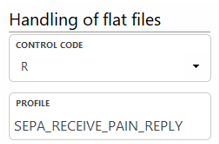
XML Payments Return Response | XML Payments - Return Response After Secure FTP Shipment If the payments do not arrive for approval in the bank, a return response can be retrieved from the bank using the application 'Handling of files (0654). Return response with response from the bank is sent by e-mail. To take the facility into use, a set-up must be made in the corresponding ABC document.
| ||
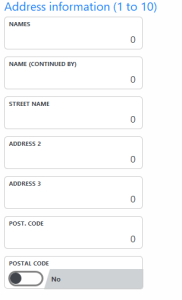
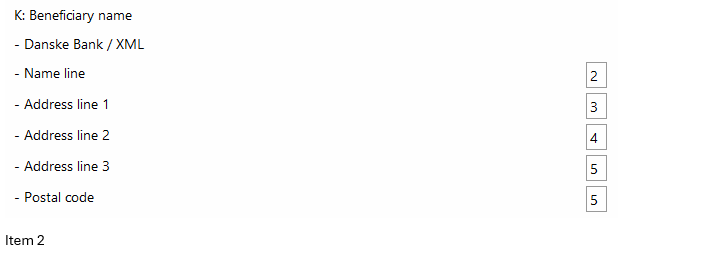
XML Payments | Handling of creditor address on XML payments to the bank In the application parameter for application 'Maintain payment proposal' (3220) it must be set up which name and address lines from creditor master data are to be written in the XML file. As for something new, this can now be overridden per payment type, as it is now possible to select name and address lines in the general file section 3122 'Payment type'.
| ||
XML Payments | XML Payments Item 1 Due to a requirement for payment via Sydbank, the structured address field in the XML file has been expanded with street names. Set up in application parameter for application 'Maintain payment proposal' (3220)
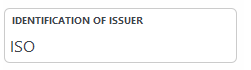
Item 2 For payments via Danske Bank locally in Finland, the identification of the document issuer and document type are noted in the XML file. In general file section 3128 'Message form' this parameter must be set to 'ISO':
| ||

Faulty functions and resolved issues
Labels | Client Release Notes | Key |
1021 1436 | Wrong general file section on lookup When you want to see possible VAT reports in the 'VAT report' field with List (F4), data from the general file section 1439 'Report name for VAT visualisation' is now displayed. Application 'VAT rules’ (1020) will in future include general file section 1439 'Report name for VAT visualisation'. | |
1111 | Validation against the exchange rate adjustment code When validating against permitted exchange rate adjustment codes from general file section 1255 'Booking of losses and gains on exchange rate adjustment', it will be validated whether an adjustment code has been created for the specific ledger account. | |
1242 | Posting on a chain-customer (only relevant for users of ASPECT4 Transport) You can now make a posting on chain-customer, on a closed charteque. | |
1242 | Posting texts Debtor and creditor names with unicode fields are now handled correctly as posting texts. | |
1242 | Accrual via action code If a financial transaction is marked with action code 1 (Accrual), then the transaction cannot be maintained. If the transaction is not OK, then it must be deleted and created correctly. | |
1282 1381 | Posting an exchange rate adjustment transactions via the interface Financial transactions with action code 2 (rate adjustment) are now handled correctly in the interface to ASPECT4 Finance. | |
1282 1381 | Difference between registered rate and calculated rate in the interface to ASPECT4 Finance If a financial transaction is created with amounts in currency, amounts in company currency and exchange rate, the interface to ASPECT4 Finance validates whether the rate is correct in relation to the two registered amounts. If not, the transaction is reported with an error. ASPECT4 has previously allowed a difference in the calculated rate and the registered rate of max. 0.1. A parameter has been added in the general file section 1412 'Interface control', where it is possible to register how big a difference is to be allowed. The limit is set to max. 0.5. | |
1282 1381 | VAT transaction based on creditor transaction If an AP invoice/credit note is written to the interface to ASPECT4 with a VAT amount, it is validated that ASPECT4 can find a VAT code for the VAT transaction based on either AP master data/control account or account for undistributed costs. | |
1319 | Table Header for 'Journals on hold' The table header is now displayed correctly when there are no journals. | |
1332 1333 | Quick filter Quick filters can be used for searching in the applications. | |
1333 | Type of document Voucher type will now be cleared when you search for next or previous voucher. | |
1335 2335 2336 3335 3336 4331 | Positioning of the cursor When 'Voucher transactions’ (1333) is called from a transaction and subsequently returned to the original application, the cursor is positioned on the transaction where the voucher was displayed. | |
1381 | Exchange rate validation When a financial transaction is created/changed in the interface to ASPECT4, a registered rate is now validated correctly. | |
1640 | Code for posting (A/P) When a creditor invoice is settled with a payment where a settlement difference arises, the difference transaction is marked as posted. | |
2111 3111 | Terms of payment texts The payment term text with unicode fields is now displayed correctly when showing the customer/vendor master data. | |
2111 3111 | EU VAT number validation If the VAT number is blank, it will be validated only if the debtor/creditor is an EU debtor/creditor. | |
2111 3111 | EU VAT number validation When validating the EU VAT number for the debtor/creditor with country code 'within the EU', validation is now performed correctly when the field KVATNO is selected to be used for the EU VAT number. | |
2111 | Credit limit The footer text for the credit limit now indicates whether the amount (credit limit) is displayed in units of 100 or 1000. | |
2279 | Terms of payment text A payment term text of up to 66 characters can now be entered. | |
2433 2434 3433 3434 | Account statement after compressing transactions When an account statement is printed for a debtor/creditor after compressing transactions, the opening and closing balances are now calculated correctly. | |
2437 | Self-billing (only relevant for users of ASPECT4 Transport) It is now possible to include pre-registered but not yet posted transactions in EU list reporting. This applies, for example, when Selfbilling is received using OCR Scanning Workflow. Here, the transaction for the pre-registration is marked with a code indicating that it must be included in the EU list reporting. | |
2991 2992 2995 | Application description and translation An application description has been added to the 3 applications, and the application name has been translated into English. | |
3115 | Select the value If the option of selecting a value is used, the selection is deleted when returning back to the overview of internet addresses for a given creditor.
| |
3207 | Type of the document The text for the different document types has now been correctly translated into English and Norwegian. | |
3213 | Maintain Accounts Payable Records A correct error message is now displayed if the creditor selected for maintenance does NOT have any transactions to be worked with. | |
3335 | Viewing accounts payable transactions The transactions are now displayed correctly when a transaction has been posted more than once. | |
4213 | Maintain Fixed asset transactions When a fixed asset is selected using List (F4), the number is now taken to the requisition. | |
Section-1134 | Ledger accounts for VAT declaration Correct display of accounts for VAT declaration. Maintained using application 'Setup of VAT reporting' (1137). | |
Section-2140 | Validation of ISO country codes An ISO country code may only be associated with one country, except ISO country code GB, which can be associated with both Northern Ireland and England. | |
UDF | Calculate due date UDF for calculating due dates based on invoice date and payment term now works correctly. | |
XML Payments Return Response | Return response from Norwegian banks when uploading payments The same rate will now apply to all transactions, both ledger and financial transactions. | |
XML Payments Return Response | XML Feedback NO - incorrect currency code When processing returns on creditor payments made, the currency code from the bank is used. | |
XML Payments | Call to 'Restore XML payments to bank' (3653) When application 'Restore payments’ (3490) is executed and a direct call is requested to restore the XML file to the bank using application 'Restore XML payments to bank' (3653), the end-to-end ID in the file is changed to a new unique value so that the file can be re-uploaded to the bank. |