
This contains the default workflow for work orders and purchase orders. Custom workflows can be set up here. For further details, see the available webinar that discusses this topic or contact our Support.
Possibility to limit status changes to professional group, employee group or to one or more named persons.
A copy function for workflow is also available.
Note: Workflow for work orders has a parameter (checkbox) to set a workflow as default on jobs that require a work permit. Only one workflow can be set as default!
Purchasing (PO)
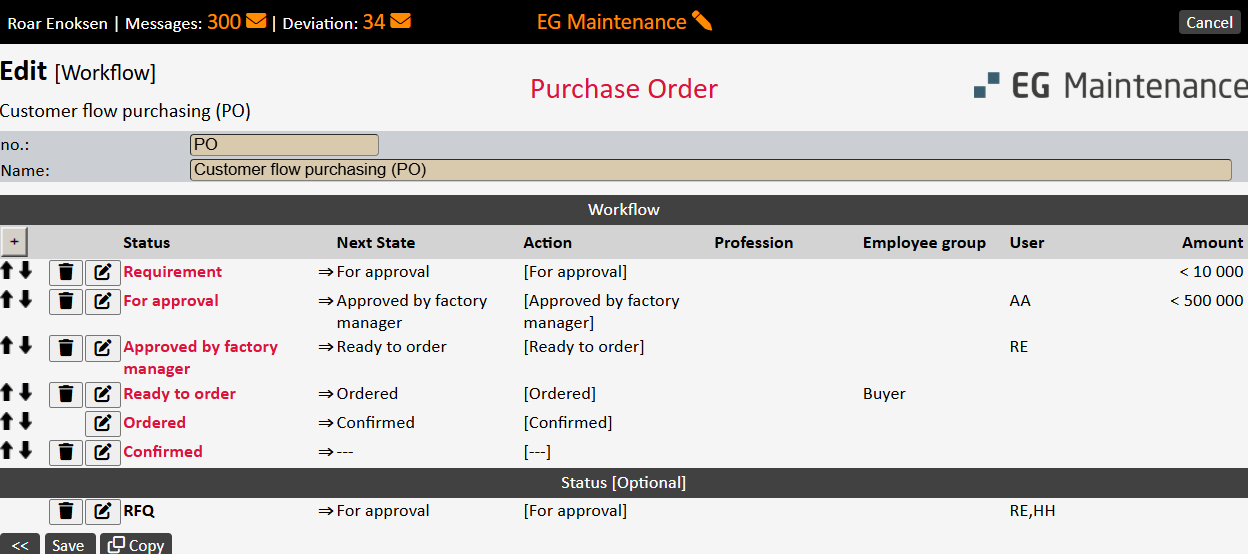
- Support for RFQ (Quotation Request). It is recommended to include RFQ as a separate step in the workflow for PO so that you can easily filter out PO's that are out for tender collection. Example: [Need]> [Request for Quotation]> [Ready to Order]. Can also be added as an alternative flow status.
- Limit amounts can be set up for a status change. An PO can then be set up to require approval for amounts greater than the stated amount limit on the change of status. In the case of a lower amount on PO, this status change will not be required. Multiple status changes can also be set up with different amount limits, ref. the example below. Note! The amount limit can be limited to the individual employee (a specific field on the employee card. If the employee's amount limit is less than the amount limit for the status change, it is the employee's amount limit that will apply.
State changes in IO flow can be set to use the access parameter here. By unmarking the SPO for the current user, and marking 'Control [Authorization]' on status change, this status change can be disabled for users without SPO.