
| Status | ||||||
|---|---|---|---|---|---|---|
|
Prerequisites are located in the menu on the left.
...
Improvements POS
| Area | Description |
|---|---|
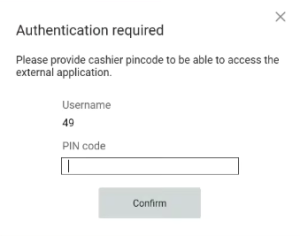
| Cashier card | BackOffice authorization if user log in to POS by cashier Card (RTP-35830) When a cashier logs in using a cashier card, they must enter their PIN before executing the OPEN_URL function.
|
| Flight integration | Scanning boarding cards in self-service (RTP-34211) A problem that could cause scanning of some boarding passes with much information in the barcode to fail in Self-service mode has been fixed. |
| Fuel integration | Fusion Forecourt Controller - Fix issues with price change messages (RTP-34784) FuellingType is added with the correct value (2) to the authorization message sent to Fusion Forecourt Controller, which previously caused issues with price change messages. Fusion Forecourt Controller - Fix for error when fuel transaction is freed up (RTP-35231) When a fuel transaction is freed up for in-store payment, error message is no longer shown and no longer causes the cash register to hang. |
| Order | Fixes for issues caused by printing order confirmation (RTP-35558) After printing order confirmation in POS:
|
| Payment | Finish transaction in Convenience mode (RTP-34093) Made sure that when Paying a 0 subtotal receipt in Convenience mode, tender is added correctly. Implemented support for:
|
| Receipt | Investigate sales that could not finish (RTP-35726) Change behavior of please wait dialog and added more logging if this kind of situations happens again. |
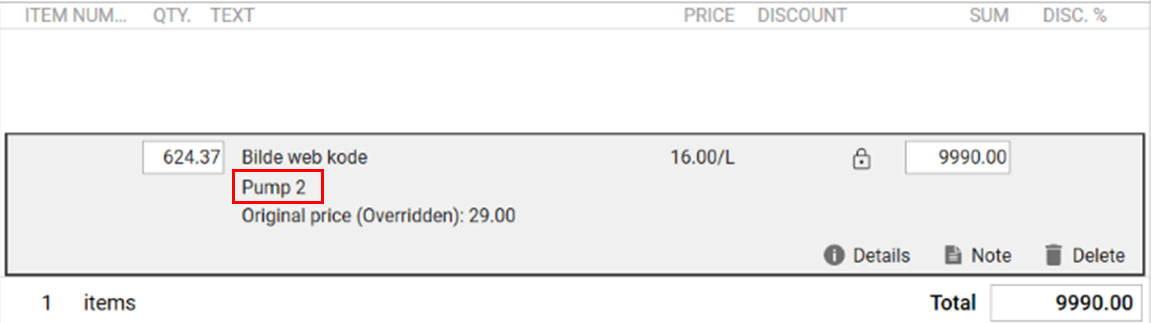
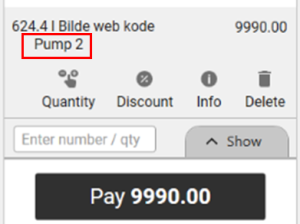
| User interface | Pump number on the item line (RTP-34885) The fuel pump number is displayed on the item line after a fuel transaction is added to the transaction in both Normal Sales View and Convenience Sales View. This would help the cash register ensure that the correct fuel transaction is being paid for by the customer. Cashier Sales view:
Convenience view:
|
Improvement POS Server
| Area | Description | |||||
|---|---|---|---|---|---|---|
| Journal Service | Time of the receipts in Receipt Journal (RTP-36884) In Receipt Journal, the time shown in the grid overview of the receipts and in the receipt view is the same.
|