
...
The Solar Power Analysis enables you to monitor your solar energy production in a user-friendly manner. After a few steps and tagging meters in the portal, you are ready to view your data in the Mestro portal. Follow the steps below to understand how it works.
Before using the solar power report
Start by setting up meters in the portal if they are not already available. You can learn how to do that here.
Once all meters are set up in the portal
The next step is to tag the meters correctly, so they are visualized correctly in the module. There are three different tags to choose from. Once inside the report, various settings will control what is aggregated in the chart. When it comes to Purchased Electricity, the levels Main Meter/Submeter will also affect the aggregation.
- Produced - The meter representing your total solar energy production.
- Used - The meter representing the energy you produced and consumed within the property.
- Sold - The meter representing the excess energy you produced and sold back to the grid.
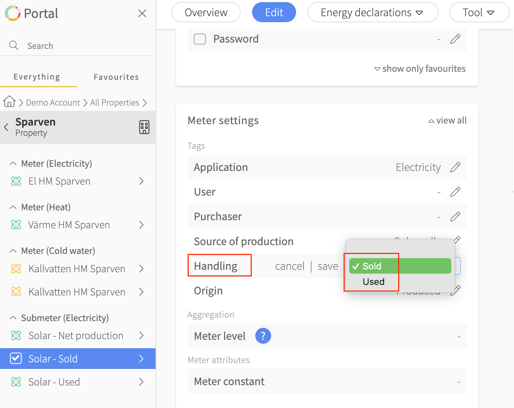
After tagging all your meters
Now you have done what is needed to view solar energy data! Let's move on to the Solar Power Analysis itself. You can find it under Reports > Solar Power Analysis.
...
Purchased Electricity = Meters tagged with the "Purchased" origin. You can change the tag under Edit -> Meter Settings for the meters.
- Produced - The meter representing your total solar energy production.
- Used - The meter representing the energy you produced and consumed within the property.
- Sold - The meter representing the excess energy you produced and sold back to the grid.
Number 2 in the image shows the different ways you can view your data: bar chart or line chart. If you choose Table, you will see an overview of all properties with solar tagging. Where you stand in the tree structure affects which meters are shown here. If you are at the portfolio level, you can see all your properties and, through the numbers in the table, which ones have solar meters underneath.
To the right of the image at number 3, you will see some useful key figures. Remember that this also depends on where you are in the tree structure. If you are at the portfolio level, the figures will represent the entire portfolio. The Self-sufficiency Rate on the last row is a calculation of how much electricity you did not need to purchase during the period. The formula for this is (Self-consumed solar energy + purchased electricity) / self-consumed solar energy.
...