
Quick guide on how to set up area-based dyanamic virtual meters!
Virtual meters are meters that are based on other existing meters in the system. Read more about our virtual meter functionality in this article.
In Mestro Portal, you can allocate a certain percentage of a meters data onto a virtual meter based on the area of a building or building component in relation to a total area. This is what we will go through in this article.
The percentage distribution will be automatically updated if the area of any included buildings, building components, or properties is changed in the portal — now that’s dynamic!
For example: Building area / total area = Resulting area distribution.
If you want to create a virtual meter that is dynamically distributed across buildings or building components, here’s how to do it:
1. Navigate to the place in the property structure where you want your virtual meter to be created.
...
6. Select the meter or meters that your virtual meter will be based on. If you want the entire meter to be distributed based on the share of a building’s area relative to the total area, keep addition and percentage at 100% at this step.
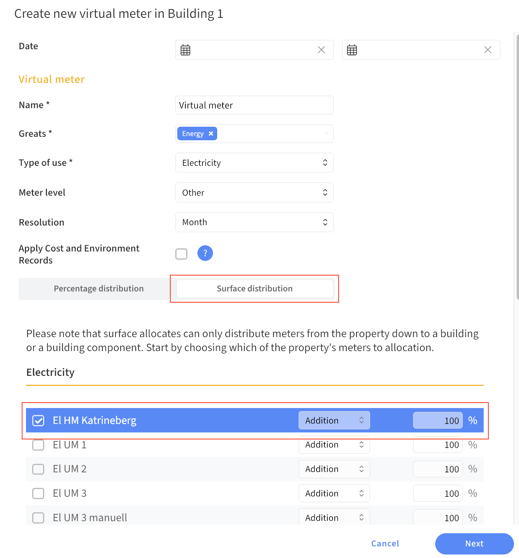
7. Click Next.
8. Choose which area type the area-based allocation should be based on from the dropdown menu. Note: the building area is always taken from the object in which the virtual meter is being created.
...
10. The resulting area distribution will be displayed, along with the calculation it’s based on.
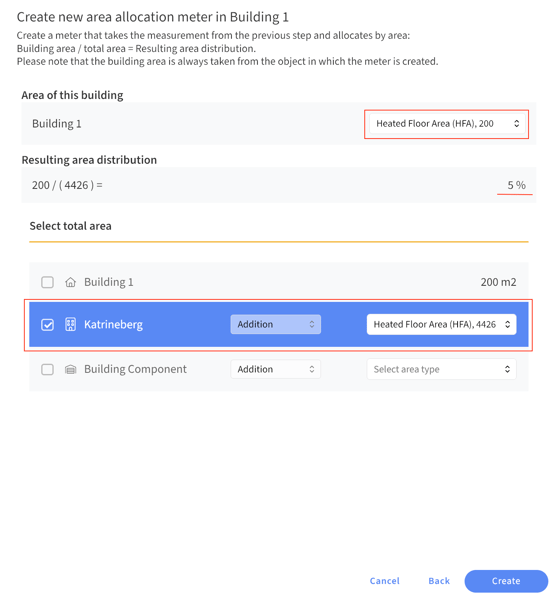
11. When you're satisfied, click Create. Your meter will appear in the property structure right away!
Please note that it may take a short while for the system to complete the calculation and visualize the virtual meter in reports.