
| Status | |||||||
|---|---|---|---|---|---|---|---|
|
Prerequisites are located in the menu on the left.
Tax codes in product lines sent to BAXI needs to be converted
The Tax Code field on the product line is converted and instead of sending the percentage, a code is sent.
| Expand | ||
|---|---|---|
| ||
New Parameter : BaxiAgentTaxCodes - default values : <SerializeableDictionaryOfStringString><Item><Key><string>0</string></Key><Value><string>0</string></Value></Item><Item><Key><string>25</string></Key><Value><string>1</string></Value></Item><Item><Key><string>12</string></Key><Value><string>2</string></Value></Item><Item><Key><string>6</string></Key><Value><string>3</string></Value></Item></SerializeableDictionaryOfStringString> |
Improvements POS
| Area | Description |
|---|---|
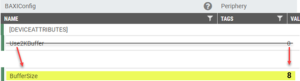
| Bank | Cancel payment when pay terminal connection is lost (RTP-36425) Cashiers can cancel a payment even if the connection to the pay terminal (Baxi.Net) is lost. This makes it possible to complete the receipt using a different payment method. When the countdown ends, pressing Cancel a third time sends a reset to Baxi. If the reset does not restore the connection, the transaction is aborted automatically and EG POS returns to the Payment screen. Existing parameter in POS Configuration: 'BankReceiveTimeOutInSeconds' (default 120) - the number of seconds before cashier is allowed to abort a transaction even when connection is lost. Auto logout timer resets after payment completion (RTP-28929) When auto logout is set up for idle time in EG POS, the logout timer resets only after the payment is fully completed. This avoids logging out the cashier too early in cases where the customer takes time to finish the payment, such as using a phone app, and keeps the payment summary visible on screen for the cashier. Relevant existing parameters in POS Configuration: 'AutoLogoutWhenIdle' = 'True' 'AutoLogoutWhenIdleTimeout' = (configured seconds) EG POS supports Baxi.Net version 1.14.0.1762 without requiring changes in EG POS itself. However, Baxi.Net must be configured correctly in POS Configuration before using this version. This ensures proper communication between the terminal and EG POS. Relevant existing parameters in POS Configuration:
|
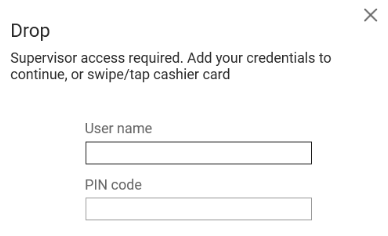
| Drop | Authorization twice when transferring cash from the drawer to the safe (RTP-38707) When supervisor/extended permissions are required to perform a drop of cash from the drawer to the safe, the user will only be asked for the permissions once. Previously a bug could cause this dialog to be shown twice.
|
| Fusion Fuel integration | Sound alerts for authorization requests (fill outside, pay inside) (RTP-33974) When there is at least one request to authorize filling (fill outside and pay inside), a sound plays on at least one cash register every 1–2 seconds. The sound continues until all active requests are closed. If a customer or cashier cancels a request, the sound stops and the alert disappears from the pump panel. |
| General | Pay terminal transactions logged correctly despite Cash button press (RTP-37541) Finished transactions from the pay terminal are always written correctly to the Poslog.xml file, even if the cashier presses the Cash button while the payment is still in progress. This ensures that payment records stay accurate, even when incorrect actions are taken during the transaction. Auto logout timer resets after payment completion (RTP-28929) When auto logout is set up for idle time in EG POS, the logout timer resets only after the payment is fully completed. This avoids logging out the cashier too early in cases where the customer takes time to finish the payment, such as using a phone app, and keeps the payment summary visible on screen for the cashier. Relevant existing parameters in POS Configuration: 'AutoLogoutWhenIdle' = 'True' 'AutoLogoutWhenIdleTimeout' = (configured seconds) |
| Payment | Error removed when committing eSale items (RTP-38676) The error that appears when committing an eSale item no longer occurs. This ensures smoother order processing and prevents interruptions when handling eSale items in the POS. |
| PLU List | PLU List view memory usage (RTP-38980) Memory is correctly cleared each time the old PLU List view is closed. This prevents system crashes caused by repeated opening and closing of the view. Cashiers can now search for items as many times as needed without affecting performance or stability. |
| Price calculation | Future price handling at POS (RTP-38899) When a future price is set and sent to POS, EG POS continues to use the current item price and current net cost until the future price becomes active. This ensures correct pricing at the time of sale and prevents premature use of future prices. |
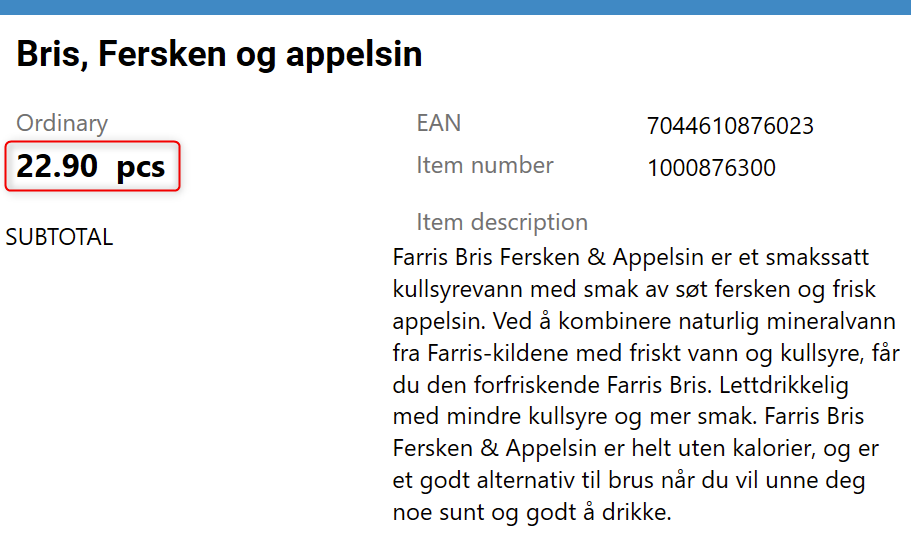
| Price checker | Showing active price in price checker view (RTP-38675) Active price is shown instead of planned price in price checker, Item information, and Price tab views in POS.
|
| Receipt | Bonus check discounts displayed separately on receipts (RTP-32817) Subtotal discounts from bonus checks appear as a separate discount line on receipts. This ensures a clear and accurate breakdown of discounts, preventing them from being displayed as subtotal rounding. Searching for member receipts (RTP-37843) POS no longer freezes when searching for member receipts by phone number. Net amount on receipts (RTP-39503) Net amount on receipts is taken from currently active price. |
| Sale | Make sure timers are disposed correctly (RTP-37837) To prevent Memory Leaks : Dispose() is called when timer is Closed() before a new Timer is created. Kickback on promotion price and mixmatch for the same item (RTP-37703) When promotions and offers are imported from EG cloud promotion module, the following logic is used to apply kickback adjustment on net cost:
|
Improvements POS Server
Area | Description |
|---|---|
| POS API | Bug SubtotalDiscount missing when BeginCartEditing is called has been fixed (RTP-39402) SubtotalDiscount was missing when BeginCartEditing was being called for calculation of the cart, leading to wrong calculation. That issue has been fixed for the customer and now the endpoints are being called correctly. This fix stops the addition of duplicate payments to the customer orders which were imported using BatchToPosAPI leading to critical errors. |