
Document requests are used to predefine which documentation should be included in a project. This helps ensure a clear overview of what is has been requested and what is still missing. Requests can involve remains outstanding. These requests can consist of file uploads, documents created from templates directly in the systemLandax, or checklists. They can be configured in a project template or task template. Document requests may be displayed on in dashboards or in a dedicated section within the project or task.
...
| Info |
|---|
Info: It is also possible to create document requests linked to a project or task type. All projects and tasks using that type will include the corresponding documentation request. |
In the project portal, document requests can be filtered and sorted using gadgets. In the screenshot example below, the requests are organised in a separate sub-dashboard.
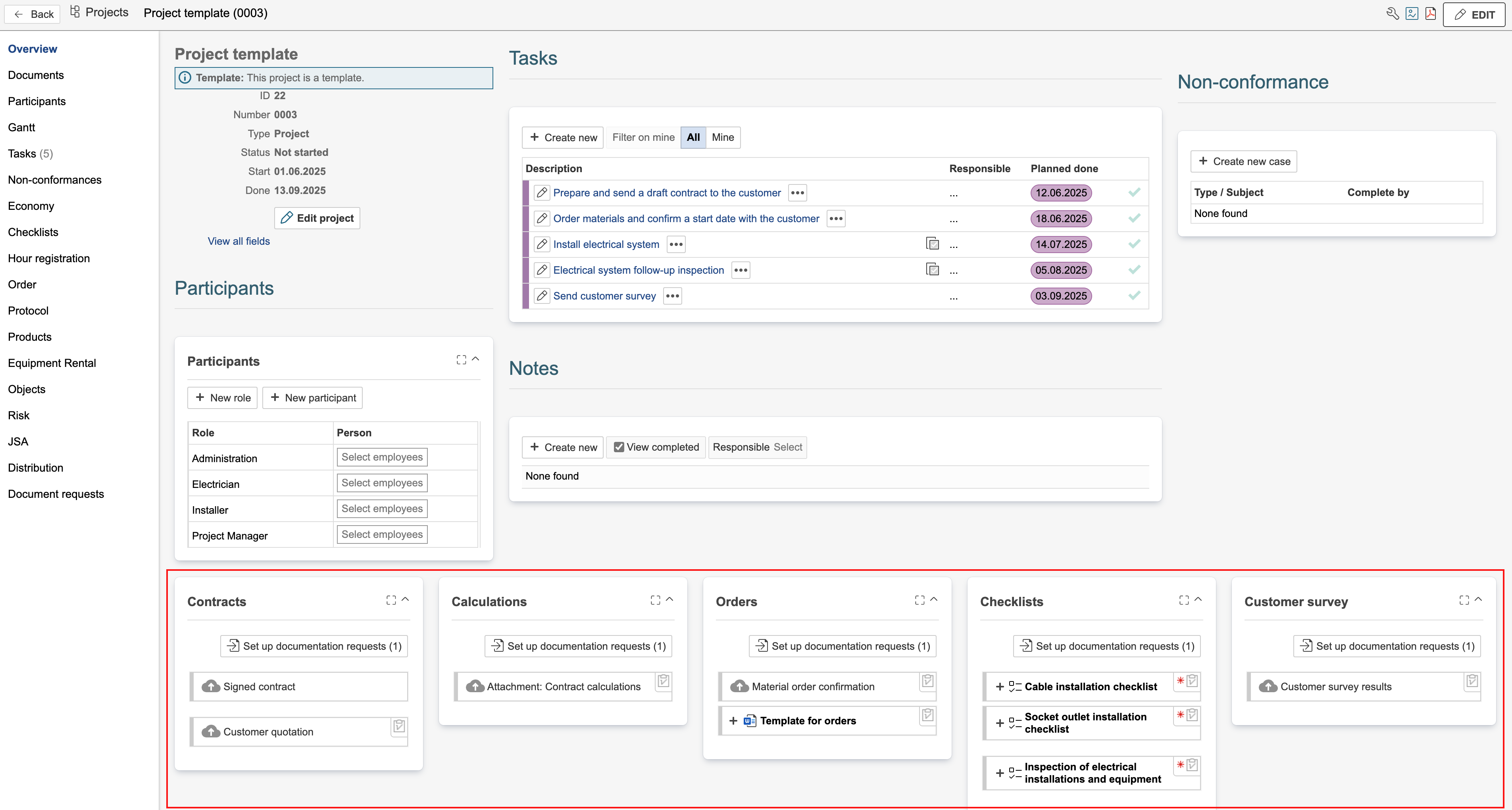
Hover the mouse pointer over the icons in the top-right corner of a document request to see its placement. Requests without an icon are linked to the record you currently have open — in this case, the project template. The number (1) next to 'Set up document requests' indicates that one document request is linked to the project template. The remaining requests are linked to the task templates within the project.

| Info |
|---|
Info: In a project with sub-levels, you can view all document requests from the main project, sub-projects, and tasks in the main project’s overview. |