
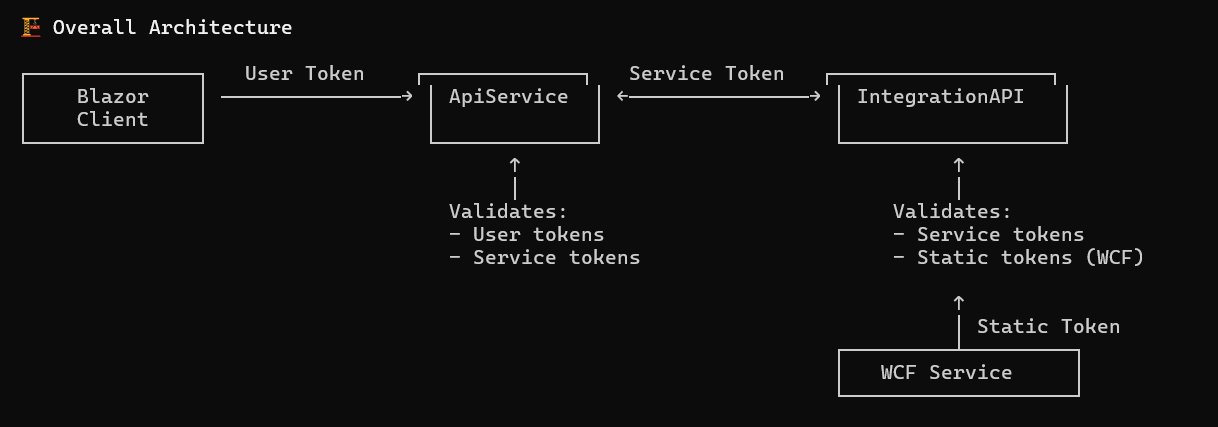
EG Zynergy Partners uses four different authentication approaches depending on the client and use case.
To accomplish this flow, four different Entra ID app registrations are used .
...
1. User Authentication (CIAM)
Used by: End users accessing the Blazor WebAssembly application
Authentication Method: OAuth 2.0 Authorization Code Flow with PKCE
Identity Provider: Microsoft Entra ID (CIAM tenant)
How it works:
- User logs in via Microsoft login page
- Multi-factor authentication (MFA) required via Microsoft Authenticator app
- Receives access token (1 hour) and refresh token (90 days)
- Tokens stored in browser sessionStorage
- Access token automatically attached to API requests
Key Details:
- Tenant ID:
6073ce8b-73f3-4df4-9b80-5e40cdc6965f - Client ID:
84c38b43-12e4-4c26-8292-8910d79aa532 - Scope:
api://4dad5d62-dc8c-4378-8bd0-ae736a4d73fe/ApiService_UserAccess - Token Lifetime: 1 hour (access), 90 days (refresh)
- Storage: Browser sessionStorage (cleared on tab close)
Documentation: User Authentication
...
2. Swagger Authentication (Azure AD)
Used by: Developers accessing Swagger UI for API testing
Authentication Method: OAuth 2.0 Authorization Code Flow
Identity Provider: Microsoft Entra ID (Azure AD tenant)
How it works:
- User clicks "Authorize" in Swagger UI
- Redirected to Microsoft login page
- Logs in with Azure AD credentials
- Token returned and stored by Swagger UI
- Token automatically included in Swagger API test requests
Key Details:
- Tenant ID:
6073ce8b-73f3-4df4-9b80-5e40cdc6965f - Client ID:
84c38b43-12e4-4c26-8292-8910d79aa532(same as user auth) - Authority:
https://login.microsoftonline.com/{tenantId}/v2.0 - Token Lifetime: 1 hour
- Environment Access: Development (open), Testing/Staging/UAT (IP whitelisted), Production (disabled)
Documentation: Swagger Authorization and Swagger IP whitelisting
...
3. Service-to-Service Authentication (Azure AD Client Credentials)
Used by: ApiService ↔ IntegrationServiceAPI bidirectional communication
Authentication Method: OAuth 2.0 Client Credentials Flow
Identity Provider: Microsoft Entra ID (Azure AD tenant)
How it works:
- Service authenticates using client ID and client secret (no user involved)
- Requests token from
...
- Entra ID using client credentials
- Token cached for 1 hour (with 5-minute buffer)
- ServiceTokenHandler automatically attaches token to outgoing requests
- Receiving service validates token using
...
- Entra ID public keys
Key Details:
ApiService → IntegrationServiceAPI:
- Client ID:
4dad5d62-dc8c-4378-8bd0-ae736a4d73fe - Scope:
api://bd5100ee-af63-4880-8c60-47d4207d60c1/.default
IntegrationServiceAPI → ApiService:
- Client ID:
bd5100ee-af63-4880-8c60-47d4207d60c1 - Scope:
api://4dad5d62-dc8c-4378-8bd0-ae736a4d73fe/.default
Common:
- Tenant ID:
6073ce8b-73f3-4df4-9b80-5e40cdc6965f - Token Lifetime: 1 hour
- Token Caching: Yes (automatic)
- No User Context: Tokens represent service identity, not user
Documentation: Service-to-service authentication
...
4. Static Token Authentication (WCF Service)
Used by: Legacy WCF service sending work order messages to IntegrationServiceAPI
Authentication Method: Static JWT token with symmetric key signing
Identity Provider: None (self-issued token)
How it works:
- WCF service has pre-configured static JWT token
- Token signed with HS256 (HMAC-SHA256) using shared secret key
- Token stored in Azure environment variable
- Token attached to every request
- IntegrationServiceAPI validates signature using same secret key
- Only valid for specific endpoint
Key Details:
- Token Issuer:
"PartnerPortal" - Token Audience:
"EGU.PartnerPortal" - Service Name Claim:
"WCFservice" - Signing Algorithm: HS256 (symmetric)
- Token Lifetime: Long-lived (typically years)
- Allowed Endpoint:
/api/ReceiveWCFIncomingMessageonly - Secret Key Storage:
- WCF: Azure environment variable
- IntegrationServiceAPI:
appsettings.json(AccessToken:SecretKey)
Security Note: Path restriction prevents token misuse on other endpoints. Token only works for receiving WCF incoming messages.
Documentation: WCF Static Token Authentication