
| Status | ||||||
|---|---|---|---|---|---|---|
|
Prerequisites are located in the menu on the left
Support for Baxi.Net Pay Terminal Version 1.13.5.1728 in EG POS
EG POS now supports Baxi.Net pay terminal solution from Nets, version 1.13.5.1728.
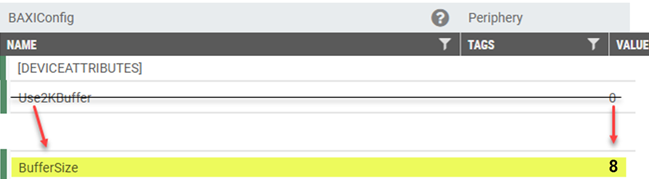
To ensure proper connection, specific POS configuration changes are required. If not configured correctly, EG POS will be unable to connect to the terminal. Please refer to the configuration details below to set up your system.
| Info | ||
|---|---|---|
| ||
Note that new Baxi.Net version 1.13.5.1728 is implemented in this version of EG POS. This requires necessary configuration changes in parameter 'BaxiConfig' before upgrading POS. See configuration description. |
| Expand | ||
|---|---|---|
| ||
|
Improvements POS
Area | Description |
|---|
| Bank | Control pay terminal access from sales view (RTP-38354) It's possible to turn off the option to start pay terminal transactions directly from the Sales view. This helps avoid triggering payments by mistake, for example when pressing a key on a physical keyboard. To start a payment, users then need to go through the Payment view. New parameter in POS Configuration: 'BankStartPaymentWhenInSalesView' (default 'True') - when set to 'False', pay terminal payments may only be started from Payment view. Payments made through Baxi.Net pay terminals now handle multi-currency transactions correctly, whether the payment starts from the Sales view or the Payment view. Payments triggered using on-screen buttons or physical keyboards consistently apply the correct currency, ensuring smooth and accurate processing. Cashiers can cancel a payment even if the connection to the pay terminal (Baxi.Net) is lost. This makes it possible to complete the receipt using a different payment method. When the countdown ends, pressing Cancel a third time sends a reset to Baxi. If the reset does not restore the connection, the transaction is aborted automatically and EG POS returns to the Payment screen. Existing parameter in POS Configuration: 'BankReceiveTimeOutInSeconds' (default 120) - the number of seconds before cashier is allowed to abort a transaction even when connection is lost. |
| Discounts | Wrong display of currency and delete button (RTP-35181) When doing line discount, correct currency is displayed in the popup and the delete button is showed correctly. |
| Epsilon integration | Epsilon app improvement (RTP-37715) Switching between Epsilon app and POS screen can be done without any issues encountered. |
| Fuel integration |
Fix issues with price change |
messages (RTP-34784) FuellingType is added with the correct value (2) to the authorization message sent to Fusion Forecourt Controller, which previously caused issues with price change messages. |
Fix for error when fuel transaction is freed up (RTP-35231) When a fuel transaction is freed up for in-store payment, error message is no longer shown and no longer causes the cash register to hang. Online return in Fusion Forecourt integration (RTP-34882) Online return can be performed on a fuel sales transaction done via Fusion Forecourt integration. The relevant information for the fuel transaction is added in ARTS XML. | |
| General | Fix for error in scanning receipt (RTP-27552) Application wide error no longer occurs when scanning receipt paid with bonus and card. |
| Item transaction | Limits for items with active substances removed for item transactions (RTP-35379) In POS, item transactions can be done on items with with active substances and it is not restricted with the maximum limit. Sales transactions are still limited to the set maximum limit. |
| Order | Printing of order confirmation for prepaid web orders (RTP-37327) "Print order confirmation " button is added in Prepaid Web Orders tab in Web Orders view. Moreover, automatic print of order confirmation no longer fails. Order return (RTP-31168) POS no longer throws an error when return item from web order is selected. Fixes for issues caused by printing order |
confirmation (RTP-35558) After printing order confirmation in POS:
| |
| Payment | Handling returns and sales on the same receipt (RTP-37011) When canceling dialog "Confirm Klarna Payment - Order will pay to Klarna xxx" will now not send anything to Klarna. Error removed when committing eSale items (RTP-38676) The error that appears when committing an eSale item no longer occurs. This ensures smoother order processing and prevents interruptions when handling eSale items in the POS. Finish transaction in Convenience mode (RTP-34093) Made sure that when Paying a 0 subtotal receipt in Convenience mode, tender is added correctly. |
| PLU Board | Fix for unexpected error in PLU board (RTP-37528) Unexpected error in POS when switching between PLU Board no longer occurs. |
| PLU List | PLU List view memory usage (RTP-38980) Memory is correctly cleared each time the old PLU List view is closed. This prevents system crashes caused by repeated opening and closing of the view. Cashiers can now search for items as many times as needed without affecting performance or stability. |
| Receipt | Drive off receipts (RTP-35222) Drive off receipts are marked as "Drive off". |
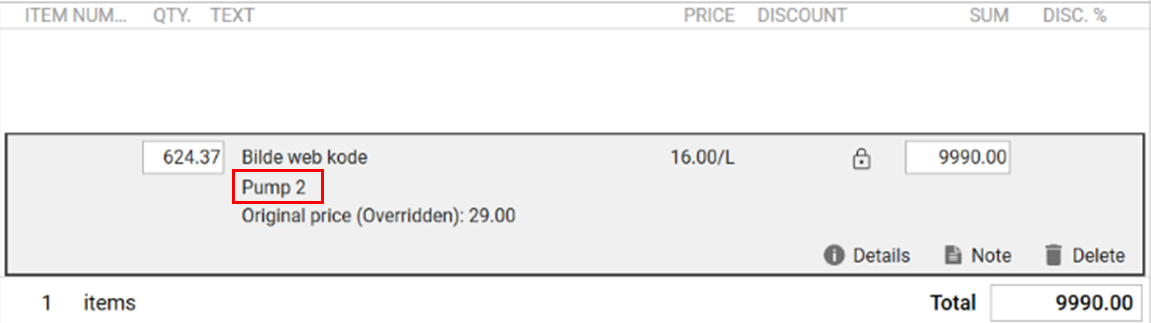
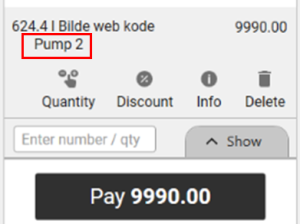
| User interface | Pump number on the item line (RTP-34885) The fuel pump number is displayed on the item line after a fuel transaction is added to the transaction in both Normal Sales View and Convenience Sales View. This would help the cash register ensure that the correct fuel transaction is being paid for by the customer. Cashier Sales view:
Convenience view:
|
| Web order | Selection of pick up points for PAC/PAC.CW orders (RTP-37124) The cashier can scroll through all possible pickup points for PAC/PAC.CW orders. Previously, only 10 store where shown in this view even though there are more than 10 possible pick up points. |
Improvement POS Server
Area | Description |
|---|---|
| POS API | Bug SubtotalDiscount missing when BeginCartEditing is called has been fixed (RTP-39402) SubtotalDiscount was missing when BeginCartEditing was being called for calculation of the cart, leading to wrong calculation. That issue has been fixed for the customer and now the endpoints are being called correctly. |