
...
3. Enter a name and select settings. You can choose whether the group should be selectable, and whether equipment belonging to the group should, by default, allow non-conformance reporting. If the group is intended to be a sub-group, you must select a parent group in the "Parent" field. If you want the form for equipment with this group to differ from other equipment forms, you can enable "Separate field configuration". Changes to the form are made by activating configuration mode and will only apply to equipment with the group you have opened. If the group is intended to be a sub-group, you must select a parent group in the "Parent" field Click Save and close form when you are finished. To create additional groups, click Save and create new.
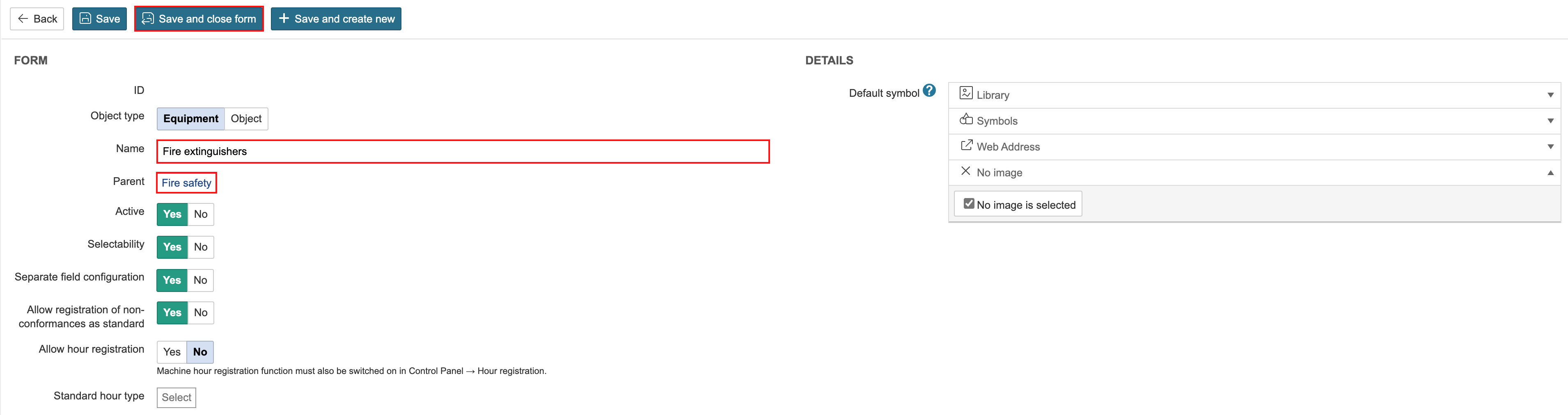
The equipment group is placed under "Fire Safety" because "Fire Safety" is set as its parent group.
...