
Document status: RELEASED
Date:
See child page for prerequisites for Chain Web version 2.9.190.
Highlights | |
|---|---|
Release version: 2.9.190  |
|
Note: This version contains incomplete changes in InStore App regarding click and collect functionality. For this to not impact current functionality the following needs to be set as system parameter in Chain Web: PickingOrdersForClickAndCollectEnabled, false. Default value is False. This will be fixed in 2.9.191.
Chain Web: EG Design
(TFS: 165170)
New design as EG. Colours and icons are changed across the Chain Web platform to reflect the EG brand.
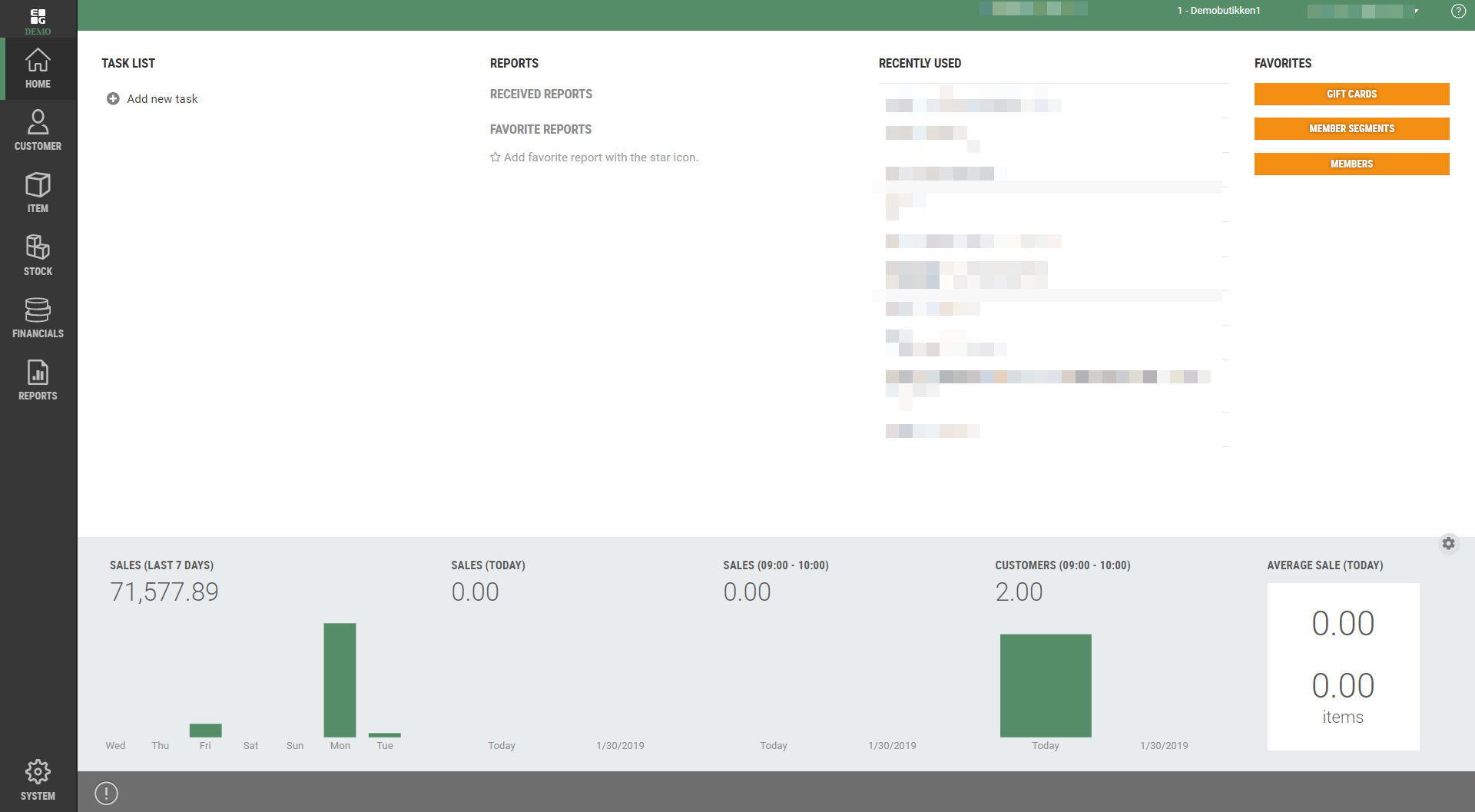
Before:

After:

New report for Internal transfer
(TFS: 165552)
New report showing item transactions with internal transfer. Report is used to show discounted cost price used between stores.
Requirements:
The report requires minimum Reporting version 56.
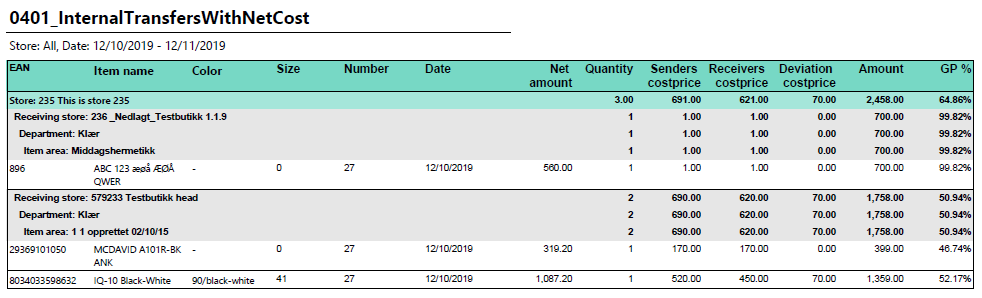
Report details for the Internal transfer report | |
File name | 0401_InternalTransfersWithNetCost |
Data source | Analysis services (Cube) |
Selections | Comment |
Date from | Default today |
Date to | Default today |
Store | Multiselect, default all |
Columns | |
EAN | Grouped from Store, Receiving store, Department and Item area. Show total for each group. |
Item Name | Article name |
Colour | Colour from article |
Size | Colour from article |
Number | Operator number |
Date | Date of transaction |
Net amount | Net amount for article |
Quantity | Quantity |
Senders cost price | Normal cost price for article (NetCostNormalPrice in POSLog). |
Receivers cost price | Cost price for receiving store (NetCost in POSLog). |
Deviation cost price | Difference between sender and receiver cost price. |
Amount | Price for item incl. VAT. |
GP% | Gross profit in percent. |
Differential report
(TFS: 155500)
New report showing difference in sales between two stores in selected period.
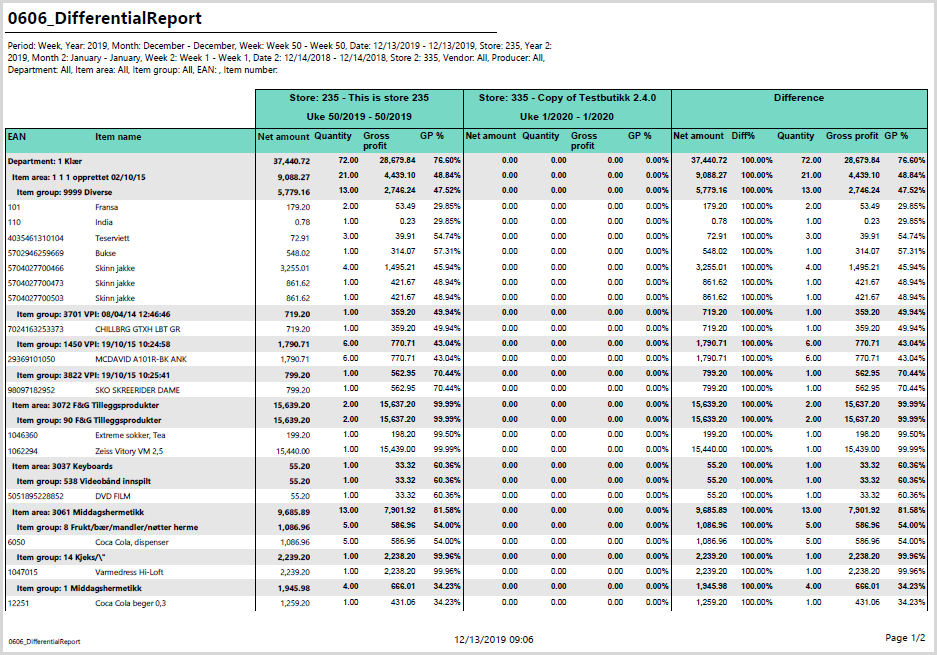
Report details for Differential report | |
File name | 0606_DifferentialReport.rdl |
Data source | Analysis services (Cube) |
Selections | Comment |
Period | Month, week or day. |
Year | Default this year. |
Month from | Only if period month is selected. |
Month to | Only if period month is selected. |
From week | Only if period week is selected. |
To week | Only if period week is selected. |
Date from | Only if period day is selected. |
Date to | Only if period day is selected. |
Retail store | Store to show sales for period selected above. |
Comparable year | Year to compare sales to. |
Comparable month from | Only if period month is selected. |
Month to comparable | Only if period month is selected. |
Comparable week from | Only if period week is selected. |
Week to comparable | Only if period week is selected. |
Comparable date from | Only if period day is selected. |
Date to comparable | Only if period day is selected. |
Store comparable | Store to compare sales to. |
Vendor | Filter on vendors, default all. |
Producer | Filter on producer, default all. |
Department | Filter on department, default all. |
Article area | Filter on article area, default all. |
EAN list | Filter on EAN list. Possible to search for items and create list. |
Item number | Filter on list of item numbers. |
Columns - One row per EAN. Totals per Department, Item area and Item group. | |
EAN | EAN for item. Also showing Department, item area and item group. |
Item Name | Article name |
Three groups for next columns. | First is showing number from Retail Store in selected period. Second is comparable store, third is difference between store and comparable store. |
Net amount | Amount excl. vat. |
Quantity | Number of sold items. |
Gross profit | Gross profit. |
GP % | Gross profit in percent. |
New report, ordinary prices in projects
(TFS: 165800)
New report showing ordinary prices in projects.
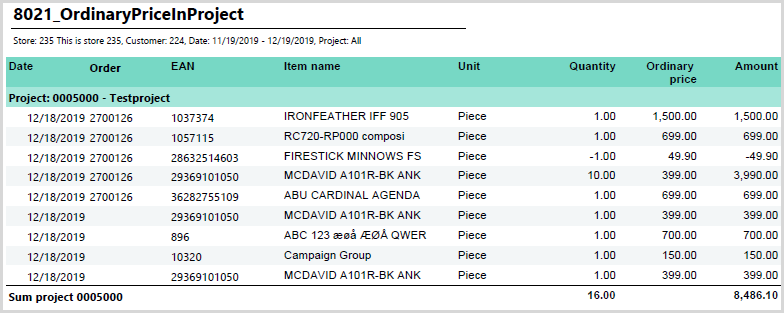
Report details for the Ordinary prices in projects | |
File name | 8021_OrdinaryPricesInProjects |
Data source | Lindbak POS Reporting DW. |
Relevant parameters | |
pOffsetNumberOfDays | How many days back default ProjectStartDateFrom should be. Default 30. |
Selections | Comment |
Retail store | Store number, single select. |
Customer | Customer, single select. |
Project start date from | Shows only projects with start date after this date. Default is today - pOffsetNumberOfDays. |
Project start date to | Shows only project with start date before this date. Default is today. |
Project | Lists all projects filtered with above selections. |
Columns | |
Date | Date when sale is made. |
Order | Order number linked to sale. |
EAN | EAN for item. |
Item name | Item name. |
Unit | Unit of measure for item. |
Quantity | Quantity of item. |
Ordinary price | Ordinary price for single item. |
Amount | Total amount for ordinary price (Quantity * Ordinary price) |
New report - Customer club sales
(TFS: 166049)
New report showing customer club sales compared to total sales.

Report details for Customer club sales | |
File name | 0308_CustomerClubSales |
Data source | Analysis services (Cube) |
Selections | Comment |
Loyalty program | Default first available loyalty program. |
Customer club sale is defined as sales linked to member. | |
Date from | Default today. |
Date to | Default today. |
Team | Default all. |
Retail store | Default all. |
Department | Default all. |
Columns, one row per store: | |
No | Store number. |
Store | Store name. |
Turnover | |
Total | Total turnover. |
Cust club | Total turnover for member sales. |
Turnover ex. VAT | |
Total | Total - Total turnover ex. VAT. |
Cust club | Total turnover ex. VAT for member sales. |
Share | How much percentage of total sales is member sales. |
Receipts | |
Total | Total number of receipts. |
Cust club | Number of receipt with member sales. |
Gross profit % | |
Total | Gross profit percentage for totals sales. |
Not cust cl. | Gross profit percentage for sales without member. |
Cust club | Gross profit percentage for member sales. |
Average quantity sold | |
Total | Average quantity per receipt for total sales. |
Not cust cl. | Average quantity per receipt for sales without member. |
Cust club | Average quantity per receipt for member sales. |
Average sale ex. VAT | |
Total | Average sales ex. VAT per receipt for total sales. |
Not cust cl. | Average sales ex. VAT per receipt for sales without member. |
Cust club | Average sales ex. VAT per receipt for member sales. |
New report - Detailed customer club sales
(TFS: 166055)
New report showing information about sales with member.

Report details for Detailed customer club sales | |
File name | 0307_DetailedCustomerClubSales |
Data source | "Lindbak POS Reporting DW" database |
Selections | Comment |
Date | Default today. Only one date can be selected. |
Store | Only visible for HQ users. Default all stores. |
Columns - one row per store: | |
Store | Store name |
Workstation | Workstation |
Cashier | Cashier |
Receipt | Receipt number |
Member number | Member number from receipt. |
Amount | Sum amount (incl. VAT) from receipt. |
Net amount | Sum amount (excl. VAT) from receipt. |
Quantity | Number of articles in receipt. |
Share of Collect@Store for reports
(TFS: 160680)
Share of Collect@Store is added to two reports. New columns can be hidden with parameter.
Changed reports: 0100_WeekReport and 0103_Totalsales.
New parameter added to both reports:
pStoreUserContext True/False - Default false. If new columns for Collect@Store are hidden or not (True = hidden).
Collect@Store sales is all sales which has customer order reference to it.
New columns for 0100_WeekReport
Collect@Store
% This week - how much percentage of sales are Collect@Store for selected week.
% This week LY - how much percentage of sales are Collect@Store for compared week last year.
% So for this year - how much percentage of sales are Collect@Store for sales this year.
% So for last year - how much percentage of sales are Collect@Store for compared sales last year.
New columns for 0103_TotalSales
% C@S of sales - how much percentage of sales are Collect@Store for selected period.
% C@S of LY - how much percentage of sales are Collect@Store for compared period last year.
Improvements Chain Web
Modules | Description |
|---|---|
Credit sales | Edit cost price in Credit sale (TFS: 161206) Users with the role "EditCostPrice" are able to change net cost in credit sales with status Draft, and to make correction in Invoiced or ready for invoiced sales. Users without “EditCostPrice” role will not have access to edit this field. Focus in price field (TFS: 161231) After adding a new open price item in Credit sale, the focus is set in Unit price field. Value in this field must be higher than 0. Do not allow user to change or edit customer name in credit sales (TFS: 165496) The customer name field has been locked when making correction on Credit sale and invoice base. |
Customer ordrer | Focus in unit price field (TFS: 161230) After adding a new open price item in customer order, the focus is set in Unit price field. Value in this field must be higher than 0. Focus on Customer order lines (TFS: 161232) When adding a new item in a customer order, focus is set on the Quantity field, so the process of adding items will be less time consuming. Edit item text on open price item on submitted order (TFS: 164247) It was not possible to edit the item text on open price items after the order had been submitted. This has been fixed. |
Export data | Translation in pop-up (TFS: 166543) Swedish translation for pop up when exporting reason code is added. |
Reports | Report for sale and waste (TFS: 165072) Small improvement in report for sale and waste. Correction in the calculation of visible decrease. Changed report: 0605_SaleAndWastePerArticleFromRIGAL. Handling parameters for new report 0606 (TFS: 165500) Project report (TFS: 168329) Added translation of unitofmeasure in Project report. Changed report: 8021_OrdinaryPriceInProject |
Sales | Invoices with different delivery addresses (TFS: 164074) When two credit orders with different delivery addresses, but the same customer are credited simultaneously, system will prepare two different invoices. When delivery address for both credit orders are the same, then the system will merge the invoices into one. |
Stores | Removing Store from Team (TFS: 167014) The user now can delete teams from the store configuration without any errors. |