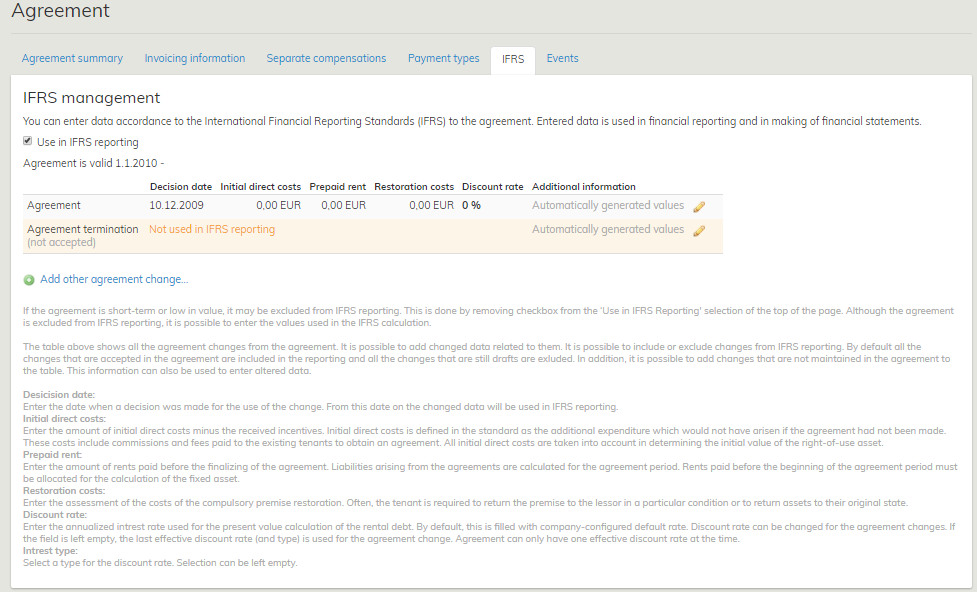
IFRS data can be managed in accepted inrent agreements. The data is shown in the agreement summary page on a separate tab.
The data can be entered only by companies that are using IFRS calculation.
By default, an accepted agreement is taken into account in reporting, but it can also be disregarded by unticking the ‘Use in IFRS reporting’ check box on the top of the view.
The selection determines whether the agreement is included in the balance sheet or not. With the selection, you can filter those agreements that are either included or not included in the balance sheet. You can still enter information for all agreements, and the rents specified in them will be calculated in the data storage.
The IFRS tab displays the agreement term, as well as a table in which each agreement and the changes made in them are shown in separate rows. Here, the changes to the agreement are
1. Change document
2. Rent correction document
3. Renewal option
4. Automatic renewal option
5. Terminating the agreement
In addition to these changes, you can enter another related change to the agreement. This option can be used, for example, when the discount rate used in the agreement changes but the agreement itself does not.
You can enter information on each row in the table:
Decision date
2. Initial direct costs
3. Prepaid rent
4. Restoration costs
5. Discount rate
6. Interest type
7. Additional information
When the agreement is terminated, it is possible to set a new end date for the agreement. You need to determine a name for the Other option.
The information is entered in currency selected for the agreement.
Initial direct costs, Prepaid rent and Restoration costs are treated as non-recurring in the calculations, and they are considered only for the month for which their decision date is set. The discount rate, on the other hand, is considered each month for the entire agreement period. An agreement can have only one valid interest rate at a time. The interest rate that is valid is determined according to the last row taken into account (as per the decision date).
The agreement row is created automatically when finalizing the agreement. The decision date for the agreement row is set by default according to the signature date entered for the agreement. However, if the entered signature date comes after the agreement begins, the begin date of the agreement is used as the decision date. Initial direct costs, Prepaid rent and Restoration costs are set by default to EUR 0.00, and the default discount rate entered for the company is set as the discount rate. In addition, the field Interest type is empty.
You can edit the information by clicking the pen icon on the right side of each row. Editing information takes place in modal.[EN1] If someone saves information, the details are recorded in the system log (who, what, when).
For the IFRS, any changes to the agreement are treated so that they become effective from the date on which the implementation of the change is deemed probable (the decision date of the change). The decision date of the change is different than the date when the change actually becomes effective. A date on which a decision to continue the agreement (option) is made, for example, differs from the date when the option is actually exercised. When changes are made to an agreement, the parameters used in IFRS calculation might change.
In addition to the entire agreement, you can select single rows of agreement changes to be included in the reporting. By default, the rows of agreement changes are set in the ‘Not included’ state. If the agreement change is accepted in the agreement, the information on the row in question will change automatically to Included also in the IFRS tab. The user can manually change the status of a row, e.g. if it is to be supposed that the renewal option is used, even though it has not been exercised on the agreement yet.
If a row is marked as Included, you can enter IFRS data relating to it. By clicking the pen icon, a modal appears. Here, you can enter changed values. Those fields that are unaffected by the changes made to the agreement should be left blank.
For accepted change documents and options, the date of their acceptance is automatically used as their decision date. If the date of the acceptance comes after the begin date of the agreement change, the begin date of the change document / option is used as the decision date. If the user changes the status of a row manually to Included, the decision date is set by default to the current date. The decision date is mandatory.
The discount rate and interest type are generated to the row of the agreement change from the previous row (as per the decision date).
The interest rate that is valid is highlighted in the table. An agreement can have only one valid interest rate at a time.
The rents for the agreements, as well as the IFRS data entered, are calculated in the data storage. Both the data obtained directly from the agreement (e.g. rent) and the values entered in IFRS tab (e.g. discount rate) are used in calculation. The data is stored automatically to the data storage, whenever changes to the agreements are made.
In IFRS calculation, the rents excluding the tax are used (VAT 0).
The data is organized by the month in the data storage. When searching, you need to determine the reporting month according to which the data is shown.
For agreements valid until further notice, an imputed end date is calculated: first possible term of notice + term of notice.