Localization is making our application (partnerportal) able to changelanguage on the UI, making it reach out to more customers.
In the context of software development, localization involves modifying the user interface (UI), content, and functionality to suit the preferences and expectations of users in different regions.
Locals;
Danish
Swedish
English (Defualt)
_________________________
Now that the foundation has been laid, it will be easy to add a new language.
A language selector dropdown or settings option should be included in the user interface. It's up to the developers to decide on the design or method they prefer (Sub points are the techniques. If you know other methods, you can use those too. As a user, I want to change from English to Danish.
- Provide a language dropdown where users can select their preferred language (e.g., English, Danish). or

- Detect the user's browser language or system locale and load the corresponding translation file automatically.
All text in the user interface (UI) should be translated into Danish, including buttons, labels, menus, tooltips, and notifications.
The content should dynamically change to Danish upon selection without requiring the user to refresh the page.
Dates should be displayed in the Danish format (DD/MM/YYYY).
Times should be displayed in a 24-hour format (e.g., 14:30) as per Danish conventions.
All system-generated error messages, warnings, and alerts should be properly translated into Danish.
Error handling should ensure that any exception messages are presented in a user-friendly manner in Danish.
The user should be able to switch to Danish at any time from within the application settings, and the interface should immediately update to reflect the Danish language without session loss.
The user’s language preference for Danish should be saved across sessions, ensuring that when the user logs in again, the language remains set to Danish.
Ensure that text in Danish fits well within the UI. Danish translations may require additional space for certain words or phrases, so the layout should adapt accordingly.
All translations into Danish should be accurate and culturally appropriate, reflecting the nuances of the language. This may require review by native Danish speakers or professional translators.
When translating content, ensure that idiomatic expressions and cultural references are properly adapted to Danish context.
Thorough testing should be conducted with native Danish speakers to ensure the application is fully functional in the Danish language.
The localization system should be flexible enough to add more languages in the future, while maintaining the ability to update Danish translations as needed.
The implementation will be split into 3 categories
Research & Implementation: During research, I tried several ways of localizing. From the outcome, I chose one way, which is the "default approach." when it comes to localization, though with some variations;
The way my approach differs is by using JSRunTime to store the locale in the browser.
This involves leveraging JavaScript's runtime environment to save the user's language preference directly in the browser's local storage.
This method allows for quick access to the locale settings without needing to make server requests each time the user navigates to a new page.
Most commonly, the approach is to make a controller that handles the chosen locale, which I decided not to use.
In the context of software development, localization involves modifying the user interface (UI), content, and functionality to suit the preferences and expectations of users in different regions.
Package used;
NuGet Gallery | Microsoft.Extensions.Localization 9.0.2
Because all translations are stored in resource files (.resx), there needs to be some structuring done.
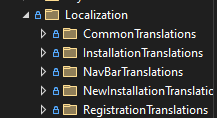
What the team and I have decided is to make a folder with translations per page.
This means that each page has its own resource files, providing a more bird's eye view when translating.
Additionally, my team suggested having a CommonTranslations folder for all the repeating common words, which was also implemented.
This approach with having a common folder gives a much faster way of translating.
Here is a screenshot that shows the structuring;
To localize a string, you need to initialize the IStringLocalizer interface for both your specific page translations and common translations. Here’s how you can do it:
Initialize the Localizers:
   IStringLocalizer<TranslationsDesignerClass> localizer;
   IStringLocalizer<CommonLocalizer> commonLocalizer;

FOR .RAZOR PAGES

   @inject IStringLocalizer<TranslationsDesignerClass> localizer;
   @inject IStringLocalizer<CommonLocalizer> commonLocalizer;
Localize Strings:
var localizedString = localizer["ThisStringIsLocalized"];
var commonLocalizedString = commonLocalizer["ThisStringIsACommonWord"];
Add Strings to Resource Files:
.resx files. This allows the application to retrieve the correct translations based on the user's selected localeI decided not to use MudLocalizer for several reasons.
Firstly, MudLocalizer is not fully compatible with all UI components, which limits its effectiveness in the localization process.
Additionally, using JSRunTime to store the locale in the browser does not work seamlessly with MudLocalizer, causing issues with retrieving and applying the correct locale settings.
Implementing a custom MudLocalizer also requires additional setup and maintenance, including registering custom localization services and handling potential conflicts with existing components.
Furthermore, while MudBlazor has a growing community, the support and resources available for MudLocalizer are still limited compared to more established localization libraries.
Given these factors, I chose to use Microsoft.Extensions.Localization, which offers better compatibility, ease of use, and community support for our needs.
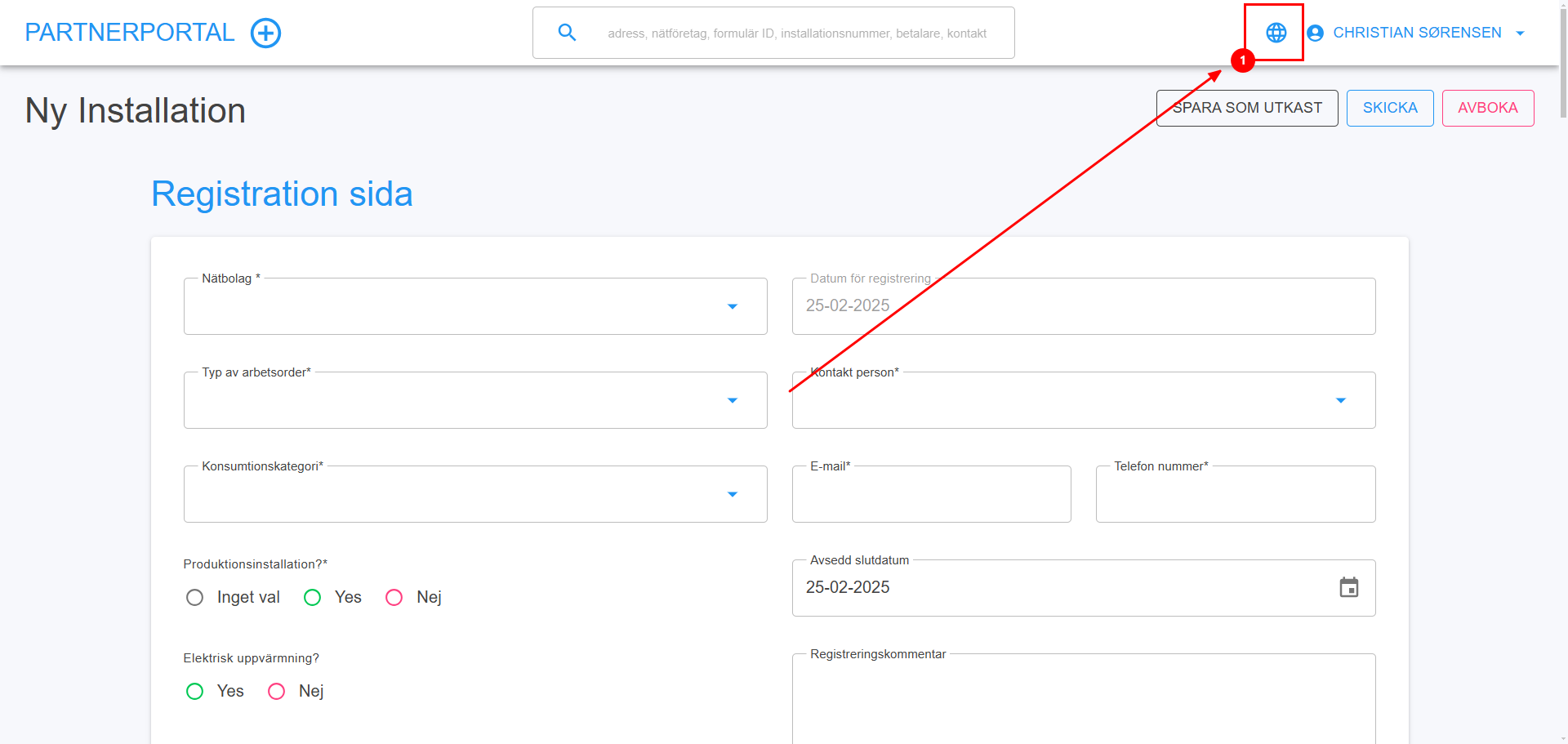
When clicking the global icon this opens up;
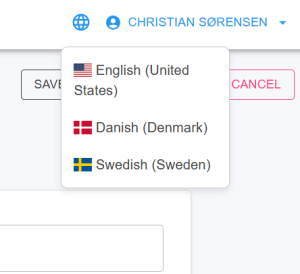
Here u can choose a language in our case we choose danish;

And we can see that the locale has changed to da-DK;
SIDENOTE;
This browser locale will keep being there even if closed,
until a change of browser or changing language.