ASPECT4 Finance release Y25H2 contains new features, improvements and corrections.
Contents
ASPECT4 Finance release Y25H2 contains new features, improvements and corrections.
ASPECT4 Finance Y25H2 focuses, among other things, on VAT functionality, due to the possibility of reporting VAT digitally. This requires VAT codes to be set on the financial items.
Once the VAT codes are in place, it is recommended to use the facilities for printing VAT reconciliation and digital VAT reporting.
This is done using the applications 1436 'Print VAT Reconciliation' and 1437 'Print VAT Reporting'. Both applications have been available for several years. The necessary setup for VAT reporting can now be done using two new applications, namely the applications 1136 'Setup VAT Reconciliation' and 1137 'Setup VAT Reporting'.
Our solution for posting using Excel has been expanded with the option of archiving the voucher template in ASPECT4 Attachment. This allows the Excel posting file to be presented in ASPECT4 in the same way as other archived attachments in ASPECT4 Attachment.
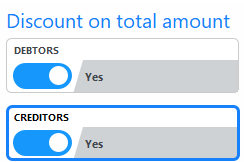
In relation to new VAT requirements, the country code information has been expanded with two codes that indicate whether the amount entitled to a cash discount must be calculated including or excluding VAT for debtors and creditors, respectively.
Among the new features is also the new format for SAF-T reporting in Norway.
All new features, quality assurances and corrections are described at application and task level in this document.
Latest Features
Labels | Client Release Notes | Key | ||||||||||||||||||||||||||||||||||||||||||||
1131 | Screen Management The following has been corrected: · When a VAT code has been edited and returned to the VAT summary screen, the cursor is positioned to the VAT code that was edited. · When the slider for EU purchase VAT/Reverse VAT is activated, information on EU purchase VAT/Reverse VAT is displayed immediately. · When the slider for EU purchase VAT/Reverse VAT is deactivated, deletion of the information on EU purchase VAT/Reverse VAT must be confirmed. | |||||||||||||||||||||||||||||||||||||||||||||
1136 Section_1439 | Setup for VAT Reconciliation (1436) The application is used to maintain the setup for the VAT Reconciliation. For further information, look at the application description for application 'Setup VAT Reconciliation' (1136) and application 'Print VAT Reconciliation (1436). | |||||||||||||||||||||||||||||||||||||||||||||
1137 Section_1438 | Setup VAT Reporting and Return (1437) The application is used to maintain the setup of VAT reporting and return. For further information, look at the application description for application 'Setup VAT reporting and return' (1137) and application 'Print VAT Reporting and return' (1437). | |||||||||||||||||||||||||||||||||||||||||||||
1139 1217 | Changes of financial transactions The financial transactions that have been extracted for backup and upload to the Cloud can no longer be modified. | |||||||||||||||||||||||||||||||||||||||||||||
1172 | Maintain SAF-T master data (NO) Application 'SAF-T master data - Norway' replaces application 'SAF-T master data' (1172). Look at SAF-T function description for further information. | |||||||||||||||||||||||||||||||||||||||||||||
1207 1219 2213 2281 2420 2425 2437 2440 3213 3420 3440 4213 | Test against number of open journals The test has been extended to the maximum number of journals, so that it is now possible to process transactions on posted journals within the range of open journals | |||||||||||||||||||||||||||||||||||||||||||||
1219 1242 1270 1318 1319 2204 2440 3440 | List of open records
| |||||||||||||||||||||||||||||||||||||||||||||
1234 Section_1020 Section_1030 | Validation when copying chart of accounts The following validations were added when copying a chart of accounts: · The chart of accounts must be created in the company where it is copied from. · Accounts must exist in the chart of accounts from where you copy · There must be no accounts in the chart of accounts being copied to for the dimension being copied. · The chart of accounts that is copied to must be created in at least one company in the group to which it is copied, in general file section 1010 'Chart of accounts header'. · The chart of accounts must NOT be deleted in general file section 1010 'Chart of accounts header' if accounts have already been created in the chart of accounts. · Validation on deletion in section 1020 'Accounting charts of accounts' and 1030 'Reference charts of accounts'. | |||||||||||||||||||||||||||||||||||||||||||||
1242 | Record copying When financial transactions are copied, it is now possible to copy transactions to a closed month, according to the setup in the application 'Date limitation' (1270), specifically the field 'Transactions in closed period from'. This only applies if the user has permission to post in closed period. Permission is granted at the function or user level for the application 'Voucher registration' (1242). | |||||||||||||||||||||||||||||||||||||||||||||
1242 1282 | Discount on total amount including or excluding VAT A parameter has been added in the general file, section 2140 'Country', for each country code, where it must be decided whether the cash discount on invoice items should be calculated including or excluding VAT.
| |||||||||||||||||||||||||||||||||||||||||||||
1282 1381 | Validation of accounts payable transactions at the interface to ASPECT4 Finance Going forward, a creditor invoice can no longer be posted in ASPECT4 using the Interface, if the VAT amount on the transaction exceeds the invoice amount. | |||||||||||||||||||||||||||||||||||||||||||||
1282 | Non-visible characters When posting data from the interface, non-visible characters are removed from the posting texts. | |||||||||||||||||||||||||||||||||||||||||||||
1301 | Show automatically generated posting When 'Show transaction' is called - either directly using the application or from an entry overview - automatically generated financial entries will show which transaction is the basis for the transaction shown. The following information is displayed: accounting code, currency code, posting type and sequence number from the accounts receivable, accounts payable or fixed asset transaction. | |||||||||||||||||||||||||||||||||||||||||||||
1320 | Type of document The voucher type is now displayed on the transactions. | |||||||||||||||||||||||||||||||||||||||||||||
1333 1335 | Application Names Application 1333 has changed its name to 'Voucher entries'. Application 1335 has changed its name to 'Posting on G/L account'. | |||||||||||||||||||||||||||||||||||||||||||||
1335 | Search via quick filter The application can now be searched using quick filters. Position the cursor in the table and press Alt.+ F to display the quick filter. | |||||||||||||||||||||||||||||||||||||||||||||
1433 1434 1435 | VAT report with comment (Norway) Application 'Comments to VAT settlement - NO' (1433).
The comments are automatically removed when running 'VAT reconciliation XML Norway' (1435), so in the event of a rerun, the comments must be entered again. Comments are placed in the file VATNTXT1. | |||||||||||||||||||||||||||||||||||||||||||||
1436 | VAT Reconciliation - posting list in Excel It is possible to print the posting list in Excel, which is sent by e-mail. The following application parameter must be registered to create and send the posting list. | |||||||||||||||||||||||||||||||||||||||||||||
1437 | Handling of signs on list, Excel file and XML file In general file section 1135 'Texts for VAT Statement' it is now possible to control whether the sign should be reversed for individual lines on the report. | |||||||||||||||||||||||||||||||||||||||||||||
1437 | VAT reporting and return The following changes have been made to the application: · It is now possible to mark records as reported. · It is now possible to extract transactions based on invoice date. Recommendation: In relation to Danish VAT legislation, we recommend using the invoice date. Going forward, the requisition for the application will appear as follows: | |||||||||||||||||||||||||||||||||||||||||||||
1478 | SAF-T reporting in Norway The new form (version 1.30) is mandatory from 01.01.2025. Due to the scope of changes, it does not offer full backward compatibility. The new form can be adopted immediately if desired. The old form (version 1.20) can still be used for previous years (financial year 2024 and earlier). There are several fields in the file that have been changed from optional to mandatory. Note: The option for mapping the company’s accounts against the 2- or 4-digit standard chart of accounts has been removed. The only valid mapping from 01.01.2025 will be against the business specification GroupingCategory. This change removes the ability to use the link between internal accounts and the default chart of accounts. Mapping of accounts to the new business specification is a link between the company’s own accounts in the statement of accounts and a standard set of themes/accounts. This is done for analysis purposes. · Valid accounts with associated GroupingCategory are placed in the enclosed file - SAFNORT1. · Mapping should still be performed in application 'Chart of accounts' (1111). | |||||||||||||||||||||||||||||||||||||||||||||
1540 1541 | Challenge with lock on the object (file) It has previously been difficult to check the data written in the file used in the application 'Financial account plan: Next workflow' (1540) and application 'Fixed asset account plan: Next workflow' (1541) with ASPECT4 Query Manager, because the file was not released after use. With this release, the situation has been resolved, allowing Query Manager to be used to check the content of the file. | |||||||||||||||||||||||||||||||||||||||||||||
1640 | Asset transactions logging When a fixed asset or appropriation transaction is posted, the relationship between the transaction and the automatically generated financial transaction is logged. This relationship can subsequently be seen in 'Show transaction' (1301) on the derived financial item. | |||||||||||||||||||||||||||||||||||||||||||||
1640 | File PSTVATT1 The file has been expanded with a field for voucher type. | |||||||||||||||||||||||||||||||||||||||||||||
1644 | Uploading accounting data to the Cloud The standard chart of accounts and alternative number are now automatically retrieved from the general file section 1001 Bookkeeping Act – set up' The file for upload has been expanded with texts for VAT code, default VAT code account, default account, application and user. Empty journals will be marked as processed. | |||||||||||||||||||||||||||||||||||||||||||||
1657 1658 | Opportunity for additional information The following fields have been added to the display:
If you want to be able to see one or more of these fields in the application, you must setup the fields in general file section 850 'Field attributes’ for application 1658 using application 'System parameters’ (0029). | |||||||||||||||||||||||||||||||||||||||||||||
1836 | Clearing VAT report date This application must be used to reset the date/user for VAT Reconciliation or VAT reporting on financial entries if the dates have been incorrectly updated when running the applications 'Print VAT Reconciliation' (1436) or 'Print VAT reporting' (1437). | |||||||||||||||||||||||||||||||||||||||||||||
2111 3111 | EU VAT number When the EU VAT number is validated on the debtor/creditor master data, a warning is displayed if the number is left blank. | |||||||||||||||||||||||||||||||||||||||||||||
2111 3111 | Credit limit An application parameter has been added so that you can choose to have the credit maximum displayed in 100 or in 1000 units. Remember that the text for the field for 'Maintain A/R master data' (2111) and 'Maintain A/P master data' (3111) must be adjusted if this parameter is changed. Adjust the text using application 'Variable User setup' (0125). | |||||||||||||||||||||||||||||||||||||||||||||
2265 3265 | Receiving incoming payment Several invoice references are now being searched for, running the application for settlement of invoices, if more than 1 reference has been noted on a payment entry from the bank. | |||||||||||||||||||||||||||||||||||||||||||||
2265 3265 | Receiving incoming payment It is possible to create and post the payments on a journal per voucher. How the journals are to be created is set up in general file section 2265 ' Receiving incoming payments': | |||||||||||||||||||||||||||||||||||||||||||||
2265 3265 | Exclude FIK/Reference payments With a parameter in the setup for payment receive in general file section 2265 ' Receiving incoming payments’ it is now possible to omit all reference payments when loading data via application 'Handling of files’ (0654) | |||||||||||||||||||||||||||||||||||||||||||||
2382 | Search invoice by reference When searching for one or more invoices using a reference number, the system first searches for whether the reference number has been extracted when printing out the account statement. If not, the invoice reference is searched for on the debtor transaction. | |||||||||||||||||||||||||||||||||||||||||||||
2414 3414 | Historical Overview An application parameter has been created so you no longer need to print all history data to be able to investigate for settlement history errors on accounts receivable or accounts payable transactions. | |||||||||||||||||||||||||||||||||||||||||||||
2437 | Possibility to exclude customers from specific countries in the list It is possible to exclude customers from up to 5 specific countries from the list. For this to happen, the following application parameter must be initiated. The solution now also works for customers with VAT numbers without prefixed ISO country codes | |||||||||||||||||||||||||||||||||||||||||||||
2457 | Stop code If a stop code is set on one or more records for a customer, the customer is marked in the overview with a yellow flag to indicate that some of the customer’s transactions will not be included on the reminder. In the general file section 2421 'Reminder level' a new parameter has been added where you can choose whether the stop code for reminders for the individual transaction should be retained or not. If it is retained, then the transaction will automatically be included on the next reminder proposal, but the transaction will be marked as stopped for reminder. | |||||||||||||||||||||||||||||||||||||||||||||
2658 3658 4658 4659 | Editing dates The dates for debtor, creditor, asset and appropriation master data are now been edited correctly. | |||||||||||||||||||||||||||||||||||||||||||||
3220 | Card type code and reference information On the screen with invoice entries in 'Maintain payment proposal' (3220) two columns have been added with respectively card type code and reference from the individual entry. Information about the card type code and reference has also been added to the Excel printout with the payment proposal. | |||||||||||||||||||||||||||||||||||||||||||||
3220 3490 3652 XML payments | Creditor address for XML payments In the application parameter for 'Maintain payment proposal' (3220) you can set up which address lines are to be written in the file for the bank. 3rd address line has been added. | |||||||||||||||||||||||||||||||||||||||||||||
3220 | Vouchers per payment By changing the application parameter, it has been made possible to get a new voucher number per payment. This requires setting this application parameter equal to 3: | |||||||||||||||||||||||||||||||||||||||||||||
3490 3652 | Vendor Number The creditor number is normally written in front of the creditor name in the xml file for the bank. A parameter has now been created in general file section 3128 ' Notification Method', where it is possible to deselect, the number to be being written. | |||||||||||||||||||||||||||||||||||||||||||||
3491 | Restore XML Creditor Payments (NO) This application is only relevant for Norwegian companies. The application is used to restore XML creditor payments for unposted payment transactions. See the application description for the application for more information. | |||||||||||||||||||||||||||||||||||||||||||||
3652 | NO XML Return (Norge) This change is only relevant for Norwegian companies. The date for 'Send to bank' (KDATO1) will be set to 0 in the future when the invoice has been settled. | |||||||||||||||||||||||||||||||||||||||||||||
3653 | Restore file with xml payments to bank This correction is only relevant for Norwegian companies. When payments are to be restored for upload to the bank, a file with information regarding return response now updated successfully. | |||||||||||||||||||||||||||||||||||||||||||||
3851 | Resend Records from Workflow Records from WorkFlow transactions can be received a second time. This may be necessary if errors are found or if the transactions are erroneously deleted. | |||||||||||||||||||||||||||||||||||||||||||||
3851 | Dealing with small differences It is now possible to allow small differences according to the setup for the posting application in general file section 1412 'Interface control'. | |||||||||||||||||||||||||||||||||||||||||||||
4312 | Copy Applications If you create an application based on application 'Asset transactions - operation’ (4312), you can now put in a message member in the application parameter to control the headings for the new application. | |||||||||||||||||||||||||||||||||||||||||||||
Acubiz integration | ACUBIZ integration The integration file for mapping voucher numbers with attachments has been expanded to include date and time of receipt. | |||||||||||||||||||||||||||||||||||||||||||||
Archiving | Restservice archiving When archiving via residual service, it is validated against section 1148 'Call of MultiArchive for application number and posting ID whether the document must be archived. If an error while archiving, the document is placed in application 'Resend in the event of an error in archiving' (3844). | |||||||||||||||||||||||||||||||||||||||||||||
Excel accounting | Archiving of Excel template for posting A new ABC document set-up has been created including modules that make it possible to archive the actual Excel file in Attachment. The solution requires that the voucher type is used in the Excel template and that the voucher type alone controls that a voucher number is extracted via lookup in ASPECT4 Finance. The ABC document is called: This requires a licence for Excel accounting and a licence for attachment. If NEXT 2.0 archiving solution is used, further archiving can take place afterwards. If necessary, contact your EG consultant to get help using this new option. | |||||||||||||||||||||||||||||||||||||||||||||
Tax Information | Restservice to retrieve VAT information from ASPECT4 Finance A service has been developed to retrieve VAT information from ASPECT4 Finance for e.g. WorkFlow or other external systems. GETVATCODES_ · enter date for VAT information | |||||||||||||||||||||||||||||||||||||||||||||
UDF | UDF for calculating a due date Two new UDFs have been prepared for calculating the due date for the debtor and creditor respectively based on the payment term on master data. Debtor: Payduedate_1(Group, Company, Debtor, Invoice date/calculation date, Due date number (1, 2 or 3)) Creditor Payduedate_2(Group, Company, Creditor, Invoice date/Calculation date, Due date number (1, 2 or 3)) |
Faulty functions and inconveniences
Labels | Client Release Notes | Key |
1131 | Application parameter handling The application parameter for language control is initiated to the Danish language if the language setup has not been decided. | |
1131 | Calculation basis % for reverse VAT liability The calculation basis can now be maintained when working with reverse VAT liability | |
1131 | VAT account The selected account is now validated as a VAT account | |
1282 Interface | Vendor invoice entries posted from the interface An invoice item marked with transaction ID 30 will in future always be processed as a posting of an invoice item that has already been posted. | |
1282 Interface accounting | Posting with difference via the interface If a journal is posted with an approved difference and if ASPECT4 is set up to post the difference per voucher, the difference entry will now have the same voucher type/voucher as the voucher that differs. | |
1333 | Type of document The voucher type will now be initiated correctly. | |
1392 1393 1394 1395 | Displaying transaction history The search is now performed correctly when searching for changed data in transaction/interface transactions. | |
1435 | XML Reporting The period is now written correctly in the report. | |
1436 | As Of Date As of the end of February is now displayed correctly. | |
1437 | Addition of negative numbers The total and the sign are now correct on the report. | |
1640 | Logging of discount on settlement of accounts receivable transactions When posting, the information concerning how the discount transaction was created, is now correctly written into the INTLOGT1 file. | |
2107 3107 | Reconciliation If a rate has been registered, it will not be recalculated. | |
2111,211F 231F 3111,311F 331F | Information whether there are texts on the debtor/creditor When scrolling with Next/Previous in master data, the information telling if there are texts is now displayed correctly. | |
2111 3111 | Bank registry number The bank registration number is now displayed without text if the registration number has not been create in ASPECT4. | |
2111 3111 | When changing the CVR number When the facility for validation of CVR number against VIRK.DK is used and when the CVR number is changed in the application: · The CVR number is validated, and if it is validated okay information from VIRK.DK is shown · If the CVR number is not valid, data will be reported as error | |
2111 3111 | Anonymisation The buttons in the information boxes now work when anonymising debtors/creditors. | |
2114 2115 3114 3115 | Test of email addresses An email address is now validated correctly if there is a hyphen after @. | |
2114 2115 | Maintain Internet Information - Debtors It is now possible to use List (F4) for record type. | |
211F 311F | E-mail addresses For 'Joint maintenance' of debtor/creditor master data, incorrect characters are no longer written in the information fields in the Internet files. | |
2265 3265 | Reconciliation If there are several invoice transactions with the same date/voucher the selected invoices will be settled and settlement errors will no longer occur. | |
2265 3265 | The filters The application is now filtering correctly | |
2265 3265 | Settlement using reference If there are several reference numbers on the payment transaction from the bank, it is now tested whether all reference numbers belong to the same customer. If not, the first customer found will be suggested as the settlement customer. The part of the amount that cannot be settled is registered as an open balance. | |
2265 3265 | Match by name Match on name using data listed in application 'Match on name – payments' (2866/3866) now works correctly. | |
2279 | Payment terms (only relevant for users of ASPECT4 Logistics) Payment terms and associated texts are now correctly updated into ASPECT4 Logistics. | |
2279 | Terms of payment texts It is now possible to handle terms of payment texts with unicode data. | |
2437 | Sign List of amounts to report have had minus suppressed. This has been corrected. Please note that the data in the report file was correct. | |
3205 | Posting charteque (only relevant for users of ASPECT4 Transport) The posting is now correct. | |
3205 | Voucher type The voucher type has now been entered for all VAT items. | |
3207 | ISO Currency Code The ISO currency code is now retrieved from the correct company. | |
3265 | Reconciliation The settlement history will now be correct when settling several invoices per payment. | |
3265 | Payment receipt (only relevant for users of ASPECT4 Transport) The application now shows links to the correct applications. | |
3420 | Test against balance The balance is now tested against the latest due date from the requisition when the following parameter is selected: | |
3420 | Balance calculation The balance on a debtor/creditor is now calculated correctly when no entries have been registered on the main creditor. | |
3844 | Logging of processed data If an error occurs and you re-archive, there will no longer be a new error line on the same voucher. | |
3844 | Handling of record number The application will now handle the correct journal. | |
3849 | Invoice match NEXT/ASPECT4 Logistics When matching invoices, the correct parameter call is now used. | |
3851 | Selecting language If the user’s language setup does not find a text, the text is read from language 0 (Danish) | |
3851 | VAT Management The application can now handle VAT codes created without a VAT code text. | |
4401 | Language management The application can now be run with Norwegian and English headings in the table (on screen and in Excel). | |
Payments XML | Return response to XML payments (Norway) Correct reading of exchange rate in ASPECT4 if no exchange rate is sent from the bank. | |
Historical | Posting history In previous releases, there have been problems with creating a transaction history for accounts payable transactions when changing an existing transaction. Changes have been made to the database trigger program to solve this problem. |