This document aims to help guide Timmaniacs when a user contacts Cuha to get help to gain access to their account. This document also covers the case for when a user is unable to verify their identity and for when they have lost access to their 2-Factor Verification (2FV) (phone).
💡 Note! The first step should always be that the user uses the “lost password?” button to regain access to their account. This document is only relevant once the user has lost access to their email account.
💡 Note! If the user who lost their password or their 2-Factor Verification method is a us an admin, or if there are multiple admins at the salon, direct the user to ask help from the other admin to deactivate 2FV or help them change their credentials.
Applies to CuHa, Sales, and for Sole admin users.
Case: The sole admin has forgotten their password and is unable to use the "Forgot Password?" option to recover the account.
Miro board: Flowchart on account recovery process
Ensure that the person reaching out to you is the one who should have access to the account.👀
-> If No, there is no phone number registered in user information proceed to Step 2.
-> If yes, call the number and make sure that the person answering has lost access to their account and is trying to recover it. It is important that we contact the number registered in the account, to make sure that the number has not been spoofed*.
Spoofing is when someone disguises an email address, display name, phone number, text message, or website URL.
If the person answering confirms that they have lost access to their account and want to regain access, we can help them to regain access to their account by updating the email address in their account so they can use the “lost password?” or temporarily set up a new password for them. ✅
If No valid phone: Request that the user verify their identity by submitting additional documents.
To protect the interest of our users and work to keep their accounts secure, we need to request that they can verify their identity. We therefore need to request that they come back to us with additional information that can support their identity verification.
Request that they submit following documents to CuHa via email:
Step 3: Check that info matches🔍
Once the documents have been submitted, double check that the name of the id card matches the name in:
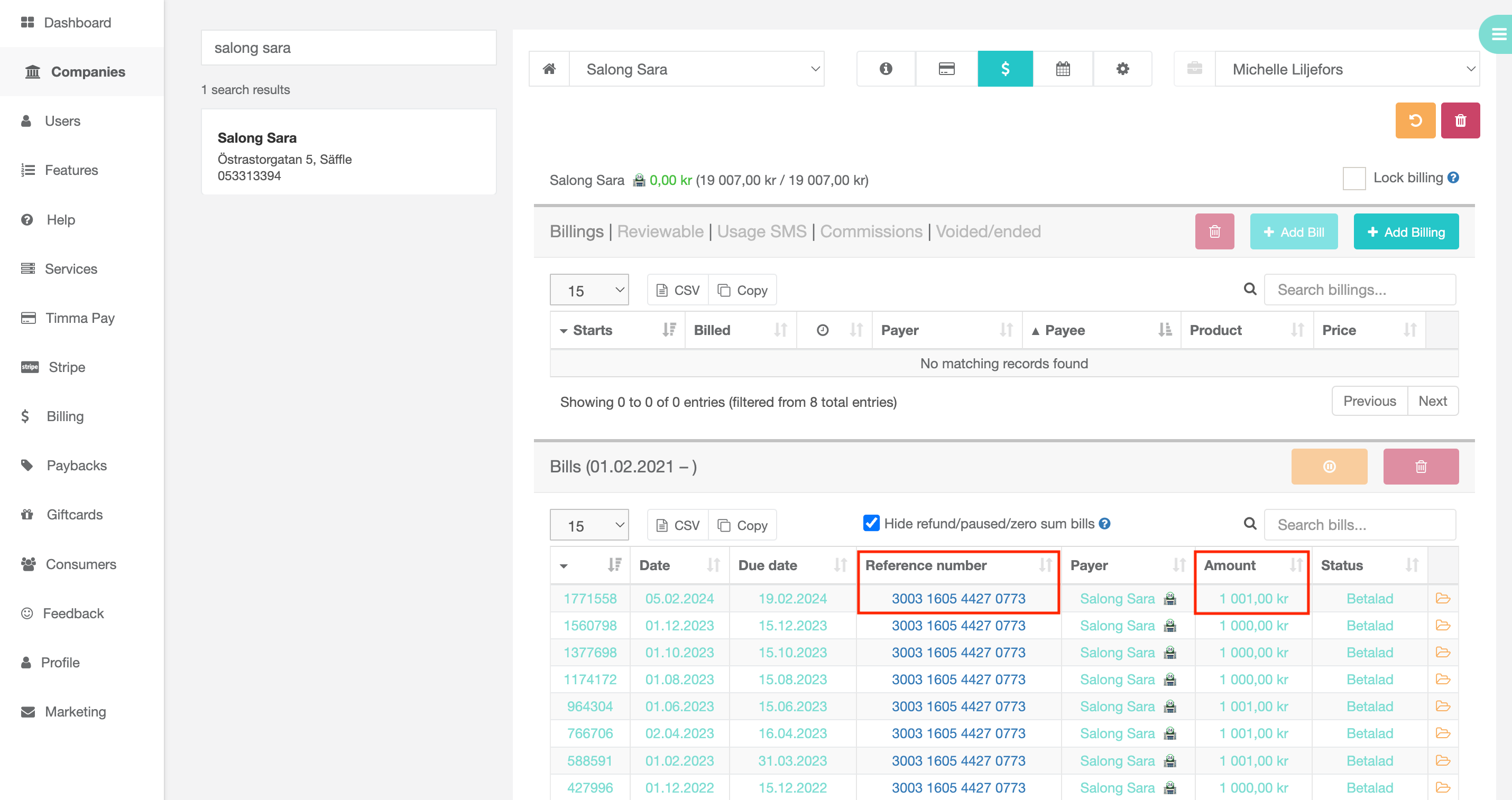
Also control that the reference number and amount in the bank transaction matches the one in their account. See below:
Once we can verify that the person is the same person who should have access to the account, we can help them access their account by updating the email address in their account so they can use the “lost password?” or temporarily set up a new password for them.
In this case, the only way for the user to regain access to their account is that they verify their identity by following the instructions in Step 2 above. After confirming that the information submitted matches the information we have, we can disable SMS-verification, which enables them to log in using only email and password.
⚠️ NOTE: Always delete all emails containing images and documents from users after they have been used for user verification.
| You may also want to use visual panels to communicate related information, tips or things users need to be aware of. |
Related articles appear here based on the labels you select. Click to edit the macro and add or change labels.
|