Why?
It is important to remember to use the tags. When you use them it becomes a habit and it’s part of your daily work!
The tagged conversations/calls collect relevant data about all of the CuHa contacts handled in email and phone calls. In the long term, this will help us to improve the proactiveness of CuHa. Also, the data will be used in product development as well and affect the priority of cases. All the countries are using the same tags and that way we get more accurate data.
How?
Using a tag is very simple; use the tag or tags that are most related to the conversation/email/phone call.
It is not possible (or the purpose) to remember all of the tags but you will start to learn the best way to use them when you do it often. First, you may want to think about which top category the topic is related to.
Example: The conversation is related to billing.
→ You start typing “billing” and you will get the following suggestions:
“billing: late payment”, “billing: pricing”, “billing: other” etc.
→ Then you pick the one that is the most related to that topic.
You may start to remember that overdue invoices are related to “billing: late payment” so typing just “late” will give you the right suggestion.
See the explanation for each tag in the section below.
What tags do we use?
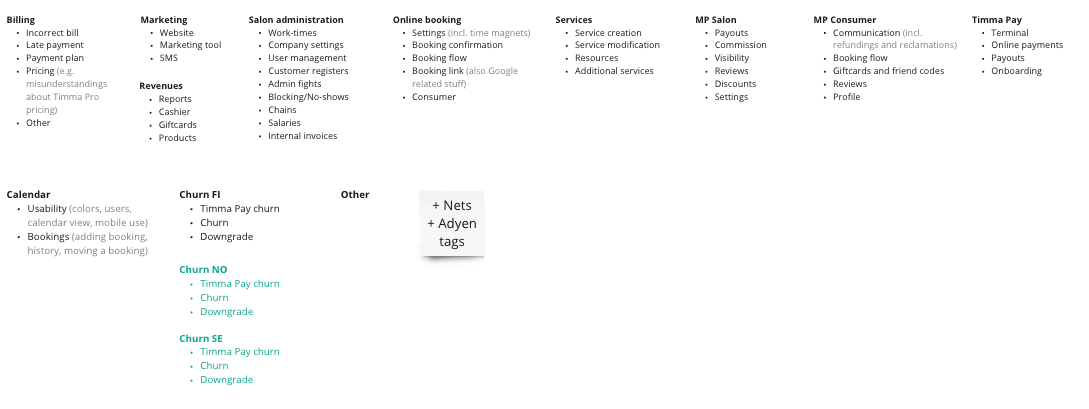
Billing
- Incorrect bill
- Something went wrong with their invoice, wrong payer, etc.
- Late payment
- When a salon or a user asks about their overdue bill or sends a receipt of the paid overdue bill.
- Payment plan
- Some salons have payment plans with us (made by us) if they have a lot of overdue bills and they can’t pay everything at once. We mainly want these contacts via email.
- Pricing
- Anything related to Timma Pro monthly pricing e.g. misunderstandings and questions about the amount.
- Other
- Anything related to billing or invoices that does not go under any other tag.
Marketing
- Website
- Questions and problems related to the website provided by Timma. Also, domain questions could go under this.
- Marketing tool
- Marketing messages (email and SMS) sent from the marketing tool provided by Timma.
- SMS
- One-off-SMS sent from Timma Pro.
Revenues
- Reports
- Questions about reports and where to find the right report (Revenues > Accounting).
- Cashier
- Anything related to Timma Pro cashier i.e. making receipts, refunds, and invoices for customers.
- Gift cards
- Anything related to gift cards sold from the salon or the gift card machine online, how to set up the gift card machine etc.
- Products
- Anything related to Products page.
Salon administration
- Work times
- Setting up, editing, and deleting the work times or problems in this area.
- Company settings
- Any settings that will concern the company (Company page).
- User management
- Anything related to users, user settings (Profile page).
- Customer registers
- Admin fights
- Sometimes two or more admins in a salon disagree with something. These cases rarely have anything to do with Timma and we are not the judge there. The fight can be about who is the owner of Timma’s customer register or both parties claim the other user should be removed.
- Blocking/no-show
- Customer did not show up for scheduled time so salon asks us what to do.
- Chains
- Anything related to chaining salons in Timma.
- Salaries
- Salaries -page in Timma Pro which is used for counting the salary for employees.
- Internal Invoices
- Internal Invoices -page in Timma Pro which is used between salon and entrepreneurs.
Online booking
- Settings
- Settings related to the salon’s online booking. F. ex. time magnets.
- Booking confirmation
- Any questions or problems related to the booking confirmation we send automatically via email.
- Booking flow
- Any questions or problems related to the booking flow. F. ex. customer can’t proceed with the payment.
- Booking link
- Where to find the online booking link, how to edit it etc. Also, Google related stuff.
- Consumer
- Consumer contacts us about online booking.
Services
- Service creation
- How to create services, also User services.
- Service modification
- How to edit services (name, price, time etc.)
- Resources
- Questions and problems related to resources.
- Additional services
- How to create, edit or manage additional services.
MP Salon
- Payouts
- Payouts from the Marketplace.
- Commission
- Questions related to the commission from the Marketplace or commission invoice.
- Visibility
- Questions about visibility in the Marketplace both for user and the salon.
- Reviews
- The feedback consumers give from Marketplace bookings.
- Discounts
- Discounts and off-peak-prices on the Marketplace.
- Settings
- Any general settings that affects the Marketplace.
MP Consumer
- Communication
- Consumers trying to contact (or should contact) the salon, including the refunds and reclamations.
- Booking flow
- Booking flow in the Marketplace for the consumer.
- Gift cards and friend codes
- Questions about the gift cards and how to use them. The friend code campaign ended in 2023.
- Reviews
- The feedback consumer gives, including removing or editing the reviews if the consumer themselves is asking.
- Profile
- Updating the profile information on their consumer account or any other stuff related to their Profile.
Timma Pay
- Terminal
- Timma Pay terminal-related questions and problems.
- Online payments
- Timma Pay / Adyen account-related things.
- Payouts
- Timma Pay / Adyen payouts.
- Onboarding
- When starting to use the Timma Pay terminal or online payments.
Calendar
- Usability
- Calendar settings such as colors, calendar view, etc. Also, mobile use.
- Bookings
- Adding, editing or moving a booking, booking history, or existing bookings.
Churn FI / NO / SE / DK
- Timma Pay churn
- When salon/user quits using Timma Pay terminal.
- Churn
- When a salon quits using Timma.
- Downgrade
- When a single user quits using Timma (less churn).
Other
- Nets
- Some salons still have Nets payment terminal which might be integrated into Timma Pro.
| You may also want to use visual panels to communicate related information, tips or things users need to be aware of. |
Related articles
Related articles appear here based on the labels you select. Click to edit the macro and add or change labels.
