Document status:
Date:
Version Requirements is located on the menu to the left.
Modules | Description |
|---|---|
Customer order | Slow processing of customer orders (RTC-9676) Performance when updating customers is much faster after improving code related to handling of communication channels. |
Document status:
Date:
Version Requirements is located on the menu to the left.
(RTC-773)
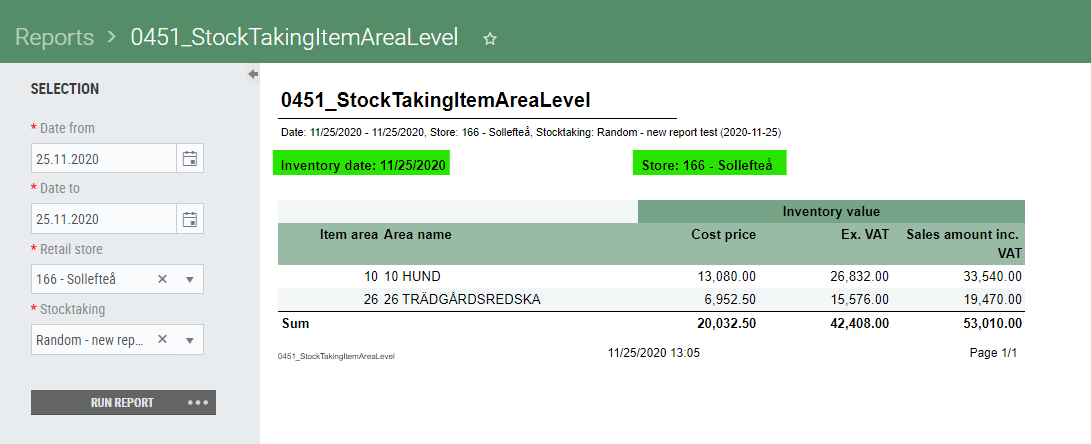
When completing a stocktaking of the type "random count", a third report is available for the user (0451_StockTakingItemAreaLevel). The main purpose of this report is to provide valuable data regarding the stocktaking, for customers who does not have stock management in Chain. The report is only available when performing a random count.
Document status:
Date:
Version Requirements is located on the menu to the left.
(TFS: 189521)
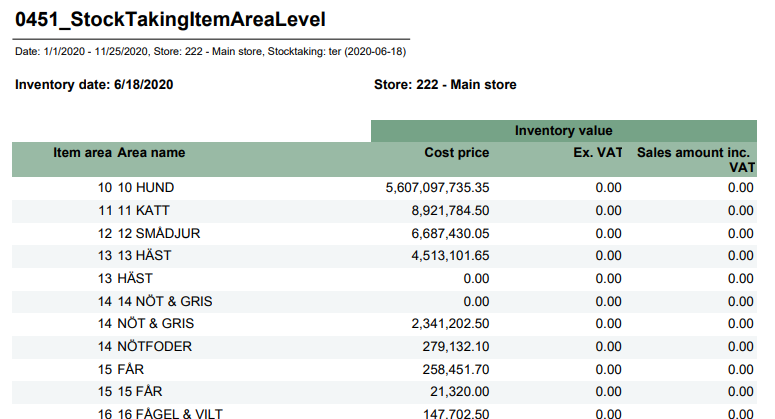
New report showing stocktaking results divided by item area.
Inventory per item area | |
File name | 0451_StockTakingItemAreaLevel.rdl |
Data source | Lindbak Retail (database) |
Selections | Comment |
Date from | Default today. |
Date to | Default today. |
Retail store | Which store to run report for. |
Stocktaking | Shows all stocktaking's for selected store within date from - to range. |
Report shows inventory date and store number and name. | |
Columns, one row per item area. | |
Item area | Area number |
Area name | Area name |
Inventory value, Cost price | Sum cost price |
Inventory value, Ex. VAT | Sum salesprice ex. VAT. |
Inventory value, Sales amount inc. VAT | Sum salesprice inc. VAT. |
Modules | Description |
|---|---|
Gift cards | Can not remove item in order (TFS: 190200) Method 'UpdateCartPayments' in POSAPI is implemented, to support changing an order with either Digital Gift cards or Klarna payments. Chain Web calls this method to adjust the payment authorizations. This call replaced the call to UpdateKlarnaPayment method. Required: POS WCF 3.0.0.11812 |
Invoices | Show the amount that is rounded in the invoice (TFS: 184868) Sum of rounding's is visible on the invoice. |
Document status:
Date:
Version Requirements is located on the menu to the left.
(TFS: 188572)
New settlement report for operator. Report is based on settlement report 0709.
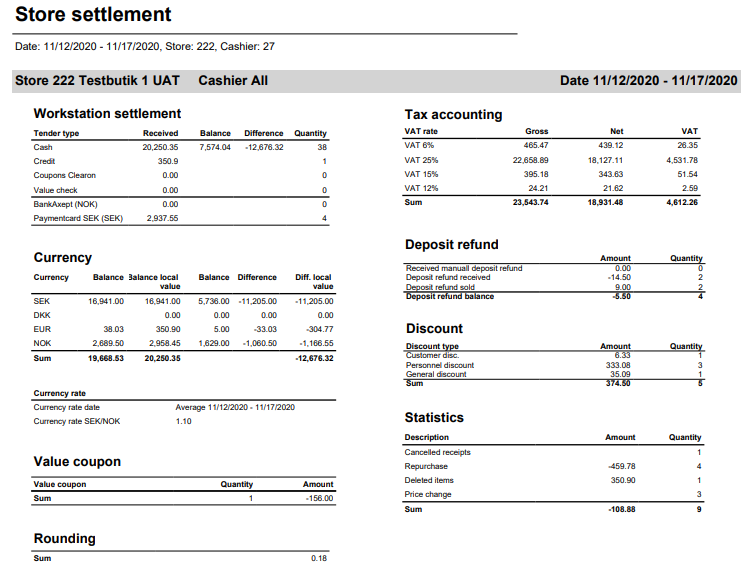
Differences are described below:
Parameters | Description |
|---|---|
1410_subSettlement | |
pCardnumbersBankAxept | Paymentcardkey for Norwegian bankaxept, default 30 |
1424_subValueCoupon | |
pValueCouponEAN | EAN for value coupon, default 926. |
1405_subDepositRefund | |
pArtGrpManualDepositRefundIn | Article group for manual received deposit refund, default 502. |
pArtGrpDepositRefundIn | Article group for deposit refund, default 501. |
pArtGrpDepositRefundSold | Article group for sold deposit refund, default 500. |
1411_subStatistics | |
pArtGrpManualDepositRefundIn | Article group for manual received deposit refund, default 502. |
pArtGrpDepositRefundIn | Article group for deposit refund, default 501. |
Workstation settlement: | |
Bankaxept (NOK) | Currency amount for credit debit where payment card set in parameter pCardnumbersBankAxept |
Paymentcard (SEK) | Amount for rest of creditdebit. |
Currency rate | Currency rate is based on balance receipts, calculating rate from amount / currency amount for NOK. |
Currency rate date | If report runs for one date, currency rate is calculated based on this date. If report runs for several dates, we calculate average. |
Currency rate SEK/NOK | Shows calculated currency rate for SEK to NOK. |
Value coupon | Shows sales for EAN set in parameter pValueCouponEAN |
Deposit refund: | |
Received manual deposit refund | Shows all sales with direction = in for article group from parameter pArtGrpManualDepositRefundIn |
Deposit refund received | Shows all sales with direction = in for article group from parameter pArtGrpDepositRefundIn |
Deposit refund sold | Shows all sales with direction = out for article group from parameter pArtGrpDepositRefundSold |
Discount: | |
Customer discount | Shows discount with type = CustomerGroup |
Personal discount | Shows sub total discount where customer as isEmployee flag set. |
General discount | Shows line discount. |
Document status:
Date:
Version Requirements is located on the menu to the left.
Modules | Description |
|---|---|
Customer order | Show returned icon for online returns (TFS: 188719) The return icon is shown on item lines in customer order, that have been returned using “Online return”.  |
POS Replication setup | Store must be required in new subscriber setup (TFS: 188387) It is not possible to add/save subscriber without selected store. |
Document status:
Date:
Version Requirements is located on the menu to the left.
Modules | Description |
|---|---|
Customer | Support hyphen in org no for customers of Swedish stores (TFS: 188336) Organization number with hyphen can be entered for business customers of Swedish stores. The EHF invoice is still generated without hyphen for business customers. |
Customer order | Order returned in POS cannot be returned in Chain Web (TFS: 186872) If an item in an order has been returned in POS, it is not possible to return it in Chain Web. |
Document status:
Date:
Version Requirements is located on the menu to the left.
Modules | Description |
|---|---|
Invoices | Changes to the PDF Invoice and user interface (TFS: 185463) For Swedish stores, the invoice shows information about:
Sum total VAT amount on Invoice (TFS: 186891) The Invoice has a new field for the total VAT amount. |
Document status:
Date:
Version Requirements is located on the menu to the left.
(TFS: 186006)
The gift card number is displayed on the order line, so the gift cards sold in an order can be identified.
Dependencies to another products:
POS Services in version 7.76.03505 or higher required.
(TFS: 186007)
The gift card can be sent by email, from the order line view in a customer order.
Dependencies to another products:
POS Services in version 7.76.03505 or higher required.
Modules | Description |
|---|---|
Invoice | Changes to the PDF Invoice and user interface (TFS: 185463) For Swedish stores, the invoice shows information about:
Sum total VAT amount on Invoice (TFS: 186891) The Invoice has a new field for the total VAT amount. |
Store | Support hyphen in account number for Swedish customers (TFS: 186256) Hyphen in bank account number is supported. The account number can look like this: 123-4567. |
Document status:
Date:
Version Requirements is located on the menu to the left.
(TFS:180032)
In the Gift cards view, it is possible to view the picture of a digital gift card by clicking on "View digital gift card" below the distributions. Sending the digital gift card by email can be done by clicking the email icon. A new email address can be entered, if the gift card is to be sent to an other email address.
(TFS: 180790)
Icons to preview the gift card, and to send the gift card by email, are placed on the Gift card payment in the tab "Payments".

(TFS: 180745)
Webshop orders with Klarna and/or gift card payments have a Payments tab, with the payment type and status. Active orders will have payments that are "Reserved", and completed orders will have payment status "Completed". Orders can be cancelled as long as the order is active, and the payment reservation will then be cancelled.
Requirements:
Lindbak POS Services 7.76.0350.
(TFS: 180793)
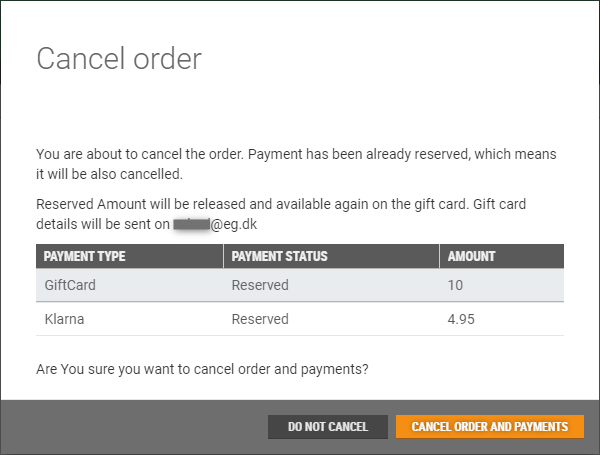
When cancelling a customer order with a reserved Klarna or gift card payment, the dialogue will inform about the reserved payments. After cancellation, the payment lines will get status Cancelled.
(TFS: 180798)
Orders containing payments with Klarna and/or giftcard, will display the Klarna and giftcard details in the payment section below the Order total on the order confirmation.
Dependencies to another products:
OrderMessageIntegration package in version 1.1.3 or higher required.
The installation package file can be found at: \\nas_install\LRS\Lindbak Integrations\3.0\OrderMessage Integration\For ChainWeb 2.9.270
(TFS: 180794)
If defined, two new system parameters, "DefaultReasonCode" and "DefaultTreatmentCode", will by default fill the fields in the refund/return view. If the parameters are not set, the user must select "Reason code" and "Treatment code" manually.
(TFS: 180797)
For weborders, the "Pay to customer" and "Confirmation" step looks a bit different than for other orders, to support the return and refund steps towards gift card and Klarna.
Required configuration: The system parameter DigitalGiftCardEnabled need to be set to true (the default value of it is false) to get this new screen and also the system parameter ReturnDispatchWebshopOrdersInCustomerOrder need to be set to 'false' because when it is set to true then no payments will be added after refund (the default value of it is false).
Dependencies to another products:
Lindbak POS API 3.0.0.11802 or higher.
Lindbak POS Services in version 7.76.03503 or higher.
Lindbak POS JournalService 7.76.03502 or higher.
To get this fix for the Refund: Product Backlog Item 185023: POS API: Support the Chain Web refund scenario - The Lindbak POS API need to be upgraded to 3.0.0.11803
(TFS: 180741)
Generation of gift card images in gift card service is supported. The text on the gift card will be displayed in the language specified in the parameter 'defaultImageCulture' in gift card service configuration in tenant admin. Supported cultures are: en-GB (english), nb-NO (norwegian), sv-SE (Swedish). If an image is not included in the request, a hardcoded image in gift card service will be used as background.
Two new methods are added to the Gift Card Service:
GetTestGiftCardImage(ProfileID) - Returns generated image with fake data and background from the selected profile.
GetGiftCardImage(giftCardNumber, ProfileID, showPin) - Generate image with real data and background from the selected profile.
(TFS: 180740)
Adding and deleting background images for digital gift cards is done in "Gift card service images", under "Setup" in the System menu. Different images can be uploaded to different profiles.
(TFS: 180737)
Email distribution supports distribution for new gift card, recharge operation and remind gift card email. The email's body and subject can be configured in the 'Email distributor' job.
The text on the generated gift card image depends on the value of the parameter 'Default culture of the generated image.' There are three supported cultures: sv-SE (Swedish), nb-NO (Norwegian), en-GB/en-US (English).
(TFS 180739)
Both email and phone owned gift cards are exported from on premise to cloud, additionally the ProfileId related to the store is exported. Previously we only export gift cards with the correct phone number.
Dependencies to another products: GiftCardsIntegration package - new version 1.3.0 - it can be found on: \\nas_install\LRS\Lindbak Integrations\3.0\GiftCards Integration\For Chain Web 2.9.270\GiftCards Integration 1.3.0 - LIP BackOffice Trunk_Integrations_20-09-16.1.
(Work ID: 179889)
Used and active EG digital coupons (and stamp card status) can be shown in POS. This makes is possible to inform about possible discounts and also to help the customer find out if a coupon was already used.
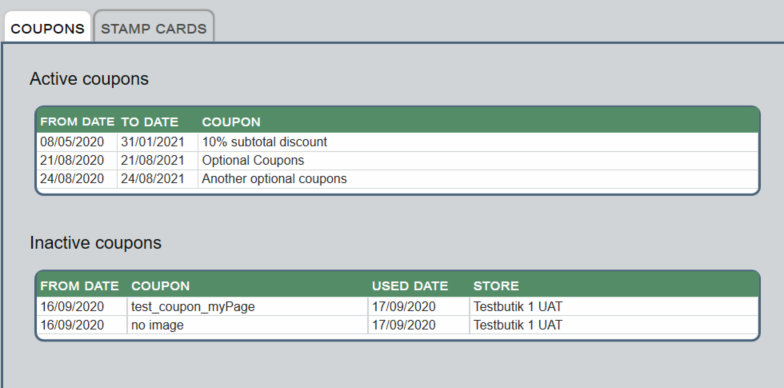
Chain Web version 2.9.271 or newer is required. |
|
(TFS: 168116)
Prices are exported from the Concession.ItemConcessionPrice blob to Chain.
NOTE: A case with several prices for the same item in one import file is not handled yet. It will cause Priceupdate job failure. It will be handled in 183935: [Concession] Add support for duplicated prices.
Configuration:
Install ChainIntegration 1.5.0 package
(TFS: 179991)
Report was created to get an overview of non-invoiced credit sales.
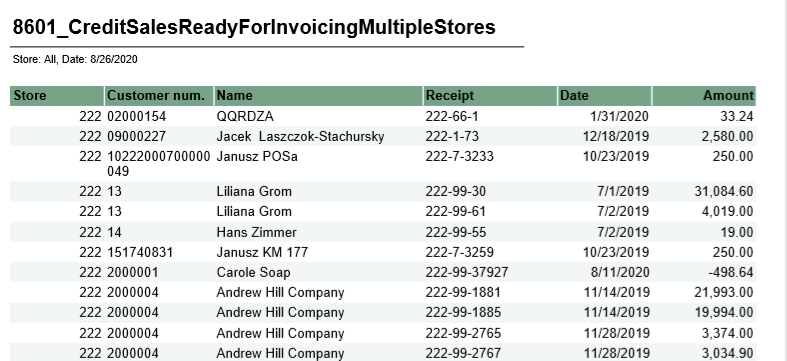
Credit sales for invoicing | |
File name | 8601_CreditSalesReadyForInvoicingMultipleStores. |
Data source | Database (Lindbak Retail) and Cube. |
Selections | Comment |
Retail store | Default all. |
Date | Show all receipts before (and including) this date. Defalult today. |
Columns – One row per receipt | |
Store | Store number. |
Customer num. | Customer number. |
Name | Customer name. |
Receipt | Receipt number. |
Date | Date for receipt. |
Amount | Receipt amount. |
(TFS: 179995)
New report which shows an overview of overdue payments.
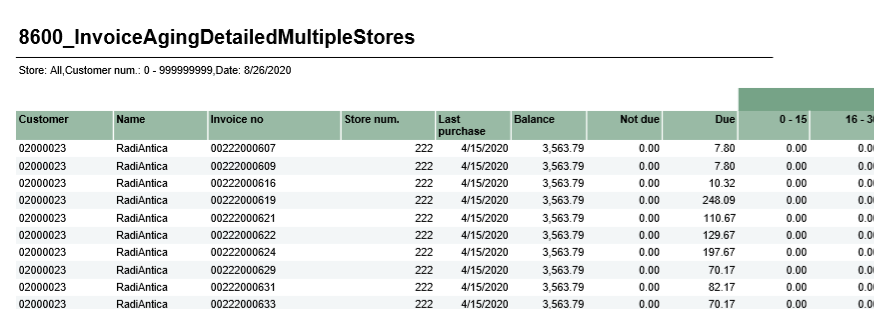
Invoice aging with invoice details | |
File name | 8600_InvoiceAgingDetailMultipleStores. |
Data source | Database (Lindbak Retail) and Cube. |
Selections | Comment |
Retail store | Default all (shows only for HQ users). |
Ref date | Due date for invoice. Reports shows Days due from selected date. |
From customer | Possible to set range of customer from - to customer number. Default 0. |
To customer | Possible to set range of customer from - to customer number. Default 999999999. |
Columns – One row per receipt | |
Customer | Customer number. |
Name | Customer name. |
Invoice no | Invoice number. |
Store num | Store number. |
Last purchase | Date for last purchase for customer (not specific for invoice) |
Balance | Total balance for customer. |
Not due | Amount from invoice which is not due. |
Due | Amount from invoice which is due. |
Daye due | Amount of invoice which is due, based on number of days due. |
Modules | Description |
|---|---|
Cashier | Fields in Cashiers view should not be case sensitive (TFS: 166535) Search fields in Cashiers view are no longer case sensitive. |
Credit sales | View credit sales created by another user or from POS (TFS: 184581) To be able to edit credit sales created by another user or from POS, the user must have the access: "Edit credit sales". |
Customer | Support Swedish Zip codes in Customer view (TFS: 183813) Swedish zip codes are supported in the customer menu. Invoice fee created for member with 0 credit (TFS: 183083) An Invoice fee receipt is created, regardless of the customer's credit limit. This can cause the credit limit to be exceeded by the invoice fee. |
Customer Order | Customer order tasks failed if they exceeded 50 characters (TFS: 172869) An issue which caused customer orders to fail during POSLog processing if the PackageTrackingNumber contained more than 50 characters is corrected. PackageTrackingNumber can exceed 50 characters - the maximum value is 255 characters. Lock customer orders with status “Completed” from editing (TFS: 177861) When order is "completed" it is not possible to add or edit the order. This is done to reduce potential human errors. Text in the copy customer order popup (TFS: 179819) The text in the Copy customer order popup is improved. |
Order Dispatch | Not possible to delete not delivered items, if some lines are delivered in picking order (TFS: 171140) Undelivered order lines can be removed from partially delivered picking orders. Hide orders with status 'Delivered To Customer' in Dispatch Orders view (TFS: 182716) In the Dispatch Order view in Chain Web, orders with status "Delivered to Customer" and ''Delivered'' will only be shown when filtering on these statuses. |
Gift cards view | All column for owner email (TFS: 185904) A new column for 'Email' has been added to the Gift cards' grid. |
Inventory Control | Max 1000 items in counting Group (TFS: 176822) The maximum amount of items in count groups has been limited to 1000. It applies to both count group imported via Inventory Control integration and count groups created in Chain Web. |
Invoices | Support invoicing for Swedish customers (TFS: 184101) Invoice generated for Swedish stores use MOD10 OCR payment reference number. Note: Make sure that in [Lindbak Retail].[Chain].[StoreGroupConfiguration] DB [PrintKID] is set '1' in configuration for requested storegroup. Electronic invoice should not contain an empty "Description" field (TFS: 179958) When the line note on the line in the order or credit sale only contains white spaces, then the description field will not be created for this line in the Electronic invoice xml file. This change is made to avoid sending an empty description field, which causes an error when validating the EHF invoice. |
Reporting | Promotion articles (TFS: 184489) Changes made in report for promotion article sales, to make sure query uses correct index. Changed report 0069_PromotionArticleSales. Ordinary price in project (TFS: 184893) Existing report for showing ordinary prices in project is extended. New columns for amount with and without tax and tax amount. Changed report: 8021_OrdinaryPriceInProject. |
System | Change “Lindbak POS” to EG POS” (TFS: 176297) In the System menu "EG POS" is displayed at the top of the menu. Team view in Chain Web (TFS: 178777) All stores that are part of a team are displayed in Chain Web Team menu. |
User | First/Last Name is not mandatory for Azure users (TFS: 172957) It is possible to create Azure User in Chain Web without First/Last Name, which is still mandatory for standard user. |