Document status:
Date:
Version Requirements is located on the menu to the left.
Modules | Description |
|---|---|
Customer order | Slow processing of customer orders (RTC-9676) Performance when updating customers is much faster after improving code related to handling of communication channels. |
Order dispatch | Error handling of CompletePickingCriticalExceptions (RTC-10050) An issue with storing the DeliveryReceiptID caused internal transfers to not be performed correctly for some dispatch orders. This is corrected and values like DeliveryReceiptId and ShipmentNumber are stored correctly in the database. |
Document status:
Date:
Version Requirements is located on the menu to the left.
Modules | Description |
|---|---|
Order dispatch | Not possible to delete "last not delivered" item (RTC-7099) Fixed an issue related to removing last line from "in picking". |
Document status:
Date:
Version Requirements is located on the menu to the left.
Modules | Description |
|---|---|
Order Dispatch | Pay & Collect with fallback (TFS: 187560) The following corrections has been made: Pay&Collect orders containing non-sale items can be picked and will be successfully delivered . Additionally, Pay & Collect orders that are missing communication channel SMS, will get added successfully in db. |
Document status:
Date:
Version Requirements is located on the menu to the left.
(TFS: 185988)
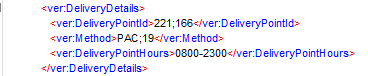
It is possible to redispatch Pay & Collect orders to desired store and with desired delivery method.
It is done by adding the next DeliveryPointId and Method in the POSLog:
Modules | Description |
|---|---|
Item management | Update chain with file from Item Service (TFS: 168116) Prices are exported from the Concession.ItemConcessionPrice blob to Chain. NOTE: A case with several prices for the same item in one import file is not handled yet. It will cause Priceupdate job failure. It will be handled in Product Backlog Item 183935: [Concession] Add support for duplicated prices. Configuration: Chain Integration package in version 1.5.0 or higher required. The installation package file can be found at: \\nas_install\LRS\Lindbak Integrations\3.0\ChainIntegration\For Chain Web 2.9.262 |
Document status:
Date:
Version Requirements is located on the menu to the left.
(TFS: 176036, 176035, 176032, 175819)
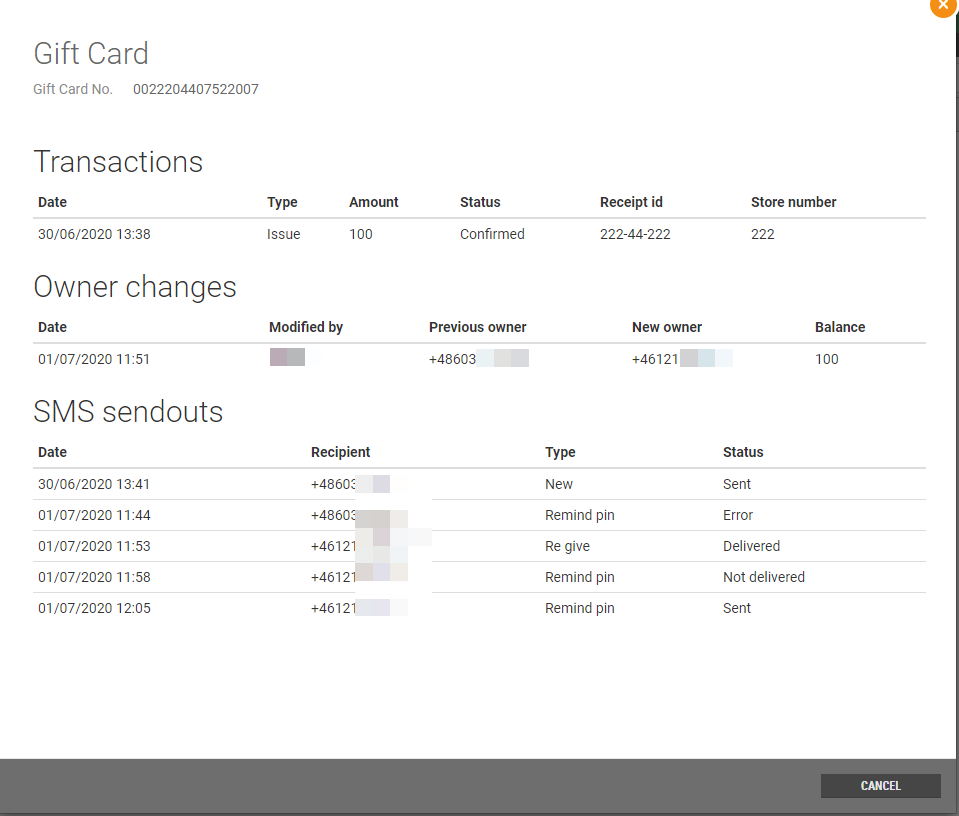
The existing functionality for reminding a customer of their giftcard’s PIN code has been reimplemented to use GiftCardService. All distributions of giftcards are displayed in the details of giftcard menu in Chain Web when clicking the “eye” icon. When a new gift card is purchased, it is required to be registered with a valid phone number, as the PIN code will be sent by SMS to the owner. Additionally, it is possible to give a gift card away to another owner, for example as a birthday present. When giving away a gift card it is important that the new owner’s phone number is registered on the giftcard when giving it away, so that they will receive the PIN code on SMS. Changing the owner of a gift card can be done through the GiftcardService API in a 3rd party application or in Chain Web.

Requirements: |
|---|
|
|
|
Configuration regarding the content of the SMS sent to customers is configured in the Integration platform. There are three SMS templates that can be configured, for three different scenarios:
“New giftcard”. When a new giftcard is sold, an SMS is sent to the owner with this template. The SMS can maximum contain 320 characters and it is possible to add a variable for the 4-digit PIN Code (this applies to all three templates).
“Re-give” giftcard. When an existing giftcard is given away, the owner is changed on the giftcard. A specific SMS can be configured to be sent to the new owner when receiving the giftcard. Additionally, it is supported to include a variable which will include a personal message from the person giving it away. The contents of the personal message can be defined in a 3rd party application and cannot be longer than 160 characters.
Re-send PIN code. A customer may have forgotten their PIN code and asks customer support to resend it. This is done in the giftcard register in Chain Web. A specific SMS template can be configured for this purpose.
(TFS: 173144)
Sub vendor (name) and assortment code (name) is shown on items in the Item view.
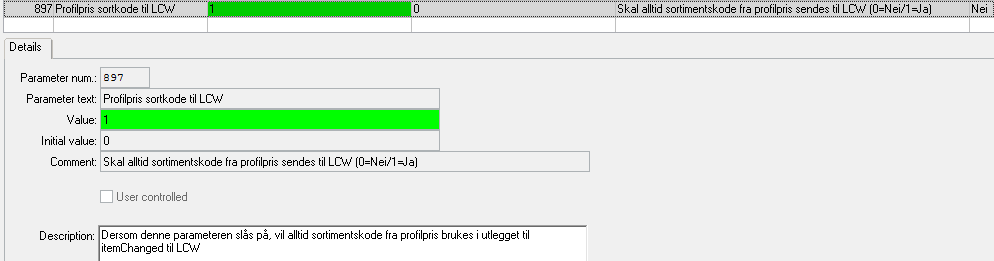
Only the assortment code from the profile price will be exported from Chain Classic to Chain Web.
Related Chain Classic 2.1 configuration:
System parameter 897 need to be set to 1
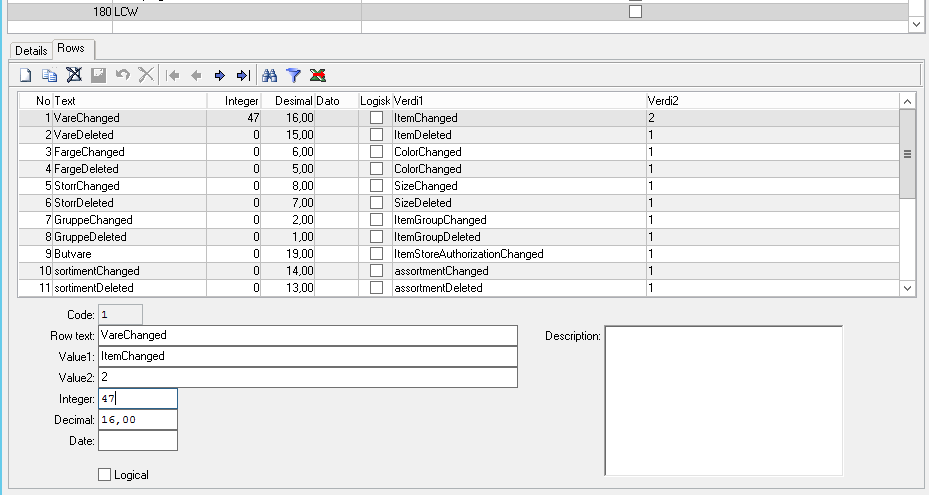
System alternatives 180:
Row 1 (ItemChanged):
Value2: 2
Integer: 47
Row 20 (VendorItemChanged):
Value2: 2
Integer: 6
(TFS: 179037)
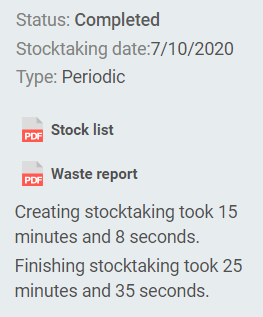
In the stocktaking dashboard, it is displayed how long it took to create the stocktaking and how long it took to complete it after clicking the "Finish"button.
(TFS: 181241)
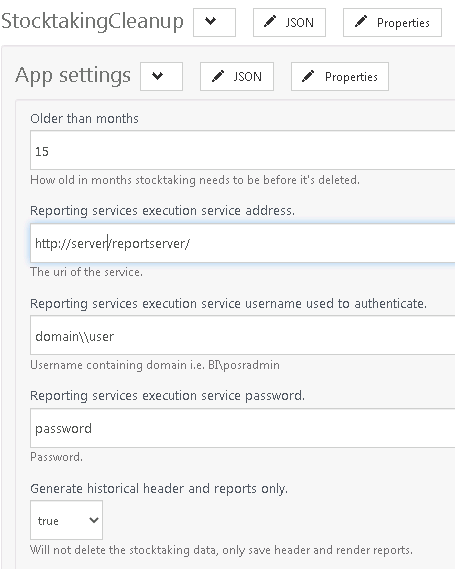
StocktakingCleanup job has been added to the BackOfficeIntegrationSubscriber. The job, by default, archives stocktaking that are older than 15 months. The job is executed once per day.
When "Generate historical header and reports only" parameter value is set to true, then only stocktaking will be archived and reports will be generated.
When "Generate historical header and reports only" parameter value is set to false, then stocktaking will be archived, reports will be generated and data connected to stocktaking will be deleted from Lindbak Retail database.
More information can be found in the job's documentation.
Configuration:
Set up parameters related to report server.
(TFS: 179991)
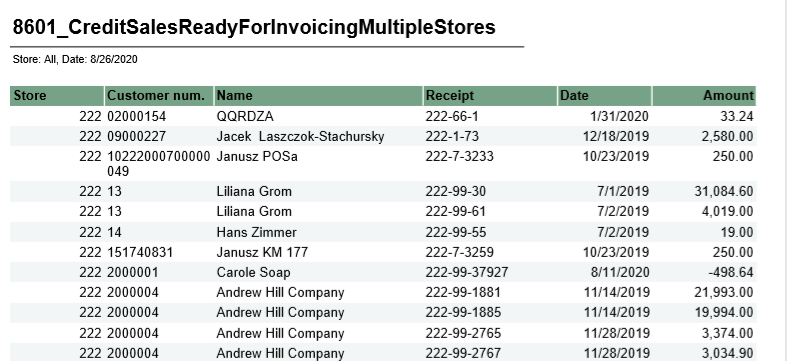
Report was created to get an overview of non-invoiced credit sales.
Credit sales for invoicing | |
File name | 8601_CreditSalesReadyForInvoicingMultipleStores. |
Data source | Database (Lindbak Retail) and Cube. |
Selections | Comment |
Retail store | Default all. |
Date | Show all receipts before (and including) this date. Defalult today. |
Columns – One row per receipt | |
Store | Store number. |
Customer num. | Customer number. |
Name | Customer name. |
Receipt | Receipt number. |
Date | Date for receipt. |
Amount | Receipt amount. |
(TFS: 179995)
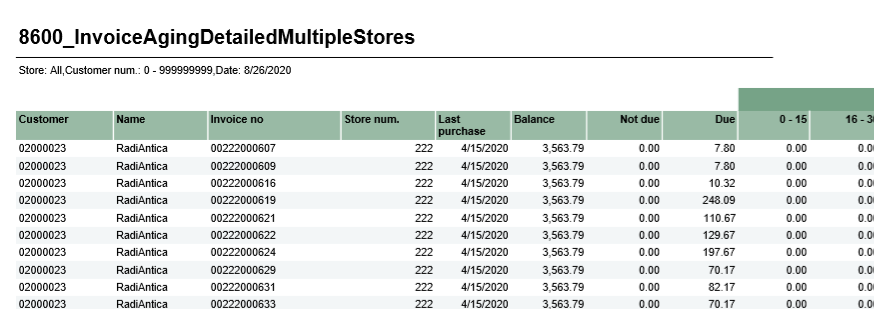
New report which shows an overview of overdue payments.
Invoice aging with invoice details | |
File name | 8600_InvoiceAgingDetailMultipleStores. |
Data source | Database (Lindbak Retail) and Cube. |
Selections | Comment |
Retail store | Default all (shows only for HQ users). |
Ref date | Due date for invoice. Reports shows Days due from selected date. |
From customer | Possible to set range of customer from - to customer number. Default 0. |
To customer | Possible to set range of customer from - to customer number. Default 999999999. |
Columns – One row per receipt | |
Customer | Customer number. |
Name | Customer name. |
Invoice no | Invoice number. |
Store num | Store number. |
Last purchase | Date for last purchase for customer (not specific for invoice) |
Balance | Total balance for customer. |
Not due | Amount from invoice which is not due. |
Due | Amount from invoice which is due. |
Daye due | Amount of invoice which is due, based on number of days due. |
(TFS: 178955)
New scheduled trigger has been added to Store2 job. Now it is possible to configure when to trigger the Store2 job to export stores.
noteNote: This is part of a feature which will be presented in October.
Note: This is part of a feature which will be presented in October.
Requirements:
BackOfficeBatchGenerator package in version 1.2.12 or higher required.
(TFS: 179543)
If a count list is not used within 10 months after creating it, it will get the status “Expired” and can no longer be used in a stocktaking.
(TFS: 181758)
The Archive view, under Stocktaking, shows information about stocktakings that are older than the number of months defined in the 'StocktakingCleanup' job.
The waste and stock report, along with key values from the stocktaking, are available in this view.
Modules | Description |
|---|---|
Cashier roles | Hide deactivated system roles from selection lists (TFS: 176287) Deactivated cashier roles are not visible on the dropdown list when creating new cashiers. Hide functions from the cashier roles view (TFS: 176288) Changes in cashier menu:
Cashier roles - Export functions with the role (TFS: 179846) Functions are properly exported with a custom cashier role. BackOfficeBatchGenerator package version 1.2.11. |
Customer order | Prevented "double" confirmation in dialogue window (TFS: 171819) Sending multiple customer orders to credit can only be confirmed once. |
Dispatch orders | Show “Payment status” in Dispatch order (TFS: 172850) 'Payment Status' column has been added to 'Dispatch Order' grid to enable filtering on Paid/Unpaid Dispatch Orders. Additionally, 'Payment Status' field appears in each delivered 'Dispatch Order' details view to inform the user if the Dispatch Order has been paid or not. HUB delivery (TFS: 180915) Filtering of postal codes has been fixed in preferred Stores list editor. New button to delete preferred stores from the list editor has been added. Delivering Pay & Collect orders (TFS: 182360) An issue where it was not possible to deliver a Pay & Collect order for select stores is corrected. No order confirmation email sent when creating order (TFS: 182714) Order confirmation message is triggered after creating a new Pay & Collect order. Missing SMS on delivery for Dispatch orders (TFS: 182766) SMS with shipping confirmation, for non-split orders, can be sent. Not possible to delete not delivered items, if some lines are delivered in picking order (TFS: 171140) Undelivered order lines can be removed from partially delivered picking orders. Show 'Delivered to customer' status in Dispatch Order Grid (TFS: 182710) Orders delivered to customer in Dispatch order grid show the correct status, and filtering on this value can be done. Hide orders with status 'Delivered To Customer' in Dispatch Orders view (TFS: 182716) In the Dispatch Order view in Chain Web, orders with status "Delivered to Customer" and ''Delivered'' will only be shown when filtering on these statuses. User interface for choosing Pay & Collect Stores (TFS: 180965) New multiselect has been added to dispatch rules. It is possible to select Pay & Collect stores (one or more) and save setting correctly. The stores added to the list will be available for offering Pay & Collect to customers. |
Invoicing | Swedish translations for invoice PFD and invoice GUI (TFS: 182797) Bank account number' is translated to 'Bankgironummer' on the invoice PDF and in the UI. |
Receipt journal | Character and digits in POS Unit Field (TFS: 176305) Entering letters and digits in the POS Unite field in the Receipt Journal is now supported without error message. |
Reports | Correct Swedish Translation for Report 0719 (TFS: 180334) The correct translation for Swedish 'Data Type' is now in place for report 0719. |
Giftcard/Credit Note | Expiration of credit note (TFS: 172744) The “ValidToDateTime” on credit notes are set to the end of the expiration date. |
Stocktaking | Timeout when removing a large count list from a stocktaking (TFS: 167434) The performance, when removing a large count list from a stocktaking, is improved. A timeout shall not occur for count lists containing up to 50,000 items. Tandem switch and item deleted in Chain (TFS: 176229) If an item is deleted in Chain Classic, it cannot be deleted in Chain Web if it has been included in a previous stocktaking. In this case, the 'IsDeletedInChain' flag is set to True, and the tandem relation is deleted from the item. The same is done for items that have been switched to tandems. Items that are marked as 'IsDeletedInChain' will not return results when trying to add the item to a count list or stocktaking. Timeout when editing item in stocktaking (TFS: 178884) When editing an item in a stocktaking, a notification will we shown if the item quantity is successfully updated. If the item cannot be updated at that time, the following notification will be shown: "An error occured while updating the database. Please try again later." Retry creating stocktaking (TFS: 178895) If creating the stocktaking fails due to timeout, the job creating the stocktaking will try to create it again for as many times as defined in the new parameter MaxNumberOfTries, that has been added to the StocktakingProcessorJob. The parameter specifies maximal number of retries of the single batch event. The event will get status RetryPending when the timeout occurs. When the batch is retried as many times as MaxNumberOfTries, the batch will get status Error. For other errors than timeouts, the batch will get status Error after first failed processing. Include all Items from the model when 'ModelItemsProcessingType' = Full (TFS: 180760) When one item is added manually or via service, to a stocktaking or count list, all Items from the model will be added if 'ModelItemsProcessingType' = Full. Required configuration: ModelitemsProcessingType = 'Full' to process items with same model (all colors & all sizes) (also not available in selected store). ModelitemsProcessingType = 'Simple' to process item and others from same model (one color) available in selected store (with all sizes). ModelitemsProcessingType = 'None' to process only one item. Refresh stock status for not assigned count lists (TFS: 180803) When a stocktaking is completed for a store, a new basis file will be generated. Stock for all unassigned count lists will be refreshed based on the basis file. Handle duplicated events from Chain (TFS: 181375) Duplicated messages from Chain will be blocked and user will be notified in BackOffice.Service.Host.IIS logs. Date for when stocktaking was completed (TFS: 182493) "Stocktaking completed" date has been added to the completed stocktaking's dashboard, below "Stocktaking created". Improvements in the Archive GUI (TFS: 182614) Improvements in the Archive view:
|