Document status:
Date:
Version Requirements for 2.9.230 is located on the menu to the left.
Highlights | |
|---|---|
Release version: 2.9.230  |
|
Extend Sales tab item information
(TFS: 171153)
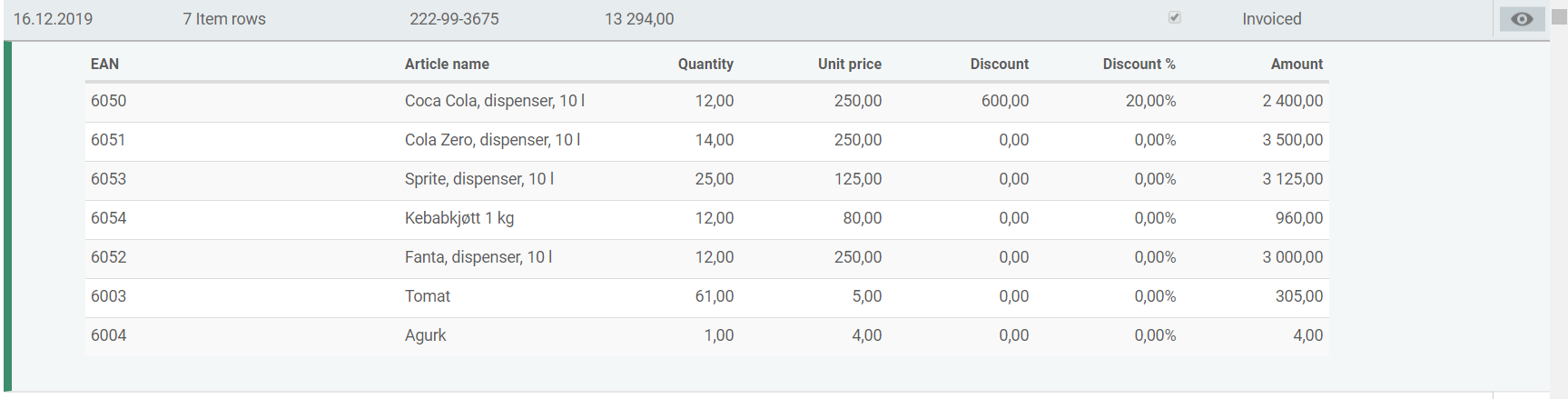
Additional item information has been added to the Sales tab on the customer. The following columns are visible for items in the sales tab: EAN, Article name, Quantity, Unit price, Discount, Discount %, Amount.
Export invoice journal on customer number
(TFS: 171381)
When exporting invoice journal, all customers are selected by default. It is possible to export for one customer only by selecting the customer in the customer field.

Invoice rounding on store level
(TFS: 172272)
The system parameter 'ElectronicInvoiceDueAmountRoundingRule' is no longer in use.
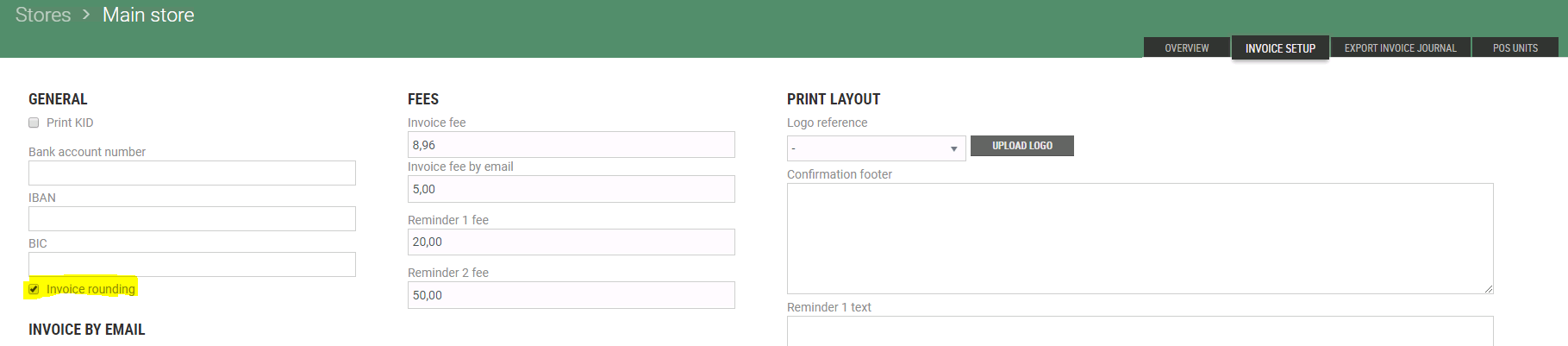
The invoice rounding is decided for each store individually. Invoice rounding is activated by ticking the checkbox in store configuration (System → Stores), in the tab: 'Invoice setup'.
Display longer company name on the invoice
(TFS: 171942)
An additional field for Marketing Name (NO: Markedsføringsnavn) is placed below Company Name (NO: Foretaksnavn).
If Marketing Name is filled, it is displayed below Company Name on the html and pdf invoices.
If Marketing Name is not filled, there are no empty lines displayed on pdf and html invoices.
There is a limitation on 50 characters or less in both Company Name and Marketing name, because if the characters combined exceed 100 characters they will not fit on Invoice.
Expiration date on Internal transfer
(TFS: 171285)
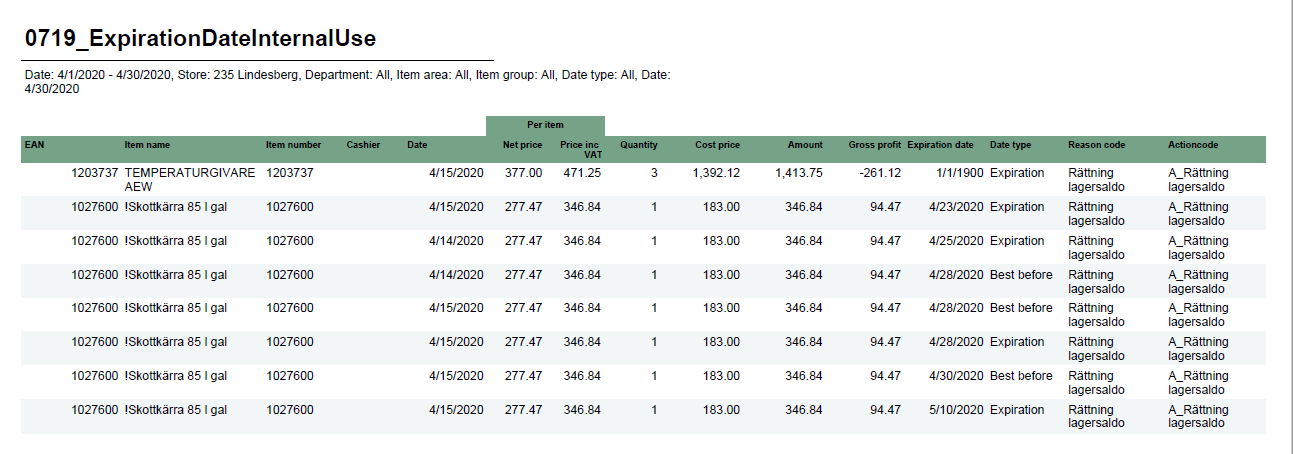
To help retail chains keep control of items with expiration dates used in internal transfers, report 0719_ExpirationDateInternalUse is created.
Report name: Expiration date
File name: 0719_ExpirationDateInternalUse
Data source: Database (Lindbak POS reporting DW) and Cube.
Selections: | Columns - one row per transaction |
|---|---|
Date from - Default today | EAN - EAN |
Date to - Default today | Item name - Article name |
Retail store - Default users store. | Item number - Item number |
Department - Default all | Cashier - Cashier number. |
Article area - Default all | Date - Transaction date. |
Article group - Default all | Per item / Net price - Net price per item. |
Data type - Expiration or best before. Default all. | Per item / Price inc VAT - Item price including VAT. |
Shelf life date - Default today. This only works if parameter "All shelf life dates" is turned off. | Quantity - Quantity |
All shelf life dates - If on report shows all transactions regardless of shelf life date. If off, only transactions with shelf life date from parameter "Shelf life date" is shown. | Cost price - Cost price for transaction (all items) |
EAN list - Default none. | Amount - Price including VAT for transaction (all items). |
Gross profit - Gross profit for transaction (all items) | |
Expiration date - Expiration / Best before date | |
Data type - Expiration or Best before | |
Reason code - Reason code on transaction. | |
Action code - Action code on transaction. |
Requirement |
|---|
Reporting v.59 |
‘Balance’ fulltext reindexing to new job
(TFS: 165732)
The Balance property is supported by the FulltextReindexer job. Also, the parallelism was added to the FullTextReindexer job. The job is able to process reindexing for more than one type at the same time. The way in which the progress is reported was also changed. After each batch of ProgressReindexingEvent event is published on FullTextNotification topic in service bus, the event is handled by FullTextReindexingNotification subscriber in Chain Web and balance information is updated in the UI in Chain Web.
Configuration:
new endpoint in the BackOffice web.config file
<add name="FullTextNotification" status="Enabled" topicPath="FullTextNotification" subscriptionName="Portal" />
fulltextnotification topic in the on-premise service bus with the Portal subscription.
Improvements
Modules | Description |
|---|---|
Accounts Receivable | Can’t use manual payment on invoices that are credited or partially paid (TFS: 169059) Now it is possible to add manual payment to “Credited”, “Partially paid” and “Not paid” invoice. |
Cashiers | Improvements in service for cashier password change (TFS: 172932) The cashier password is validated based on the values in the PinLastChangedDate column and CashiersPinValidityTimeInMonths parameter (PinLastChangedDate + CashiersPinValidityTimeInMonths < today). This way changes in the 'CashiersPinValidityTimeInMonths' parameter has an immediate effect on all cashier passwords. This change included backwards compatibility with the previous validation method. Configuration: The link in the Web.config file for BackOffice should be updated by default: from: <add name="BackOffice.CashierService" uri="http://#BASESERVERNAME#/backoffice-service/UserManagement/v1/CashierService.svc" contract="BackOfficeIPingable"></add> to: <add name="BackOffice.CashierService" uri="http://chainwebappserver/LindbakRetail.Service.Host.IIS/UserManagement/v1/CashierService.svc" contract="BackOfficeIPingable"></add> |
Customers | Hide customer discount on brand (TFS: 173677) Adding brand discount directly on customer should not be possible until it is supported in POS. When this functionality is added, the system parameter UseCustomerBrandDiscount should be set to True.
UseCustomerBrandDiscount set to false. Customer account endpoint not fetched (TFS: 172875) An issue with sending a customer segment to APSIS has been corrected. Requirement: ApsisIntegration version 1.7.10 (and higher). |
Customer order | Identifying the cashier (TFS: 166635) The cashier number instead of the username is added to the Salesperson and OperatorID fields in the POSLog. This is done to ensure the identification of the cashier who conducted the sale is correct, so that reports are correct. Reminder to save changes before exiting customer order (TFS: 173652) When the user is navigating out of an order with status “Changed without submitting”, a popup reminder to save the changes will appear. |
Customer project | Improve project search (TFS: 168305) Support for search on reference number and reference text has been added in project search. Requirement: To apply changes for old (already existing) projects, project full text has to be rebuilded. |
General | Log in page (TFS: 173839) 'Lindbak' has been removed from login page in Chain Web and InStore App. |
Invoice | New text on invoicing regarding remaining total to pay (TFS: 170780) On the invoice pdf, the previous “Remaining” (NO: Gjenstående) label is replaced by new text To pay (NO: Å betale). It appears on 'Partially Paid ' invoices which are created in POS and displayed in Chain Web menu Invoices. This is done to make the amount the customer needs to pay more transparent. No rounding in the invoice journal export (TFS: 172273) No amounts in the invoice journal export are rounded in order to provide as accurate amounts as possible. |
Item search | Changes in item search (TFS: 173145) When searching for items in Item search, the user will only see items that exists in the store the user belongs to. |
Reports | New colors in reports (TFS: 166652) Changed color scheme in all reports to match the new EG design. |
Stocktaking | Sorting and filtering of stocktaking grid (TFS: 169108) An issue where adding a filter on the 'Counted' column and sorting any other field descending in Stocktaking resulted in duplicating lines when exporting to 'Excel' is corrected. Additionally, multiple issues with adding filters on columns and sorting by other fields than 'EAN' is corrected. Items not counted should not be treated as counted (TFS: 169380) Not-counted items were treated as counted, in the event that the user chooses “keep stock level” when creating a stocktaking with the option “items not counted since”. Additionally, all not-counted items contain 0 in 'Counted' column which caused the user to perceive them as not counted. This has been corrected and these type of items is no longer visible in the grid if they have already been treated. Furthermore, the performance of 'Stocktaking Basis Processor' has been improved. |
User management | Error message when user is required to change password on next login (TFS: 174312) An error message was shown, when the user logged in after “Password reset is required on next login” had been selected in the User details page. |