Real-time occupancy information requires occupancy sensors to be installed in your company’s premises. Sensors typically detect human presence by sensing movement and heat, protecting the privacy of the users.
EG Worksense uses multiple sources of information for availability of spaces:
- Booking status: if your company has enabled bookings in EG Worksense, users can reserve specific spaces in advance
- Occupancy status: real-time occupancy of spaces based on sensor data. EG Worksense shows occupancy status for spaces on the floor plan when it shows the live status of the floor
- Out of use: spaces can be temporarily set out of use, which means that they are not available for booking
The app uses colors and symbols for visualizing the availability of spaces on the floor plan:
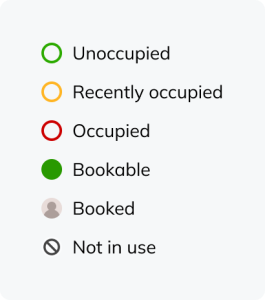
- Unoccupied - No one is using the space now (based on occupancy sensor data)
- Recently occupied- Someone has recently been using the space (based on occupancy sensor data)
- Occupied- Someone currently uses the space (based on occupancy sensor data)
- Bookable - The space is available for booking
- Booked- Someone has booked the space
- Out of use -The space cannot be used or booked, or it needs maintenance
Booked spaces are marked on the floor plan with the profile picture or initials of the person who made the booking. For anonymous bookings, a placeholder profile picture is shown.