Ett bilagedokument ska skapas för sådana hyresområden som har avtalsvillkor som avviker från huvudavtalet. Detta innebär i regel en annan hyrestid eller en annan hyresjustering.
Bilagedokumentet kan skapas i det skede då det egentliga avtalet inte har skapats, dvs. när avtalsutkastet inte ännu har godkänts.
Bilagedokumentet fogas till avtalsutkastet. Ifall flera hyresområden har olika avtalsvillkor men man vill koppla dem till samma avtal som de andra, ska ett eget bilagedokument skapas för varje avvikande område.
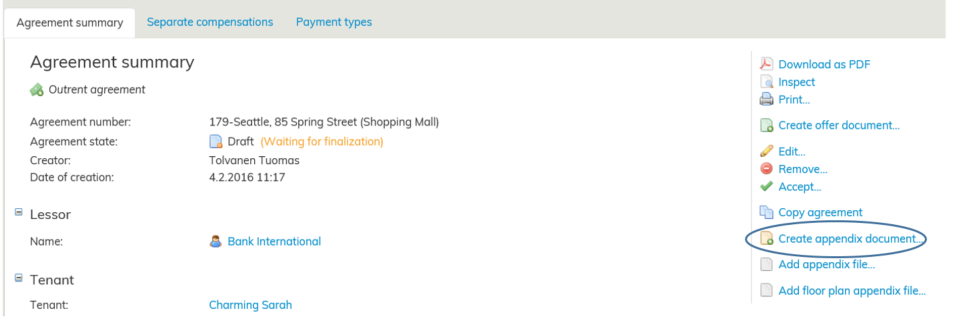
Sök fram det upprättade avtalsutkastet. Välj Skapa bilagedokument i höger kant på avtalets samlingsblankett.
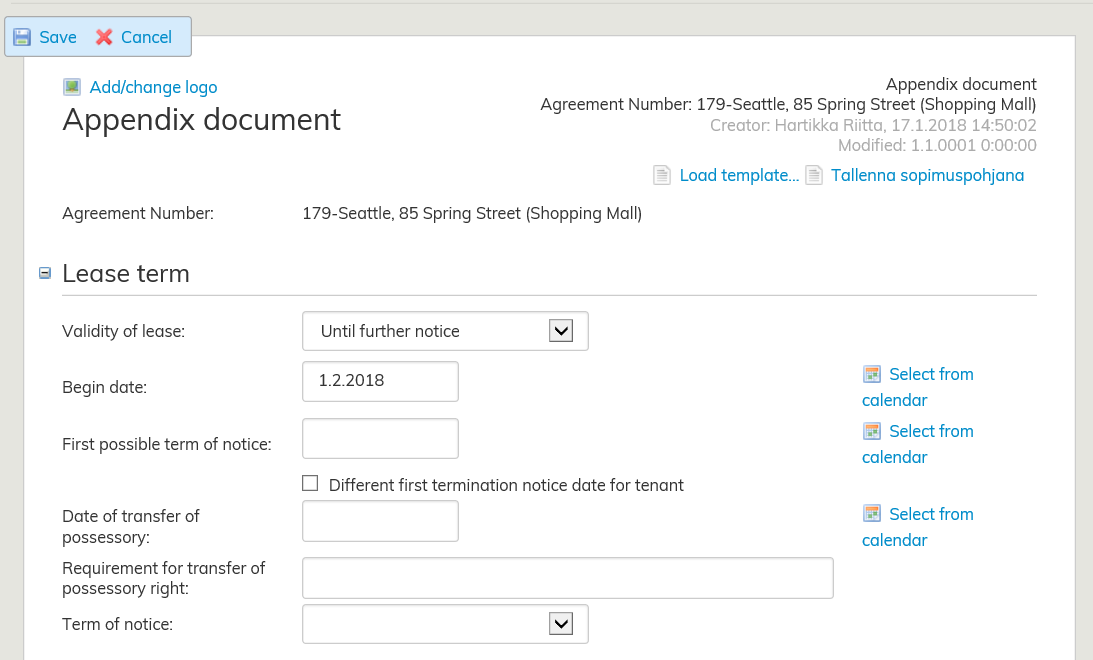
Definiera giltighetsvillkoret: Tills vidare eller På viss tid. Ange startdatum, och för avtal på viss tid dessutom slutdatum.
Lägg till det hyresobjekt vars villkor avviker från huvudavtalet genom att trycka på Välj i lista. Du kan lägga till flera objekt om de har samma avtalsvillkor.
Lägg till första möjliga uppsägningsdag samt överföring av besittningsrätt.
Ange bilagedokumentets uppsägningsvillkor i rullgardinsmenyn. I punkten Hyresjustering kan du välja justeringsvillkor för grundavtalet eller alternativt skapa ett nytt villkor för bilagedokumentet.
Närmare instruktioner om hur avtalsvillkoren fylls i finns i punkten Fylla i hyresavtalsblanketten
For rental areas which have agreement terms that differ from the main agreement, you need to create an appendix document. In practice, these different agreement terms are usually a different lease term or a different type of rent adjustment.
Appendix documents can only be created before the actual agreement has been made (i.e. before the draft agreement has been approved).
The appendix document will be added to the draft agreement as an attachment.
If you have more than one rental area with different terms but you want to add them to the same agreement, you need to make a separate appendix document for each rental area.
Find the draft agreement that you wish to work on. Select Create appendix document on the right of the agreement summary page.
Determine the validity of lease: Until further notice or Fixed term. Enter the begin date (and the end date for a fixed-term agreement).
Add the rental area that has terms that differ from the terms of the main agreement by clicking on Select from list. You can add multiple areas, as long as they have the same agreement terms. Enter the first possible term of notice and the date of transfer of possessory right.
Select the term of notice for the appendix document from the pull-down menu. For rent adjustment, you can choose the adjustment terms of the main agreement or create a new rent adjustment term for the appendix document.
For more detailed instructions on how to enter the validity of lease, see section Filling out the lease agreement form.