Skapa budgetmall visas för användare som har behörighet för Optimaze ekonomikörning.
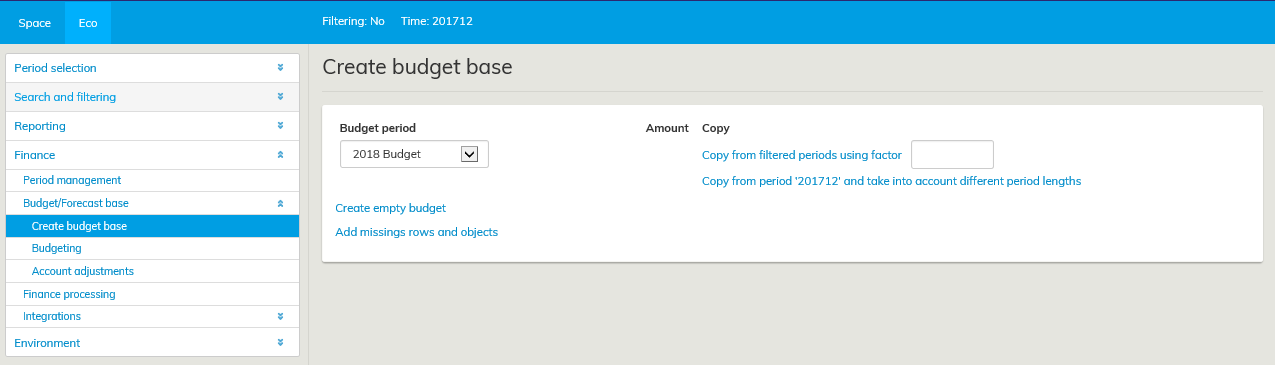
Som grundläggande uppgifter i budgeten kan du utnyttja föregående års budget i Optimaze eller debiterings- eller utfallsuppgifter. Vid användning av utgångsdata för utfalls- och debiteringsuppgifterna kan du vid behov använda utfallen för en eller flera månader.
De perioder som ska kopieras väljs i fönstret Val av period och vid punkten Kopiera från de filtrerade perioderna med koefficienten markerar du med vilken koefficient du vill kopiera den valda uppgiften.
Om du vill kan du även skapa en tom budgetmall, där det inte finns några som helst kostnader. I sådana fall matas budgetkostnaderna i från början i budgetmallen. I sådan fall trycker du på länken Skapa tom budget.
I Optimaze är det även möjligt att importera budgetuppgifterna med en Excel-fil. I sådana fall måste filen innehålla uppgifterna i rader om objektet, kontot och eurobeloppet.
The Budget template creation option is available for users who have access rights to finance processing in Optimaze.
In budgeting, it is possible to use the budget from a previous year that is saved in Optimaze, or the charging or realization information. When using the realization or charging information as a basis, it might be required to use the realization data from one month or more.
Periods to be copied are selected from the Period selection window. Enter the multiplier with which the selected information should be copied in the field Copy from filtered periods using factor.
If required, it is possible to create a blank budget template that does not include any costs. In this case, the budget costs must be entered in the budget template from the beginning. If you want to do this, click on the link Create blank budget.
It is also possible to import budget data to Optimaze with an Excel file. Information on the site, account and amount in euros must then be included in separate rows.