Versions Compared

Key

  • This line was added.
  • This line was removed.
  • Formatting was changed.

...

Expand
title0780_DailyReport

Standard report


Description:

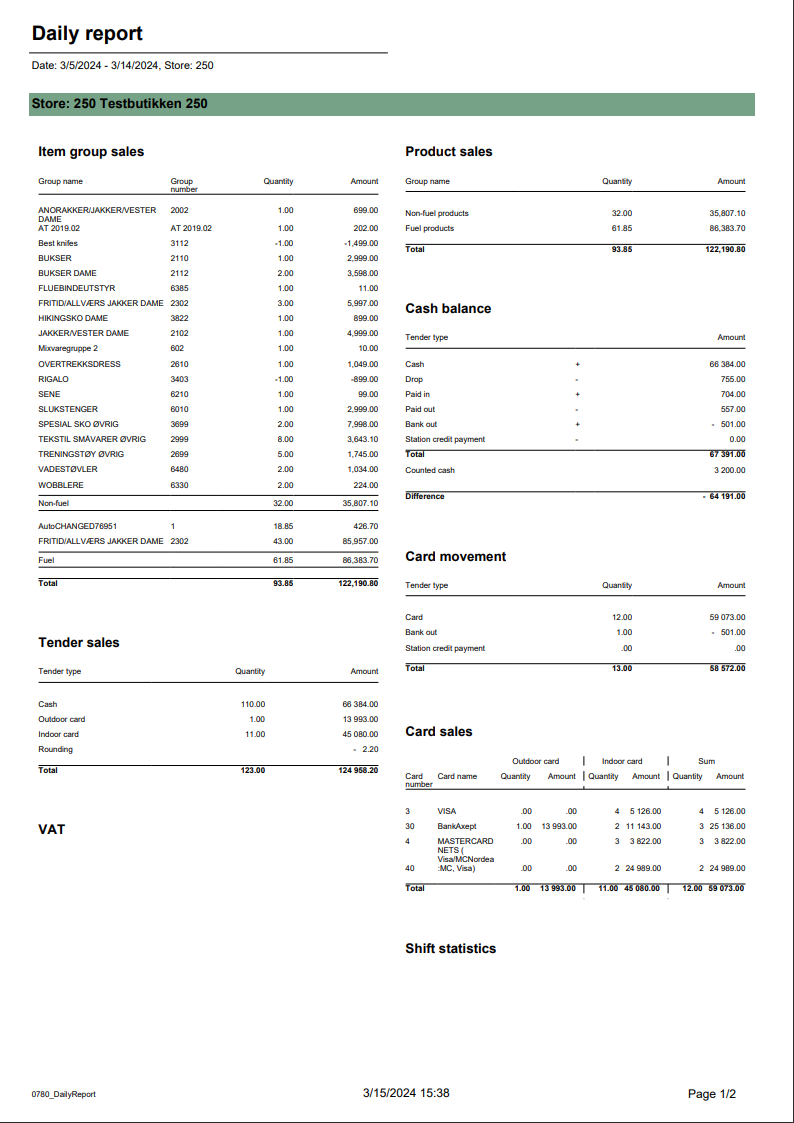
Report allows to follow up sales in a specified store: comparing fuel and non fuel articles on all product groups, selected tender measures, VAT and measures like: cash balance, card movements, card sales and shift statistics. Depending on number of results it can be multi page. Report is divided in 8 subreports which will be descriped separatly below.

Selections (applies to all subreports): 

  • Date from: Default yesterday
  • Date to: Default yesterday
  • Store: Single value; Default first available from the list.

Hidden parameters: 

  • pFuelItemType - Item type number used to identify fuel items - Default: [Article].[Item Type].&[10]
  • pPriceChannelOutdoor - Price channel number (in Reporting) used to identify outdoor sales - Default: [Price Channel].[Price Channel].&[11]
  • pReasonCodeBreakage - Reason code name used to identify Driveoff - Default: [Reason Code].[Reason Code].&[Avstikk]&[Return]

Subreports:


Expand
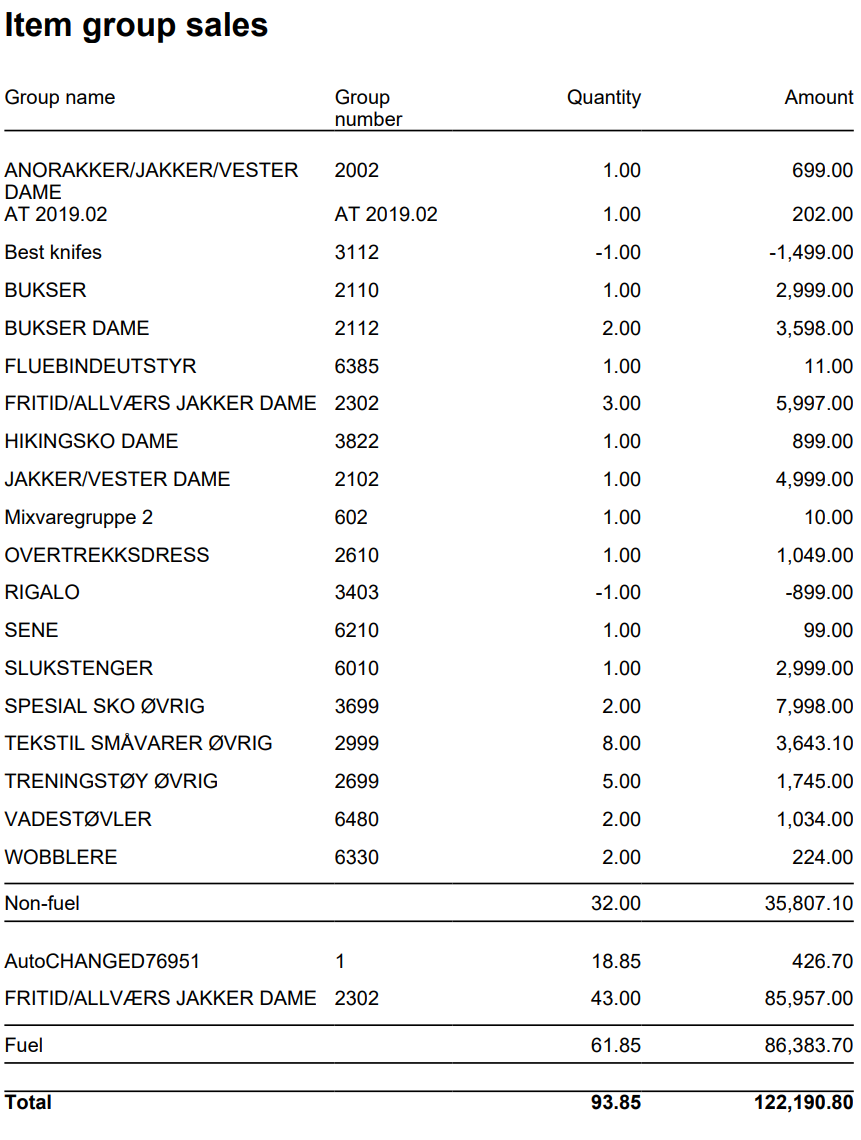
title1801_subItemGroupSales

Columns:

  • Item Group Name
  • Item Group Number
  • Quantity
  • Amount

Rows:

  • One row per item group with divide to fuel and non fuel.
  • Subtotal: Total for all rows above Subtotal

______________________________________________________________________________________

  • Total
Expand
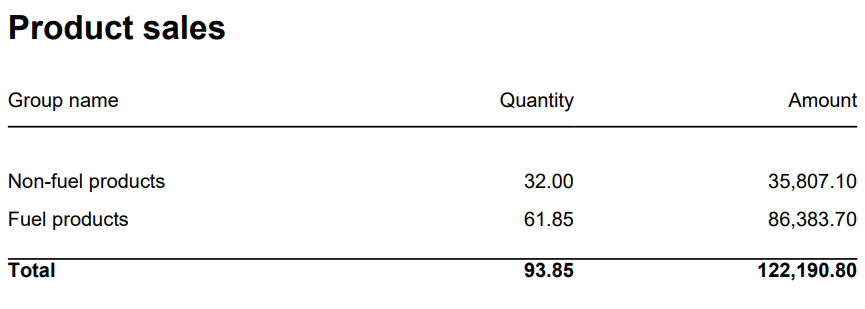
title1802_subProductSales

Columns:

  • Item Group Name
  • Item Group Number
  • Quantity
  • Amount

Rows:

  • Subtotal Fuel
  • Subtotal Non Fuel

______________________________________________________________________________________

  • Total


Expand
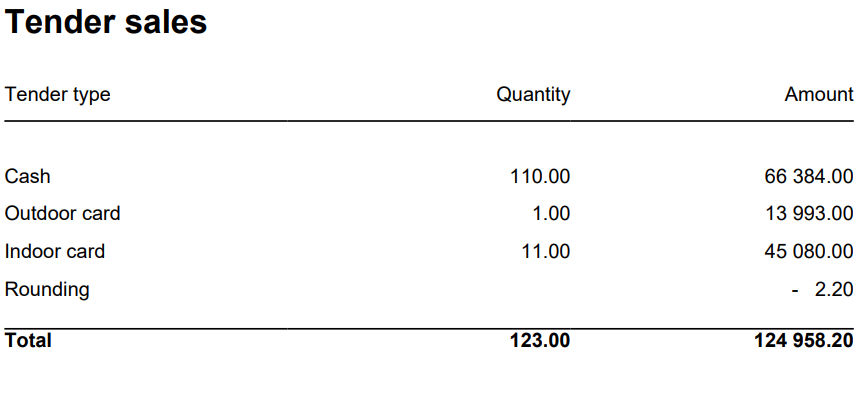
title1803_subTenderSales

Columns:

  • Tender Type
  • Quantity = Tender Count
  • Amount = Tender Amount

Rows:

  • Cash = TenderType.Cash
  • Outdoor Cash
  • Indoor Cash
  • Credit
  • Card = TenderType.CreditDebit & TenderType.ECreditDebit selected price channel
  • Indoor Card = All price channels except selected
  • Credit = TenderType.Credit
  • Other = All tender types except mentioned above Other
  • Rounding

_____________________________________________________________________________________

  • Total = Tender Amount - Rounding (can be negative)
Expand
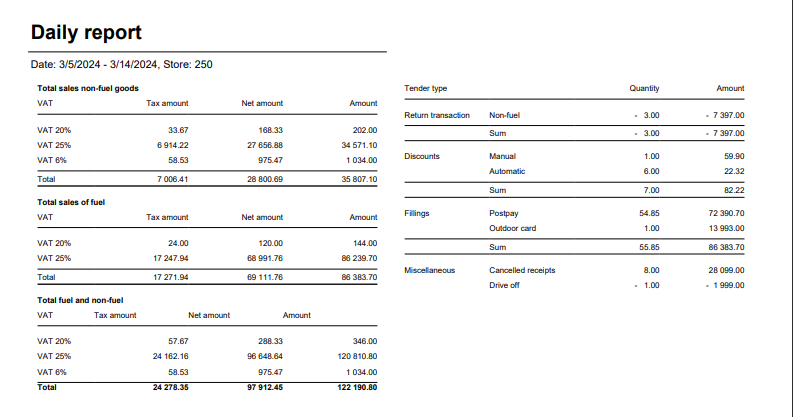
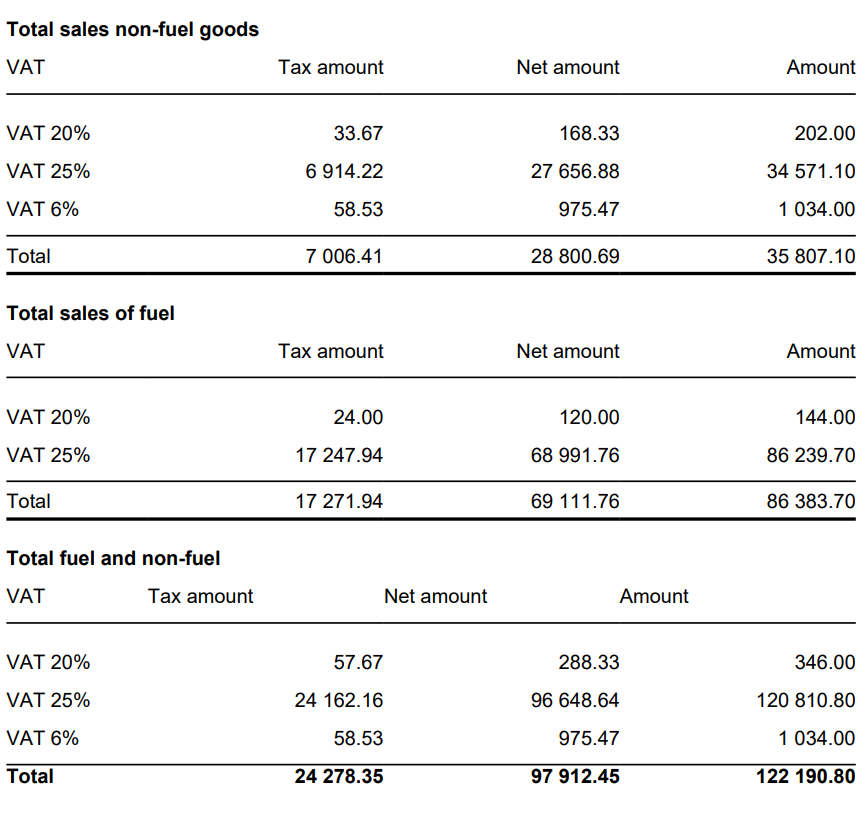
title1804_subVAT

Columns:

  • VAT
  • Tax Amount
  • Net Amount
  • Amount

Rows:

  • One row per VAT with divide to fuel and non fuel.
  • Subtotal: Total for all rows above Subtotal

______________________________________________________________________________________

  • One row per VAT
  • Total 
Expand
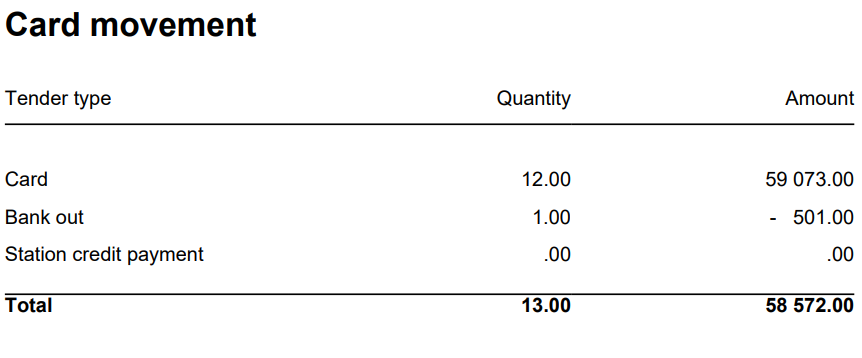
title1805_subCardMovement

Columns: 

  • Tender Type
  • Quantity
  • Amount

Rows:

  • Card
  • Cashback

  • Station Credit Payment
  • In Payment

_____________________________________________________________________________________

  • Total
Expand
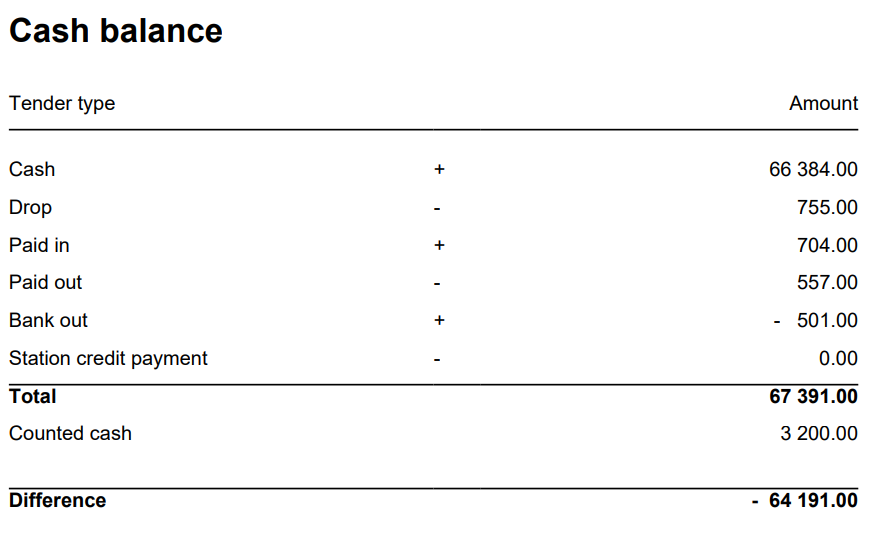
title1806_subCashBalance

Columns: 

  • Tender Type
  • Quantity
  • Amount

Rows:

  • Cash = TenderAmount for TenderType.Cash - ControlAmount for TenderControlType.PayedIn + ControlAmount for TenderControlType.PayedOutCashback = TenderAmount for TenderType.CashBack
  • Drop = ControlAmount for TenderControlType.Drop
  • Paid In = ControlAmount for TenderControlType.PayedIn
  • Paid Out = ControlAmount for TenderControlType.PayedOut
  • Cashback = TenderAmount for TenderType.CashBack
  • Station Credit Payment = TenderAmount for TenderControlType.Cash and TenderControlType.PaymentOnAccount

_____________________________________________________________________________________

  • Total (Cash - Cashback - Drop + Paid In + Paid Out(negative) - Station Credit Payment)
    = TenderAmount for TenderType.Cash - ControlAmount for TenderControlType.PayedIn + ControlAmount for TenderControlType.PayedOut 
    + TenderAmount for TenderType.CashBack
    - ControlAmount - ControlAmount for TenderControlType.Drop
    + ControlAmount for TenderControlType.PayedIn
    - ControlAmount for TenderControlType.PayedOut 
    + TenderAmount for TenderType.CashBack (negative value)
    - TenderAmount for TenderControlType.Cash and TenderControlType.PaymentOnAccount
  • Balance Amount Cash = BalanceAmount for TenderType.Cash

_____________________________________________________________________________________

  • Difference (Balance Amount Cash - Total)
Expand
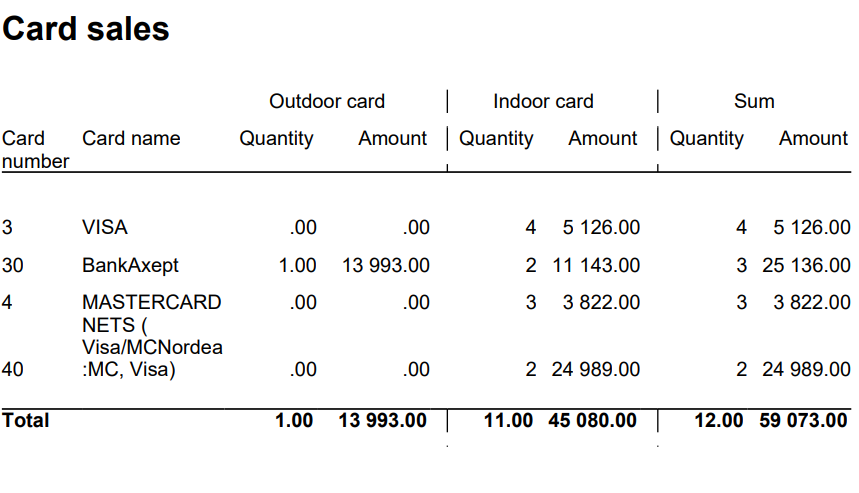
title1807_subCardSales

Columns:

  • Card Number
  • Card Name
  • Quantity Outdoor
  • Amount Outdoor
  • Quantity Indoor
  • Amount Indoor
  • Quantity
  • Amount

Rows:

  • One row per Card

______________________________________________________________________________________

  • Total
Expand
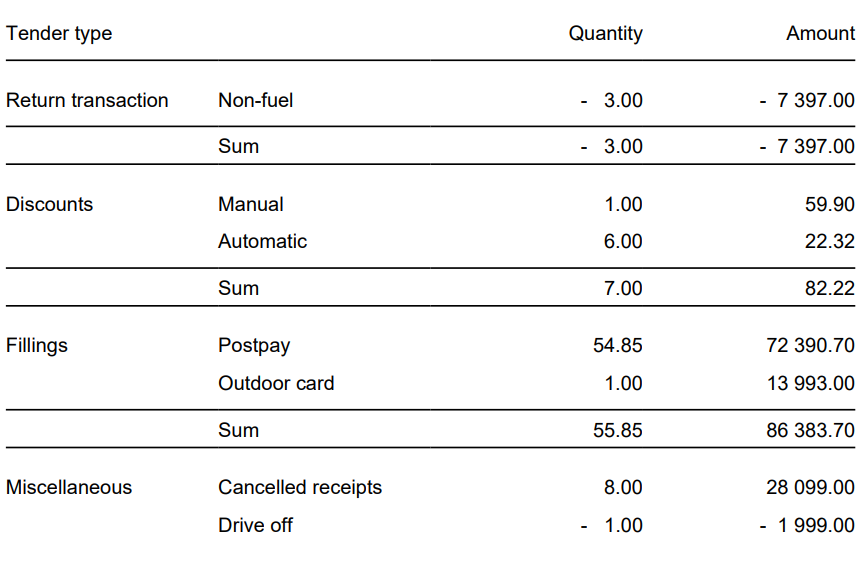
title1808_subShiftStatistics

Columns: 

  • Tender Type Grouping
  • Tender Type
  • Quantity
  • Amount

Rows:

  • Return Transaction
    • Fuel
    • Non Fuel

_____________________________________________________________________________________

  • Subtotal (section above)

_____________________________________________________________________________________

  • Discounts
    • Manual
    • Automatic

_____________________________________________________________________________________

  • Subtotal (section above)

_____________________________________________________________________________________

  • Fillings
    • Post Pay
    • Outdoor Card

_____________________________________________________________________________________

  • SubTotal (section above)

_____________________________________________________________________________________

  • Miscellaneous
    • Cancelled Receipts
    • Drive Off
    • Pos Shift Count

Source:

  • Lindbak POS Reporting cube (OLAP)


...