Versions Compared

Key

  • This line was added.
  • This line was removed.
  • Formatting was changed.

...

Expand
title0758_SalesPerHour

CO-271850 based on 0603_SalesPerHour


Description:

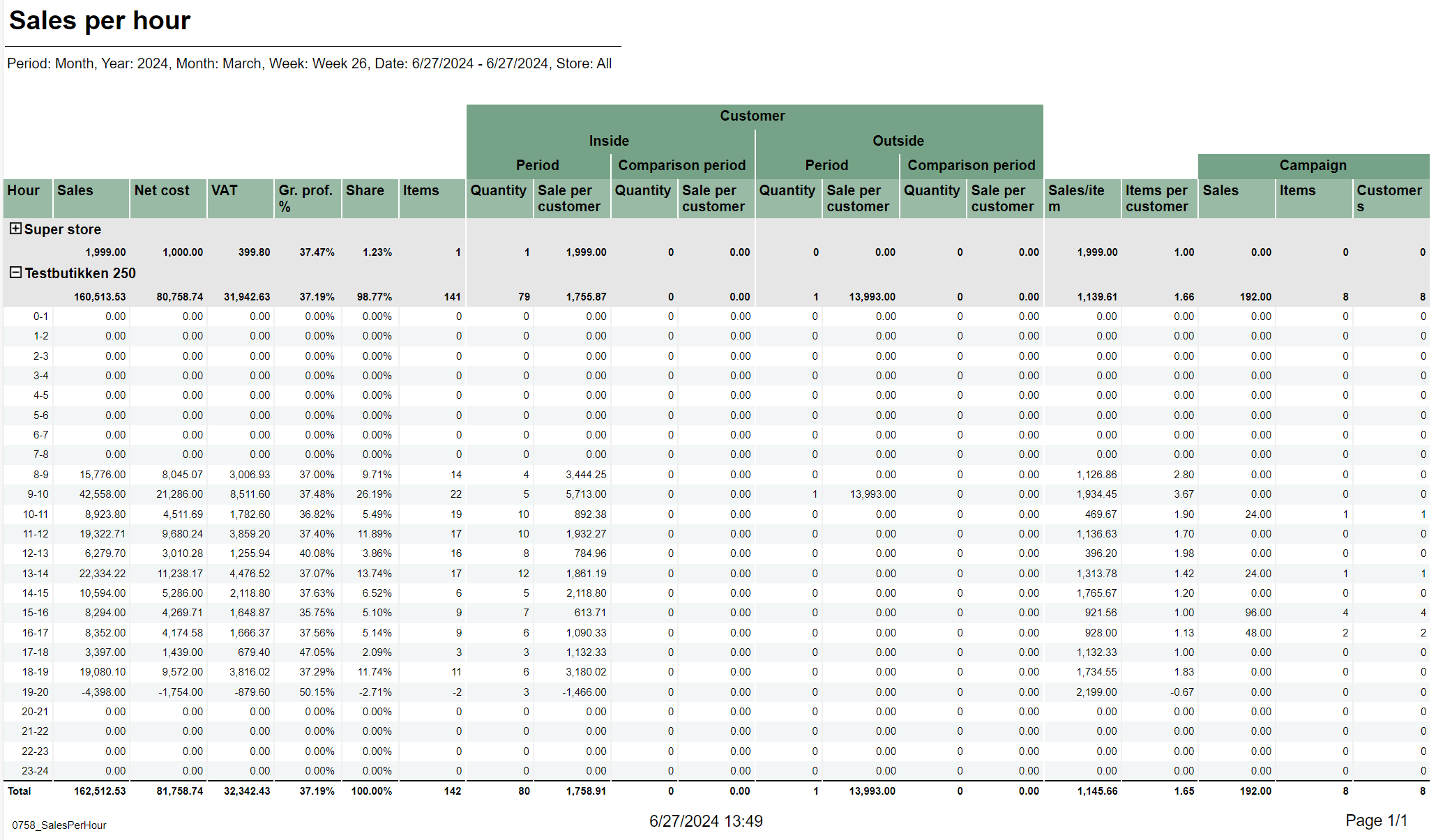
Report lists sales per hour with counting customer inside and outside. It also compares inside / outside data with selected period.

Selections:

  • Periode – default month
  • Year – Default current year
  • Month – Default current month
  • Week – Default current week
  • Date from – Default today
  • Date to – Default today
  • Compare date from - Default yesterday.
  • Compare date to - Default yesterday.
  • Profile – Default all
  • Team – Default all
  • Store – Default all
  • Exclude groups – Default false
  • Excluded groups – Default list of excluded groups

Parameters:

  • pExcludedGroupsList - Parameter to create list of itemgroups to use in excluded groups selection (<name>;<itemgroupnumber>,<name>;<itemgroupnumber>). Default = Bilvask;93
  • pPriceChannelIn - Parameter to define pricechannel for inside customers. Default = [Price Channel].[Price Channel Key].&[Cashier]
  • pPriceChannelOut - Parameter to define pricechannel for outside customers. Default = [Price Channel].[Price Channel Key].&[ShopAndGoCheckTerminal]
  • pHourFrom and pHourTo - Parameters to define which hours should be shown in report. Default 0 - 23.

Output:

  • Report has a summary at the end of table on each column.
  • Summary totals in the beginning  of new hierarchy level for store.

Columns:

  • Hour – Hour of a day
  • Sales – Sales amount
  • Net cost
  • VAT – VAT amount
  • Gr. prof. % - Gross profit percentage
  • Share
  • Items – Sales quantity
  • Quantity - Customer inside/Customer outside quantity for period and comparison period
  • Sale per customer - Customer inside/Customer outside sale per customer for period and comparison period
  • Sales/item – Sales amount divided by item quantity Items per customer
  • Items per customer
  • Sales – Campaign sales amount
  • Items – Campaign item quantity
  • Customers – Campaign customer count

Source:

  • Lindbak POS Reporting DW
  • Lindbak POS Reporting Cube (OLAP)

Anchor
0759_SalesAnalysisWithComparisonAndDrilldown

Expand
title0759_SalesAnalysisWithComparisonAndDrilldown

CO-211507 / RTC-45144
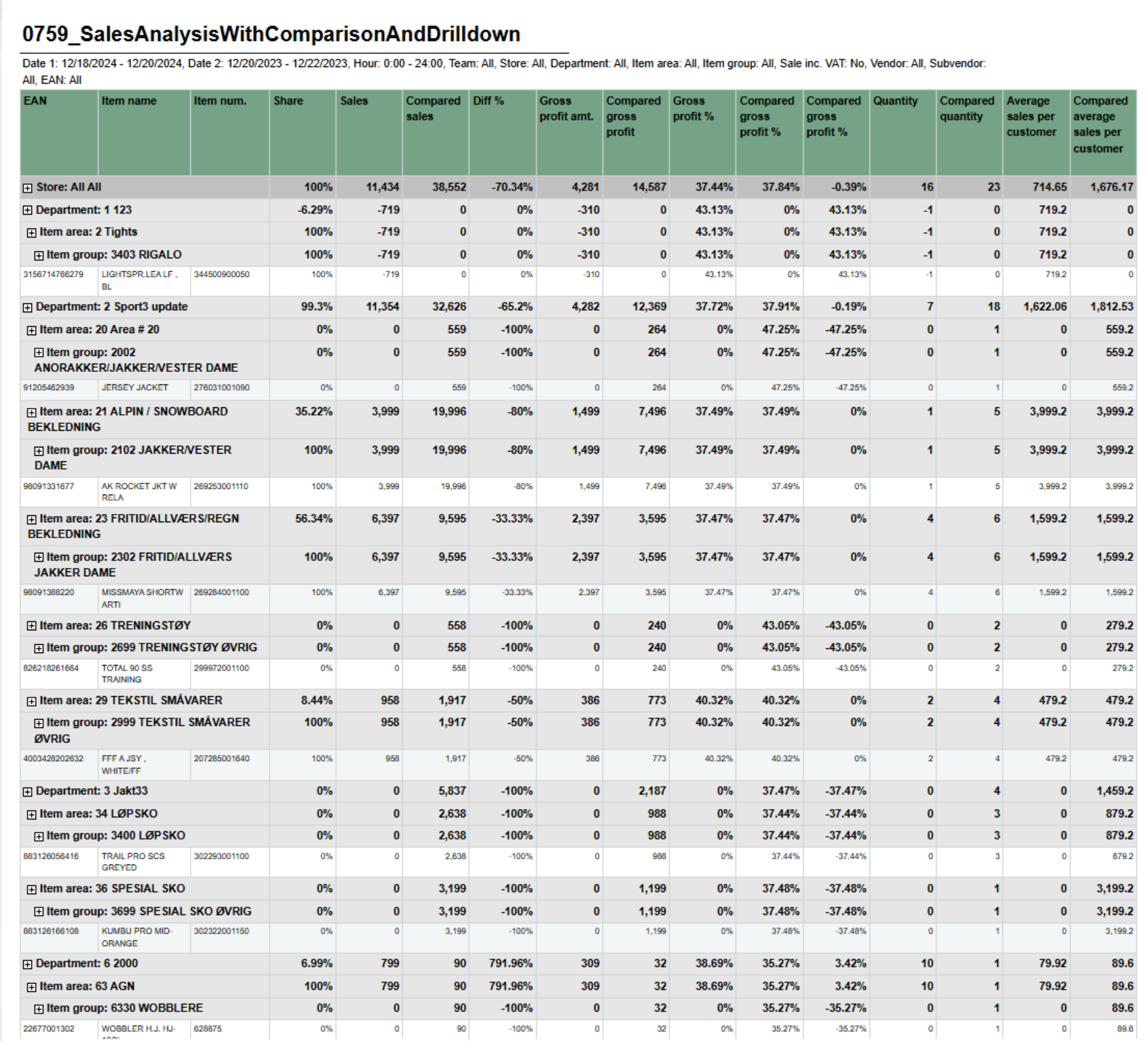
Image Added


Description:

Report shows sales statistics in a hierarchy from store to department, item area, item group and item. Report show statistics for all selected stores and a total page for all selected store.


Selections:


  • Date from – Default today
  • Date to – Default today
  • Compare date from – Default last year from today
  • Compare dat to – Default last year from today
  • Hour from – Default 0:00
  • Hour to – Default 24:00
  • Team – Default all
  • Stores – Default all
  • Department – Default all
  • Article area – Default all
  • Article group – Default all
  • Vendor – Default all
  • Subvendor – Default all
  • EAN list  - Default empty
  • Include VAT – Default false
  • Exclude groups  - Default false
  • Excluded groups – Default groups 2 and 92.  Appears when Exclude groups is switched to true

Output:

One line per item with the hierarchy from store, department, item area and item group.


Columns:

  • EAN - Shows the entire hierchy down to EAN
  • Item name - Item name
  • Item num. - Item number
  • Share - Percentage share of sales
  • Sales - Sales amount
  • Compared ex. VAT – Compared sales excluding VAT
  • Diff % - Difference percentage between sales and compared sales
  • Gross profit amt. – Gross profit amount Compared gross profit
  • Gross profit % - Gross profit percentage
  • Compared gross profit % - Compared gross profit percentage
  • Diff gr. prof. %-units – Difference gross profit percentage in units
  • Quantity
  • Compared quantity
  • Average sales per customer inc. VAT – Average sales per customer including VAT
  • Compared average sales per customer inc. VAT – Compared average sales per customer including VAT


Hidden parameters:

  • pExcludedGroupsList – Report contain hidden parameter with selected article groups to be exluded by default. This parameter and pExcludedGroups will not work until parameter pExludeGroups will be set as True by user.


Source:

  • Lindbak POS Reporting Cube (OLAP)
  • Lindbak POS Reporting DW


Anchor
0780_DailyReport
0780_DailyReport

...