
...
| Expand | ||
|---|---|---|
| ||
Standard Report
Description:
Selections:
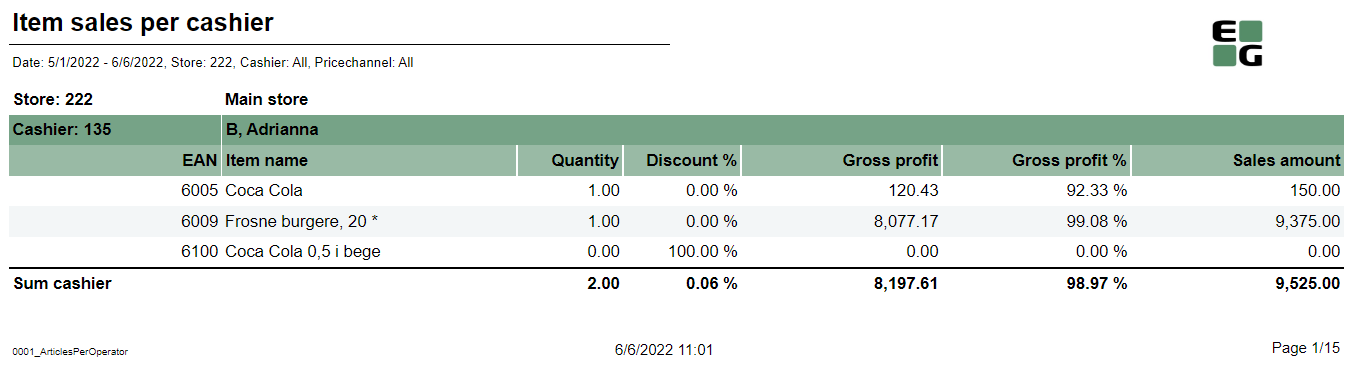
Output: Item sale statistics showed individually per each cashier (with number between Operator from and Operator to) per each stores (with number between Retail store from and Retail store to). Additionally there are totals for each cashier and each store. Columns:
Sorting:
Source:
|
| Anchor | ||||
|---|---|---|---|---|
|
| Expand | ||
|---|---|---|
| ||
Standard report
Description:
Selections:
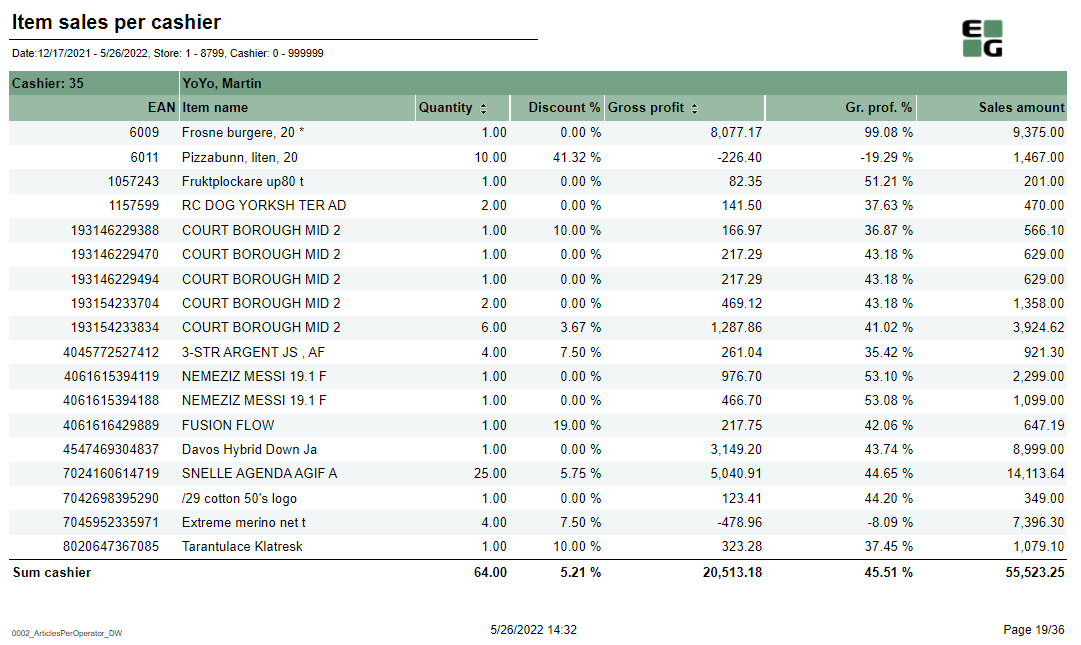
Output: Item sale statistics showed individually per each cashier (with number between Operator from and Operator to) per each stores (with number between Retail store from and Retail store to). Additionally there are totals for each cashier and each store. Columns:
Sorting:
Source:
|
| Anchor | ||||
|---|---|---|---|---|
|
| Expand | ||
|---|---|---|
| ||
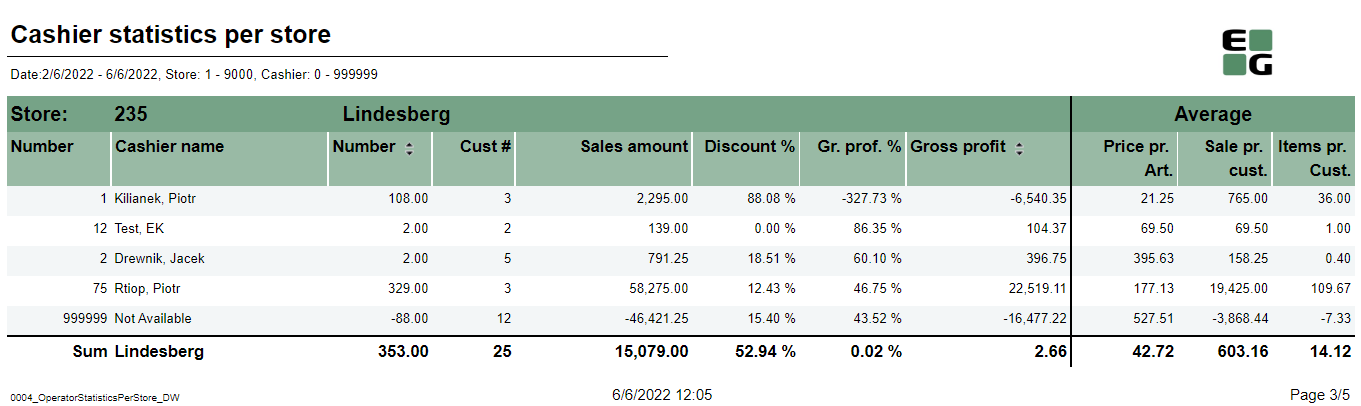
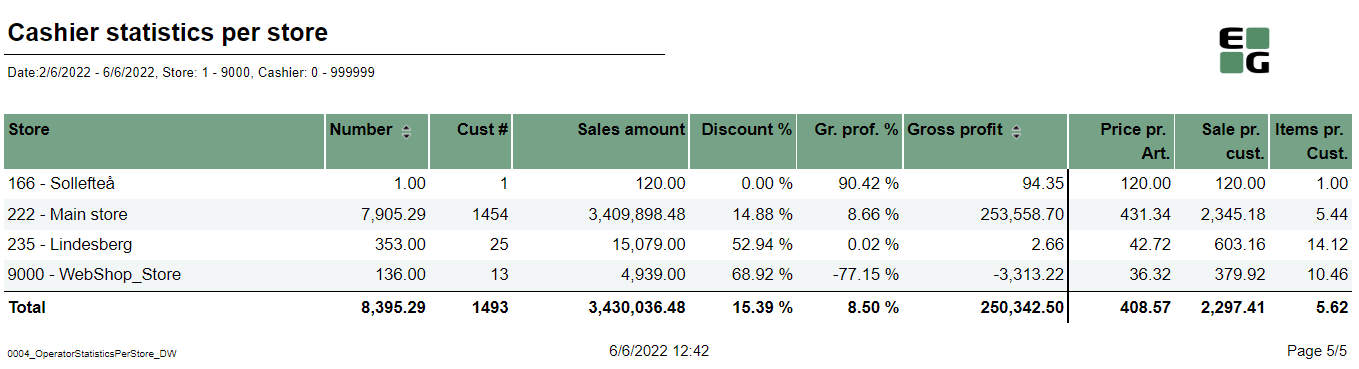
Standard report
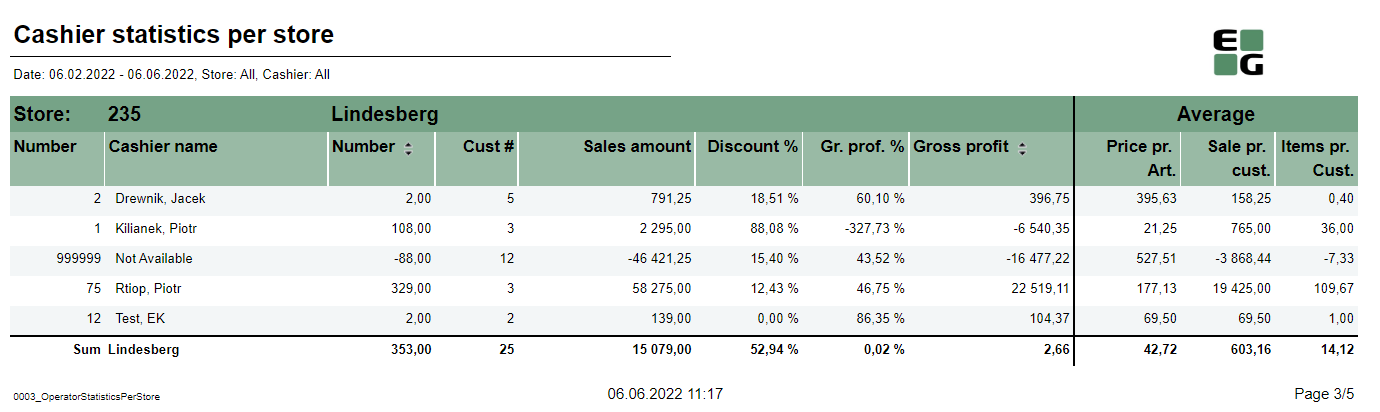
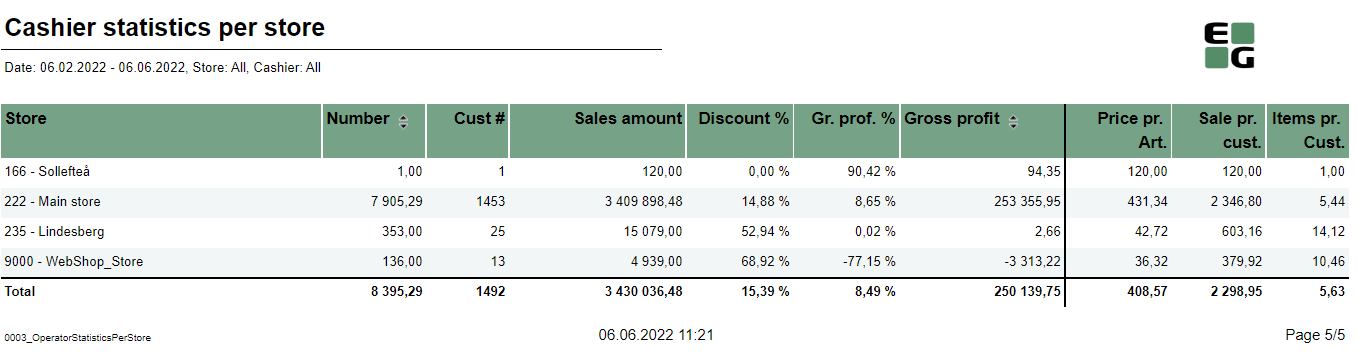
Description: Report is devided one page per store and shows cashiers sale statistics. On the last page there is summary for all selected stores. Selection:
Output:
Columns:
Sorting:
Source:
|
| Anchor | ||||
|---|---|---|---|---|
|
| Expand | ||
|---|---|---|
| ||
Standard report
Description: Report is divided one page per store and shows cashiers sale statistics. On the last page there is summary for all selected stores. Selection:
Output:
Columns:
Sorting:
Source:
|
| Anchor | ||||
|---|---|---|---|---|
|
| Expand | ||
|---|---|---|
| ||
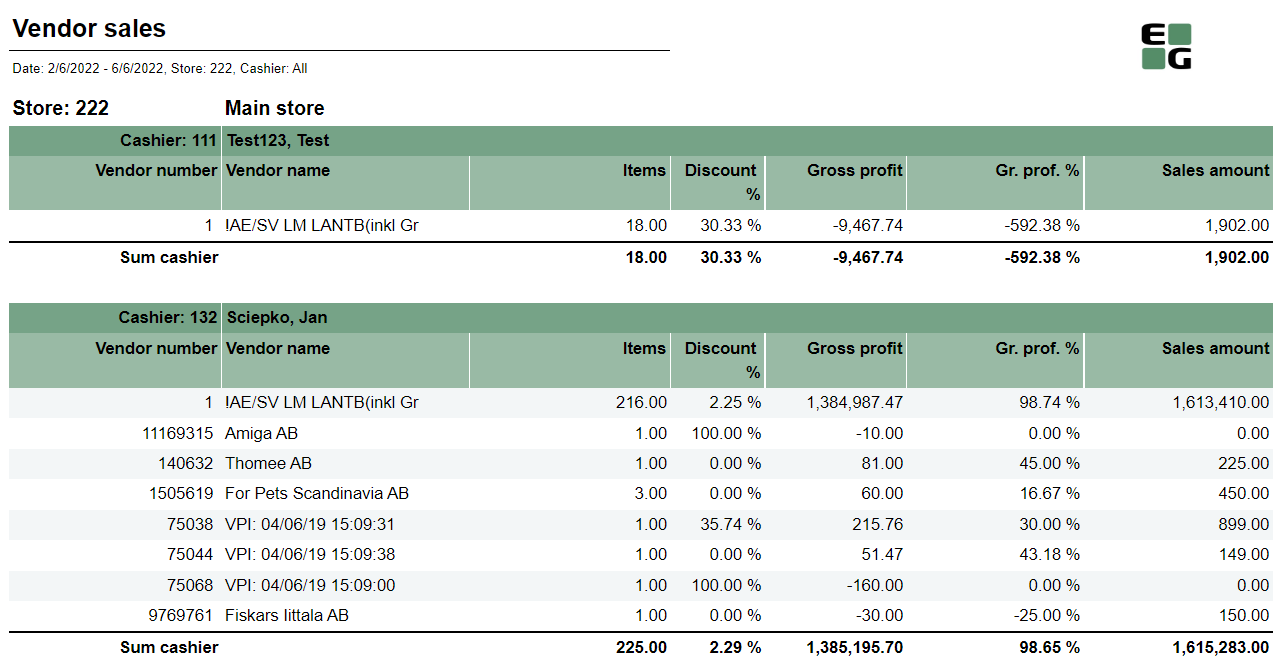
Standard report
Description: Report allows to follow up sales statistics per cashier and per vendor (supplier). Report is devided sections per each selected cashier. Each section shows sales statistics per vendor. Selection:
Output:
Columns:
Source:
|
| Anchor | ||||
|---|---|---|---|---|
|
| Expand | ||
|---|---|---|
| ||
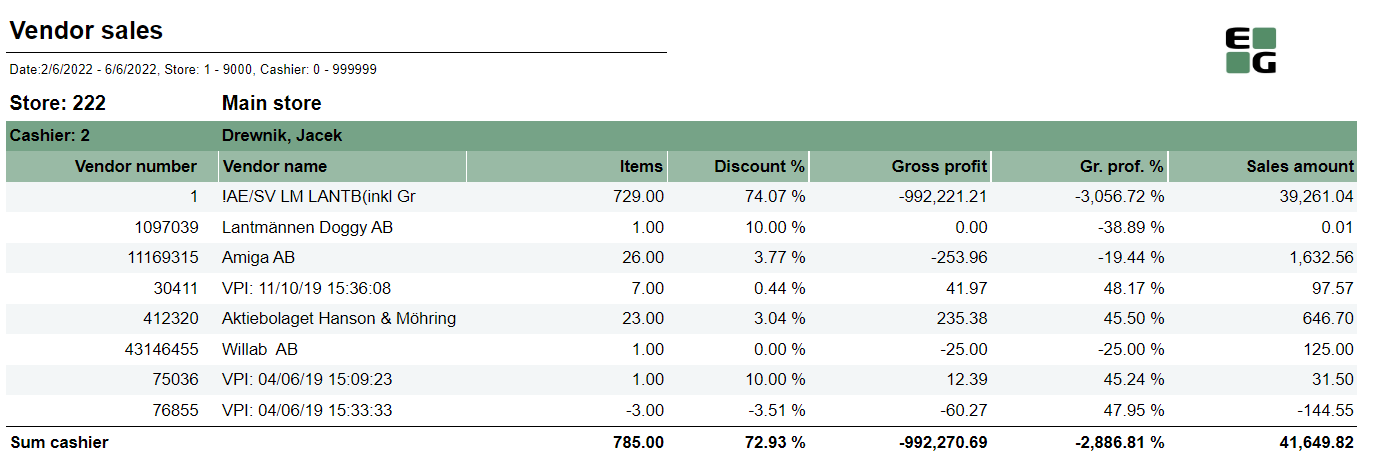
Standard report
Description: Report allows to follow up sales statistics per cashier and per vendor (supplier). Report is divided sections per each selected cashier. Each section shows sales statistics per vendor. Selection:
Output:
Columns:
Source:
|
| Anchor | ||||
|---|---|---|---|---|
|
| Expand | ||
|---|---|---|
| ||
Standard report
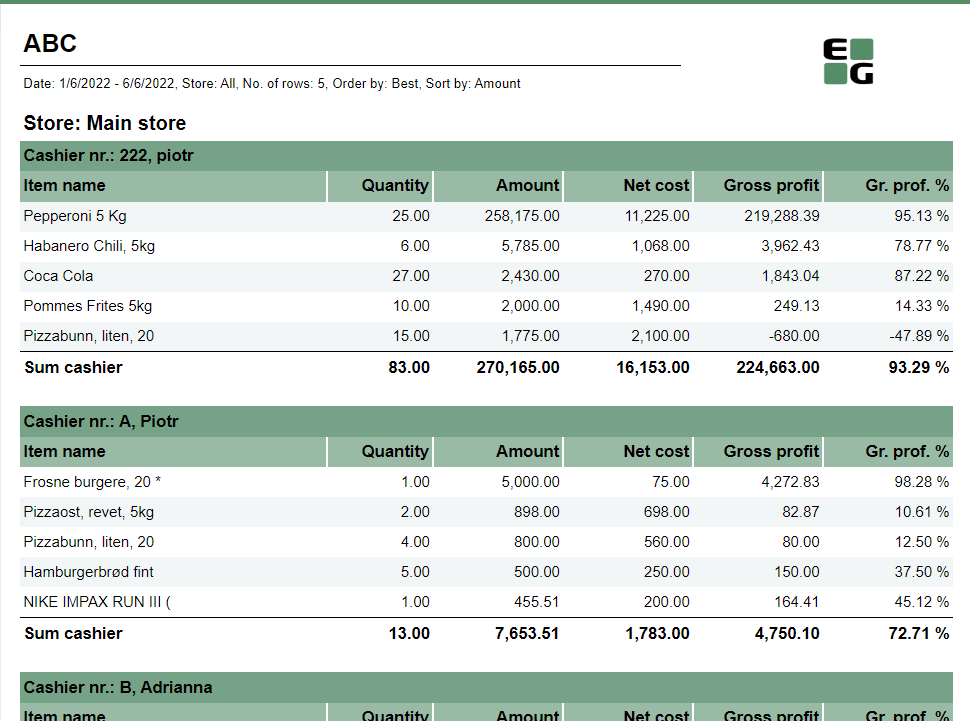
Description: Report allows to find given number of best or worst selling items per store, per cashier on multiple levels (amount, quantity, net cost, gross profit). Selections:
Output: One page per each store. One section per each cashier. Inside the section selected number of best (or worst) selling items for given cashier. Columns:
Sorting:
Source:
|
| Anchor | ||||
|---|---|---|---|---|
|
| Expand | ||
|---|---|---|
| ||
Standard report
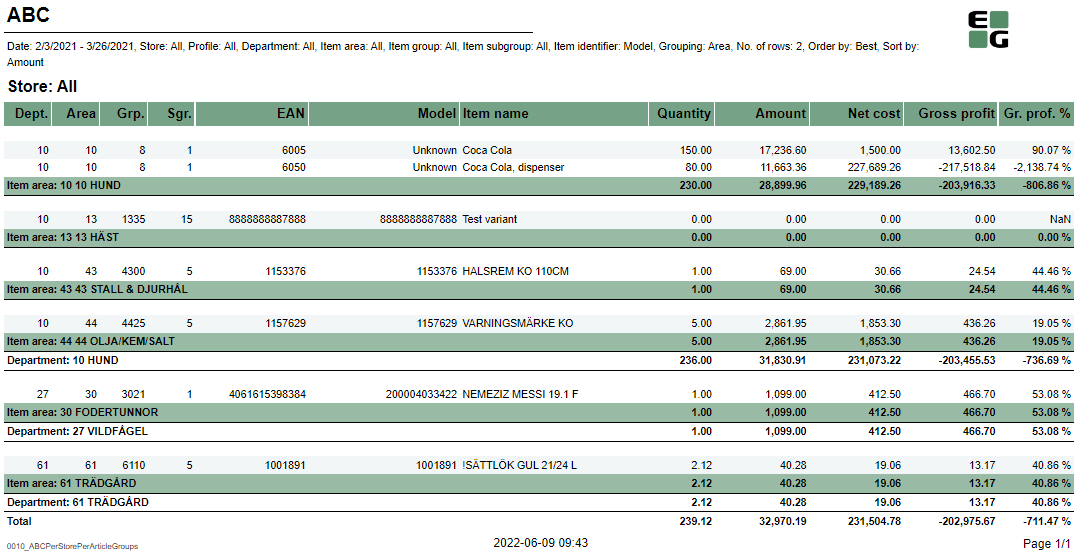
Description: Report allows to find given number of best or worst selling items on multiple levels (amount, quantity, gross profit, etc.) per selected hierarchy level (department,item area, etc.) Selections:
Output: Sale statistics for selected number of best or worst items per selected grouping (store or hierarchy level) sorted by selected sort measure with totals on higher levels (e.g. for grouping: article area there are totals for department and store, but for grouping: depratment there will be only total per store) Columns:
Sorting:
Clarifications:
Source:
|
| Anchor | ||||
|---|---|---|---|---|
|
| Expand | ||
|---|---|---|
| ||
Standard report
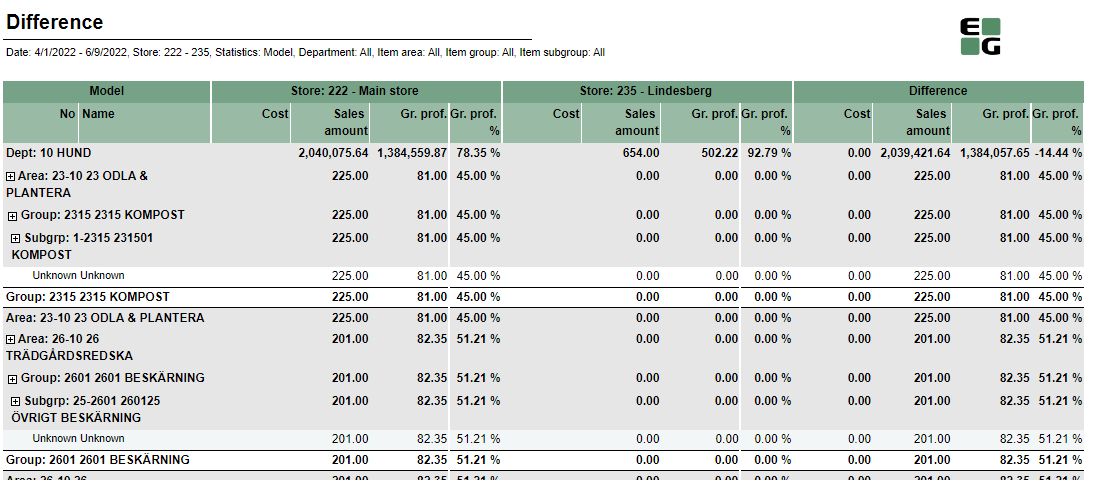
Description: Report allows to comapare sales between two selected stores. Selections:
Output: Sales statistics per all item ierarchy levels (department, area, group, subgroup, item) expanded as selected in Statiscitcs parameter. Report is devoded in 3 sections:
Columns:
Sorting:
Clarifications:
Source:
|
| Anchor | ||||
|---|---|---|---|---|
|
| Expand | ||
|---|---|---|
| ||
Standard report
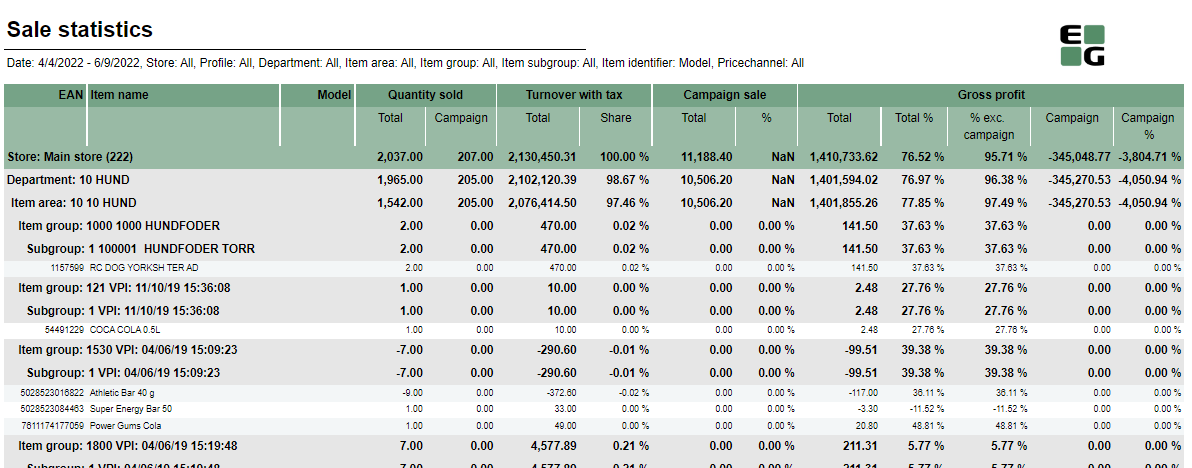
Description: Report gives detailed sales statistics with campaign sales statistics included. Selections:
Output: Sale statistics for all items with not null sale amount narrowed down only by selections. One row per item. Totals in the begining of new hierarchy level for:
Columns:
Sorting:
Hidden parameters:
Source:
|
| Anchor | ||||
|---|---|---|---|---|
|
| Expand | ||
|---|---|---|
| ||
Standard report
Description: Report gives detailed sales statistics with campaign sales statistics included with easier access to needed information than 0012. Selections:
Output: Sale statistics for all items with not null sale (or sale + nonsale if include nonsale box checked) amount narrowed down only by selections. One row per item. Totals in the begining of new hierarchy level for:
Columns:
Sorting:
Hidden parameters:
Source:
|
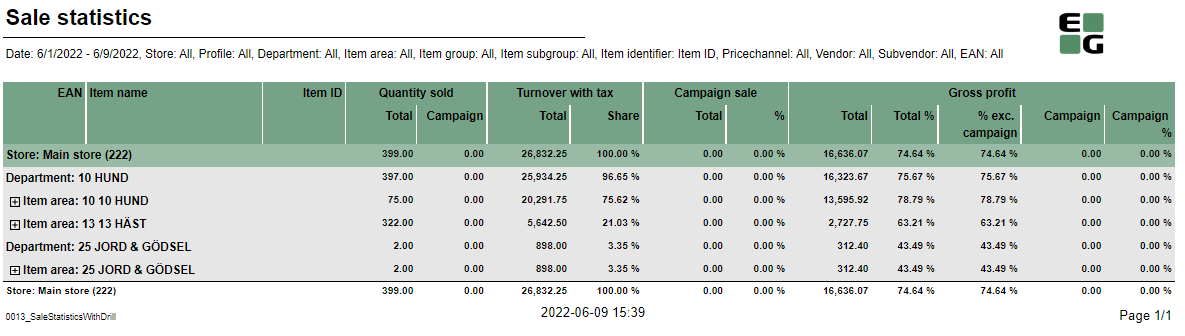
 Expand to: Expands drill down to selected level; default Area
| Anchor | ||||
|---|---|---|---|---|
|
| Expand | ||
|---|---|---|
| ||
Standard report
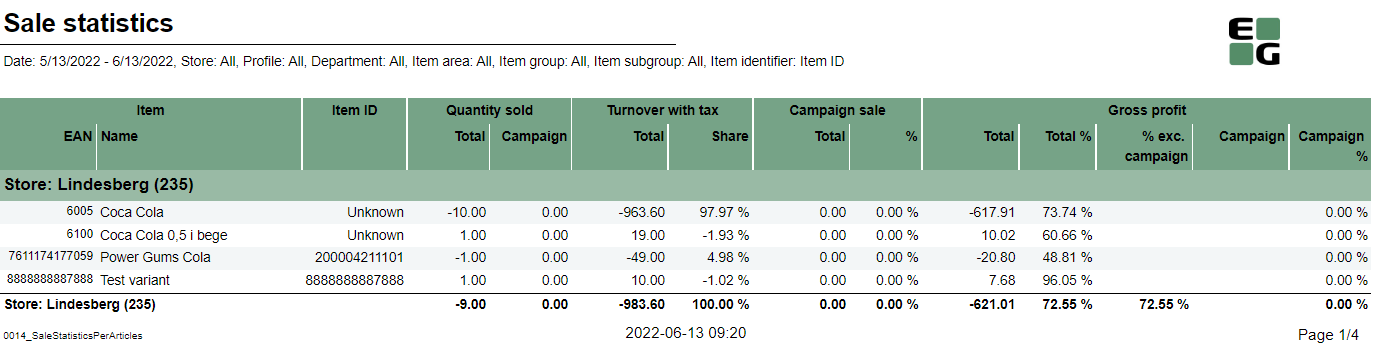
Description: Report gives detailed sales statistics with campaign sales statistics per article with grouping only per store. Selections:
Output: Sale statistics for all items with not null sale amount narrowed down only by selections. One row per item. One page per store. Columns:
Sorting:
Source:
|
| Anchor | ||||
|---|---|---|---|---|
|
| Expand | ||||||||||||||||||||||||||||||||||||||||||||||||||||||||||||
|---|---|---|---|---|---|---|---|---|---|---|---|---|---|---|---|---|---|---|---|---|---|---|---|---|---|---|---|---|---|---|---|---|---|---|---|---|---|---|---|---|---|---|---|---|---|---|---|---|---|---|---|---|---|---|---|---|---|---|---|---|
| ||||||||||||||||||||||||||||||||||||||||||||||||||||||||||||
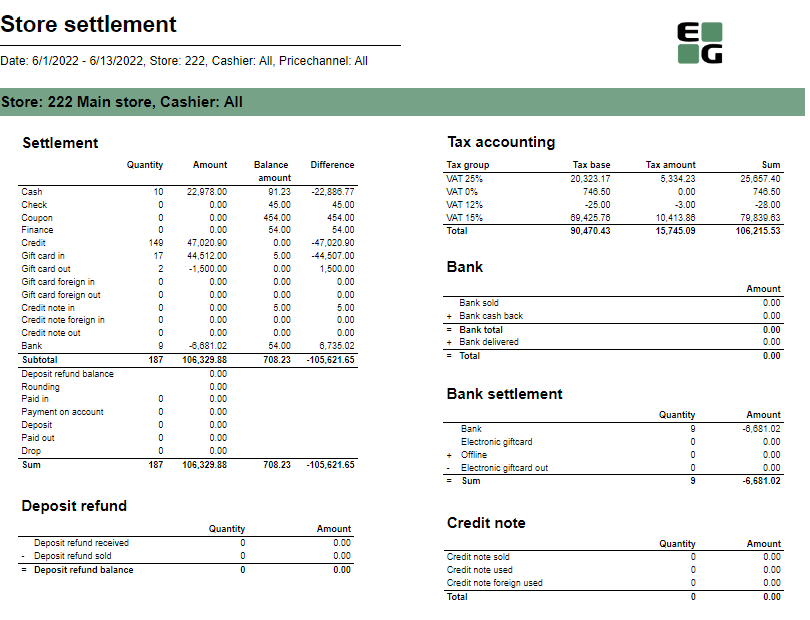
Standard report
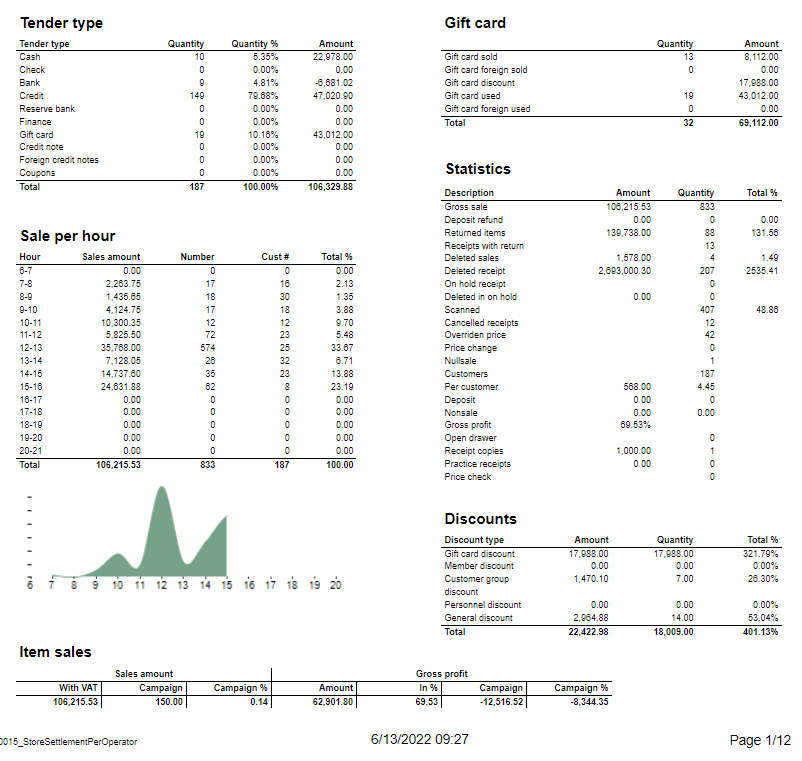
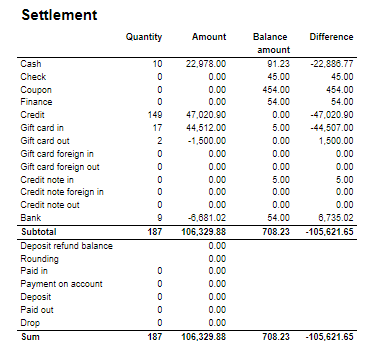
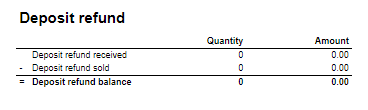
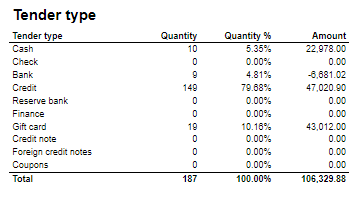
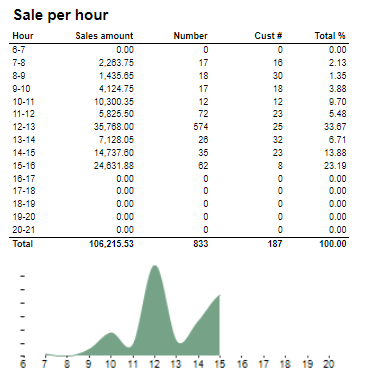
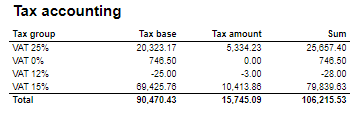
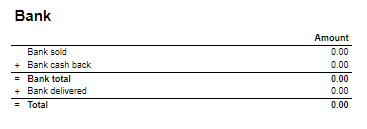
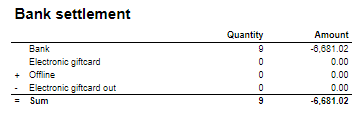
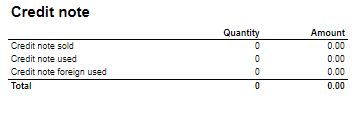
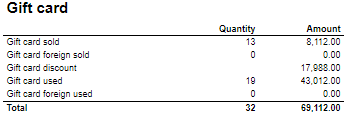
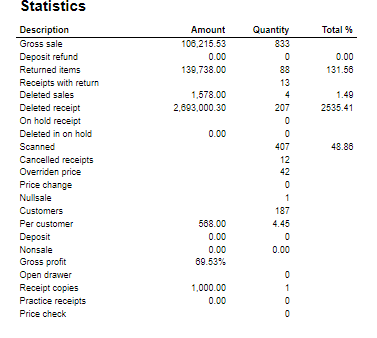
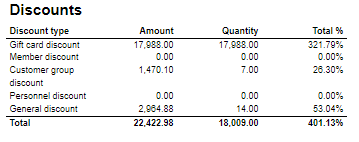
Description: Report allows to follow up store settlement: on first page settlement for all selected cashiers (if all cashiers are selected it equals whole store settlement) and settlement per each cashier on following pages. Report is divided in 12 subreports which will be descriped separatly below. Selections (applies to all subreports):
Subreports:
Source:
|

| Anchor | ||||
|---|---|---|---|---|
|
| Expand | |||||||||||||||||||||||||||||||||||||||||||||||||||||||||||||||||||||||||||
|---|---|---|---|---|---|---|---|---|---|---|---|---|---|---|---|---|---|---|---|---|---|---|---|---|---|---|---|---|---|---|---|---|---|---|---|---|---|---|---|---|---|---|---|---|---|---|---|---|---|---|---|---|---|---|---|---|---|---|---|---|---|---|---|---|---|---|---|---|---|---|---|---|---|---|---|
| |||||||||||||||||||||||||||||||||||||||||||||||||||||||||||||||||||||||||||
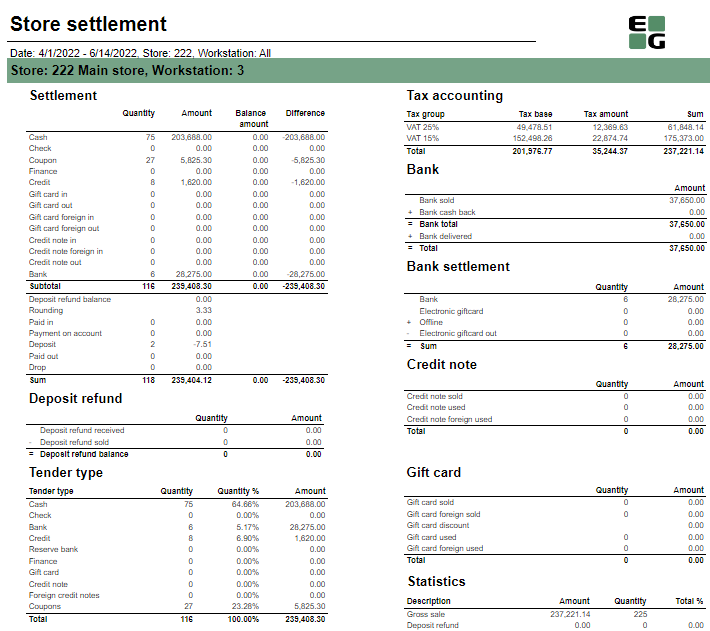
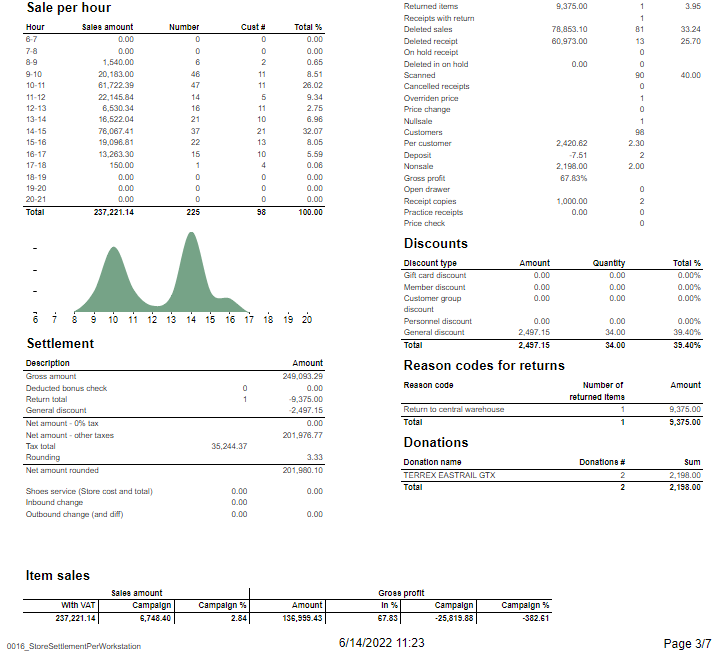
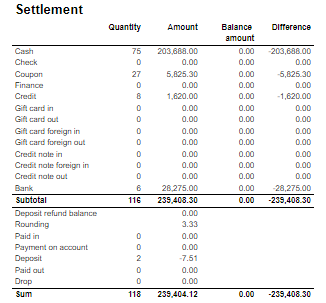
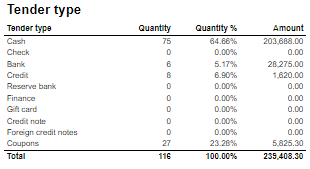
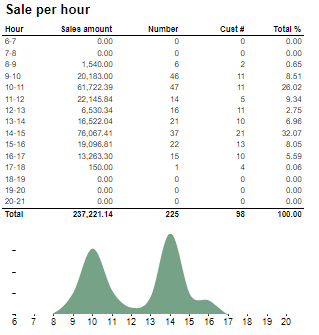
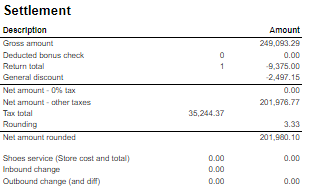
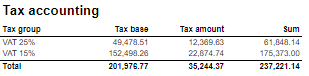
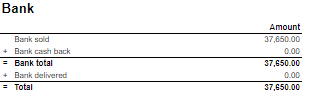
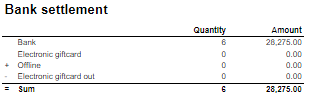
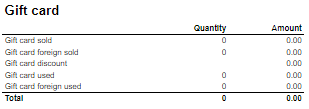
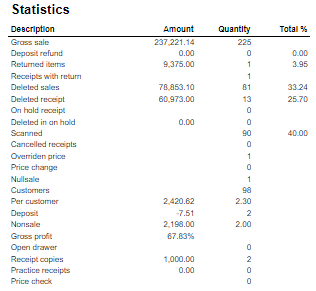
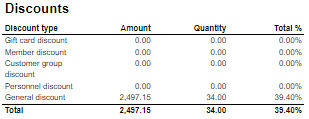
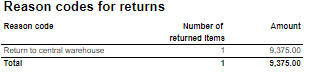
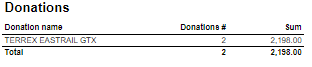
Description: Report allows to follow up store settlement: on first page settlement for all selected workstations and settlement per each workstation on following pages. Report is divided in 15 subreports which will be descriped separatly below. Selections (applies to all subreports):
Subreports:
Source:
|

| Anchor | ||||
|---|---|---|---|---|
|
...
| Expand | ||
|---|---|---|
| ||
Standart report
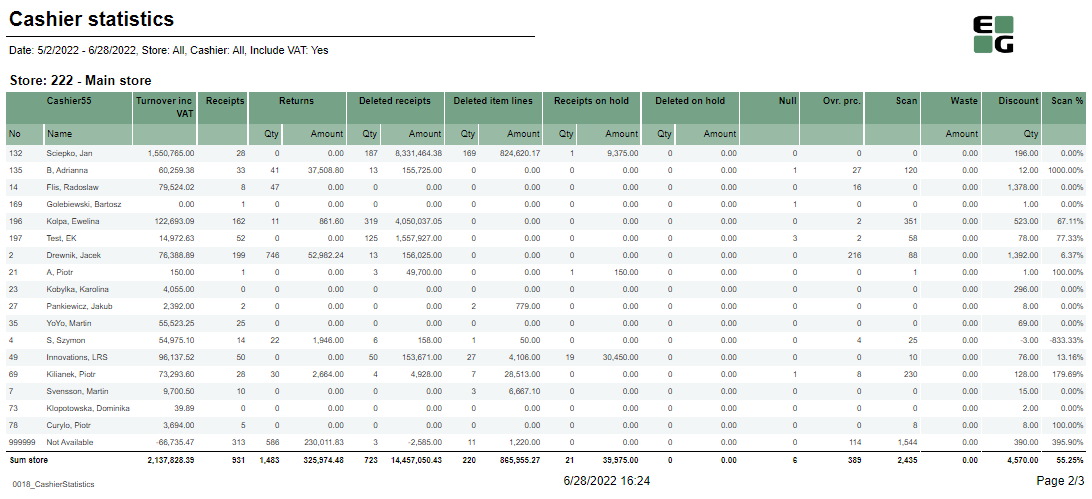
Description:
Selections:
Output: One page per store One row per cashier Columns:
Sorting:
Source:
|
| Anchor | ||||
|---|---|---|---|---|
|
| Expand | ||
|---|---|---|
| ||
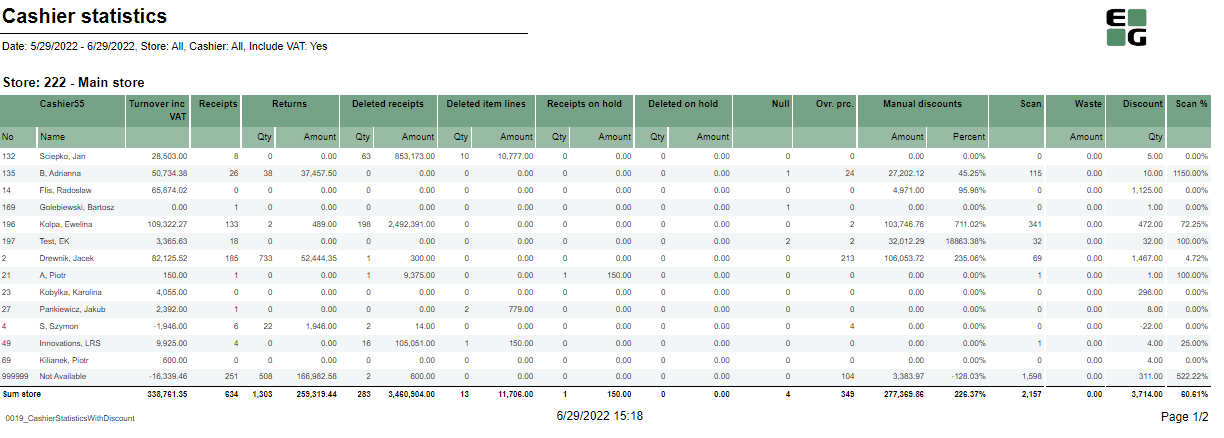
Description:
Selections:
Output: One page per store One row per cashier Columns:
Sorting:
Source:
|
| Anchor | ||||
|---|---|---|---|---|
|
...
| Expand | ||
|---|---|---|
| ||
CO attached to PBI #12200
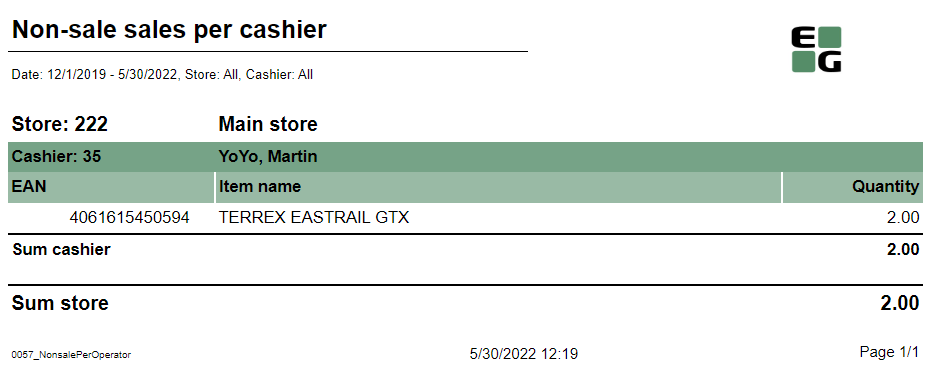
Description:
Selections:
Output: One row per item showing quantity of nonsale transaction on given item. Total per each cashier and per each store. Columns:
Sorting:
Source:
|
| Anchor | ||||
|---|---|---|---|---|
|
...
| Expand | ||
|---|---|---|
| ||
CO: 190338
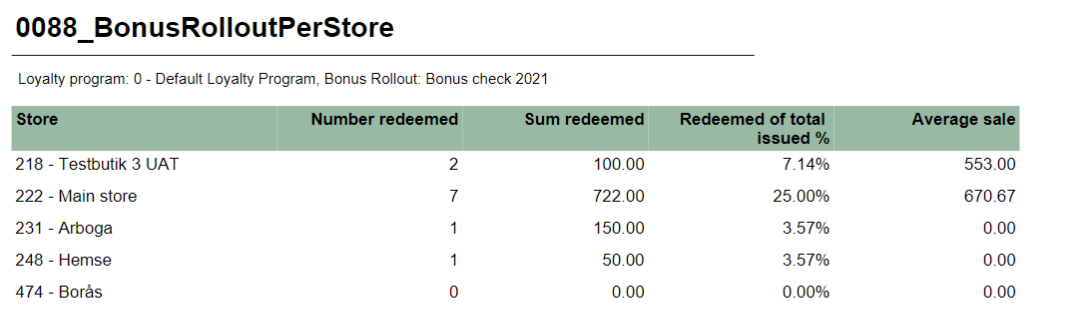
Description: Report allows to follow up bonus rollout checks usage and sales made using bonus checks. Selections:
Output: Bonus checks usage and sales statistics grouped per store. Report lists all the stores in which checks were issued or redeemed. Columns:
Sorting:
Clarifications:
Source:
|
| Anchor | ||||
|---|---|---|---|---|
|
...
| Expand | ||
|---|---|---|
| ||
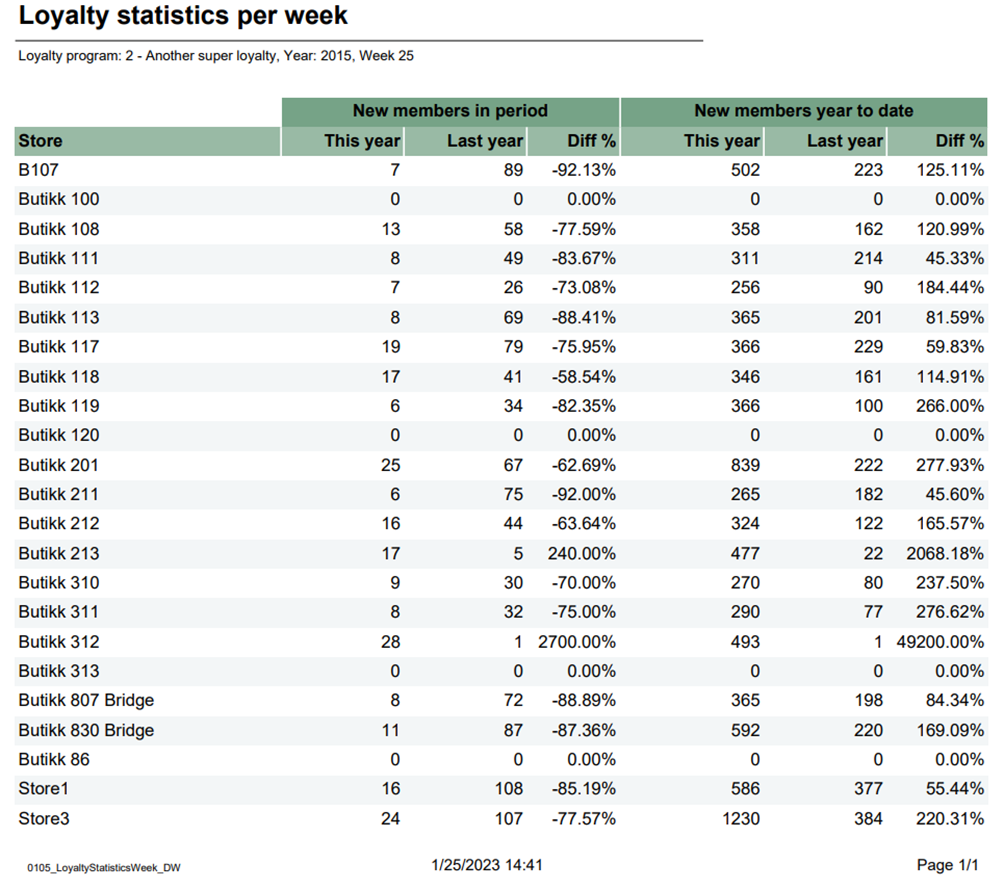
Description: Report lists loyalty statistic per week in selected year. Selections:
Output: Report shows new members in period and new members years to date in this year and last year for each store in selected year and week Columns:
Source:
|
...
| Expand | ||
|---|---|---|
| ||
Description: Report lists members for selected parameters. Selections:
Output: Report shows members list with all details about each member for many selections. Columns:
Clarifications: Report table is too large to fit on one page and part of it is moved to the next page. Selection TOP X (X=) is responsible for number of rows displayed in the table. Source:
|

| Anchor | ||||
|---|---|---|---|---|
|
...
| Expand | ||
|---|---|---|
| ||
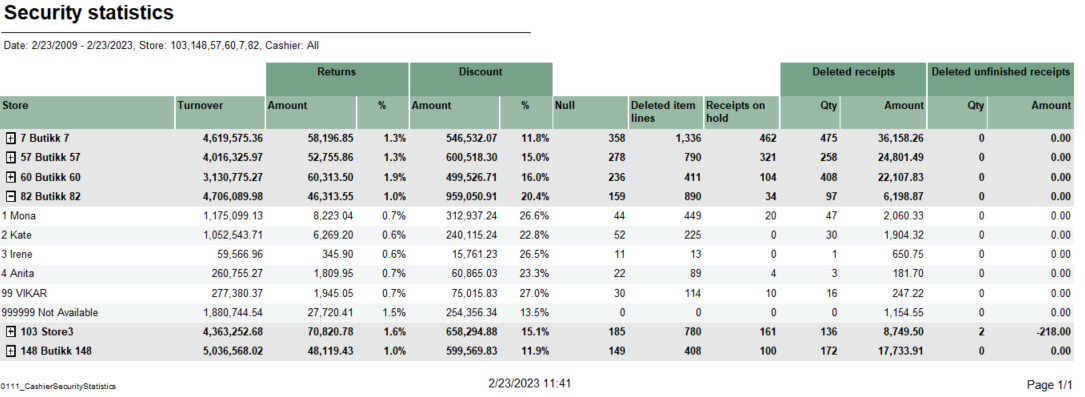
Description: Report lists Cashier security statistics. Selections:
Output: Summary totals in the beginning of new hierarchy level for stores. After expanding,there is list of cashiers. Columns:
Source:
|
...
| Expand | ||
|---|---|---|
| ||
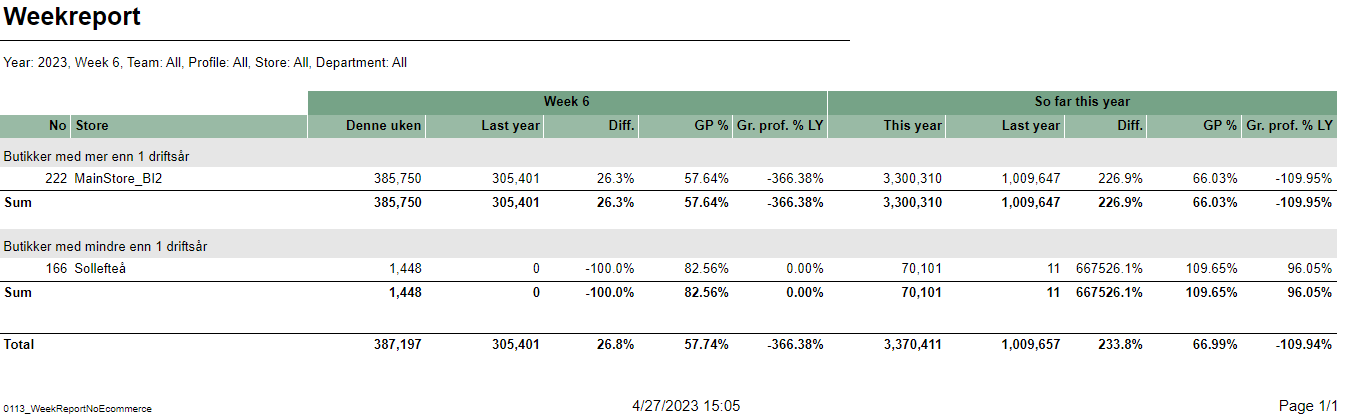
Description: Report lists weekly sale statistics with comparison to last year. Selections:
Output: Report shows stores sales statistics with less and more than 1 year of operation. Report has a summary for for stores with less than 1 year operation and total summary for all stores at the end of each column. Columns:
Source:
|
| Anchor | ||||
|---|---|---|---|---|
|
| Expand | ||
|---|---|---|
| ||
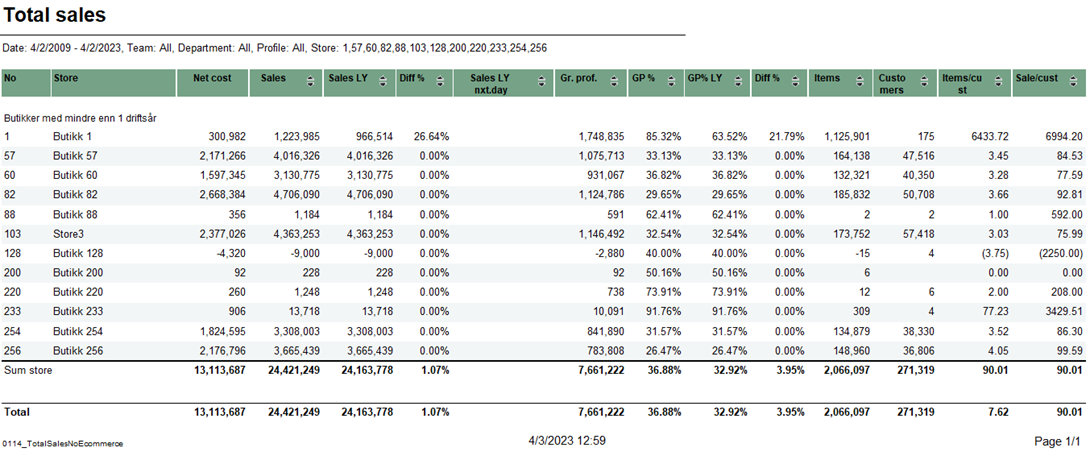
Description: Report lists total sales for selected stores in selected period of time. Selections:
Output: Report shows total sales statistics with comparison to last year. Report has a summary for each column. Columns:
Interactive sorting: Interactive sorting on all columns except Number store, store name and net cost. Source:
|
| Anchor | ||||
|---|---|---|---|---|
|
...
| Expand | ||
|---|---|---|
| ||
CO: 176619
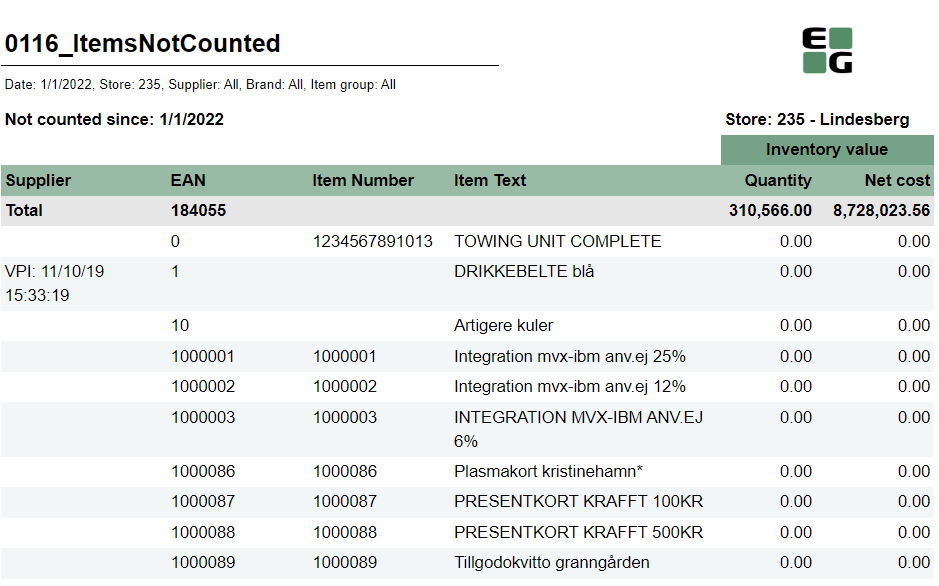
Description: Report shows all items which were not counted during inventory since given date. Selection:
Output: All items which don't appear on last stocktaking. First row is total where under EAN there is a number of all items not counted. Columns:
Sorting:
Source:
|
| Anchor | ||||
|---|---|---|---|---|
|
| Expand | ||
|---|---|---|
| ||
CO: 225452 RTC-28001
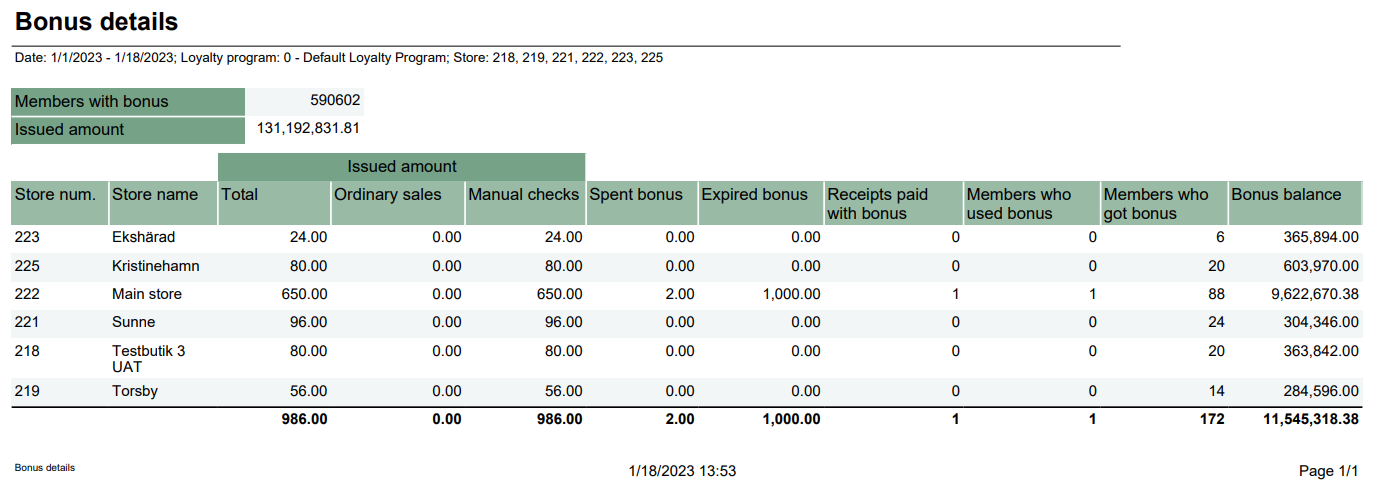
Description: Report lists changes in bonus balance and how much bonus is issued and used over a period of time Selection:
Output: Bonus checks overview. For each store sum of issued, redeemed, spent, expired and balance bonus checks with number of sales and members who got/used bonus. Next table with issued amount and member with bonus independent of chosen period. Total sum of each column for all selected stores. Columns:
Clarifications:
Source:
|
| Anchor | ||||
|---|---|---|---|---|
|
...
| Expand | |||||||||||||||||||||||||||||||||||||||||||||
|---|---|---|---|---|---|---|---|---|---|---|---|---|---|---|---|---|---|---|---|---|---|---|---|---|---|---|---|---|---|---|---|---|---|---|---|---|---|---|---|---|---|---|---|---|---|
| |||||||||||||||||||||||||||||||||||||||||||||
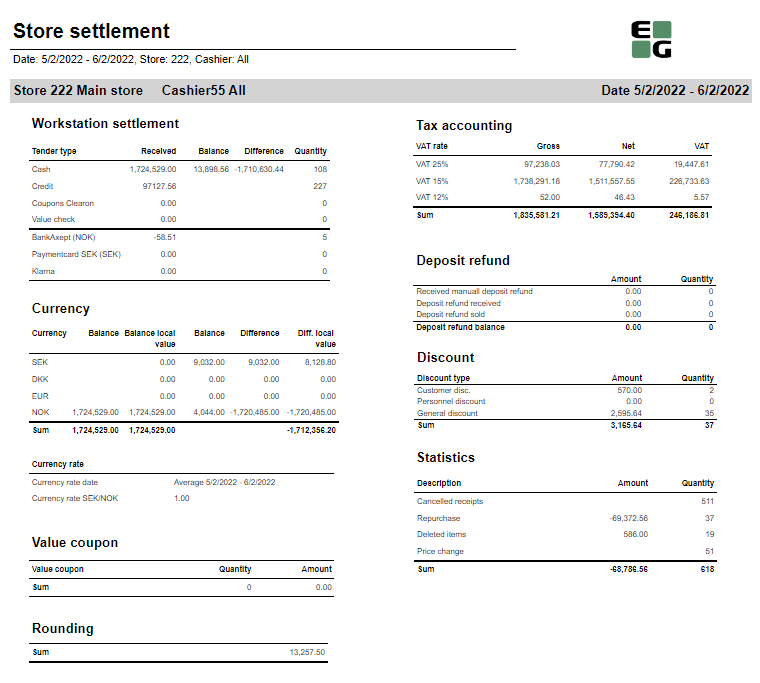
CO: 156791. Based on report 0709.
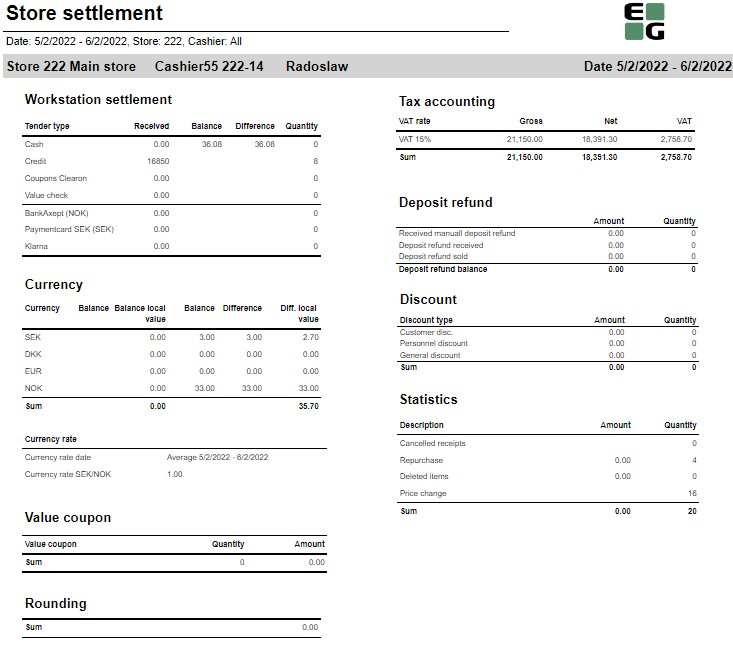
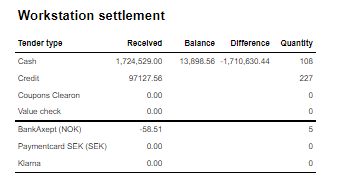
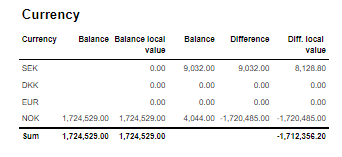
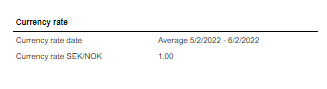
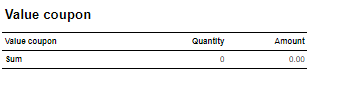
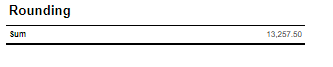
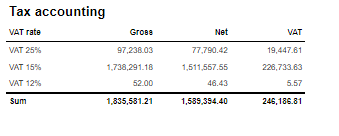
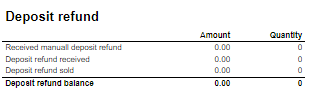
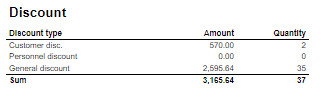
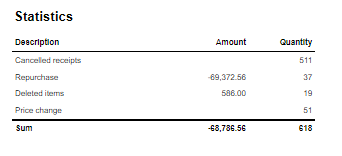
Description: Report allows to follow up store settlement: on first page settlement for all selected cashiers (if all cashiers are selected it equals whole store settlement) and settlement per each cashier on following pages. Report is divided in 9 subreports which will be descriped separatly below. Selections (applies to all subreports):
Subreports:
Source:
|
| Anchor | ||||
|---|---|---|---|---|
|
...
| Expand | ||
|---|---|---|
| ||
CO-167575
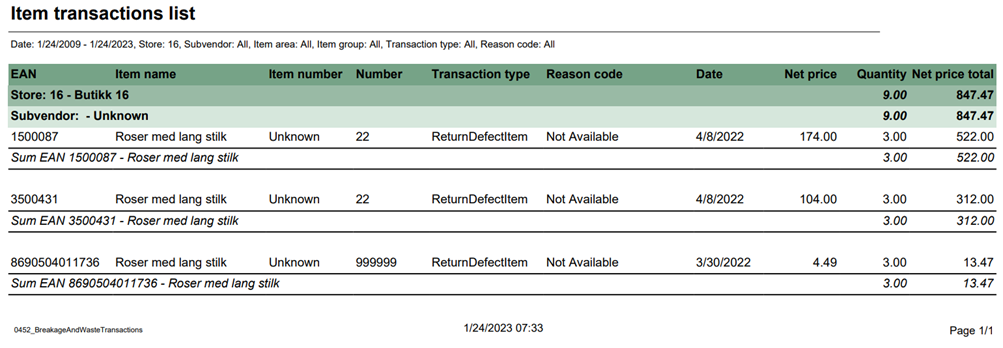
Descriptions: Report lists broken and waisted items. Selections:
Relevant parameters:
Output: Report shows items, their transaction type with price and quantity for selected stores and their subvendors. Columns:
Clarifications: Report allow to show same items with different transaction types and sum up of quantity and price. It happens under each selected subvendor, which is placed under selected store. Source:
|
...
| Expand | ||
|---|---|---|
| ||
CO: 190620
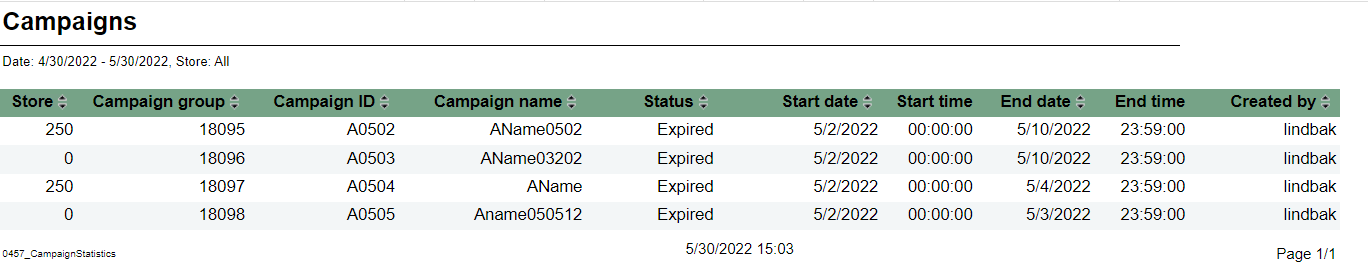
Description: Report allows to follow upcoming and ongoing campaigns and also browse expired campaigns. Selections:
Output: One row per campaign Columns:
Sorting:
Source:
|
...
| Expand | ||
|---|---|---|
| ||
CO: 191144
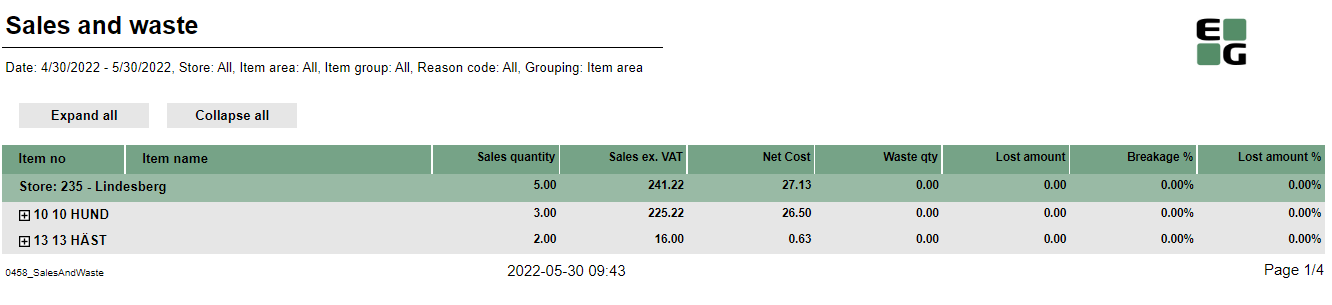
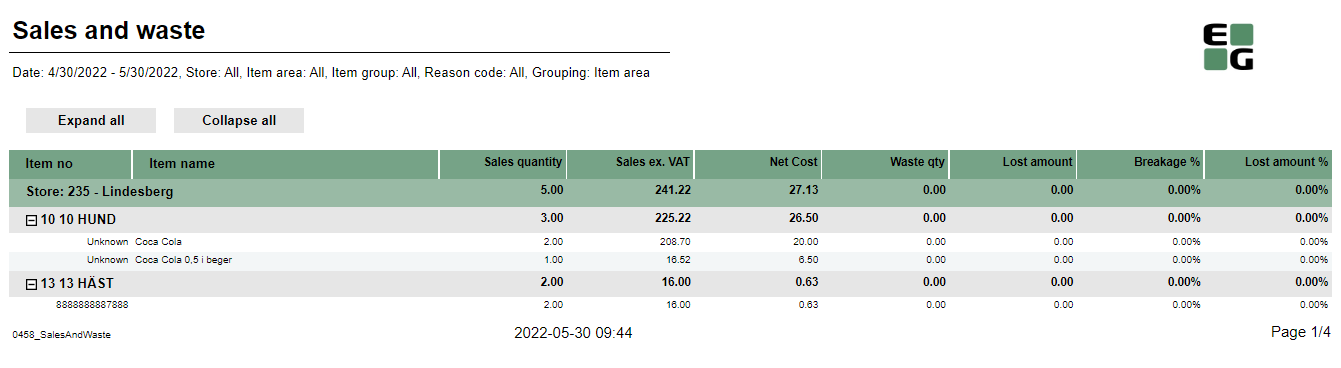
Description: Report allows to follow up article sales and waste grouped per store and per (item group or item area). Selections:
Output: Article sales and waste statistics grouped per store and per item group or item area sorted by highest Lost amount. There is a page break per each store and total all stores in the bottom of last page. If Exclude items without breakage parameter is set to true there will be only items with breakage. Columns:
Sorting:
Clarifications:
Source:
|
| Anchor | ||||
|---|---|---|---|---|
|
...
| Expand | ||
|---|---|---|
| ||
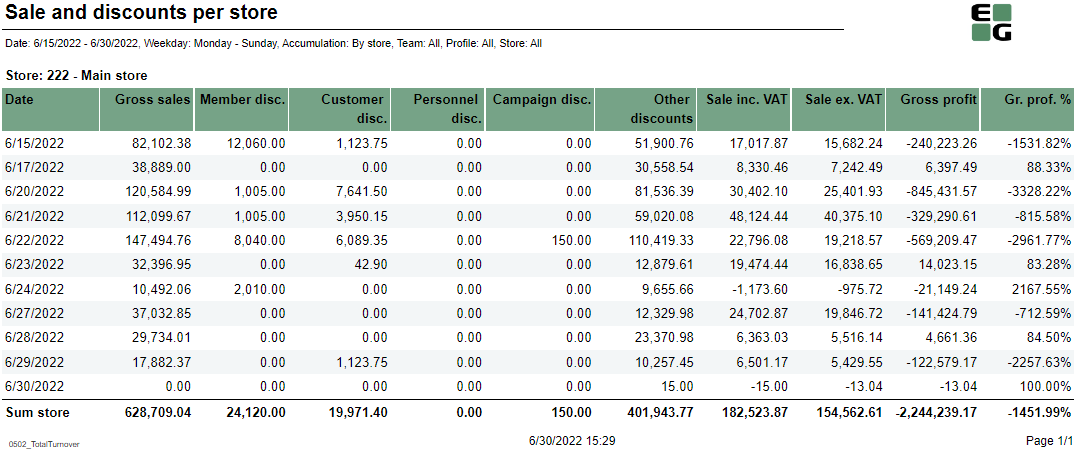
Description: Report allows to follow up daily sales statistics per one of following: Store/Profile/Team/Total. Selections:
Output: One page per selected accumulation(Store/Profile/Team/Total) One row per day within selected date range and only day within Week day from and Week day to. Columns:
Sorting:
Source:
|
| Anchor | ||||
|---|---|---|---|---|
|
| Expand | ||
|---|---|---|
| ||
Standard report
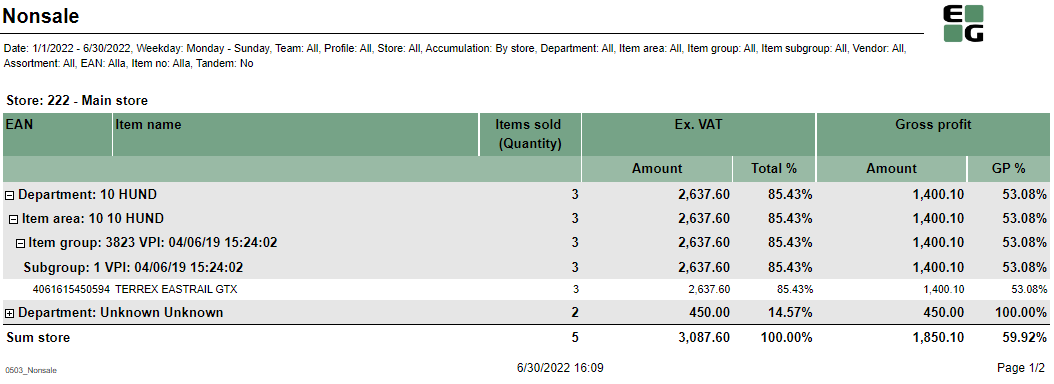
Description: Report allows to follow up nonsales statistics per item per Store or all stores. Selections:
Output: One page per selected accumulation(Store/Total) One row per Article (EAN or Main EAN if tandem switched to no) Article statistics are grouped on multile levels: Subgrouo, Group, Area, Department and Columns:
Sorting:
Source:
|
| Anchor | ||||
|---|---|---|---|---|
|
| Expand | ||
|---|---|---|
| ||
Standard report
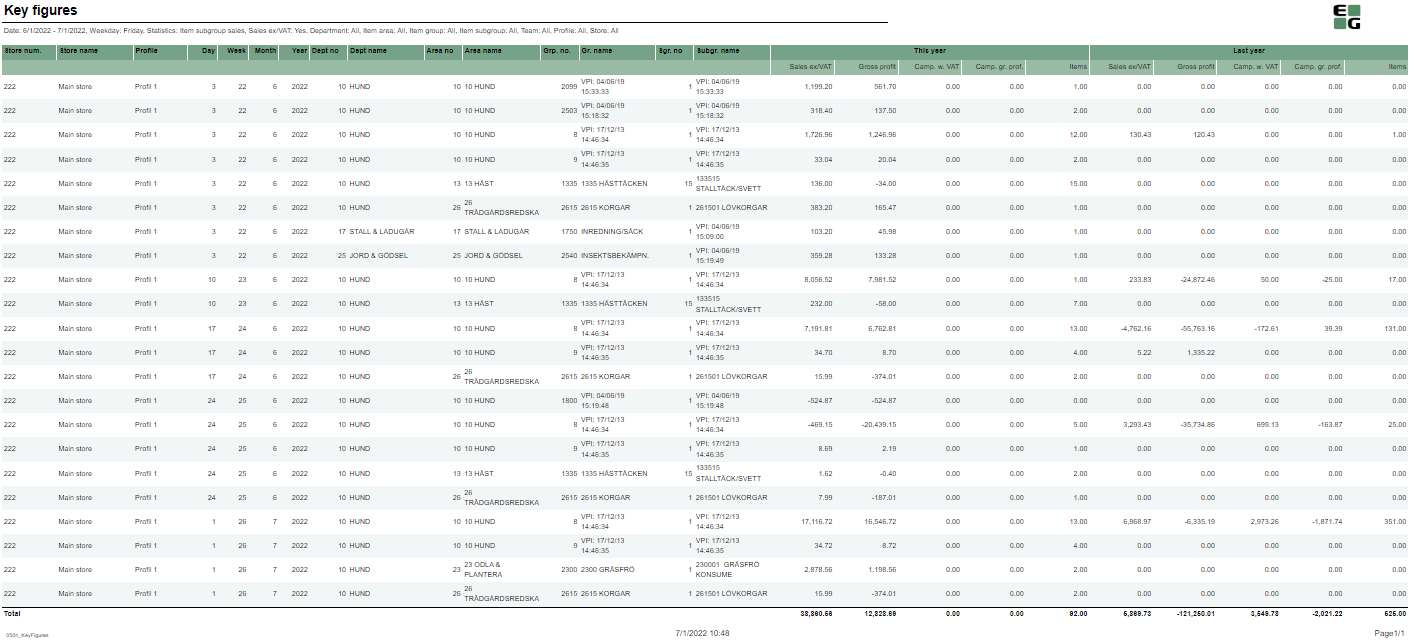
Description: Report allows to follow up nonsales statistics per item per Store or all stores. Selections:
Output: One row per level selected in Statistics parameter. Columns:
Sorting:
Source:
|
| Anchor | ||||
|---|---|---|---|---|
|
| Expand | ||
|---|---|---|
| ||
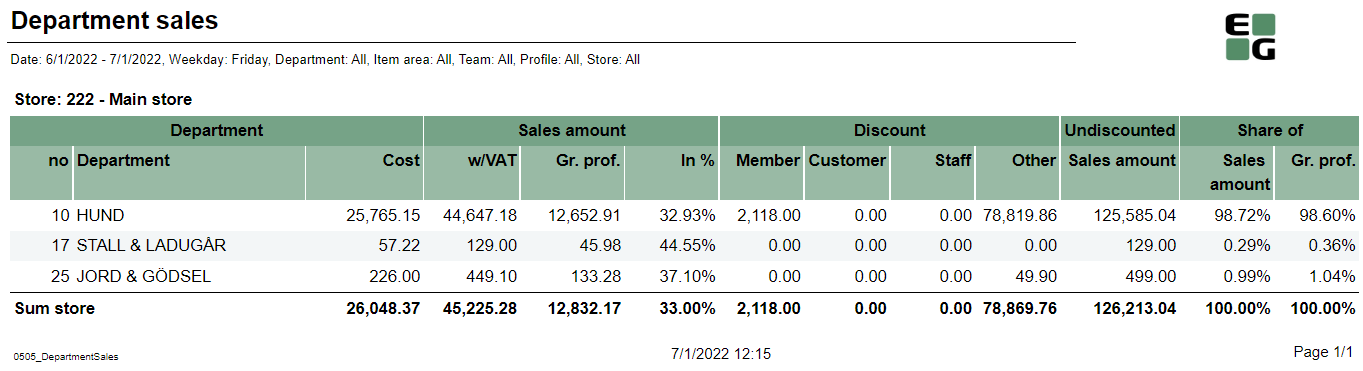
Description: Report allows to follow up sales statistics on Department level. Selections:
Output: One page per Store One row per Department Columns:
Sorting:
Source:
|
| Anchor | ||||
|---|---|---|---|---|
|
...
| Expand | ||||||||||||||||||||||||||||||
|---|---|---|---|---|---|---|---|---|---|---|---|---|---|---|---|---|---|---|---|---|---|---|---|---|---|---|---|---|---|---|
| ||||||||||||||||||||||||||||||
Standard report
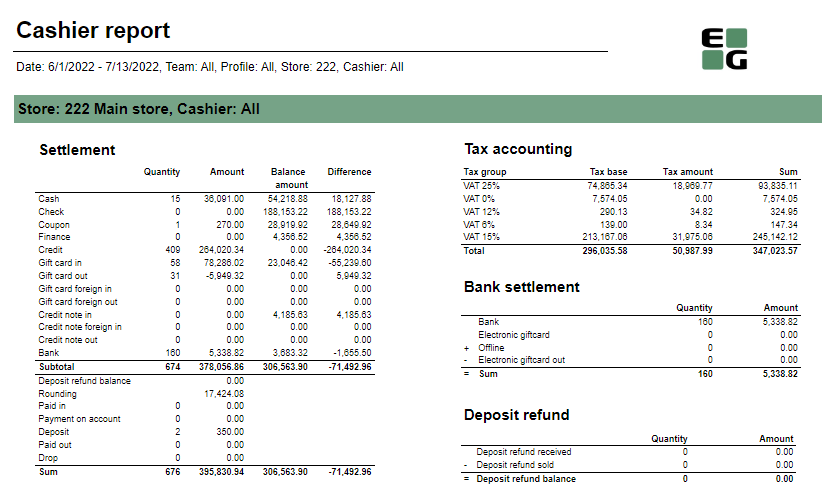
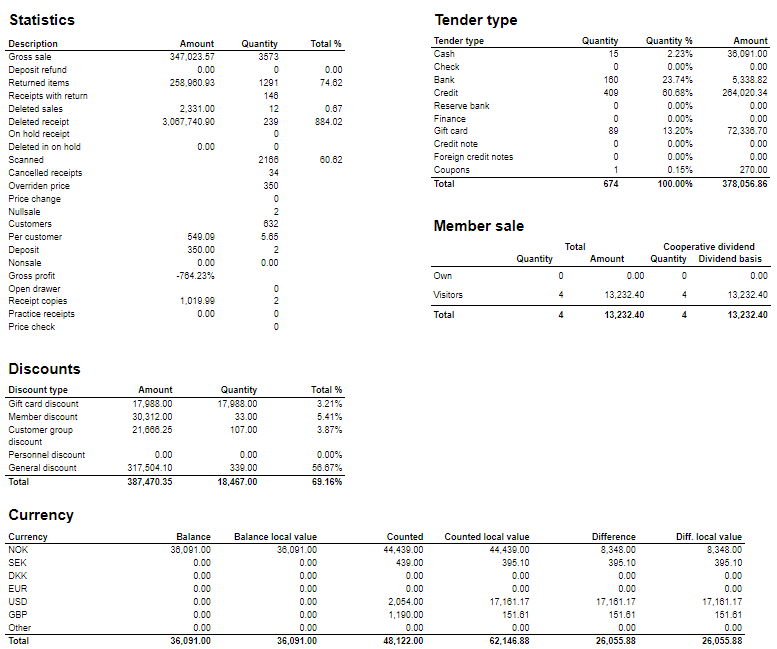
Description: Report allows to follow up store settlement: on first page settlement for all selected cashiers (if all cashiers are selected it equals whole store settlement) and settlement per each cashier on following pages. Report is divided in subreports which will be descriped separatly below. Selections (applies to all subreports):
Subreports:
Source:
|
| Anchor | ||||
|---|---|---|---|---|
|
| Expand | ||||||||||||||||||||||||||||||
|---|---|---|---|---|---|---|---|---|---|---|---|---|---|---|---|---|---|---|---|---|---|---|---|---|---|---|---|---|---|---|
| ||||||||||||||||||||||||||||||
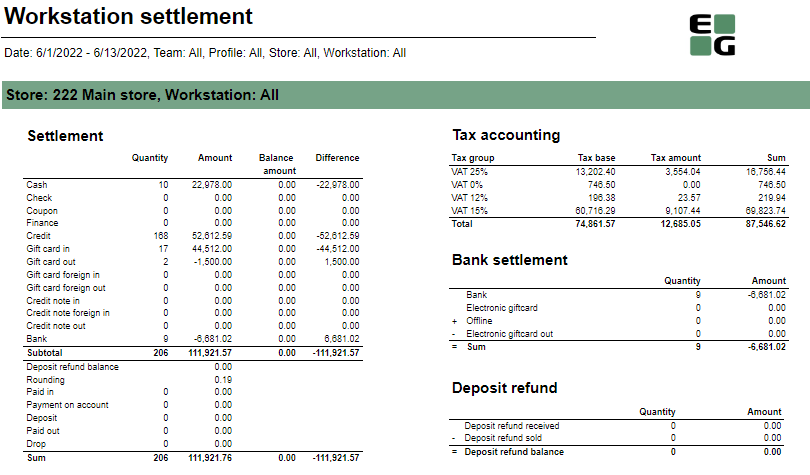
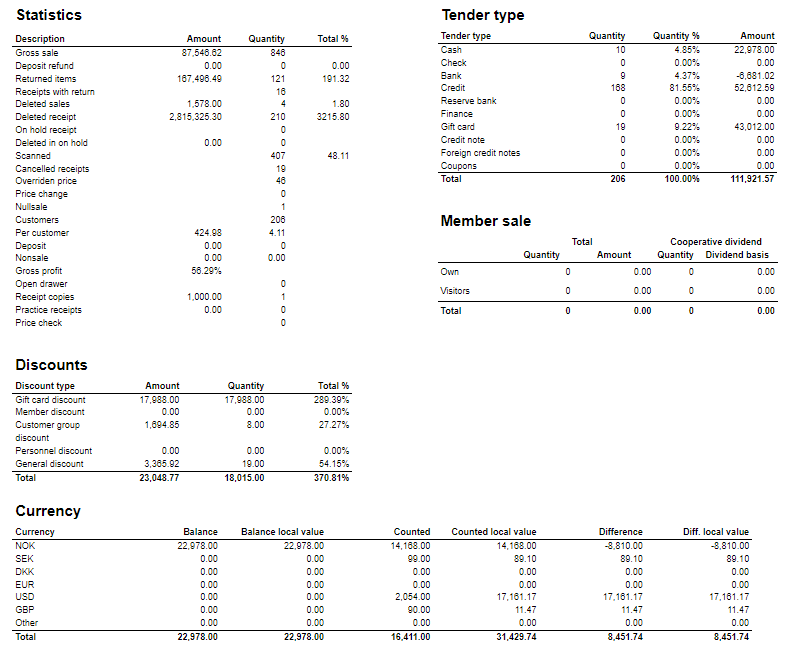
Standard report
Description: Report allows to follow up store settlement: on first page settlement for all selected workstations (if all cashiers are selected it equals whole store settlement) and settlement per each workstation on following pages. Report is divided in subreports which will be descriped separatly below. Selections (applies to all subreports):
Subreports:
Source:
|
| Anchor | ||||
|---|---|---|---|---|
|
...
| Expand | ||
|---|---|---|
| ||
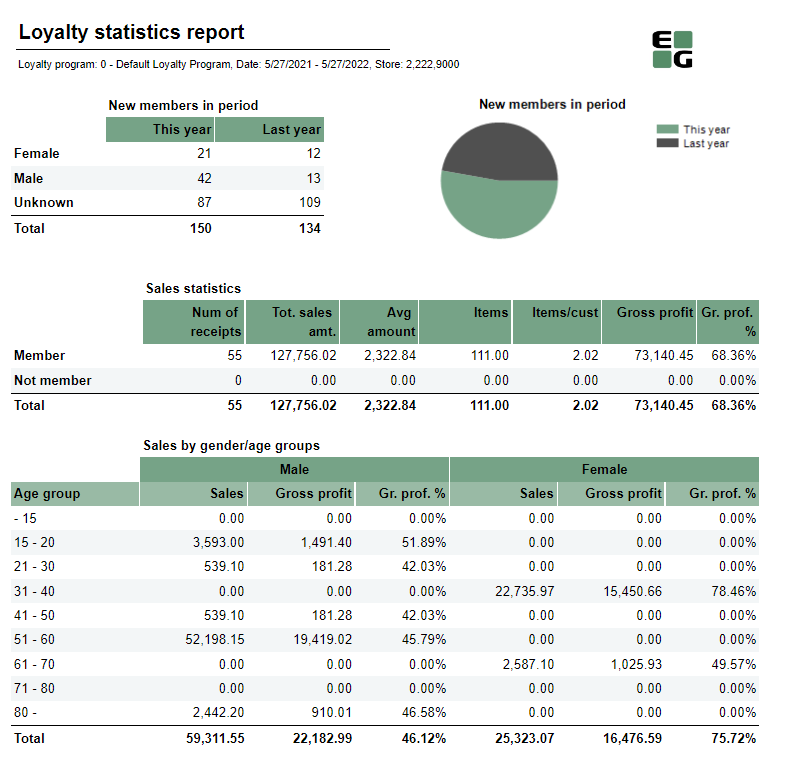
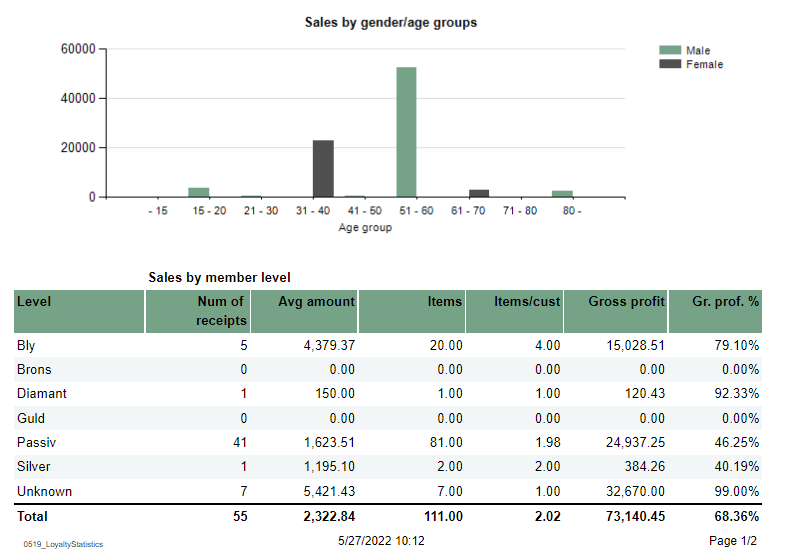
Standard report
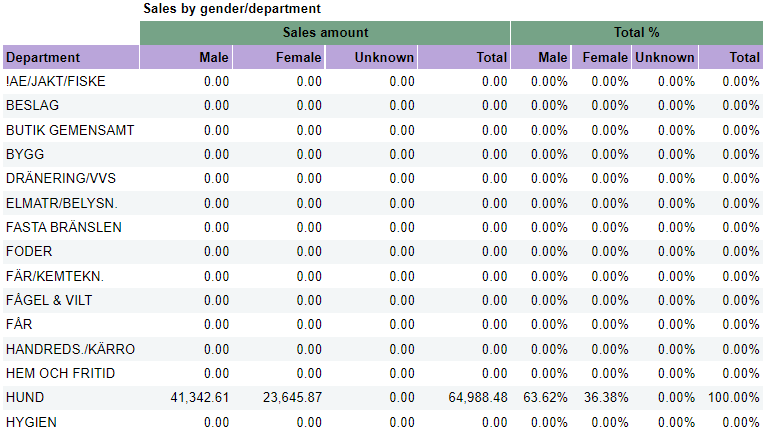
Description: Report allows to follow up meber and member sale statistics divided by member age and member gender. Selections:
Output: Report is devided in 5 sections:
Columns:
Sorting:
Clarifications:
Source:
|
| Anchor | ||||
|---|---|---|---|---|
|
| Expand | ||
|---|---|---|
| ||
Standard report
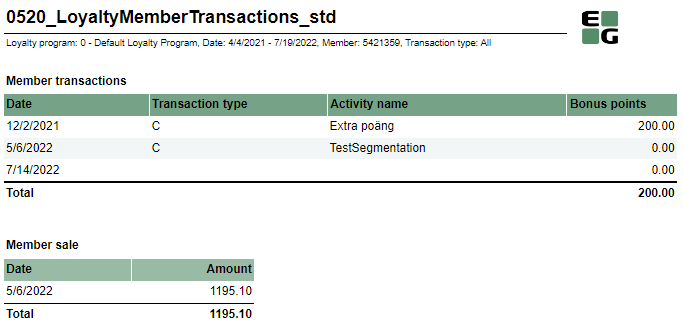
Description: Report allows to follow up specific member activities. Selections:
Output: There are two sections:
Columns:
Source:
|
| Anchor | ||||
|---|---|---|---|---|
|
| Expand | ||
|---|---|---|
| ||
Standard report
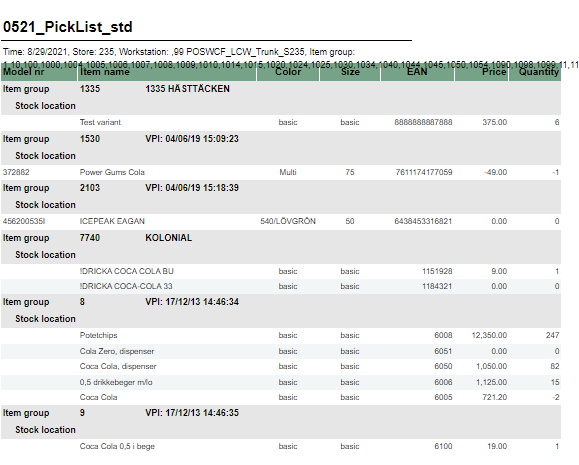
Description: Report allows to follow up sales in specific locations. Selections:
Output: One row per one item sold in specific LocationKey from DimStockLocation. Data is presented per item group. Columns:
Source:
|
| Anchor | ||||
|---|---|---|---|---|
|
| Expand | ||
|---|---|---|
| ||
Standard report
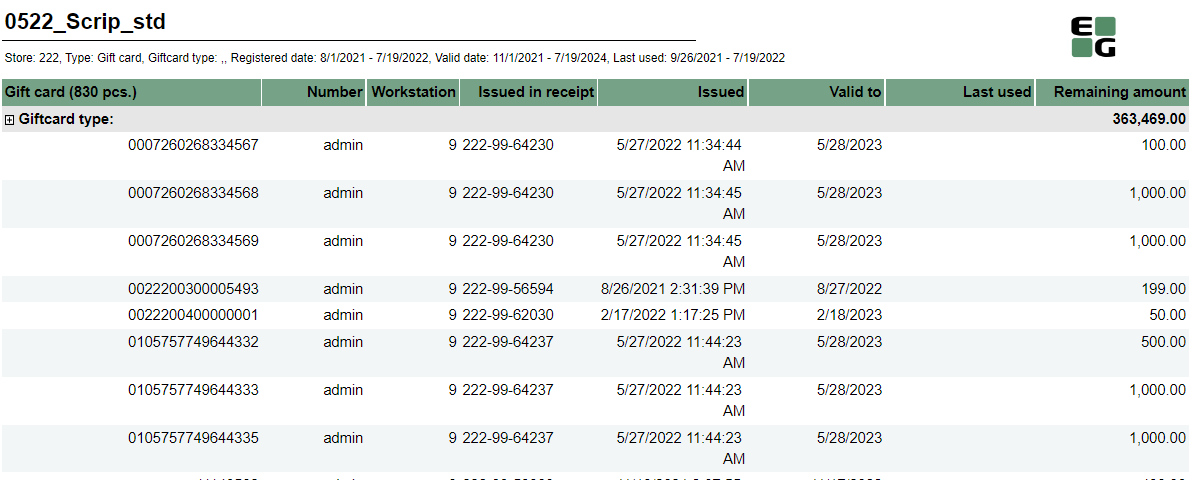
Description: Report allows to follow usage of giftcards. Selections:
Output: One row per one item sold in specific LocationKey from DimStockLocation. Data is presented per item group. Columns:
Source:
|
| Anchor | ||||
|---|---|---|---|---|
|
| Expand | ||
|---|---|---|
| ||
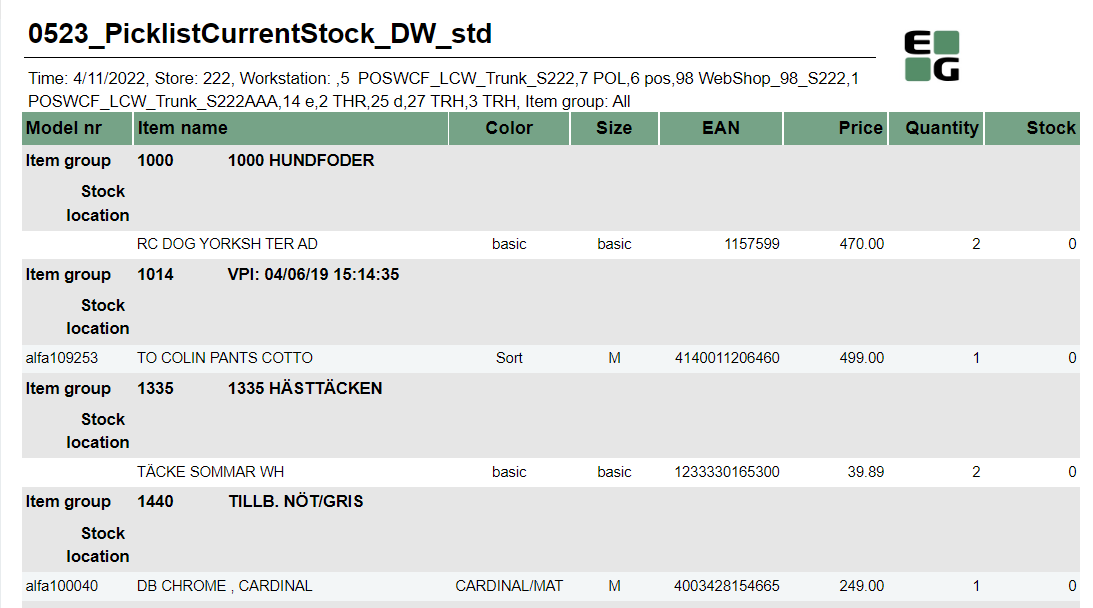
Description: Report allows to follow up sales in specific locations. Selections:
Output: One row per one item sold in specific LocationKey from DimStockLocation. Data is presented per item group. Columns:
Source:
|
| Anchor | ||||
|---|---|---|---|---|
|
| Expand | ||
|---|---|---|
| ||
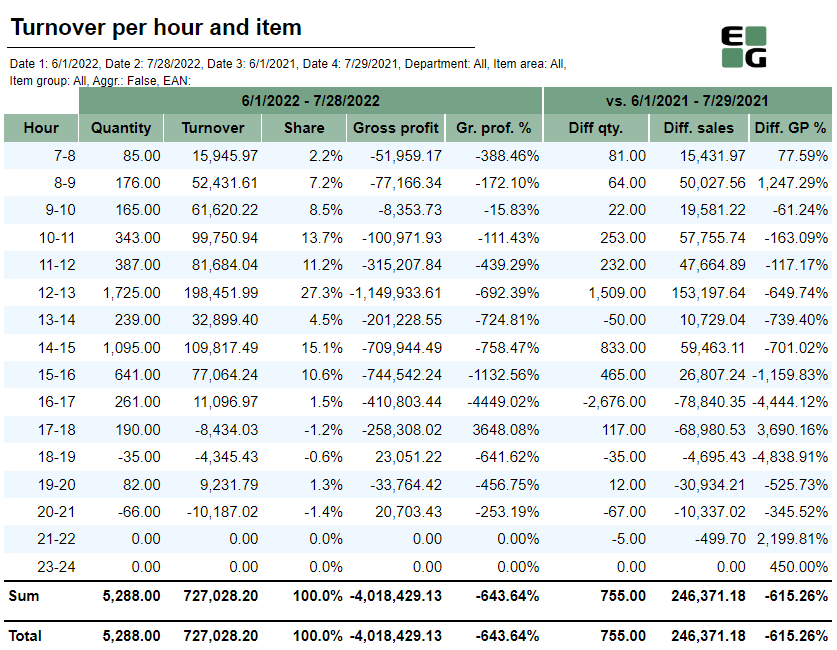
Description: Report lists turnover sales per hour for article. Selections:
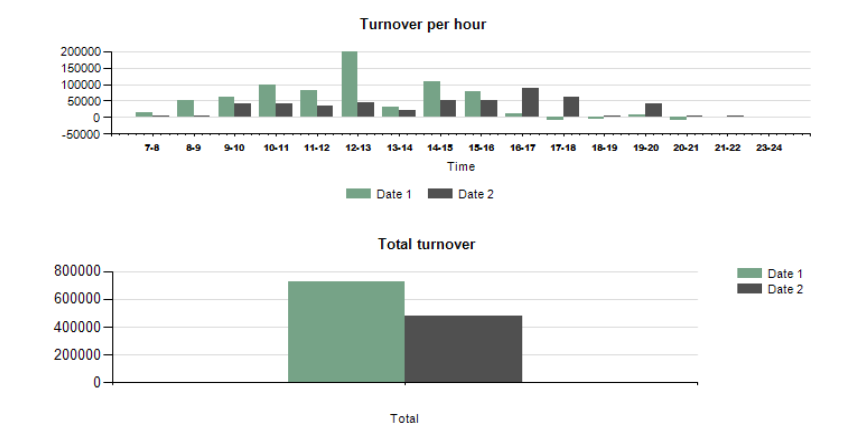
Output: Report shows sales statistics per hour and per item. Report has a sales statistics table with selected date and compared date with hours rows. Table has a total summary on each column. Report has also two charts. First chart shows turnover per hour. On x-axis is date 1 and date 2 with hours bars, on y-axis is turnover amount. Second chart shows total turnover with x-axis: date 1 and date 2, and y-axis as turnover amount. Columns:
Source:
|
| Anchor | ||||
|---|---|---|---|---|
|
| Expand | ||
|---|---|---|
| ||
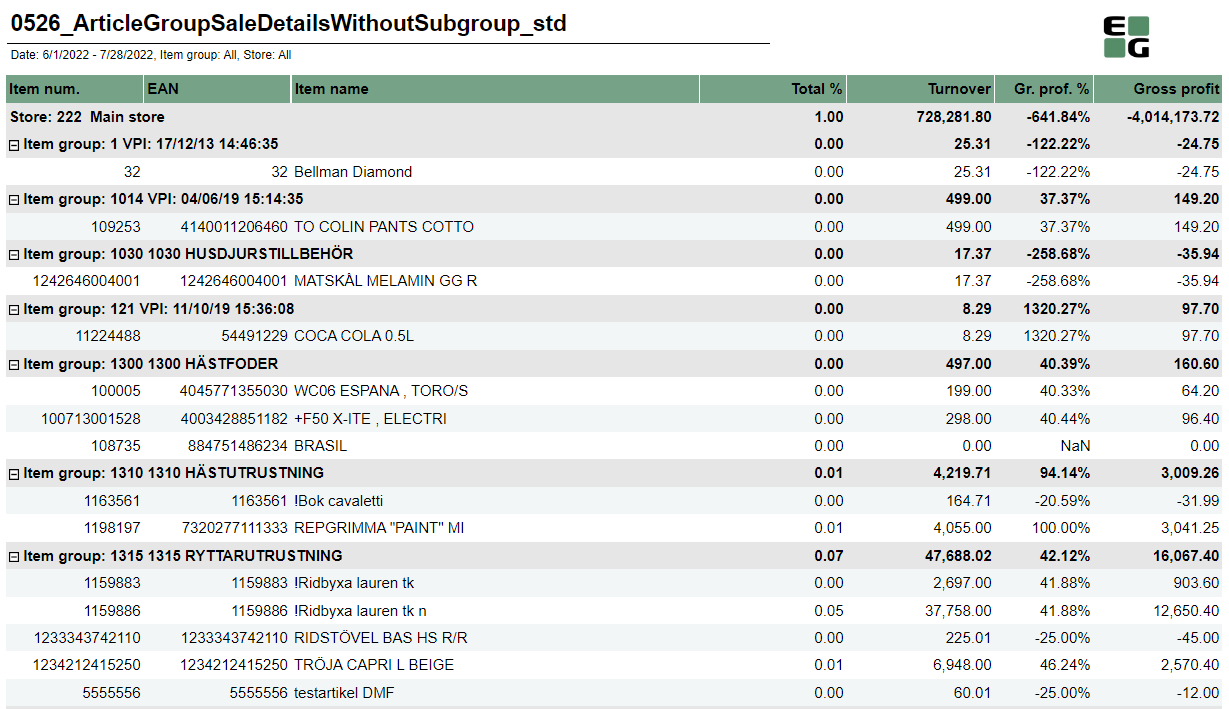
Description: Report lists article group sales details without subgroups. Selections:
Output:
Columns:
Source:
|
| Anchor | ||||
|---|---|---|---|---|
|
| Expand | ||
|---|---|---|
| ||
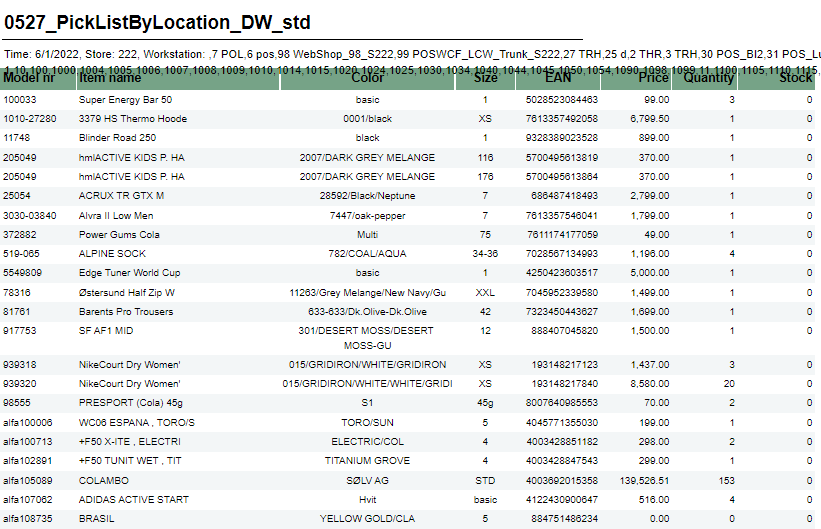
Description: Report allows to follow up sales in specific locations. Selections:
Output: One row per one item sold in specific LocationKey from DimStockLocation. Data is presented per item group. Columns:
Source:
|
| Anchor | ||||
|---|---|---|---|---|
|
| Expand | ||
|---|---|---|
| ||
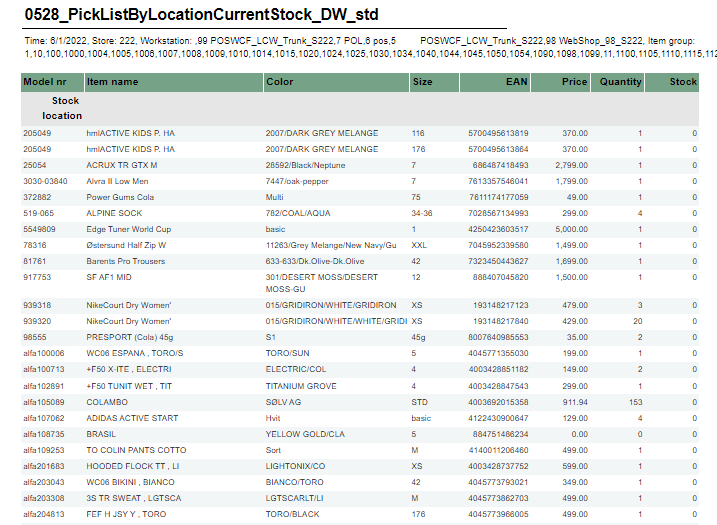
Description: Report allows to follow up sales in specific locations. Selections:
Output: One row per one item sold in specific LocationKey from DimStockLocation. Data is presented per item group. Columns:
Source:
|
| Anchor | ||||
|---|---|---|---|---|
|
| Expand | ||
|---|---|---|
| ||
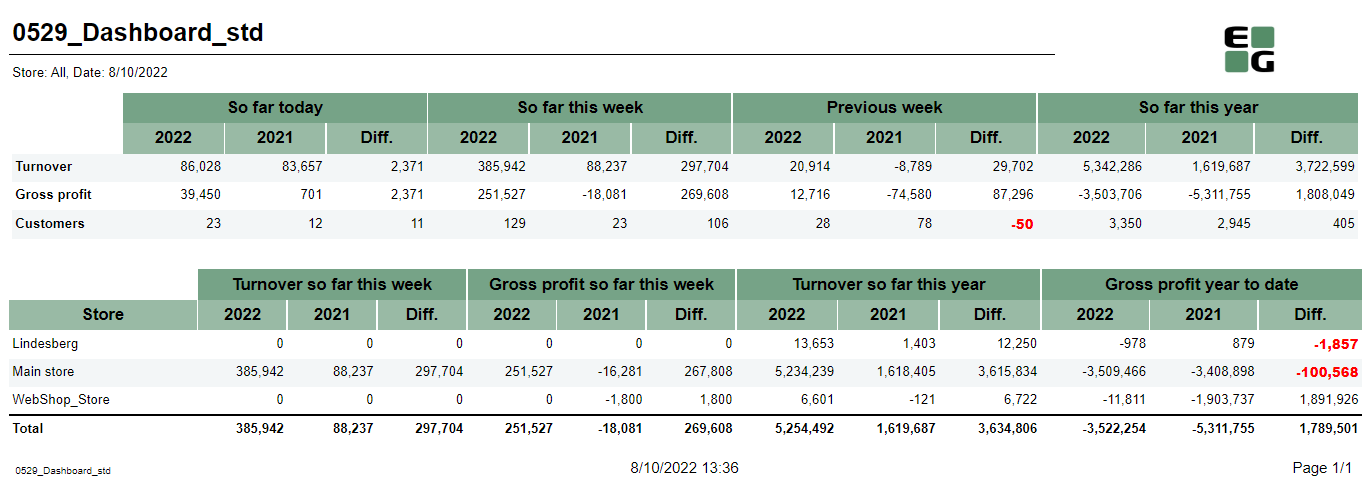
Description: Report allows to follow up sales in specific locations. Selections:
Output: One row per one item sold in specific LocationKey from DimStockLocation. Data is presented per item group. Columns:
Clarifications: Negative values in report are marked red. Source:
|
| Anchor | ||||
|---|---|---|---|---|
|
...
| Expand | ||
|---|---|---|
| ||
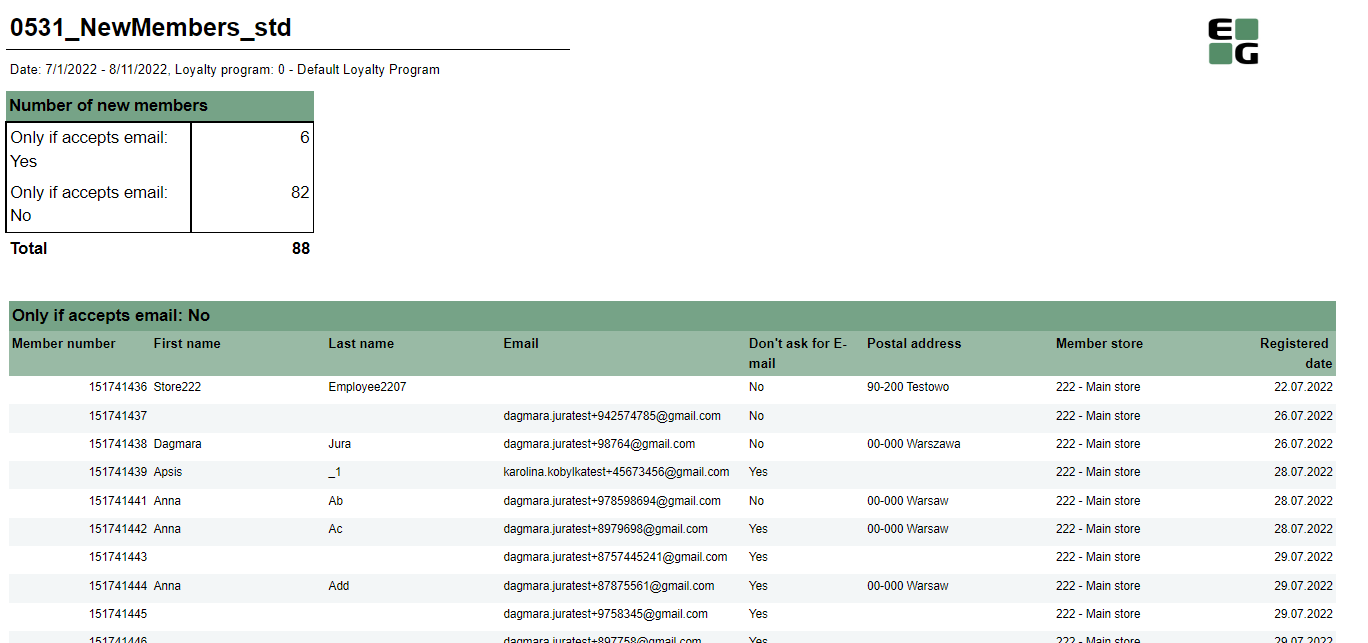
Description: Report allows to check new members. Selections:
Output: One row per new member Columns:
Source:
|
| Anchor | ||||
|---|---|---|---|---|
|
| Expand | ||
|---|---|---|
| ||
Description: Report allows to check new members. Selections:
Output: One row per new member Columns:
Source:
|

| Anchor | ||||
|---|---|---|---|---|
|
...
| Expand | ||
|---|---|---|
| ||
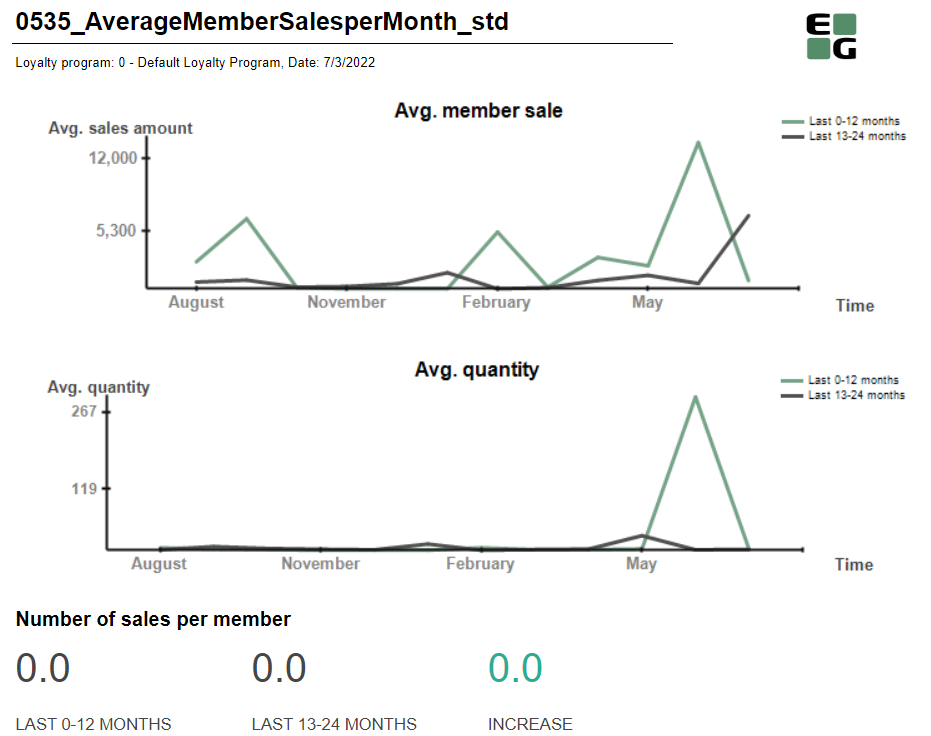
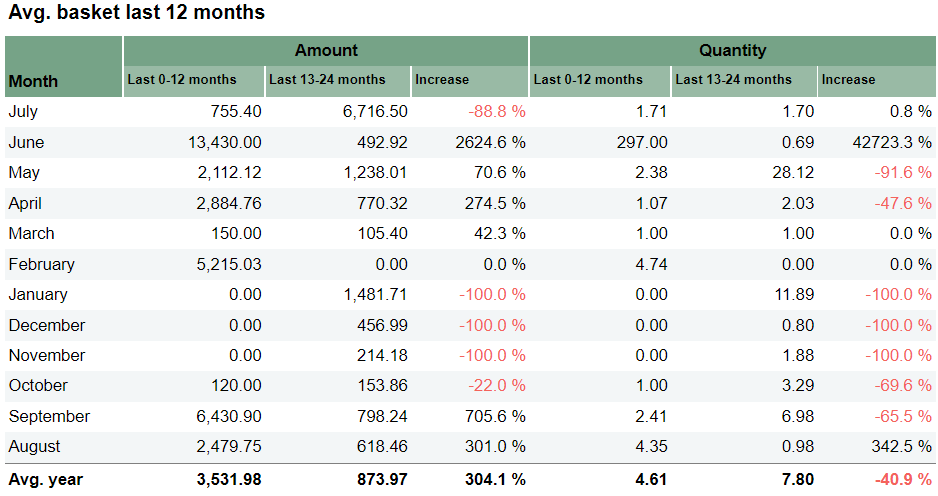
Description: Report allows to follow up avg. member sales. Report divides sales data for months Selections:
Output: Graphs show sales amount and sales quantity. Table is divided in to parts - amount and quantity Columns:
Source:
|
| Anchor | ||||
|---|---|---|---|---|
|
| Expand | ||
|---|---|---|
| ||
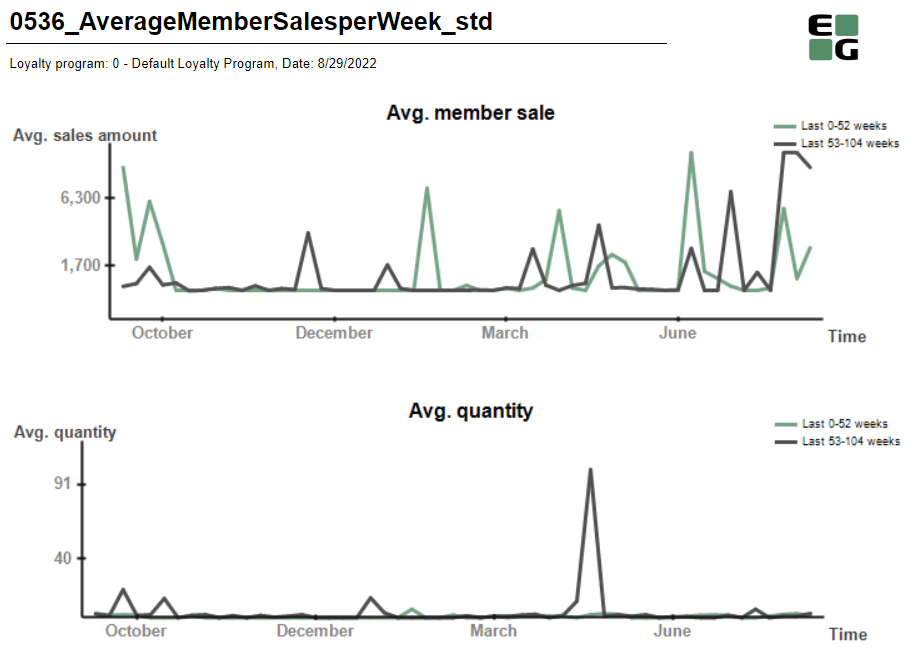
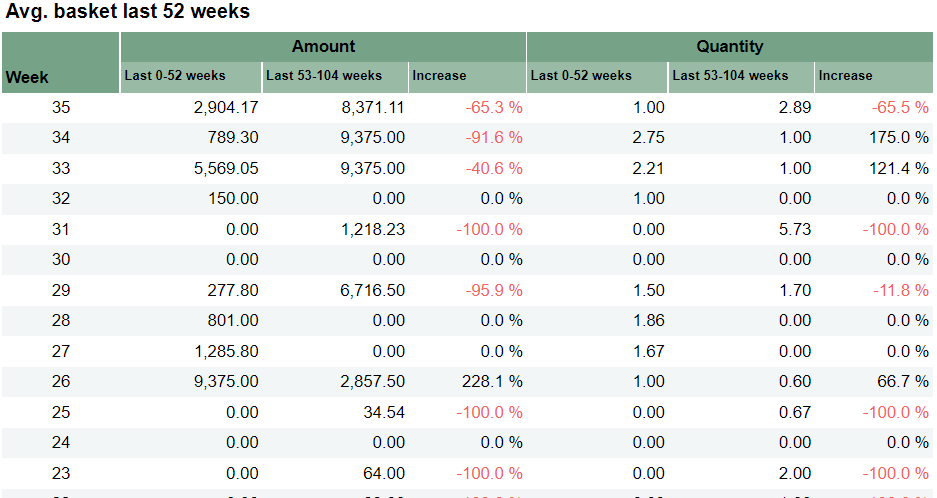
Description: Report allows to follow up avg. member sales. Report divides sales data for weeks Selections:
Output: Graphs show sales amount and sales quantity. Table is divided in to parts - amount and quantity Columns:
Source:
|
| Anchor | ||||
|---|---|---|---|---|
|
| Expand | ||
|---|---|---|
| ||
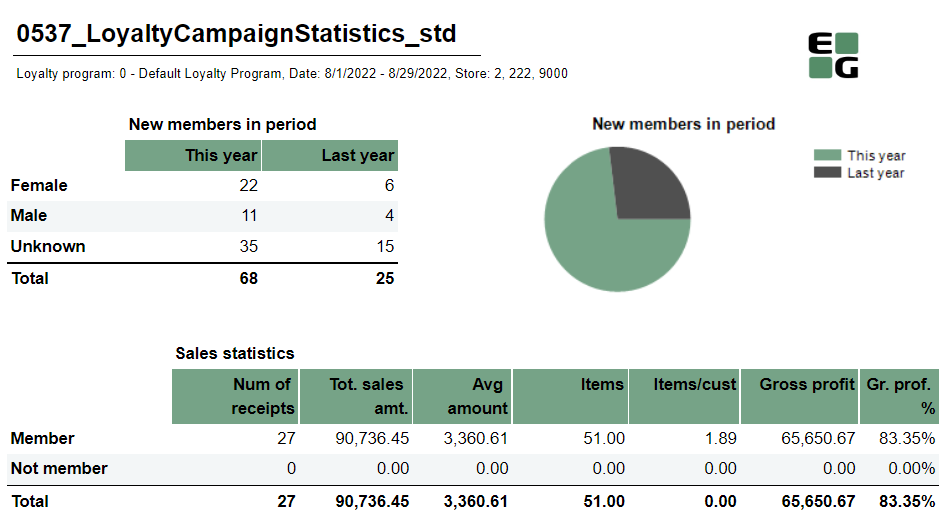
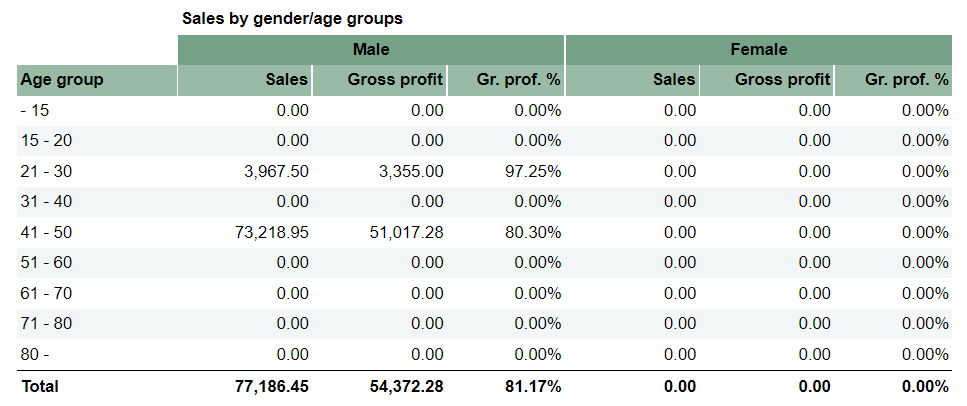
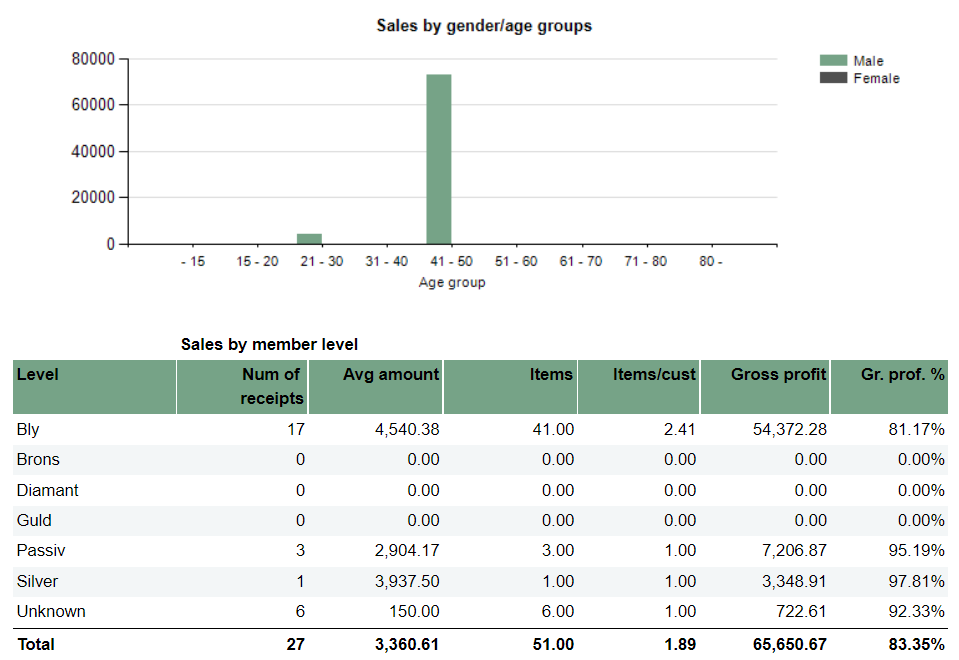
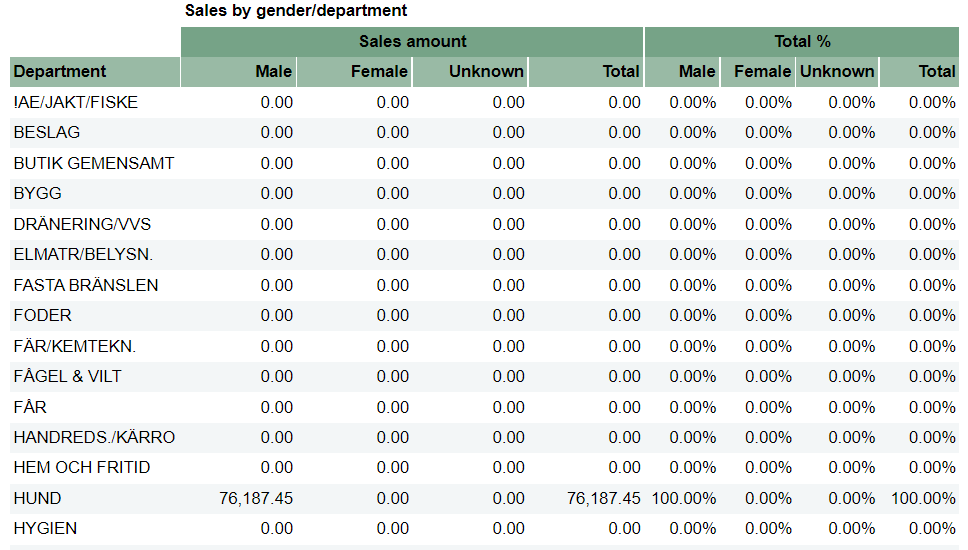
Description: Report allows to follow up meber and member sale statistics divided by member age and member gender. Selections:
Output: Report is devided in 5 sections:
Columns:
Sorting:
Clarifications:
Source:
|
| Anchor | ||||
|---|---|---|---|---|
|
...
| Expand | ||
|---|---|---|
| ||
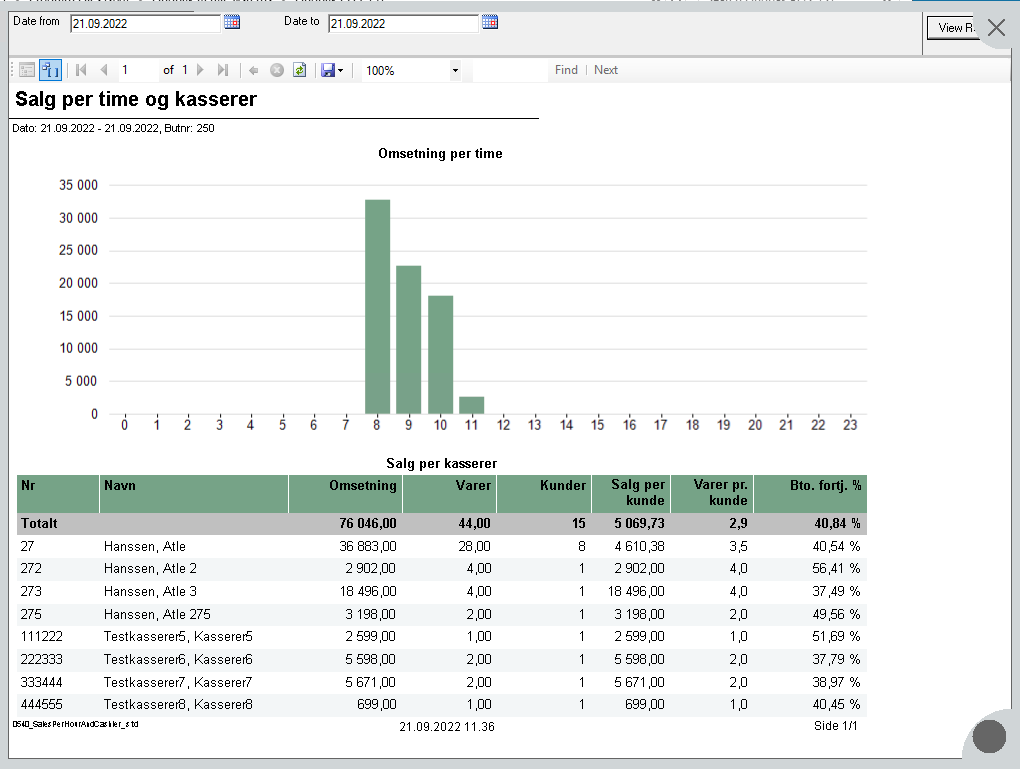
Description: Created on request from product because funtion SALE_STAT in CR only gets data from Chain classic. This report is optimized to run from Cash register with resolution set to 1024 * 768. Meant to use for cashiers to check sales statistics from today. Selections:
Output: Report is divided into two sections. First is showing graphical sale per hour. Second is showing sale statistics for cashiers. Columns: For seciton one. One row per cashier and one row for total on top.
Sorting:
Clarifications:
Source:
|
| Anchor | ||||
|---|---|---|---|---|
|
| Expand | ||
|---|---|---|
| ||
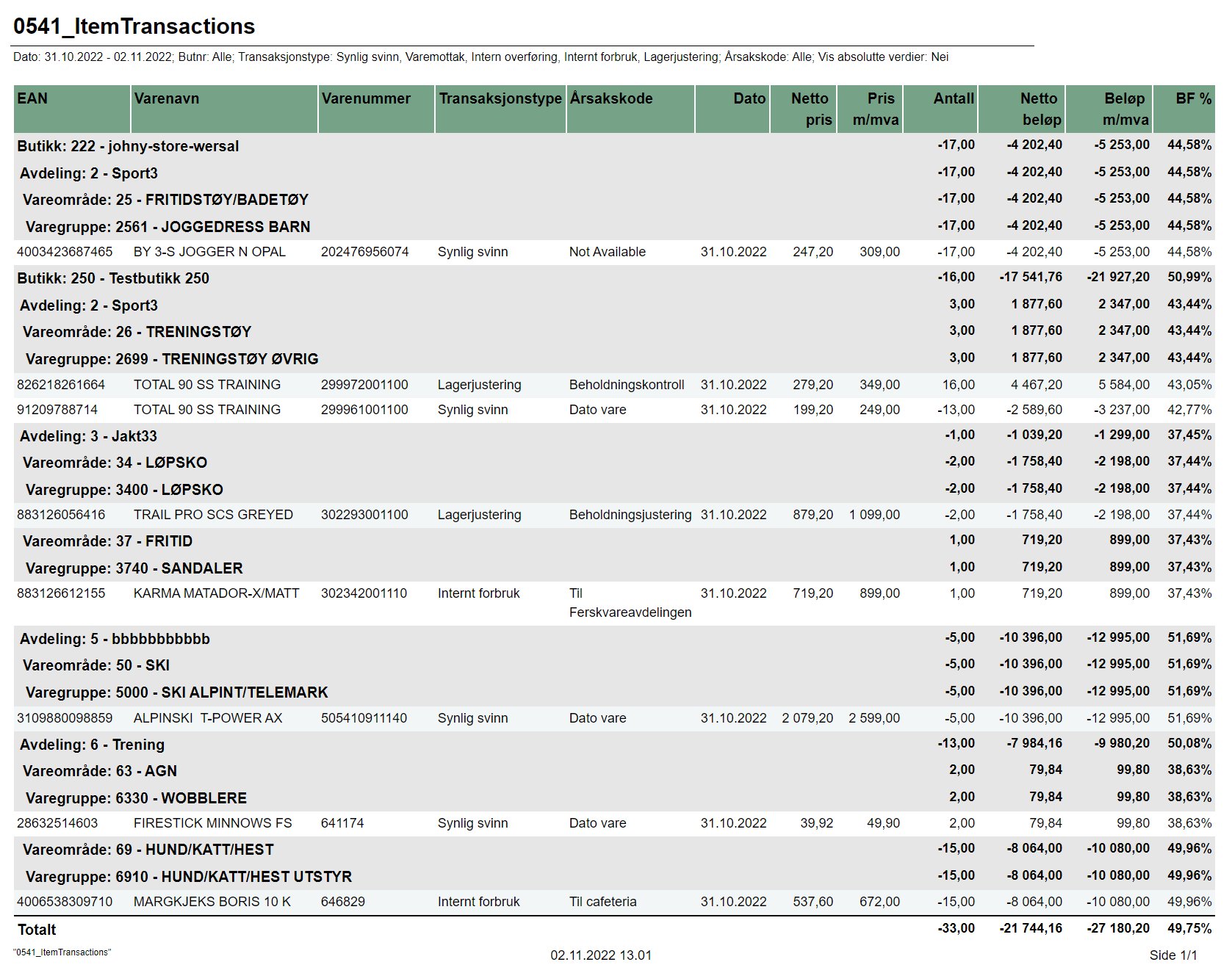
Description: General report for item transaction. This report will show all item transactions with reason code. Source:
Selections:
Relevant parameters:
Output: List of item transactions with reason code Columns (sum for store and each level of hierarchy. Sum total on last row):
Clarifications:
|

...
| Expand | ||
|---|---|---|
| ||
RTC-27768
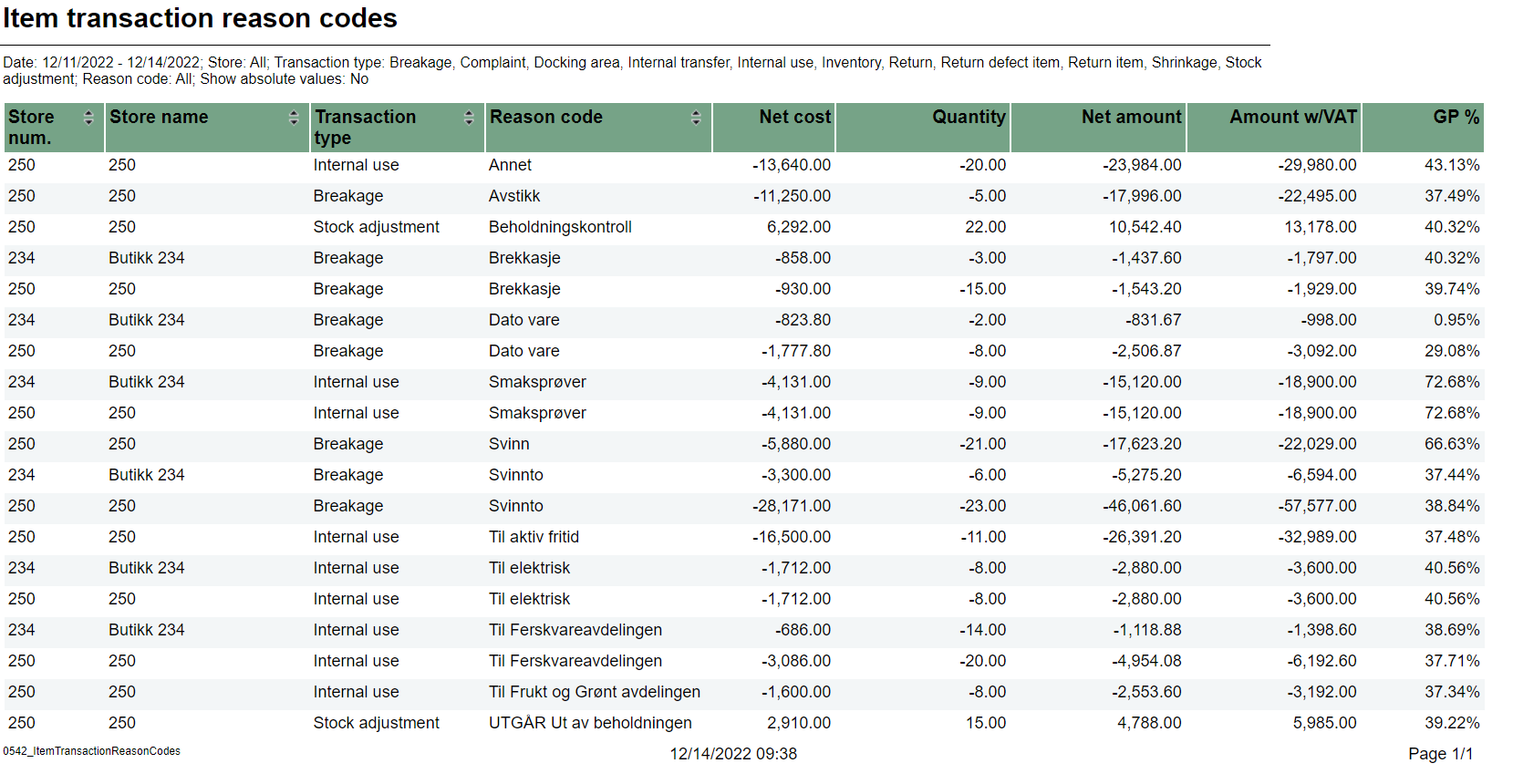
Description: Report lists all reasoncodes for all stores. Layout of the report makes it easy to export data to Excel. Selections:
Relevant parameters:
Output: List of item transactions with reason codes Columns (interactive sorting on Storenum, Storename, Transaction type and Reason code):
Clarifications:
|
...
| Expand | ||
|---|---|---|
| ||
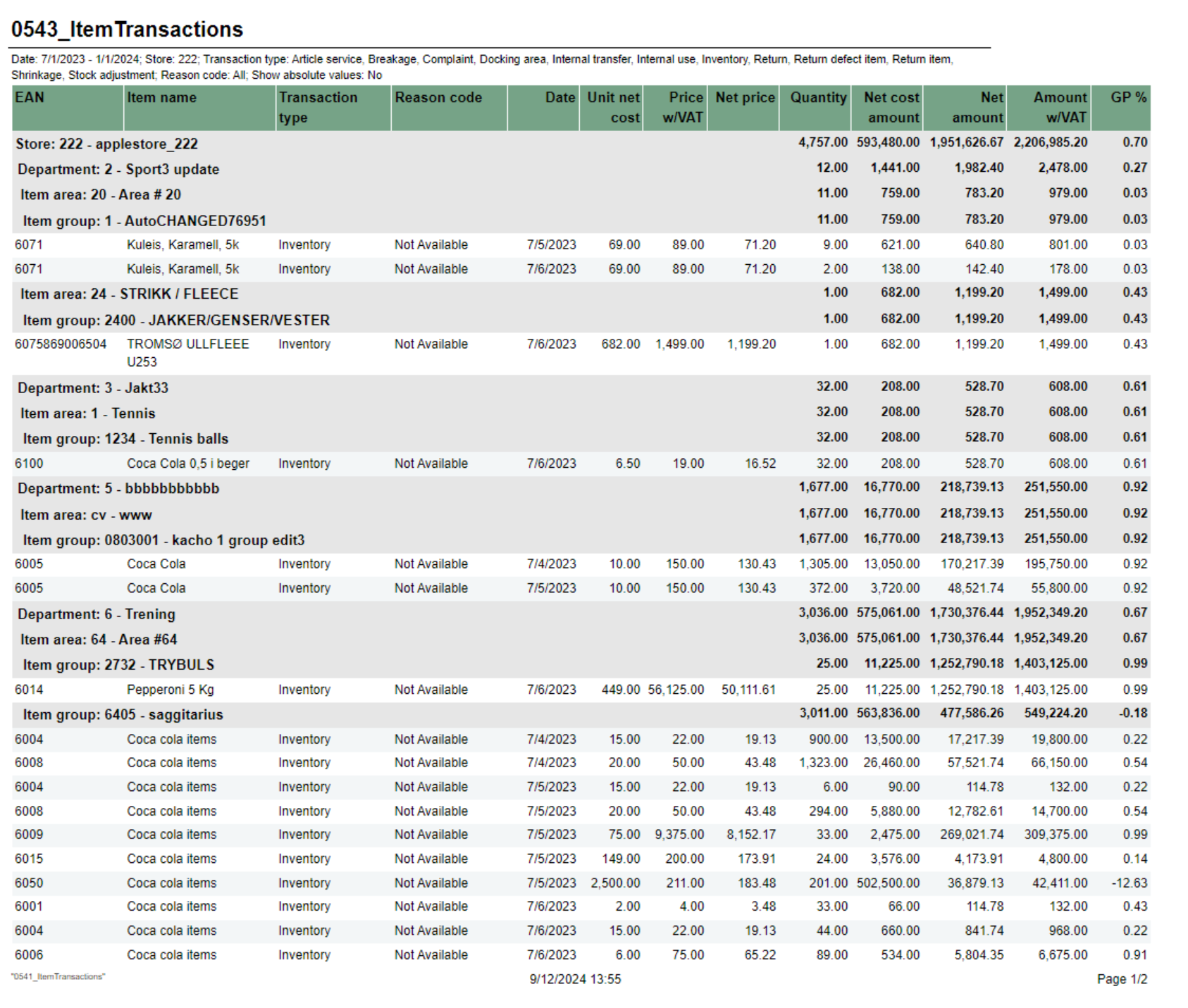
Description: RTP-33121 General report for item transaction. This report will show all item transactions with reason code. Report is similar to 0541 without item number and two extra columns for net cost. Source:
Selections:
Relevant parameters:
Output: List of item transactions with reason code Columns (sum for store and each level of hierarchy. Sum total on last row):
Clarifications:
|
...
| Expand | ||||||||||||||||||||||||||||||||||||||||||||||||||||||||||||||||||||||||||||||||
|---|---|---|---|---|---|---|---|---|---|---|---|---|---|---|---|---|---|---|---|---|---|---|---|---|---|---|---|---|---|---|---|---|---|---|---|---|---|---|---|---|---|---|---|---|---|---|---|---|---|---|---|---|---|---|---|---|---|---|---|---|---|---|---|---|---|---|---|---|---|---|---|---|---|---|---|---|---|---|---|---|
| ||||||||||||||||||||||||||||||||||||||||||||||||||||||||||||||||||||||||||||||||
CO-256310, RTC-30351
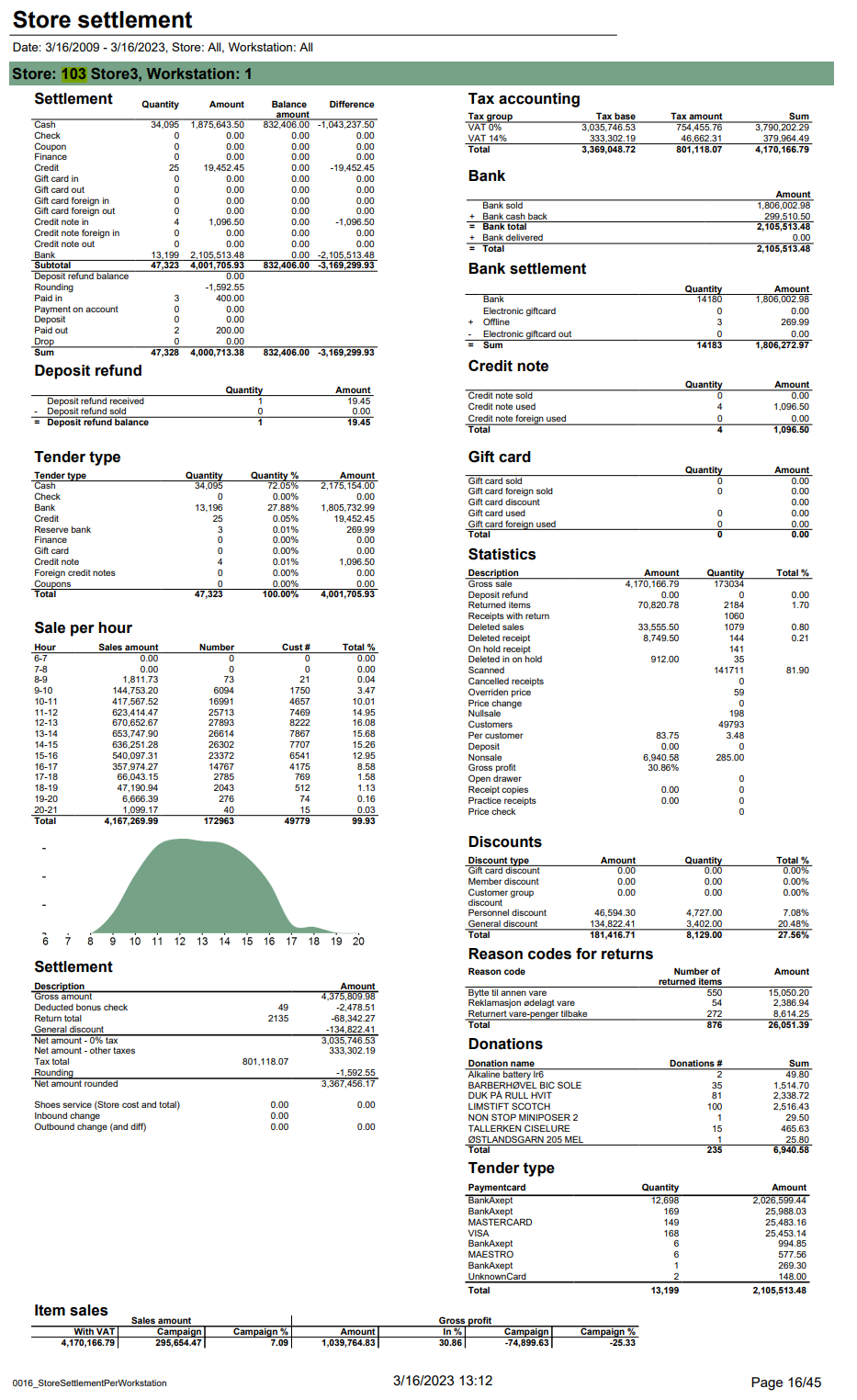
Description: Report allows to follow up store settlement: on first page settlement for all selected workstations and settlement per each workstation on following pages. Report is divided in 16 subreports which will be descriped separatly below. Selections (applies to all subreports):
Parameters:
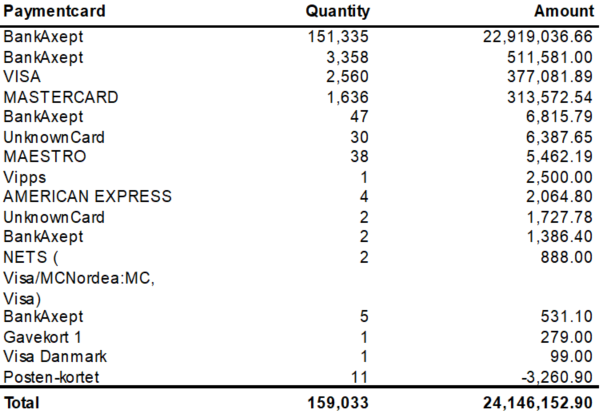
Clarifications: Report is mostly based on 0016_StoreSettlementPerWorkstation_std report. Additionaly report contains new 1022_subPaymentCard report, GLN code for each store in title and multivalue selections for stores. Subreports:
Source:
|
...
| Expand | ||||||||||||||||||||||||||||||
|---|---|---|---|---|---|---|---|---|---|---|---|---|---|---|---|---|---|---|---|---|---|---|---|---|---|---|---|---|---|---|
| ||||||||||||||||||||||||||||||
CO-262513 RTC-31644
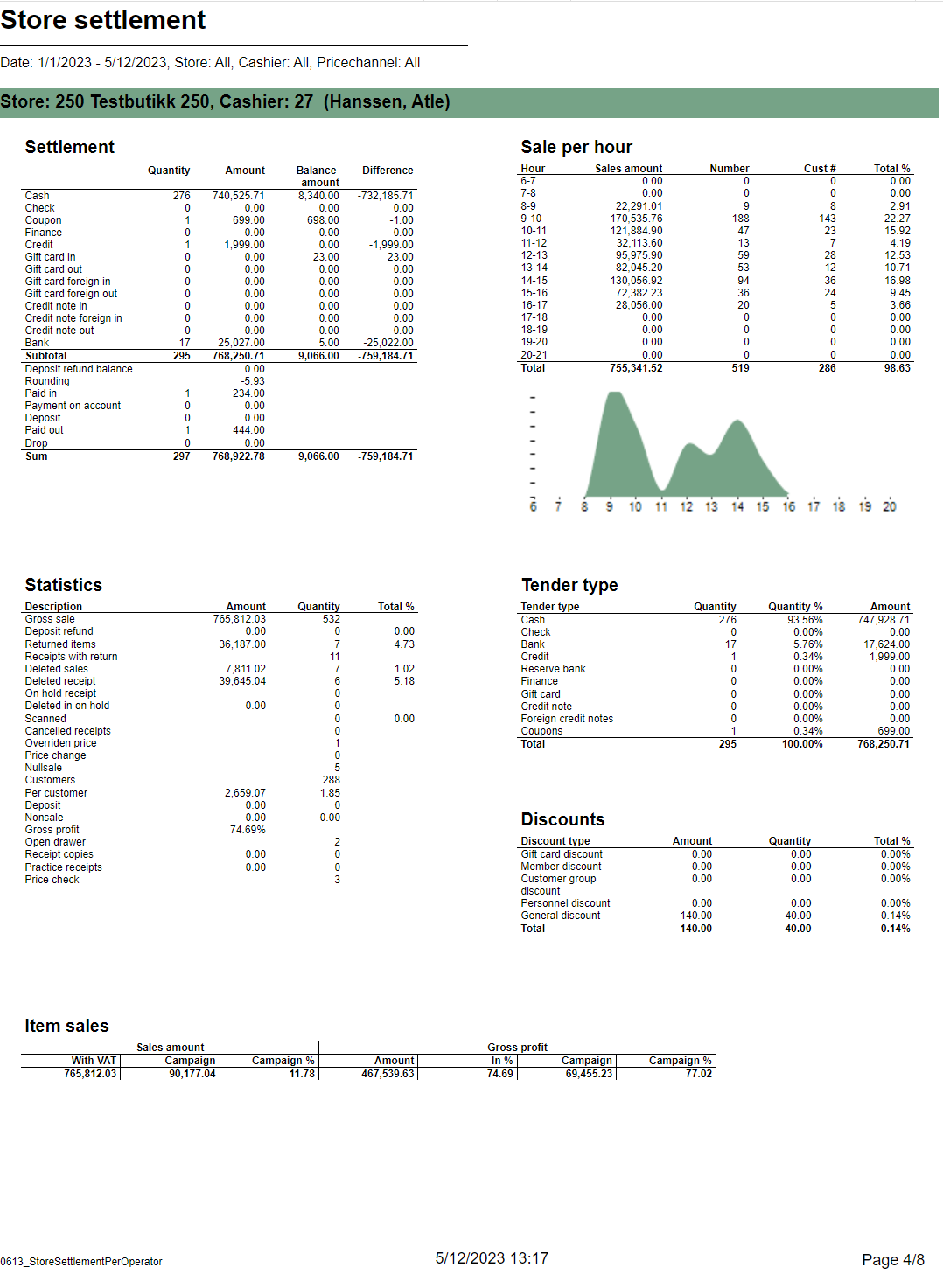
Description: Report allows to follow up store settlement. On first page per storefor all selected cashiers (if all cashiers are selected it equals whole store settlement) and settlement per each cashier on following pages. Report is divided in subreports which will be descriped separatly below. Selections:
Subreports:
|
...
| Expand | |||||||||||||||||||||||||||||||||||
|---|---|---|---|---|---|---|---|---|---|---|---|---|---|---|---|---|---|---|---|---|---|---|---|---|---|---|---|---|---|---|---|---|---|---|---|
| |||||||||||||||||||||||||||||||||||
CO-262513 RTC-31644
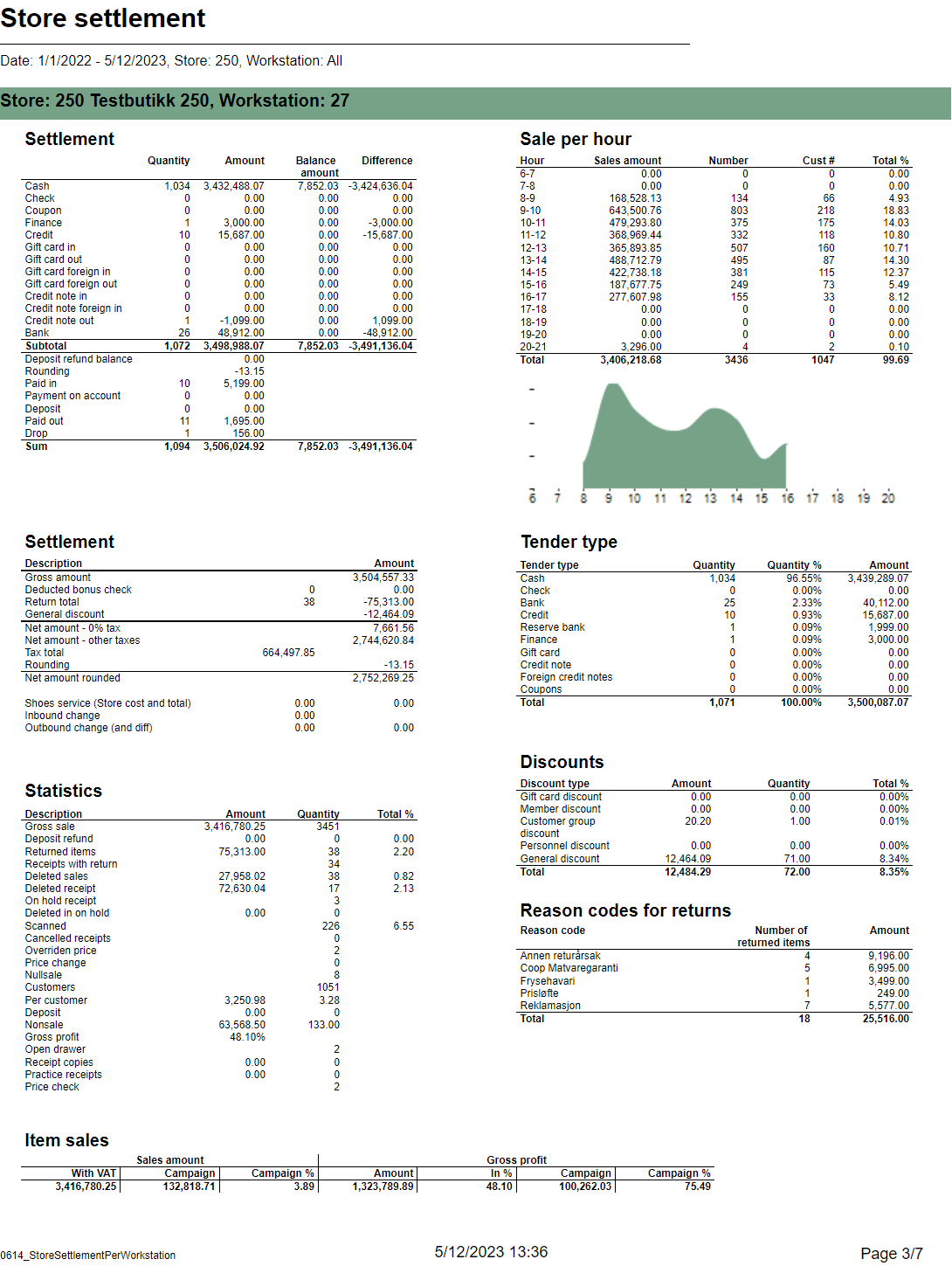
Description: Report allows to follow up store settlement. On first page per store, data for all selected cash registers (if all cash registers are selected it equals whole store settlement) and settlement per each cash register on following pages. Report is divided in subreports which will be descriped separatly below. Selections:
Subreports:
|
...
| Expand | ||
|---|---|---|
| ||
CO-273435
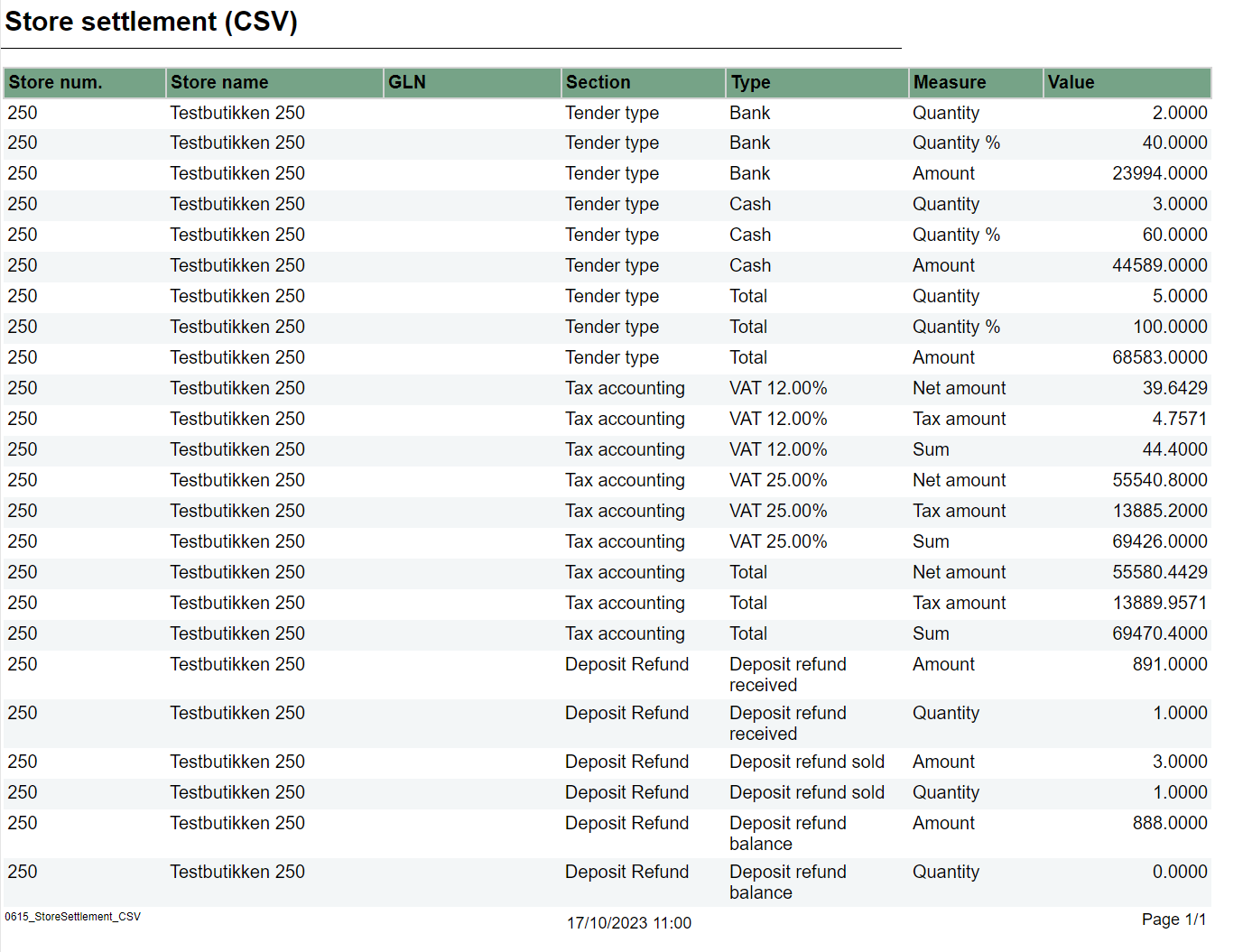
Description: Report lists data from some of sections used in 0612. Output is to make it easier for exporting data to csv format. Selections:
Parameters:
Output: Report lists data from sub-reports listed below in one line per store section (sub-report) type and measure. Data is aggregated per store within date selection. Columns:
|
...
| Expand | ||||||||||||||||||||||||||||||||||||||||
|---|---|---|---|---|---|---|---|---|---|---|---|---|---|---|---|---|---|---|---|---|---|---|---|---|---|---|---|---|---|---|---|---|---|---|---|---|---|---|---|---|
| ||||||||||||||||||||||||||||||||||||||||
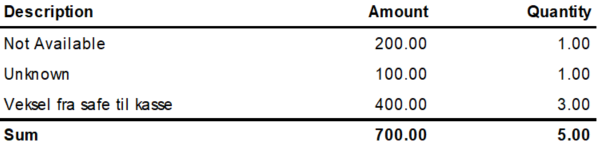
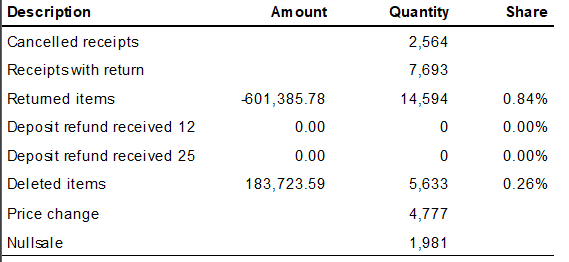
CO: 10400, PBI#90853
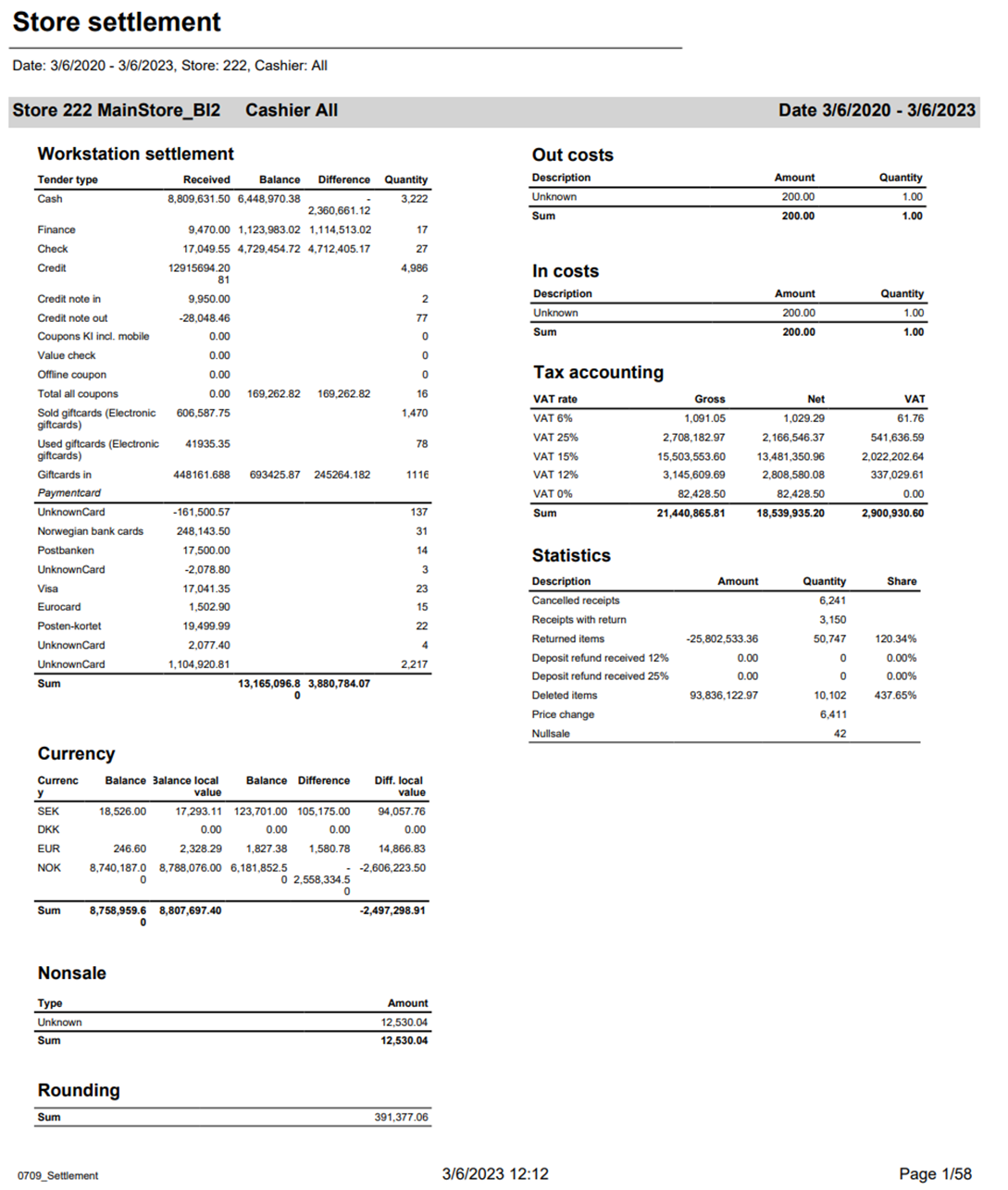
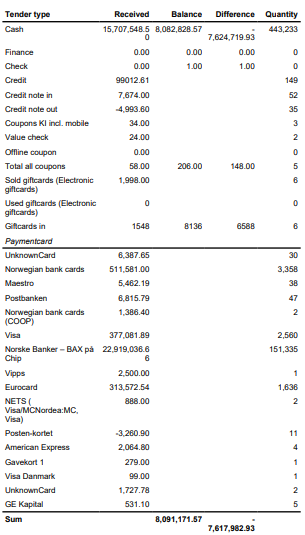
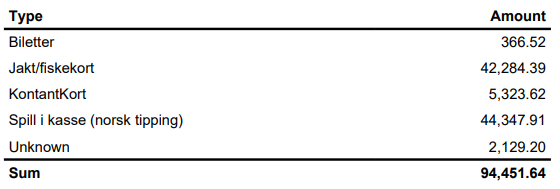
Description: Report allow to follow up store settlement: all selected Chahiers (if all cashiers are selected it equals whole store settlement) and settlement per each Cashier on following pages. Selections:
Subreports:
Source:
|

...
| Expand | ||
|---|---|---|
| ||
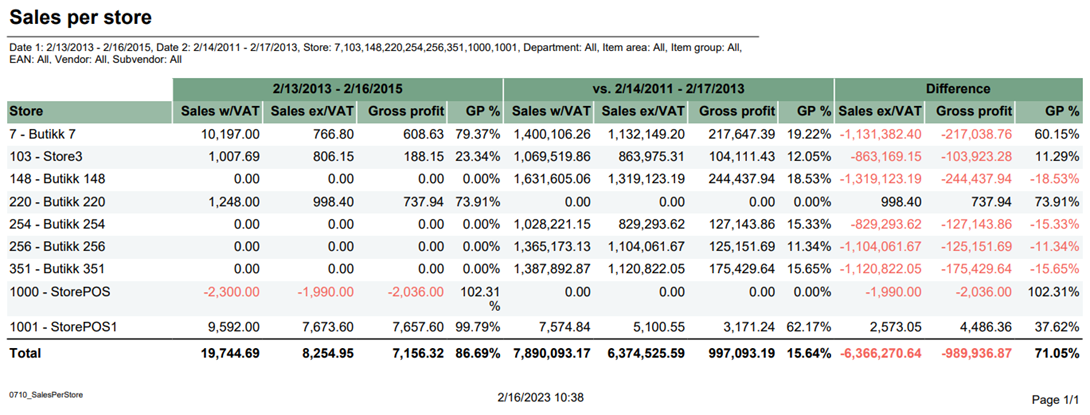
CO: 10625, PBI#116476
Description: Report lists sales per store with comparison sales and difference. Selections:
Output: Report lists sales in stores in selected period of time and comparison sales in other selected period of time with difference both sales. Report has a summary of each column. Columns:
Clarifications: Negative values are colored red. Source:
|
...
| Expand | ||
|---|---|---|
| ||
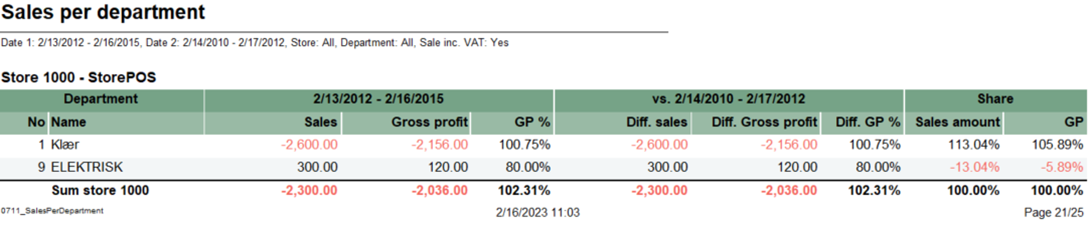
CO: 10603, PBI#116490
Description: Report lists sales per department with comparison sales. Selections:
Output:
Columns:
Sorting: No – Department number (default sorting) Clarifications: Negative values are colored red. Source:
|
...
| Expand | ||
|---|---|---|
| ||
CO-10610, PBI#116539
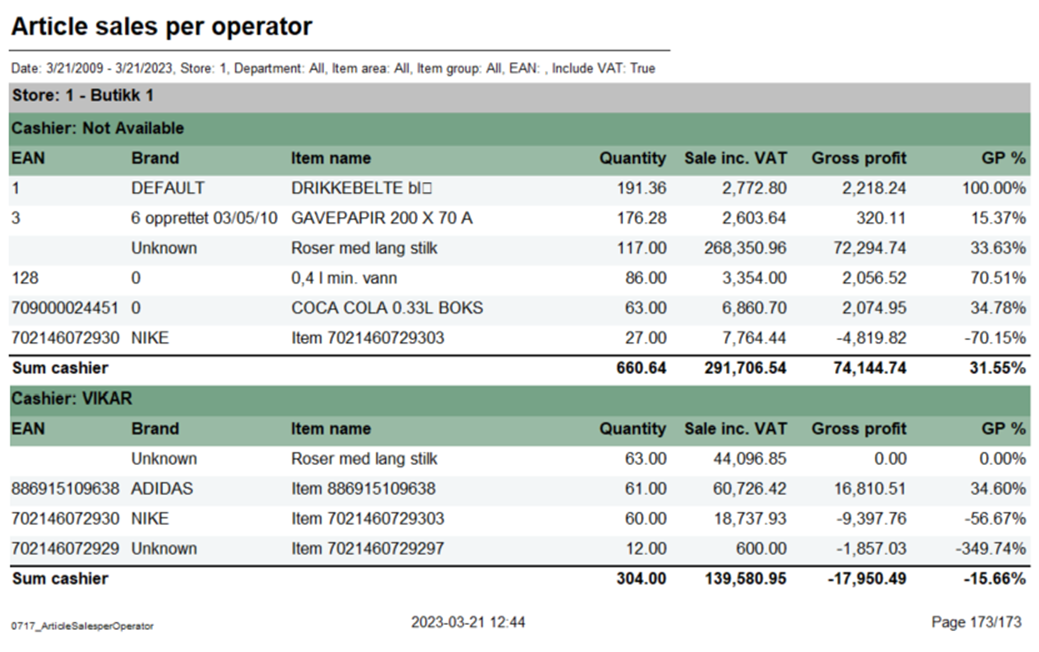
Description: Report lists article sales per operator. Selections:
Output: Report shows list of sales articles for each cashier in selected stores. Columns:
Source:
|
...
| Expand | ||
|---|---|---|
| ||
CO: 70942, PBI#144616
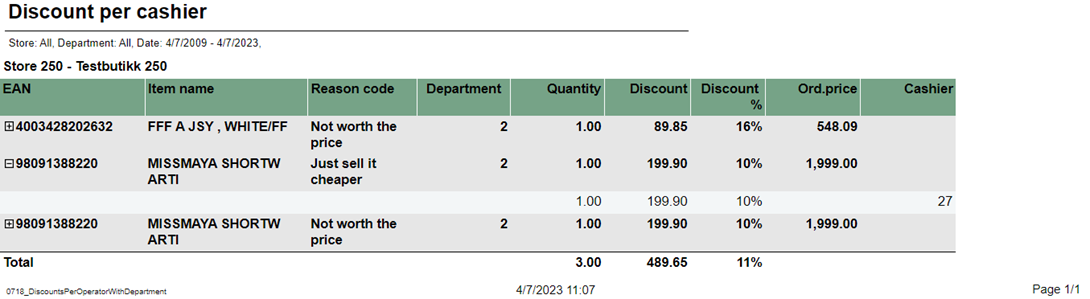
Description: Report lists discount per cashier with selected department Selections:
Output:
Columns:
Source:
|
| Anchor | ||||
|---|---|---|---|---|
|
| Expand | ||
|---|---|---|
| ||
CO: 115424
Description: Report lists expiration dates of items including transaction type internal use with reason code. Selections:
Columns:
Output: Raport shows list of items for selected store and departments, and also for selected Article ares and groups. It is one row per EAN and present expiration date including transaction type internal use with reason code. Clarifications:
Source:
|

...
| Expand | ||||||||||||||||||||||||||||||||||||||||||||||||||||||||||||
|---|---|---|---|---|---|---|---|---|---|---|---|---|---|---|---|---|---|---|---|---|---|---|---|---|---|---|---|---|---|---|---|---|---|---|---|---|---|---|---|---|---|---|---|---|---|---|---|---|---|---|---|---|---|---|---|---|---|---|---|---|
| ||||||||||||||||||||||||||||||||||||||||||||||||||||||||||||
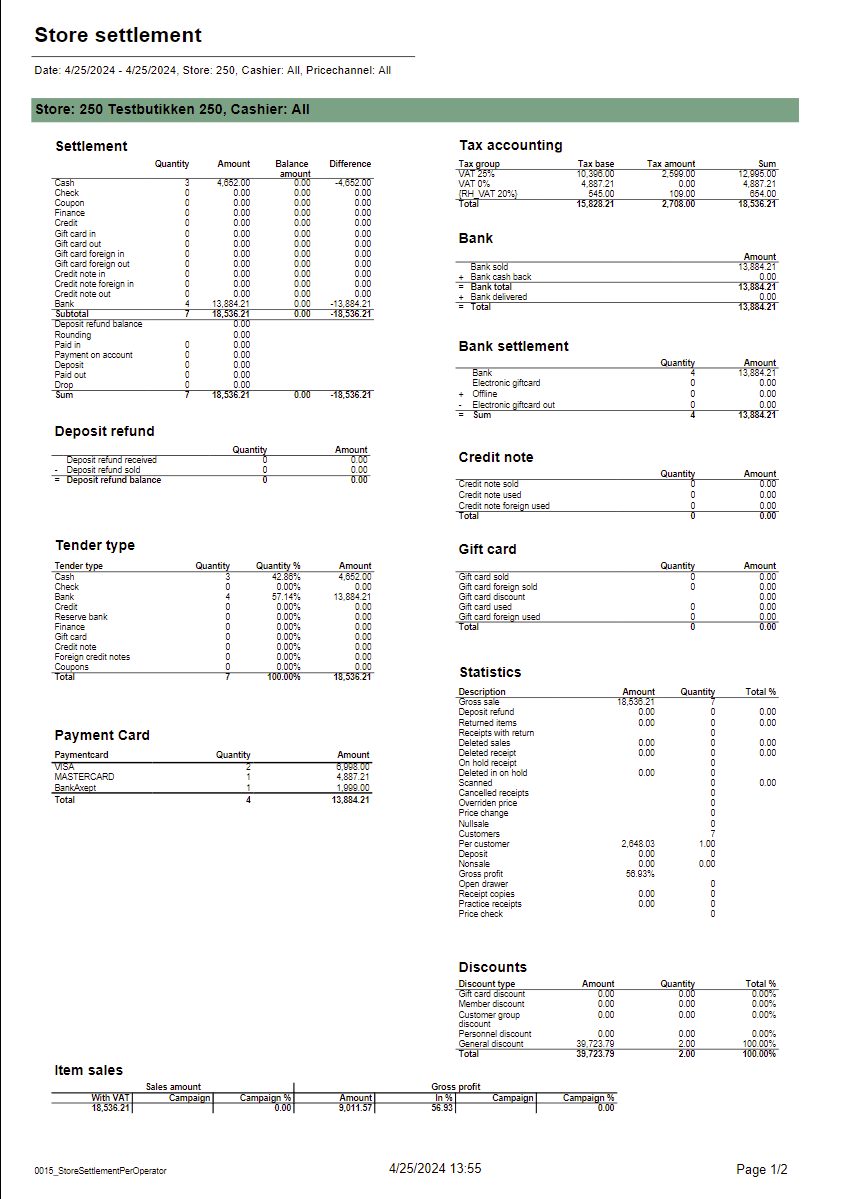
Standard report
Description: Report allows to follow up store settlement: on first page settlement for all selected cashiers (if all cashiers are selected it equals whole store settlement) and settlement per each cashier on following pages. Report is divided in 12 subreports which will be descriped separatly below. Selections (applies to all subreports):
Subreports:
Source:
|
| Anchor | ||||
|---|---|---|---|---|
|
| Expand | |||||||||||||||||||||||||||||||||||||||||||||||||||||||||||||||||||||||||||
|---|---|---|---|---|---|---|---|---|---|---|---|---|---|---|---|---|---|---|---|---|---|---|---|---|---|---|---|---|---|---|---|---|---|---|---|---|---|---|---|---|---|---|---|---|---|---|---|---|---|---|---|---|---|---|---|---|---|---|---|---|---|---|---|---|---|---|---|---|---|---|---|---|---|---|---|
| |||||||||||||||||||||||||||||||||||||||||||||||||||||||||||||||||||||||||||
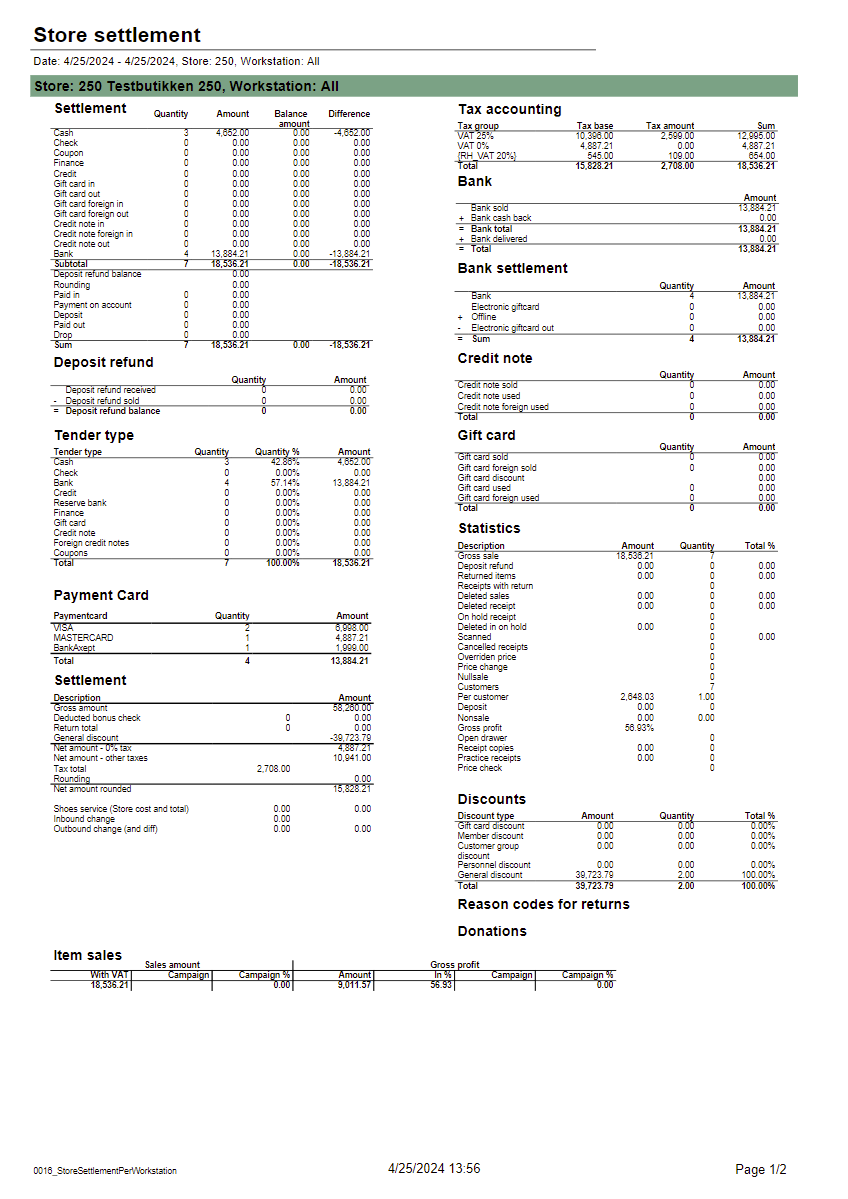
Description: Report allows to follow up store settlement: on first page settlement for all selected workstations and settlement per each workstation on following pages. Report is divided in 15 subreports which will be descriped separatly below. Selections (applies to all subreports):
Subreports:
Source:
|
| Anchor | ||||
|---|---|---|---|---|
|
...
| Expand | ||
|---|---|---|
| ||
CO based on report 0714
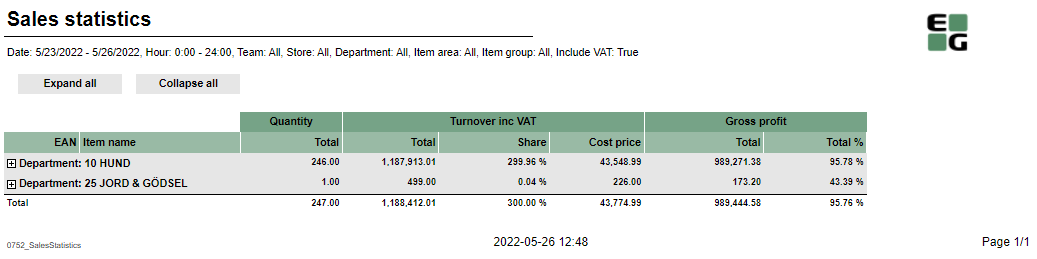
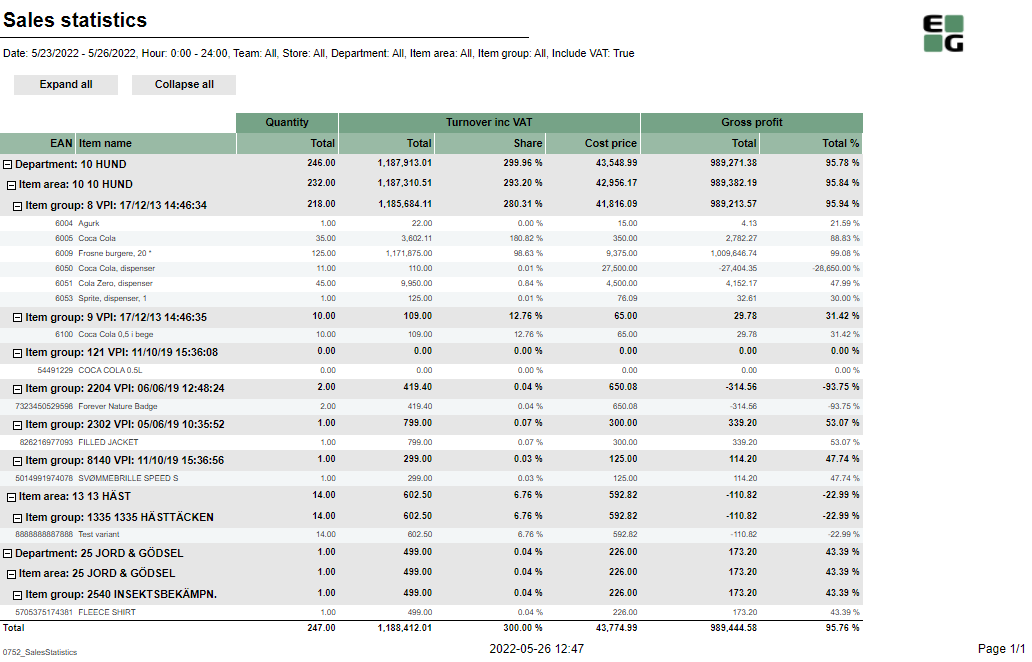
Description: Report allows to follow up article sales on multiple levels with possibility to select specific hourly intervals and exclude specific item groups. Selections:
Output: Article sale statistics for selected stores, for selected date interval and for selected time interval grouped by department, area and group. By default data is shown for department and it is possible to drill down to item level manually by clicng plus button or by using expand all button to expand everithing to item level at once. Columns:
Sorting:
Clarifications:
Hidden parameters:
Source:
|
| Anchor | ||||
|---|---|---|---|---|
|
...
| Expand | ||
|---|---|---|
| ||
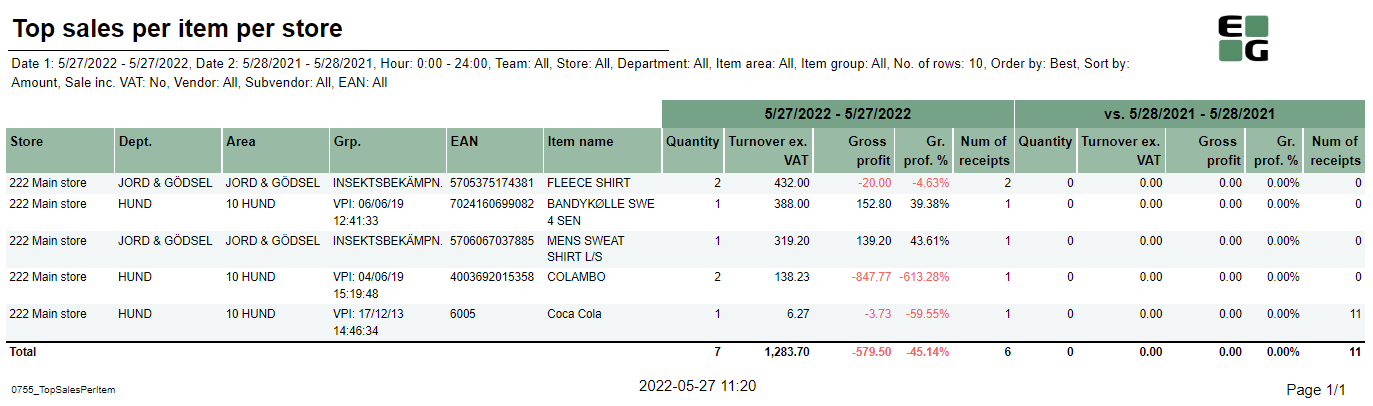
CO: 207212. Based on report 0754
Description: Report allows to find given number of best or worst selling items on multiple levels (amount, quantity, gross profit) in two date intervals. Possible to select specific hourly interval. Selections:
Output: Sale statistics for selected number of best or worst items per store sorted by selected sort measure devided in two selected date intervals in selected hour range. Columns:
Sorting:
Clarifications:
Hidden parameters:
Source:
|
| Anchor | ||||
|---|---|---|---|---|
|
| Expand | ||
|---|---|---|
| ||
CO: 208778. Based on report 0650
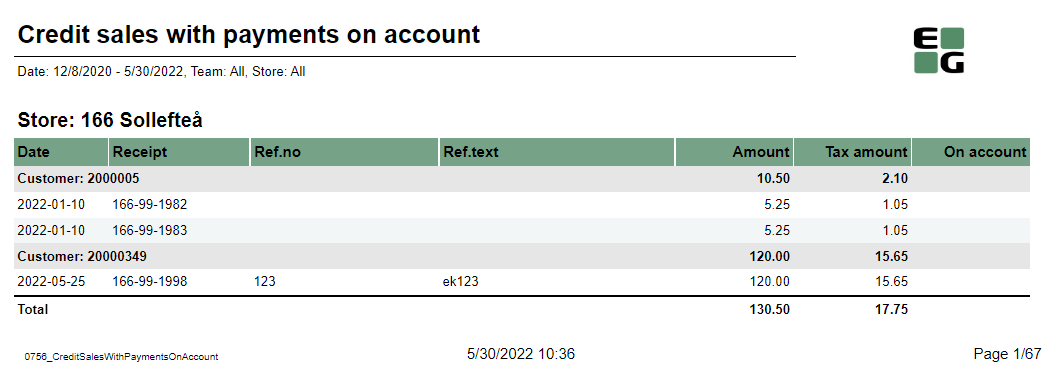
Description: Report shows credit sales and payments on account to get a better overview over drive-offs. Selections:
Output: One row per transaction grouped by store and customer. Page break and total for each store. Columns:
Sorting:
Clarifications: Transaction can be either Credit sale or Payment on account. If transaction is Payment on account there is no data available for columns: Ref.no and Ref.text Source:
|
| Anchor | ||||
|---|---|---|---|---|
|
...
| Expand | ||
|---|---|---|
| ||
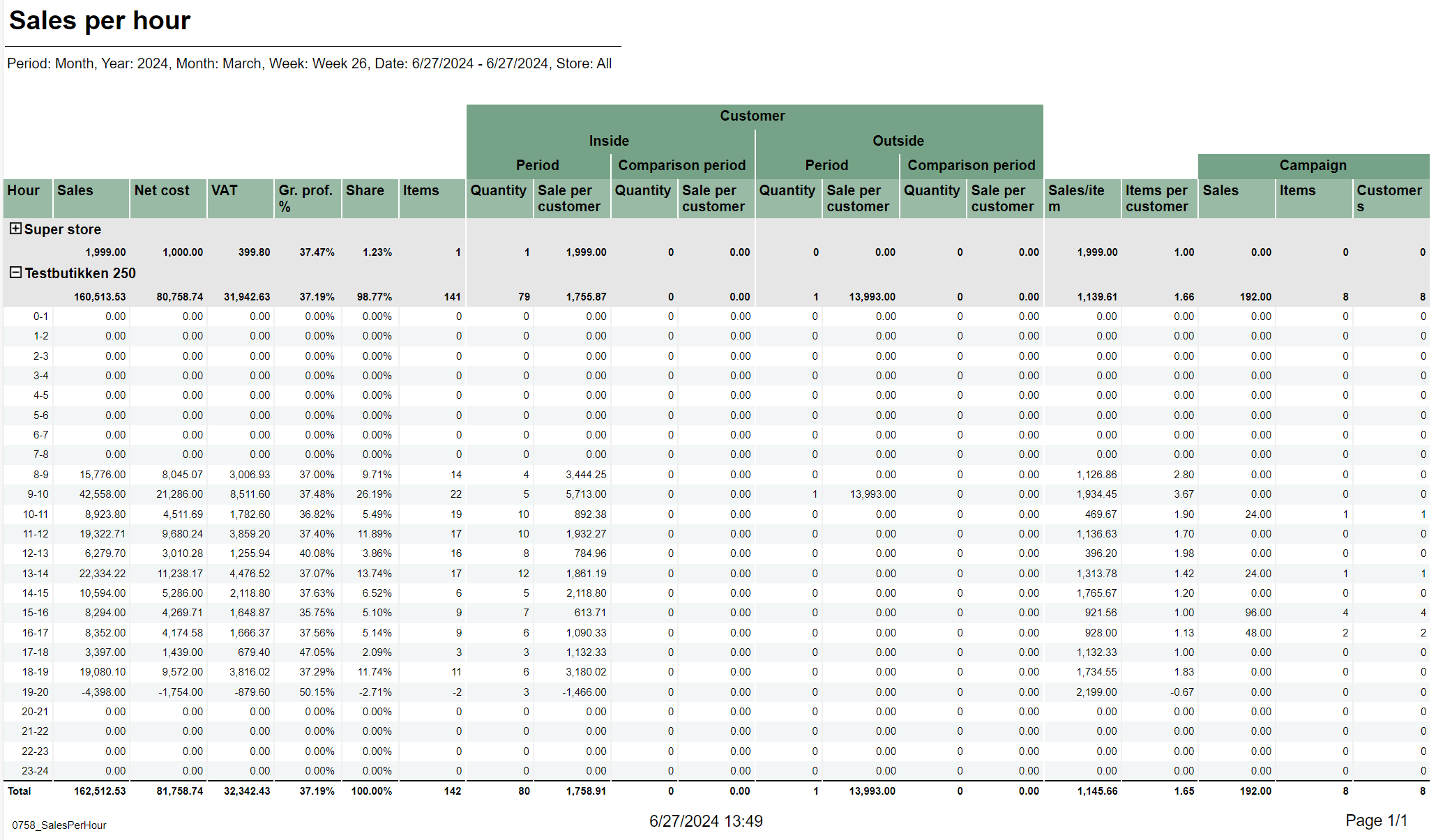
CO-271850 based on 0603_SalesPerHour
Description: Report lists sales per hour with counting customer inside and outside. It also compares inside / outside data with selected period. Selections:
Parameters:
Output:
Columns:
Source:
|
...
| Expand | ||
|---|---|---|
| ||
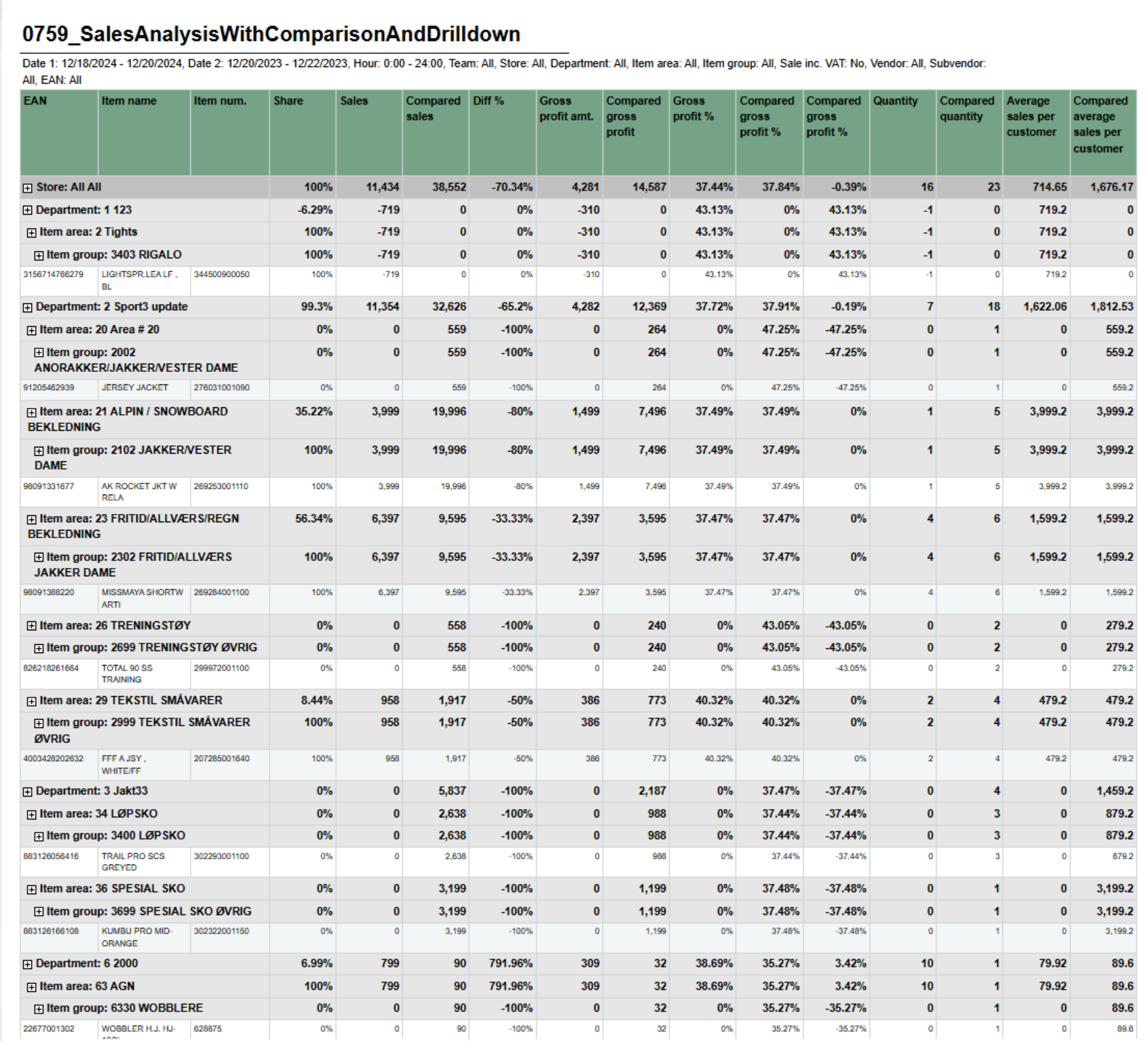
CO-211507 / RTC-45144
Description: Report shows sales statistics in a hierarchy from store to department, item area, item group and item. Report show statistics for all selected stores and a total page for all selected store. Selections:
Output: One line per item with the hierarchy from store, department, item area and item group. Columns:
Hidden parameters:
Source:
|
| Anchor | ||||
|---|---|---|---|---|
|
| Expand | ||||||||||||||||||||||||||||||||||||||||
|---|---|---|---|---|---|---|---|---|---|---|---|---|---|---|---|---|---|---|---|---|---|---|---|---|---|---|---|---|---|---|---|---|---|---|---|---|---|---|---|---|
| ||||||||||||||||||||||||||||||||||||||||
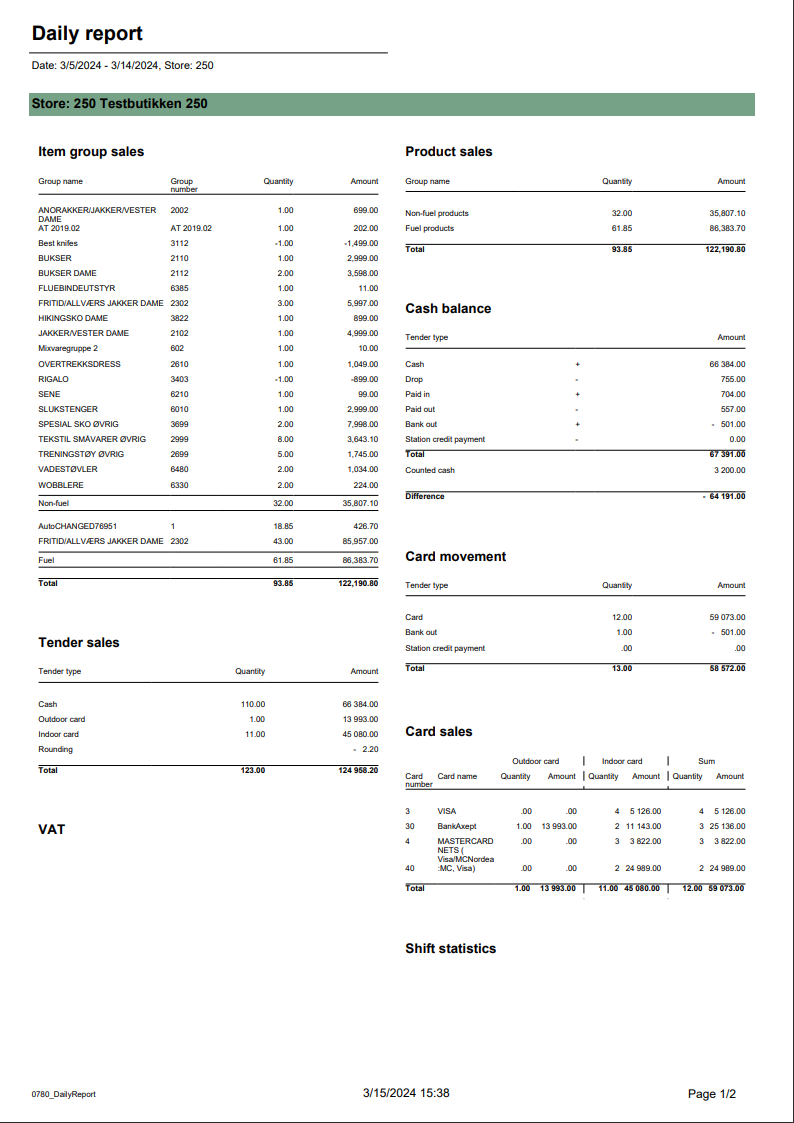
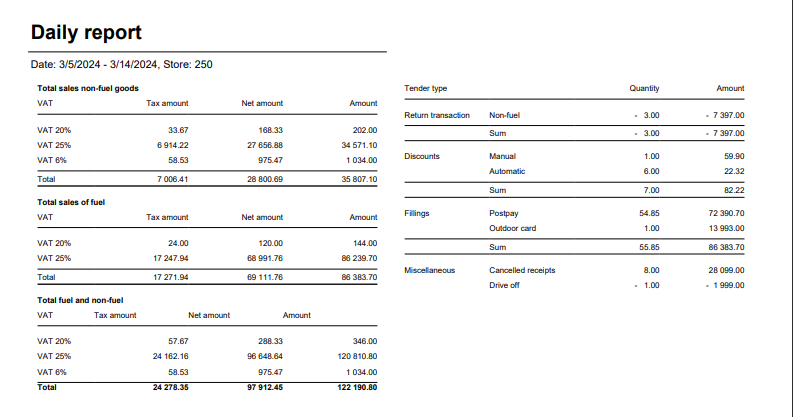
Standard report
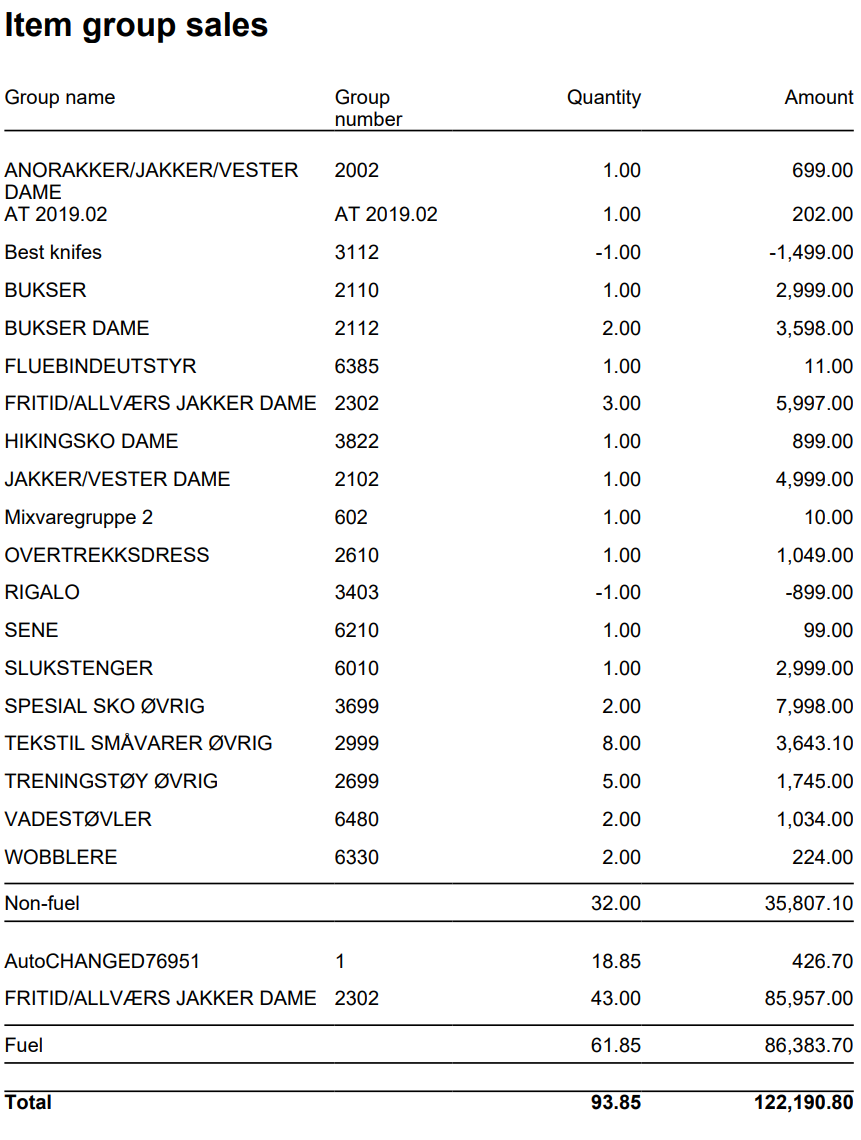
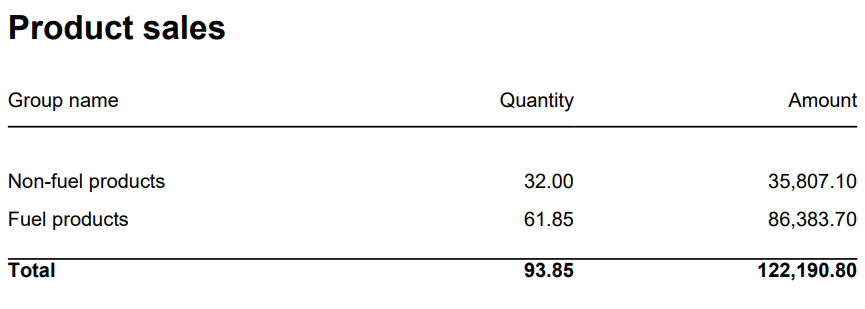
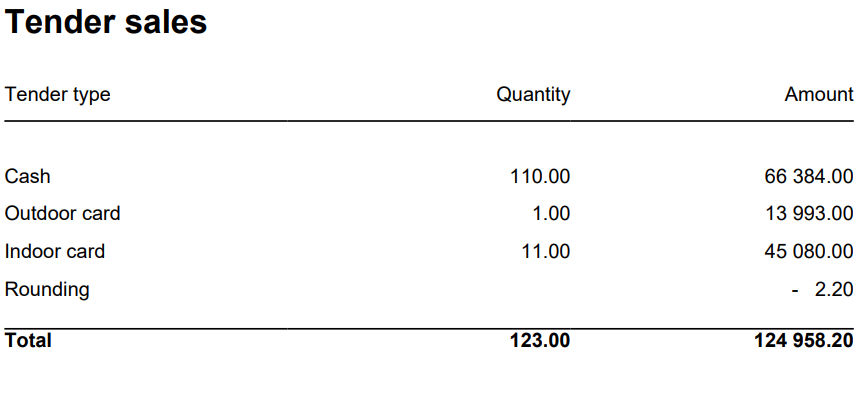
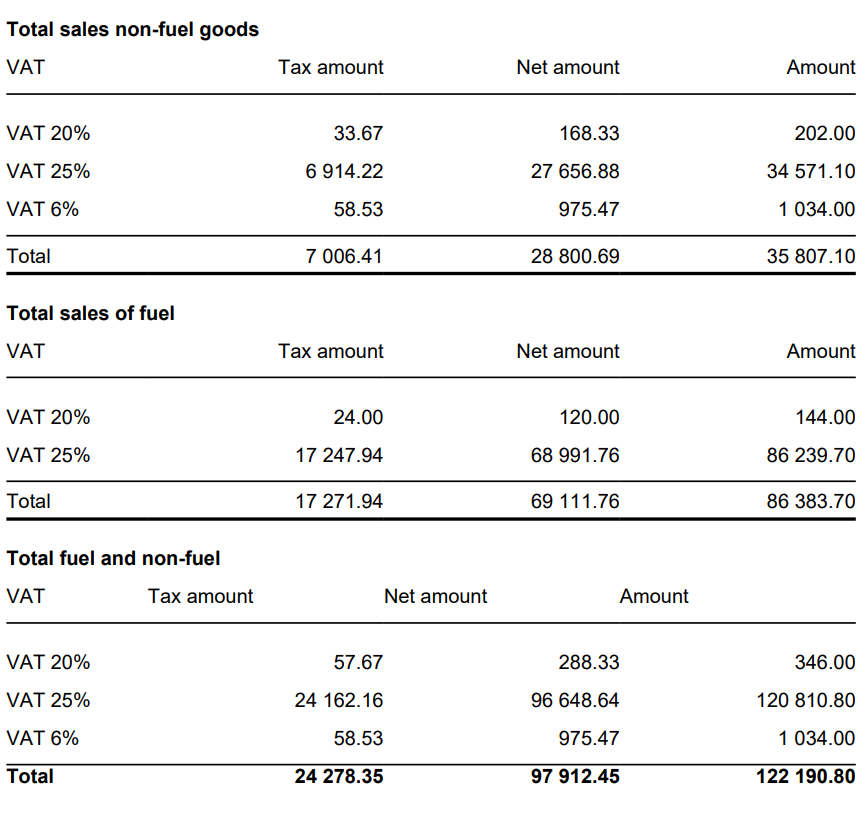
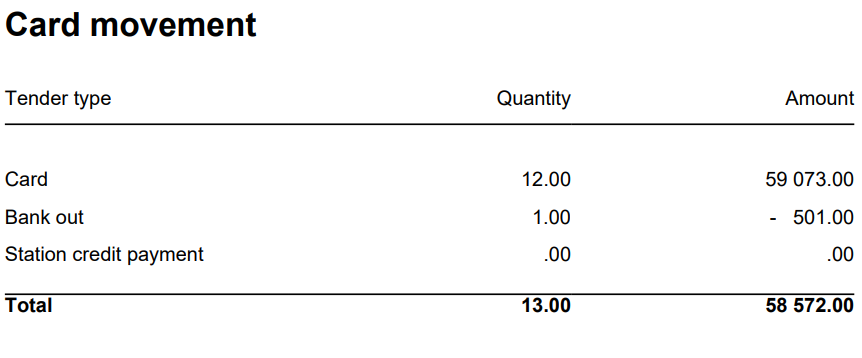
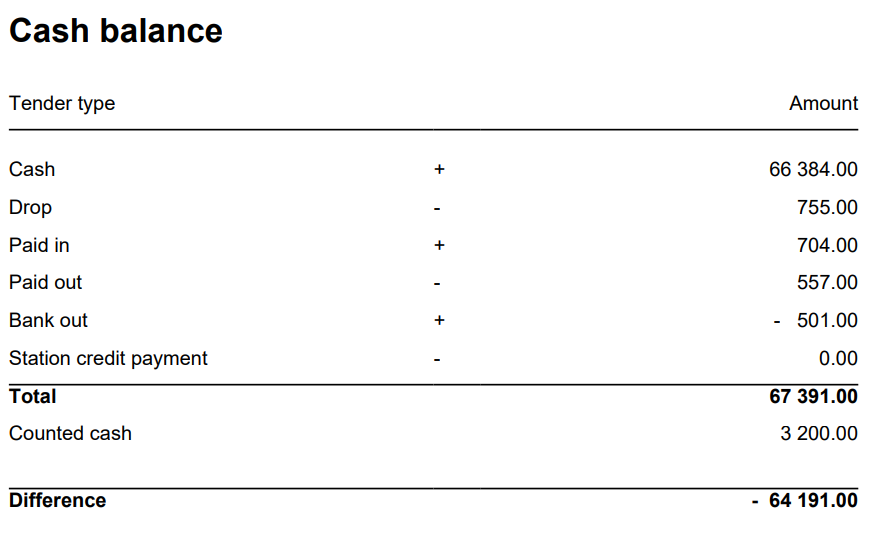
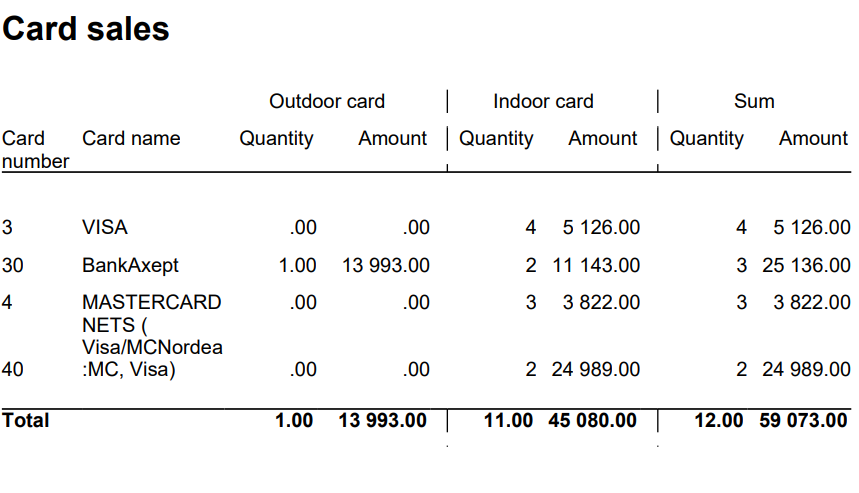
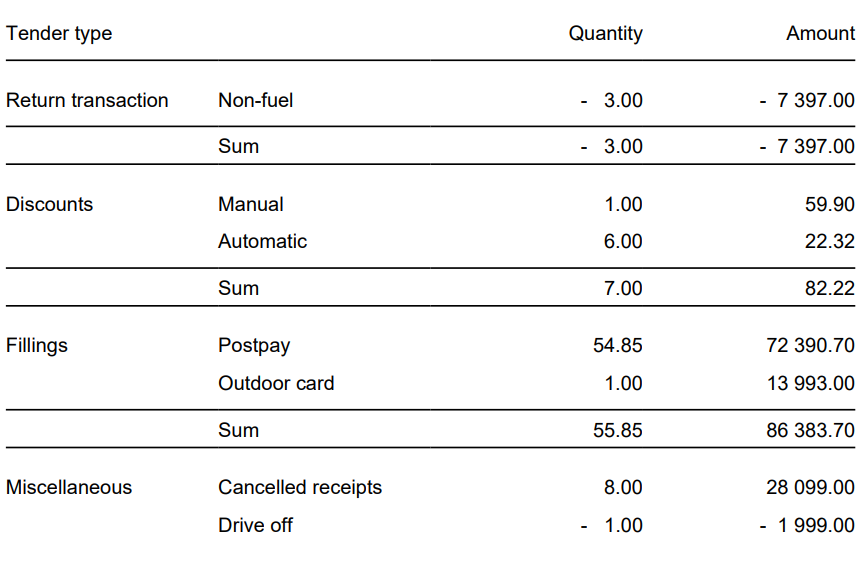
Description: Report allows to follow up sales in a specified store: comparing fuel and non fuel articles on all product groups, selected tender measures, VAT and measures like: cash balance, card movements, card sales and shift statistics. Depending on number of results it can be multi page. Report is divided in 8 subreports which will be descriped separatly below. Selections (applies to all subreports):
Hidden parameters:
Subreports:
Source:
|
| Anchor | ||||
|---|---|---|---|---|
|
| Expand | ||
|---|---|---|
| ||
[RTC-44550] [YXB] New cashier statistics report (0781) with Fuel column (CO-344179)
Description:
Selections:
Hidden parameters:
Output: One page per store - one row per cashier Columns:
Sorting:
Source:
|

| Anchor | ||||
|---|---|---|---|---|
|
| Expand | ||
|---|---|---|
| ||
[RTC-39849] TRN: Cashier security statistics report with turnover split and price checks - EG A/S
Description:
Selections:
Output: One page per store One row per cashier Columns:
Sorting:
Source:
|

| Anchor | ||||
|---|---|---|---|---|
|
| Expand | ||
|---|---|---|
| ||
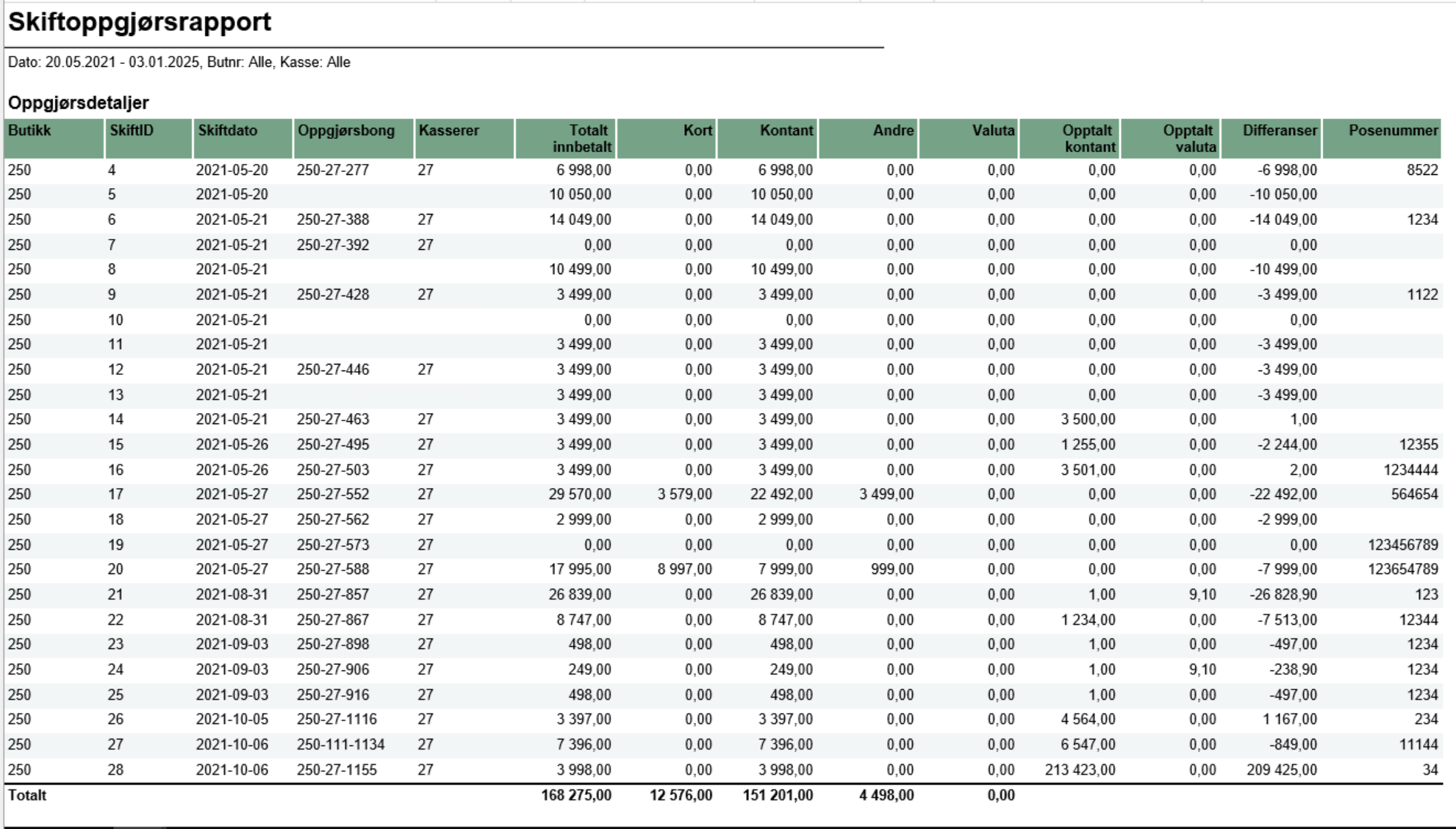
[RTC-44692] [TRN] Shift balance report (CO-335148) PIC - TO BE UPDATED Description:
Selections:
Parameters:
Output: The report consist of four tables:
Columns:
Sorting:
Source:
|
...
| Expand | ||||||||||
|---|---|---|---|---|---|---|---|---|---|---|
| ||||||||||
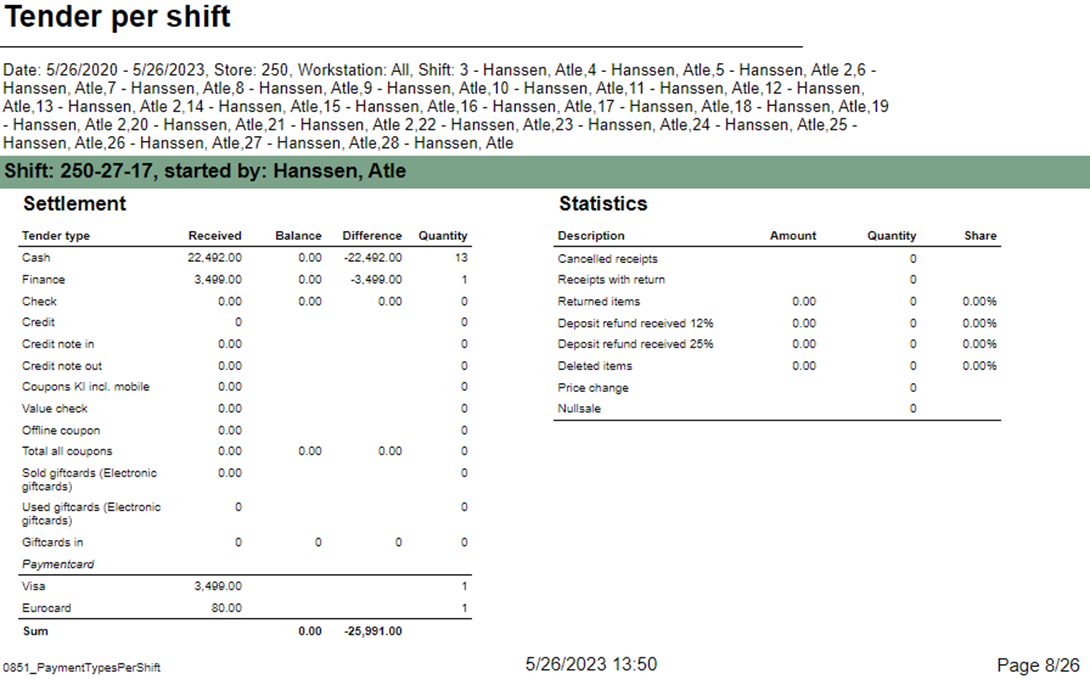
Description: Report allow to follow up tender per shift. Report has two subreports, one settlement and second about statistics. Selections:
Subreports:
Source:
|
...
| Expand | ||
|---|---|---|
| ||
RTC-27636 / CO-222611
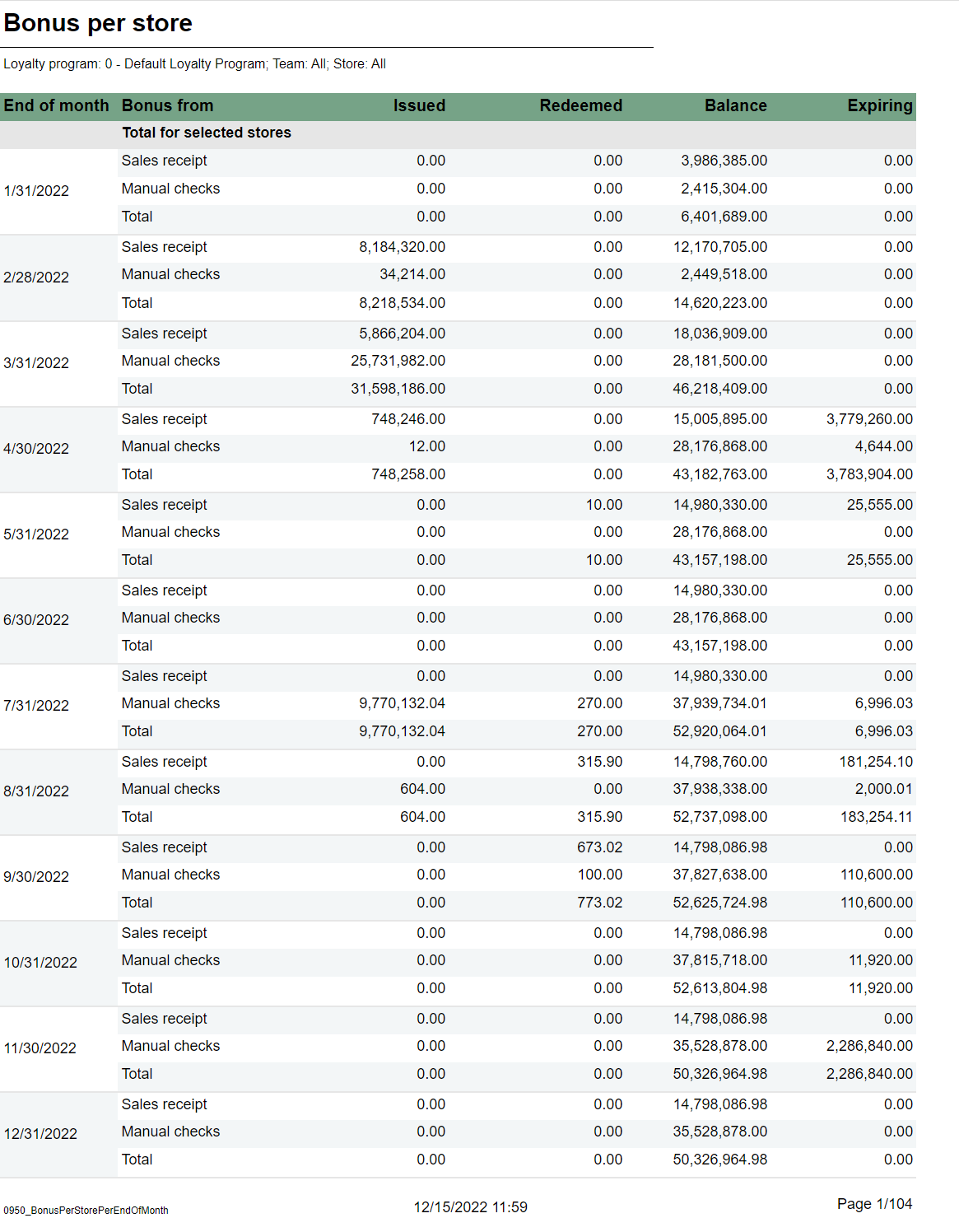
Description: Report shows information about issued, redeemed and balance for bonus checks, per month and store for the last 12 months. Selections:
Output: One page per store. For each month sum of issued, redeemed, balance and expired bonus checks. One sum for manual issued checks, checks issued from sales and total. First page of report is total for all stores. Columns:
Sorting:
Source:
|
| Anchor | ||||
|---|---|---|---|---|
|
...