Versions Compared

Key

  • This line was added.
  • This line was removed.
  • Formatting was changed.

...

Expand
title4004_SalesByDepartmentAreaAndGroup

RTC-46772

Description:

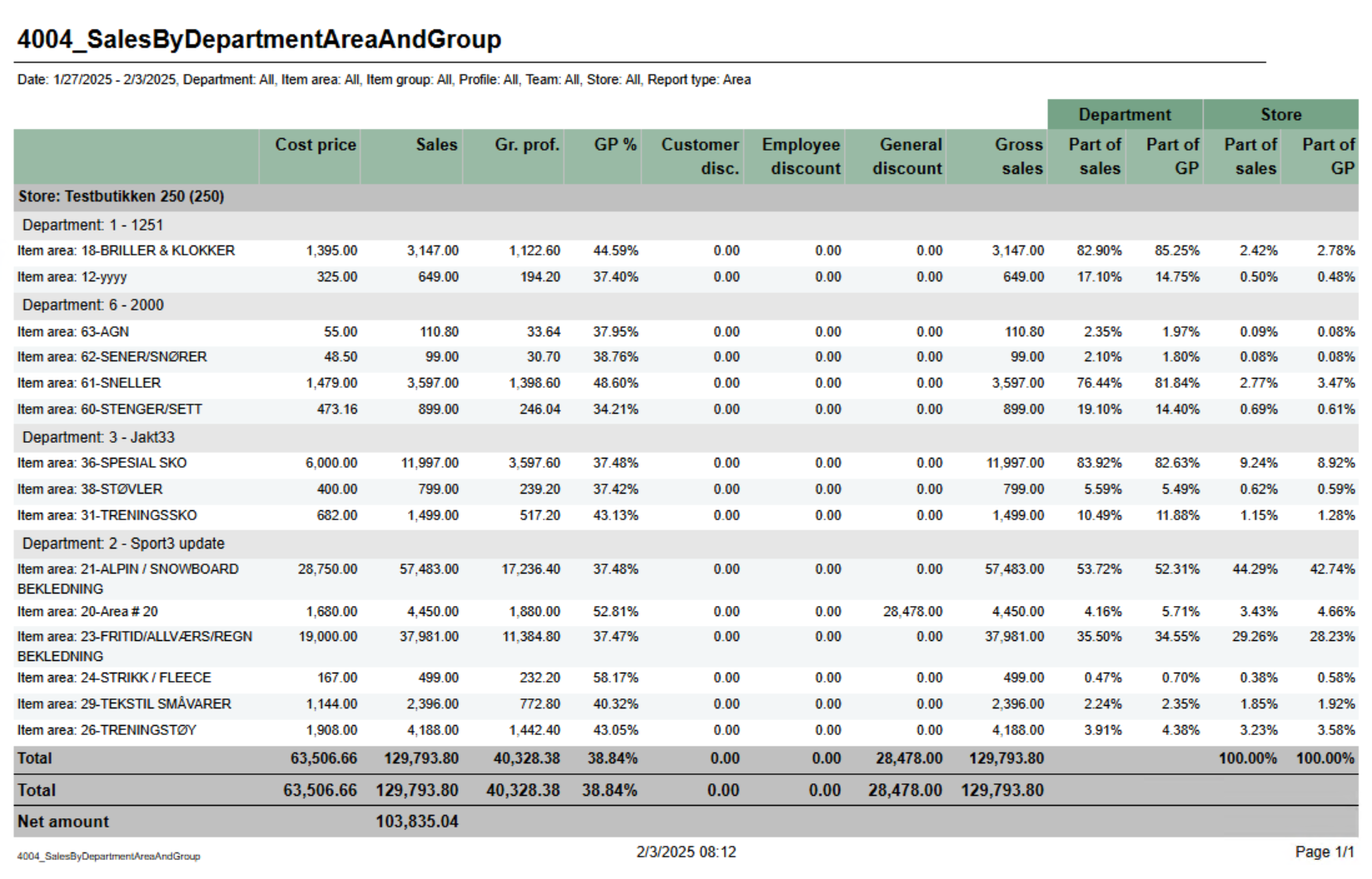
Report showing statistics about sales, gross profit and discount. Report is either on department, are or group depending on selection. Also share of gross profit and sales for department and store.

Selections:

  • Date from - default today
  • Date to - default today
  • Department - default all
  • Article area - default all
  • Article group default all
  • Profile - default all
  • Team - default all
  • Retail store - default all
  • Report type - Which lever of hierarchy report will be created on. Default Department.

Output:

One line per level of selected hierarcy with total for department.

Columns:

  • Cost price - Net cost
  • Sales - Sales amount including VAT
  • Gr.prof. - Gross profit in amount
  • GP% - Gross profit in percentage
  • Customer disc. - Customer grup discount
  • Eployee discount - Personal discount
  • General discount - Other discounts except customer and personal
  • Gross sales - Sales amount including depositdefund items
  • Department
    • Part of sales - Percentage part of sales per department
    • Part of GP - Percentage part of gross profit per department
  • Store 
    • Part of sales - Percentage part of sales per store
    • Part of GP - Percentage part of gross profit per store

Source:

Lindbak POS Reporting Cube (Olap)

Anchor
4006_SalesDifferencePerStore2

Expand
title4006_SalesDifferencePerStore2

RTC-47005

Image Added

Description:

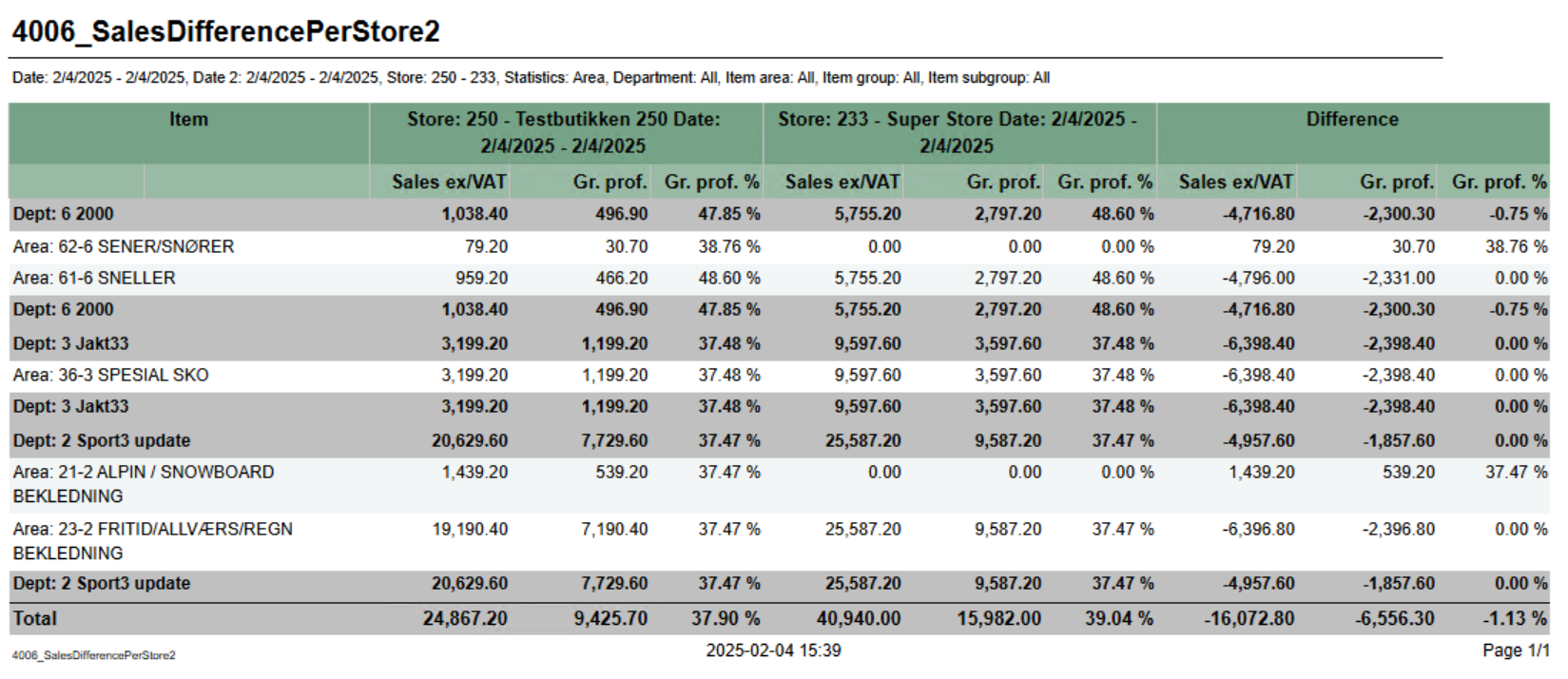
Report for comparing basic sales between two stores with date selection for each store.

Selections:

  • Date from - Start date for reference store. Default today
  • Date to - End date for reference store. Default today
  • Compare date from - Start date for comparing store. Default today
  • Compare date to - End date for comparing store. Default today
  • Retail store ref - Reference store. Default all
  • Retail store comp - Comparing store. Default all
  • Department - default all
  • Article area - default all
  • Article group - default all
  • Article subgroup - default all
  • Statistic - Which level of hierarcy to run report for. Department, Area, Group, SubGroup and Item. Default Department.

Output:

One row for each level of selected hierarchy. Totals for all level of hierarchy above selected. Hierarchy above selected is colored dark grey.

Columns:

  • Item
    • Number and name of hierarchy.
  • Reference store with date selections.
    • Sales ex/VAT - Sales excluding VAT
    • Gr.prof. - Gross profit
    • Gr.prof. % - Gross profit in percentage
  • Comparing store with date selections
    • Sales ex/VAT - Sales excluding VAT
    • Gr.prof. - Gross profit
    • Gr.prof. % - Gross profit in percentage
  • Difference
    • Sales ex/VAT - Difference between reference store and comparing store
    • Gr.prof. - Difference between reference store and comparing store
    • Gr.prof. % - Difference between reference store and comparing store

Source:

Lindbak POS Reporting Cube (Olap)


Anchor
8000_InvoiceAging
8000_InvoiceAging

...