Versions Compared

Key

  • This line was added.
  • This line was removed.
  • Formatting was changed.

...

Expand
title4004_SalesByDepartmentAreaAndGroup

RTC-46772

Description:

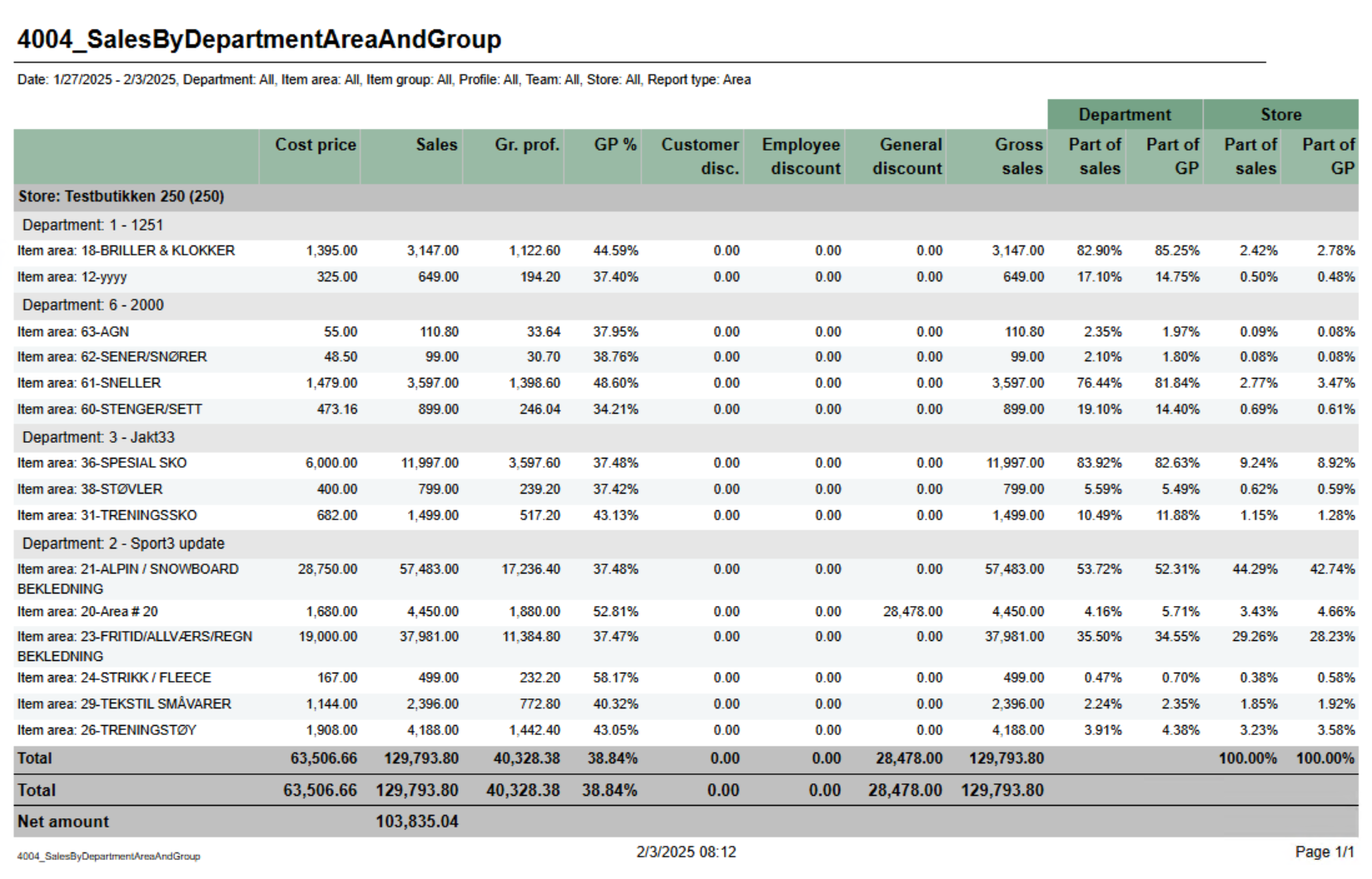
Report showing statistics about sales, gross profit and discount. Report is either on department, are or group depending on selection. Also share of gross profit and sales for department and store.

Selections:

  • Date from - default today
  • Date to - default today
  • Department - default all
  • Article area - default all
  • Article group default all
  • Profile - default all
  • Team - default all
  • Retail store - default all
  • Report type - Which lever of hierarchy report will be created on. Default Department.

Output:

One line per level of selected hierarcy with total for department.

Columns:

  • Cost price - Net cost
  • Sales - Sales amount including VAT
  • Gr.prof. - Gross profit in amount
  • GP% - Gross profit in percentage
  • Customer disc. - Customer grup discount
  • Eployee discount - Personal discount
  • General discount - Other discounts except customer and personal
  • Gross sales - Sales amount including depositdefund items
  • Department
    • Part of sales - Percentage part of sales per department
    • Part of GP - Percentage part of gross profit per department
  • Store 
    • Part of sales - Percentage part of sales per store
    • Part of GP - Percentage part of gross profit per store

Source:

Lindbak POS Reporting Cube (Olap)

Anchor
4005_SafetyReport
4005_SafetyReport

Expand
title4005_SafetyReport

RTC-47002

Image Added

Description:

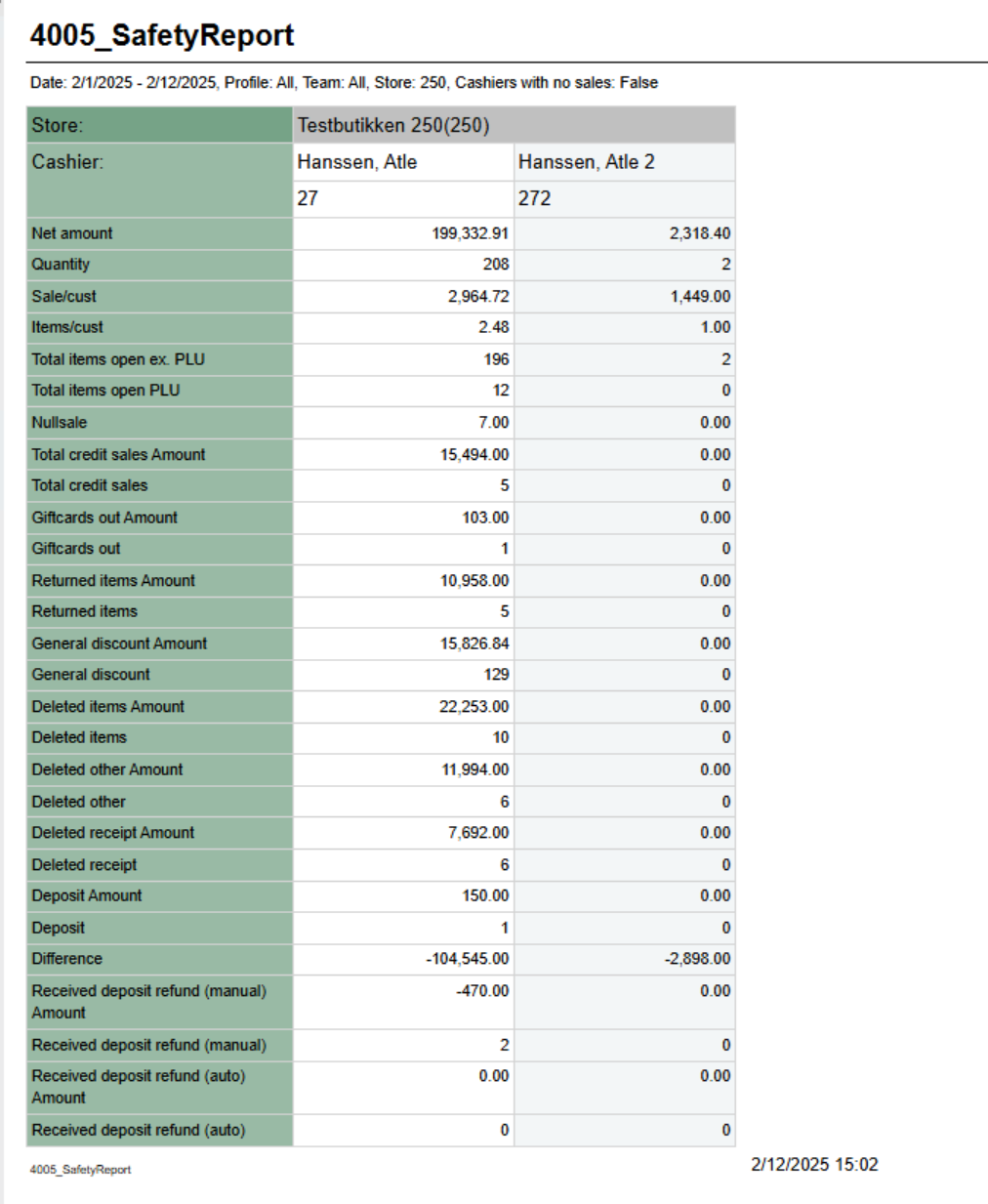
Report showing statistics per cashier in store. Because of performence report has single selct on store.

Selections:

  • Date from - default today
  • Date to - default today
  • Profile - defalt all
  • Team - default all
  • Retail store - single selct, first available store selected
  • Operator - defalt all for selected store
  • Cashiers with no sale - default off. If on report will list all cashiers from store even if no sales

Hidden parameters:

  • pDeletedArticlesStatuses - Which deleted status will be included in row for Deleted items. Default: 2 - Deleted,12 - Deleted is last registered, 13 - Deleted is last remaining,14 - Deleted is last remaining and is last registered
  • pDeletedOtherStatuses - Which deleted status will be included in row for Deleted other. Default: 7 - Deleted from on hold, 10 - Deleted in on hold from on hold, 15 - Deleted unfinished receipt, 16 - Deleted from unfinished receipt
  • pDeletedReceiptStatuses - Which deleted status will be included in row for Deleted receipt. Default: 3 - Delted receipt
  • pGeneralDiscount - Which discount types will be included in row for General discount. Default: 2 - Line discount, 3 - Group discount, 4 - Customer group discount, 5 - Adhoc package, 6 - Model discount, 7 - Member discount, 8 - Campaign discount, 9 - Giftcard discount, 10 - Personal discount, 11 - Subtotal discount
  • pManualDepositRefundInArtGrp - Which item group will be included in row for Deposit refund manual. This will be calculated for all articles with articletype = depositrefund.

Output:

Rows for data with one column for each operator.

Rows:

  • Store - Storename and number
  • Cashier - Cashier name and number
  • Net amount - Net amount sales
  • Quantity - Number of articles sold
  • Sale/cust - Average sale per customer
  • Item/cust - Average items per customer
  • Total items open ex. PLU - Items sold without open price
  • Total items open PLU - Items sold with open price
  • Nullsale - Number of receipts finished with salesamount 0
  • Total credit sales Amount - Amount sold on tendertype Credit
  • Total credit sales - Number of sales with tendertype Credit
  • Giftcards out Amount - Amount of sold gift cards (sale with articletype giftcard)
  • Giftcards out - Number of gift cards sold (sale with articletype giftcard)
  • Returned items Amount - Amount of returned items (sales with direction in)
  • Returned items - Quantity of returned items (sales lines with direction in)
  • General discount Amount - Sum of discount for discount types set in parameter pGeneralDiscount
  • General discount - Quantity of items with discount types set in parameter pGeneralDiscount
  • Deleted items Amount - Amount of deleted items with deleted status from parameter pDeletedArticlesStatuses
  • Deleted items - Quantity of deleted items with deleted status from paramter pDeletedArticlesStatuses
  • Deleted other Amount - Amount of deleted items with deleted status from parameter pDeletedOtherStatuses
  • Deleted other - Quantity of delted items with deleted status from parameter pDeletedOtherStatuses
  • Deleted receipt Amount - Amount of deleted receipts with deleted status from parameter pDeletedReceiptStatuses
  • Deleted receipt - Quanity of deleted receipts with deleted status from parameter pDeletedReceiptStatuses
  • Deposit - Number of deposit sales
  • Difference - Difference between cash from balance and cash from tender
  • Received deposit refund (manual) Amount - Sum of sales with direction In from articles with article type = depositrefund where article is in articlegroup from parameter pManualDepositRefundInArtGrp
  • Received deposit refund (manual) - Quantity of items with direction In from articles with article type = depositrefund where article is in articlegroup from parameter pManualDepositRefundInArtGrp
  • Received deposit refund (auto) Amount - Sum of sales with direction In from articles with article type = depositrefund where article is NOT in articlegroup from parameter pManualDepositRefundInArtGrp
  • Received deposit refund (auto) - Quantity of items with direction In from articles with article type = depositrefund where article is NOT in articlegroup from parameter pManualDepositRefundInArtGrp

Source: 

Lindbak POS Reporting Cube (Olap)


Anchor
4006_Difference
4006_Difference

...