Versions Compared

Key

  • This line was added.
  • This line was removed.
  • Formatting was changed.

...

Expand
title4006_Difference

RTC-47005

Description:

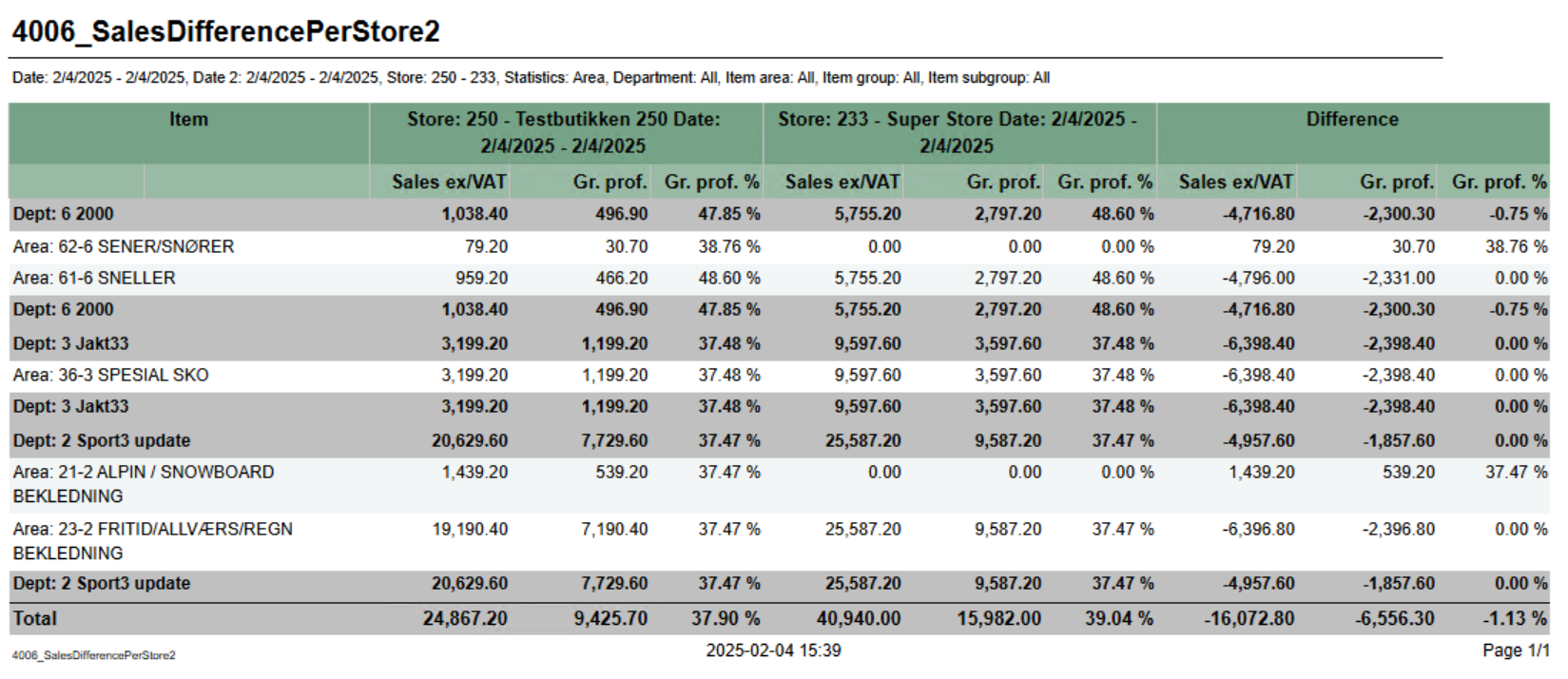
Report for comparing basic sales between two stores with date selection for each store.

Selections:

  • Date from - Start date for reference store. Default today
  • Date to - End date for reference store. Default today
  • Compare date from - Start date for comparing store. Default today
  • Compare date to - End date for comparing store. Default today
  • Retail store ref - Reference store. Default all
  • Retail store comp - Comparing store. Default all
  • Department - default all
  • Article area - default all
  • Article group - default all
  • Article subgroup - default all
  • Statistic - Which level of hierarcy to run report for. Department, Area, Group, SubGroup and Item. Default Department.

Output:

One row for each level of selected hierarchy. Totals for all level of hierarchy above selected. Hierarchy above selected is colored dark grey.

Columns:

  • Item
    • Number and name of hierarchy.
  • Reference store with date selections.
    • Sales ex/VAT - Sales excluding VAT
    • Gr.prof. - Gross profit
    • Gr.prof. % - Gross profit in percentage
  • Comparing store with date selections
    • Sales ex/VAT - Sales excluding VAT
    • Gr.prof. - Gross profit
    • Gr.prof. % - Gross profit in percentage
  • Difference
    • Sales ex/VAT - Difference between reference store and comparing store
    • Gr.prof. - Difference between reference store and comparing store
    • Gr.prof. % - Difference between reference store and comparing store

Source:

Lindbak POS Reporting Cube (Olap)


Anchor
4007_ShortCashierReport

Expand
title4007_ShortCashierReport

RTC-47013

Image Added

Description:

Report giving information about revenue payment methods and settlement for cashiers

Selections:

  • Date from - default today
  • Date to - default today
  • Team - default all
  • Profile - default all
  • Retail store - default all
  • Operator - default all for selected store(s)

Output:

Grouped by store with one row for each cashier.

Columns:

  • Cashier - <storenum>-<cashiernum>
  • First name - First name of cashier
  • Last name - Last name of cashier
  • Registered revenue - Sales amount including VAT
  • Bank card - Tender used with bank card (CreditDebit)
  • Credit - Tender used with Credit
  • Paid in - Controltransaction with Paid in
  • Drop / paid out - Controltransactions with Drop and paid out
  • Other payment methods - Tender with tender types not mentioned above or below.
  • Received cash/check - Tender used with Cash and Check
  • Cash settlement - Balance transaction with tender type Cash and Check
  • Difference - Difference between Cash Settlement and Received cash/check

Source:

Lindbak POS Reporting Cube (Olap)

Anchor
4008_CashRegisterReport

Expand
title4008_CashRegisterReport

RTC-47014

Image Added

Description:

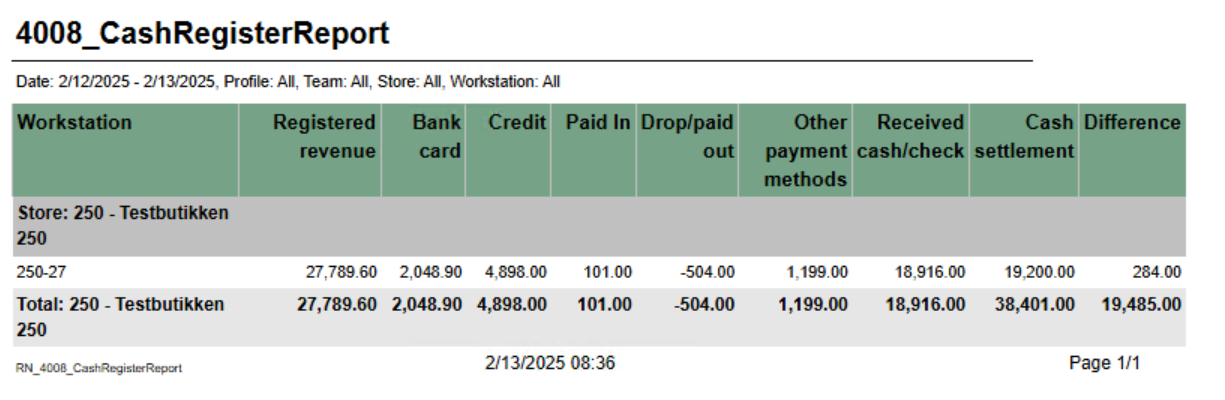
Report giving information about revenue payment methods and settlement for cash registers

Selections:

  • Date from - default today
  • Date to - default today
  • Team - default all
  • Profile - default all
  • Retail store - default all
  • Workstation - default all for selected store(s)

Output:

Grouped by store with one row for each workstation.

Columns:

  • Workstation - <storenum>-<workstationnum>
  • Registered revenue - Sales amount including VAT
  • Bank card - Tender used with bank card (CreditDebit)
  • Credit - Tender used with Credit
  • Paid in - Controltransaction with Paid in
  • Drop / paid out - Controltransactions with Drop and paid out
  • Other payment methods - Tender with tender types not mentioned above or below.
  • Received cash/check - Tender used with Cash and Check
  • Cash settlement - Balance transaction with tender type Cash and Check
  • Difference - Difference between Cash Settlement and Received cash/check

Source:

Lindbak POS Reporting Cube (Olap)


Anchor
8000_InvoiceAging
8000_InvoiceAging

...