Standard report 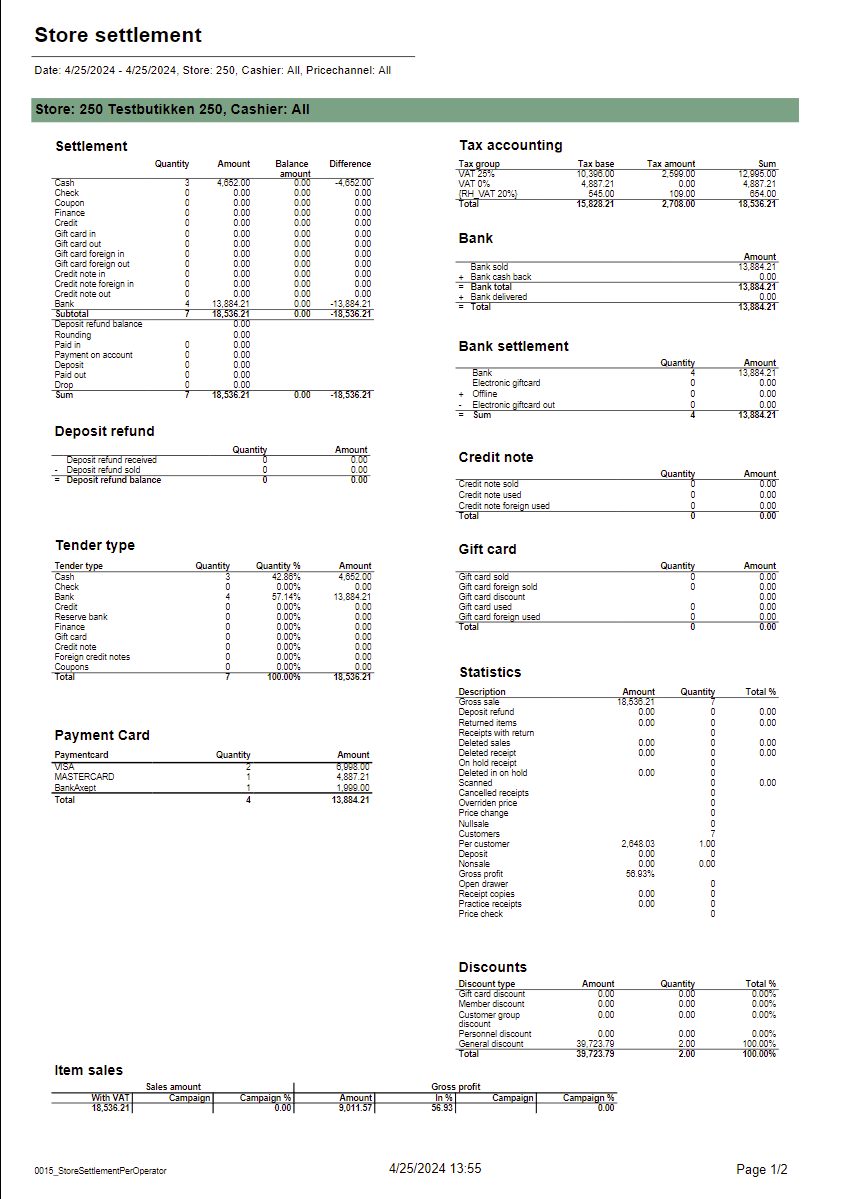 Image Added Image Added
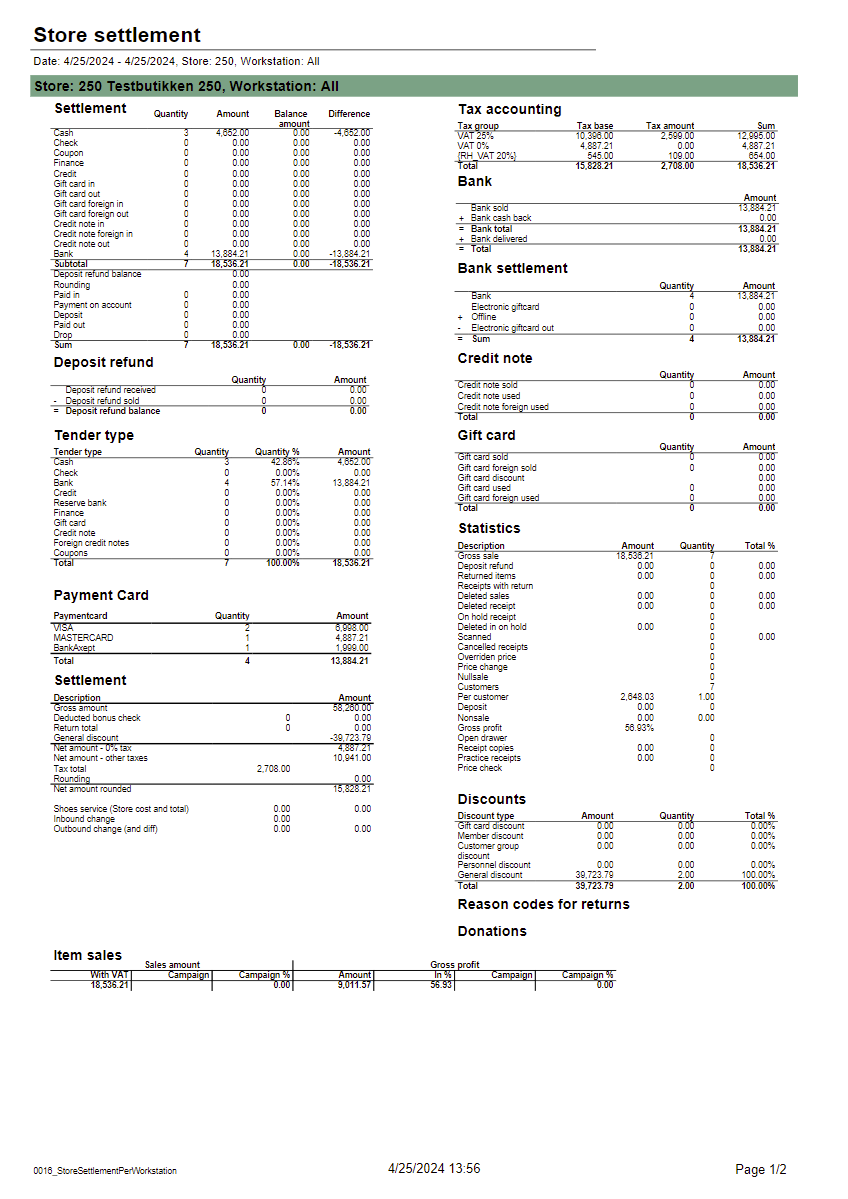
Description: Report allows to follow up store settlement: on first page settlement for all selected cashiers (if all cashiers are selected it equals whole store settlement) and settlement per each cashier on following pages. Report is divided in 12 subreports which will be descriped separatly below. Selections (applies to all subreports): - Date from: Default today
- Date to: Default today
- Store: Single value; default first available from the list.
- Operator: Multivalue; default all
- Price channels: Multivalue; default all
Subreports:
| Expand |
|---|
| title | 1023_subSettlementAlt |
|---|
| 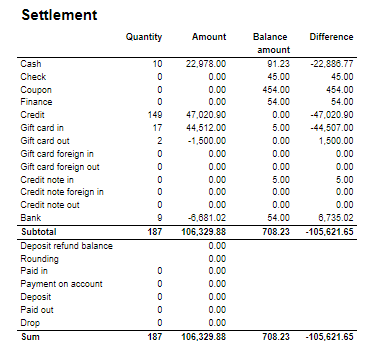 Image Added Image Added
Columns: - Quantity
- Amount
- Balance amount
- Difference: Balance amount - Amount Excluding Bank row from calculation
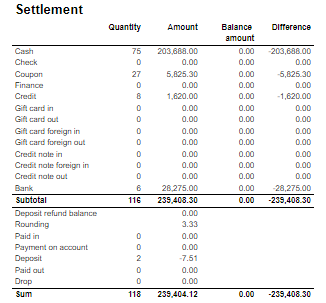
Rows: One row per tender type . In means received, out means given (returns etc...) - Cash: Tender type key = Cash or CashBack
- Check
- Coupon
- Finance
- Credit
- Gift card in
- Gift card out
- Gift card foreign in
- Gift card foreign out
- Credit note in
- Credit note foreign in
- Credit note out
- Bank: Tender Type Key = CreditDebit or CreditDebitOffline or ECreditDebit
- Subtotal: Total for all rows above Subtotal
______________________________________________________________________________________ - Deposit refound balance: Tender type key DepositRefund received - DepositRefund given
- Rounding: Subtotal rounding
- Paid in: Tender Control Type Key: PayedIn
- Payment on account: Tender Control Type Key: PaymentOnAccount
- Deposit: Article Type Key: Deposit
- Paid out: Tender Control Type Key: PayedOut
- Drop: Tender Control Type Key: Drop
|
| Expand |
|---|
| title | 1005_subDepositRefound |
|---|
| 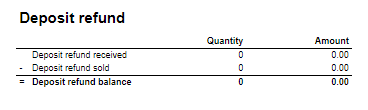 Image Added Image Added
Columns: - Amount: Sales amount inc. VAT
- Qunatity: Number of receipts.
Rows: - Deposit refund received: Amount (or number of receipts) for direction in for Article Type Key: DepositRefund
- Deposit refund sold: Amount (or number of receipts) for direcion out for Article Type Key: DepositRefund
- Deposit refund balance: Received - sold
|
| Expand |
|---|
| 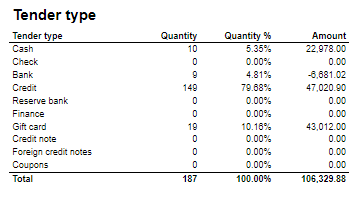 Image Added Image Added
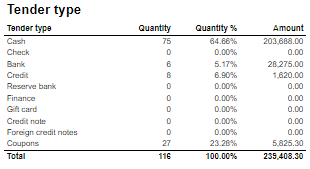
Columns: - Qunatity
- Qunatity %: Share of given tender type quantity in whole quantity
- Amount: Sales inc. VAT per tender type
Rows: - One row per one tender type
|
| Expand |
|---|
| 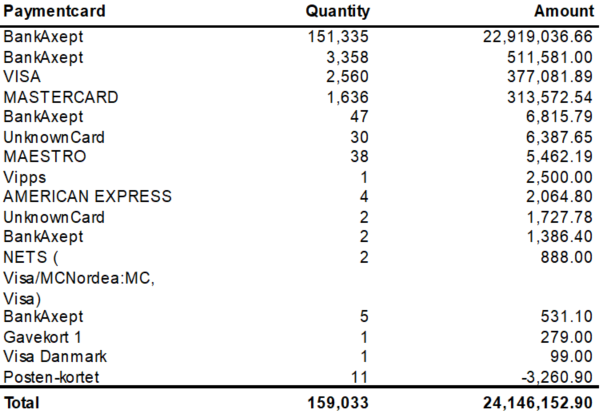 Image Added Image Added
Columns: - Paymentcard – Type of paymentcard
- Quantity – Tender count
- Amount – Tender amount
Output: - Subreport lists one row per type of payment card.
- Table has a total summary quantity and amount for all payment cards.
|
| Expand |
|---|
|  Image Added Image Added
Columns: - Sales amount With VAT:
- Sales amount Campaign: Sale amount inc. VAT for campaigns with discount keys: CampaignPrice, Group, MemberPrice
- Sales amount campaign %: Share of campain sales in all sales (Sales amount Campaign / Sales amount With VAT)
- Gross profit Amount
- Gross profit In %: Share of Gross profit in Net Amount
- Gross profit Campaign: Gross profit for Campaign
- Gross profit Campaign %: Share of gross profit for campains in campaign sales (Gross profit Campaign/ Sales amount Campaign)
Rows: |
| Expand |
|---|
| title | 1012_subTaxAccounting |
|---|
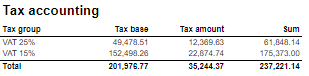
| 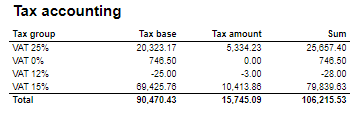 Image Added Image Added
Columns: - Tax group: tax type
- Tax base: Net amount
- Tax amount: tax
- Sum: Turnover inc. VAT
Rows: |
| Expand |
|---|
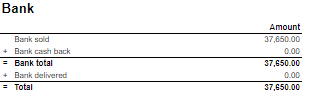
| 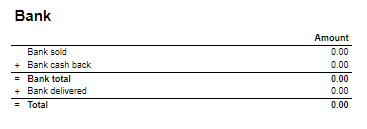 Image Added Image Added
Rows: - Bank sold: Sales amount for tender types: CreditDebit, CreditDebitOffline, ECreditDebit
- Bank cash back: tender type Cash back
- Bank delivered: tender type: DeliveredBalance
|
| Expand |
|---|
| title | 1003_subBankSettlement |
|---|
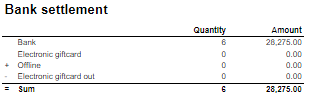
| 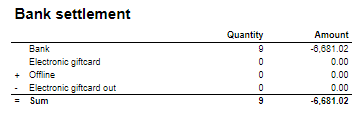 Image Added Image Added
Rows: - Bank: Amount for tender types: CreditDebit, CreditDebitOffline, ECreditDebit, Cash back
- Electronic giftcard: Amount for few hard coded payment card keys
- Offline: Amount for CreditDebitOffline
- Electronic giftcard out: Outcoming amount for few hard coded payment card keys
|
| Expand |
|---|
| 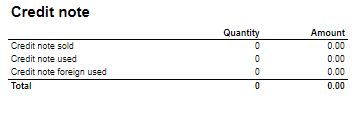 Image Added Image Added
Rows: - Credit note sold: Quantity/ Amount of sold by store credit notes
- Credit note used: Credit notes used in the store
- Credit note foreign used: Foreign credit notes used in the store
|
| Expand |
|---|
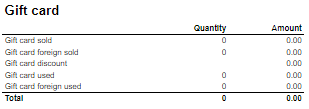
| 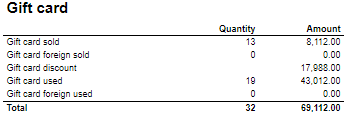 Image Added Image Added
Columns: - Quantity: number of gift cards
- Amount: Amount on gift cards
Rows: - Gift Card sold: Gift cards sold by given operator in given store
- Gift card foreign sold: Foreign gift cards sold by given operator in given store
- Gift card discount:
- Gift card used: Sales amount inc. VAT made with gift cards. (Number of transactions made with gift cards)
- Gift card foreign used: Sales amount inc. VAT made with foreign gift cards. (Number of transactions made with foreign gift cards)
|
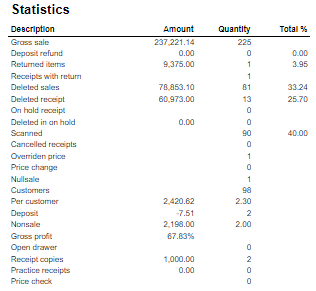
| Expand |
|---|
| 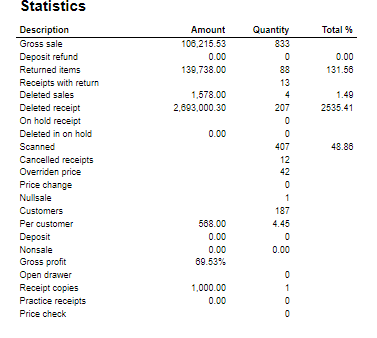 Image Added Image Added
Rows: - Gross sale amount: Amount inc. VAT
Total%: - Deposit refund: Deposit refound amount / Gross sale amount
- Returned items: Returned items amount/ Gross sale amount
- Deleted sales: Deleted amount/ Gross sale amount
- Deleted reciept: Deleted receipts amount/ Gross sale amount
- Scanned: Scanned quantity/ Gross sale qunatity
|
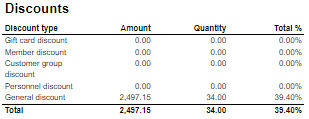
| Expand |
|---|
| 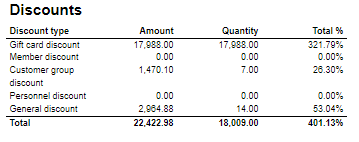 Image Added Image Added
Columns: - Amount: Discount amount
- Quantity: quantity of items sold with given discount
- Total %: Share of given discount amount in all discounts amount
Rows: - One row per one type of discount
|
Source: - Lindbak POS Reporting cube (OLAP)
|