
...
On this page, you will find information about new features and changes in the system, including a brief explanation and where to find them. The most recent items are listed at the top.
May 2025
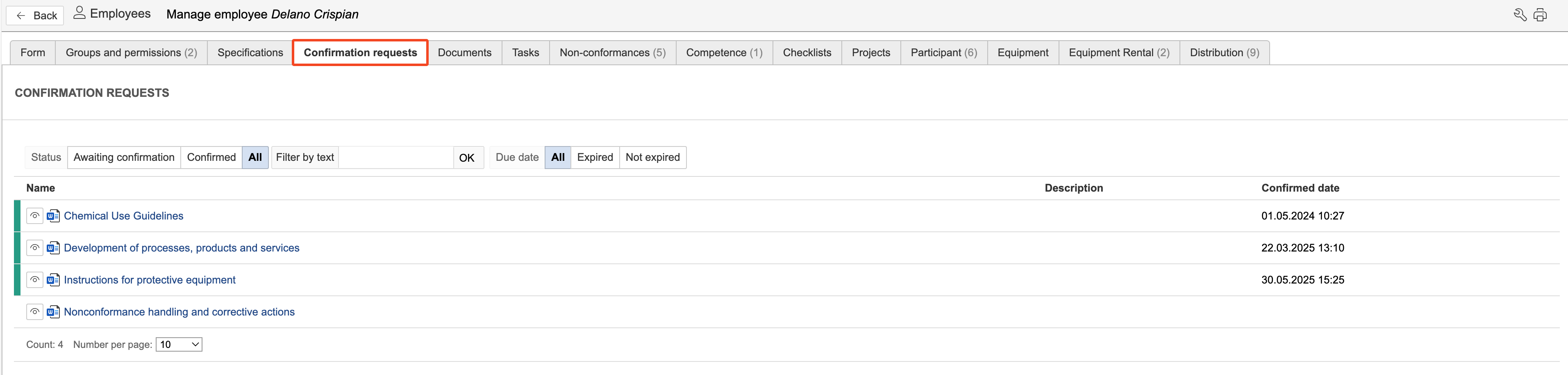
- Tab for reading confirmation: In the employee module, each user now has their own tab displaying requests for reading confirmation on documents that have been sent to them. Requests marked in green are those that have been confirmed as read and understood.
- Risk aspects in JSA module: The JSA module has a new basic data element called "Risk aspects". Risk aspects are configured in the control panel.
- Categories in the task module: You can now link categories to types the same way as in the non-conformance module. This allows you to filter which categories should be visible for the different task types.
- Duplicate non-conformances: To duplicate a non-conformance, open the non-conformance you want to duplicate, hover the mouse pointer over the three dots in the top right corner, and click Duplicate.

Previous
- Batch creation of tasks: You can create the same task for multiple locations, equipment, or departments at the same time. To do this, select the locations, equipment, or departments in the overview and click "Create tasks".
...