...
The configuration file have the following elements :
| Key | Values | Description | Comment |
|---|---|---|---|
| LogState | On, Off | Toggle for logging | |
| LogType | FILE | Type of logging |  |
| LogLevel | ALL | What kind of information to log | |
| FullXmlLog | TRUE/FALSE | If true, then logs the full xml reveived to the log file. (Helpfull for debugging but takes a log of space in the log file) | |
| IpWhiteListing | TRUE/FALSE | If the service runs whitelisting (This is done in azure for now) | |
| IpWhitelistingCooldown | n | When to retrieve valid ip adresses for the whitelisting | |
| InputValidation | TRUE/FALSE | Validate the input comming from SonWin | |
| ApiCommunicationType | PRODUCTION/DEBUG | Send data to the integration api for production. (Adding to the database etc, DEBUG is only used when developing) | |
| ApiCommunication | TRUE/FALSE | Not used | |
| ApiBaseAdress | URL | The adresse of the endpoint to communicate to (Integration Api) | |
| ApiExceptionHandling | TRUE/FALSE | If true then the service will throw an exception to the client if anything goes wrong, causing the client to try to resend the message. |
Comments:
-Will be removed as the log types available for this application ended up being just this pone type.
...
-WIll be removed as teh communication is always on
After having made a change to the configuration, it will be a good idea to restart the service.
Restarting the service is done by clicking the Menu point Overview and then clicking the menu point in the ribbon named Restart
A restart normally takes app 10 seconds MAX.
Log
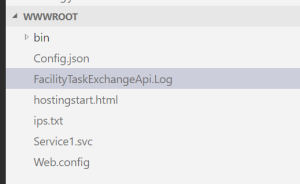
If logging have been enabled in the configuration file, the service will log to a file located in the hosting environment named FacilityTaskExchangeApi.Log.
To view the logfile, use the App Service Editor and click the file in teh root view: