
This page contains information on how to support the flow in the new 'InstallationsBlanket' that have been developed in PartnerPortal.
The Flow
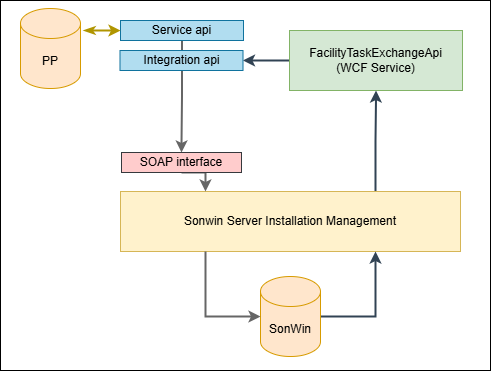
The above diagram explains the communication flow for a workorder:
- The contracter creates a workorder in Partner Portal on the web page
- Upon pressing SEND button in the UI, the workorder is saved to the database and send to the Service Api
- The Service Api deliveres the data to the Integration api
- The Integration api sends the data to the SOAP interface that is exposed by the Sonwin Server Installation Management Electricity Service at the Grid company envioronment
- The workorder is intercepted, and data is added to the SonWIn database
- The Grid company fills in data in Billing Client (AELBLANKETLIST) according to the workorder and at some point presses a button that will cause the service to send back a workorder instruction
- FacilityTaskExchangeApi intercepts the workorder from GridCompany
- FacilityTaskExchangeApi delivers teh data to the Integration api
- Integration api delivers data to Service api
- Service Api adds data to the Partner Portal Database
- The new data can now be seen on the web site