
| Table of Contents |
|---|
About
The FacilityTaskExchaneApi is the link between the SonWIn Installation Management Electricity Service and the PartnerPortal.
It serves as the accesspoint for the SonWIn application to send data to the portal.
The service is hosted in Azure and transfers incomming data to teh integration api, which handles the further communication with the backend.
Configuration
In order to configure the service, use teh guide for viewing and editing a file (Found in this document) and open the file named Config.Json
...
A restart normally takes app 10 seconds MAX.
Log
If logging have been enabled in the configuration file, the service will log to a file located in the hosting environment named FacilityTaskExchangeApi.Log.
To view the logfile, use the App Service Editor and click the file in teh root view: 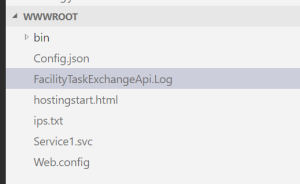
App Service Editor (File Editor)
In order to view and edit files on the server, one can use the App Service Editor.
It is found in the following way:
...
- Open http://portal.azure.com
- Log in with your credentials
- Locate the environment that you want to access and (Usually PROD)
- Click the FacilityTaskExchangeApi

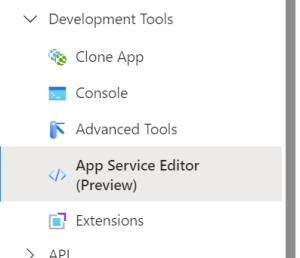
- In the left most menu pane, scroll down untill you reach the menu named DevelopmentTools, open it and click the sub-menu named App Service Editor
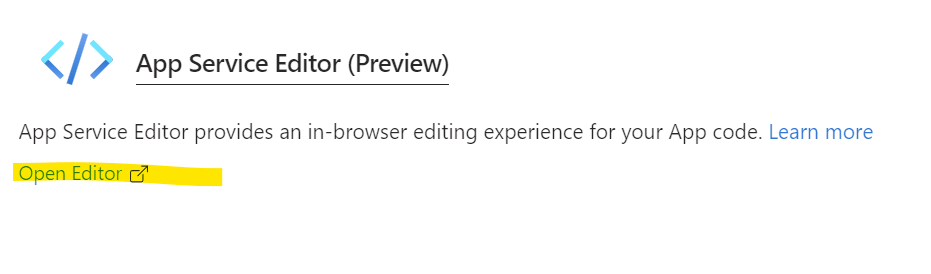
- In the window to the right click the link named Open Editor
- In the window that opens select the file ypou want to view
Services in the hosted environments
The services have different names regarding what environment they are hosted in.
...