Standard report 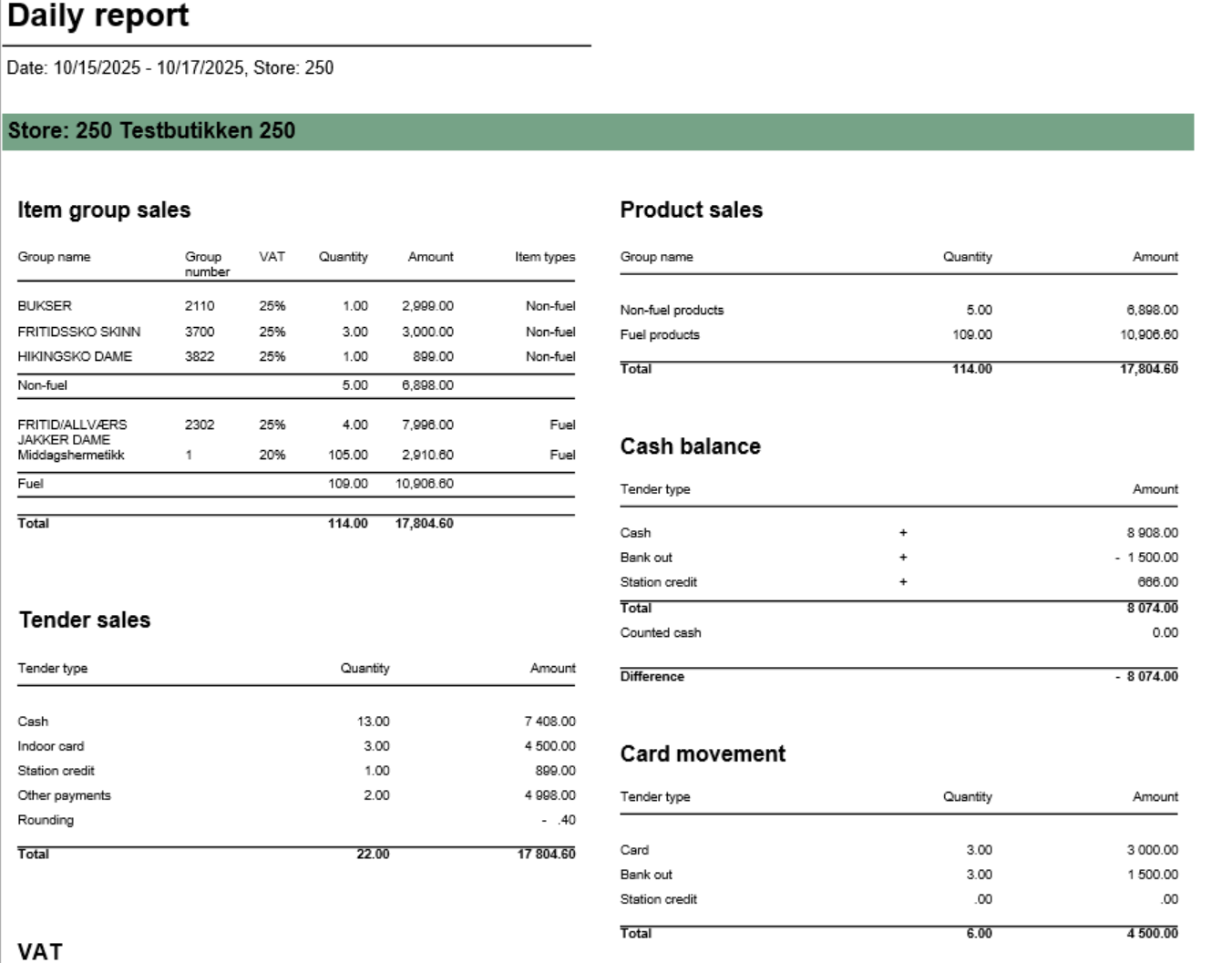

Description: Report provides comprehensive daily settlement and sales statistics per store. Similar to 0780_DailyReport but with enhanced VAT breakdown. Report is divided into multiple sections showing product sales, tender types, cash reconciliation, card payments, and drive-off tracking. Selections (applies to all sub reports): - Date from: Default yesterday
- Date to: Default yesterday
- Retail store: Single value; default first available from the list
Hidden parameters: - pFuelItemType: Default \[Article\].\[Item Type\].&\[Fuel\] - Defines which item types qualify as fuel
- pOtherPaymentCards: Default 30,31,32,33,34,35,36,37,38,39 - Payment card numbers for "other payments" section
- pReasonCodeBreakage: Default \[Reason Code\].\[Reason Code\].&\[Avstikk\]&\[Return\] - Reason code for drive-off tracking
- pPriceChannelOutdoor: Default \[Price Channel\].\[Price Channel\].&\[11\] - Price channel qualifying as outdoor sales
Source: - Lindbak POS Reporting Cube (OLAP) - All reports
- Lindbak POS Reporting DW - 1812, Item Group Driveoff section only
| Expand |
|---|
| title | 1802_subProductSales |
|---|
| 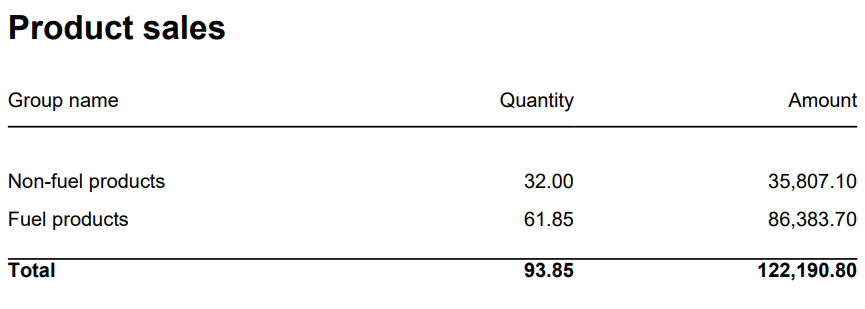
Columns: - Item Group Name
- Item Group Number
- Quantity
- Amount
Rows: - Subtotal Fuel
- Subtotal Non Fuel
______________________________________________________________________________________
|
| Expand |
|---|
| 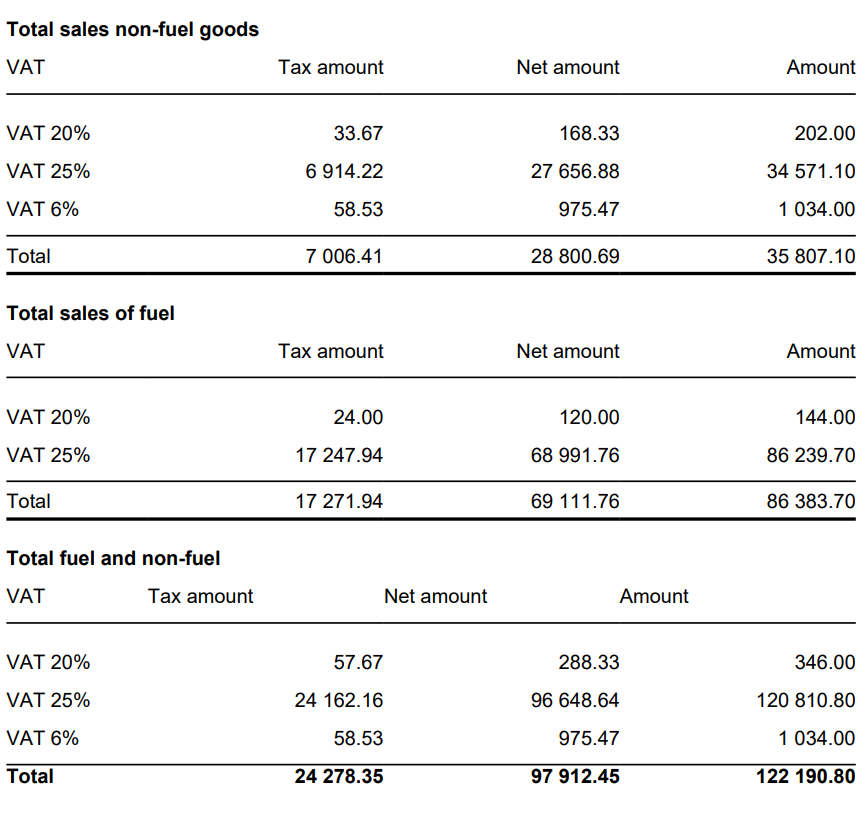
Columns: - VAT
- Tax Amount
- Net Amount
- Amount
Rows: - One row per VAT with divide to fuel and non fuel.
- Subtotal: Total for all rows above Subtotal
______________________________________________________________________________________ |
| Expand |
|---|
| title | 1805_subCardMovement |
|---|
| 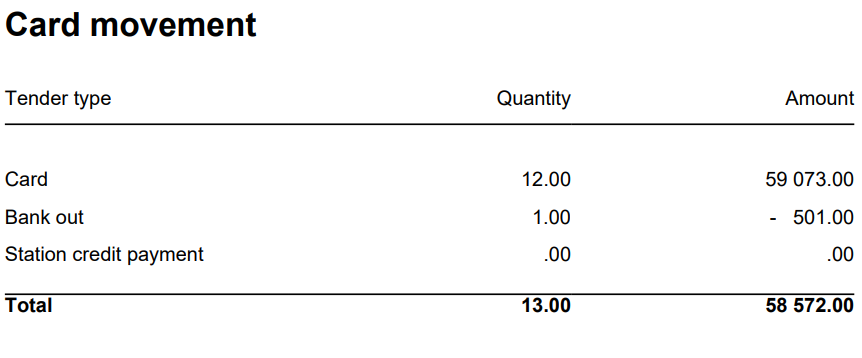
Columns: - Tender Type
- Quantity
- Amount
Rows: - Card
Cashback - Station Credit Payment
- In Payment
_____________________________________________________________________________________ |
| Expand |
|---|
| 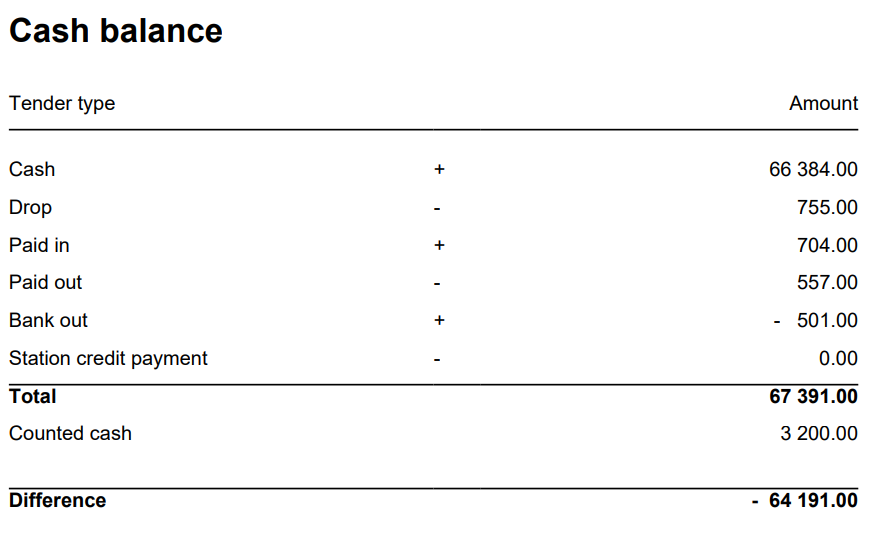
Columns: - Tender Type
- Quantity
- Amount
Rows: - Cash = TenderAmount for TenderType.Cash - ControlAmount for TenderControlType.PayedIn + ControlAmount for TenderControlType.PayedOut
- Drop = ControlAmount for TenderControlType.Drop
- Paid In = ControlAmount for TenderControlType.PayedIn
- Paid Out = ControlAmount for TenderControlType.PayedOut
- Cashback = TenderAmount for TenderType.CashBack
- Station Credit Payment = TenderAmount for TenderControlType.Cash and TenderControlType.PaymentOnAccount
_____________________________________________________________________________________ - Total (Cash - Cashback - Drop + Paid In + Paid Out(negative) - Station Credit Payment)
= TenderAmount for TenderType.Cash - This is sum of all cash sales from tender except controltransactions.
- ControlAmount for TenderControlType.Drop - Sum of all cash sales from tender with controltransaction Drop
+ ControlAmount for TenderControlType.PayedIn - Sum of all cash sales from tender with controltransaction PayedIn
- ControlAmount for TenderControlType.PayedOut - Sum of all cash sales from tender with control transaction PayedOut
+ TenderAmount for TenderType.CashBack (negative value)
- Balance Amount Cash = BalanceAmount for TenderType.Cash
_____________________________________________________________________________________ - Difference (Balance Amount Cash - Total)
|
| Expand |
|---|
| 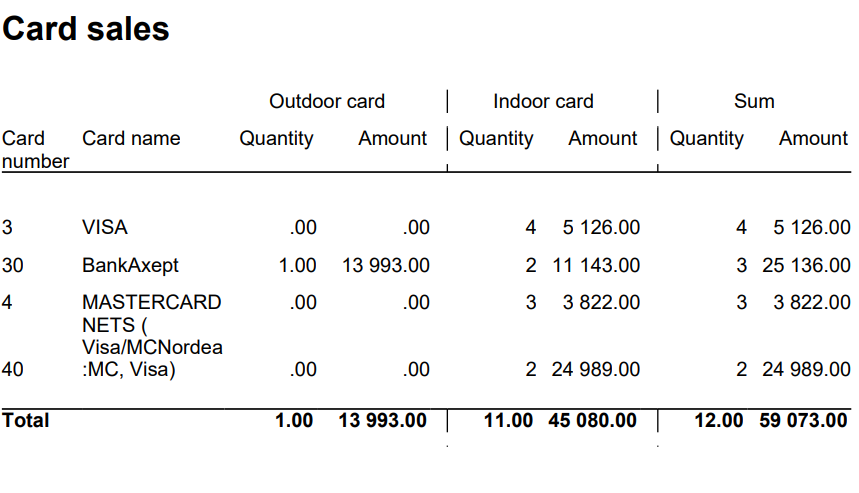
Columns: - Card Number
- Card Name
- Quantity Outdoor
- Amount Outdoor
- Quantity Indoor
- Amount Indoor
- Quantity
- Amount
Rows: ______________________________________________________________________________________ |
| Expand |
|---|
| title | 1809_subItemGroupSalesVat |
|---|
| 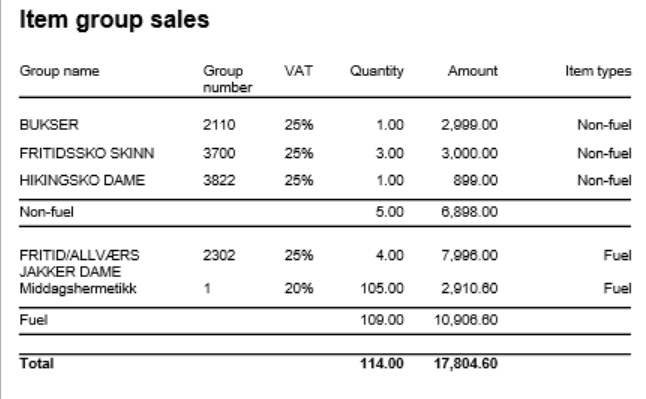
Columns: - Item Group Name
- Item Group Number
- VAT: VAT percentage
- Quantity: Sold quantity
- Amount: Sales amount inc. VAT
- Type: Fuel or Non-Fuel classification
Grouping: - Data grouped by Fuel vs Non-Fuel products
- Subtotals per fuel type
- Grand total for all item groups
|
| Expand |
|---|
| title | 1811_subTenderSales_2 |
|---|
| 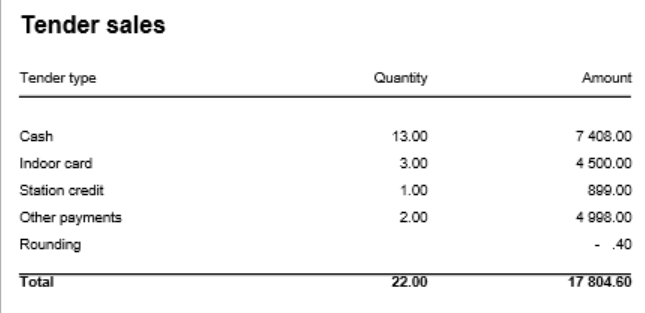
Columns: - Tender Type
- Quantity: Number of transactions
- Amount: Tender amount
Rows: - Cash: Cash payments (excluding control transactions)
- Outdoor Card: Card payments via outdoor price channel
- Indoor Card: Card payments via indoor price channels
- Station Credit: Station credit payments
- Other: Other tender types
- Rounding: Subtotal rounding amount
- Total: Sum of all tender types
|
| Expand |
|---|
| title | 1810_subTenderSalesOtherPayments |
|---|
| 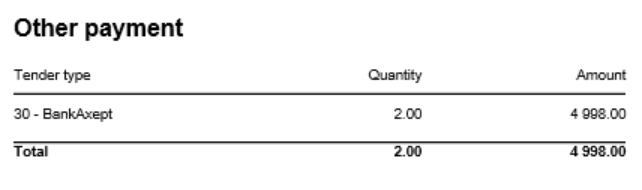
Columns: - Tender Type: Payment card number and name
- Quantity: Number of transactions
- Amount: Tender amount
Rows: - One row per payment card included in pOtherPaymentCards parameter (default: cards 30-39)
- Total row
- Rows with zero amount are hidden
|
| Expand |
|---|
| title | 1812_subItemGroupDriveoff |
|---|
| 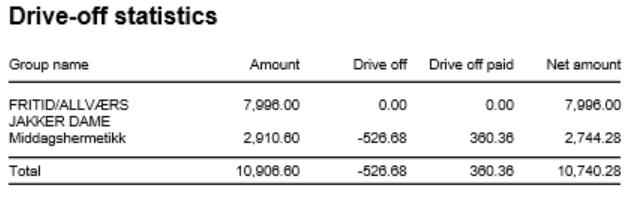
Columns: - Item Group Name: Article group name
- Amount: Total sales amount inc. VAT
- Drive Off: Breakage amount (negative transactions)
- Drive Off Paid: Sold/paid amount (positive transactions)
- Net Amount: Grand total (Amount + Drive Off + Drive Off Paid)
Rows: - One row per article group
- Total row
- Entire section hidden if both totals are zero
Clarifications: - Uses reason code from pReasonCodeBreakage parameter to identify drive-off transactions
- Drive Off column shows negative values from item transactions
- Drive Off Paid shows positive values from item transactions
- Only includes fuel item types specified in pFuelItemType parameter
Sorting: - No interactive sorting
- Data sorted by natural hierarchy (Store, Article Group, etc.)
|
h4. Source:
* Lindbak POS Reporting Cube (OLAP) - All sections except Item Group Driveoff
* Lindbak POS Reporting DW - Item Group Driveoff section only h4. Technical Notes:
* Report uses RSToolkit for language localization via User!Language
* Date parameters converted using Code.RSToolkit.ToTimeHierarchyString
* Multiple subreports with conditional visibility based on data availability
* Visibility logic: Rows/sections hidden when amounts are null or zero
* Report displays one page per selected store
* Footer displays "0780_DailyReport" (report name), page numbers, and current datetime
| 