RTP-43325 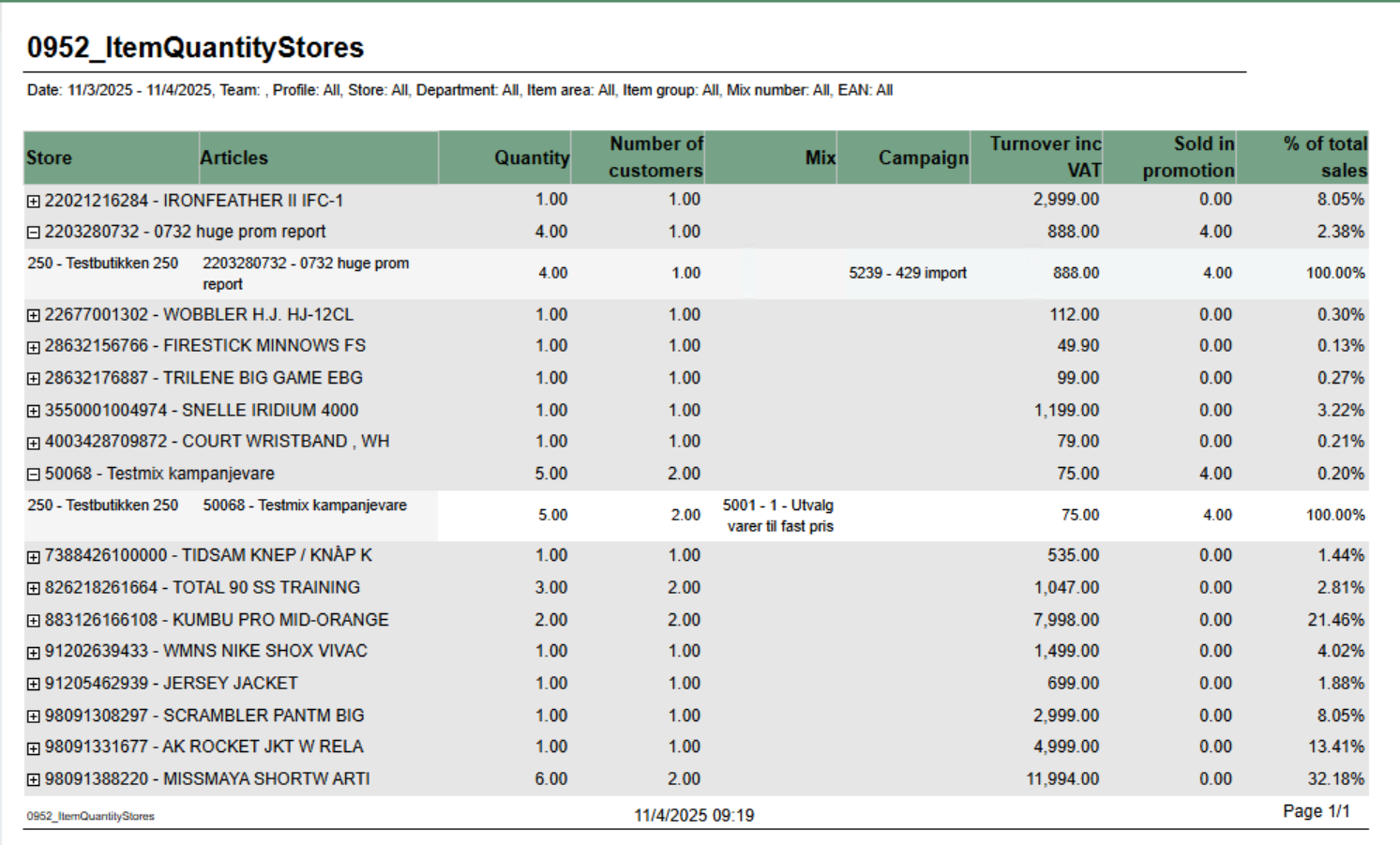 Image Added Image Added
Description: Report displays item quantity sales data aggregated by retail store with support for mix and campaign analysis. It provides detailed sales information including quantity sold, number of customers, turnover, and promotional sales breakdown. The report allows drill-down from article level to individual store performance. Selections: - Date from: Default today
- Date to: Default today
- Team: Multivalue; default all
- Profile: Multivalue; default all
- Store: Multivalue; default all (filtered by Team selection)
- Department: Multivalue; default all
- Article area: Multivalue; default all
- Article group: Multivalue; default all
- Mix: Multivalue; default all
- EAN list: Text input; default empty (comma-separated list of EAN codes)
- Include VAT: Boolean; default true (toggles between amounts including/excluding VAT)
- Expand all: Boolean; default false (when true, automatically expands all article groups to show store details)
Output: Article sales statistics grouped by EAN with drill-down capability to individual store level. Report shows: - Summary row per article (EAN) with aggregated data across all stores
- Detail rows per store showing individual store performance (visible when expanded)
- Mix numbers and campaign information displayed as comma-separated lists when multiple values exist
Columns: - Retail Store: Article EAN and name (at summary level)
- Articles: Article EAN and name (at detail level)
- Quantity: Total quantity sold
- Customers: Distinct receipt count (number of customers)
- Mix: Mix numbers and names (comma-separated if multiple mixes apply to the article-store combination)
- Campaigns: Campaign numbers and names (comma-separated if multiple campaigns apply)
- Turnover: Total sales amount (with or without VAT based on Include VAT parameter)
- Sold in Promotion: Quantity sold with discounts/campaigns (calculated as: Total Quantity - Quantity Not Discounted)
- % of Total Sales: Percentage of article turnover compared to total report turnover
Sorting: - Primary: EAN (ascending)
- Secondary: Retail Store Number (ascending)
Clarifications: - Quantity Not Discounted logic: Shows quantity only when Mix is 1, -1, or Unknown AND Campaign is Adhoc, NoCampaign, Not Available, or Unknown. Otherwise returns NULL.
- Mix and Campaign Display: Uses LookupSet function to aggregate multiple mixes/campaigns per article-store combination with "|" delimiter for matching
- Parameter Dependencies: Store parameter options are dynamically filtered based on Team selection
Source: - Lindbak POS Reporting Cube (OLAP)
|