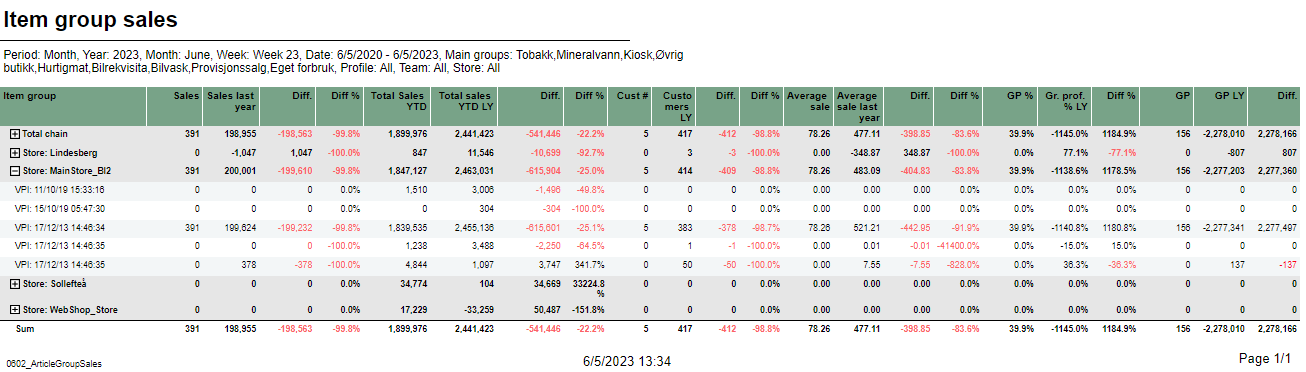
Description: Report lists item group sales with drilldown for selected stores Selections: - Periode – default month (it will decide if we use Year, Month, Week or Date parameters to choose selected and reference time scope)
- Year – Default current year
- Month – Default current month
- Week – Default current week
- Date from – Default today
- Date to – Default today
- Maingroup – Default all
- Profile – Default all
- Team – Default all
- Store – Default all
Output: - One page per store. Report has a summary on each column.
- Summary totals in the beginning of new hierarchy level for store.
Columns: - Item group
- Sales – sales net amount
- Sales last year – Sales net amount last year
- Diff. – Difference for sales, total sales, customers, average sales and gross profit
- Diff. % - Difference percentage
- Total sales YTD – Total sales year to date
- Total sales YTD LY – Total sales year ro date last year
- Cust # - Number of customers
- Customers LY – Customers last year
- Average sale
- Average sale last year
- GP % - Gross profit percentage
- Gr. prof. % LY – Gross profit percentage last year
- GP – Gross profit
- GP LY – Gross profit last year
Clarifications: Negative values are colored red. Use pPeriod=Date for subscriptions with dynamic periods in chain web to use dynamic dateFrom dateTo. Source: - Lindbak POS Reporting DW
- Lindbak POS Reporting Cube (OLAP)
|