
...
- Go to http://portal.azure.com and login with your credentials
- Navigate to the environment that you want to view (Usually PROD)

- Click on the integration api in the application list

- In the left side pane scroll to the Menupoint named Monitoring and click the sub-menu named Log Stream
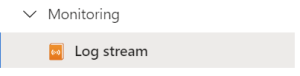
- In the view that opens, it is possible to view the logs that comes from the integration api.
- Change the view in the following radio button in order to view the data that suits your need:

- The log will appear in the inline console view.
App Insights Log
App insights hav ebeen implemented for the integration api.
In order to view information about thoose please follow this link: