...
| Expand |
|---|
| title | 0781_CashierStatisticsWithDiscount |
|---|
|
[RTC-44550] [YXB] New cashier statistics report (0781) with Fuel column (CO-344179) 
Description: - Report allows to follow up Cashiers sales and selected activities (based on: 0019)
Selections: - Date from: Default today
- Date to: Default today
- Retail store: Default all
- Operator: Default all
- Include VAT: Allows to decide if Vat is included in sales amount or not; default yes.
Hidden parameters: - pFuelItemType - Item type number used to identify fuel items - Default: [Article].[Item Type].&[10]
- pDiscountKeys - Discount keys to include in discount statistics - Default: [Discount].[Discount Key].[ALL]
- pExcludeStores - Store numbers to be excluded from the report - Default: 9997,9998,99900,99901
Output: One page per store - one row per cashier Columns: - No: Operator number
- Name: Operator name
- Turnover inc VAT/ Turnover ex VAT - total turnover, except for fuel items (items of type fuel - defined in hidden parameter pFuelItemType)
- Fuel inc VAT/Fuel ex. VAT - total turnover for fuel items (items of type fuel - defined in hidden parameter pFuelItemType)
- Receipts: number of reciepts
- Returns
- Deleted receipts
- Deleted item lines
- Receipts on hold
- Deleted on hold
- Null: Number of drawer opening without any transaction
- Ovr. prc.: Overriden price count
- Manual Discount Amount
- Manual Discoun percent.: Discount Amount divided by Original amount
- Scan: Number of scanned articles
- Discount: Discount quantity
- Scan %: Scan divided by Quantity of sold items
Sorting: Source: - Lindbak POS Reporting cube (OLAP)
|
| Anchor |
|---|
| 07900783_CashierStatisticsDailyReportVat0790 |
|---|
| 0783_CashierStatisticsDailyReportVat |
|---|
|
| Expand |
|---|
| title | 07900783_CashierStatisticsDailyReportVat |
|---|
|
Standard report 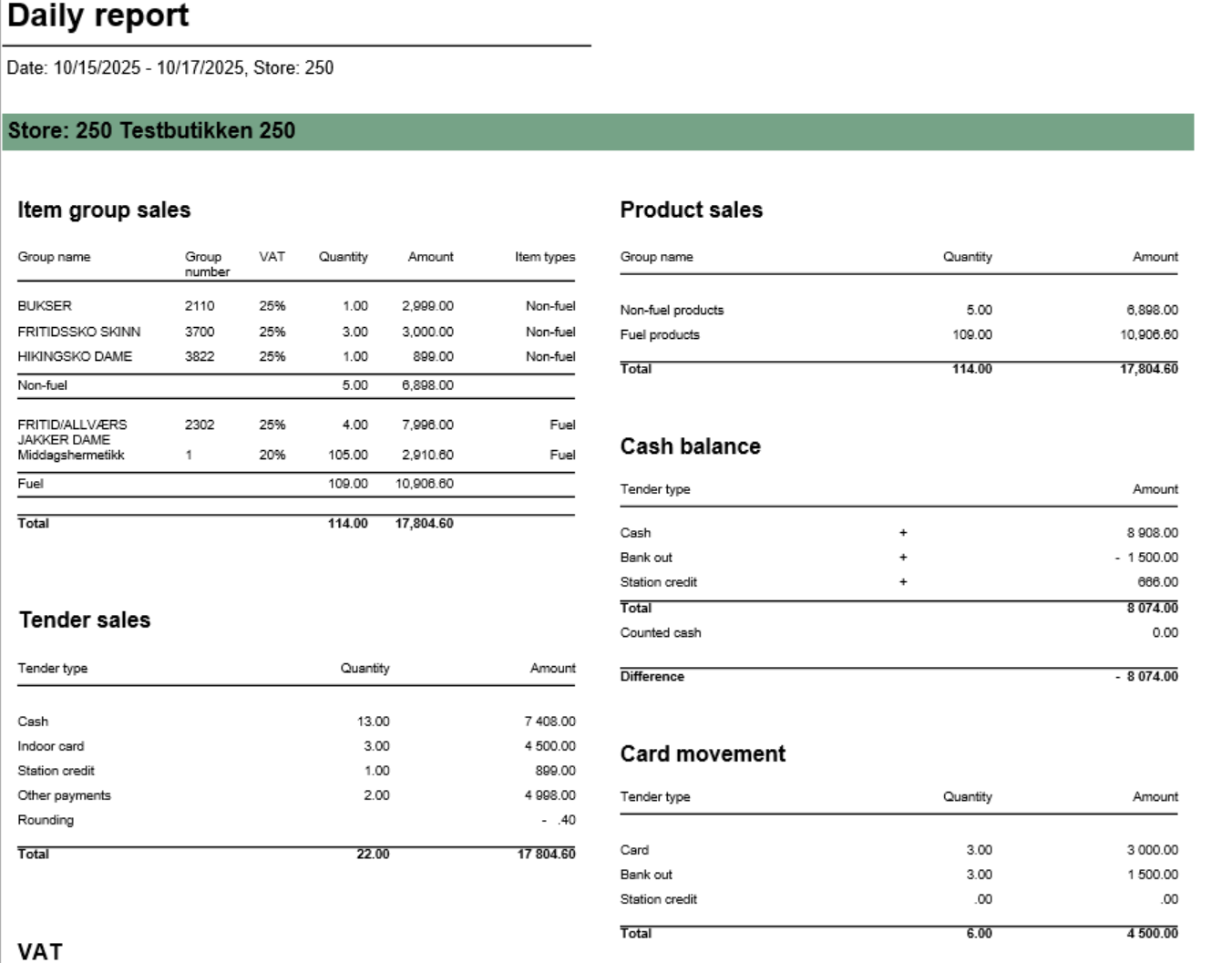 Image Added Image Added
 Image Added Image Added
[RTC-39849] TRN: Cashier security statistics report with turnover split and price checks - EG A/S  Image Removed Image Removed
Description: Report allows to follow up Cashiers sales and selected activities.provides comprehensive daily settlement and sales statistics per store. Similar to 0780_DailyReport but with enhanced VAT breakdown. Report is divided into multiple sections showing product sales, tender types, cash reconciliation, card payments, and drive-off tracking. Selections (applies to all sub reports)Selections: - Date from: Default
today- yesterday
- Date to: Default
today- yesterday
- Retail store:
Default all- Operator: Default all
Output: One page per store One row per cashier Columns: - No: Operator number
- Name: Operator name
- Tender (NB! this is tender data and does not represent turnover).
- Cash
- Other (ohter than cash)
- Receipts: number of reciepts
- Returns
- Deleted receipts
- Deleted item lines
- Receipts on hold
- Null: Number of drawer opening without any transaction
- Ovr. prc.: Overriden price count
- Scan %: Scan divided by Quantity of sold items
- Discount: Discount quantity
- Price check: How many times price check funtion is used.
Sorting: Source: - Lindbak POS Reporting cube (OLAP)
|
...
| title | 0791_ShiftBalanceReport |
|---|
[RTC-44692] [TRN] Shift balance report (CO-335148)
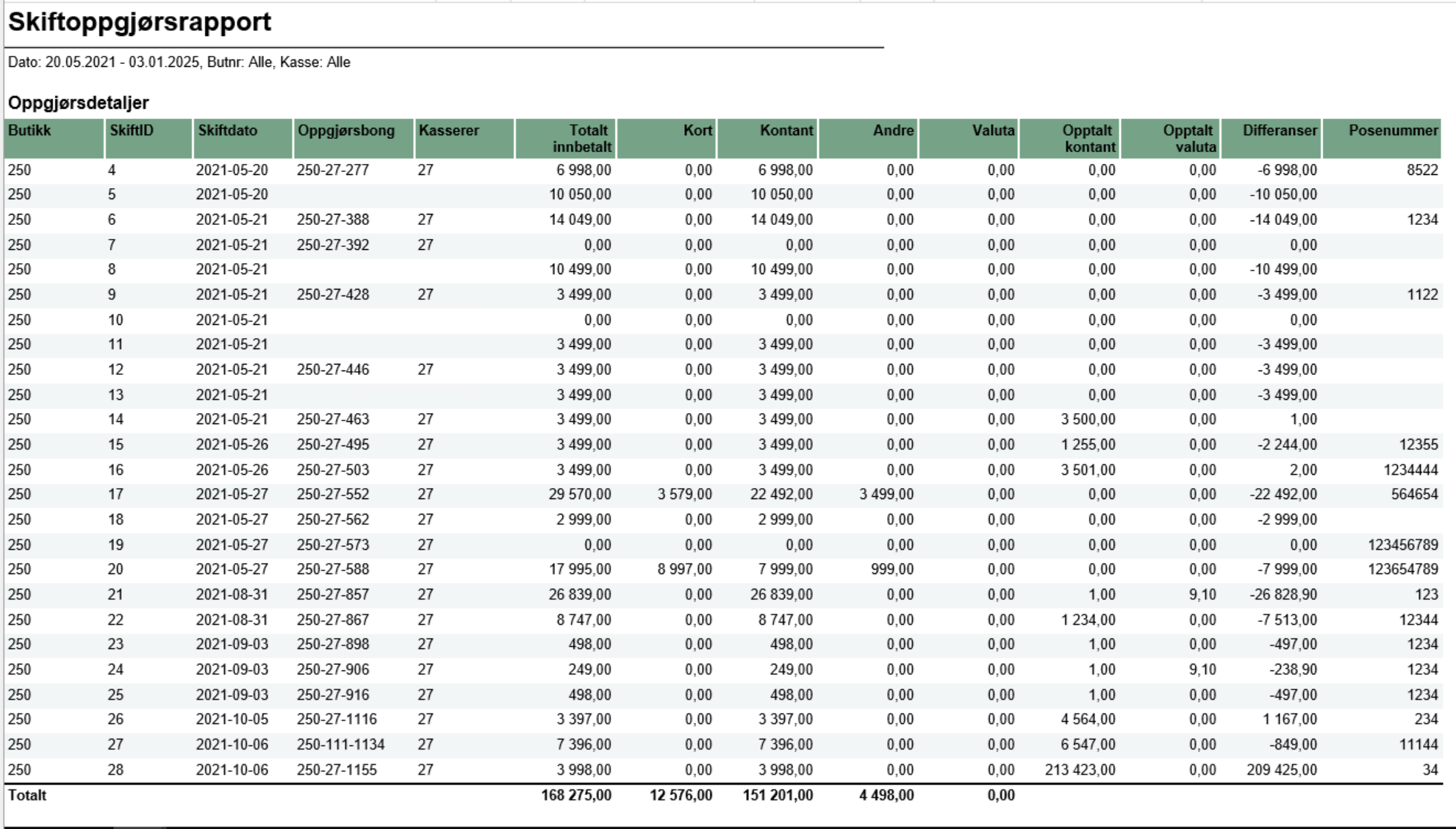 Image Removed
Description:
- The report gives an overview of all shifts in the selected date range and for selected store(s) and workstations.
Selections:
- Date from: default today
- Date to: default today
- Retail store: default all
- Workstation: default all
- Main currency (hidden): default NOK - the main currency for cash calculations.
Parameters:
- pShiftEndDate - Determine if shift date should be based on start- or end-date for the shift. Default False meaning it is based on start-date. Chosed date-type is used both in report (Shift date column) and in date selection.
Output:
The report consist of four tables:
- Shift overview - lists all shifts in the selected date range and for given store(s) and cash registers and contains the details about each shift balance (if registered).
- Currency - lists all currencies (except the main currency), their exchange rates and amount in main currency
- VAT overview - lists all VAT rates with sales gross, net and tax amount
- Payment card overview - lists all payment cards and related statistics (number of transactions and amount)
Columns:
- Shift overview
- Store - store number,
- ShiftID - ID of the shift,
- Shift date - shift start date, or end date, depending on parameter pShiftEndDate
- Balance receipt ID - ID of the balance receipt for given shift,
- Cashier No - cashier number,
- All tenders - total tender amount for given shift,
- Card - total amount paid by cards for given shift (tender types: CreditDebit, ECreditDebit, CreditDebitOffline),
- Cash - total amount paid by cash in main currency for given shift,
- Other - other tender types, aggregated, for given shift
- Currency - total amount paid by cash in foreign currencies (all except main currency) for given shift,
- Counted cash - balance amount of cash tender type in main currency for given shift,
- Counted currency - balance amount of cash tender type in foreign currencies for given shift,
- Difference: (Counted cash - Cash) + (Counted currency - Currency)
- Bag number - bag number registered on the balance receipt
- Currency
- Code - currency code (3 letter code),
- Exchange rate - the average exchange rate for selected period,
- Currency amount - amount in currency,
- Amount in XXX - amount in main currency (default NOK)
- VAT overview
- VAT rate,
- Sales inc. VAT,
- VAT amount,
- Sales excl. VAT,
- Nonsale
- Payment card overview:
- Card - card issuer ID and name,
- Quantity - number of transactions,
- Amount - total amount of transactions
Sorting:
- Shift overview - sorted by store number and shift date (ascending),
- Currency - sorted by currency code (A to Z),
- VAT overview - sorted by VAT rate (ascending),
- Payment card overview - sorted by card issuer ID (ascending)
Source:
- Lindbak POS Reporting cube (OLAP)
- Lindbak POS Reporting DW
- Single value; default first available from the list
Hidden parameters: - pFuelItemType: Default \[Article\].\[Item Type\].&\[Fuel\] - Defines which item types qualify as fuel
- pOtherPaymentCards: Default 30,31,32,33,34,35,36,37,38,39 - Payment card numbers for "other payments" section
- pReasonCodeBreakage: Default \[Reason Code\].\[Reason Code\].&\[Avstikk\]&\[Return\] - Reason code for drive-off tracking
- pPriceChannelOutdoor: Default \[Price Channel\].\[Price Channel\].&\[11\] - Price channel qualifying as outdoor sales
Source: - Lindbak POS Reporting Cube (OLAP) - All reports
- Lindbak POS Reporting DW - 1812, Item Group Driveoff section only
| Expand |
|---|
| title | 1802_subProductSales |
|---|
| 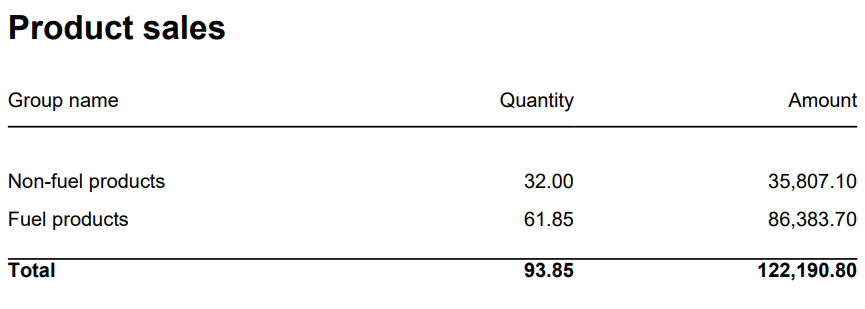 Image Added Image Added
Columns: - Item Group Name
- Item Group Number
- Quantity
- Amount
Rows: - Subtotal Fuel
- Subtotal Non Fuel
______________________________________________________________________________________
|
| Expand |
|---|
| 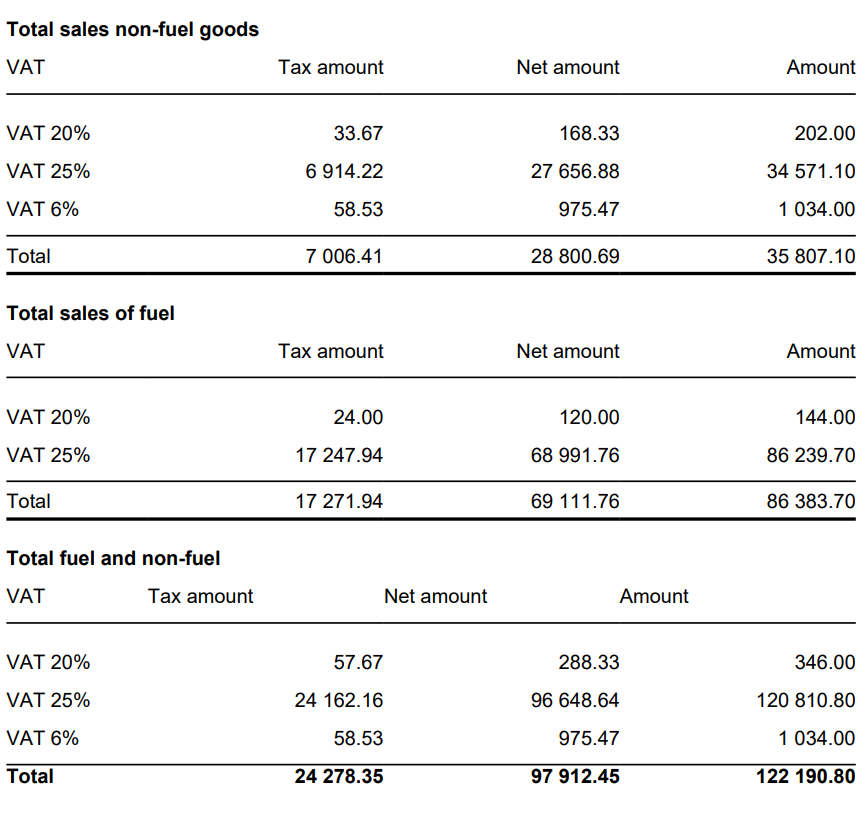 Image Added Image Added
Columns: - VAT
- Tax Amount
- Net Amount
- Amount
Rows: - One row per VAT with divide to fuel and non fuel.
- Subtotal: Total for all rows above Subtotal
______________________________________________________________________________________ |
| Expand |
|---|
| title | 1805_subCardMovement |
|---|
| 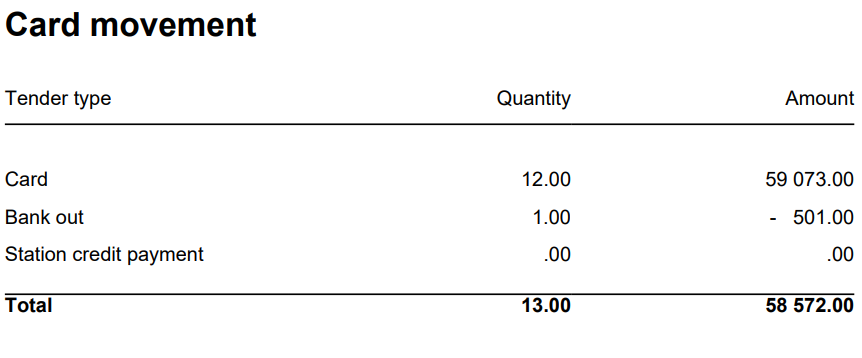 Image Added Image Added
Columns: - Tender Type
- Quantity
- Amount
Rows: - Card
Cashback - Station Credit Payment
- In Payment
_____________________________________________________________________________________ |
| Expand |
|---|
| 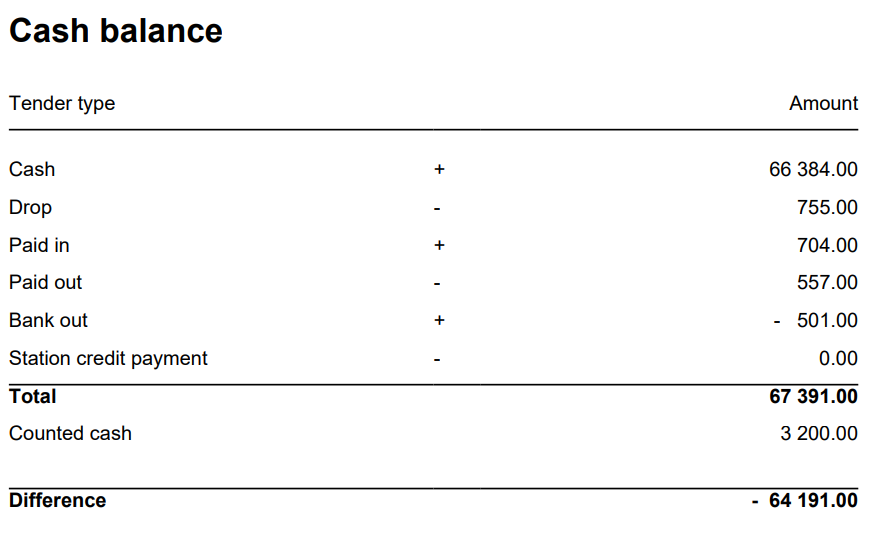 Image Added Image Added
Columns: - Tender Type
- Quantity
- Amount
Rows: - Cash = TenderAmount for TenderType.Cash - ControlAmount for TenderControlType.PayedIn + ControlAmount for TenderControlType.PayedOut
- Drop = ControlAmount for TenderControlType.Drop
- Paid In = ControlAmount for TenderControlType.PayedIn
- Paid Out = ControlAmount for TenderControlType.PayedOut
- Cashback = TenderAmount for TenderType.CashBack
- Station Credit Payment = TenderAmount for TenderControlType.Cash and TenderControlType.PaymentOnAccount
_____________________________________________________________________________________ - Total (Cash - Cashback - Drop + Paid In + Paid Out(negative) - Station Credit Payment)
= TenderAmount for TenderType.Cash - This is sum of all cash sales from tender except controltransactions.
- ControlAmount for TenderControlType.Drop - Sum of all cash sales from tender with controltransaction Drop
+ ControlAmount for TenderControlType.PayedIn - Sum of all cash sales from tender with controltransaction PayedIn
- ControlAmount for TenderControlType.PayedOut - Sum of all cash sales from tender with control transaction PayedOut
+ TenderAmount for TenderType.CashBack (negative value)
- Balance Amount Cash = BalanceAmount for TenderType.Cash
_____________________________________________________________________________________ - Difference (Balance Amount Cash - Total)
|
| Expand |
|---|
| 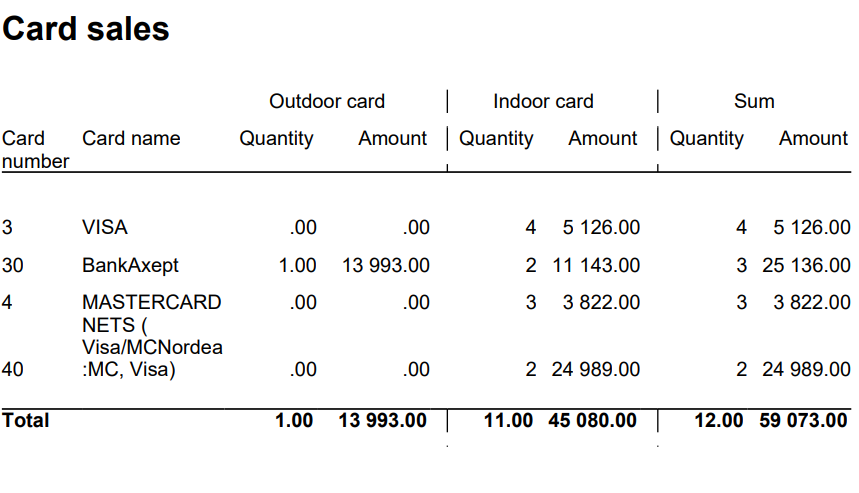 Image Added Image Added
Columns: - Card Number
- Card Name
- Quantity Outdoor
- Amount Outdoor
- Quantity Indoor
- Amount Indoor
- Quantity
- Amount
Rows: ______________________________________________________________________________________ |
| Expand |
|---|
| title | 1809_subItemGroupSalesVat |
|---|
| 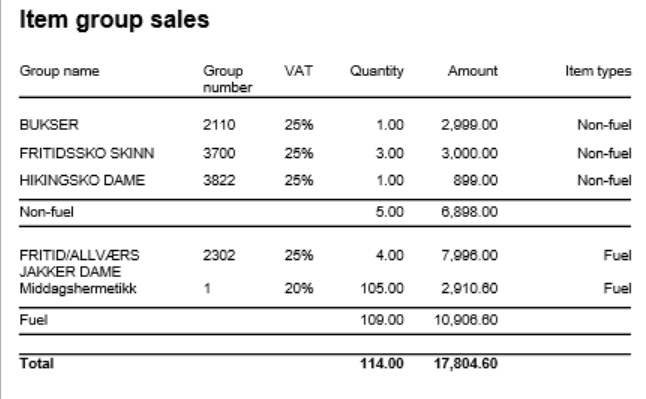 Image Added Image Added
Columns: - Item Group Name
- Item Group Number
- VAT: VAT percentage
- Quantity: Sold quantity
- Amount: Sales amount inc. VAT
- Type: Fuel or Non-Fuel classification
Grouping: - Data grouped by Fuel vs Non-Fuel products
- Subtotals per fuel type
- Grand total for all item groups
|
| Expand |
|---|
| title | 1811_subTenderSales_2 |
|---|
| 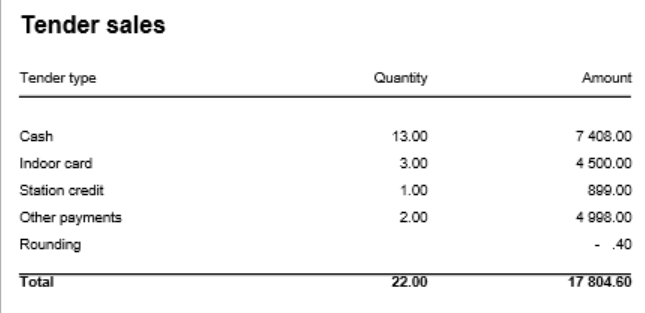 Image Added Image Added
Columns: - Tender Type
- Quantity: Number of transactions
- Amount: Tender amount
Rows: - Cash: Cash payments (excluding control transactions)
- Outdoor Card: Card payments via outdoor price channel
- Indoor Card: Card payments via indoor price channels
- Station Credit: Station credit payments
- Other: Other tender types
- Rounding: Subtotal rounding amount
- Total: Sum of all tender types
|
| Expand |
|---|
| title | 1810_subTenderSalesOtherPayments |
|---|
| 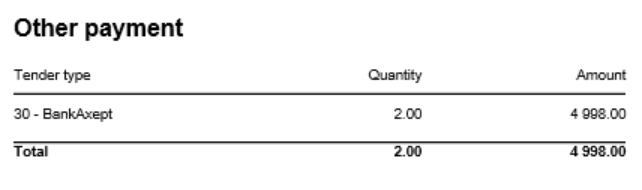 Image Added Image Added
Columns: - Tender Type: Payment card number and name
- Quantity: Number of transactions
- Amount: Tender amount
Rows: - One row per payment card included in pOtherPaymentCards parameter (default: cards 30-39)
- Total row
- Rows with zero amount are hidden
|
| Expand |
|---|
| title | 1812_subItemGroupDriveoff |
|---|
| 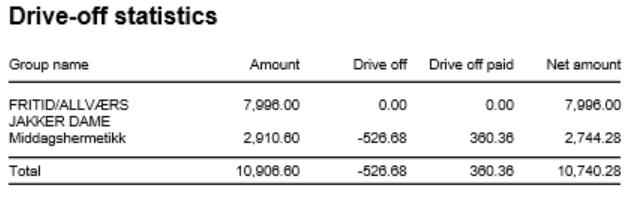 Image Added Image Added
Columns: - Item Group Name: Article group name
- Amount: Total sales amount inc. VAT
- Drive Off: Breakage amount (negative transactions)
- Drive Off Paid: Sold/paid amount (positive transactions)
- Net Amount: Grand total (Amount + Drive Off + Drive Off Paid)
Rows: - One row per article group
- Total row
- Entire section hidden if both totals are zero
Clarifications: - Uses reason code from pReasonCodeBreakage parameter to identify drive-off transactions
- Drive Off column shows negative values from item transactions
- Drive Off Paid shows positive values from item transactions
- Only includes fuel item types specified in pFuelItemType parameter
Sorting: - No interactive sorting
- Data sorted by natural hierarchy (Store, Article Group, etc.)
|
|
| Anchor |
|---|
| 0790_CashierStatistics |
|---|
| 0790_CashierStatistics |
|---|
|
| Expand |
|---|
| title | 0790_CashierStatistics |
|---|
|
[RTC-39849] TRN: Cashier security statistics report with turnover split and price checks - EG A/S Image Added
Description: - Report allows to follow up Cashiers sales and selected activities.
Selections: - Date from: Default today
- Date to: Default today
- Retail store: Default all
- Operator: Default all
Output: One page per store One row per cashier Columns: - No: Operator number
- Name: Operator name
- Tender (NB! this is tender data and does not represent turnover).
- Cash
- Other (ohter than cash)
- Receipts: number of reciepts
- Returns
- Deleted receipts
- Deleted item lines
- Receipts on hold
- Null: Number of drawer opening without any transaction
- Ovr. prc.: Overriden price count
- Scan %: Scan divided by Quantity of sold items
- Discount: Discount quantity
- Price check: How many times price check funtion is used.
Sorting: Source: - Lindbak POS Reporting cube (OLAP)
|
| Anchor |
|---|
| 0791_ShiftBalanceReport |
|---|
| 0791_ShiftBalanceReport |
|---|
|
| Expand |
|---|
| title | 0791_ShiftBalanceReport |
|---|
|
[RTC-44692] [TRN] Shift balance report (CO-335148) Image Added
Description: - The report gives an overview of all shifts in the selected date range and for selected store(s) and workstations.
Selections: - Date from: default today
- Date to: default today
- Retail store: default all
- Workstation: default all
- Main currency (hidden): default NOK - the main currency for cash calculations.
Parameters: - pShiftEndDate - Determine if shift date should be based on start- or end-date for the shift. Default False meaning it is based on start-date. Chosed date-type is used both in report (Shift date column) and in date selection.
Output: The report consist of four tables: - Shift overview - lists all shifts in the selected date range and for given store(s) and cash registers and contains the details about each shift balance (if registered).
- Currency - lists all currencies (except the main currency), their exchange rates and amount in main currency
- VAT overview - lists all VAT rates with sales gross, net and tax amount
- Payment card overview - lists all payment cards and related statistics (number of transactions and amount)
Columns: - Shift overview
- Store - store number,
- ShiftID - ID of the shift,
- Shift date - shift start date, or end date, depending on parameter pShiftEndDate
- Balance receipt ID - ID of the balance receipt for given shift,
- Cashier No - cashier number,
- All tenders - total tender amount for given shift,
- Card - total amount paid by cards for given shift (tender types: CreditDebit, ECreditDebit, CreditDebitOffline),
- Cash - total amount paid by cash in main currency for given shift,
- Other - other tender types, aggregated, for given shift
- Currency - total amount paid by cash in foreign currencies (all except main currency) for given shift,
- Counted cash - balance amount of cash tender type in main currency for given shift,
- Counted currency - balance amount of cash tender type in foreign currencies for given shift,
- Difference: (Counted cash - Cash) + (Counted currency - Currency)
- Bag number - bag number registered on the balance receipt
- Currency
- Code - currency code (3 letter code),
- Exchange rate - the average exchange rate for selected period,
- Currency amount - amount in currency,
- Amount in XXX - amount in main currency (default NOK)
- VAT overview
- VAT rate,
- Sales inc. VAT,
- VAT amount,
- Sales excl. VAT,
- Nonsale
- Payment card overview:
- Card - card issuer ID and name,
- Quantity - number of transactions,
- Amount - total amount of transactions
Sorting: - Shift overview - sorted by store number and shift date (ascending),
- Currency - sorted by currency code (A to Z),
- VAT overview - sorted by VAT rate (ascending),
- Payment card overview - sorted by card issuer ID (ascending)
Source: - Lindbak POS Reporting cube (OLAP)
- Lindbak POS Reporting DW
|
| Anchor |
|---|
| 0800_TopXArticlesSold |
|---|
| 0800_TopXArticlesSold |
|---|
|
| Expand |
|---|
| title | 0800_TopXArticlesSold |
|---|
|
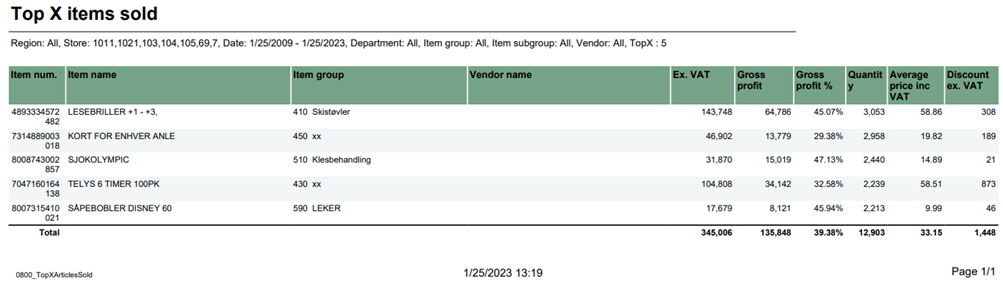 Image Added Image Added
Description: Report lists top items sold in selected stores in period time. Selections: - Region – Default all
- Store – Default all
- Date from – Default today
- Date to – Default today
- Department – Default all
- Article Group – Default all
- Article Subgroup – Default all
- Vendor – Default all
- Top X – Number of rows, default set 10
Output: Report shows top x items and item groups with their amount, gross profit and quantity in selected ranges. Report sum up all columns with numbers. Columns: - Item num. – Item number
- Item name – Article long name
- Item group – Group number and article group
- Vendor
- name Ex. VAT – Net amount
- Gross profit
- Gross profit % - Gross profit percentage
- Quantity
- Average price inc VAT – Average price including VAT
- Discount ex. VAT - Item discount excluding VAT
Clarifications: If vendor name is not avaible return empty rows. Source: - Lindbak POS Reporting Cube (OLAP)
|
| Anchor |
|---|
| 0801_CustomerFrequency |
|---|
| 0801_CustomerFrequency |
|---|
|
| Expand |
|---|
| title | 0801_CustomerFrequency |
|---|
|
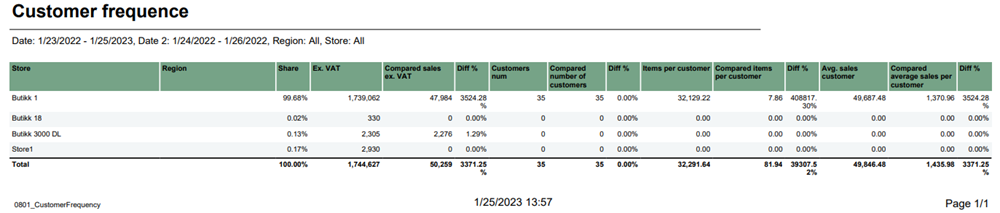 Image Added Image Added
Description: Report lists how often customer buys product in comparison to previous period time. Selections: - Date from – Default first day of a current week
- Date to – Default today
- Compare date from - Default year ago from today
- Compate date to - Default year ago from today
- Region – Default all
- Store – Default all
Output: Report shows amount, number of customers and sold items for selected stores, regions and period time in comparison to previous selected period time. Raport presents percentage differences and sum up all columns for selected stores Columns: - Store – Store name
- Region- Team name
- Share – percentage net amount
- Ex. VAT – net amount
- Compared sales ex. VAT – Compared net amount
- Diff % - Percentage difference to compared date
- Customers num – Customer number
- Compared number of customers
- Diff % - Percentage difference to compared date
- Items per customer
- Compared items per customer
- Diff % - Percentage difference to compared date
- Avg. sales customer – Average sales customer
- Compared average sales per customer
- Diff % - Percentage difference to compared date
Clarifications: Diff % is percentage difference (increase or decrease) between date and comparable date Source: - Lindbak POS Reporting Cube (OLAP)
|
| Anchor |
|---|
| 0802_SalesPerArticleGroup |
|---|
| 0802_SalesPerArticleGroup |
|---|
|
| Expand |
|---|
| title | 0802_SalesPerArticleGroup |
|---|
|
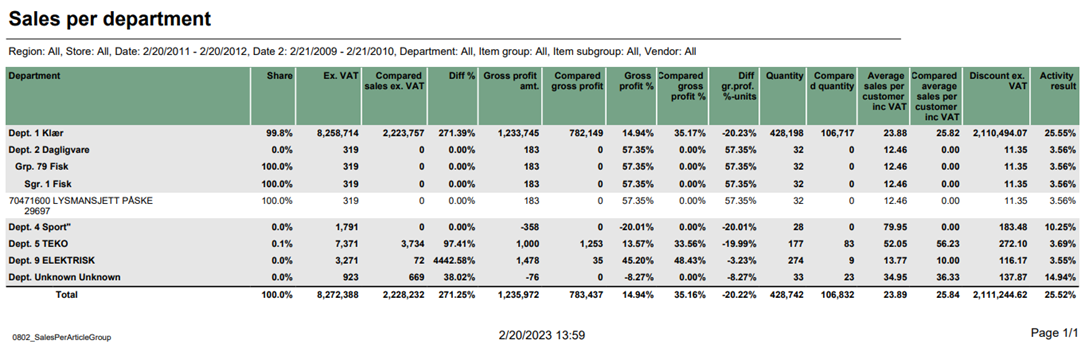 Image Added Image Added
Description: Report lists sales per department and comparison sales in selected period of time. Selections: - Region – Default all
- Store – Default all
- Date from – Default today
- Date to – default today
- Compare date from - Default the same day of week as Date from year before
- Compare date to - Default the same day of week as Date to but year before
- Department – Default all
- Article group – Default all
- Article subgroup – Default all
- Vendor – Default all
Output: - Report has a summary for each column for all selected departments.
- Summary totals in the beginning of new hierarchy level for:
- Department
- Article group
- Article subgroup
Columns: - Buttons for expanding and collapsing all drilldowns
- Department – Department number and name
- Share Ex. VAT – Sales Excluding VAT
- Compared sales ex. VAT – Compared sales excluding VAT
- Diff % - Difference percentage between sales excluding VAT
- Gross profit amt. – Gross profit amount
- Compared gross profit
- Gross profit % - Gross profit percentage
- Compared gross profit % - Compared gross profit percentage
- Diff. gr. prof. %-units – Difference gross profit percentage in units
- Quantity
- Compared quantity
- Average sales per customer inc VAT – Average sales per customer including VAT
- Discount ex. VAT – Discount excluding VAT
- Activity result – Activity result between discount exc. VAT and exc. VAT
Source: - Lindbak POS Reporting Cube (OLAP)
|
| Anchor |
|---|
| 0803_SalesPerAssortment |
|---|
| 0803_SalesPerAssortment |
|---|
|
| Expand |
|---|
| title | 0803_SalesPerAssortment |
|---|
|
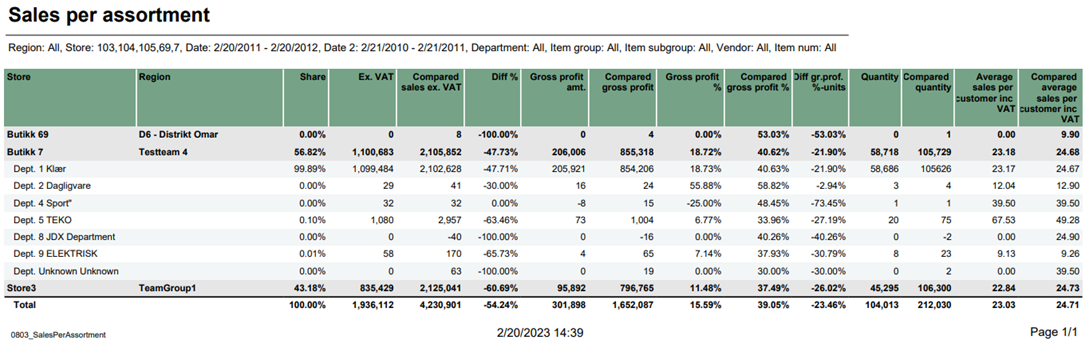 Image Added Image Added
Description: Report lists sales per assortment and comparison sales in selected period of time. Selections: - Region – Default all
- Store – Default all
- Date from – Default today
- Date to – default today
- Compare date from - Default the same day of week as Date from year before
- Compare date to - Default the same day of week as Date to but year before
- Department – Default all
- Article group – Default all
- Article subgroup – Default all
- Vendor – Default all
- Item number – Default empty
Output: - Report has a summary for each column for all selected stores.
- Summary totals in the beginning of new hierarchy level for stores.
Columns: - Buttons for expanding and collapsing all drilldowns
- Store – Store name
- Region – Region team Share Ex. VAT – Sales Excluding VAT
- Compared ex. VAT – Compared sales excluding VAT
- Diff % - Difference percentage between sales and compared sales
- Gross profit amt. – Gross profit amount Compared gross profit
- Gross profit % - Gross profit percentage
- Compared gross profit % - Compared gross profit percentage
- Diff gr. prof. %-units – Difference gross profit percentage in units
- Quantity
- Compared quantity
- Average sales per customer inc. VAT – Average sales per customer including VAT
- Compared average sales per customer inc. VAT – Compared average sales per customer including VAT
Source: - Lindbak POS Reporting Cube (OLAP)
|
| Anchor |
|---|
| 0804_DashBoard |
|---|
| 0804_DashBoard |
|---|
|
| Expand |
|---|
|
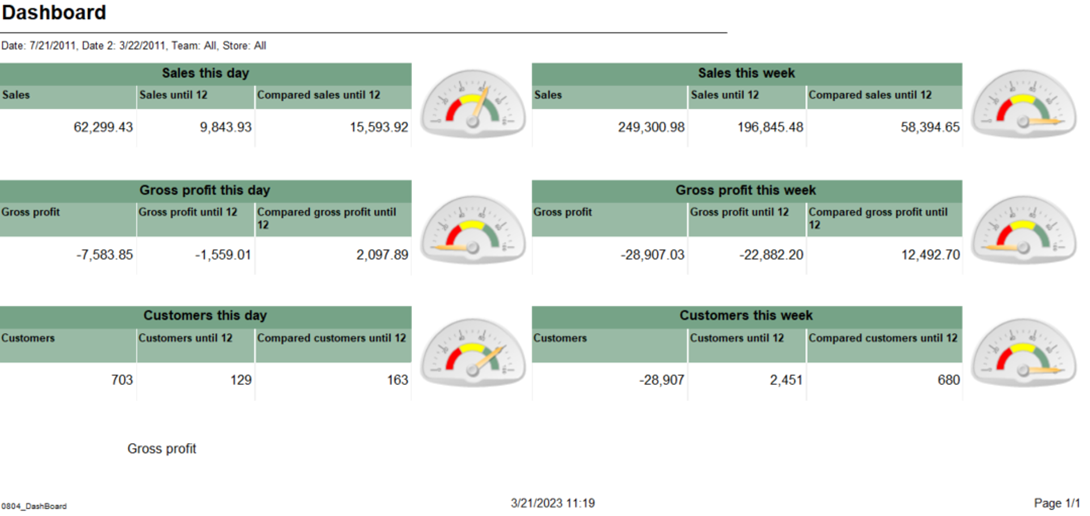 Image Added Image Added
Description: Report lists dashboard comparison sales, gross profit and customers with compare date for one day and the whole week. Selections: - Date – Default today
- Compare date – Default last week from today
- Team – Default all
- Store – Defaul all
Output: - Report shows sales, gross profit and customers statistics for selected date and selected compared date. Appropriately report shows statistics for whole week for that selected day.
- Report has six Gauge panels which compared statistics from current hour in percentage.
Columns: - Sales – Whole day sales
- Sales until 12 – Date sales to current hour
- Compared sales until 12 – Compared date sales to current hour
- Gross profit – Whole day gross profit
- Gross profit until 12 – Date gross profit to current hour
- Compared gross profit until 12 – Compared date gross profit to current hour
- Customers – Whole day customer count
- Customers until 12 – Date customer count to current hour
- Compared customers until 12 – Compared customer count to current hour
Source: - Lindbak POS Reporting Cube (OLAP)
|
| Anchor |
|---|
| 0805_ReconciliationOfGiftcards |
|---|
| 0805_ReconciliationOfGiftcards |
|---|
|
| Expand |
|---|
| title | 0805_ReconciliationOfGiftcards |
|---|
|
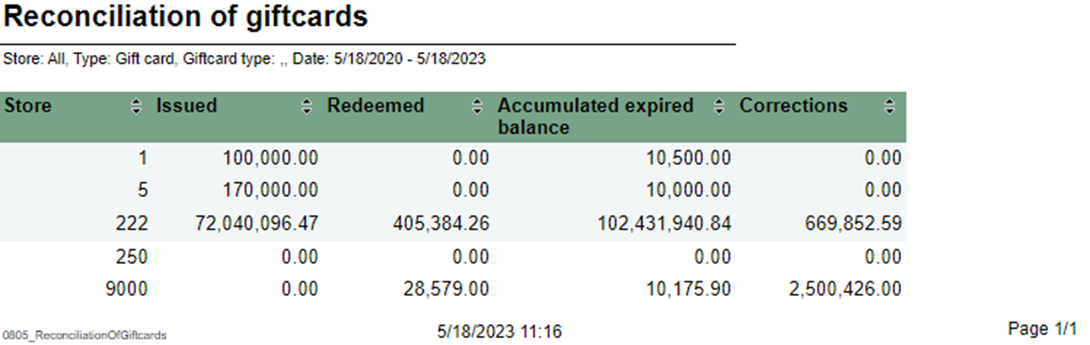 Image Added Image Added
Description: Report lists reconciliation of giftcards. Selections: - Type – Default gift card
- GiftCard type- Default all
- Store – Default all
- Date from – Default today
- Date to – Default today
Output: Report shows reconciliation of giftcards with statistics for selected stores. Columns: - Store – Store number
- Issued – Sum amount issue
- Redeemed – Sum amount redeemed
- Accumulater expired balance
- Corrections – Corrections amount
Interactive sorting: Interactive sorting on all columns Source:
|
| Anchor |
|---|
| 0806_GiftcardsBalancePerStore |
|---|
| 0806_GiftcardsBalancePerStore |
|---|
|
| Expand |
|---|
| title | 0806_GiftcardsBalancePerStore |
|---|
|
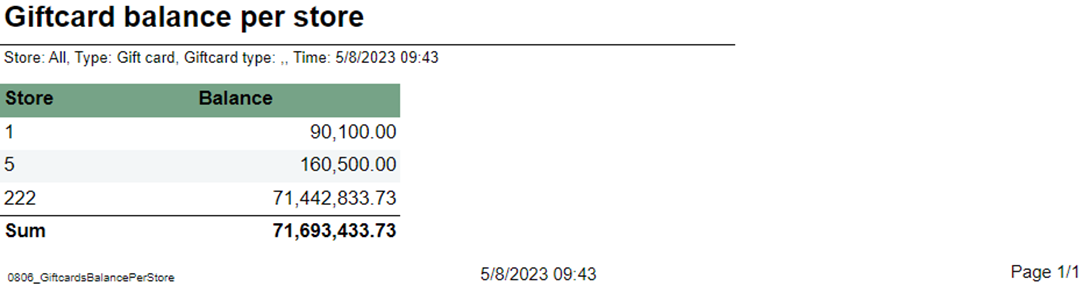 Image Added Image Added
Description: Report lists giftcard balance per store. Selections: - Store – Default all
- Type – Default gift card
- GiftCard type – Default all
Output: Report has a summary at the end of table. Columns: - Store – Store number
- Balance - ScripBalance
Source:
|
| Anchor |
|---|
| 0807_GiftcardReconciliationPerStore |
|---|
| 0807_GiftcardReconciliationPerStore |
|---|
|
| Expand |
|---|
| title | 0807_GiftcardReconciliationPerStore |
|---|
|
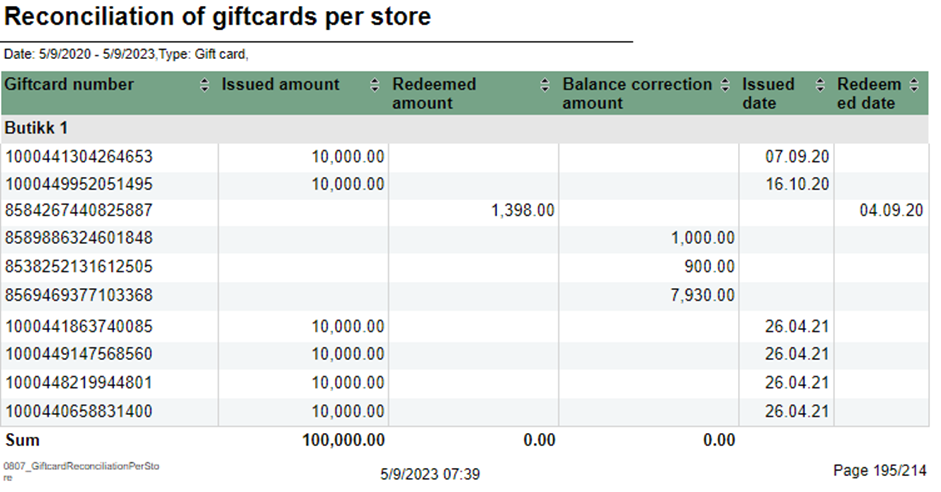 Image Added Image Added
Description: Report lists reconciliation of giftcards per store. Selections: |
...
| Expand |
|---|
| title | 0800_TopXArticlesSold |
|---|
|
Image Removed Description: Report lists top items sold in selected stores in period time. Selections: - Region – Default all
- Store – Default all
- Date from – Default today
- Date to – Default today
- Department Type – Default allgift card
- Article Group Store – Default all
- Article Subgroup – Default all
- Vendor – Default all
- Top X – Number of rows, default set 10
Output: Report shows top x items and item groups with their amount, gross profit and quantity in selected ranges. Report sum up all columns with numbers. Columns: - Item num. – Item number
- Item name – Article long name
- Item group – Group number and article group
- Vendor
- name Ex. VAT – Net amount
- Gross profit
- Gross profit % - Gross profit percentage
- Quantity
- Average price inc VAT – Average price including VAT
- Discount ex. VAT - Item discount excluding VAT
Clarifications: If vendor name is not avaible return empty rows.Output: Report has table for each store and summary at the end of each column on that table. Columns: - Giftcard number
- Issued amount
- Redeemed amount
- Balance correction amount
- Issued date
- Redeemed date
Interactive sorting: Interactive sorting on all columns. Source:
|
| Anchor |
|---|
| 0808_MemberAndElectronicCommunication |
|---|
| 0808_MemberAndElectronicCommunication |
|---|
|
| Expand |
|---|
| title | 0808_MemberAndElectronicCommunication |
|---|
|
CO-99244, PBI#155899 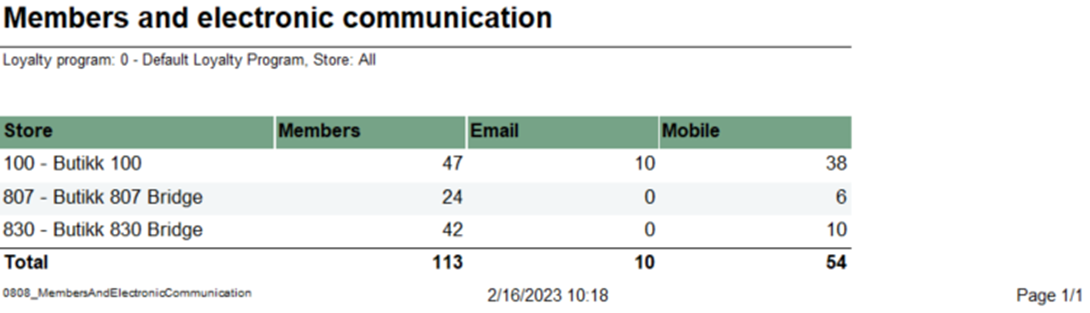 Image Added Image Added
Description: Report lists members and e-mail/SMS subscriptions Selections: - Loyalty program – Default Loyalty program
- Store – Default all
Output: Report shows members with e-mail/SMS subscriptions, one row per store with summary of each column. Columns: - Store – Store number and store name
- Members – Members quantity
- Email – Email quantity
- Mobile – Mobile quantity
Source: - Lindbak POS Reporting Cube (OLAP)DW
|
| Anchor |
|---|
| 08010809_CustomerFrequencyLoyaltyStatistics0801 |
|---|
| 0809_CustomerFrequencyLoyaltyStatistics |
|---|
|
| Expand |
|---|
| title | 0801_CustomerFrequency | 0809_LoyaltyStatistics |
|---|
|
CO-99233, PBI#155902. Based on report 0519 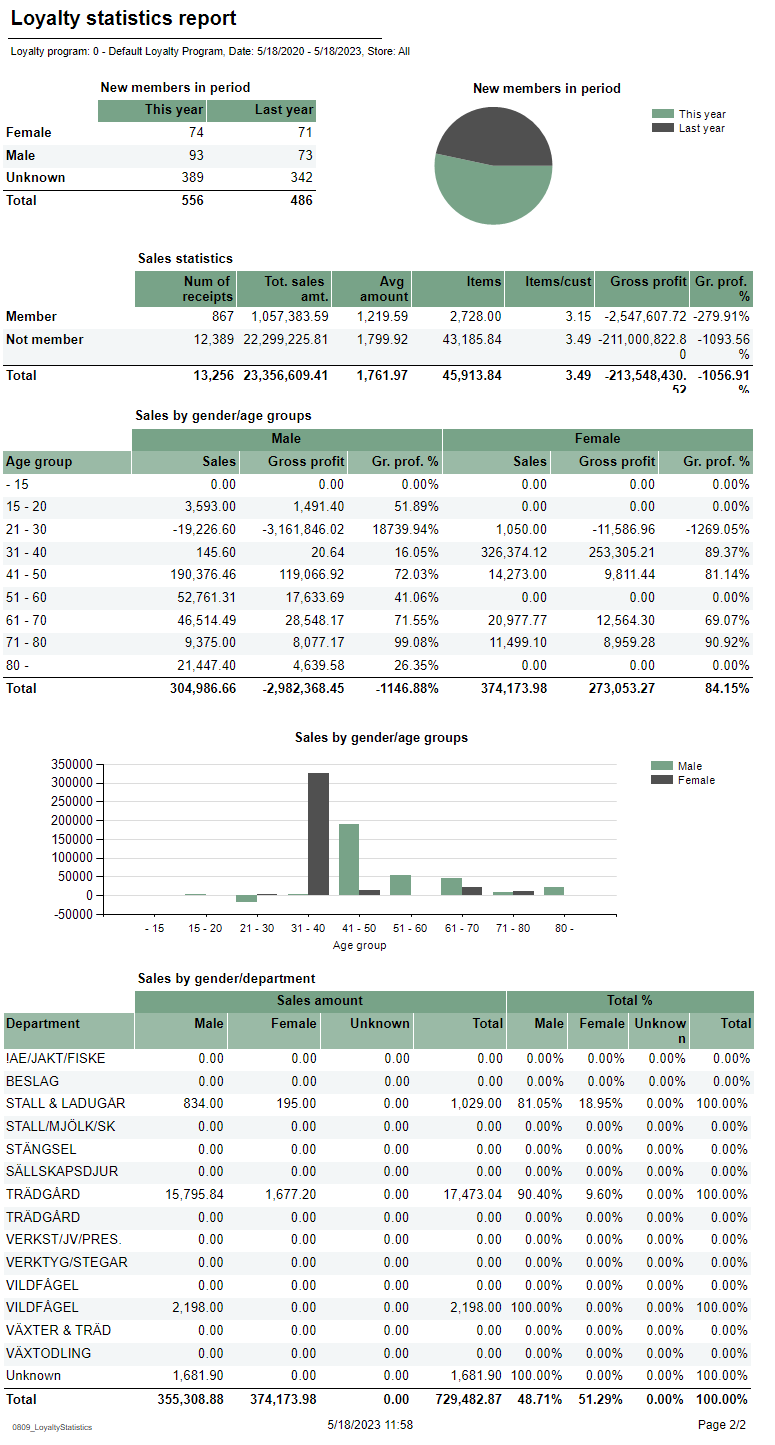 Image AddedImage Removed Image AddedImage Removed
Description: Report lists how often customer buys product in comparison to previous period timeloyalty statistics. Selections: - Loyalty program – Default loyalty program
- Date from – Default first day of a current weektoday
- Date to – Default today
- Compare date from - Default year ago from today
- Compate date to - Default year ago from today
- Region – Default all
- Store – Default all
Output: Report shows amount, number of customers and sold items for selected stores, regions and period time in comparison to previous selected period time. Raport presents percentage differences and sum up all columns for selected stores Columns: - Store – Store name
- Region- Team name
- Share – percentage net amount
- Ex. VAT – net amount
- Compared sales ex. VAT – Compared net amount
- Diff % - Percentage difference to compared date
- Customers num – Customer number
- Compared number of customers
- Diff % - Percentage difference to compared date
- Items per customer
- Compared items per customer
- Diff % - Percentage difference to compared date
- Avg. sales customer – Average sales customer
- Compared average sales per customer
- Diff % - Percentage difference to compared date
Clarifications: Diff % is percentage difference (increase or decrease) between date and comparable date Output: Report is divided on 4 tables and 2 charts. Every table has a stotal sumamry at the end table for each column. Columns: - New members in period table
- Sex – Female, male and unknown
- This year – Number of new members
- Last year – Number of new members last year
- New member in period circle chart
- This year – New member this year
- Last year – New member last year
- Sales statistics table
- Member and not member rows
- Num of receipts – Number of receipts
- Tot. sales amt. – Total sales amount
- Avg amount – Average amount
- Items – Items quantity
- Items/cust – Number of items over number of sales for members.
- Gross profit
- Gr. prof. % - Gross profit percentage
- Sales by gender/age groups table
- Age group
- Male/Female
- Sales – Sales amount
- Gross profit
- Gr. prof. % - Gross profit percentage
- Sales by gender/age groups chart
- X – axis – Age group
- Y – axis – Sales amount
- Legend – Male and Female bars
- Sales by gender/department table
- Department
- Sales amount
- Male – Male sales amount
- Female – Female sales amount
- Unknown – Unknown sales amount
- Total – Total amount for all genders
- Total %
- Male – Male sales amount percentage
- Female – Female sales amount percentage
- Unknown – Unknown sales amount percentage
- Total – Total sales amount for all genders percentage
Source: - Lindbak POS Reporting Cube (OLAP)
- Lindbak POS Reporting DW
|
| Anchor |
|---|
| 08020810_SalesPerArticleGroupLoyaltyClubSales0802 |
|---|
| 0810_SalesPerArticleGroupLoyaltyClubSales |
|---|
|
| Expand |
|---|
| title | 0802_SalesPerArticleGroup | 0810_LoyaltyClubSales |
|---|
|
CO-92729, PBI#155905
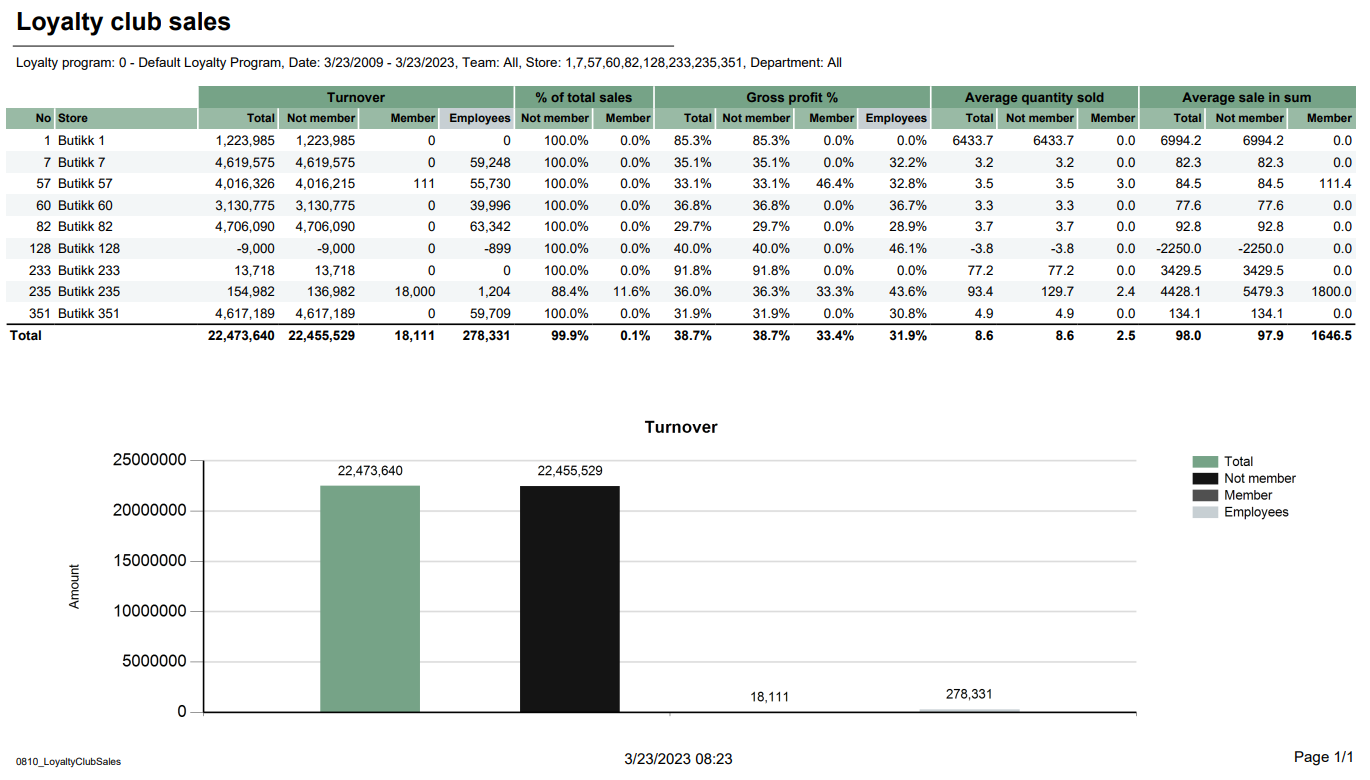 Image AddedImage Removed Image AddedImage Removed
Description: Report lists sales per department and comparison sales in selected period of timestores in loyalty clubs. Report also present turnover chart. Selections: - Region Loyalty program – Default allStore – Default allfirst loyalty program
- Date from – Default today
- Date to – default today
- Compare date from - Default the same day of week as Date from year before
- Compare date to - Default the same day of week as Date to but year before
- Default today
- Team Department – Default all
- Article group Store – Default all
- Article subgroup – Default all
- Vendor Department – Default all
Output: - Report shows sales statistics in loyalty club for selected stores. Report has a summary for at the end of each column for all selected departments.
- Summary totals in the beginning of new hierarchy level for:
- Department
- Article group
- Article subgroup
Columns: - .
- Report has a turnover bar chart. On x-axis are turnover information bars: total, not member, member and employees. On y-axis is turnover amount.
Columns: - No – Store number
- Store – Store name
- Turnover
- Total – Total turnover amount
- Not member – Turnover amount without members
- Member - Turnover amount with members
- Employees – Turnover employees amount
- % of total sales
- Not member – Percentage of total sales without members
- Member - Percentage of total sales with members
- Gross profit %
- Total – Total gross profit percentage
- Not member – Total gross profit percentage without members
- Member - Total gross profit percentage with members
- Employees – Total gross profit percentage
- Average quantity sold
- Average sale in sum
- Buttons for expanding and collapsing all drilldowns
- Department – Department number and name
- Share Ex. VAT – Sales Excluding VAT
- Compared sales ex. VAT – Compared sales excluding VAT
- Diff % - Difference percentage between sales excluding VAT
- Gross profit amt. – Gross profit amount
- Compared gross profit
- Gross profit % - Gross profit percentage
- Compared gross profit % - Compared gross profit percentage
- Diff. gr. prof. %-units – Difference gross profit percentage in units
- Quantity
- Compared quantity
- Average sales per customer inc VAT – Average sales per customer including VAT
- Discount ex. VAT – Discount excluding VAT
- Activity result – Activity result between discount exc. VAT and exc. VAT
Source: - Lindbak POS Reporting Cube (OLAP)
|
| Anchor |
|---|
| 08030850_SalesPerAssortmentShiftStatistics0803 |
|---|
| 0850_SalesPerAssortmentShiftStatistics |
|---|
|
| Expand |
|---|
| title | 08030850_SalesPerAssortmentShiftStatistics |
|---|
|
Image Removed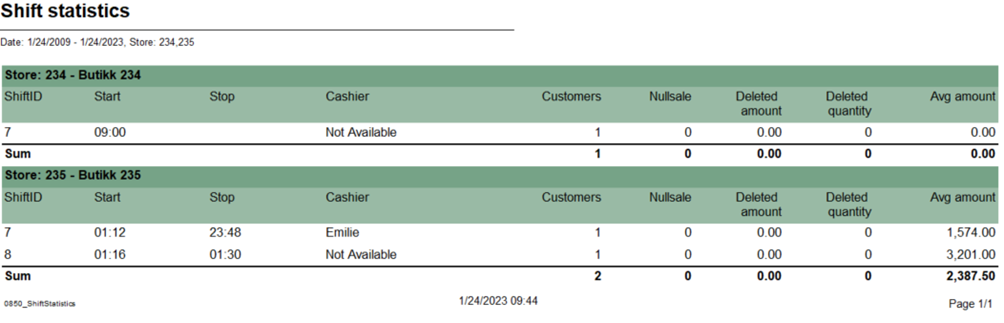 Image Added Image Added Description: Report lists sales per assortment and comparison sales in selected period of time. Selections: Region – Default alllist shift statistic for selected stores and period time Selections: Store – Default all- Date from – Default today
- Date to – default Default today
- Compare date from - Default the same day of week as Date from year before
- Compare date to - Default the same day of week as Date to but year before
- Department – Default all
- Article group – Default all
- Article subgroup – Default all
- Vendor – Default all
- Item number – Default empty
Output: - Report has a summary for each column for all selected stores.
- Summary totals in the beginning of new hierarchy level for stores.
Columns: Relevant parameters: - pDeletedStatuses - Comma separated list of statuses keys not to show in deleted receipts.
Output: - Report shows shift statistic for each cashier with served customers, null sales and average amount for selected stores and period time.
- Report sum up customers, null sales, deleted amount, deleted quantity and average amount for each store.
Columns: - Store – Store number and store name
- ShiftID
- Start – Shift start
- Stop – Shift end
- Cashier
- Customers – receipts count
- Nullsale – Total zero count
- Deleted amount – deleted receipts amount
- Deleted quantity – Deleted receipts quantity
- Avg amount – Average amount
- Buttons for expanding and collapsing all drilldowns
- Store – Store name
- Region – Region team Share Ex. VAT – Sales Excluding VAT
- Compared ex. VAT – Compared sales excluding VAT
- Diff % - Difference percentage between sales and compared sales
- Gross profit amt. – Gross profit amount Compared gross profit
- Gross profit % - Gross profit percentage
- Compared gross profit % - Compared gross profit percentage
- Diff gr. prof. %-units – Difference gross profit percentage in units
- Quantity
- Compared quantity
- Average sales per customer inc. VAT – Average sales per customer including VAT
- Compared average sales per customer inc. VAT – Compared average sales per customer including VAT
Source: - Lindbak POS Reporting Cube (OLAP)
|
| Anchor |
|---|
| 08040851_DashBoardPaymentTypesPerShift0804 |
|---|
| 0851_DashBoardPaymentTypesPerShift |
|---|
|
| Expand |
|---|
| title | 08040851_DashBoardPaymentTypesPerShift |
|---|
|
Image Removed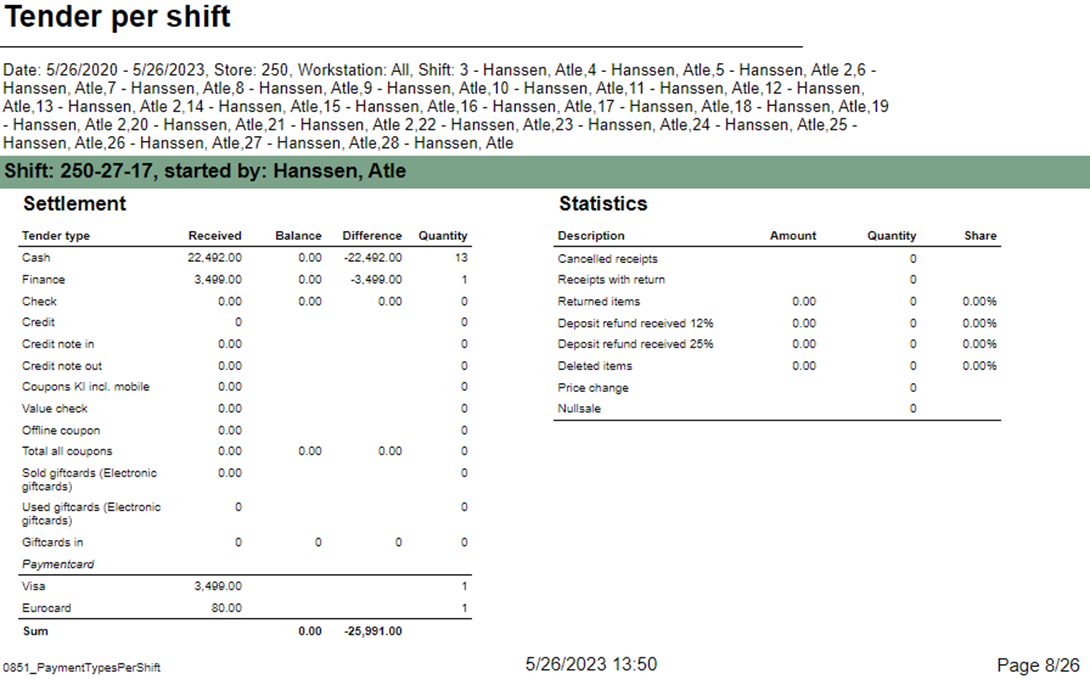 Image Added Image Added Description: Report lists dashboard comparison sales, gross profit and customers with compare date for one day and the whole weekReport allow to follow up tender per shift. Report has two subreports, one settlement and second about statistics. Selections: - Date – from - Default today
- Compare date – Default last week from today
- Team – Default all
- Store – Defaul all
Output: - Report shows sales, gross profit and customers statistics for selected date and selected compared date. Appropriately report shows statistics for whole week for that selected day.
- Report has six Gauge panels which compared statistics from current hour in percentage.
Columns: Sales – Whole day salesSales until 12 – Date sales to current hourCompared sales until 12 – Compared date sales to current hourGross profit – Whole day gross profitGross profit until 12 – Date gross profit to current hourCompared gross profit until 12 – Compared date gross profit to current hourCustomers – Whole day customer countCustomers until 12 – Date customer count to current hour- Date to - Default today
- Retail Store - Default select a single store
- Workstation - Default all
- Shift - Default select a single value
Subreports: | Expand |
|---|
| 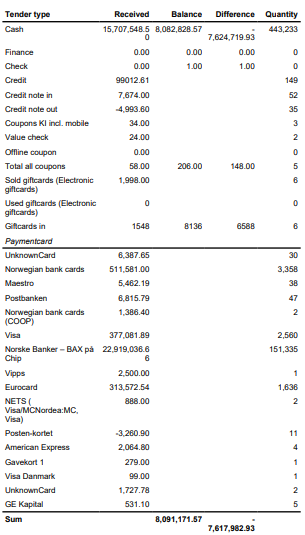 Image Added Image Added
Columns: - Tender type - payment method
- Received - Sales amount inc. VAT received in given tender type
- Balance - Money amount registered in the end of the day (sum for selected operators who made balance and selected days)
- Difference - Balance - Received
- Quantity - Number of items sold in given tender type
Output: One row per one tender type. Clarifications: - Balance and Difference make sense only for cash since only cash it's kept in cash register.
|
| Expand |
|---|
| 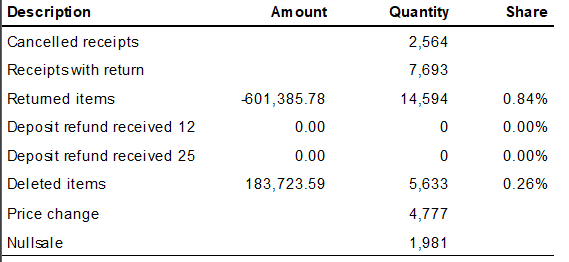 Image Added Image Added
Columns: - Description - Type of reason code
- Amount
- Quantity
- Share
Output: Subreport lists one row per one reason code type. |
Compared customers until 12 – Compared customer count to current hourSource: - Lindbak POS Reporting Cube (OLAP)
|
| Anchor |
|---|
| 08050900_ReconciliationOfGiftcardsMembersalesPerAssociation0805 |
|---|
| 0900_ReconciliationOfGiftcardsMembersalesPerAssociation |
|---|
|
| Expand |
|---|
| title | 08050900_ReconciliationOfGiftcardsMembersalesPerAssociation |
|---|
|
Image Removed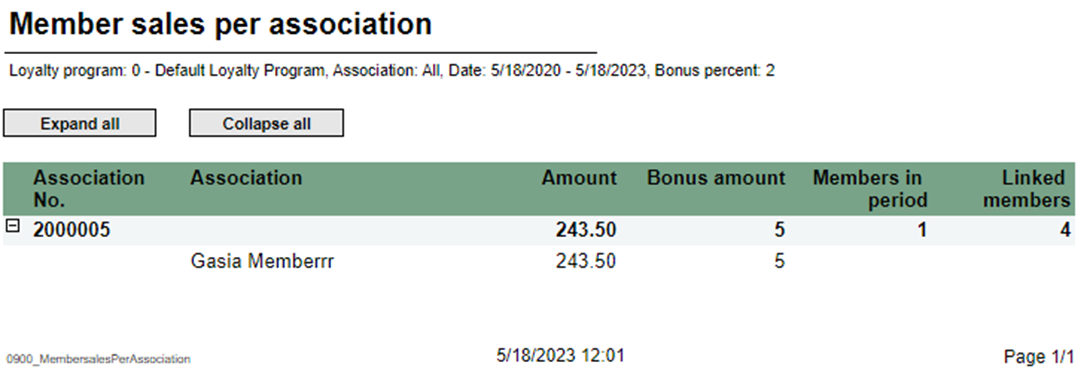 Image Added Image Added
Description: Report lists reconciliation of giftcardsmember sales per association. Selections: - Type Loyalty program – Default gift card
- GiftCard type- Default all
- Store – Default all
- loyalty program
- Date from – Default today
- Date to – Default today
- Customer – Default empty
Output: shows reconciliation of giftcards with statistics for selected stores.Columns: - Store – Store number
- Issued – Sum amount issue
- Redeemed – Sum amount redeemed
- Accumulater expired balance
- Corrections – Corrections amount
Interactive sorting: Interactive sorting on all columns Source: - has expand all and collapse all buttons for drilldowns.
- Totals in the beginning of new hierarchy level for:
- Association No.
- Association
Columns: - Buttons for expanding and collapsing all drilldowns
- Association
- No. Association
- Amount
- Bonus amount
- Members in period
- Linked members
Source: - Lindbak POS Reporting Cube (OLAP)
|
| Anchor |
|---|
| 0901_MemberDiscountGroup |
|---|
| 0901_MemberDiscountGroup |
|---|
|
| Anchor |
|---|
| 0806_GiftcardsBalancePerStore | 0806_GiftcardsBalancePerStore |
|
| Expand |
|---|
| title | 08060901_GiftcardsBalancePerStoreMemberDiscountGroup |
|---|
|
Image Removed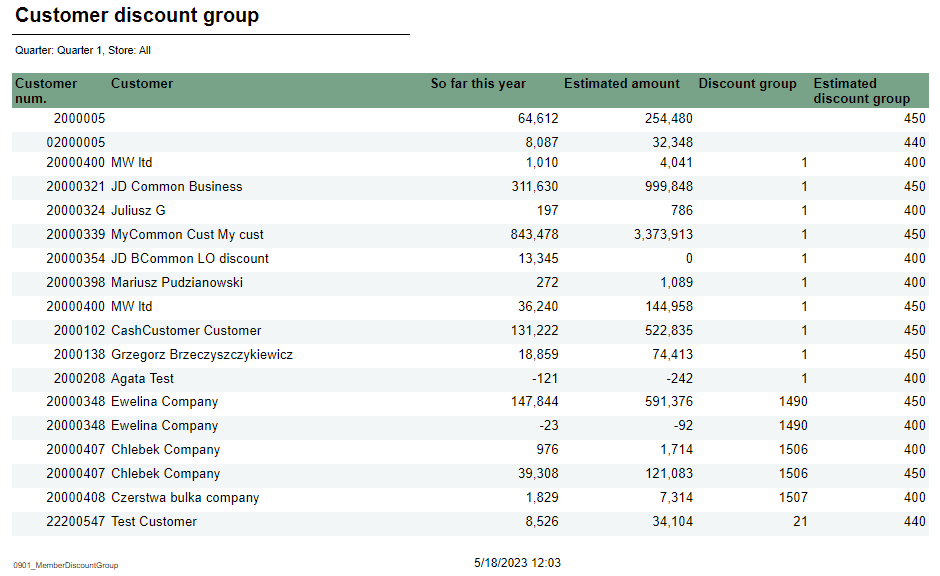 Image Added Image Added
Description: Report lists giftcard balance per store.new discount tgroup for member Selections: - Store Quarter – Default allquarter 1Type
- Show – Default gift cardGiftCard type – Default allall (Changed discount group or unchanged discount group)
Output: Report has a summary at the end of table. Columns: shows customer discount group list for member Columns: - Customer num. – Customer number
- Customer – Customer name
- So far this year – Amount this year
- Estimated amount
- Discount group
- Estimated discount group
- Store – Store number
- Balance - ScripBalance
Source: Lindbak RetailPOS Reporting Cube (OLAP)
|
| Anchor |
|---|
| 08070902_GiftcardReconciliationPerStoreNewMembers0807 |
|---|
| 0902_GiftcardReconciliationPerStoreNewMembers |
|---|
|
| Expand |
|---|
| title | 08070902_GiftcardReconciliationPerStoreNewMembers |
|---|
|
Image Removed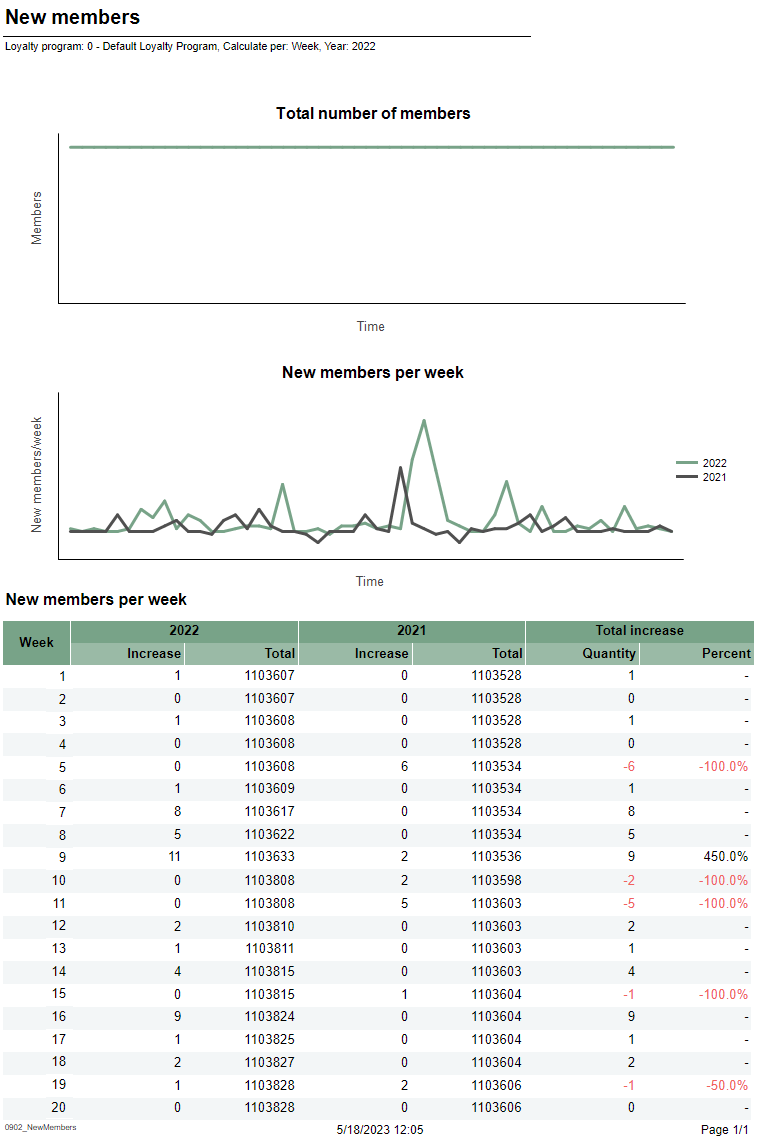 Image Added Image Added
Description: Report lists reconciliation of giftcards per store.new member per week/month Selections: - Date from Loyalty program – Default todayDate to loyalty program
- Calculate per – Default todayper month
- Type Year – Default gift card
- Store – Default all
- select a single value
Output: Report has table for each store and summary at the end of each column on that tableshows two charts and one table for new members per week or per month. Columns: - Giftcard number
- Issued amount
- Redeemed amount
- Balance correction amount
- Issued date
- Redeemed date
Interactive sorting: - Total number of members chart
- X-axis – Time
- Y-axis – Members – number of members
- New members per week/month chart
- X-axis – Time
- Y-axis – New members number
- Legend – Number of members for this year and last year
- New members per week table
- Week
- This year/Last year
- Increase – Number of new members
- Total
- Total increase
- Quantity – Difference between this year and last year
- Percent – Percentage difference between this year and last year
Clarifications: Negative values are marked redInteractive sorting on all columns. Source: - Lindbak RetailPOS Reporting DW
|
| Anchor |
|---|
| 08080903_LoyaltyClubSales_MemberAndElectronicCommunicationDW0808 |
|---|
| 0903_LoyaltyClubSales_MemberAndElectronicCommunicationDW |
|---|
|
| Expand |
|---|
| title | 08080903_LoyaltyClubSales_MemberAndElectronicCommunicationDW |
|---|
|
Based on report 0107, but uses SQL instead of MDX 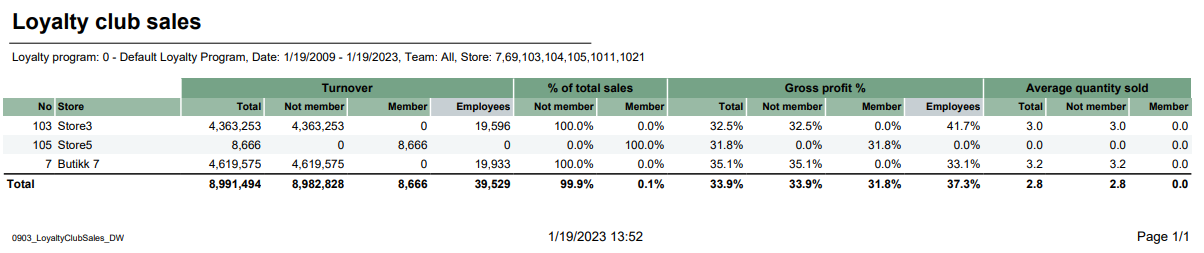 Image Added Image Added
Descriptions: Report lists loyalty club sales for selected stores depending on loyalty program and team. CO-99244, PBI#155899 Image Removed Description: Report lists members and e-mail/SMS subscriptions Selections: - Loyalty program – default 1
- Date from – Default today
- Date to – Default today
- Team – Default Loyalty programall
- Store – Default all
Relevant parameters: - pCustomerGroupsEmployees – Customer group used for employees, default 1.
Output: Report shows members with e-mail/SMS subscriptions, one row per store with summary of each column- One row per store.
- Raport show turnover, percentage of total sales, gross profit percentage and average quantity sold.
- Total sum of each column for selected stores.
Columns: - No – Store number
- Store – Store number and store name
- Members – Members quantity
- Email – Email quantity
- Mobile – Mobile quantity
Source: - name
- Turnover
- Total – total mount
- Not member – Amount without Loyalty program
- Member – Amount with Loyalty program
- Employess – Amount with Customer group
- % of total sales
- Not member – percentage members without Loyalty program
- Member – percentage members with Loyalty program
- Gross profit %
- Total – percentage total of gross profit
- Not member – percentage of gross profit for members without Loyalty program
- Member – percentage of gross profit for members with Loyalty program
- Employess – percentage of gross profitt for members with customer group
- Average quantity sold
- Total – quantity of articles per customers
- Not member - quantity of articles per customers without Customer club
- Member - quantity of articles per customers with Customer club
Clarifications: Customer club refers to LoyaltyProgramKey and Employees refers to CustomerGroupKey. Gross profit is a value referred to NetCost deducted from NetAmount. Source: - Lindbak POS Reporting cube (OLAP)
- Lindbak POS Reporting DW
|
| Anchor |
|---|
| 08090904_LoyaltyStatisticsCashierStatistics0809 |
|---|
| 0904_LoyaltyStatisticsCashierStatistics |
|---|
|
| Expand |
|---|
| title | 08090904_LoyaltyStatisticsCashierStatistics |
|---|
|
CO-99233, PBI#155902. Based on report 0519: 154926 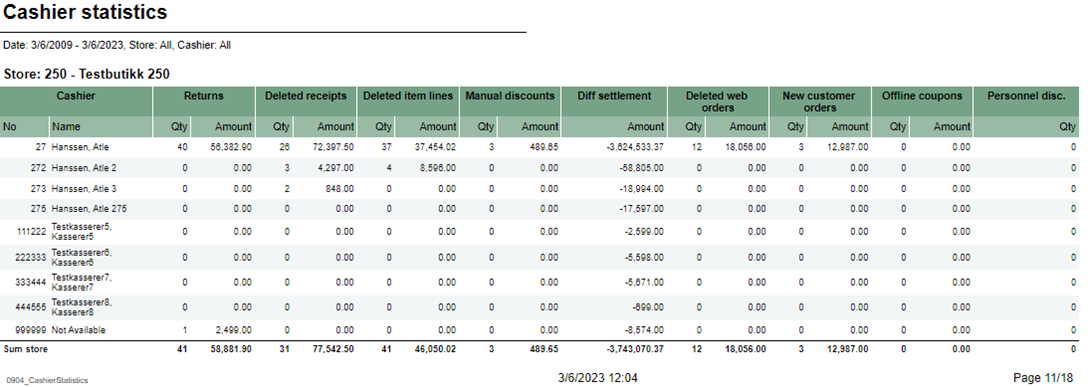 Image AddedImage Removed Image AddedImage Removed
Description: Report lists loyalty cashiers statistics for selected stores. Selections: Loyalty program – Default loyalty program- Date from – Default today
- Date to – Default today
- Store – Default all
- Operator – Default operator
Output: Report is divided on 4 tables and 2 charts. Every table has a stotal sumamry One page per store. Report has a summary for each column at the end table for each columneach store's table. Columns: - Cashier No and Name – Cashier number and cashier name
- Returns quantity and amount
- Deleted receipts quantity and amount
- Deleted item lines quantity and amount
- Manual discounts quantity and amount
- Diff settlement amount – Difference settlement amount
- Deleted web order quantity and amount
- New customer orders quantity and amount
- Offline coupons quantity and amount
- Personnel disc. qty – Personnel discount quantity
- New members in period table
- Sex – Female, male and unknown
- This year – Number of new members
- Last year – Number of new members last year
- New member in period circle chart
- This year – New member this year
- Last year – New member last year
- Sales statistics table
- Member and not member rows
- Num of receipts – Number of receipts
- Tot. sales amt. – Total sales amount
- Avg amount – Average amount
- Items – Items quantity
- Items/cust – Number of items over number of sales for members.
- Gross profit
- Gr. prof. % - Gross profit percentage
- Sales by gender/age groups table
- Age group
- Male/Female
- Sales – Sales amount
- Gross profit
- Gr. prof. % - Gross profit percentage
- Sales by gender/age groups chart
- X – axis – Age group
- Y – axis – Sales amount
- Legend – Male and Female bars
- Sales by gender/department table
- Department
- Sales amount
- Male – Male sales amount
- Female – Female sales amount
- Unknown – Unknown sales amount
- Total – Total amount for all genders
Total %- Male – Male sales amount percentage
- Female – Female sales amount percentage
- Unknown – Unknown sales amount percentage
Total – Total sales amount for all genders percentage
Source: - Lindbak POS Reporting Cube (OLAP)Lindbak POS Reporting DW
|
| Anchor |
|---|
| 08100950_LoyaltyClubSalesBonusPerStorePerEndOfMonth0810 |
|---|
| 0950_LoyaltyClubSalesBonusPerStorePerEndOfMonth |
|---|
|
| Expand |
|---|
| title | 08100950_LoyaltyClubSalesBonusPerStorePerEndOfMonth |
|---|
|
RTC-27636 / CO-92729, PBI#155905222611 Image Removed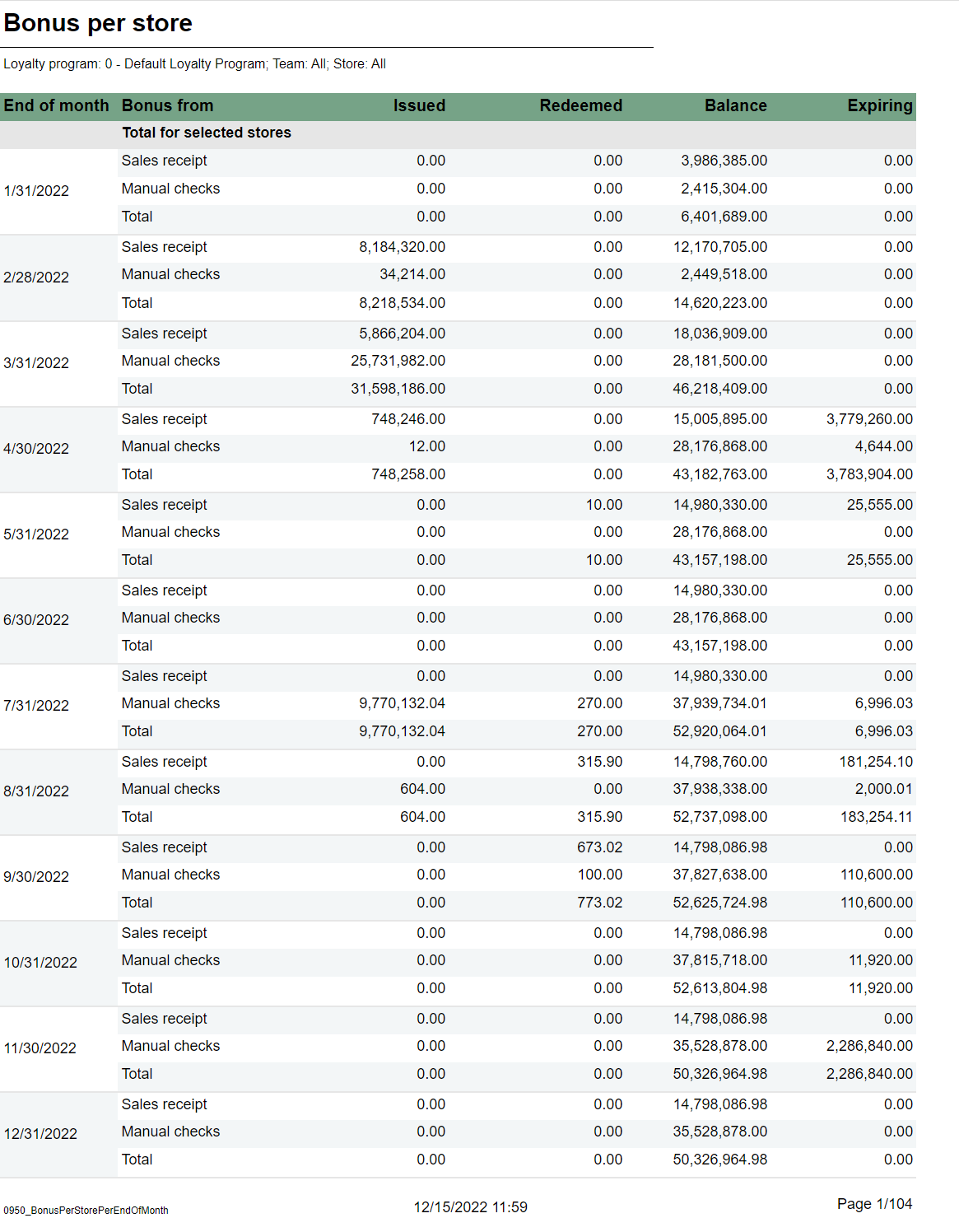 Image Added Image Added Description: Report lists sales in selected stores in loyalty clubs. Report also present turnover chart.shows information about issued, redeemed and balance for bonus checks, per month and store for the last 12 months. Selections: - Loyalty program – - Default first loyalty program
- Date from – Default today
- Date to – Default today
- 1
- Team - Team – Default all
- Store – - Default all Department – Default allavailable in selected teams
Output: - Report shows sales statistics in loyalty club for selected stores. Report has a summary at the end of each column.
- Report has a turnover bar chart. On x-axis are turnover information bars: total, not member, member and employees. On y-axis is turnover amount.
Columns: - No – Store number
- Store – Store name
- Turnover
- Total – Total turnover amount
- Not member – Turnover amount without members
- Member - Turnover amount with members
- Employees – Turnover employees amount
- % of total sales
- Not member – Percentage of total sales without members
- Member - Percentage of total sales with members
- Gross profit %
- Total – Total gross profit percentage
- Not member – Total gross profit percentage without members
- Member - Total gross profit percentage with members
- Employees – Total gross profit percentage
- Average quantity sold
- Average sale in sum
Source: - Lindbak POS Reporting Cube (OLAP)
|
...
One page per store. For each month sum of issued, redeemed, balance and expired bonus checks. One sum for manual issued checks, checks issued from sales and total. First page of report is total for all stores. Columns: - End of month - Shows last date in each month for the last 12 months.
- Bonus type - For each month there is one row for manual issues checks, checks issued from sales and total.
- Issued - Sum of bonus amount issued.
- Redeemed - Sum of redeemed bonus amount.
- Balance - Sum of not exipred, not used bonus amount.
- Expired Sum of bonus amount expired at the end of month.
Sorting: Source:
|
| Anchor |
|---|
| 0951_SecurityReport_DW |
|---|
| 0951_SecurityReport_DW |
|---|
|
| Expand |
|---|
| title | 0951_SecurityReport_DW |
|---|
|
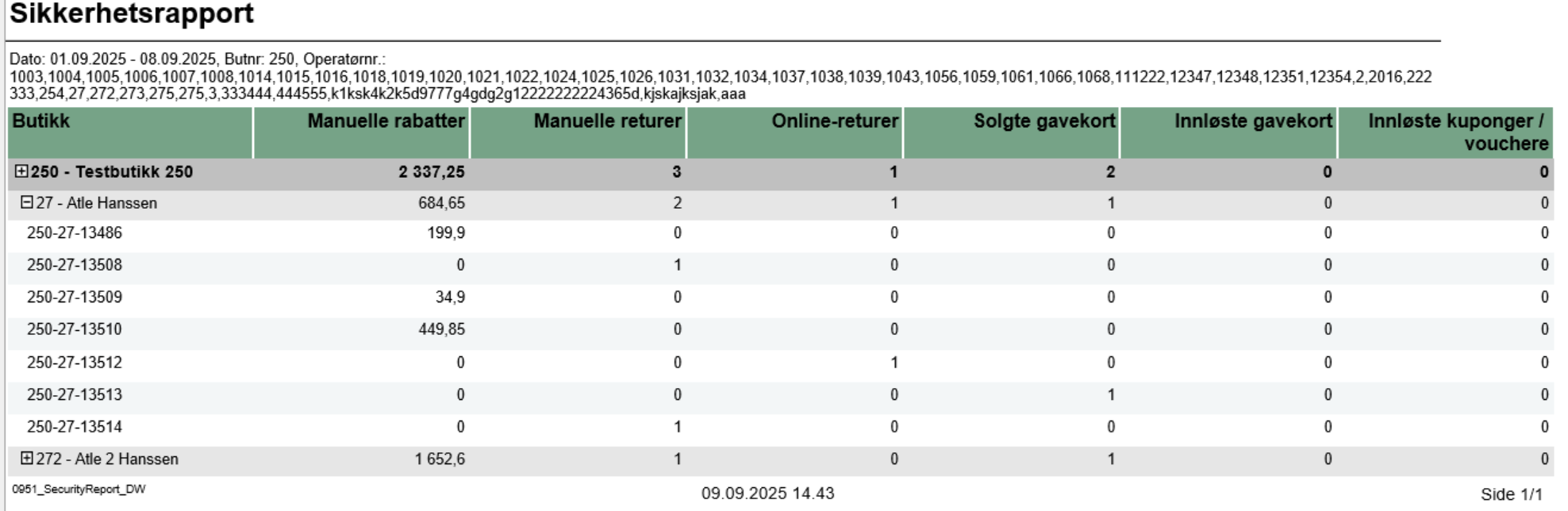
Description:- Report allows to monitor security-sensitive activities performed by cashiers/operators in the store, including manual discounts, returns, gift card transactions, and voucher usage.
Selections:- Date from: Default yesterday
- Date to: Default yesterday
- Retail store: Single select on store (because of performance). Default first available.
- Operator: Default all operators for the selected store
Output:Security activity statistics shown individually per each cashier security-relevant activities like manual discounts, returns, gift card sales/redemptions, and voucher usage with reference to receipt number. Additionally there are totals for each operator and |
...
| Expand |
|---|
| title | 0850_ShiftStatistics |
|---|
|
Image Removed Description: Report list shift statistic for selected stores and period time Selections: - Date from – Default today
- Date to – Default today
- Store – Default all
Relevant parameters: - pDeletedStatuses - Comma separated list of statuses keys not to show in deleted receipts.
Output: Report shows shift statistic for each cashier with served customers, null sales and average amount for selected stores and period time.Report sum up customers, null sales, deleted amount, deleted quantity and average amount for each store. Columns:- Retail Store
– - - Store
number - identifier and
store name- ShiftID
- Start – Shift start
- Stop – Shift end
- Cashier
- Customers – receipts count
- Nullsale – Total zero count
- Deleted amount – deleted receipts amount
- Deleted quantity – Deleted receipts quantity
Avg amount – Average amount- name
- Manual discounts - Sum of manual discount amounts (line and sub-total discounts)
- Manual returns - Quantity of items returned without reference to original transaction
- Online returns - Quantity of items returned with reference to original transaction
- Giftcards out - Quantity of gift cards sold
- Giftcards in - Count of gift card redemptions/usage
- Voucher/coupon used - Count of voucher/coupon usage transactions
Sorting:- Retail Store (default)
- Operator Display
- Transaction ID
Source:- Lindbak POS Reporting
Cube (OLAP)- DW - Data Warehouse database
|
| Anchor |
|---|
| 08510952_PaymentTypesPerShiftItemQuantityStores0851 |
|---|
| 0952_PaymentTypesPerShiftItemQuantityStores |
|---|
|
| Expand |
|---|
| title | 0851_PaymentTypesPerShift | 0952_ItemQuantityStores |
|---|
|
RTP-43325 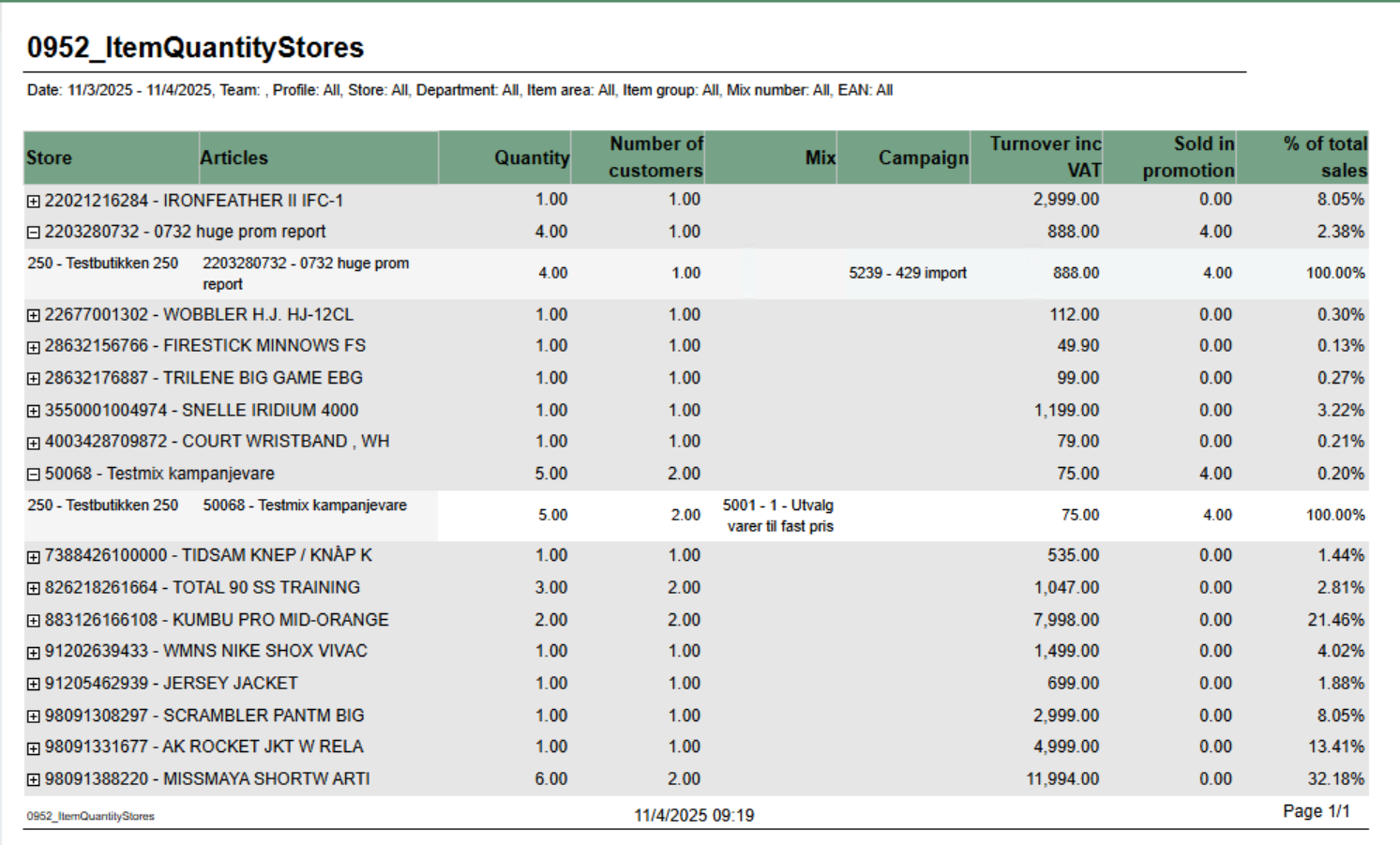 Image Added Image Added
Image RemovedDescription: Report allow to follow up tender per shift. Report has two subreports, one settlement and second about statisticsdisplays item quantity sales data aggregated by retail store with support for mix and campaign analysis. It provides detailed sales information including quantity sold, number of customers, turnover, and promotional sales breakdown. The report allows drill-down from article level to individual store performance. Selections: - Date from
- - : Default today
- Date to
- - : Default today
- Retail Store - Default select a single store
- Workstation - Default all
- Shift - Default select a single value
Subreports: | Expand |
|---|
| Image Removed Columns: - Tender type - payment method
- Received - Sales amount inc. VAT received in given tender type
- Balance - Money amount registered in the end of the day (sum for selected operators who made balance and selected days)
- Difference - Balance - Received
- Quantity - Number of items sold in given tender type
Output: One row per one tender type. Clarifications: - Balance and Difference make sense only for cash since only cash it's kept in cash register.
|
| Expand |
|---|
| Image Removed Columns: - Description - Type of reason code
- Amount
- Quantity
- Share
Output: Subreport lists one row per one reason code type. |
Source: - Lindbak POS Reporting Cube (OLAP)
|
...
- Team: Multivalue; default all
- Profile: Multivalue; default all
- Store: Multivalue; default all (filtered by Team selection)
- Department: Multivalue; default all
- Article area: Multivalue; default all
- Article group: Multivalue; default all
- Mix: Multivalue; default all
- EAN list: Text input; default empty (comma-separated list of EAN codes)
- Include VAT: Boolean; default true (toggles between amounts including/excluding VAT)
- Expand all: Boolean; default false (when true, automatically expands all article groups to show store details)
Output: Article sales statistics grouped by EAN with drill-down capability to individual store level. Report shows: - Summary row per article (EAN) with aggregated data across all stores
- Detail rows per store showing individual store performance (visible when expanded)
- Mix numbers and campaign information displayed as comma-separated lists when multiple values exist
Columns: - Retail Store: Article EAN and name (at summary level)
- Articles: Article EAN and name (at detail level)
- Quantity: Total quantity sold
- Customers: Distinct receipt count (number of customers)
- Mix: Mix numbers and names (comma-separated if multiple mixes apply to the article-store combination)
- Campaigns: Campaign numbers and names (comma-separated if multiple campaigns apply)
- Turnover: Total sales amount (with or without VAT based on Include VAT parameter)
- Sold in Promotion: Quantity sold with discounts/campaigns (calculated as: Total Quantity - Quantity Not Discounted)
- % of Total Sales: Percentage of article turnover compared to total report turnover
Sorting: - Primary: EAN (ascending)
- Secondary: Retail Store Number (ascending)
Clarifications: - Quantity Not Discounted logic: Shows quantity only when Mix is 1, -1, or Unknown AND Campaign is Adhoc, NoCampaign, Not Available, or Unknown. Otherwise returns NULL.
- Mix and Campaign Display: Uses LookupSet function to aggregate multiple mixes/campaigns per article-store combination with "|" delimiter for matching
- Parameter Dependencies: Store parameter options are dynamically filtered based on Team selection
|
...
| Expand |
|---|
| title | 0900_MembersalesPerAssociation |
|---|
|
Image Removed
Description: Report lists member sales per association. Selections: - Loyalty program – Default loyalty program
- Date from – Default today
- Date to – Default today
- Customer – Default empty
Output: - Report has expand all and collapse all buttons for drilldowns.
- Totals in the beginning of new hierarchy level for:
- Association No.
- Association
Columns: - Buttons for expanding and collapsing all drilldowns
- Association
- No. Association
- Amount
- Bonus amount
- Members in period
Linked members
Source: - Lindbak POS Reporting Cube (OLAP)
|
| Anchor |
|---|
| 09014000_MemberDiscountGroupItemSaleQuantityReport0901 |
|---|
| 4000_MemberDiscountGroupItemSaleQuantityReport |
|---|
|
| Expand |
|---|
| title | 0901_MemberDiscountGroup | 4000_ItemSaleQuantityReport |
|---|
|
RTC-46626 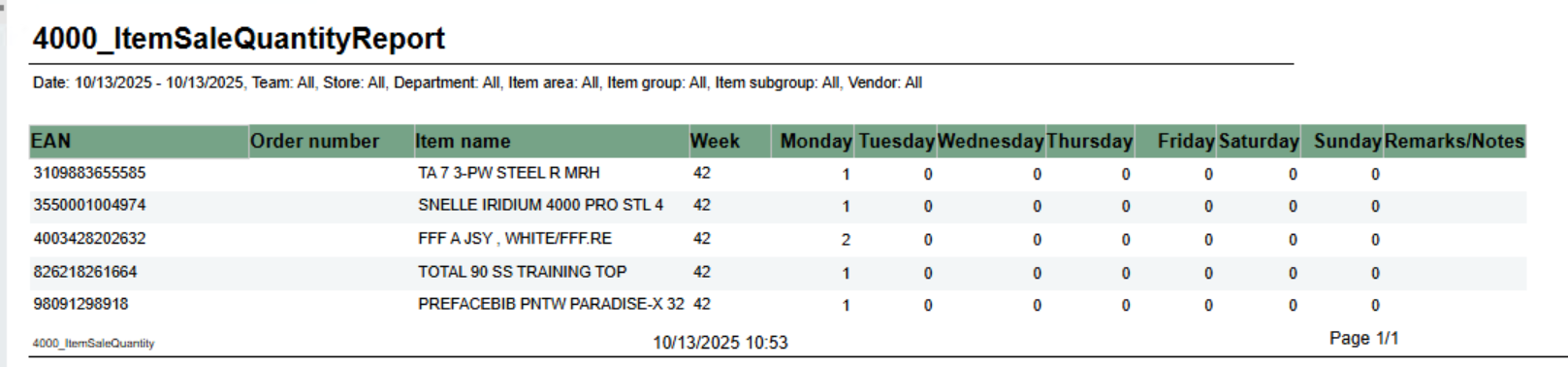 Image AddedImage Removed Image AddedImage Removed
Description: Report lists new discount tgroup for member Selections: - Quarter – Default quarter 1
- Show – Default all (Changed discount group or unchanged discount group)
Output: Report shows customer discount group list for member Columns: - Customer num. – Customer number
- Customer – Customer name
- So far this year – Amount this year
- Estimated amount
- Discount group
- Estimated discount group
Source: Lindbak POS Reporting Cube (OLAP) |
...
shows number of sold items per day of week. Grouped by week. Selections: - From date - default first date of current week.
- To date - default today
- Team - default all
- Retail store - default all
- Department - default all
- Article area - default all
- Article group - default all
- Article subgroup - default all
- Vendor - default all
Note that is is possible to select default e.g article groups by selecting group(s) in parameter pArticleGroup Output: One row for ean item with columns for each day of week. In addition one column for notes. Columns: - EAN - EAN
- Item ID - Item number
- Item name - Item name
- Week - Week number
- Monay - Friday - One column for each day
- Remarks / Notes - Empty column
|
...
| Expand |
|---|
|
Image Removed
Description: Report lists new member per week/month Selections: - Loyalty program – Default loyalty program
- Calculate per – Default per month
- Year – Default select a single value
Output: Report shows two charts and one table for new members per week or per month. Columns: - Total number of members chart
- X-axis – Time
- Y-axis – Members – number of members
- New members per week/month chart
- X-axis – Time
- Y-axis – New members number
- Legend – Number of members for this year and last year
- New members per week table
- Week
- This year/Last year
- Increase – Number of new members
- Total
- Total increase
- Quantity – Difference between this year and last year
- Percent – Percentage difference between this year and last year
Clarifications: Negative values are marked redSource: Lindbak POS Reporting DWCube (Olap)
|
| Anchor |
|---|
| 09034001_LoyaltyClubSales_DWHourlySalesReport0903 |
|---|
| 4001_LoyaltyClubSales_DWHourlySalesReport |
|---|
|
| Expand |
|---|
| title | 09034001_LoyaltyClubSales_DWHourlySalesReport |
|---|
|
RTC-46798 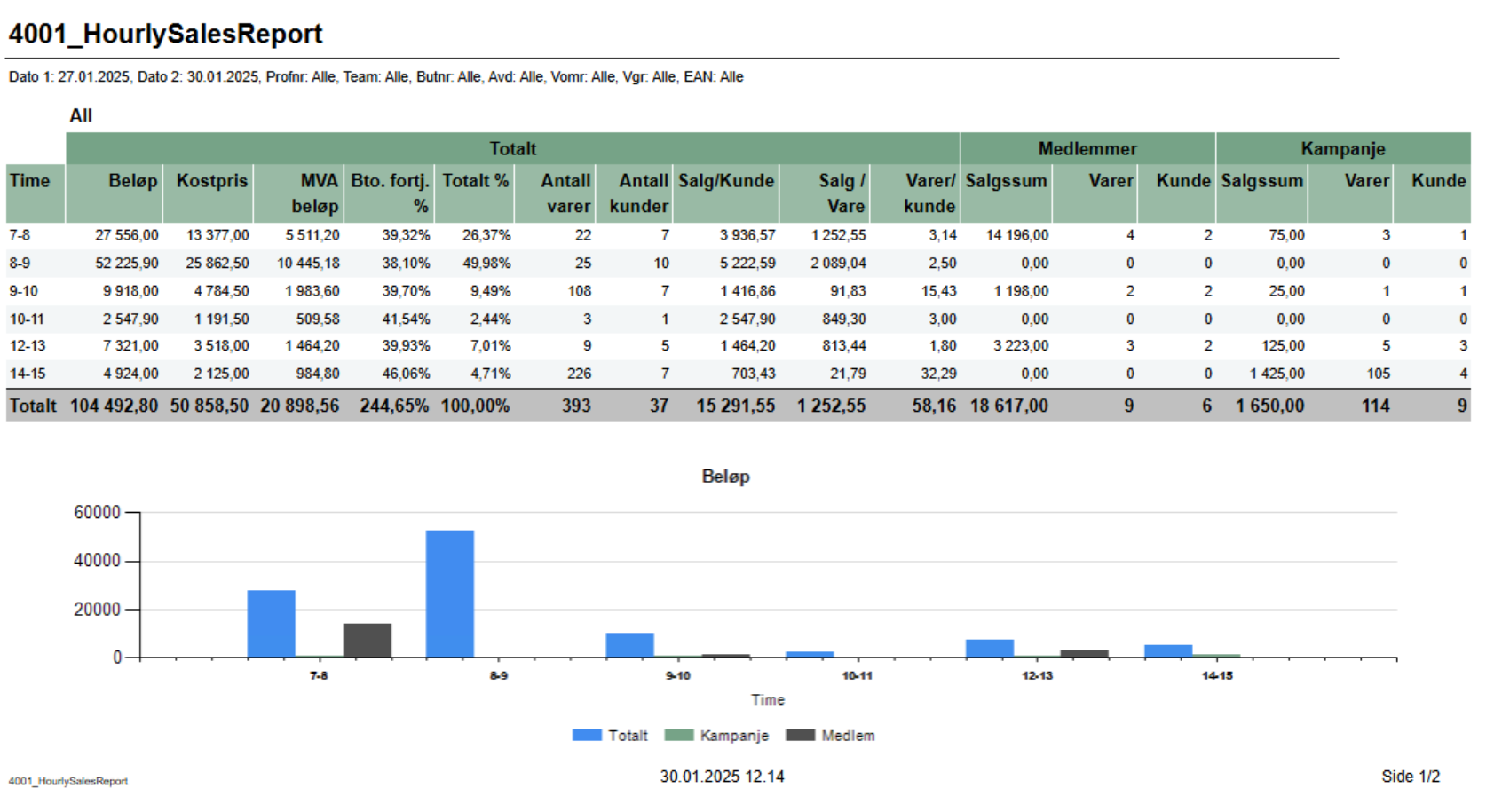 Image Added Image Added
Description Based on report 0107, but uses SQL instead of MDX Image Removed Descriptions: Report lists sale statistics for total sales also sales statistics for member and campaign sales. Graph in bottom showing Total, campaign and member sales. Report show only hours with sales loyalty club sales for selected stores depending on loyalty program and team. Selections: - Loyalty program – default 1
- Date from
– Default - - default today
- Date to
– Default today- Team – Default all
- Store – Default all
Relevant parameters: - - default today
- Hour from - default 0 (start of hour, meaning 0 is between 0 and 1.
- Hour from - default 23 (start of hour, meaning 23 is between 23 and 00.
- Profile - default All
- Team - default All
- Retail store - default All
- Department - default All
- Article area - default All
- Article group - default All
- EAN list - default empty
pCustomerGroupsEmployees – Customer group used for employees, default 1.
Output: One row per hour with sale. One page per store .Raport show turnover, percentage of total sales, gross profit percentage and average quantity sold.Total sum of each column for selected stores.and one for All stores. Bottom of page showing graph for Total-, Campaign- and Member-sales. Columns: - Hour - Showing from - to hour.
- Total
- Amount - Sales amount including VAT
- Net cost - Net cost
- VAT amount - VAT amount
- Gr. profit % - Gross profit in percentage
- Total % - Share of sales for this hour
- Article count - Number of articles sold
- Customer count - Number of receipts / customers
- Sales / Customer - Average sales per customer
- Sales / Item - Average sales amount per item
- Articles / Customer - Average items per customer / receipt
- Members (where there is member in receipt)
- Sales amount - Sales amount including VAT
- Articles - Number of articles
- Customer - Number of customers
- Campaign (where there is discount type Campaign)
- Sales amount - Sales amount including VAT
- Articles - Number of articles
- Customer - Number of customers
Sorting: Sorted by hour, earliest first Columns: - No – Store number
- Store – Store name
- Turnover
- Total – total mount
- Not member – Amount without Loyalty program
- Member – Amount with Loyalty program
- Employess – Amount with Customer group
- % of total sales
- Not member – percentage members without Loyalty program
- Member – percentage members with Loyalty program
- Gross profit %
- Total – percentage total of gross profit
- Not member – percentage of gross profit for members without Loyalty program
- Member – percentage of gross profit for members with Loyalty program
- Employess – percentage of gross profitt for members with customer group
- Average quantity sold
- Total – quantity of articles per customers
- Not member - quantity of articles per customers without Customer club
- Member - quantity of articles per customers with Customer club
Clarifications: Customer club refers to LoyaltyProgramKey and Employees refers to CustomerGroupKey. Gross profit is a value referred to NetCost deducted from NetAmount. Source: Lindbak POS Reporting cube Cube ( OLAPOlap) Lindbak POS Reporting DW |
| Anchor |
|---|
| 09044002_CashierStatisticsRevenueReport0904 |
|---|
| 4002_CashierStatisticsRevenueReport |
|---|
|
| Expand |
|---|
| title | 09044002_CashierStatisticsRevenueReport |
|---|
|
RTC-46685 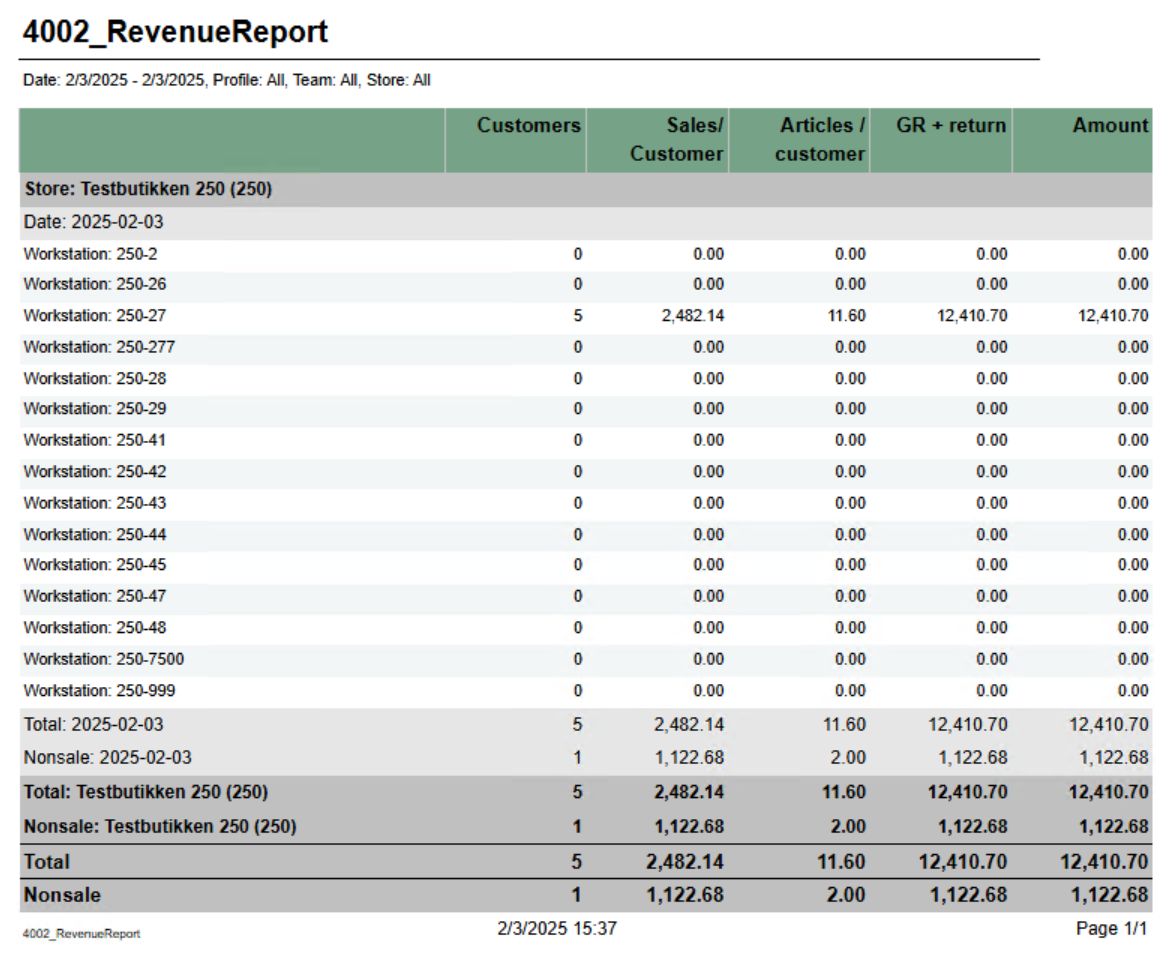 Image Added Image Added
CO: 154926 Image Removed Description: Report lists cashiers statistics for selected storesshowing revenue per cash regsiter for store with sale. Selections: - Date from – Default - default today
- Date to
– Default today- Store – Default all
Operator – Default operator- - default today
- Profile - default all
- Team - default all
- Retail store - default all
Output: One page per store. Report has a summary for each column at the end each store's table. Columns: - Cashier No and Name – Cashier number and cashier name
- Returns quantity and amount
- Deleted receipts quantity and amount
- Deleted item lines quantity and amount
- Manual discounts quantity and amount
- Diff settlement amount – Difference settlement amount
- Deleted web order quantity and amount
- New customer orders quantity and amount
- Offline coupons quantity and amount
- Personnel disc. qty – Personnel discount quantity
row for each workstation in store with statistics about customers and sales. NB! Showing all cash registers for store but only stores with sales. Also showing total per store and total nonsale per store. Columns: - Customers - Number of customer/receipts
- Sales / customer - Average sale per customer/receipt
- Articles / customer - Average article per customer/receipt
- GR + return - Gross sales including return. Gross sales is sales including depositrefunt
- Amount - Sales amount including VAT
Source: Lindbak POS Reporting Cube ( OLAPOlap) |
| Anchor |
|---|
| 09504003_BonusPerStorePerEndOfMonthHourlySalesPerItem0950 |
|---|
| 4003_BonusPerStorePerEndOfMonthHourlySalesPerItem |
|---|
|
| Expand |
|---|
| title | 09504003_BonusPerStorePerEndOfMonthHourlySalesPerItem |
|---|
|
RTC-27636 / CO-22261146808 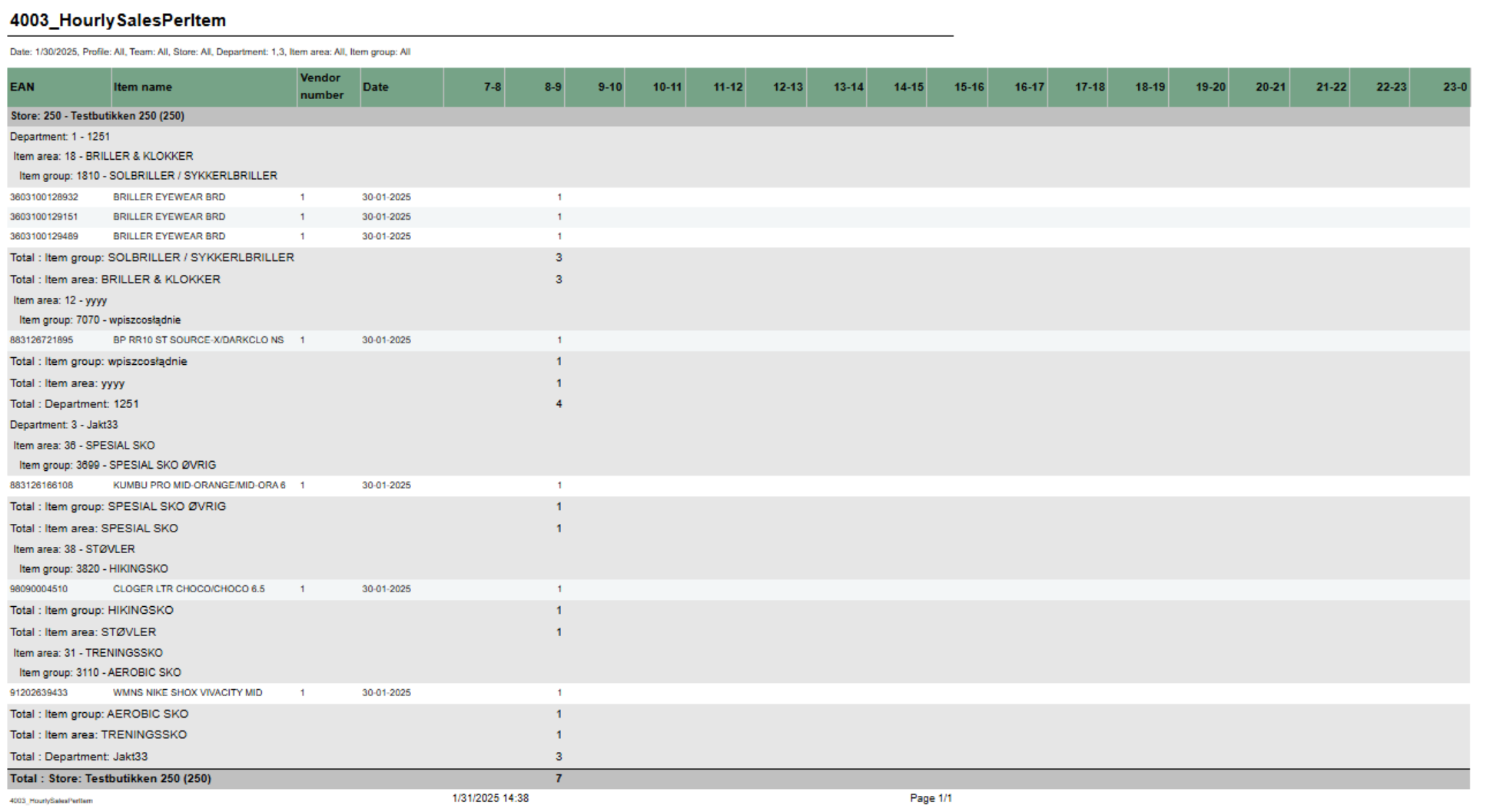 Image AddedImage Removed Image AddedImage Removed
Description: Report shows information about issued, redeemed and balance for bonus checks, per month and store for the last 12 monthsshowing number of sold items per hour for selected date. Also showing total for hierarchy. Selections: - Loyalty program - Default 1
- Team - Default all
- Store - Default all available in selected teams
Output: One page per store. For each month sum of issued, redeemed, balance and expired bonus checks. One sum for manual issued checks, checks issued from sales and total. First page of report is total for all stores. Columns: - End of month - Shows last date in each month for the last 12 months.
- Bonus type - For each month there is one row for manual issues checks, checks issued from sales and total.
- Issued - Sum of bonus amount issued.
- Redeemed - Sum of redeemed bonus amount.
- Balance - Sum of not exipred, not used bonus amount.
- Expired Sum of bonus amount expired at the end of month.
Sorting: - Date - single selction of date, default today
- Hour from - Showing only hours from selected hour. Hour in selection is start of hour (7 is hour 7-8). Default 7. Default can be changed by parameter pHourFrom
- Hour to - Showing only hours to selected hour. Hour in selection is start of hour (23 is hour 23-00). Default 23. Default can be changed by parameter pHourTo
- Profile - default All
- Team - default All
- Retail store - default All
- Department - default All
- Article area - default All
- Article group - default All
Not that is is possible to select default e.g article groups by selecting group(s) in parameter pArticleGroup Output: One row per item with total for group, area and department. Columns: - EAN - EAN
- Item name - Item name
- Vendor number - Vendor number
- Date - Date selected
- One column for each selected hour
Month
Source: Lindbak POS Reporting DWCube (Olap) |
| Anchor |
|---|
| 40004004_ItemSaleQuantityReportSalesByDepartmentAreaAndGroup4000 |
|---|
| 4004_ItemSaleQuantityReportSalesByDepartmentAreaAndGroup |
|---|
|
| Expand |
|---|
| title | 40004004_ItemSaleQuantityReportSalesByDepartmentAreaAndGroup |
|---|
|
RTC-4662646772 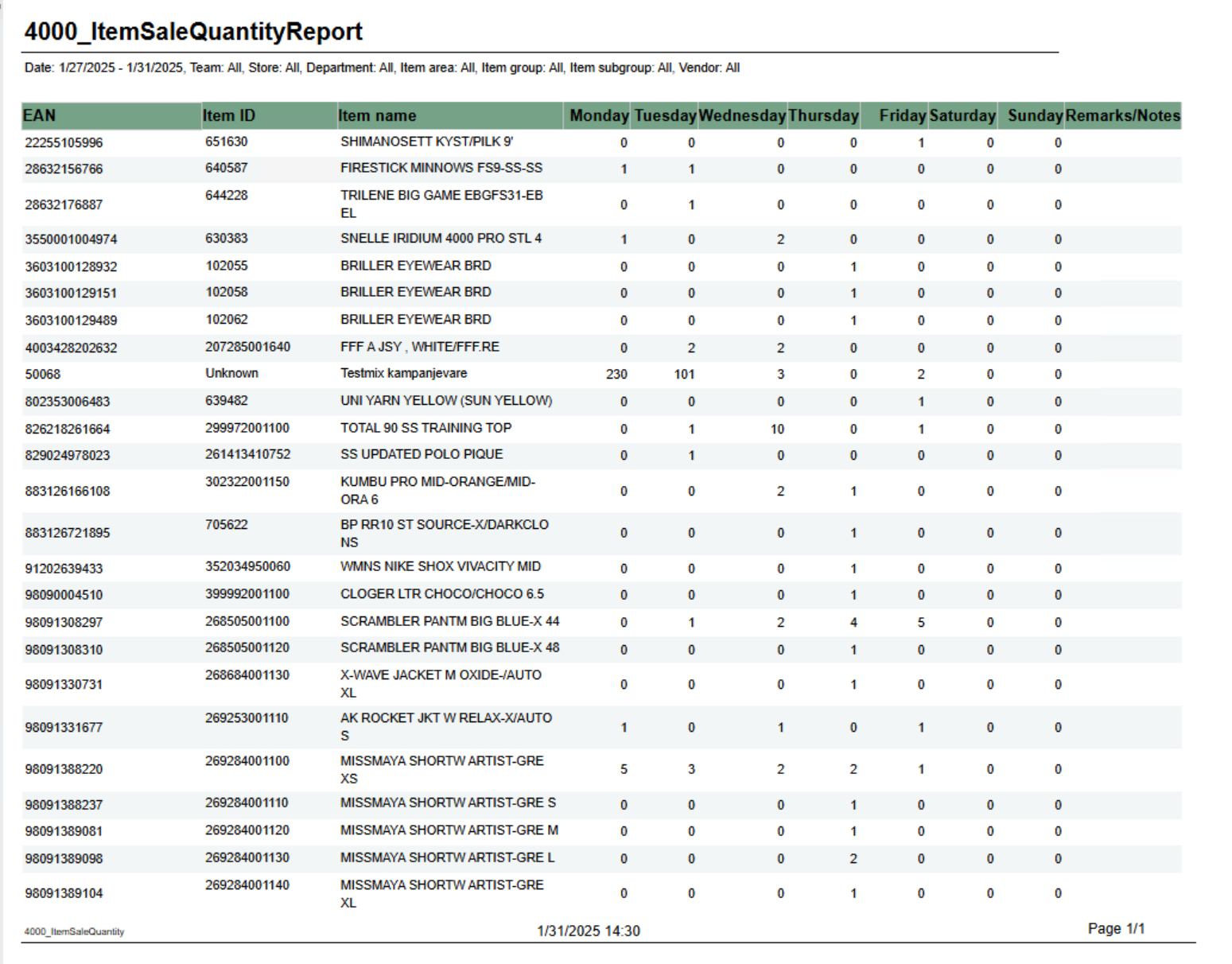 Image Removed Image Removed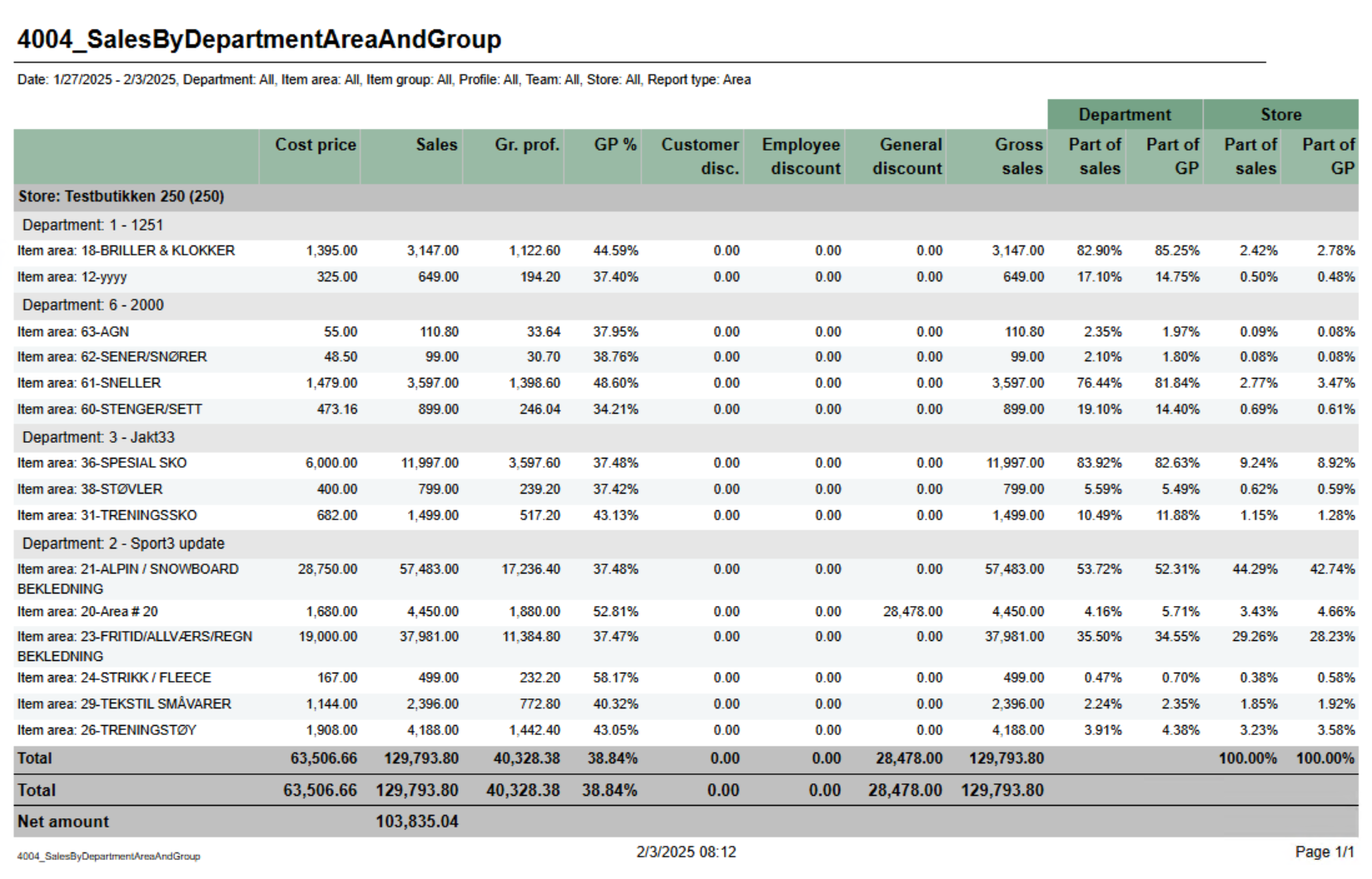 Image Added Image Added
Description: Report shows number of sold items per day of weekReport showing statistics about sales, gross profit and discount. Report is either on department, are or group depending on selection. Also share of gross profit and sales for department and store. Selections: From date - Date from - default
first date of current week.- today
- Date to
To date - - default today
- Team - default all
- Retail store - default all
- Department - default all
- Article area - default all
- Article group default all
- Profile - default all
Article subgroup - Team - default all
Vendor - Retail store - default all
Note that is is possible to select default e.g article groups by selecting group(s) in parameter pArticleGroup- Report type - Which lever of hierarchy report will be created on. Default Department.
Output: One row for ean item with columns for each day of week. In addition one column for notes. Columns: line per level of selected hierarcy with total for department. Columns: - Cost price - Net cost
- Sales - Sales amount including VAT
- Gr.prof. - Gross profit in amount
- GP% - Gross profit in percentage
- Customer disc. - Customer grup discount
- Eployee discount - Personal discount
- General discount - Other discounts except customer and personal
- Gross sales - Sales amount including depositdefund items
- Department
- Part of sales - Percentage part of sales per department
- Part of GP - Percentage part of gross profit per department
- Store
- Part of sales - Percentage part of sales per store
- Part of GP - Percentage part of gross profit per store
- EAN - EAN
- Item ID - Item number
- Item name - Item name
- Monay - Friday - One column for each day
Remarks / Notes - Empty column.
Source: Lindbak POS Reporting Cube (Olap) |
| Anchor |
|---|
| 40014005_HourlySalesReportSafetyReport4001 |
|---|
| 4005_HourlySalesReportSafetyReport |
|---|
|
| Expand |
|---|
| title | 40014005_HourlySalesReportSafetyReport |
|---|
|
RTC-4679847002 Image Removed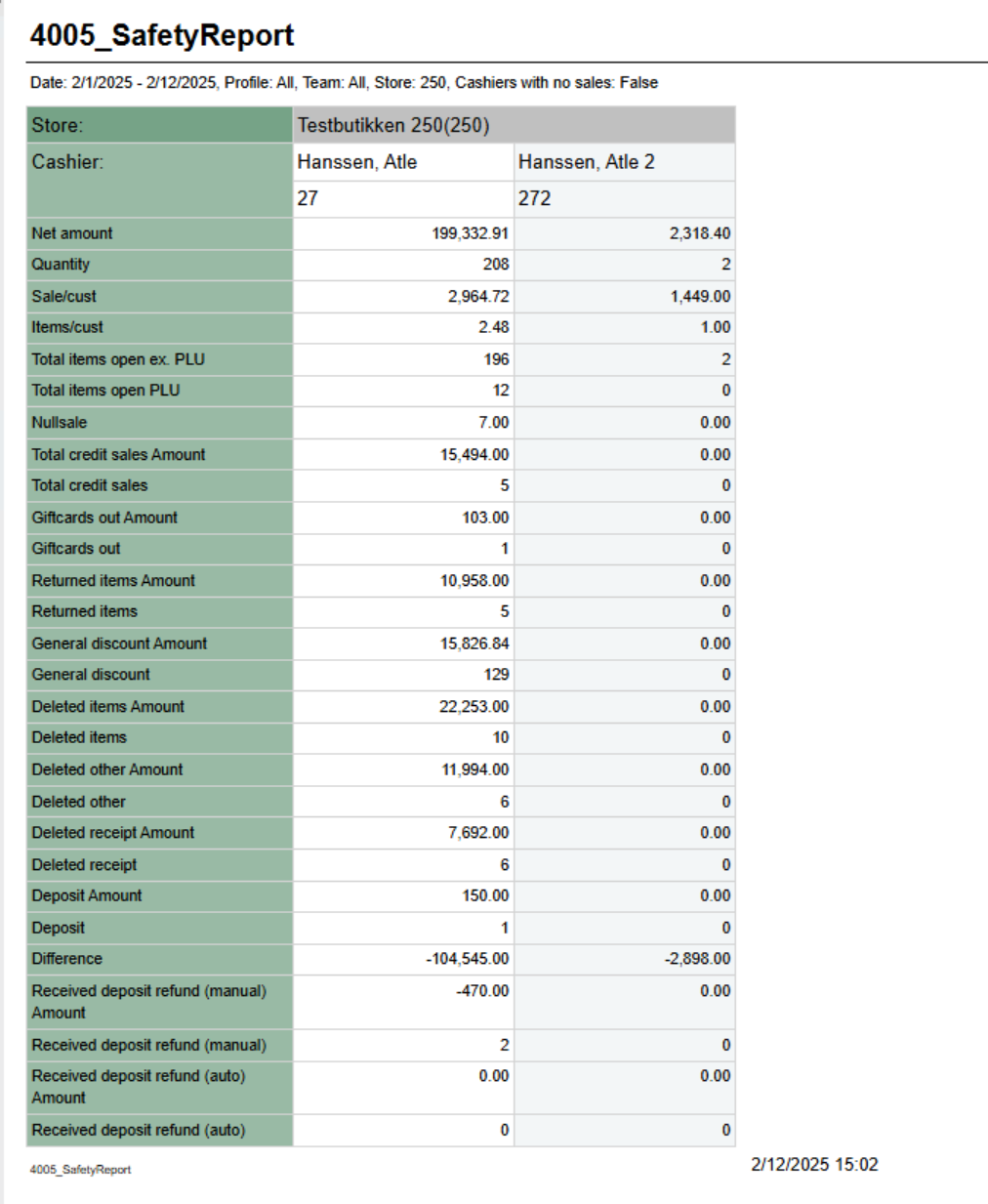 Image Added Image Added Description: Report lists sale statistics for total sales also sales statistics for member and campaign sales. Graph in bottom showing Total, campaign and member sales. Report show only hours with sales. Selections: - Date from - default today
- Date to - default today
- Hour from - default 0 (start of hour, meaning 0 is between 0 and 1.
- Hour from - default 23 (start of hour, meaning 23 is between 23 and 00.
- Profile - default All
- Team - default All
- Retail store - default All
- Department - default All
- Article area - default All
- Article group - default All
- EAN list - default empty
Output: One row per hour with sale. One page per store and one for All stores. Bottom of page showing graph for Total-, Campaign- and Member-sales. Columns: - Hour - Showing from - to hour.
- Total
- Amount - Sales amount including VAT
- Net cost - Net cost
- VAT amount - VAT amount
- Gr. profit % - Gross profit in percentage
- Total % - Share of sales for this hour
- Article count - Number of articles sold
- Customer count - Number of receipts / customers
- Sales / Customer - Average sales per customer
- Sales / Item - Average sales amount per item
- Articles / Customer - Average items per customer / receipt
- Members (where there is member in receipt)
- Sales amount - Sales amount including VAT
- Articles - Number of articles
- Customer - Number of customers
- Campaign (where there is discount type Campaign)
- Sales amount - Sales amount including VAT
- Articles - Number of articles
- Customer - Number of customers
Sorting: Sorted by hour, earliest first. Source: Lindbak POS Reporting Cube (Olap) |
...
showing statistics per cashier in store. Because of performence report has single selct on store. NB! Report require minimum reporting v84 Selections: - Date from - default today
- Date to - default today
- Profile - defalt all
- Team - default all
- Retail store - single selct, first available store selected
- Operator - defalt all for selected store
- Cashiers with no sale - default off. If on report will list all cashiers from store even if no sales
Hidden parameters: - pDeletedArticlesStatuses - Which deleted status will be included in row for Deleted items. Default: 2 - Deleted,12 - Deleted is last registered, 13 - Deleted is last remaining,14 - Deleted is last remaining and is last registered
- pDeletedOtherStatuses - Which deleted status will be included in row for Deleted other. Default: 7 - Deleted from on hold, 10 - Deleted in on hold from on hold, 15 - Deleted unfinished receipt, 16 - Deleted from unfinished receipt
- pDeletedReceiptStatuses - Which deleted status will be included in row for Deleted receipt. Default: 3 - Delted receipt
- pGeneralDiscount - Which discount types will be included in row for General discount. Default: 2 - Line discount, 3 - Group discount, 4 - Customer group discount, 5 - Adhoc package, 6 - Model discount, 7 - Member discount, 8 - Campaign discount, 9 - Giftcard discount, 10 - Personal discount, 11 - Subtotal discount
- pManualDepositRefundInArtEAN - Comma separated list of items which will be included in row for Deposit refund manual. Default 99
Output: Rows for data with one column for each operator. Rows: - Store - Storename and number
- Cashier - Cashier name and number
- Net amount - Net amount sales
- Quantity - Number of articles sold
- Sale/cust - Average sale per customer
- Item/cust - Average items per customer
- Total items open ex. PLU - Items sold without open price
- Total items open PLU - Items sold with open price
- Nullsale - Number of receipts finished with salesamount 0
- Total credit sales Amount - Amount sold on tendertype Credit
- Total credit sales - Number of sales with tendertype Credit
- Giftcards out Amount - Amount of sold gift cards (sale with articletype giftcard)
- Giftcards out - Number of gift cards sold (sale with articletype giftcard)
- Returned items Amount - Amount of returned items (sales with direction in)
- Returned items - Quantity of returned items (sales lines with direction in)
- General discount Amount - Sum of discount for discount types set in parameter pGeneralDiscount
- General discount - Quantity of items with discount types set in parameter pGeneralDiscount
- Deleted items Amount - Amount of deleted items with deleted status from parameter pDeletedArticlesStatuses
- Deleted items - Quantity of deleted items with deleted status from paramter pDeletedArticlesStatuses
- Deleted other Amount - Amount of deleted items with deleted status from parameter pDeletedOtherStatuses
- Deleted other - Quantity of delted items with deleted status from parameter pDeletedOtherStatuses
- Deleted receipt Amount - Amount of deleted receipts with deleted status from parameter pDeletedReceiptStatuses
- Deleted receipt - Quanity of deleted receipts with deleted status from parameter pDeletedReceiptStatuses
- Deposit - Number of deposit sales
- Difference - Difference between cash from balance and cash from tender
- Received deposit refund (manual) Amount - Sum of sales with direction In from articles with article type = depositrefund where article is in parameter pManualDepositRefundInArtEAN
- Received deposit refund (manual) - Quantity of items with direction In from articles with article type = depositrefund where article is in parameter pManualDepositRefundInArtEAN
- Received deposit refund (auto) Amount - Sum of sales with direction In from articles with article type = depositrefund where article is NOT in parameter pManualDepositRefundInArtEAN
- Received deposit refund (auto) - Quantity of items with direction In from articles with article type = depositrefund where article is NOT in parameter pManualDepositRefundInArtEAN
Source: |
...
| Expand |
|---|
|
RTC-46685 Image Removed Description: Report showing revenue per cash regsiter for store with sale. Selections: - Date from - default today
- Date to - default today
- Profile - default all
- Team - default all
- Retail store - default all
Output: One row for each workstation in store with statistics about customers and sales. NB! Showing all cash registers for store but only stores with sales. Also showing total per store and total nonsale per store. Columns: - Customers - Number of customer/receipts
- Sales / customer - Average sale per customer/receipt
- Articles / customer - Average article per customer/receipt
- GR + return - Gross sales including return. Gross sales is sales including depositrefunt
- Amount - Sales amount including VAT
Source: Lindbak POS Reporting Cube (Olap)
|
| Anchor |
|---|
| 40034006_HourlySalesPerItemDifference4003 |
|---|
| 4006_HourlySalesPerItemDifference |
|---|
|
| Expand |
|---|
| title | 40034006_HourlySalesPerItemDifference |
|---|
|
RTC-4680847005 Image Removed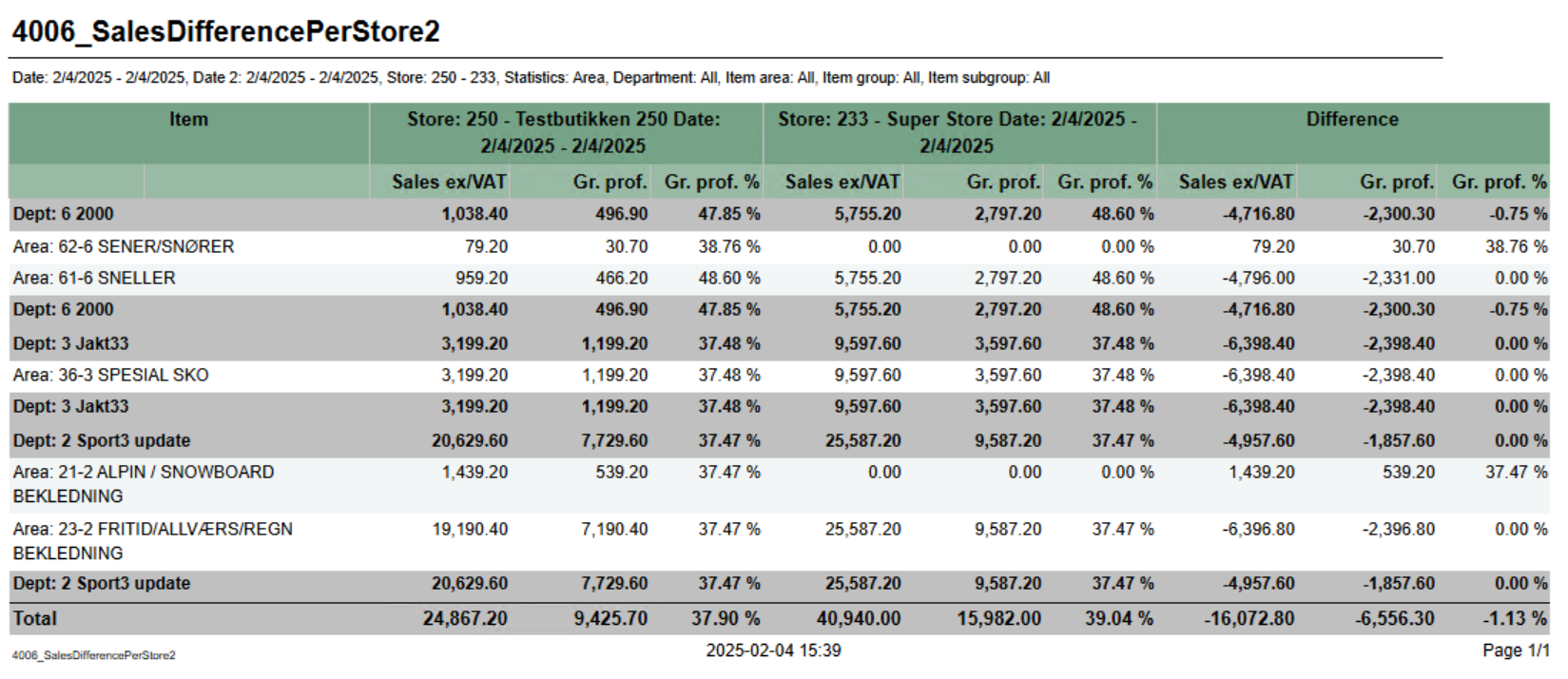 Image Added Image Added Description: Report showing number of sold items per hour for selected date. Also showing total for hierarchyfor comparing basic sales between two stores with date selection for each store. Selections: - Date from -
single selction of date, default today- Hour from - Showing only hours from selected hour. Hour in selection is start of hour (7 is hour 7-8). Default 7. Default can be changed by parameter pHourFrom
- Hour to - Showing only hours to selected hour. Hour in selection is start of hour (23 is hour 23-00). Default 23. Default can be changed by parameter pHourTo
- Profile - default All
- Team - default All
- Retail store - default All
- Department - default All
- Article area - default All
- Article group - default All
Not that is is possible to select default e.g article groups by selecting group(s) in parameter pArticleGroup Output: One row per item with total for group, area and department. Columns: - Start date for reference store. Default today
- Date to - End date for reference store. Default today
- Compare date from - Start date for comparing store. Default today
- Compare date to - End date for comparing store. Default today
- Retail store ref - Reference store. Default all
- Retail store comp - Comparing store. Default all
- Department - default all
- Article area - default all
- Article group - default all
- Article subgroup - default all
- Statistic - Which level of hierarcy to run report for. Department, Area, Group, SubGroup and Item. Default Department.
Output: One row for each level of selected hierarchy. Totals for all level of hierarchy above selected. Hierarchy above selected is colored dark grey. Columns: - Item
- Number and name of hierarchy.
- Reference store with date selections.
- Sales ex/VAT - Sales excluding VAT
- Gr.prof. - Gross profit
- Gr.prof. % - Gross profit in percentage
- Comparing store with date selections
- Sales ex/VAT - Sales excluding VAT
- Gr.prof. - Gross profit
- Gr.prof. % - Gross profit in percentage
- Difference
- Sales ex/VAT - Difference between reference store and comparing store
- Gr.prof. - Difference between reference store and comparing store
- Gr.prof. % - Difference between reference store and comparing store
- EAN - EAN
- Item name - Item name
- Vendor number - Vendor number
- Date - Date selected
One column for each selected hour
Source: Lindbak POS Reporting Cube (Olap)
|
| Anchor |
|---|
| 40044007_SalesByDepartmentAreaAndGroupShortCashierReport4004 |
|---|
| 4007_SalesByDepartmentAreaAndGroupShortCashierReport |
|---|
|
| Expand |
|---|
| title | 40044007_SalesByDepartmentAreaAndGroupShortCashierReport |
|---|
|
RTC-4677247013 Image Removed Image Added Image Added Description: Report showing statistics about sales, gross profit and discount. Report is either on department, are or group depending on selection. Also share of gross profit and sales for department and store.giving information about revenue payment methods and settlement for cashiers Selections: - Date from - default today
- Date to - default today
Department - Team - default all
Article area - Profile - default all
- Article group default all
Profile - Retail store - default all
Team - Operator - default all
- Retail store - default all
Report type - Which lever of hierarchy report will be created on. Default Department.- for selected store(s)
Output: One line per level of selected hierarcy with total for departmentGrouped by store with one row for each cashier. Columns: - Cashier - <storenum>-<cashiernum>
- First name - First name of cashier
- Last name - Last name of cashier
- Registered revenue
- Cost price - Net cost
Sales - - Sales amount including VAT
- Gr.prof. - Gross profit in amount
- GP% - Gross profit in percentage
- Customer disc. - Customer grup discount
- Eployee discount - Personal discount
- General discount - Other discounts except customer and personal
- Gross sales - Sales amount including depositdefund items
- Department
- Part of sales - Percentage part of sales per department
- Part of GP - Percentage part of gross profit per department
Store - Part of sales - Percentage part of sales per store
Part of GP - Percentage part of gross profit per store- Bank card - Tender used with bank card (CreditDebit)
- Credit - Tender used with Credit
- Paid in - Controltransaction with Paid in
- Drop / paid out - Controltransactions with Drop and paid out
- Other payment methods - Tender with tender types not mentioned above or below.
- Received cash/check - Tender used with Cash and Check
- Cash settlement - Balance transaction with tender type Cash and Check
- Difference - Difference between Cash Settlement and Received cash/check
Source: Lindbak POS Reporting Cube (Olap) |
| Anchor |
|---|
| 40054008_SafetyReportCashRegisterReport4005 |
|---|
| 4008_SafetyReportCashRegisterReport |
|---|
|
| Expand |
|---|
| title | 40054008_SafetyReportCashRegisterReport |
|---|
|
RTC-4700247014 Image Removed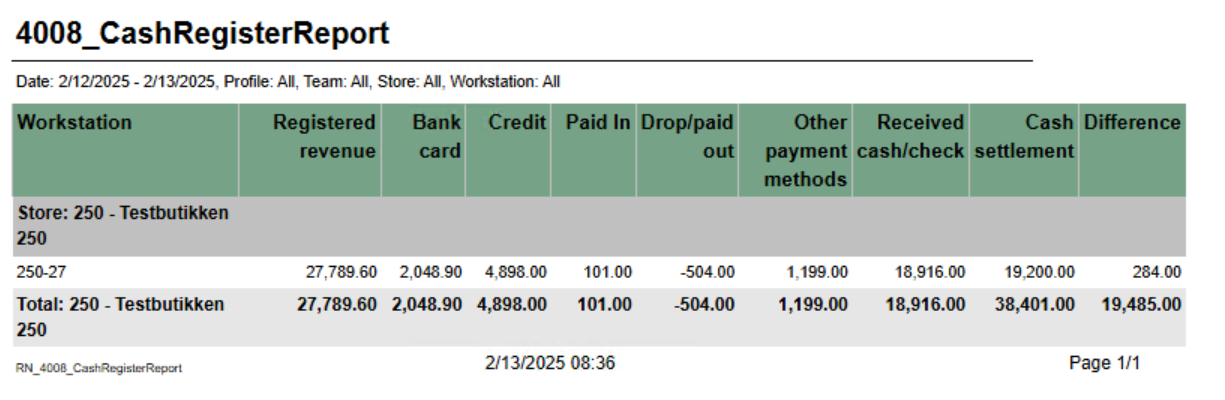 Image Added Image Added Description: Report showing statistics per cashier in store. Because of performence report has single selct on store.NB! Report require minimum reporting v84giving information about revenue payment methods and settlement for cash registers Selections: - Date from - default today
- Date to - default today
- Profile - defalt all
- Team - default all
- Retail store - single selct, first available store selected
- Operator - defalt all for selected store
- Cashiers with no sale - default off. If on report will list all cashiers from store even if no sales
Hidden parameters: - pDeletedArticlesStatuses - Which deleted status will be included in row for Deleted items. Default: 2 - Deleted,12 - Deleted is last registered, 13 - Deleted is last remaining,14 - Deleted is last remaining and is last registered
- pDeletedOtherStatuses - Which deleted status will be included in row for Deleted other. Default: 7 - Deleted from on hold, 10 - Deleted in on hold from on hold, 15 - Deleted unfinished receipt, 16 - Deleted from unfinished receipt
- pDeletedReceiptStatuses - Which deleted status will be included in row for Deleted receipt. Default: 3 - Delted receipt
- pGeneralDiscount - Which discount types will be included in row for General discount. Default: 2 - Line discount, 3 - Group discount, 4 - Customer group discount, 5 - Adhoc package, 6 - Model discount, 7 - Member discount, 8 - Campaign discount, 9 - Giftcard discount, 10 - Personal discount, 11 - Subtotal discount
- pManualDepositRefundInArtEAN - Comma separated list of items which will be included in row for Deposit refund manual. Default 99
Output: Rows for data with one column for each operator. Rows: - Store - Storename and number
- Cashier - Cashier name and number
- Net amount - Net amount sales
- Quantity - Number of articles sold
- Sale/cust - Average sale per customer
- Item/cust - Average items per customer
- Total items open ex. PLU - Items sold without open price
- Total items open PLU - Items sold with open price
- Nullsale - Number of receipts finished with salesamount 0
- Total credit sales Amount - Amount sold on tendertype Credit
- Total credit sales - Number of sales with tendertype Credit
- Giftcards out Amount - Amount of sold gift cards (sale with articletype giftcard)
- Giftcards out - Number of gift cards sold (sale with articletype giftcard)
- Returned items Amount - Amount of returned items (sales with direction in)
- Returned items - Quantity of returned items (sales lines with direction in)
- General discount Amount - Sum of discount for discount types set in parameter pGeneralDiscount
- General discount - Quantity of items with discount types set in parameter pGeneralDiscount
- Deleted items Amount - Amount of deleted items with deleted status from parameter pDeletedArticlesStatuses
- Deleted items - Quantity of deleted items with deleted status from paramter pDeletedArticlesStatuses
- Deleted other Amount - Amount of deleted items with deleted status from parameter pDeletedOtherStatuses
- Deleted other - Quantity of delted items with deleted status from parameter pDeletedOtherStatuses
- Deleted receipt Amount - Amount of deleted receipts with deleted status from parameter pDeletedReceiptStatuses
- Deleted receipt - Quanity of deleted receipts with deleted status from parameter pDeletedReceiptStatuses
- Deposit - Number of deposit sales
- Difference - Difference between cash from balance and cash from tender
- Received deposit refund (manual) Amount - Sum of sales with direction In from articles with article type = depositrefund where article is in parameter pManualDepositRefundInArtEAN
- Received deposit refund (manual) - Quantity of items with direction In from articles with article type = depositrefund where article is in parameter pManualDepositRefundInArtEAN
- Received deposit refund (auto) Amount - Sum of sales with direction In from articles with article type = depositrefund where article is NOT in parameter pManualDepositRefundInArtEAN
- Received deposit refund (auto) - Quantity of items with direction In from articles with article type = depositrefund where article is NOT in parameter pManualDepositRefundInArtEAN
Source: Lindbak POS Reporting Cube (Olap) |
...
RTC-47005
Image Removed
Description:
Report for comparing basic sales between two stores with date selection for each store.
Selections:
- Date from - Start date for reference store. Default today
- Date to - End date for reference store. Default today
- Compare date from - Start date for comparing store. Default today
- Compare date to - End date for comparing store. Default today
- Retail store ref - Reference store. Default all
- Retail store comp - Comparing store. Default all
- Department - default all
- Article area - default all
- Article group - default all
- Article subgroup - default all
- Statistic - Which level of hierarcy to run report for. Department, Area, Group, SubGroup and Item. Default Department.
Output:
One row for each level of selected hierarchy. Totals for all level of hierarchy above selected. Hierarchy above selected is colored dark grey.
Columns:
- Item
- Number and name of hierarchy.
- Reference store with date selections.
- Sales ex/VAT - Sales excluding VAT
- Gr.prof. - Gross profit
- Gr.prof. % - Gross profit in percentage
- Comparing store with date selections
- Sales ex/VAT - Sales excluding VAT
- Gr.prof. - Gross profit
- Gr.prof. % - Gross profit in percentage
- Difference
- Sales ex/VAT - Difference between reference store and comparing store
- Gr.prof. - Difference between reference store and comparing store
- Gr.prof. % - Difference between reference store and comparing store
Source:
Lindbak POS Reporting Cube (Olap)
...
| Expand |
|---|
| title | 4007_ShortCashierReport |
|---|
|
RTC-47013 Image Removed Description: Report giving information about revenue payment methods and settlement for cashiers Selections: - Date from - default today
- Date to - default today
- Team - default all
- Profile - default all
- Retail store - default all
- Operator - default all for selected store(s)
Output: Grouped by store with one row for each cashier. Columns: - Cashier - <storenum>-<cashiernum>
- First name - First name of cashier
- Last name - Last name of cashier
- Registered revenue - Sales amount including VAT
- Bank card - Tender used with bank card (CreditDebit)
- Credit - Tender used with Credit
- Paid in - Controltransaction with Paid in
- Drop / paid out - Controltransactions with Drop and paid out
- Other payment methods - Tender with tender types not mentioned above or below.
- Received cash/check - Tender used with Cash and Check
- Cash settlement - Balance transaction with tender type Cash and Check
- Difference - Difference between Cash Settlement and Received cash/check
Source: Lindbak POS Reporting Cube (Olap) |
...
| title | 4008_CashRegisterReport |
|---|
RTC-47014
Image Removed
Description:
Report giving information about revenue payment methods and settlement for cash registers
Selections:
- Date from - default today
- Date to - default today
- Team - default all
- Profile - default all
- Retail store - default all
- Workstation - default all for selected store(s)
Output:
Grouped by store with one row for each workstation.
Columns:
- Workstation - <storenum>-<workstationnum>
- Registered revenue - Sales amount including VAT
- Bank card - Tender used with bank card (CreditDebit)
- Credit - Tender used with Credit
- Paid in - Controltransaction with Paid in
- Drop / paid out - Controltransactions with Drop and paid out
- Other payment methods - Tender with tender types not mentioned above or below.
- Received cash/check - Tender used with Cash and Check
- Cash settlement - Balance transaction with tender type Cash and Check
- Difference - Difference between Cash Settlement and Received cash/check
Source:
Lindbak POS Reporting Cube (Olap)
- Team - default all
- Profile - default all
- Retail store - default all
- Workstation - default all for selected store(s)
Output: Grouped by store with one row for each workstation. Columns: - Workstation - <storenum>-<workstationnum>
- Registered revenue - Sales amount including VAT
- Bank card - Tender used with bank card (CreditDebit)
- Credit - Tender used with Credit
- Paid in - Controltransaction with Paid in
- Drop / paid out - Controltransactions with Drop and paid out
- Other payment methods - Tender with tender types not mentioned above or below.
- Received cash/check - Tender used with Cash and Check
- Cash settlement - Balance transaction with tender type Cash and Check
- Difference - Difference between Cash Settlement and Received cash/check
Source: Lindbak POS Reporting Cube (Olap)
|
| Anchor |
|---|
| 4009_CustomerOrderHistory |
|---|
| 4009_CustomerOrderHistory |
|---|
|
| Expand |
|---|
| title | 4009_CustomerOrderHistory |
|---|
|
RTC-47198 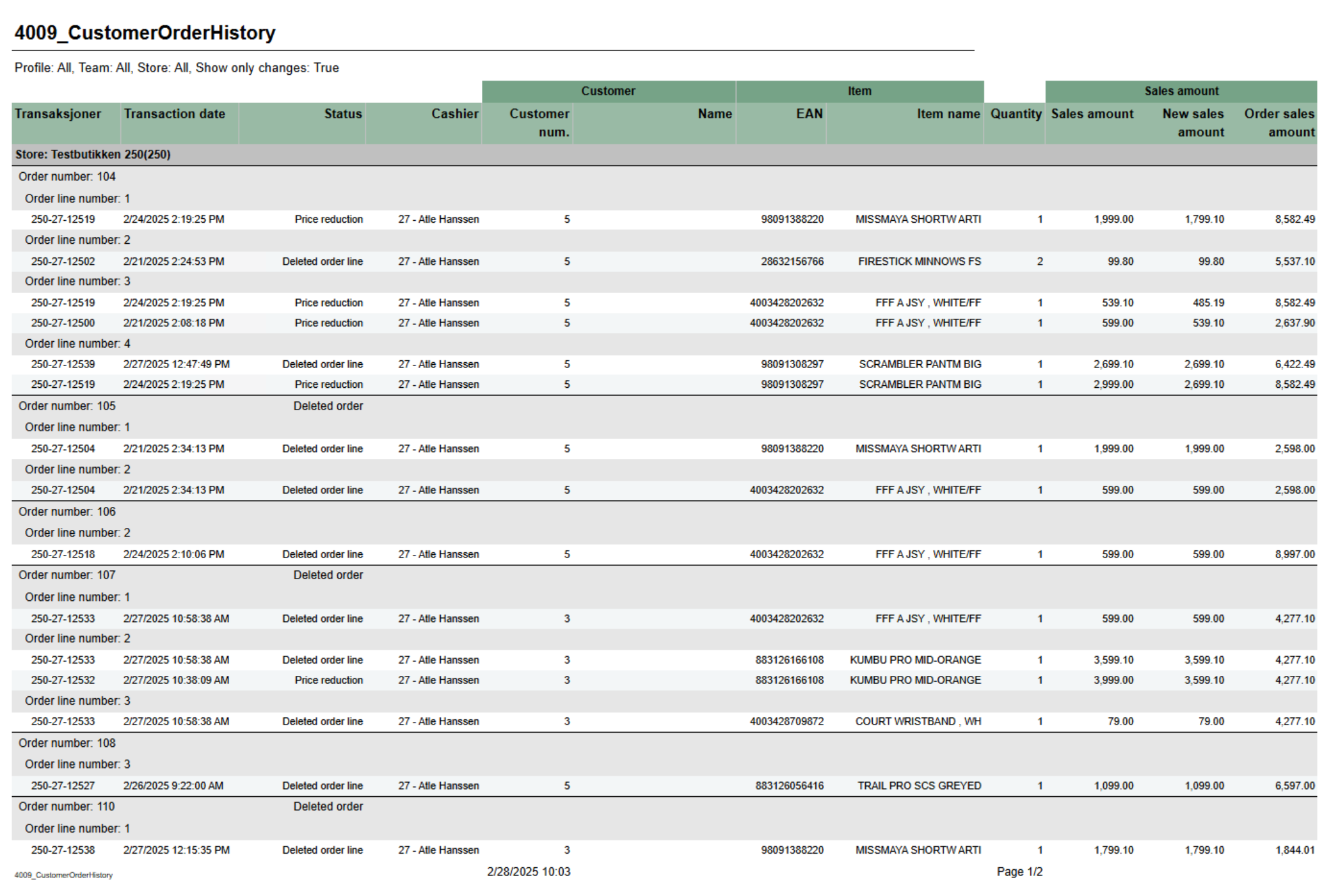 Image Added Image Added
Description: Report shoing history of order header and order lines. Mainly used for showing deletion of order, order lines and price reduction on order lines. Selections: - Date from - default today - 7 days.
- Date to - default today
- Show only changes - Changes means only showing deleted orders, deleted orderlines and order lines with price reduction. If false we are showing all history on order lines. Default true
- Profile - default All
- Team - default All
- Retail store - Default All (filtered also by profile and team)
Output: Grouped by store, order and order line. Showing transaction information, status, item information and prices per row for each order line. Columns: - Transactions - Receipt ID where where changes occured.
- Transaction date - Enddate from poslog where changes occured.
- Status - Type of change. Deleted order, Deleted order line, Price reduction or Not deleted (Other changes than mentioned can be included in this status).
- Cashier - Cashier number and name
- Customer
- Customer num. - Customer number
- Name - Customer name
- Item
- EAN - EAN
- Item name - Item name
- Quantity - Quantity
- Sales amount
- Sales amount - Sales amount of order line. If price reduction this shows before price.
- New sales amount - Sales amount of order line. If price reduction this shows new sales price.
- Order sales amount - Total sales amount of order (from order header)
Source: Lindbak POS Reporting Cube (Olap) Lindbak POS Reporting DW (SQL database) |
| Anchor |
|---|
| 4010_StoreSettlementPerWorkstation |
|---|
| 4010_StoreSettlementPerWorkstation |
|---|
|
| Expand |
|---|
| title | 4010_StoreSettlementPerWorkstation |
|---|
|
RTC-49375 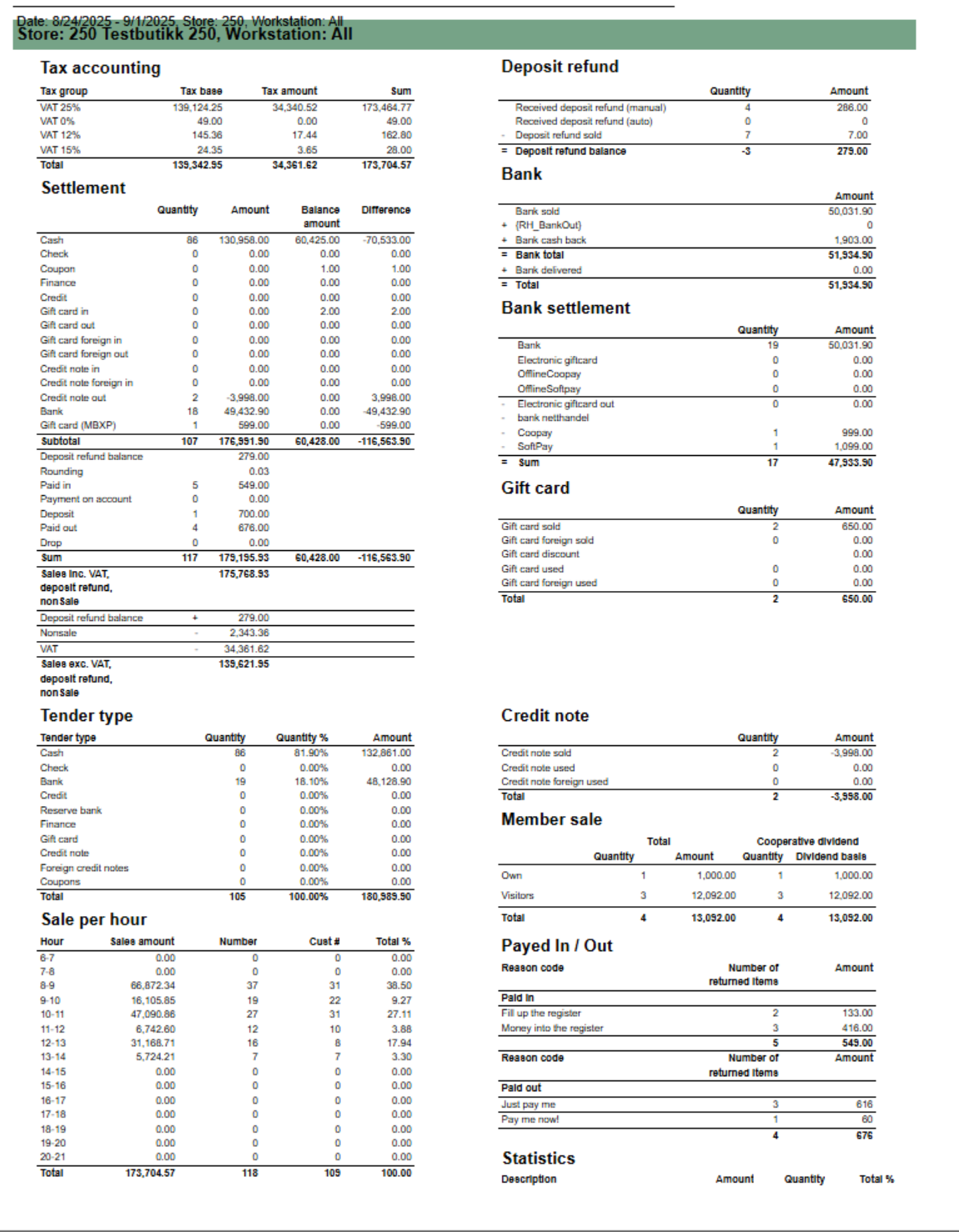 Image Added Image Added
Description Report to follow up store settlement for all selected workstations / cash registers. Report is divided into 11 different sub reports wich will be described separatly below. Selections (applies to all sub reports) - Date from: Default today
- Date to: Default today
- Retail store: Single selct, default first available store.
- Workstation: Default all for selected store
Source: - Lindbak POS Reporting cube (OLAP)
Parameters: - pAutomaticDepositRefundEans - List of EAN's used for automatic deposit refund
- pManualDepositRefundEans - List of EAN's used for manual deposit refund
Subreports: | Expand |
|---|
| title | 1023_subSettlement_3 |
|---|
| 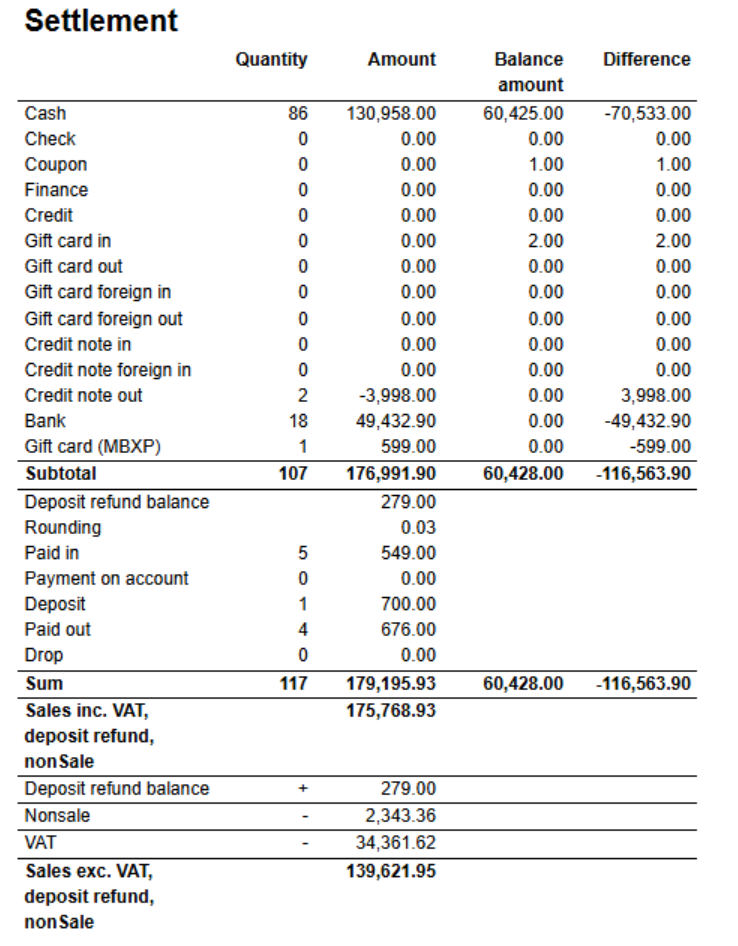 Image Added Image Added
Columns: - Quantity
- Amount
- Balance amount
- Difference
Rows: One row per tendertype with subtotal. - Cash
- Check
- Coupon
- Finance
- Credit
- Gift card in
- Gift card out
- Gift card foreign in
- Gift card foreign out
- Credit note in
- Credit note foreign in
- Credit not out
- Bank
- Gift card (MBXP)
One row for other transaction types with tender. With subtotal - Deposit refund balance
- Rounding
- Paid in
- Payment on account
- Paid out
- Drop
|
| Expand |
|---|
| title | 1024_subDepositRefund_2 |
|---|
| 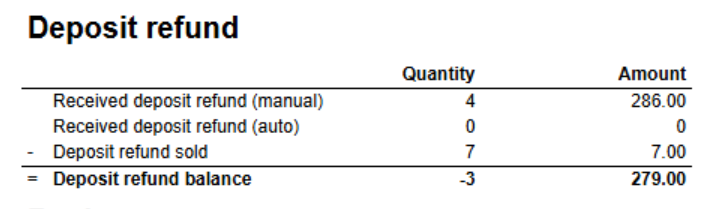 Image Added Image Added
Columns: Rows - Received deposit refund (manual) - Deposit refund for list of ean's in parameter pManualDepositRefundEans (in main report)
- Received deposit refund (auto) - Deposit refund for list of ean's in parameter pAutomaticDepositRefundEans(in main report)
- Deposit refund sold - Sold deposit refund (article type)
- Deposit refund balance = Received - sold
|
| Expand |
|---|
| 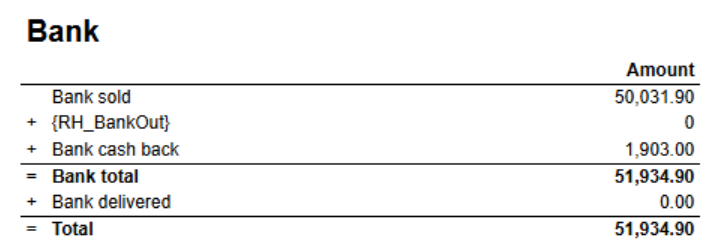 Image Added Image Added
Columns Rows - Bank sold
- Bank out
- Bank cash back
- Total = sold + out + cash back
|
| Expand |
|---|
| title | 1026_subBankSettlement_2 |
|---|
| 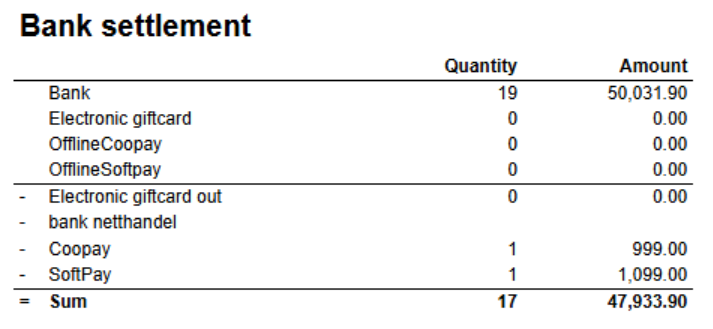 Image Added Image Added
Columns: Rows - Bank - Sold bank
- Electronic giftcard
- Offline Cooppay - Offline transactions with Cooppay
- Offline Softpay - Offline transactions with SoftPay
- Electronic giftcard out
- bank netthandel -
- Cooppay
- SoftPay
|
| Expand |
|---|
| title | 1027_subMemberSale_2 |
|---|
| 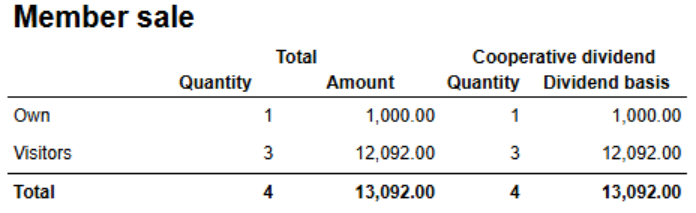 Image Added Image Added
Columns Rows - Own - Sale for members in own cooperative
- Visitors - Sale for members in other cooperatives.
|
| Expand |
|---|
| title | 1028_subPayedInOutReasonCodes |
|---|
| 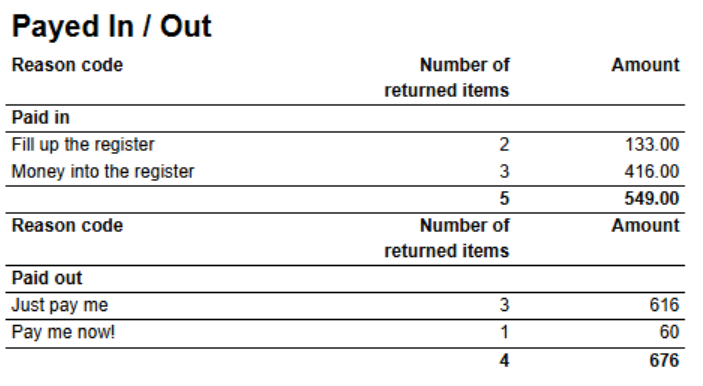 Image Added Image Added
Columns Rows - Paid in. One row for each Paid in reason code.
- Paid out. One row for each Paid out reason code.
|
| Expand |
|---|
| 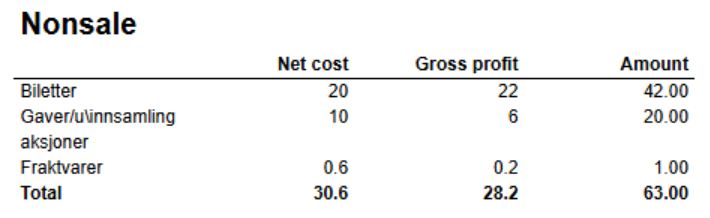 Image Added Image Added
Columns - Net cost
- Gross profit
- Amont
Rows - One row for each nonsale type. With total
|
| Expand |
|---|
| title | 1030_subPriceChannel |
|---|
| 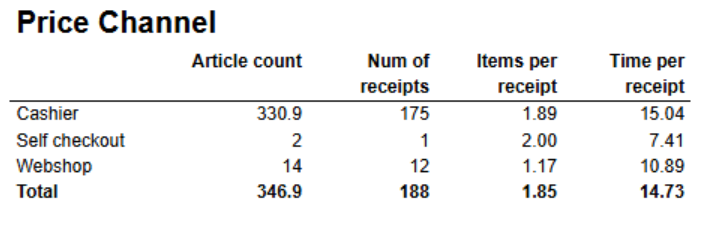 Image Added Image Added
Columns - Article count
- Num of receipts
- Items per receipt
- Time per receipt - Difference between startdatetime and enddatetime.
Rows - One row for each price channel.
|
| Expand |
|---|
| title | 1032_subSalePerHour_2 |
|---|
| 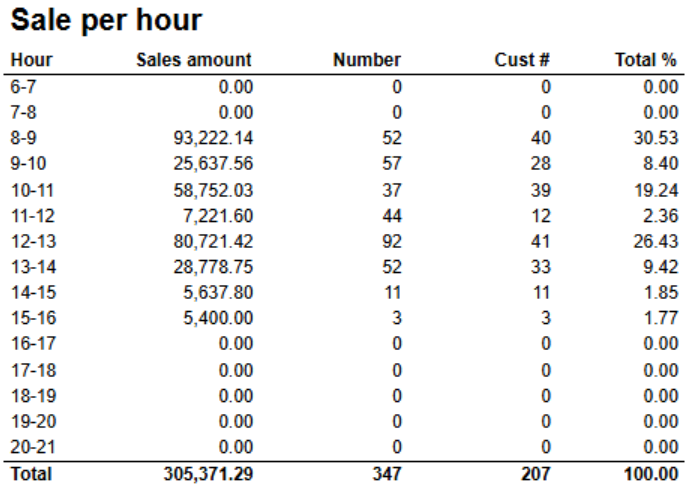 Image Added Image Added
Columns - Hour
- Sales amount
- Number - Number of items
- Cust # - Number of customers
- Total % - Share
Rows - One row for each hour set in parameter pHourFrom and pHourTo
Parameters - pHourFrom - Report will show hours between pHourFrom and pHourTo (starting hour)
- pHourTo - Report will show hours between pHourFrom and pHourTo (starting hour)
|
| Expand |
|---|
| title | 1031_subStatistics_2 |
|---|
| 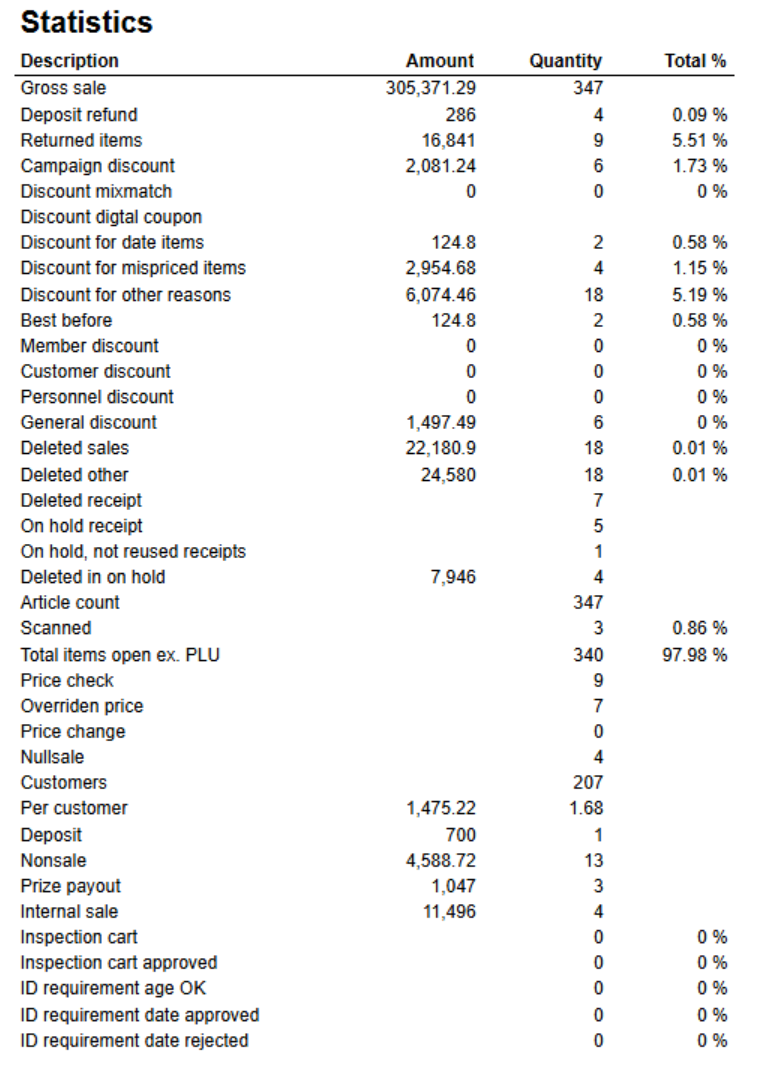 Image Added Image Added
Columns Rows - Gross sale
- Deposit refund
- Returned items
- Campaign discount
- Discount mixmatch
- Discount digital coupon
- Discount for date items
- Discount for mispriced items
- Discount for other reasons
- Best before
- Member discount
- Customer discount
- Personell discount
- General discount
- Deleted sales
- Deleted other
- Deleted receipt
- On hold receipt
- On hold, not reused receipts
- Deleted in on hold
- Article count
- Scanned
- Total items open ex. PLU
- Price check
- Overridden price
- Price change
- Nullsale
- Customers
- Per customer
- Deposit
- Nonsale
- Prize payout
- Internal sales
- Ispection cart
- Inspection cart approved
- ID requirement age OK
- ID requirement date approved
- ID requirement date rejected
|
|
...
| Expand |
|---|
| title | 4009_CustomerOrderHistory |
|---|
|
RTC-47198 Image Removed Description: Report shoing history of order header and order lines. Mainly used for showing deletion of order, order lines and price reduction on order lines. Selections: - Date from - default today - 7 days.
- Date to - default today
- Show only changes - Changes means only showing deleted orders, deleted orderlines and order lines with price reduction. If false we are showing all history on order lines. Default true
- Profile - default All
- Team - default All
- Retail store - Default All (filtered also by profile and team)
Output: Grouped by store, order and order line. Showing transaction information, status, item information and prices per row for each order line. Columns: - Transactions - Receipt ID where where changes occured.
- Transaction date - Enddate from poslog where changes occured.
- Status - Type of change. Deleted order, Deleted order line, Price reduction or Not deleted (Other changes than mentioned can be included in this status).
- Cashier - Cashier number and name
- Customer
- Customer num. - Customer number
- Name - Customer name
- Item
- EAN - EAN
- Item name - Item name
- Quantity - Quantity
- Sales amount
- Sales amount - Sales amount of order line. If price reduction this shows before price.
- New sales amount - Sales amount of order line. If price reduction this shows new sales price.
- Order sales amount - Total sales amount of order (from order header)
Source: Lindbak POS Reporting Cube (Olap) Lindbak POS Reporting DW (SQL database) |
...
| Expand |
|---|
| title | 4010_StoreSettlementPerWorkstation |
|---|
|
RTC-49375 Image Removed Description Report to follow up store settlement for all selected workstations / cash registers. Report is divided into 11 different sub reports wich will be described separatly below. Selections (applies to all sub reports) - Date from: Default today
- Date to: Default today
- Retail store: Single selct, default first available store.
- Workstation: Default all for selected store
Source: - Lindbak POS Reporting cube (OLAP)
Parameters: - pAutomaticDepositRefundEans - List of EAN's used for automatic deposit refund
- pManualDepositRefundEans - List of EAN's used for manual deposit refund
Subreports: | Expand |
|---|
| title | 1023_subSettlement_3 |
|---|
| Image Removed Columns: - Quantity
- Amount
- Balance amount
- Difference
Rows: One row per tendertype with subtotal. - Cash
- Check
- Coupon
- Finance
- Credit
- Gift card in
- Gift card out
- Gift card foreign in
- Gift card foreign out
- Credit note in
- Credit note foreign in
- Credit not out
- Bank
- Gift card (MBXP)
One row for other transaction types with tender. With subtotal - Deposit refund balance
- Rounding
- Paid in
- Payment on account
- Paid out
- Drop
|
| Expand |
|---|
| title | 1024_subDepositRefund_2 |
|---|
| Image Removed Columns: Rows - Received deposit refund (manual) - Deposit refund for list of ean's in parameter pManualDepositRefundEans (in main report)
- Received deposit refund (auto) - Deposit refund for list of ean's in parameter pAutomaticDepositRefundEans(in main report)
- Deposit refund sold - Sold deposit refund (article type)
Deposit refund balance = Received - sold
|
|
| Anchor |
|---|
| 8000_InvoiceAging |
|---|
| 8000_InvoiceAging |
|---|
|
...