...
| Expand |
|---|
| title | 0781_CashierStatisticsWithDiscount |
|---|
|
[RTC-44550] [YXB] New cashier statistics report (0781) with Fuel column (CO-344179) 
Description: - Report allows to follow up Cashiers sales and selected activities (based on: 0019)
Selections: - Date from: Default today
- Date to: Default today
- Retail store: Default all
- Operator: Default all
- Include VAT: Allows to decide if Vat is included in sales amount or not; default yes.
Hidden parameters: - pFuelItemType - Item type number used to identify fuel items - Default: [Article].[Item Type].&[10]
- pDiscountKeys - Discount keys to include in discount statistics - Default: [Discount].[Discount Key].[ALL]
- pExcludeStores - Store numbers to be excluded from the report - Default: 9997,9998,99900,99901
Output: One page per store - one row per cashier Columns: - No: Operator number
- Name: Operator name
- Turnover inc VAT/ Turnover ex VAT - total turnover, except for fuel items (items of type fuel - defined in hidden parameter pFuelItemType)
- Fuel inc VAT/Fuel ex. VAT - total turnover for fuel items (items of type fuel - defined in hidden parameter pFuelItemType)
- Receipts: number of reciepts
- Returns
- Deleted receipts
- Deleted item lines
- Receipts on hold
- Deleted on hold
- Null: Number of drawer opening without any transaction
- Ovr. prc.: Overriden price count
- Manual Discount Amount
- Manual Discoun percent.: Discount Amount divided by Original amount
- Scan: Number of scanned articles
- Discount: Discount quantity
- Scan %: Scan divided by Quantity of sold items
Sorting: Source: - Lindbak POS Reporting cube (OLAP)
|
| Anchor |
|---|
| 07900783_CashierStatisticsDailyReportVat0790 |
|---|
| 0783_CashierStatisticsDailyReportVat |
|---|
|
| Expand |
|---|
| title | 07900783_CashierStatisticsDailyReportVat |
|---|
|
Standard report 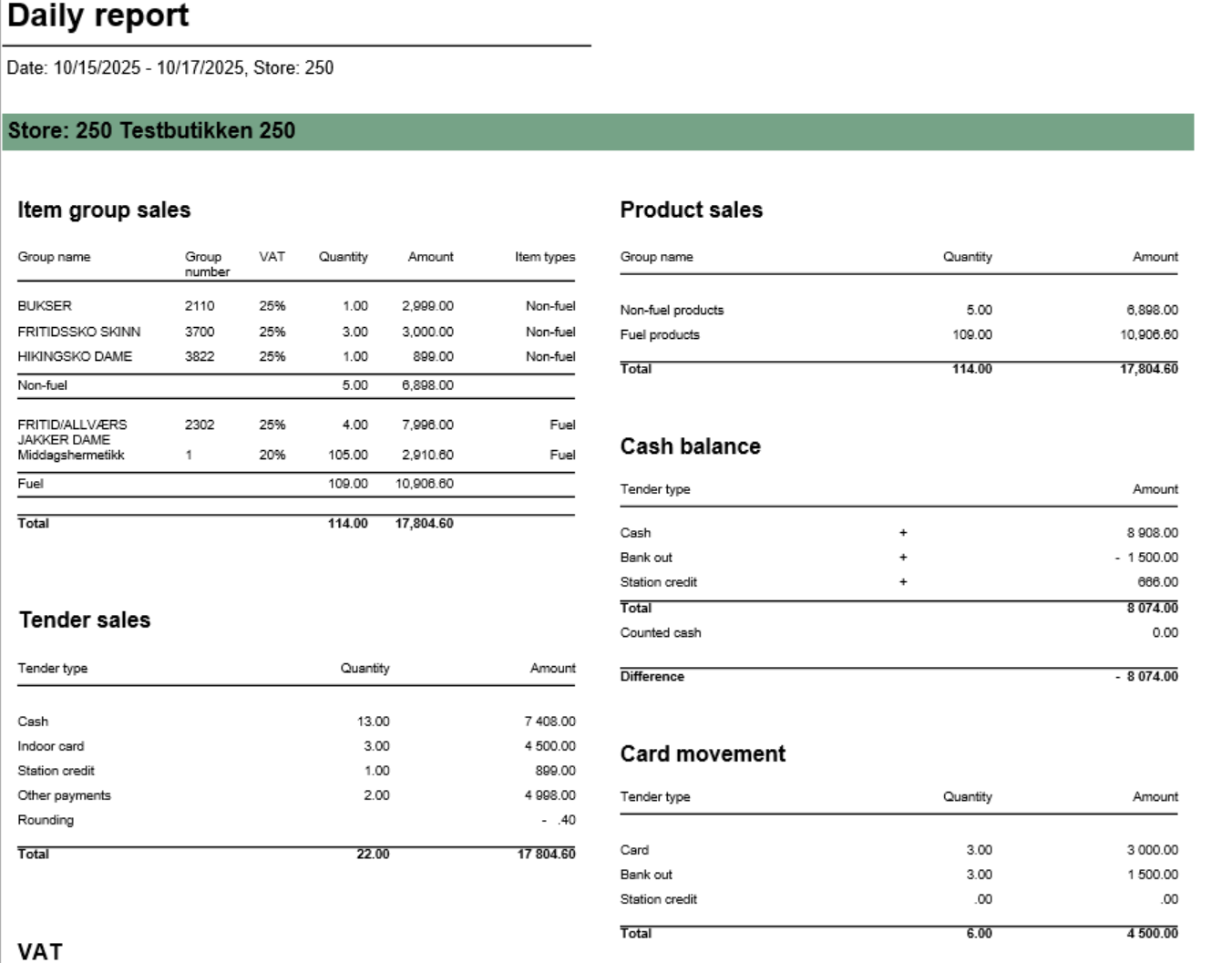 Image Added Image Added
 Image Added Image Added
[RTC-39849] TRN: Cashier security statistics report with turnover split and price checks - EG A/S  Image Removed Image Removed
Description: Report allows to follow up Cashiers sales and selected activities.provides comprehensive daily settlement and sales statistics per store. Similar to 0780_DailyReport but with enhanced VAT breakdown. Report is divided into multiple sections showing product sales, tender types, cash reconciliation, card payments, and drive-off tracking. Selections (applies to all sub reports)Selections: - Date from: Default
today- yesterday
- Date to: Default
today- yesterday
- Retail store:
Default all- Operator: Default all
Output: One page per store One row per cashier Columns: - No: Operator number
- Name: Operator name
- Tender (NB! this is tender data and does not represent turnover).
- Cash
- Other (ohter than cash)
- Receipts: number of reciepts
- Returns
- Deleted receipts
- Deleted item lines
- Receipts on hold
- Null: Number of drawer opening without any transaction
- Ovr. prc.: Overriden price count
- Scan %: Scan divided by Quantity of sold items
- Discount: Discount quantity
- Price check: How many times price check funtion is used.
Sorting: Source: - Lindbak POS Reporting cube (OLAP)
|
...
- Single value; default first available from the list
Hidden parameters: - pFuelItemType: Default \[Article\].\[Item Type\].&\[Fuel\] - Defines which item types qualify as fuel
- pOtherPaymentCards: Default 30,31,32,33,34,35,36,37,38,39 - Payment card numbers for "other payments" section
- pReasonCodeBreakage: Default \[Reason Code\].\[Reason Code\].&\[Avstikk\]&\[Return\] - Reason code for drive-off tracking
- pPriceChannelOutdoor: Default \[Price Channel\].\[Price Channel\].&\[11\] - Price channel qualifying as outdoor sales
Source: - Lindbak POS Reporting Cube (OLAP) - All reports
- Lindbak POS Reporting DW - 1812, Item Group Driveoff section only
| Expand |
|---|
| title | 1802_subProductSales |
|---|
| 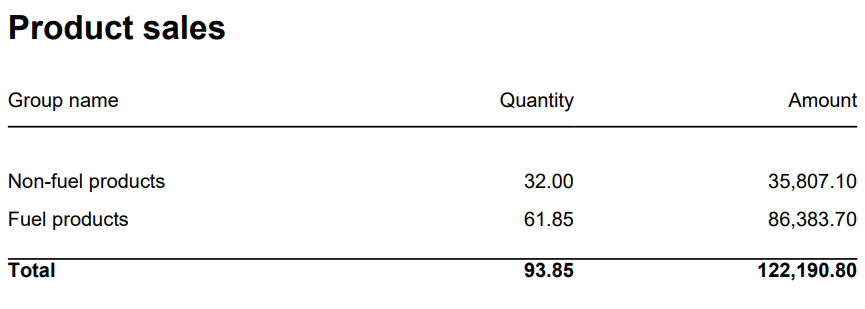 Image Added Image Added
Columns: - Item Group Name
- Item Group Number
- Quantity
- Amount
Rows: - Subtotal Fuel
- Subtotal Non Fuel
______________________________________________________________________________________
|
| Expand |
|---|
| 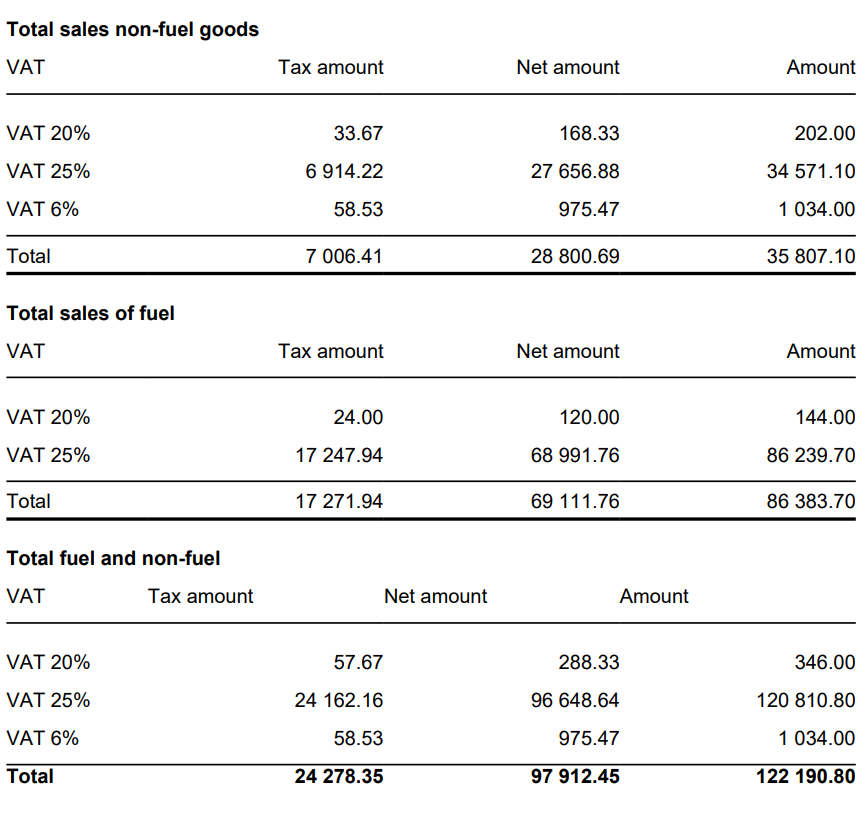 Image Added Image Added
Columns: - VAT
- Tax Amount
- Net Amount
- Amount
Rows: - One row per VAT with divide to fuel and non fuel.
- Subtotal: Total for all rows above Subtotal
______________________________________________________________________________________ |
| Expand |
|---|
| title | 1805_subCardMovement |
|---|
| 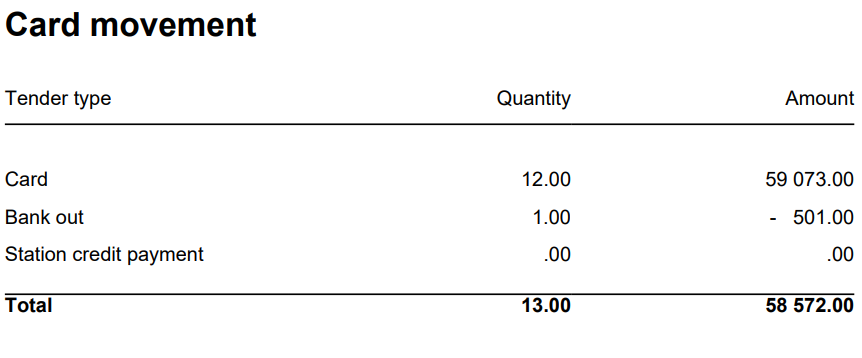 Image Added Image Added
Columns: - Tender Type
- Quantity
- Amount
Rows: - Card
Cashback - Station Credit Payment
- In Payment
_____________________________________________________________________________________ |
| Expand |
|---|
| 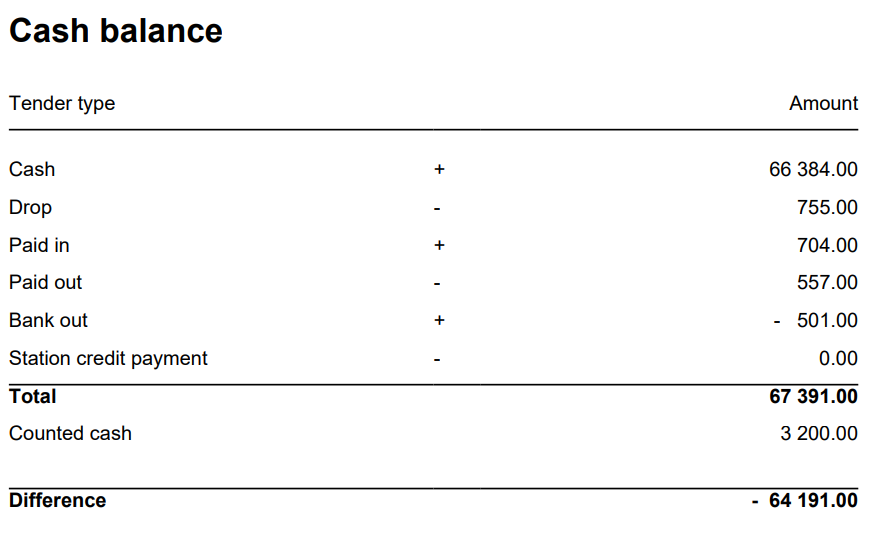 Image Added Image Added
Columns: - Tender Type
- Quantity
- Amount
Rows: - Cash = TenderAmount for TenderType.Cash - ControlAmount for TenderControlType.PayedIn + ControlAmount for TenderControlType.PayedOut
- Drop = ControlAmount for TenderControlType.Drop
- Paid In = ControlAmount for TenderControlType.PayedIn
- Paid Out = ControlAmount for TenderControlType.PayedOut
- Cashback = TenderAmount for TenderType.CashBack
- Station Credit Payment = TenderAmount for TenderControlType.Cash and TenderControlType.PaymentOnAccount
_____________________________________________________________________________________ - Total (Cash - Cashback - Drop + Paid In + Paid Out(negative) - Station Credit Payment)
= TenderAmount for TenderType.Cash - This is sum of all cash sales from tender except controltransactions.
- ControlAmount for TenderControlType.Drop - Sum of all cash sales from tender with controltransaction Drop
+ ControlAmount for TenderControlType.PayedIn - Sum of all cash sales from tender with controltransaction PayedIn
- ControlAmount for TenderControlType.PayedOut - Sum of all cash sales from tender with control transaction PayedOut
+ TenderAmount for TenderType.CashBack (negative value)
- Balance Amount Cash = BalanceAmount for TenderType.Cash
_____________________________________________________________________________________ - Difference (Balance Amount Cash - Total)
|
| Expand |
|---|
| 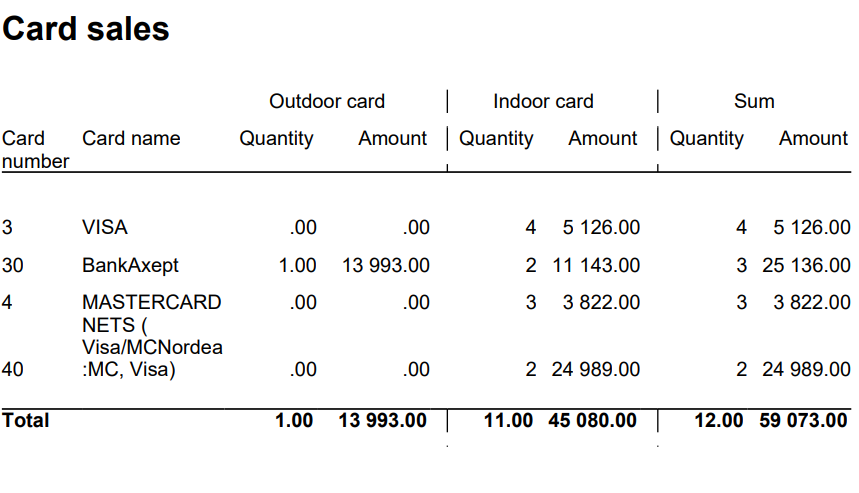 Image Added Image Added
Columns: - Card Number
- Card Name
- Quantity Outdoor
- Amount Outdoor
- Quantity Indoor
- Amount Indoor
- Quantity
- Amount
Rows: ______________________________________________________________________________________ |
| Expand |
|---|
| title | 1809_subItemGroupSalesVat |
|---|
| 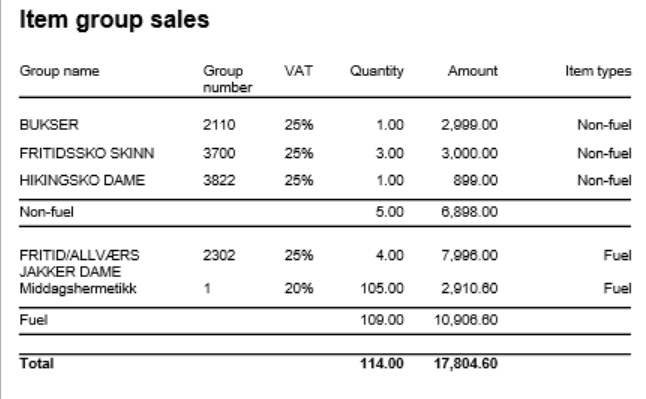 Image Added Image Added
Columns: - Item Group Name
- Item Group Number
- VAT: VAT percentage
- Quantity: Sold quantity
- Amount: Sales amount inc. VAT
- Type: Fuel or Non-Fuel classification
Grouping: - Data grouped by Fuel vs Non-Fuel products
- Subtotals per fuel type
- Grand total for all item groups
|
| Expand |
|---|
| title | 1811_subTenderSales_2 |
|---|
| 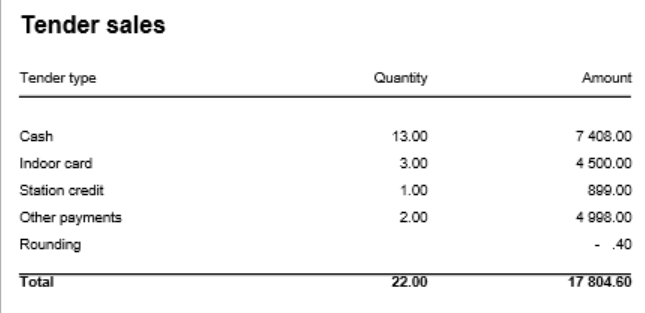 Image Added Image Added
Columns: - Tender Type
- Quantity: Number of transactions
- Amount: Tender amount
Rows: - Cash: Cash payments (excluding control transactions)
- Outdoor Card: Card payments via outdoor price channel
- Indoor Card: Card payments via indoor price channels
- Station Credit: Station credit payments
- Other: Other tender types
- Rounding: Subtotal rounding amount
- Total: Sum of all tender types
|
| Expand |
|---|
| title | 1810_subTenderSalesOtherPayments |
|---|
| 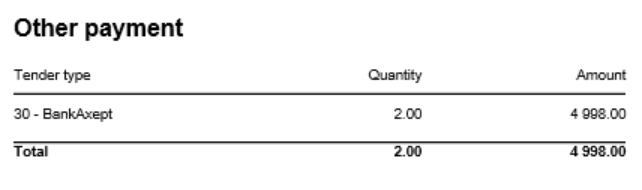 Image Added Image Added
Columns: - Tender Type: Payment card number and name
- Quantity: Number of transactions
- Amount: Tender amount
Rows: - One row per payment card included in pOtherPaymentCards parameter (default: cards 30-39)
- Total row
- Rows with zero amount are hidden
|
| Expand |
|---|
| title | 1812_subItemGroupDriveoff |
|---|
| 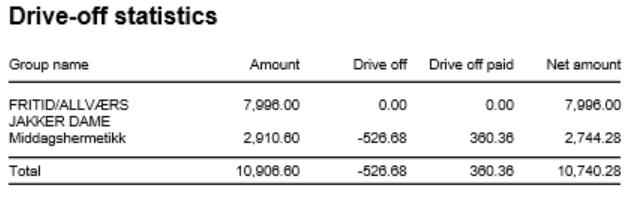 Image Added Image Added
Columns: - Item Group Name: Article group name
- Amount: Total sales amount inc. VAT
- Drive Off: Breakage amount (negative transactions)
- Drive Off Paid: Sold/paid amount (positive transactions)
- Net Amount: Grand total (Amount + Drive Off + Drive Off Paid)
Rows: - One row per article group
- Total row
- Entire section hidden if both totals are zero
Clarifications: - Uses reason code from pReasonCodeBreakage parameter to identify drive-off transactions
- Drive Off column shows negative values from item transactions
- Drive Off Paid shows positive values from item transactions
- Only includes fuel item types specified in pFuelItemType parameter
Sorting: - No interactive sorting
- Data sorted by natural hierarchy (Store, Article Group, etc.)
|
|
| Anchor |
|---|
| 0790_CashierStatistics |
|---|
| 0790_CashierStatistics |
|---|
|
| Expand |
|---|
| title | 0790_CashierStatistics |
|---|
|
[RTC-39849] TRN: Cashier security statistics report with turnover split and price checks - EG A/S Image Added
Description: - Report allows to follow up Cashiers sales and selected activities.
Selections: - Date from: Default today
- Date to: Default today
- Retail store: Default all
- Operator: Default all
Output: One page per store One row per cashier Columns: - No: Operator number
- Name: Operator name
- Tender (NB! this is tender data and does not represent turnover).
- Cash
- Other (ohter than cash)
- Receipts: number of reciepts
- Returns
- Deleted receipts
- Deleted item lines
- Receipts on hold
- Null: Number of drawer opening without any transaction
- Ovr. prc.: Overriden price count
- Scan %: Scan divided by Quantity of sold items
- Discount: Discount quantity
- Price check: How many times price check funtion is used.
Sorting: Source: - Lindbak POS Reporting cube (OLAP)
|
| Anchor |
|---|
| 0791_ShiftBalanceReport |
|---|
| 0791_ShiftBalanceReport |
|---|
|
| Expand |
|---|
| title | 0791_ShiftBalanceReport |
|---|
|
[RTC-44692] [TRN] Shift balance report (CO-335148) 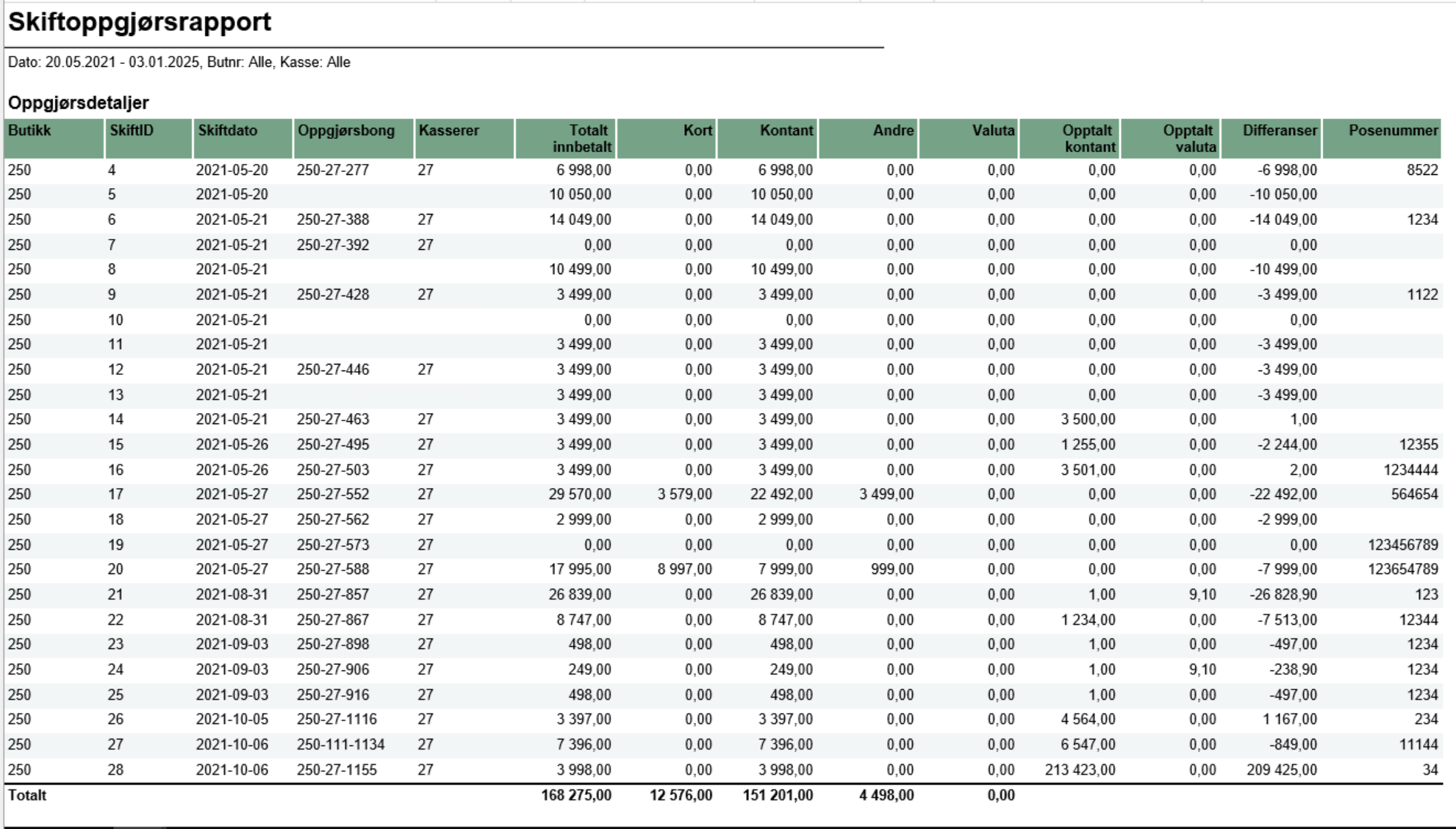 Image Added Image Added
Description: - The report gives an overview of all shifts in the selected date range and for selected store(s) and workstations.
Selections: - Date from: default today
- Date to: default today
- Retail store: default all
|
...
| Expand |
|---|
| title | 0791_ShiftBalanceReport |
|---|
|
[RTC-44692] [TRN] Shift balance report (CO-335148) Image Removed Description: - The report gives an overview of all shifts in the selected date range and for selected store(s) and workstations.
Selections: - Date from: default today
- Date to: default today
- Retail store: default all
- Workstation: default all
- Main currency (hidden): default NOK - the main currency for cash calculations.
Parameters: - pShiftEndDate - Determine if shift date should be based on start- or end-date for the shift. Default False meaning it is based on start-date. Chosed date-type is used both in report (Shift date column) and in date selection.
Output: The report consist of four tables: - Shift overview - lists all shifts in the selected date range and for given store(s) and cash registers and contains the details about each shift balance (if registered).
- Currency - lists all currencies (except the main currency), their exchange rates and amount in main currency
- VAT overview - lists all VAT rates with sales gross, net and tax amount
- Payment card overview - lists all payment cards and related statistics (number of transactions and amount)
Columns: - Shift overview
- Store - store number,
- ShiftID - ID of the shift,
- Shift date - shift start date, or end date, depending on parameter pShiftEndDate
- Balance receipt ID - ID of the balance receipt for given shift,
- Cashier No - cashier number,
- All tenders - total tender amount for given shift,
- Card - total amount paid by cards for given shift (tender types: CreditDebit, ECreditDebit, CreditDebitOffline),
- Cash - total amount paid by cash in main currency for given shift,
- Other - other tender types, aggregated, for given shift
- Currency - total amount paid by cash in foreign currencies (all except main currency) for given shift,
- Counted cash - balance amount of cash tender type in main currency for given shift,
- Counted currency - balance amount of cash tender type in foreign currencies for given shift,
- Difference: (Counted cash - Cash) + (Counted currency - Currency)
- Bag number - bag number registered on the balance receipt
- Currency
- Code - currency code (3 letter code),
- Exchange rate - the average exchange rate for selected period,
- Currency amount - amount in currency,
- Amount in XXX - amount in main currency (default NOK)
- VAT overview
- VAT rate,
- Sales inc. VAT,
- VAT amount,
- Sales excl. VAT,
- Nonsale
- Payment card overview:
- Card - card issuer ID and name,
- Quantity - number of transactions,
- Amount - total amount of transactions
Sorting: - Shift overview - sorted by store number and shift date (ascending),
- Currency - sorted by currency code (A to Z),
- VAT overview - sorted by VAT rate (ascending),
- Payment card overview - sorted by card issuer ID (ascending)
Source: - Lindbak POS Reporting cube (OLAP)
- Lindbak POS Reporting DW
|
...
| Expand |
|---|
| title | 0805_ReconciliationOfGiftcards |
|---|
|
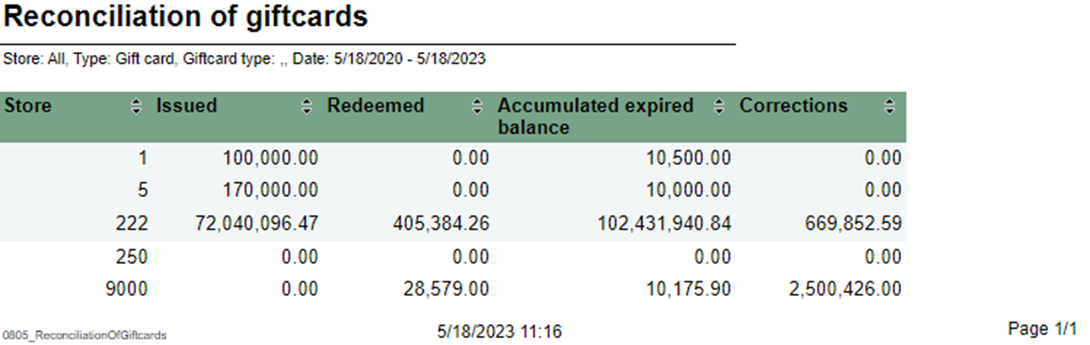
Description: Report lists reconciliation of giftcards. Selections: - Type – Default gift card
- GiftCard type- Default all
- Store – Default all
- Date from – Default today
- Date to – Default today
Output: Report shows reconciliation of giftcards with statistics for selected stores. Columns: - Store – Store – Store number
- Issued – Sum amount issue
- Redeemed – Sum amount redeemed
- Accumulater expired balance
- number
- Issued – Sum amount issue
- Redeemed – Sum amount redeemed
- Accumulater expired balance
- Corrections – Corrections amount
Interactive sorting: Interactive sorting on all columns Source:
|
| Anchor |
|---|
| 0806_GiftcardsBalancePerStore |
|---|
| 0806_GiftcardsBalancePerStore |
|---|
|
| Expand |
|---|
| title | 0806_GiftcardsBalancePerStore |
|---|
|
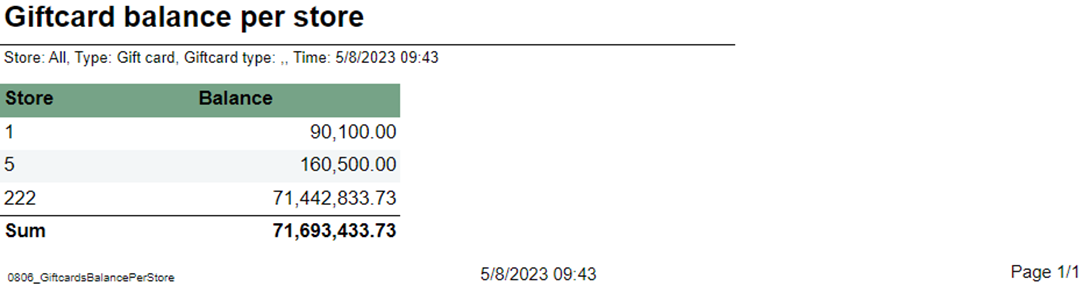 Image Added Image Added
Description: Report lists giftcard balance per store. Selections: - Store – Default all
- Type – Default gift card
- GiftCard type – Default all
Output: Report has a summary at the end of table. Columns: - Store – Store number
- Balance - ScripBalance
Source:
|
| Anchor |
|---|
| 0807_GiftcardReconciliationPerStore |
|---|
| 0807_GiftcardReconciliationPerStore |
|---|
|
| Expand |
|---|
| title | 0807_GiftcardReconciliationPerStore |
|---|
|
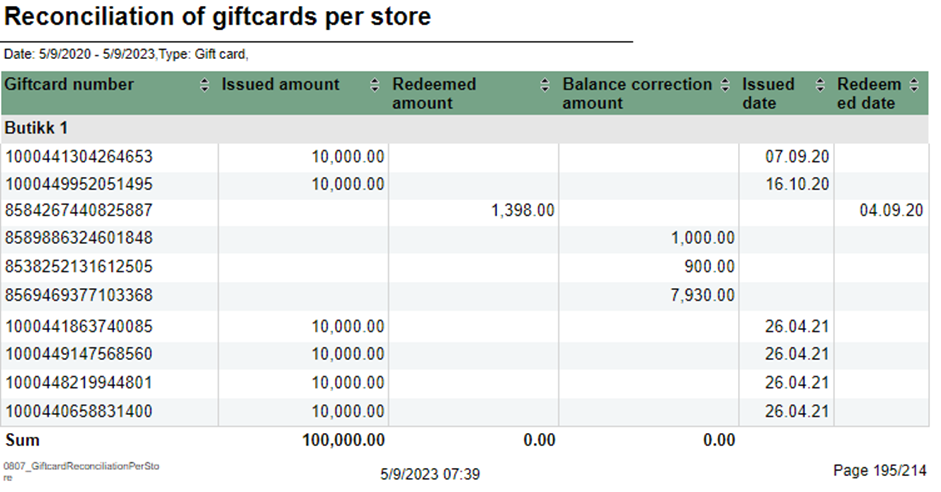 Image Added Image Added
Description: Report lists reconciliation of giftcards per store. Selections: - Date from – Default today
- Date to – Default today
- Type – Default gift card
- Store – Default all
Output: Report has table for each store and summary at the end of each column on that table. Columns: - Giftcard number
- Issued amount
- Redeemed amount
- Balance correction amount
- Issued date
- Redeemed dateCorrections – Corrections amount
Interactive sorting: Interactive sorting on all columns. Source:
|
| Anchor |
|---|
| 08060808_GiftcardsBalancePerStoreMemberAndElectronicCommunication0806 |
|---|
| 0808_GiftcardsBalancePerStoreMemberAndElectronicCommunication |
|---|
|
| Expand |
|---|
| title | 0806_GiftcardsBalancePerStore | 0808_MemberAndElectronicCommunication |
|---|
|
CO-99244, PBI#155899 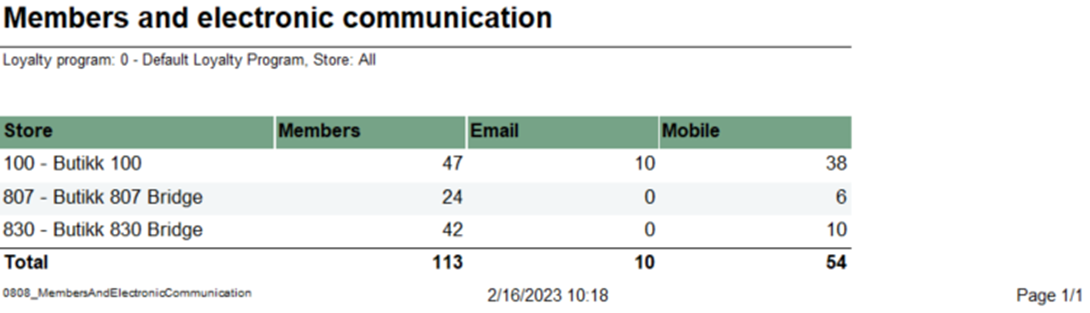 Image AddedImage Removed Image AddedImage Removed
Description: Report lists giftcard balance per store.members and e-mail/SMS subscriptions Selections: - Store Loyalty program – Default allLoyalty program
- Type Store – Default gift cardGiftCard type – Default all
Output: Report has a summary at the end of tableshows members with e-mail/SMS subscriptions, one row per store with summary of each column. Columns: - Store – Store number and store name
- Members – Members quantity
- Email – Email quantity
- Mobile – Mobile quantityBalance - ScripBalance
Source: - Lindbak RetailPOS Reporting DW
|
| Anchor |
|---|
| 08070809_GiftcardReconciliationPerStoreLoyaltyStatistics0807 |
|---|
| 0809_GiftcardReconciliationPerStoreLoyaltyStatistics |
|---|
|
| Expand |
|---|
| title | 0807_GiftcardReconciliationPerStore | 0809_LoyaltyStatistics |
|---|
|
CO-99233, PBI#155902. Based on report 0519 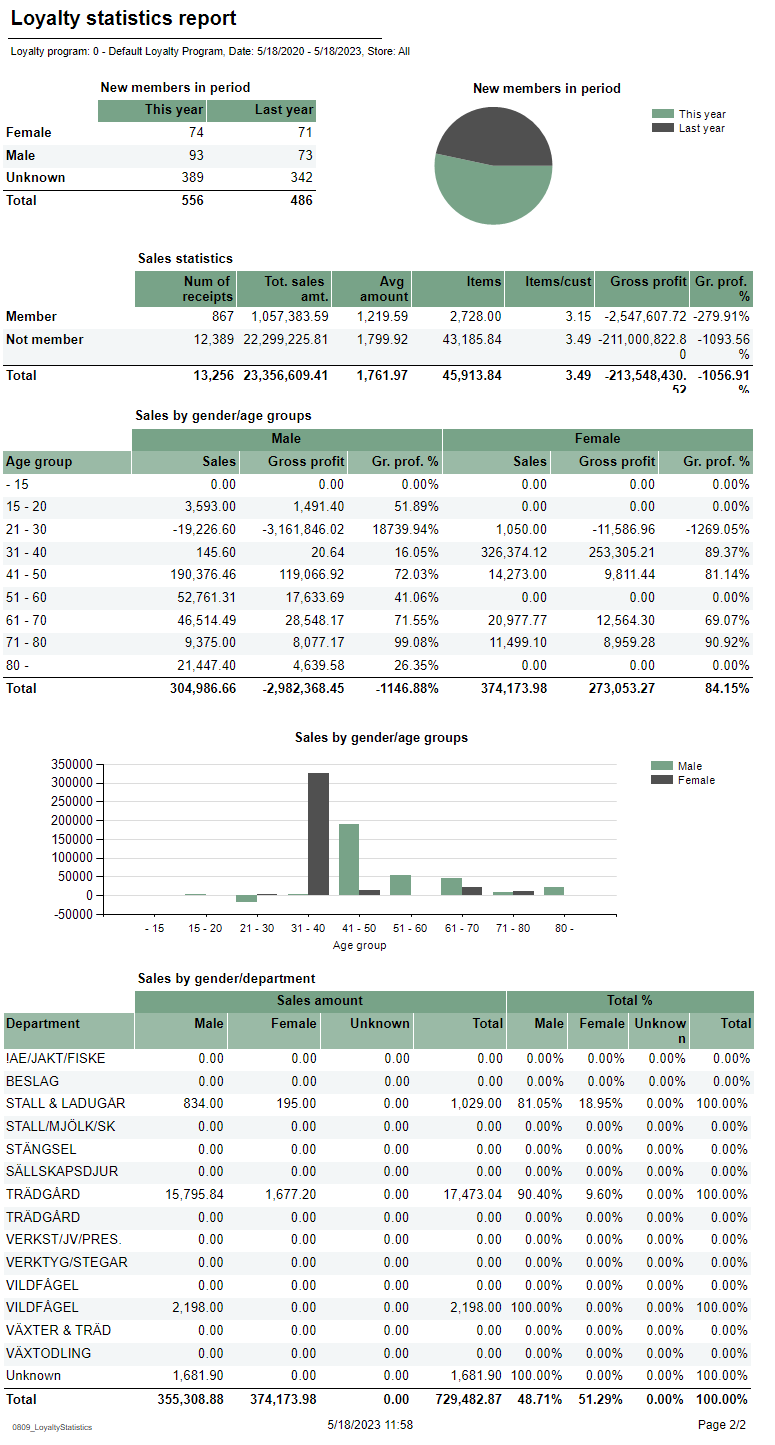 Image AddedImage Removed Image AddedImage Removed
Description: Report lists reconciliation of giftcards per storeloyalty statistics. Selections: - Loyalty program – Default loyalty program
- Date from – Default today
- Date to – Default todayType – Default gift card
- Store – Default all
Output: Report has table for each store and summary is divided on 4 tables and 2 charts. Every table has a stotal sumamry at the end of table for each column on that table. Columns: - Giftcard number
- Issued amount
- Redeemed amount
- Balance correction amount
- Issued date
- Redeemed date
Interactive sorting: Interactive sorting on all columns. Source: |
...
- New members in period table
- Sex – Female, male and unknown
- This year – Number of new members
- Last year – Number of new members last year
- New member in period circle chart
- This year – New member this year
- Last year – New member last year
- Sales statistics table
- Member and not member rows
- Num of receipts – Number of receipts
- Tot. sales amt. – Total sales amount
- Avg amount – Average amount
- Items – Items quantity
- Items/cust – Number of items over number of sales for members.
- Gross profit
- Gr. prof. % - Gross profit percentage
- Sales by gender/age groups table
- Age group
- Male/Female
- Sales – Sales amount
- Gross profit
- Gr. prof. % - Gross profit percentage
- Sales by gender/age groups chart
- X – axis – Age group
- Y – axis – Sales amount
- Legend – Male and Female bars
- Sales by gender/department table
- Department
- Sales amount
- Male – Male sales amount
- Female – Female sales amount
- Unknown – Unknown sales amount
- Total – Total amount for all genders
- Total %
- Male – Male sales amount percentage
- Female – Female sales amount percentage
- Unknown – Unknown sales amount percentage
- Total – Total sales amount for all genders percentage
Source: - Lindbak POS Reporting Cube (OLAP)
|
...
| Expand |
|---|
| title | 0808_MemberAndElectronicCommunication |
|---|
|
CO-99244, PBI#155899 Image Removed Description: Report lists members and e-mail/SMS subscriptions Selections: - Loyalty program – Default Loyalty program
- Store – Default all
Output: Report shows members with e-mail/SMS subscriptions, one row per store with summary of each column. Columns: - Store – Store number and store name
- Members – Members quantity
- Email – Email quantity
- Mobile – Mobile quantity
Source:
|
| Anchor |
|---|
| 08090810_LoyaltyStatisticsLoyaltyClubSales0809 |
|---|
| 0810_LoyaltyStatisticsLoyaltyClubSales |
|---|
|
| Expand |
|---|
| title | 08090810_LoyaltyStatisticsLoyaltyClubSales |
|---|
|
CO-99233, PBI#155902. Based on report 051992729, PBI#155905
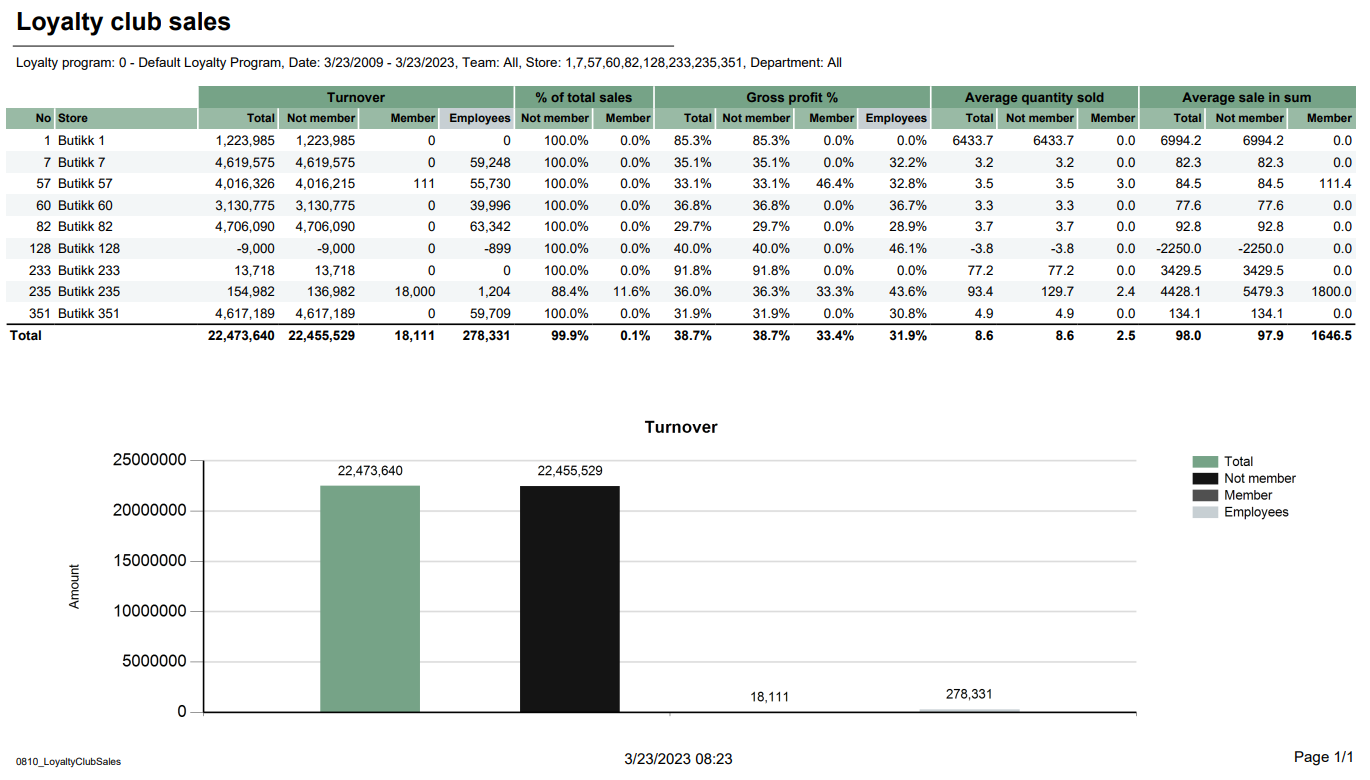 Image AddedImage Removed Image AddedImage Removed
Description: Report lists loyalty statisticssales in selected stores in loyalty clubs. Report also present turnover chart. Selections: - Loyalty program – Default first loyalty program
- Date from – Default today
- Date to – Default today
- Team – Default all
- Store – Default all
- Department – Default all
Output: is divided on 4 tables and 2 charts. Every table has a stotal sumamry - shows sales statistics in loyalty club for selected stores. Report has a summary at the end
table for each column- of each column.
- Report has a turnover bar chart. On x-axis are turnover information bars: total, not member, member and employees. On y-axis is turnover amount.
Columns: - No – Store number
- Store – Store name
- Turnover
- Total – Total turnover amount
- Not member – Turnover amount without members
- Member - Turnover amount with members
- Employees – Turnover employees amount
- % of total sales
- Not member – Percentage of total sales without members
- Member - Percentage of total sales with members
- Gross profit %
- Total – Total gross profit percentage
- Not member – Total gross profit percentage without members
- Member - Total gross profit percentage with members
- Employees – Total gross profit percentage
- Average quantity sold
- Average sale in sum
Source: - Lindbak POS Reporting Cube (OLAP)
|
| Anchor |
|---|
| 0850_ShiftStatistics |
|---|
| 0850_ShiftStatistics |
|---|
|
| Expand |
|---|
| title | 0850_ShiftStatistics |
|---|
|
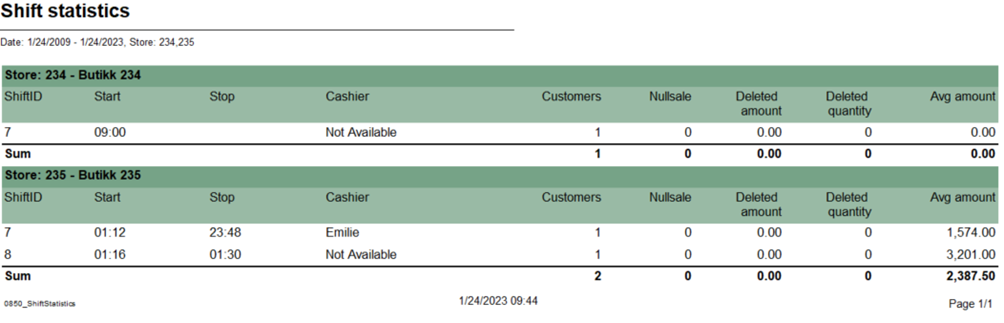 Image Added Image Added
Description: Report list shift statistic for selected stores and period time Selections: - Date from – Default today
- Date to – Default today
- Store – Default all
Relevant parameters: - pDeletedStatuses - Comma separated list of statuses keys not to show in deleted receipts.
Output: - Report shows shift statistic for each cashier with served customers, null sales and average amount for selected stores and period time.
- Report sum up customers, null sales, deleted amount, deleted quantity and average amount for each store.
Columns: - Store – Store number and store name
- ShiftID
- Start – Shift start
- Stop – Shift end
- Cashier
- Customers – receipts count
- Nullsale – Total zero count
- Deleted amount – deleted receipts amount
- Deleted quantity – Deleted receipts quantity
- Avg amount – Average amount
- New members in period table
- Sex – Female, male and unknown
- This year – Number of new members
- Last year – Number of new members last year
- New member in period circle chart
- This year – New member this year
- Last year – New member last year
- Sales statistics table
- Member and not member rows
- Num of receipts – Number of receipts
- Tot. sales amt. – Total sales amount
- Avg amount – Average amount
- Items – Items quantity
- Items/cust – Number of items over number of sales for members.
- Gross profit
- Gr. prof. % - Gross profit percentage
- Sales by gender/age groups table
- Age group
- Male/Female
- Sales – Sales amount
- Gross profit
- Gr. prof. % - Gross profit percentage
- Sales by gender/age groups chart
- X – axis – Age group
- Y – axis – Sales amount
- Legend – Male and Female bars
- Sales by gender/department table
- Department
- Sales amount
- Male – Male sales amount
- Female – Female sales amount
- Unknown – Unknown sales amount
- Total – Total amount for all genders
Total %- Male – Male sales amount percentage
- Female – Female sales amount percentage
- Unknown – Unknown sales amount percentage
Total – Total sales amount for all genders percentage
Source: - Lindbak POS Reporting Cube (OLAP)
- Lindbak POS Reporting DW
|
| Anchor |
|---|
| 08100851_LoyaltyClubSalesPaymentTypesPerShift0810 |
|---|
| 0851_LoyaltyClubSalesPaymentTypesPerShift |
|---|
|
| Expand |
|---|
| title | 08100851_LoyaltyClubSalesPaymentTypesPerShift |
|---|
|
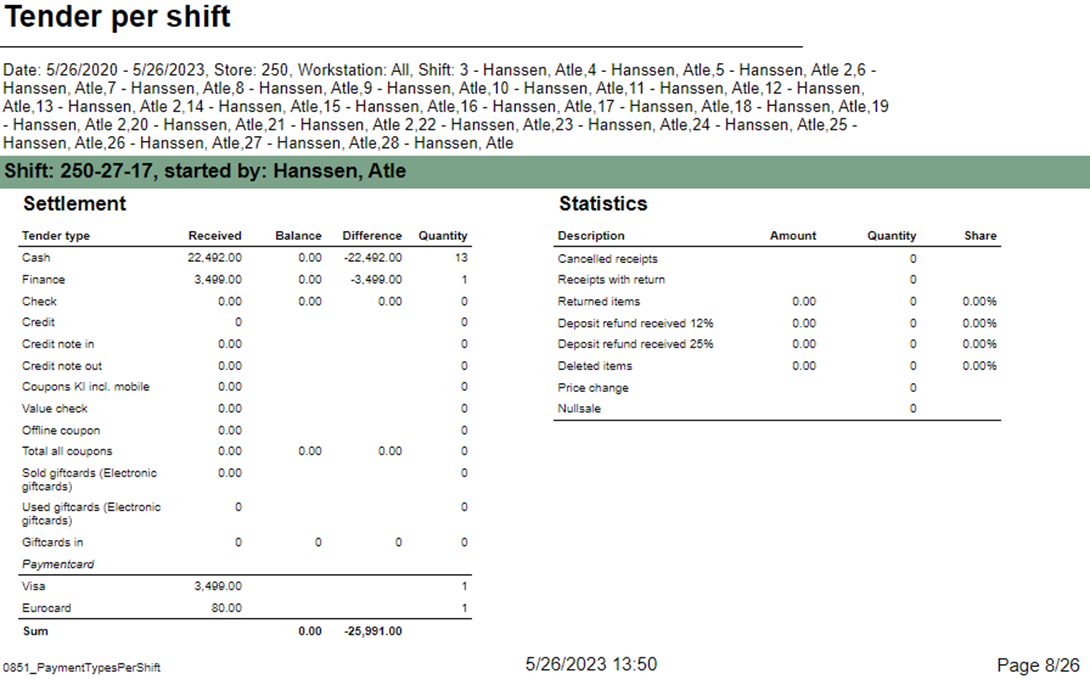 Image Added Image Added
CO-92729, PBI#155905
Image Removed Description: Report lists sales in selected stores in loyalty clubs. Report also present turnover chartallow to follow up tender per shift. Report has two subreports, one settlement and second about statistics. Selections: - Loyalty program – Default first loyalty program
- Date from – - Default today
- Date to – - Default todayTeam – Default all
- Retail Store – Default all
- Department – Default all
Output: - Report shows sales statistics in loyalty club for selected stores. Report has a summary at the end of each column.
- Report has a turnover bar chart. On x-axis are turnover information bars: total, not member, member and employees. On y-axis is turnover amount.
Columns: No – Store numberStore – Store nameTurnover- Total – Total turnover amount
- Not member – Turnover amount without members
- Member - Turnover amount with members
- Employees – Turnover employees amount
% of total sales- Not member – Percentage of total sales without members
- Member - Percentage of total sales with members
Gross profit %- Total – Total gross profit percentage
- Not member – Total gross profit percentage without members
- Member - Total gross profit percentage with members
- Employees – Total gross profit percentage
Average quantity sold- - Default select a single store
- Workstation - Default all
- Shift - Default select a single value
Subreports: | Expand |
|---|
| 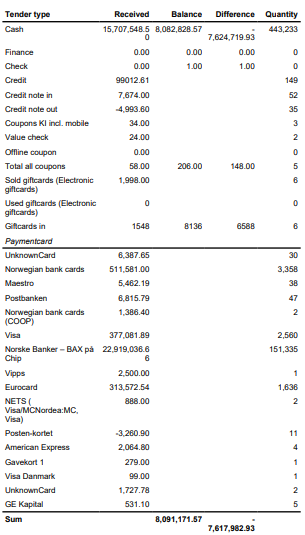 Image Added Image Added
Columns: - Tender type - payment method
- Received - Sales amount inc. VAT received in given tender type
- Balance - Money amount registered in the end of the day (sum for selected operators who made balance and selected days)
- Difference - Balance - Received
- Quantity - Number of items sold in given tender type
Output: One row per one tender type. Clarifications: - Balance and Difference make sense only for cash since only cash it's kept in cash register.
|
| Expand |
|---|
| 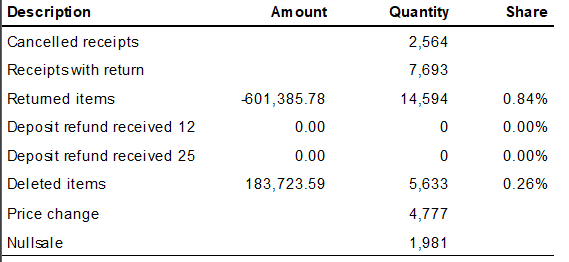 Image Added Image Added
Columns: - Description - Type of reason code
- Amount
- Quantity
- Share
Output: Subreport lists one row per one reason code type. |
Average sale in sumTotalNot memberMemberSource: - Lindbak POS Reporting Cube (OLAP)
|
| Anchor |
|---|
| 08500900_ShiftStatisticsMembersalesPerAssociation0850 |
|---|
| 0900_ShiftStatisticsMembersalesPerAssociation |
|---|
|
| Expand |
|---|
| title | 08500900_ShiftStatisticsMembersalesPerAssociation |
|---|
|
Image Removed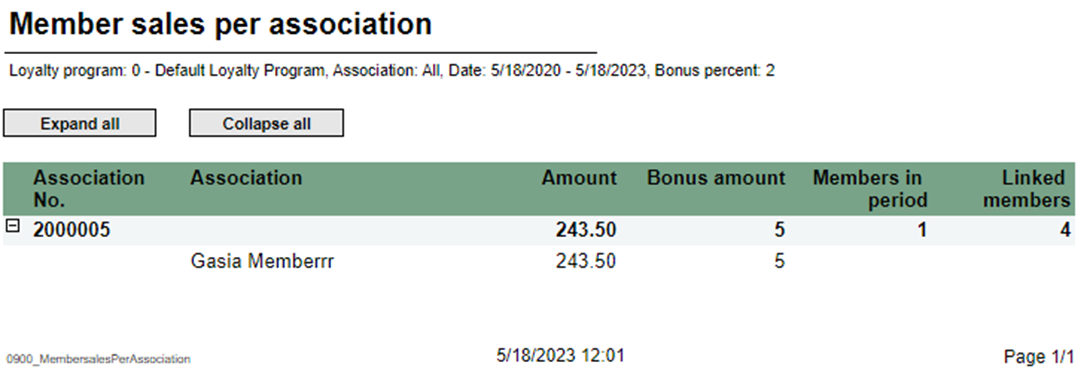 Image Added Image Added
Description: Report list shift statistic for selected stores and period timelists member sales per association. Selections: - Loyalty program – Default loyalty program
- Date from – Default today
- Date to – Default today
- Store Customer – Default empty
Output: - Report has expand all and collapse all buttons for drilldowns.
- Totals in the beginning of new hierarchy level for:
- Association No.
- Association
Columns: - Buttons for expanding and collapsing all drilldowns
- Association
- No. Association
- Amount
- Bonus amount
- Members in period
- Linked members
Source: - Lindbak POS Reporting Cube (OLAP)
|
| Anchor |
|---|
| 0901_MemberDiscountGroup |
|---|
| 0901_MemberDiscountGroup |
|---|
|
| Expand |
|---|
| title | 0901_MemberDiscountGroup |
|---|
|
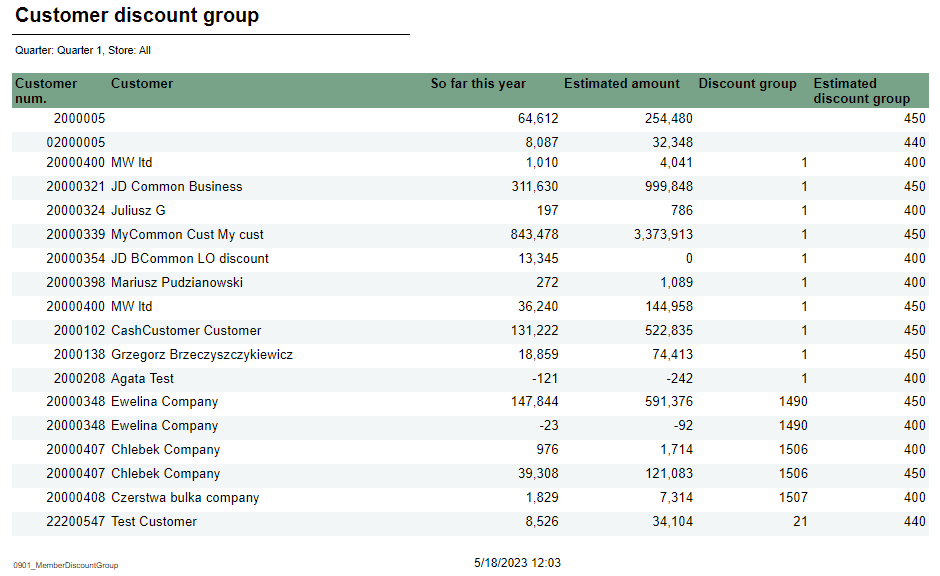 Image Added Image Added
Description: Report lists new discount tgroup for member Selections: - Quarter – Default quarter 1
- Show – Default all (Changed discount group or unchanged discount group)
Output: Report shows customer discount group list for member Columns: - Customer num. – Customer number
- Customer – Customer name
- So far this year – Amount this year
- Estimated amount
- Discount group
- Estimated discount group
Relevant parameters: - pDeletedStatuses - Comma separated list of statuses keys not to show in deleted receipts.
Output: - Report shows shift statistic for each cashier with served customers, null sales and average amount for selected stores and period time.
- Report sum up customers, null sales, deleted amount, deleted quantity and average amount for each store.
Columns: - Store – Store number and store name
- ShiftID
- Start – Shift start
- Stop – Shift end
- Cashier
- Customers – receipts count
- Nullsale – Total zero count
- Deleted amount – deleted receipts amount
- Deleted quantity – Deleted receipts quantity
- Avg amount – Average amount
Source: Lindbak POS Reporting Cube (OLAP)
|
| Anchor |
|---|
| 08510902_PaymentTypesPerShiftNewMembers0851 |
|---|
| 0902_PaymentTypesPerShiftNewMembers |
|---|
|
| Expand |
|---|
| title | 08510902_PaymentTypesPerShiftNewMembers |
|---|
|
Image Removed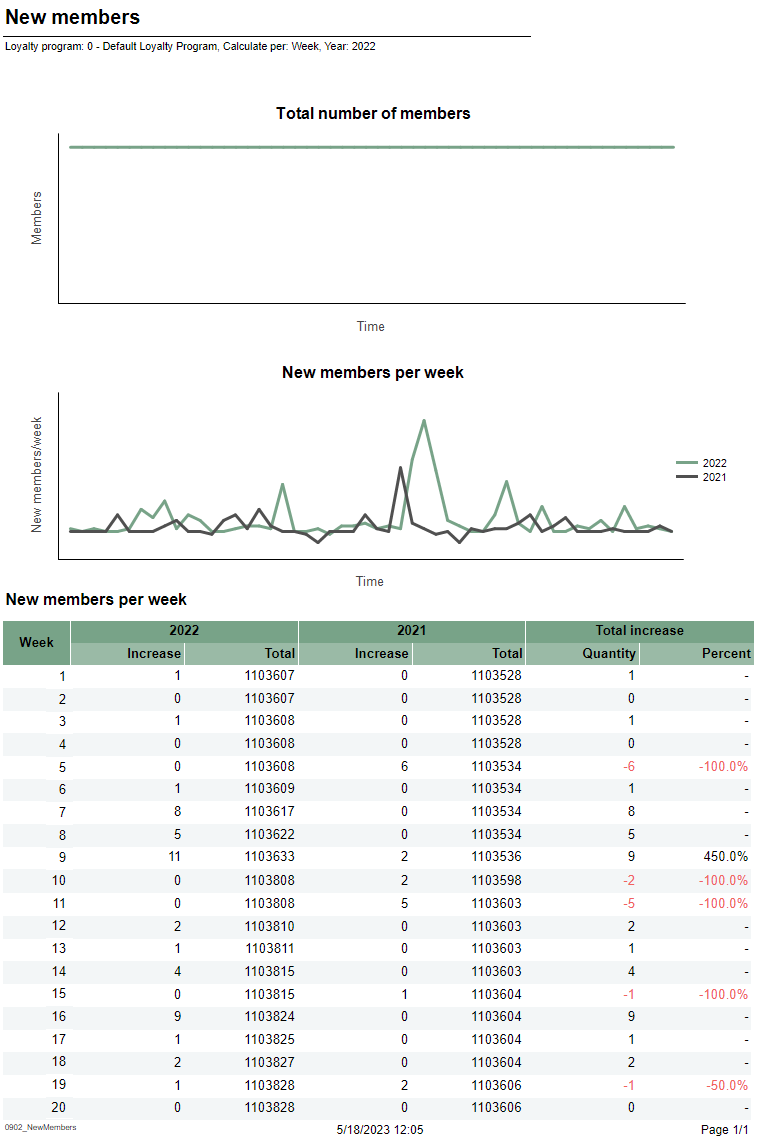 Image Added Image Added
Description: Report allow to follow up tender per shift. Report has two subreports, one settlement and second about statistics.lists new member per week/month Selections: - Loyalty program – Default loyalty program
- Calculate per – Default per month
- Year – Default
- Date from - Default today
- Date to - Default today
- Retail Store - Default select a single store
- Workstation - Default all
- Shift - Default select a single value
Subreports: | Expand |
|---|
|
|
Output:
Report shows two charts and one table for new members per week or per month.
Image RemovedColumns:
- Tender type - payment method
- Received - Sales amount inc. VAT received in given tender type
- Balance - Money amount registered in the end of the day (sum for selected operators who made balance and selected days)
- Difference - Balance - Received
- Quantity - Number of items sold in given tender type
Output:
One row per one tender type.
Clarifications:
- Balance and Difference make sense only for cash since only cash it's kept in cash register.
- Total number of members chart
- X-axis – Time
- Y-axis – Members – number of members
- New members per week/month chart
- X-axis – Time
- Y-axis – New members number
- Legend – Number of members for this year and last year
- New members per week table
- Week
- This year/Last year
- Increase – Number of new members
- Total
- Total increase
- Quantity – Difference between this year and last year
- Percent – Percentage difference between this year and last year
Clarifications:
Negative values are marked red
| Expand |
|---|
|
Image Removed
Columns:
- Description - Type of reason code
- Amount
- Quantity
- Share
Output:
Subreport lists one row per one reason code type.
Source:
- Lindbak POS Reporting Cube (OLAP)DW
| Anchor |
|---|
| 09000903_LoyaltyClubSales_MembersalesPerAssociationDW0900 |
|---|
| 0903_LoyaltyClubSales_MembersalesPerAssociationDW |
|---|
|
| Expand |
|---|
| title | 0900_MembersalesPerAssociation | 0903_LoyaltyClubSales_DW |
|---|
|
Based on report 0107, but uses SQL instead of MDX 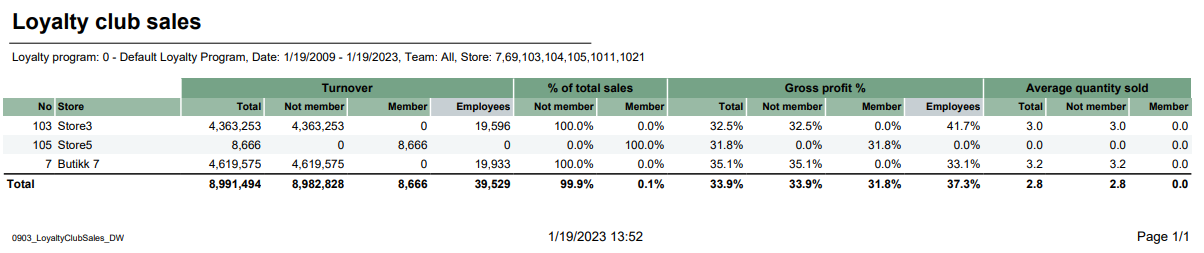 Image Added Image Added
Descriptions Image Removed
Description: Report lists member sales per associationloyalty club sales for selected stores depending on loyalty program and team. Selections: - Loyalty program – Default loyalty programdefault 1
- Date from – Default today
- Date to – Default todayCustomer – Default empty
- Team – Default all
- Store – Default all
Relevant parameters: - pCustomerGroupsEmployees – Customer group used for employees, default 1.
Output: - Report has expand all and collapse all buttons for drilldowns.
- Totals in the beginning of new hierarchy level for:
- Association No.
- Association
Columns: - Buttons for expanding and collapsing all drilldowns
- Association
- No. Association
- Amount
- Bonus amount
- Members in period
- Linked members
- One row per store.
- Raport show turnover, percentage of total sales, gross profit percentage and average quantity sold.
- Total sum of each column for selected stores.
Columns: - No – Store number
- Store – Store name
- Turnover
- Total – total mount
- Not member – Amount without Loyalty program
- Member – Amount with Loyalty program
- Employess – Amount with Customer group
- % of total sales
- Not member – percentage members without Loyalty program
- Member – percentage members with Loyalty program
- Gross profit %
- Total – percentage total of gross profit
- Not member – percentage of gross profit for members without Loyalty program
- Member – percentage of gross profit for members with Loyalty program
- Employess – percentage of gross profitt for members with customer group
- Average quantity sold
- Total – quantity of articles per customers
- Not member - quantity of articles per customers without Customer club
- Member - quantity of articles per customers with Customer club
Clarifications: Customer club refers to LoyaltyProgramKey and Employees refers to CustomerGroupKey. Gross profit is a value referred to NetCost deducted from NetAmount. Source: - Lindbak POS Reporting Cube cube (OLAP)
- Lindbak POS Reporting DW
|
| Anchor |
|---|
| 09010904_MemberDiscountGroupCashierStatistics0901 |
|---|
| 0904_MemberDiscountGroupCashierStatistics |
|---|
|
| Expand |
|---|
| title | 0901_MemberDiscountGroup | 0904_CashierStatistics |
|---|
|
CO: 154926 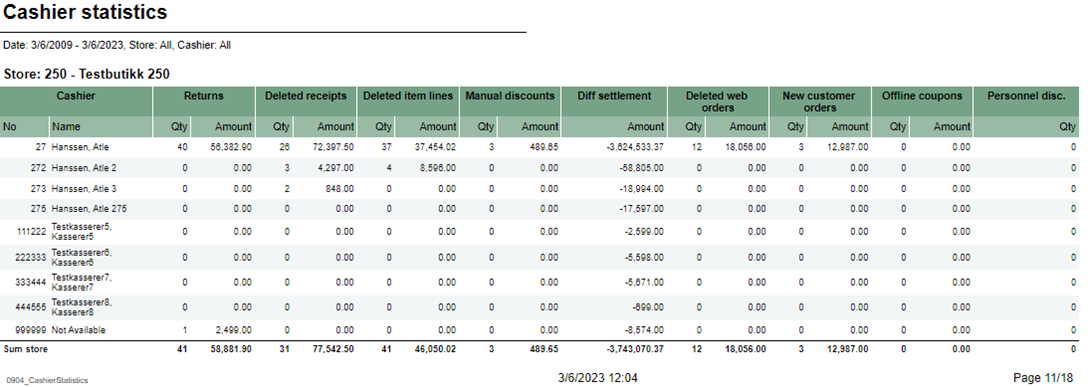 Image AddedImage Removed Image AddedImage Removed
Description: Report lists new discount tgroup for membercashiers statistics for selected stores. Selections: - Date from – Default today
- Date to Quarter – Default quarter 1today
- Show Store – Default all (Changed discount group or unchanged discount group)
- Operator – Default operator
Output: Report shows customer discount group list for memberOne page per store. Report has a summary for each column at the end each store's table. Columns: - Cashier No and Name – Cashier number and cashier name
- Returns quantity and amount
- Deleted receipts quantity and amount
- Deleted item lines quantity and amount
- Manual discounts quantity and amount
- Diff settlement amount – Difference settlement amount
- Deleted web order quantity and amount
- New customer orders quantity and amount
- Offline coupons quantity and amount
- Personnel disc. qty – Personnel discount quantity
- Customer num. – Customer number
- Customer – Customer name
- So far this year – Amount this year
- Estimated amount
- Discount group
- Estimated discount group
Source: - Lindbak POS Reporting Cube (OLAP)
|
| Anchor |
|---|
| 09020950_NewMembersBonusPerStorePerEndOfMonth0902 |
|---|
| 0950_NewMembersBonusPerStorePerEndOfMonth |
|---|
|
| Expand |
|---|
| title | 0902_NewMembers | 0950_BonusPerStorePerEndOfMonth |
|---|
|
RTC-27636 / CO-222611 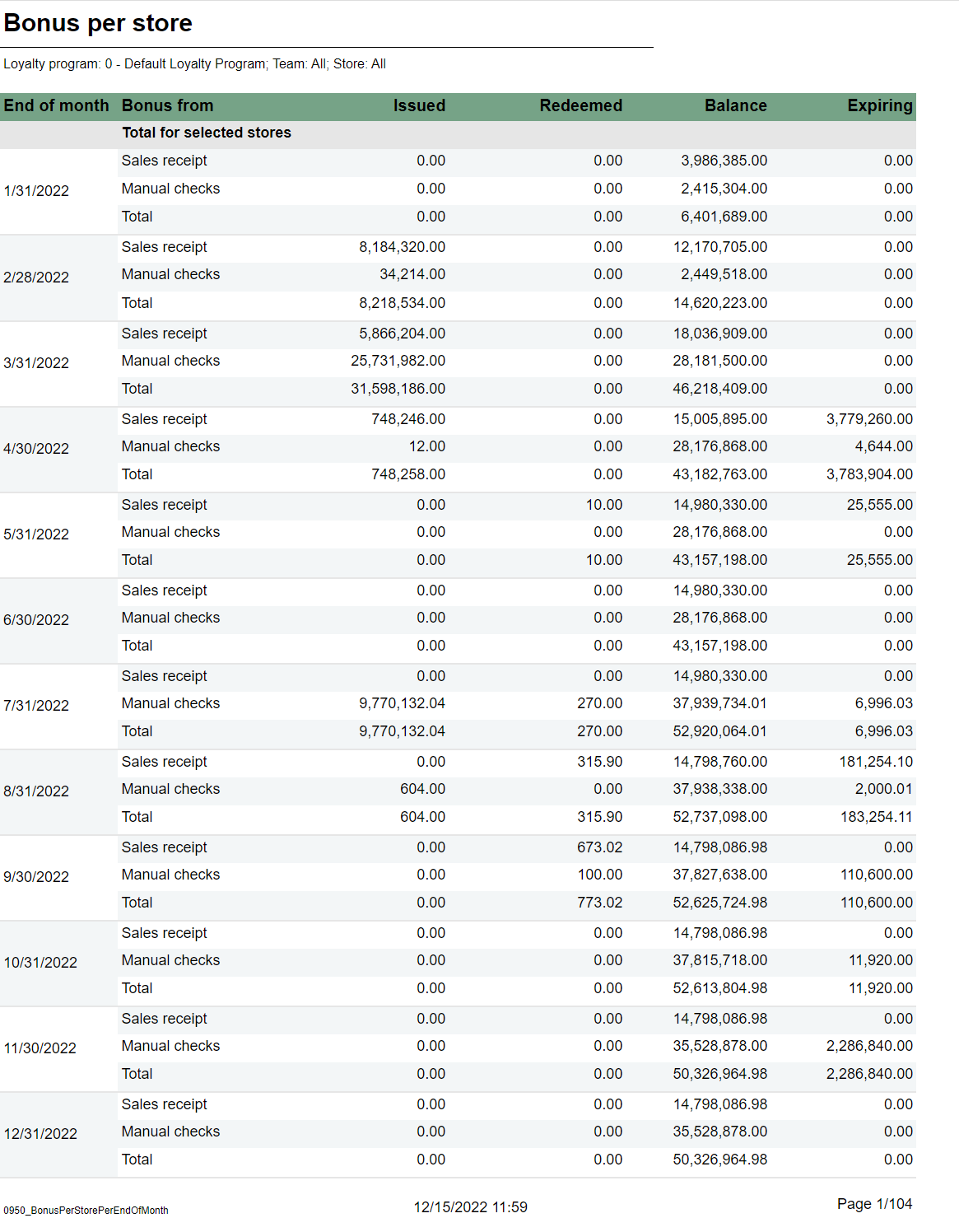 Image AddedImage Removed Image AddedImage Removed
Description: Report lists new member per week/monthshows information about issued, redeemed and balance for bonus checks, per month and store for the last 12 months. Selections: - Loyalty program – - Default loyalty program
- Calculate per – Default per month
- Year – Default select a single value
Output: - 1
- Team - Default all
- Store - Default all available in selected teams
Output: One page per store. For each month sum of issued, redeemed, balance and expired bonus checks. One sum for manual issued checks, checks issued from sales and total. First page of report is total for all storesReport shows two charts and one table for new members per week or per month. Columns: - Total number of members chart
- X-axis – Time
- Y-axis – Members – number of members
- New members per week/month chart
- X-axis – Time
- Y-axis – New members number
- Legend – Number of members for this year and last year
- New members per week table
- Week
- This year/Last year
- Increase – Number of new members
- Total
- Total increase
- Quantity – Difference between this year and last year
- Percent – Percentage difference between this year and last year
Clarifications: Negative values are marked red.- End of month - Shows last date in each month for the last 12 months.
- Bonus type - For each month there is one row for manual issues checks, checks issued from sales and total.
- Issued - Sum of bonus amount issued.
- Redeemed - Sum of redeemed bonus amount.
- Balance - Sum of not exipred, not used bonus amount.
- Expired Sum of bonus amount expired at the end of month.
Sorting: Source:
|
| Anchor |
|---|
| 09030951_LoyaltyClubSalesSecurityReport_DW0903 |
|---|
| 0951_LoyaltyClubSalesSecurityReport_DW |
|---|
|
| Expand |
|---|
| title | 09030951_LoyaltyClubSalesSecurityReport_DW |
|---|
| Based on report 0107, but uses SQL instead of MDX
Image Removed
Descriptions:
Report lists loyalty club sales for selected stores depending on loyalty program and team.
Selections:
- Loyalty program – default 1
- Date from – Default today
- Date to – Default today
- Team – Default all
- Store – Default all
Relevant parameters:
- pCustomerGroupsEmployees – Customer group used for employees, default 1.
Output:
- One row per store.
- Raport show turnover, percentage of total sales, gross profit percentage and average quantity sold.
- Total sum of each column for selected stores.
Columns:
- No – Store number
- Store – Store name
- Turnover
- Total – total mount
- Not member – Amount without Loyalty program
- Member – Amount with Loyalty program
- Employess – Amount with Customer group
- % of total sales
- Not member – percentage members without Loyalty program
- Member – percentage members with Loyalty program
- Gross profit %
- Total – percentage total of gross profit
- Not member – percentage of gross profit for members without Loyalty program
- Member – percentage of gross profit for members with Loyalty program
- Employess – percentage of gross profitt for members with customer group
- Average quantity sold
- Total – quantity of articles per customers
- Not member - quantity of articles per customers without Customer club
- Member - quantity of articles per customers with Customer club
Clarifications:
Customer club refers to LoyaltyProgramKey and Employees refers to CustomerGroupKey. Gross profit is a value referred to NetCost deducted from NetAmount.
Source:
- Lindbak POS Reporting cube (OLAP)
- Lindbak POS Reporting DW
...
| title | 0904_CashierStatistics |
|---|
CO: 154926
Image Removed
Description:
Report lists cashiers statistics for selected stores.
Selections:
- Date from – Default today
- Date to – Default today
- Store – Default all
- Operator – Default operator
Output:
One page per store. Report has a summary for each column at the end each store's table.
Columns:
- Cashier No and Name – Cashier number and cashier name
- Returns quantity and amount
- Deleted receipts quantity and amount
- Deleted item lines quantity and amount
- Manual discounts quantity and amount
- Diff settlement amount – Difference settlement amount
- Deleted web order quantity and amount
- New customer orders quantity and amount
- Offline coupons quantity and amount
- Personnel disc. qty – Personnel discount quantity
Source:
- Lindbak POS Reporting Cube (OLAP)
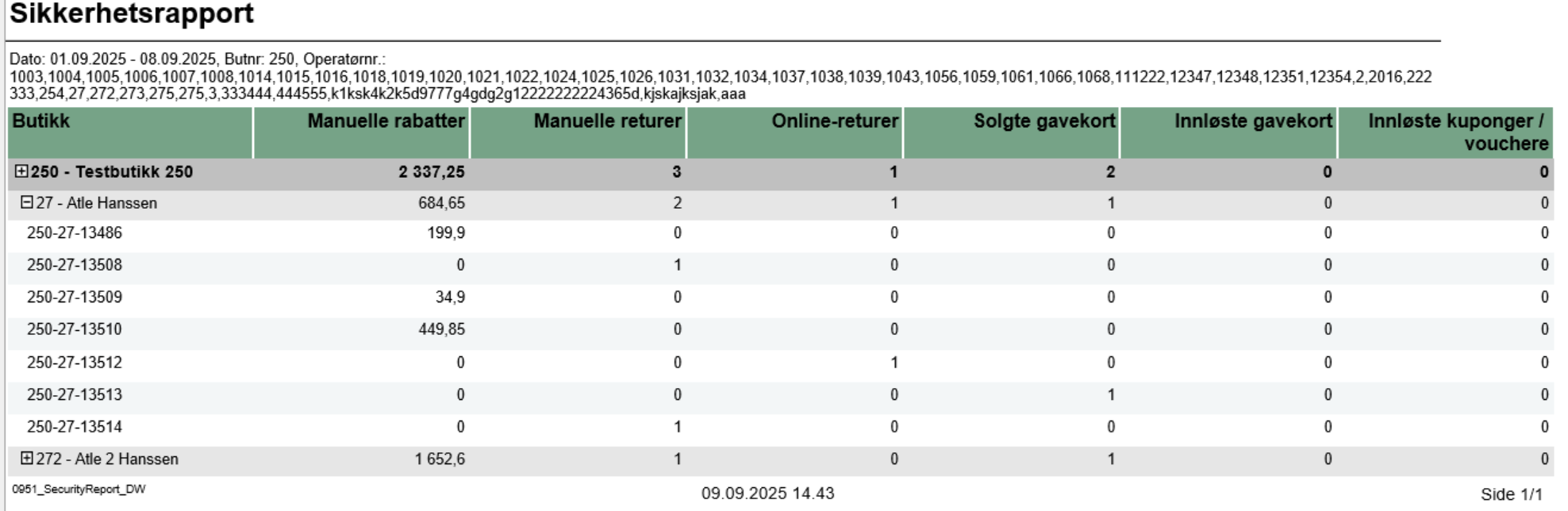
Description:- Report allows to monitor security-sensitive activities performed by cashiers/operators in the store, including manual discounts, returns, gift card transactions, and voucher usage.
Selections:- Date from: Default yesterday
- Date to: Default yesterday
- Retail store: Single select on store (because of performance). Default first available.
- Operator: Default all operators for the selected store
Output:Security activity statistics shown individually per each cashier security-relevant activities like manual discounts, returns, gift card sales/redemptions, and voucher usage with reference to receipt number. Additionally there are totals for each operator and each store. Columns:- Retail Store - Store identifier and name
- Manual discounts - Sum of manual discount amounts (line and sub-total discounts)
- Manual returns - Quantity of items returned without reference to original transaction
- Online returns - Quantity of items returned with reference to original transaction
- Giftcards out - Quantity of gift cards sold
- Giftcards in - Count of gift card redemptions/usage
- Voucher/coupon used - Count of voucher/coupon usage transactions
Sorting:- Retail Store (default)
- Operator Display
- Transaction ID
Source:- Lindbak POS Reporting DW - Data Warehouse database
|
| Anchor |
|---|
| 0952_ItemQuantityStores |
|---|
| 0952_ItemQuantityStores |
|---|
|
| Expand |
|---|
| title | 0952_ItemQuantityStores |
|---|
|
RTP-43325 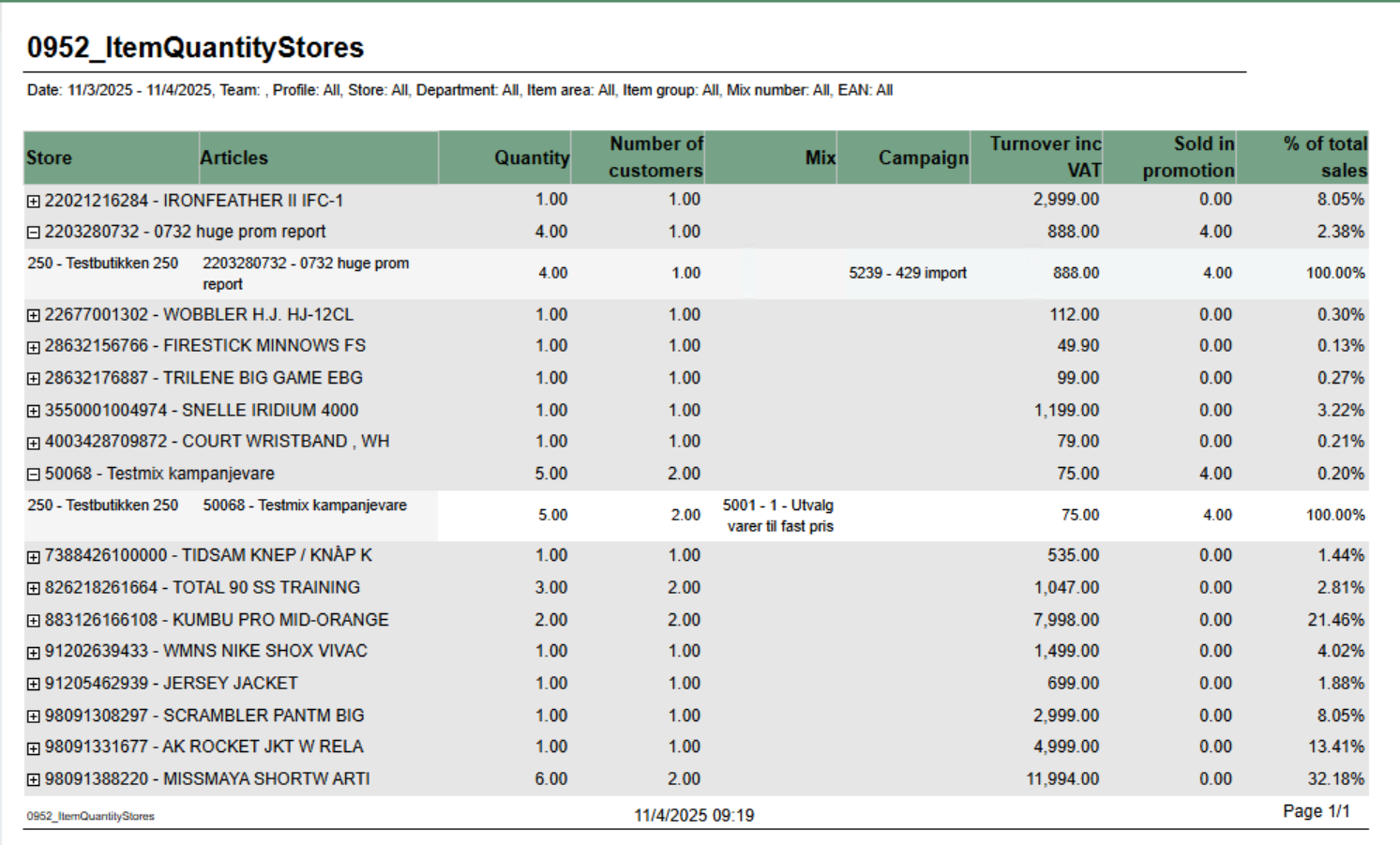 Image Added Image Added
Description: Report displays item quantity sales data aggregated by retail store with support for mix and campaign analysis. It provides detailed sales information including quantity sold, number of customers, turnover, and promotional sales breakdown. The report allows drill-down from article level to individual store performance. Selections: - Date from: Default today
- Date to: Default today
- Team: Multivalue; default all
- Profile: Multivalue; default all
- Store: Multivalue; default all (filtered by Team selection)
- Department: Multivalue; default all
- Article area: Multivalue; default all
- Article group: Multivalue; default all
- Mix: Multivalue; default all
- EAN list: Text input; default empty (comma-separated list of EAN codes)
- Include VAT: Boolean; default true (toggles between amounts including/excluding VAT)
- Expand all: Boolean; default false (when true, automatically expands all article groups to show store details)
Output: Article sales statistics grouped by EAN with drill-down capability to individual store level. Report shows: - Summary row per article (EAN) with aggregated data across all stores
- Detail rows per store showing individual store performance (visible when expanded)
- Mix numbers and campaign information displayed as comma-separated lists when multiple values exist
Columns: - Retail Store: Article EAN and name (at summary level)
- Articles: Article EAN and name (at detail level)
- Quantity: Total quantity sold
- Customers: Distinct receipt count (number of customers)
- Mix: Mix numbers and names (comma-separated if multiple mixes apply to the article-store combination)
- Campaigns: Campaign numbers and names (comma-separated if multiple campaigns apply)
- Turnover: Total sales amount (with or without VAT based on Include VAT parameter)
- Sold in Promotion: Quantity sold with discounts/campaigns (calculated as: Total Quantity - Quantity Not Discounted)
- % of Total Sales: Percentage of article turnover compared to total report turnover
Sorting: - Primary: EAN (ascending)
- Secondary: Retail Store Number (ascending)
Clarifications: - Quantity Not Discounted logic: Shows quantity only when Mix is 1, -1, or Unknown AND Campaign is Adhoc, NoCampaign, Not Available, or Unknown. Otherwise returns NULL.
- Mix and Campaign Display: Uses LookupSet function to aggregate multiple mixes/campaigns per article-store combination with "|" delimiter for matching
- Parameter Dependencies: Store parameter options are dynamically filtered based on Team selection
Source: - Lindbak POS Reporting Cube (OLAP)
|
...
| Expand |
|---|
| title | 0950_BonusPerStorePerEndOfMonth |
|---|
|
RTC-27636 / CO-222611 Image Removed Description: Report shows information about issued, redeemed and balance for bonus checks, per month and store for the last 12 months. Selections: - Loyalty program - Default 1
- Team - Default all
- Store - Default all available in selected teams
Output: One page per store. For each month sum of issued, redeemed, balance and expired bonus checks. One sum for manual issued checks, checks issued from sales and total. First page of report is total for all stores. Columns: - End of month - Shows last date in each month for the last 12 months.
- Bonus type - For each month there is one row for manual issues checks, checks issued from sales and total.
- Issued - Sum of bonus amount issued.
- Redeemed - Sum of redeemed bonus amount.
- Balance - Sum of not exipred, not used bonus amount.
- Expired Sum of bonus amount expired at the end of month.
Sorting: Source: |
| Anchor |
|---|
| 4000_ItemSaleQuantityReport |
|---|
| 4000_ItemSaleQuantityReport |
|---|
|
| Expand |
|---|
| title | 4000_ItemSaleQuantityReport |
|---|
|
RTC-46626 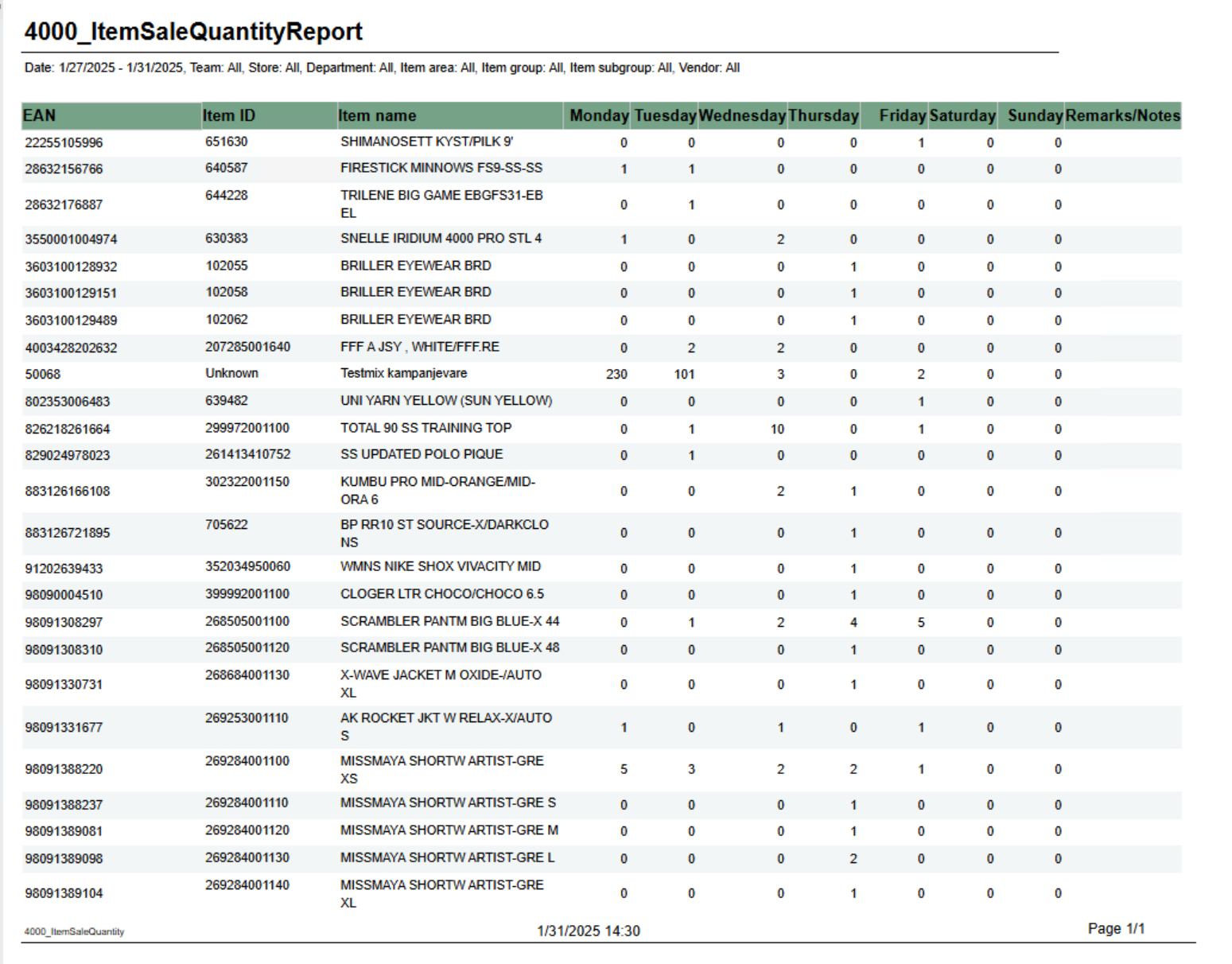 Image Removed Image Removed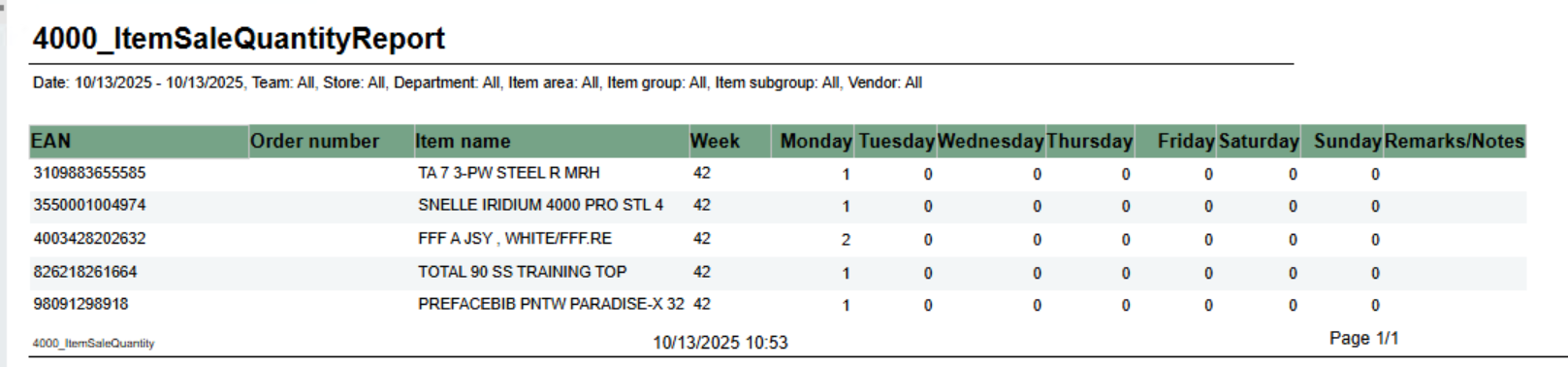 Image Added Image Added
Description: Report shows number of sold items per day of week. Grouped by week. Selections: - From date - default first date of current week.
- To date - default today
- Team - default all
- Retail store - default all
- Department - default all
- Article area - default all
- Article group - default all
- Article subgroup - default all
- Vendor - default all
Note that is is possible to select default e.g article groups by selecting group(s) in parameter pArticleGroup Output: One row for ean item with columns for each day of week. In addition one column for notes. Columns: - EAN - EAN
- Item ID - Item number
- Item name - Item name
- Week - Week number
- Monay - Friday - One column for each day
- Remarks / Notes - Empty column.
Source: Lindbak POS Reporting Cube (Olap)
|
...